If your ad gets 10,000 impressions but 230 clicks, is that a win or a silent budget leak?
CTR is one of the most misunderstood but powerful performance metrics in digital marketing. It shows how many people clicked after seeing a page, ad, or email to see what you actually had to offer.
When someone understands how to calculate CTR and its implications, they can quickly determine whether a campaign is performing well or wasting budget.
This guide breaks CTR down step by step. You will see the CTR formula, simple, realistic examples, and a free CTR “calculator” you can use now.
So, let’s get started.
Calculating and analyzing CTR in 3 simple steps
The first step of calculating CTR for any channel is to gather your data.
#1: Find impressions and clicks
The CTR formula dictates:
CTR = Total Clicks ÷ Total Impressions x 100
In this equation, clicks refer to the action a user takes. If someone taps or clicks a link, ad, or button that sends them to a landing page, website, app store, or video, it counts as a click.
Impressions record how many times an ad or piece of content is shown to a user’s feed. In paid search, an impression happens when the ad appears on a search results page. For display ads, this is when the banner ad loads on a site.
In short, you need the total number of clicks and impressions your website, advert, email, or any other marketing channel received to calculate CTR.
You can use many online tools to get this data. For example, for online platforms or pages, Google Search Console is a good way to get click and impression data.
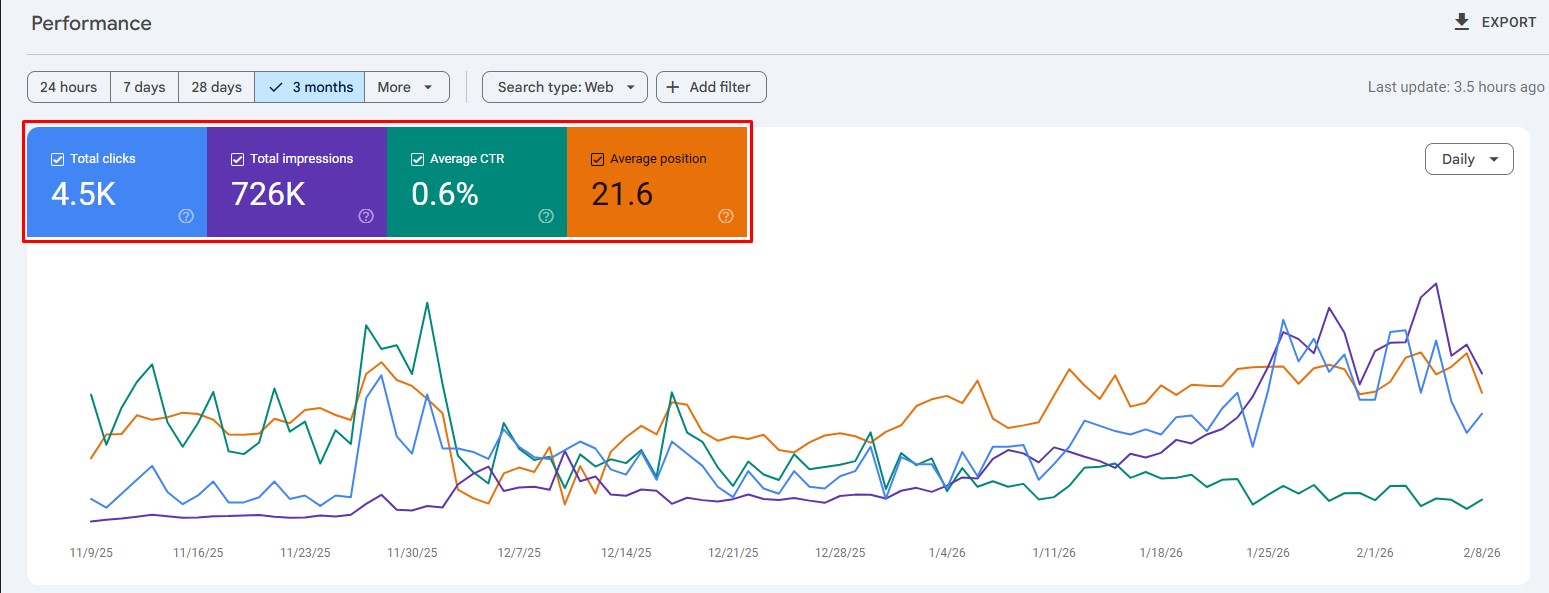
The GSC tool also shows the ‘Average CTR’ for the specific target, helping you track organic CTR across pages or platforms.
That said, it is still a good idea to learn the CTR calculation manually to understand how marketing verticals are performing overall.
#2: Input the data into the CTR calculator
Once you have the number of clicks and impressions, it is time to utilize the CTR (%) formula we mentioned earlier.
Carrying on with our previous example in Search Console, if we have 4500 total clicks and 726,000 total impressions, the CTR would look like:
CTR = [4500 ÷ 726,000] x 100 = 0.6198% CTR
As you can see, the CTR we calculated in the example is nearly the same as the ‘Average CTR’ number provided by Google Search Console. This shows that our process was, indeed, a success.
However, if you find the CTR calculation tricky, you can use our free CTR calculator for your convenience:
Try out a few examples to help you get started.
Search ad example:
If a search ad gets 1,000 impressions and 50 clicks, then its CTR calculation will be:
50 ÷ 1,000 = 0.05
0.05 × 100 = 5% CTR
That means 5 out of every 100 impressions turned into a click.
Email example:
If an email campaign sends 2,500 messages, and 100 people click a link inside, then its CTR calculation will be like:
100 ÷ 2,500 = 0.04
0.04 × 100 = 4% CTR
#3: Analyzing the results
Now that we have our CTR number, it is time to analyze it in depth.
As discussed in our CTR blog, the click-through rate can vary by industry, channel, and targeted keywords. Still, for many search campaigns, a CTR below 2% may indicate room for improvement.
Understanding why your CTR falls short
When your CTR analysis reveals underperformance (like our 0.6% example), the root causes typically fall into three categories:
- Content relevance issues: Your titles and meta descriptions may not align with search intent.
- Competitive landscape factors: Stronger competitors may be outranking you with more compelling messaging.
- SERP environment changes: Modern search results pages contain features that intercept clicks before users reach organic listings.
The first two factors are within your direct control through search engine optimization. The third factor requires a different strategic approach because you’re competing not just against other websites, but against Google’s own features, namely AI Overviews.
These AI overviews provide ‘zero-click answers’, especially for informational search queries, like ‘How tall is the Eiffel Tower?’ Therefore, users don’t proceed to read lengthy blog posts or articles to get a straightforward answer to a standard question.
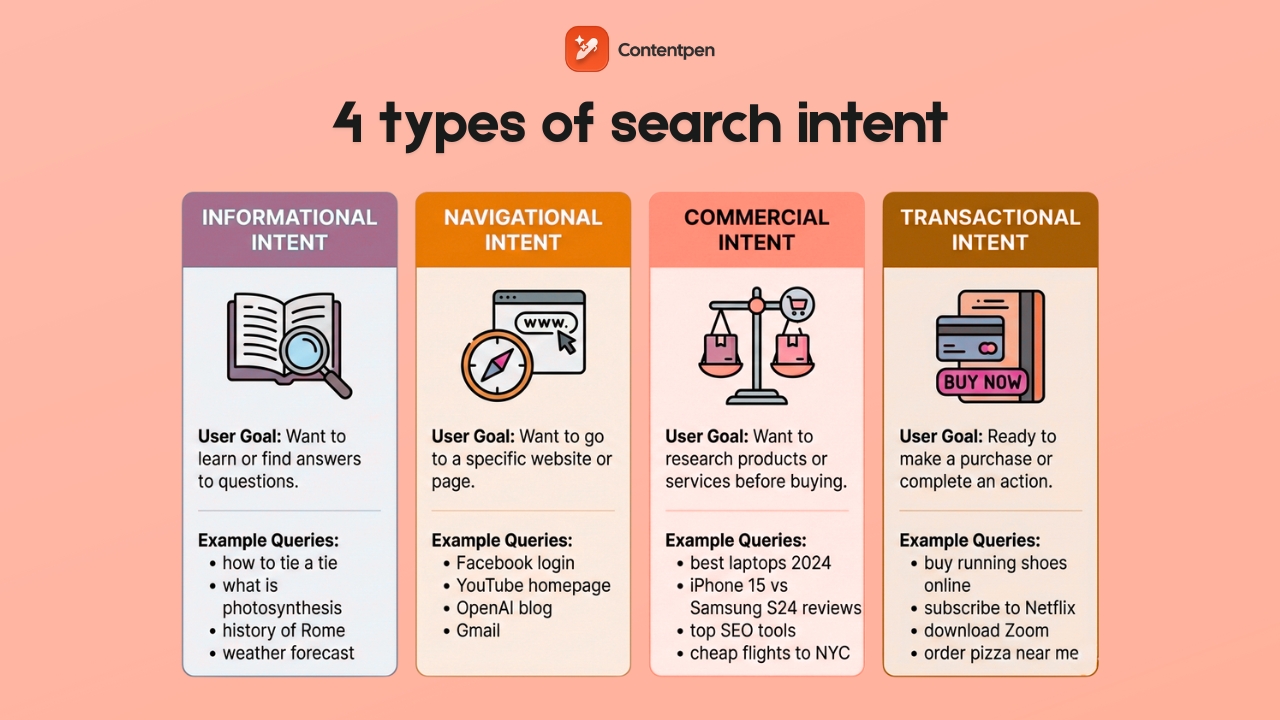
That said, commercial and navigational intents still see high CTR since people want to buy diligently and explore extensively.
In 2026, SERP features and AI overviews impact CTR a lot. Let’s explore concrete tactics to maintain strong click-through rates in this changing environment.
How SERP impacts CTR
Modern search results pages (SERPs) display far more than ten blue links. Featured snippets, People Also Ask boxes, local packs, and AI-generated overviews now dominate many SERPs, and each can reduce clicks to traditional organic listings.
Below are some common SERP elements that appear frequently and can impact CTR for your pages:
- Featured snippets: Answer boxes positioned above the #1 organic result.
- People Also Ask (PAA): Expandable question boxes with quick answers.
- Local packs: Map listings showing business information for location-based searches.
- Knowledge panels: Information boxes about entities, businesses, or topics.
- Image carousels: Visual result grids for image-focused queries.
- Video thumbnails: Embedded previews from YouTube and other video platforms.
- AI Overviews: Google’s AI-generated answers that synthesize multiple sources.
So if all these factors reduce CTR, is there a way to improve or maintain them?
The answer is YES! There are multiple ways to improve and maintain CTR, even with so many SERP and AI features around.
How to maintain and improve CTR when competing with SERP and AI features
You cannot remove SERP features, but you can position your content to capture clicks alongside them. To do that, you need to implement the following strategies:
#1: Optimize content to win the featured snippet yourself
Structure content with clear question-and-answer formats. Use concise 40-60-word answers immediately following question-style headings.
Tools like Contentpen can help you write SEO and GEO-optimized blogs and articles that help you win more snippets and clicks to your platforms.
Using built-in SEO scoring and SERP analysis, the tool writes click-worthy meta titles, descriptions, headings, and body content, helping you improve conversions and organic traffic.
When you own the featured snippet, your visibility increases significantly, giving you a chance to market your offerings to the right audience and generate a decent return on investment.
#2: Target long-tail and specific keywords
Broad terms like “digital marketing” trigger extensive SERP features, so it is naturally difficult to rank for such keywords.
More specific phrases, such as “calculate email CTR in Mailchimp,” face fewer competing elements and maintain higher organic CTRs.
Also, focus on queries that require interaction beyond reading:
- ✅ “CTR calculator tool.”
- ✅ “Free CTR tracking template download.”
- ✅ “Google Ads CTR setup tutorial.”
- ❌ “What is CTR?” (easily answered by AI.)
- ❌ “CTR definition” (no click required.)
When you start thinking with this strategy, winning the right clicks becomes much easier.
#3: Focus on branded search optimization
When users search your company name specifically, Google shows fewer competing features because the intent is clearly navigational. For example, the term “Contentpen” has a better chance of appearing on SERPs than plain ‘AI blog writer.’
This tactic helps you achieve a higher CTR, or at least maintain it for your brand in the long term.
#4: Write irresistible title tags and meta descriptions, but don’t overcommit
Compelling titles and meta descriptions make your listings, landing pages, and blog posts the most clickable.
To improve CTR, try using the title tags and descriptions in the following manner:
- Specific numbers: “7 Proven Tactics” instead of “Several Methods”
- Clear benefits: “Cut calculation time by 80%” vs. “Faster calculations.”
- Action words: “Master,” “Discover,” “Calculate” vs. passive language.
You can always use our AI blog writing tool to help you out with drafting winning meta titles and descriptions that suit the content and drive more clicks.

#5: Create tools and resources that AI cannot replicate
Build interactive calculators (like our CTR calculator), downloadable templates, or platform-specific walkthrough guides.
Since AI can describe these resources but cannot provide them directly, creating such resources puts you in a very good position to earn more clicks.
You should also consider adding original research, case studies from your clients, or unique methodologies for a particular topic. Such content provides more insight than simple AI summaries, so users will often visit your page to learn more about a query.
#6: Optimize for AI citation
Structure content so AI systems can easily extract and cite your information:
- Use short paragraphs (2-3 sentences maximum).
- Lead with definitive statements before explanations.
- Include specific data points and statistics.
- Format calculations clearly with step-by-step breakdowns.
When AI features cite your content, they often include attribution links back to your page, driving qualified clicks from users who want deeper information.
Final thoughts
CTR is one of the clearest signals of how well a message lands with its audience. Once you know how to calculate CTR with the simple formula, you can judge performance in seconds across ads, email, and search.
The math is only the start, though. Real gains come from understanding your audience, refining headlines and calls to action, improving design, and running steady tests instead of one-off guesses.
When you keep measuring click-through rate, comparing it to benchmarks, and tracking trends over time, patterns start to emerge that you can act upon. Over time, you will receive better returns.
Frequently asked questions
To calculate CTR in Excel, place ‘clicks’ in a cell A1 and impressions in a cell ‘B1’, then enter =A1/B1*100 in cell C1 and set that cell to percentage format. Repeat the same process for each campaign or ad.
Google Ads automatically shows CTR in your campaign and ad group tables, calculated as clicks divided by impressions, then multiplied by 100. To review it, add the CTR column if it is hidden and scan the numbers by keyword or ad.
A 5% CTR is very strong for most search ads and display campaigns. Email CTR varies widely by industry and list quality, but 2-5% is common for many campaigns. Always check against benchmarks and your own past results to get a better idea of what a good CTR is.
The CPC (Cost Per Click) formula is CPC = Total Cost ÷ Total Clicks. It means that if you spend $200 and get 100 clicks, your CPC is $2. The main difference between the two is that CTR shows the percentage of people who clicked after seeing your link, while CPC shows how much you pay for each click.
Leave a Reply