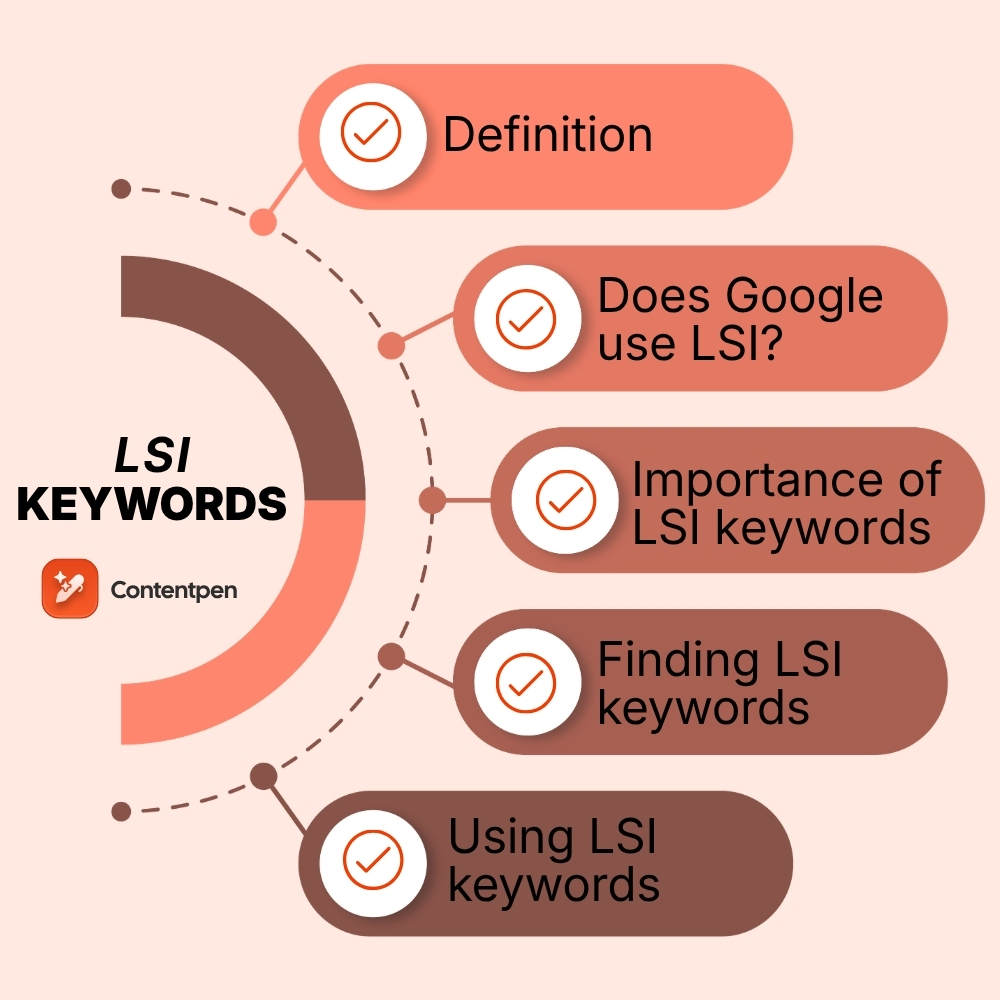
Latent Semantic Indexing (LSI) are words or phrases that conceptually relate to your targeted keywords.
LSI keywords have a buzz about them. Some say that they are a secret to ranking on SERPs, while others say Google doesn’t use them at all. When the advice clashes like that, it is hard to know what to do with an LSI keyword in SEO.
Here is the twist. The original Latent Semantic Indexing (LSI) technique from old research papers is not part of Google’s stack anymore. That said, the idea behind so‑called LSI SEO is still valid.
This article keeps things honest and practical. You will learn exactly what LSI keywords are, why they still matter, how to find them, and use them in a way that feels natural.
By the end, you will have a clear, simple process you can apply to every piece of content to rank better on searches.
So, let’s get started.
Defining LSI keywords
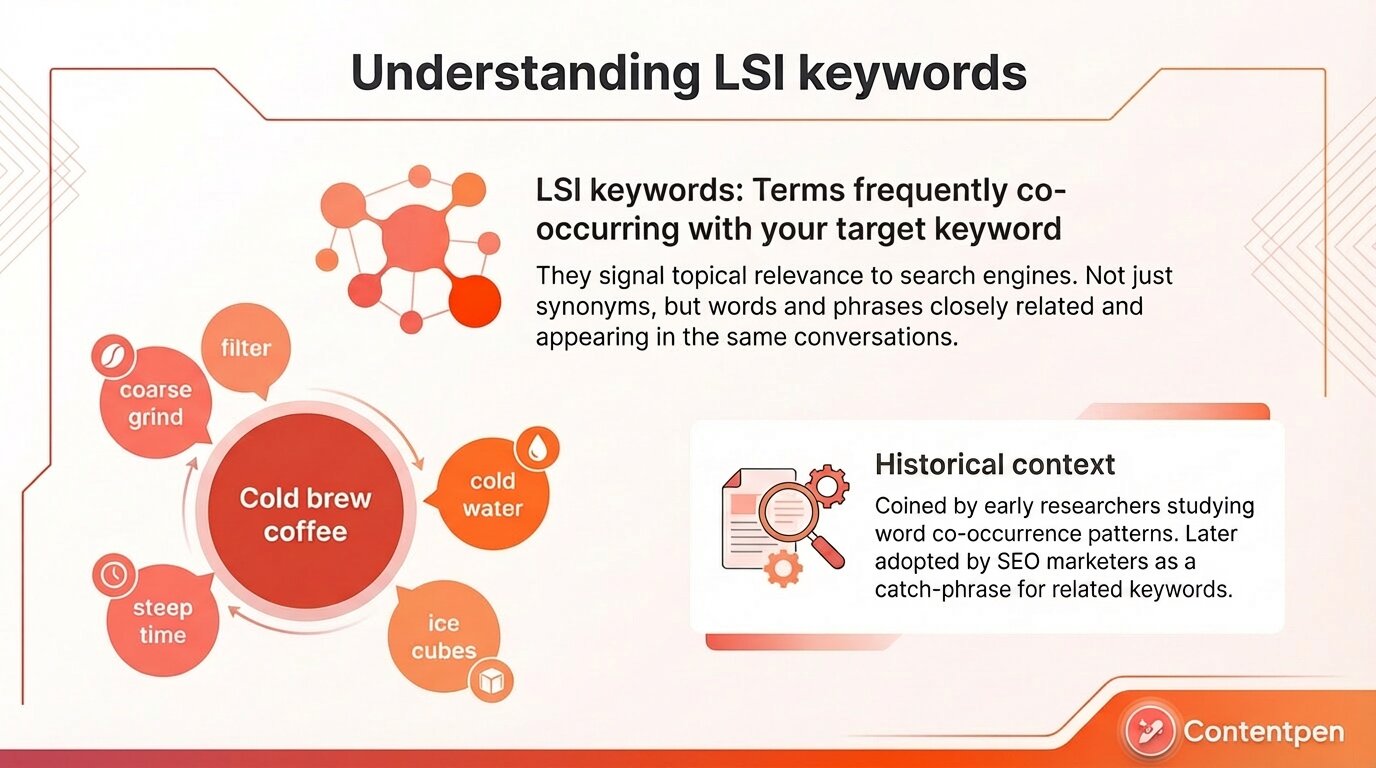
LSI keywords are terms that frequently co-occur with your target keyword across multiple documents, signaling topical relevance to search engines.
When marketers talk about LSI keywords, they usually mean words and phrases that are closely related to your main organic keyword. These are not only synonyms. They are terms that often show up in the same conversations, which helps search engines see the topic more clearly.
For instance, the keyword “cold brew coffee” has terms like “coarse grind,” “filter,” “steep time,” “cold water,” and “ice cubes” that are good LSI keyword examples.
Where did the term ‘LSI’ come from?
The term Latent Semantic Indexing came from a group of researchers who scanned documents and looked at patterns of word use based on how often they appeared in similar contexts. That was helpful for small, static document sets, long before modern web search.
Marketers later borrowed the concept and started talking about latent semantic indexing in SEO. Over time, the technical details were lost, but the label stayed.
People began using “latent semantic indexing keywords” as a catch‑all phrase for related keywords that SEO strategies should include.
Does Google use LSI?
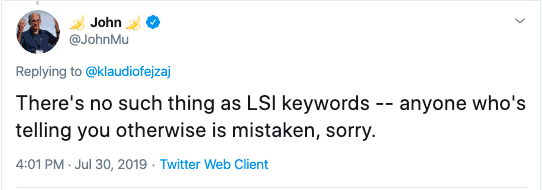
Google has been clear that it does not run a “Google LSI” system behind the scenes. John Mueller from Google has said that there is no such thing as LSI keywords in their ranking system.
Google now uses newer methods such as natural language processing, the Knowledge Graph, and machine‑learning models like RankBrain and BERT. It focuses on meaning, entities, and keyword co‑occurrence, not on the original LSI math.
Differentiating between secondary, LSI, and semantic keywords
Let us clarify between secondary, LSI, and semantic keywords, all of which are repeatedly confused by a lot of people.
Type
What it is
Example (main keyword: “cold brew coffee”)
Secondary keyword
A variation of the main phrase with the same intent
“cold brew recipe,” “how to make cold brew”
LSI keyword
A term that statistically co-occurs across other ranking pages
Think of secondary keywords as supporting keywords to the target phrase, and LSI keywords as co-occurring or co-existing with the target phrase. Semantic keywords are phrases that do not share common words but concepts with the target phrase.
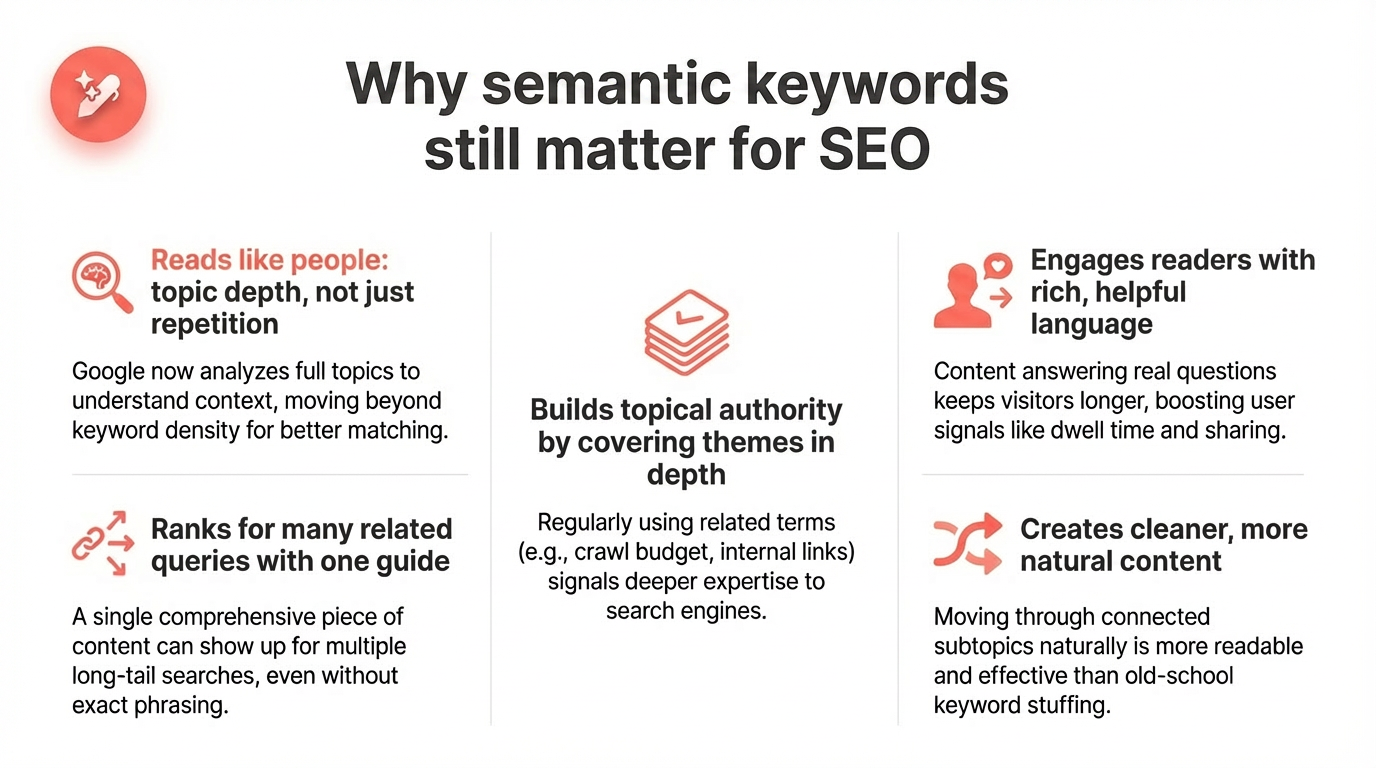
Why semantic keywords still matter for your SEO
Early SEO was obsessed with keyword density. If you wanted to rank for “SEO tips,” you stuffed “SEO tips” into every heading and paragraph.
Search engines have grown past that. Thanks to semantic search, Google now reads pages more like a person does. It looks at the full topic, not just repeated terms.
When your content includes rich, relevant language, it sends strong signals.
Google can see that you cover the subject in depth, not only the exact phrase. That helps it match your page to many related searches. This is how one guide can show up for several long‑tail queries at once, even if those phrases never appear as exact matches.
Using semantic keywords for SEO also helps build topical authority. If a group of your articles on technical SEO regularly uses terms like “crawl budget,” “internal links,” “canonical tags,” and “XML sitemap,” Google can be more confident that your site knows this subject.
It stops being just about one target keyword and becomes about the whole theme of your content.
Readers feel the difference as well:
A page that talks only about “credit cards” in vague terms is not very helpful.
A page that also explains interest rates, credit scores, annual fees, rewards programs, and balance transfers answers real questions.
People stay longer, scroll further, and are more likely to share or link. Those user signals line up well with better rankings over time.
Semantic coverage is also cleaner than keyword stuffing. Instead of repeating the same phrase ten times in one section, you use related keywords your research uncovered to move through connected subtopics. This also makes your writing sound natural.
Here is a simple comparison to help you understand these topics better:
Approach
Example text snippet
SEO impact
Keyword stuffing
“SEO tips, SEO guide, SEO best practices for SEO tips.”
Thin content, possible spam signal
Synonyms only
“Search engine optimization tips and tricks for marketers.”
Better than stuffing, but still narrow
Semantic keywords
“SEO basics like search intent, meta tags, backlinks, and crawlability.”
Strong topical authority, broader query coverage
Modern rankings lean toward the last approach. A thoughtful semantic SEO strategy is no longer a nice extra. It is part of how you stay visible against competitors who are already writing this way.
How to find LSI keywords (free and paid methods)
Once you understand what LSI keywords are in practice, the next step is to find them. You do not need a math degree or a fancy LSI keyword generator to get started. A mix of Google’s own features and a few tools is enough to build a strong related‑term list before you write.
Free methods using Google
You can get a long way just by paying close attention to Google’s results pages. These features reflect real searches and natural keyword co‑occurrence patterns.
Google Autocomplete
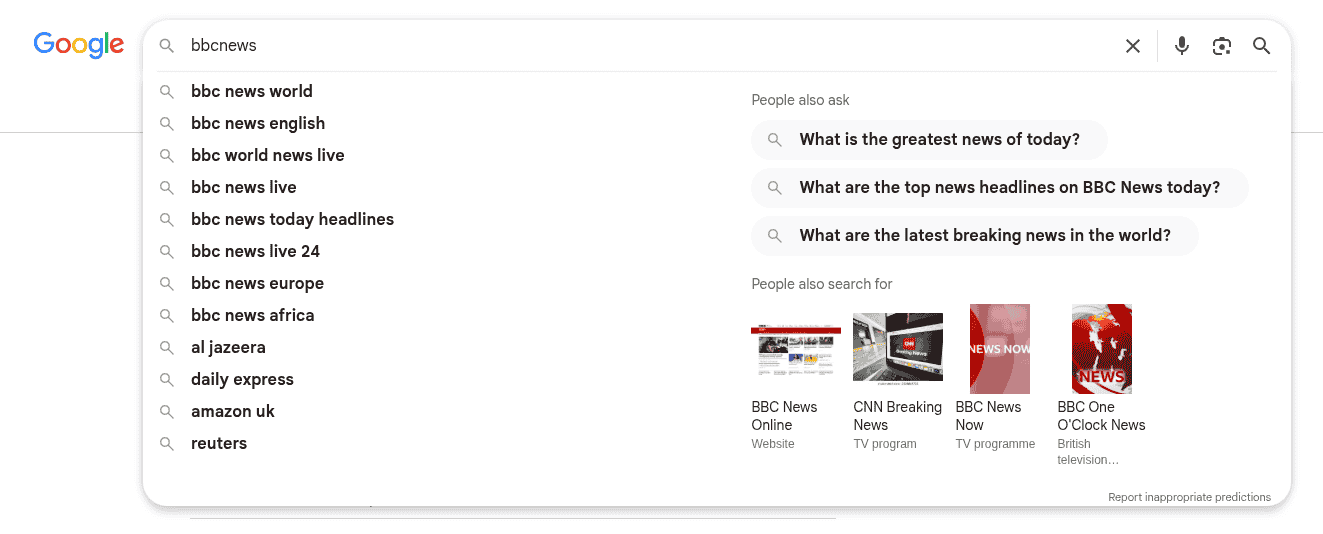
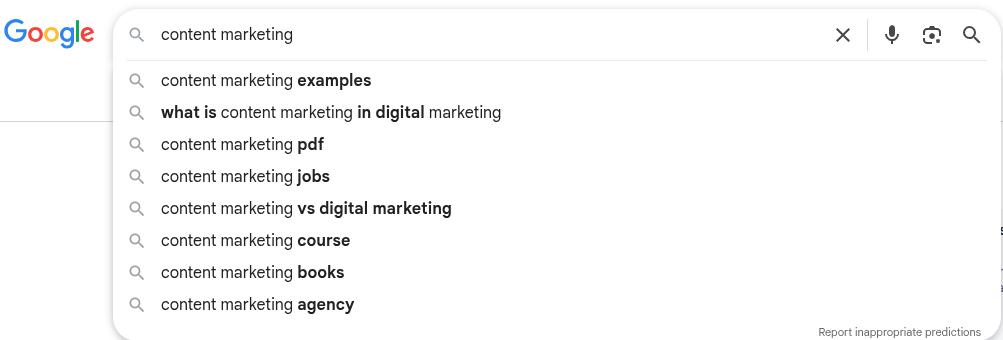
Use Google Autocomplete when you type your main keyword into the search bar. As you type “content marketing,” you might see suggestions like “content marketing examples,” “content marketing tools,” or “content marketing jobs.”
The bolded words after our primary keyword ‘content marketing’ are semantic suggestions by Google. Writing them down gives you a quick set of LSI keywords based on real user interest and intent.
Google People also search for
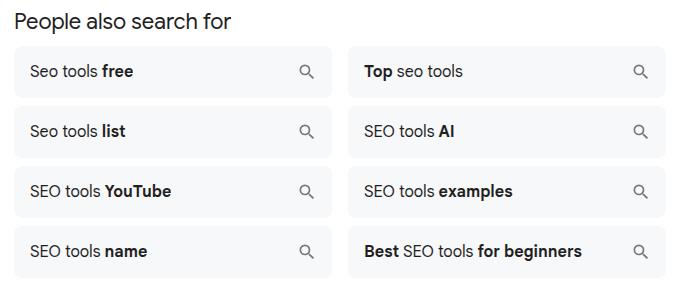
Scroll to Related searches or ‘People also search for’ box at the bottom of the results page. These are full queries that connect to your starting term.
Each one points to subtopics your audience cares about. Turning those into headings or sections helps you cover the topic in a complete way.
Google People also ask section
You can also get a hint of Latent Semantic Indexing keywords from Google’s ‘People also ask’ section, which appears for many informational, transactional, or commercial queries.
These are mostly FAQs related to a topic, so it is not a bad idea to try to answer these questions in your content. Or in your frequently asked questions section at the end of a page.
Google Images
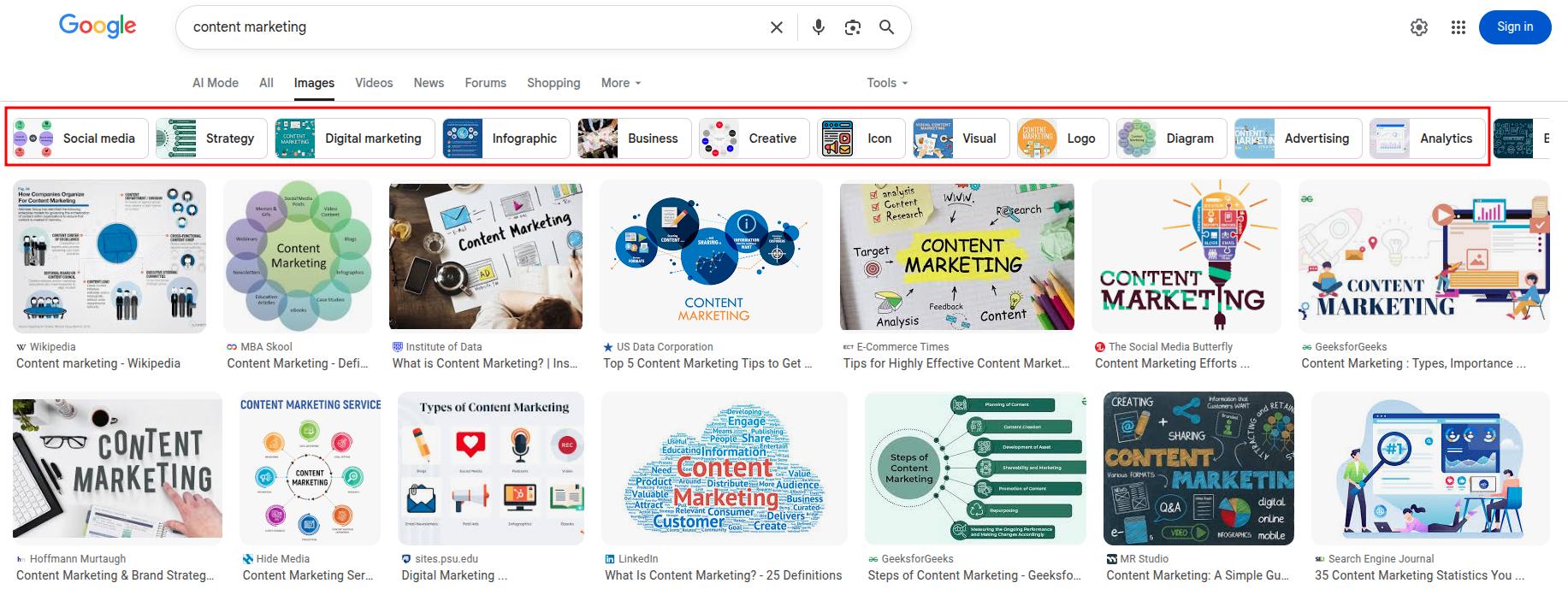
Try Google Images and look at the tags above the pictures. When you search a term there, you often see clickable chips such as “ideas,” “diagram,” or “examples.”
Those tags surface related concepts you may not have thought about yet. They are handy prompts for both new sections and extra semantic keywords.
Google Keyword Planner
Finally, use Google Keyword Planner in its free mode to get more ideas. You can enter a target keyword or even paste a competitor URL that already ranks. The tool returns many keyword ideas, including close variants and conceptually linked phrases.
Sorting through these ideas helps you find LSI keywords that matter most for your content, allowing you to establish your topical authority in a niche.
Paid and dedicated tools for deeper research
Free methods are great, but sometimes you want a deeper look at how top pages use LSI keywords. That is where paid tools and more focused workflows come in.
Contentpen
Put your research to use inside a writing workflow instead of leaving it in a spreadsheet. This is where Contentpen helps. Contentpen is an AI writer online that lets you plug in your main topic and related terms, then draft long‑form, semantically rich content around them.
It keeps your outline focused, suggests helpful angles, and gives you content that is ready to refine and publish.
Besides that, Contentpen also provides a dedicated keyword research tool that uncovers semantic terms related to your niche. It also provides helpful metrics, such as CPC, keyword difficulty, and keyword volume, to help you plan, write, and publish your content accordingly.
Automated keyword research
Work on keywords worth writing, for
Get search terms with real ranking potential, not just high volume.
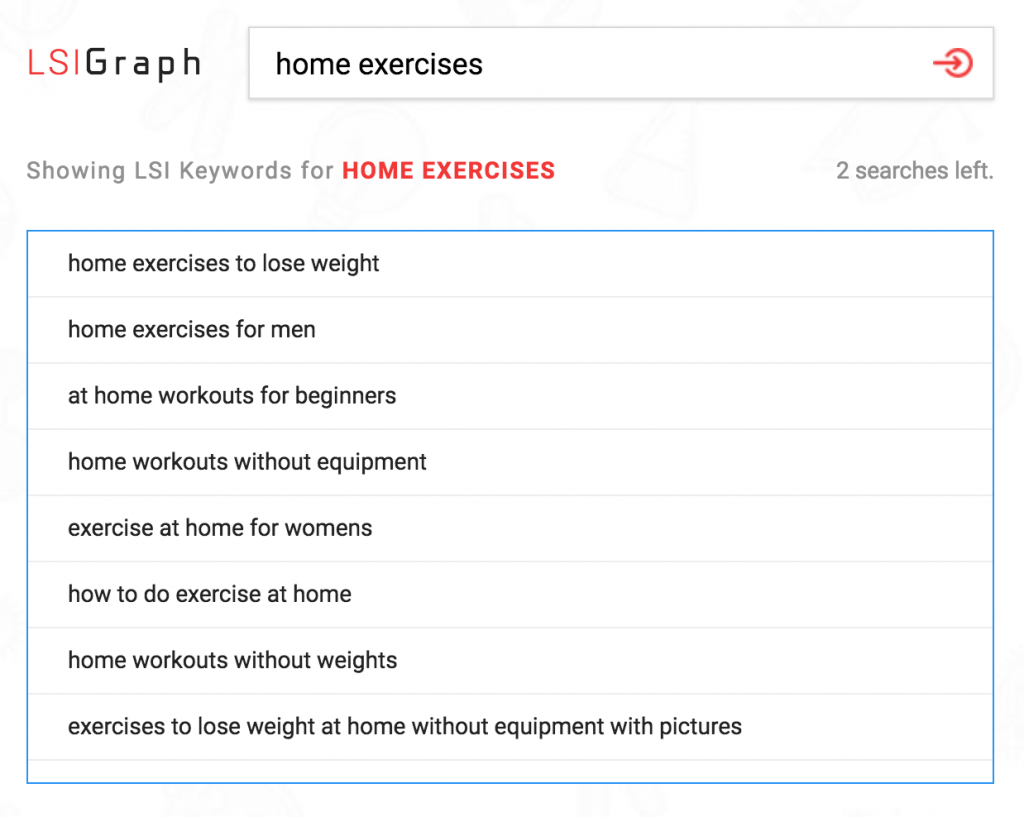
LSI Graph is yet another useful tool to get related keywords for your targeted topic. You enter a seed keyword, and the tool pulls a list of semantically related terms from pages that already rank.
Many users treat this as a free LSI keyword tool on a limited plan, then upgrade if they need more data. The main value is that it shows how real content uses related language.
Semrush
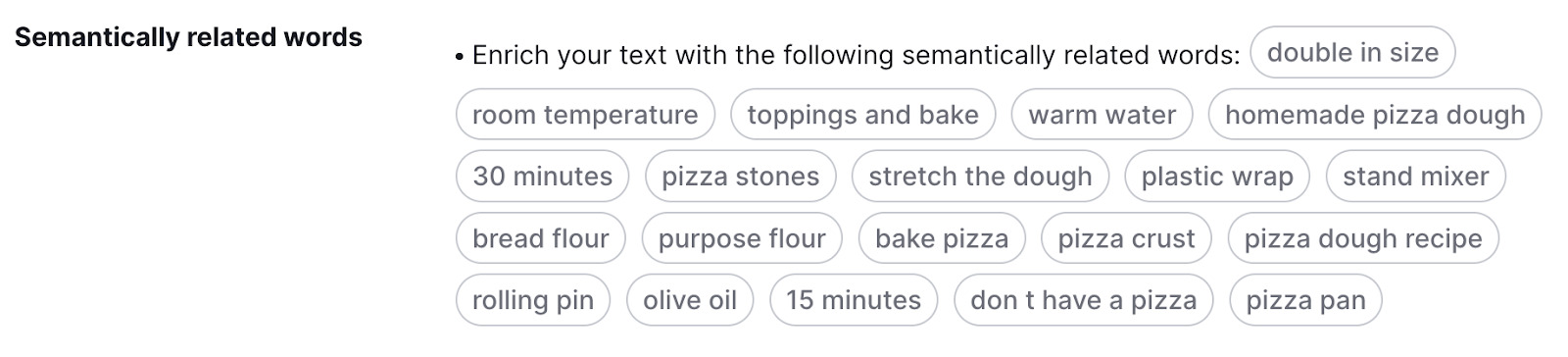
Turn to suites like Semrush for content templates and writing help. Their content tools study the first page of results for your keyword, then suggest semantic keywords and phrases that those pages share. As an example, below are LSI keywords for the term ‘how to make pizza dough.’
This feels like a guided LSI keywords generator based on live SERPs rather than guesswork. It is a fast way to spot gaps in your own outline as well.
Bonus method: Manual competitor analysis
Do manual competitor analysis for an even richer context. Open the top five to ten results and note the H2s, H3s, and repeated terms they use.
Look at how they handle questions, examples, and comparisons. Patterns you see across several pages are strong hints that those terms matter for semantic search and topic depth.
You can also use some powerful competitor analysis tools for this purpose, such as Serpstat.
Simply enter your main keyword and go to SEO Research -> Related Keywords. There you will see a list of related words and phrases that your competitors are currently ranking for. Use them in your content for better ranking and positioning in your niche.
The key is not to chase every term that any LSI keyword generator shows you. Pick a focused set of semantic keywords that match your intent and the reader’s needs, then write around those with care.
How to use LSI keywords in your content (without overdoing it)
Finding related terms is only half the battle. The real value comes from how you use LSI keywords in real articles, landing pages, and guides.
The main rule is simple: let semantic terms guide what you talk about, not force you into awkward phrases or long lists that do not read well.
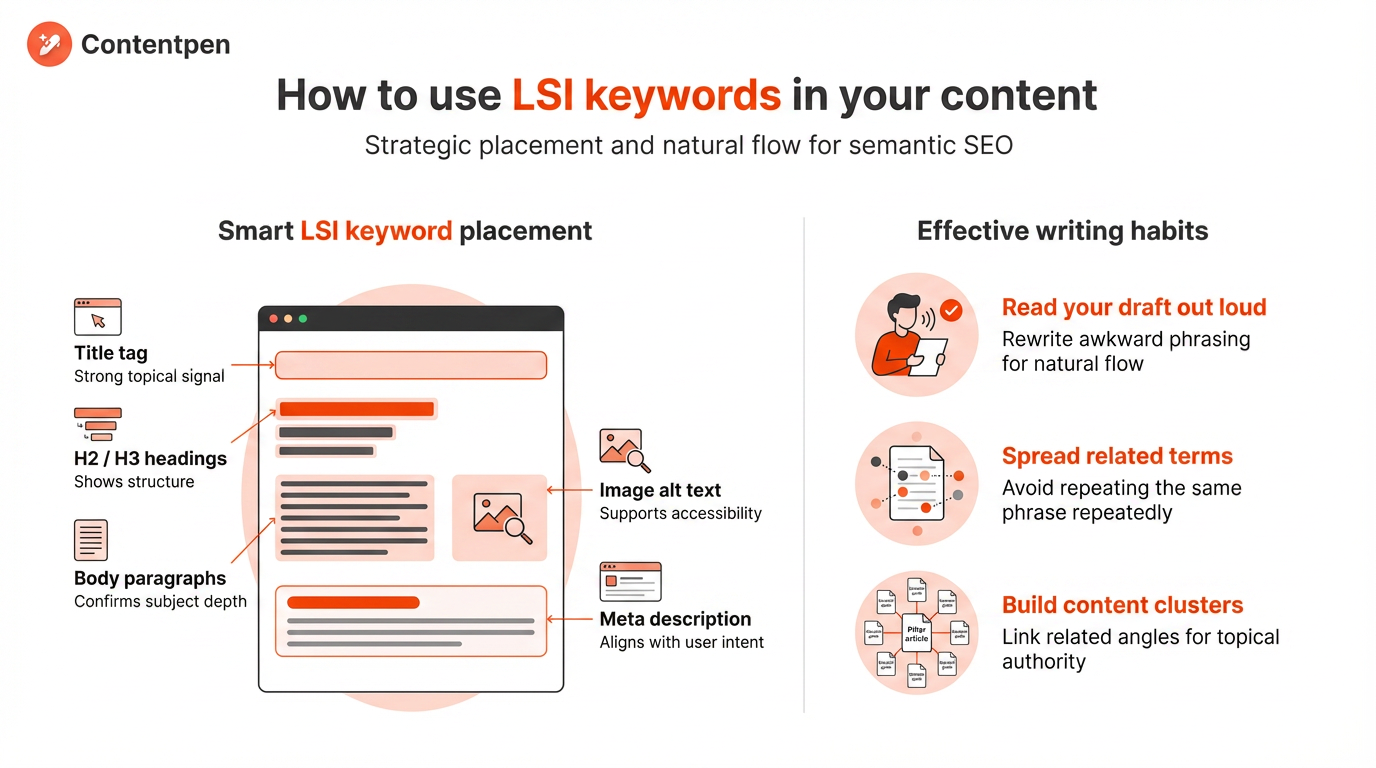
Start by deciding where semantic keywords should appear. Think about the key places where both readers and search engines look for context. Then use related language there when it fits.
You are not trying to hit a fixed number; you are trying to show a clear, well‑rounded view of the topic.
Mentioning “semantic SEO strategy and content depth.”
Aligns snippet text with user intent
When you apply this, keep a few writing habits in mind:
Read your draft out loud; any LSI keyword that sounds strange probably needs to be rewritten or removed.
Let research lead your subtopics. If “keyword co‑occurrence” appears in many results for your main term, that is a sign it deserves at least a short section.
Spread related terms across the page instead of repeating the same phrase in every paragraph.
Think beyond a single page as well. A smart semantic SEO approach uses clusters of content where a main pillar article links to several detailed guides. Each piece tackles a related angle and adds its own set of semantic keywords.
Over time, this linked group tells Google that your site understands the subject from many sides, allowing you to rank competitively for a broad term.
Contentpen can make this far less stressful. You can plan a cluster, feed your primary and related keywords into the platform, and have it draft articles that already include natural semantic coverage.
Write better blogs in less time, without sacrificing quality.
Let AI handle structure, clarity, and flow while you stay in control of the message.
Its internal linking support then helps tie those pieces together. You still steer the voice and final edits, but the heavy lift of structuring and drafting is taken care of for you.
Concluding thoughts
The label “LSI keywords” comes from old research, and Google is not running a literal LSI engine. Even so, the reason behind the term lines up with how modern search works. Good pages do more than repeat a single phrase. They use related variations to rank better.
For your own content, the plan is straightforward. Research related terms, decide which ones match your audience and intent, and weave them into titles, headings, and sections where they naturally belong. Focus on answering connected questions, not chasing a magic keyword count.
If you want help turning that plan into consistent content, Contentpen gives you a practical path. It helps you move from topic ideas and semantic keyword lists to long‑form, link‑worthy articles that both readers and search engines understand.
Frequently asked questions
How many LSI keywords should I use per page?
There is no magic number. However, most well-optimized pages include 8 to 15 semantically related terms distributed across headings, body paragraphs, and image alt text. Topic coverage, not term count, is what actually moves rankings.
Do LSI keyword tools guarantee better rankings?
No tool can guarantee rankings. An LSI keywords generator or semantic keyword tool can surface ideas you might miss, but the results are only as good as the content you write. Rankings still depend on depth, clarity, links, and how well your page matches search intent.
Can you rank well without thinking about LSI keywords at all?
You can, especially if you write naturally and cover topics in detail. When writers stay close to their subject and answer real questions, many semantic terms appear on the page by default. Thinking about LSI simply makes that process more deliberate and consistent across your site.
Do LSI keywords work for AI search and AI Overviews?
Yes, and they may matter more here than in traditional search. Google’s AI Overviews, Perplexity, and ChatGPT all pull from pages that cover a topic comprehensively. Semantic coverage is what signals depth to these systems, improving your chances of getting cited.
Many marketers chase the biggest numbers in keyword tools, then feel stuck when nothing ranks. They build SEO campaigns around broad, high-volume phrases without checking how hard those phrases are to win.
The problem isn’t effort; it is direction. It is about not knowing what keyword difficulty is.
In this guide, you will see keyword difficulty explained with basics: what it is, how tools calculate it, how to read it, and use it in your keyword research.
By the end, you will know how to pick realistic targets, how to rank for tougher keywords over time, and how tools like Contentpen can help you act on those insights faster.
So, let’s get into it.
What is keyword difficulty in SEO?
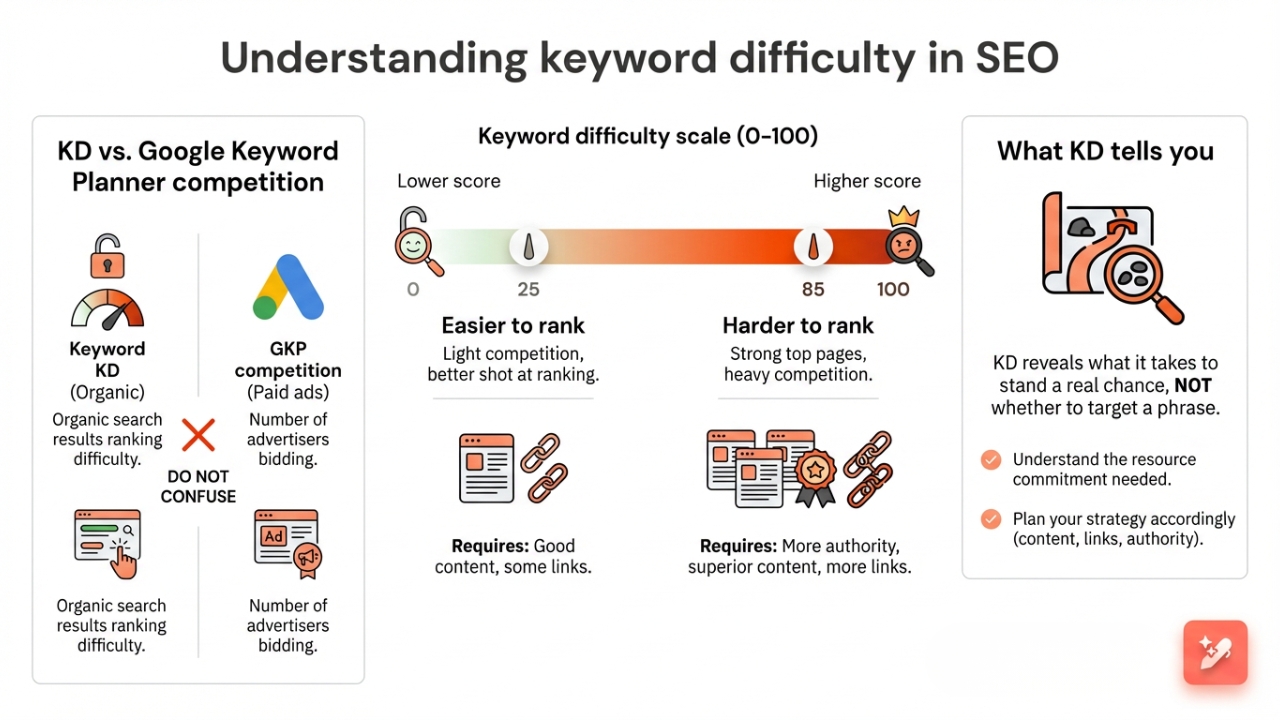
Keyword difficulty (KD) in SEO is a metric that shows how hard it is to rank for a specific search term in organic results. Most keyword research tools score this on a scale from 0 to 100.
A lower keyword difficulty score means the competition is light, and you have a better shot at ranking. A higher score means the current top pages are strong, so you need more authority, better content, and usually more links to win.
Many people confuse KD with the Competition column in Google Keyword Planner. That competition metric covers paid ads only and shows how many advertisers are bidding in Google Ads.
You may also see this metric called keyword competition or SEO difficulty. Whatever the label, KD does not tell you whether you should target a phrase; it tells you what it will take to stand a real chance.
How is keyword difficulty calculated, and why does it vary by tool?
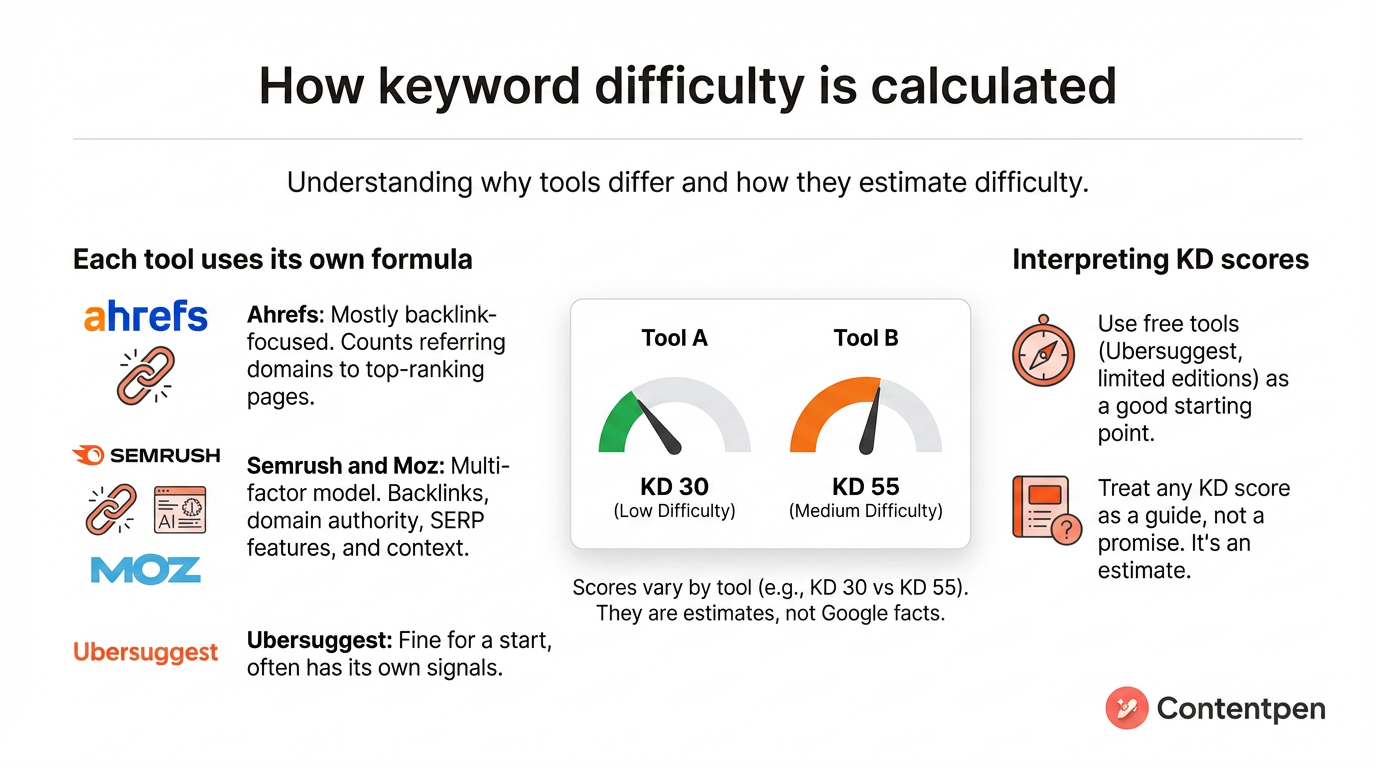
Here is where keyword difficulty gets confusing: every major tool uses its own formula. Tools such as Ahrefs, Semrush, Moz, and Ubersuggest track similar signals but weigh them differently.
That is why one keyword might look like KD 30 in one place and KD 55 in another. The number is not a fact from Google; it is an estimate based on each tool’s data.
Some tools use a mostly backlink-focused approach. For example, Ahrefs mainly looks at how many different websites link to the top-ranking pages for a term. If those top pages have a high count of strong referring domains, Ahrefs pushes the KD higher.
Others use a multi-factor model. Semrush and Moz still care about backlinks, but they also look at the authority of the domains on page one and what appears on the search results page for that particular term.
If Google is showing AI Overviews, featured snippets, shopping blocks, or a heavy local pack, they may treat that keyword as harder. They also consider context, such as branded phrases, which are often harder to outrank.
Free keyword difficulty checker options, such as Ubersuggest or limited editions from bigger tools, are fine for a start. Just remember that any KD score you see in a third-party tool is a guide, not a promise.
How to read keyword difficulty scores with scale breakdown
A common question is what a good keyword difficulty score is for a site like yours. The honest answer is that it depends on your situation.
A KD of 40 might be realistic for an established content brand, but out of reach for a new blog. Therefore, you want to look at the full keyword difficulty range and match it to your current authority level and resources.
KD score
Difficulty level
What it means for you
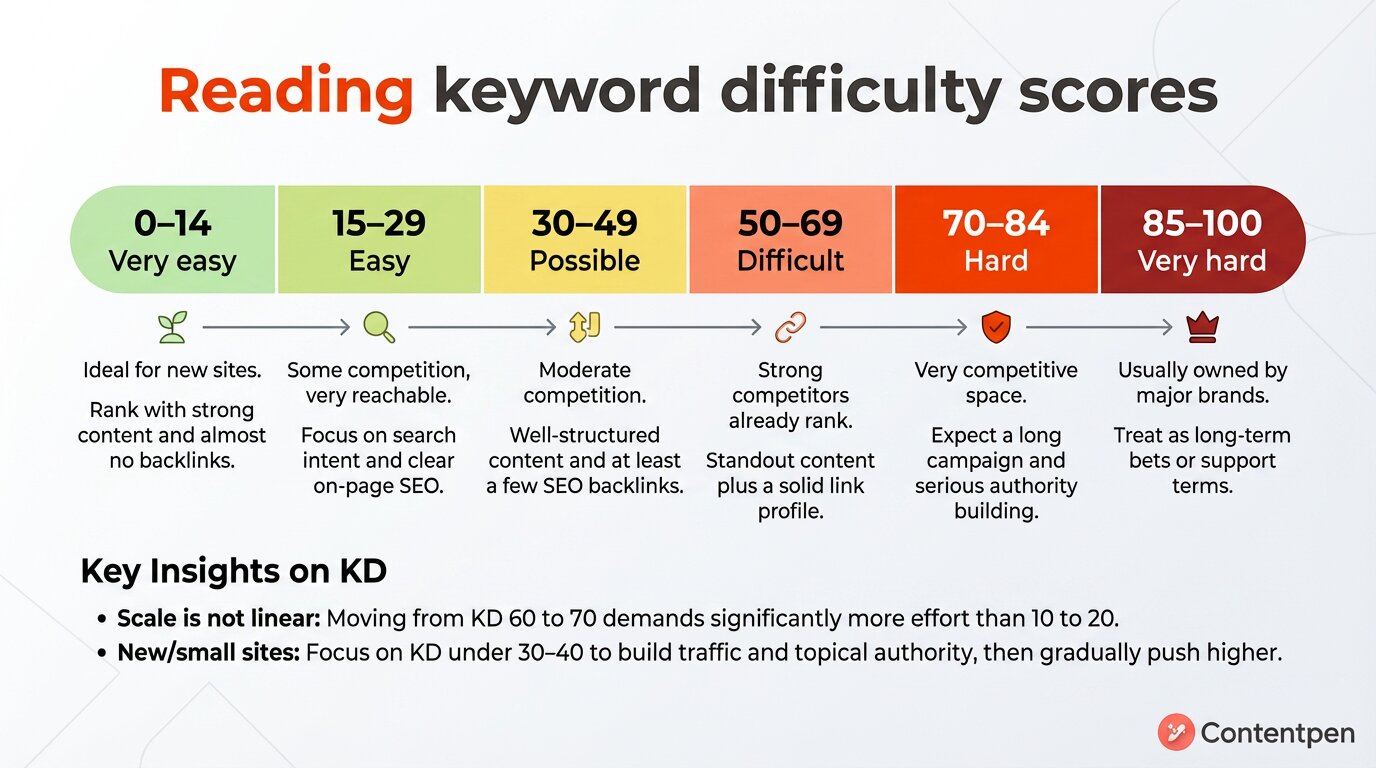
0–14
Very easy
Ideal for new sites. You can often rank with strong content and almost no backlinks.
15–29
Easy
Some competition, yet very reachable. Focus on matching search intent and clear on-page SEO.
30–49
Possible
Moderate competition. You need well-structured content and at least a few SEO backlinks.
50–69
Difficult
Strong competitors already rank. You need standout content plus a solid link profile.
70–84
Hard
Very competitive space. Expect a long campaign and serious authority building.
85–100
Very hard
Usually owned by major brands. Treat these as long-term bets or support terms.
Remember this scale is not linear. Moving from KD 10 to 20 might only need a few extra links and on-page tuning. While 60 to 70 can demand dozens of strong referring domains and a much longer content campaign.
If your site is new or still small, focus most of your SEO keyword research on KD under 30 – 40. These low-difficulty keywords help you pick up traffic, build topical authority, and start earning links.
As you grow, you can gradually push your targets upward and go after tougher phrases with higher keyword search volume.
How to estimate keyword difficulty manually (without a tool)
Keyword tools are helpful, but they are not always available, and they are never fully complete. Knowing how to read a keyword’s difficulty by hand is one of the most practical SEO skills you can build.
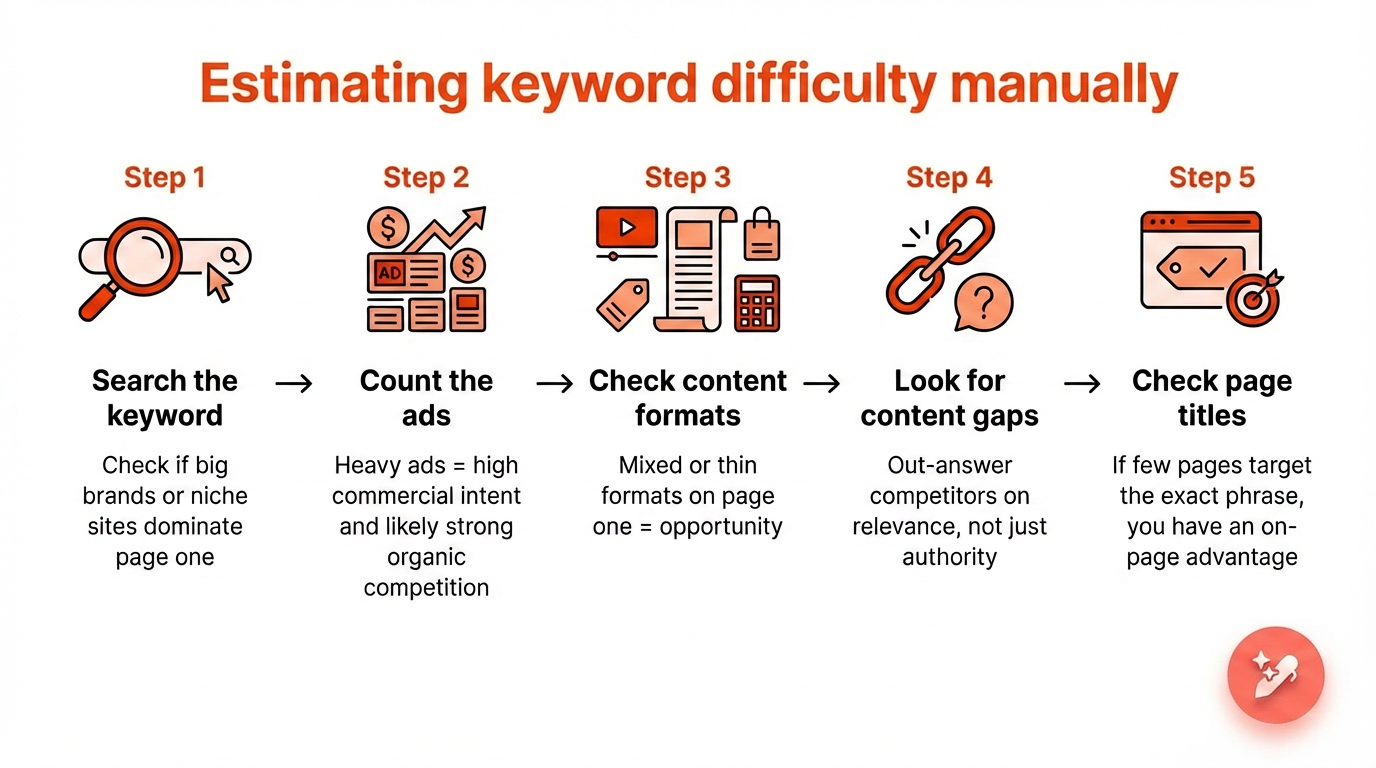
Here is a five-step manual process you can run directly from a Google search.
Step 1: Search the keyword and check who ranks
Type the keyword into Google without being logged in, ideally in a private or incognito window. Look at the first page results and ask: are these big brands, government sites, or well-known publications?
If the top five results are household names with no independent sites in sight, the keyword is likely harder than its KD score suggests. If you spot a few mid-size or niche sites in the top ten, that is a real signal that you can rank.
Step 2: Count how many ads appear
Check the top of the results page for paid ads. Heavy advertiser presence on a keyword usually means high commercial intent and, often, strong organic competition as well. No ads at all can mean lower competition or simply lower commercial value. Either way, it is a useful context before you commit.
Step 3: Check the content format on page one
Look at what type of content is ranking. Are they long guides, product pages, videos, tool pages, or short definitions?
If all ten results are in-depth guides from established domains, a thin post will not crack the top ten, regardless of how low the keyword difficulty reads.
But if the formats are mixed, or if some ranking pages are outdated or thin themselves, that inconsistency is an opportunity you can exploit with well-structured, currentcontent.
Step 4: Look for content gaps in the top results
Skim the top 3 to 5 ranking pages. What questions are they not answering? What angles are they skipping? What has changed since they published?
If there is a clear gap, you do not need to outmuscle competitors on authority. You need to out-answer them on relevance. That is a winnable battle even for newer sites.
Step 5: Check page titles for exact keyword targeting
Look at the title tags of the ranking pages in the search results. Are they directly targeting the keyword you want to rank for, or are they ranking for it incidentally?
If most page titles do not include the exact phrase, you have a clear on-page advantage available to you without building a single link. Simply targeting the keyword intentionally in your title, meta description, and H1 already puts you ahead of pages that are not doing that.
Putting it together: A real keyword walkthrough
Let us apply all five steps to a real keyword so you can see how the process works in practice.
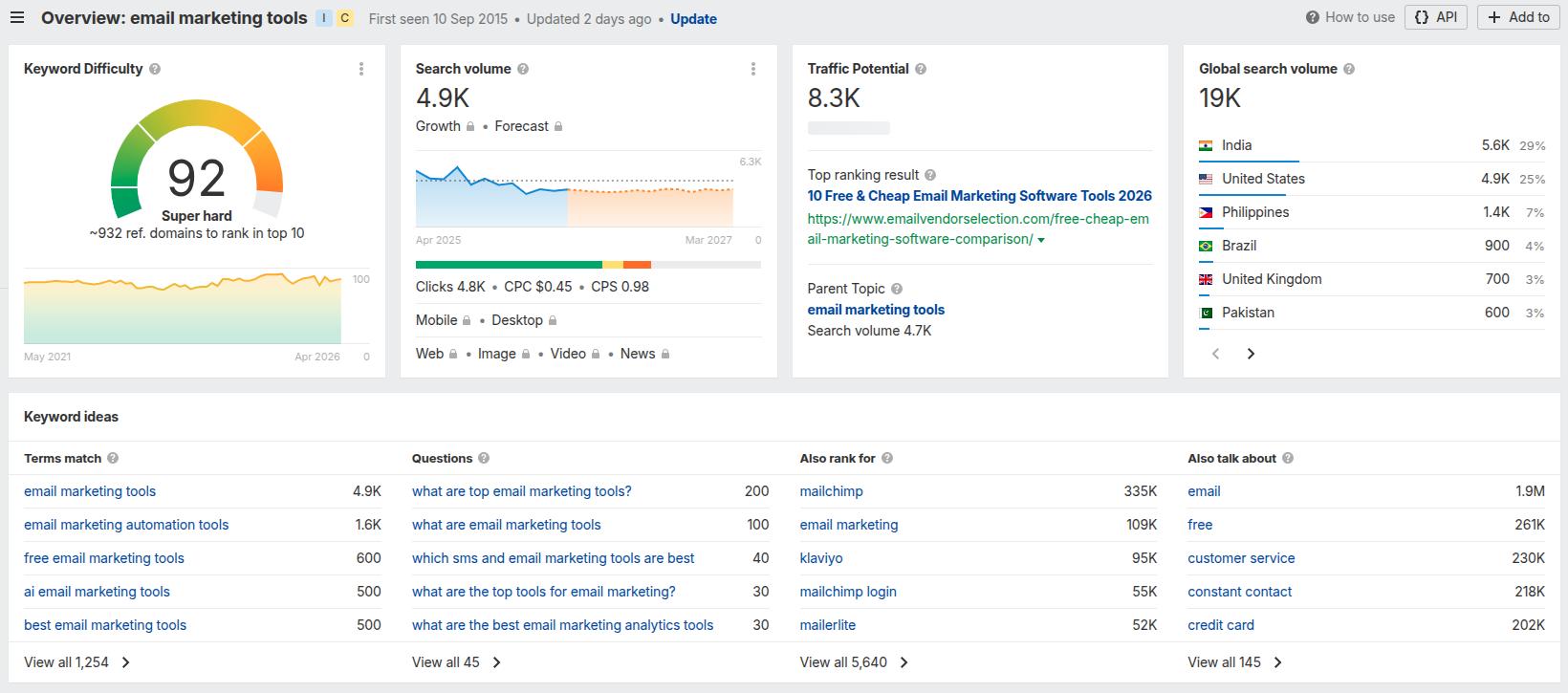
At first glance, this looks like a keyword to avoid. KD 92 in Ahrefs suggests you would need a significant referring domain count just to reach the first page.
But here is what the manual check reveals.
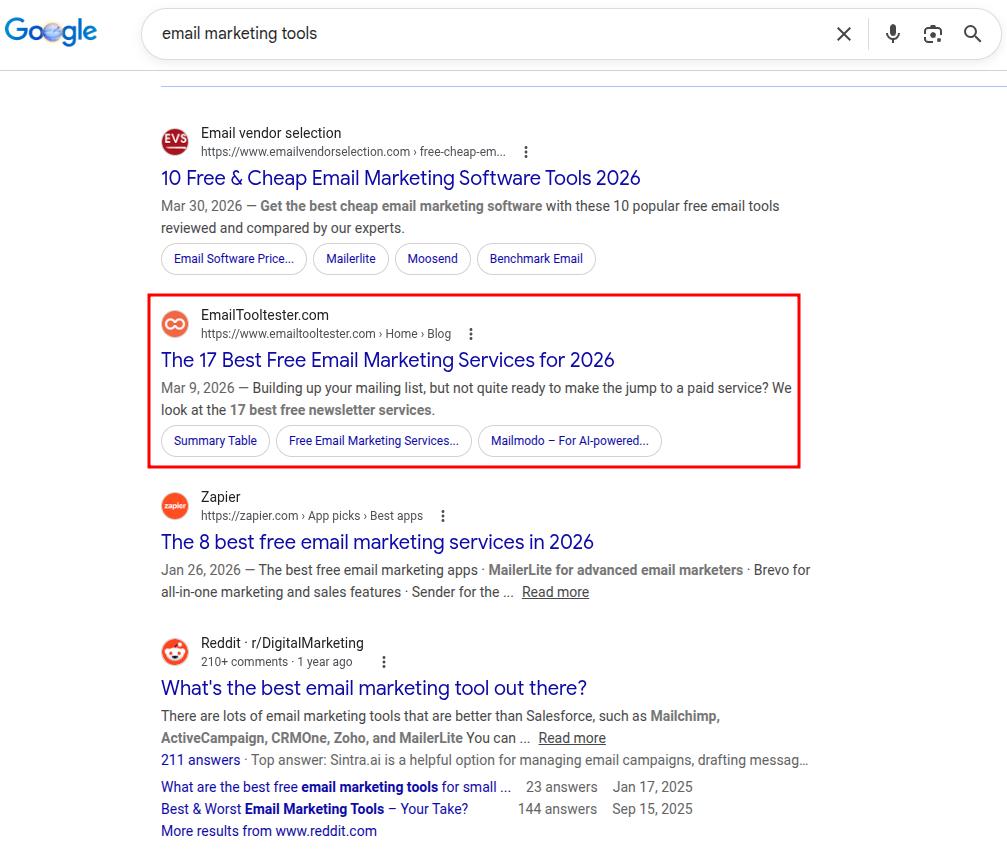
Step 1 – Who ranks: The top results are a mix of large review platforms and established marketing blogs, such as Zapier. No government sites, no Wikipedia.
A few of the ranking pages belong to software companies ranking on their own brand authority rather than the strength of this specific page.
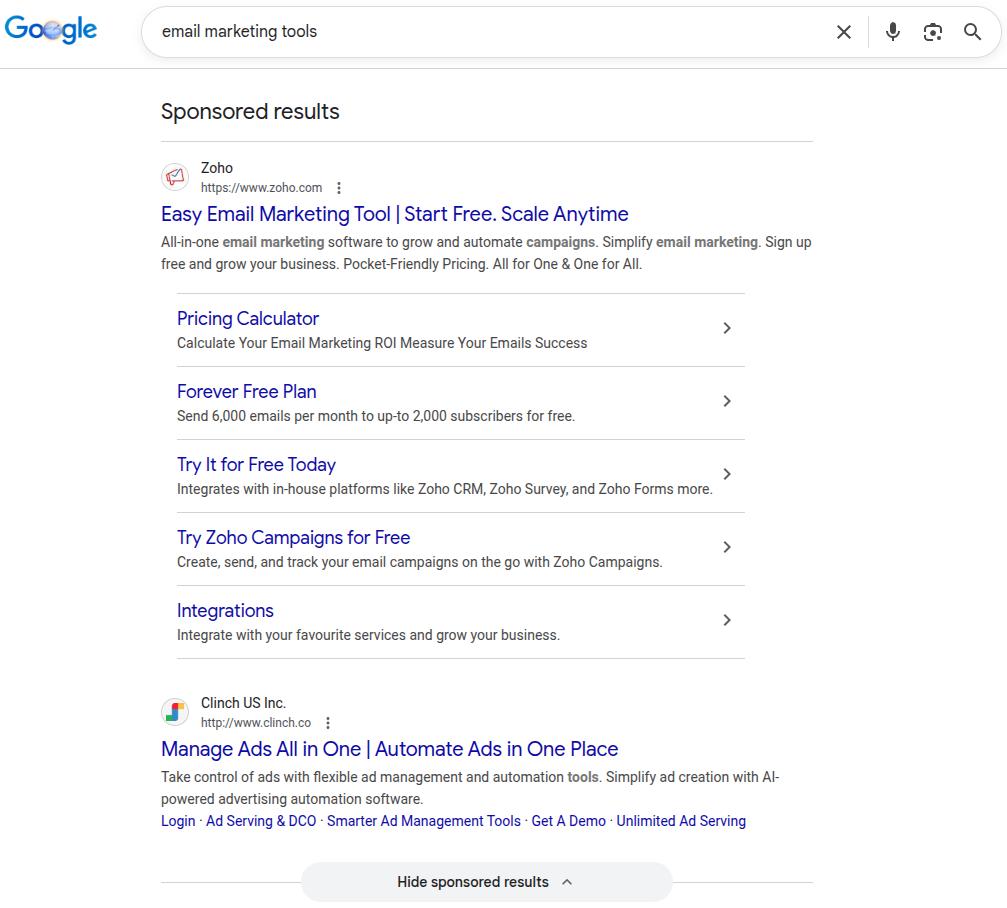
Step 2 – Ads: Two ads appear for this keyword: 1 from Zoho and the other from Clinch US. This manual SERP review signals strong commercial intent and advertiser competition.
That confirms the keyword has buying-stage traffic worth targeting, but it also confirms you are entering a competitive paid and organic space.
Step 3 – Content format: Most of the top ten results are listicles or comparison roundups. Not guides, opinion pieces, or tutorials.
If you published a “what is email marketing” style article targeting this keyword, it would not rank, regardless of how well-written it is. You need a comparison post.
Step 4 – Content gaps: Several top-ranking pages do not cover AI-native tools in that much depth.
Also, the maximum number of tools covered on page one is 17, by EmailTooltester. This means you can win on content depth by covering more email marketing tools than the other pages (18 or 20 tools on the list).
Step 5 – Title targeting: 7 of the top 10 results do not include the exact phrase “email marketing tools” in their title tag. That is a direct on-page opportunity available to any page that targets the phrase intentionally.
What this tells you: The KD score of 92 is accurate in one sense. The backlink profiles of ranking pages are strong.
But the SERP itself has weaknesses. There are brand-authority rankings rather than content-authority rankings, and a gap in modern tool coverage.
A well-resourced site with topical authority in the email marketing space has a more realistic shot here to rank than the raw keyword difficulty score suggests.
This is exactly why you always run the manual check. The SERP results tell you whether the effort is worth it, and where to aim for an SEO keyword.
Keyword difficulty vs. keyword competition vs. CPC: What each term tells you
These three terms show up together constantly in keyword research, and they are often treated as versions of the same thing. They are not. Using them interchangeably can often lead to poor targeting decisions.
You can understand these metrics with the table below:
Metric
What it measures
Who calculates it
Organic relevance
Keyword difficulty (KD)
Organic ranking competition
SEO tools
Direct
Keyword competition
Paid ad bidding density
Google Keyword Planner
None
CPC
Advertiser cost per click
Google Ads / SEO tools
Indirect (signals intent)
In short, use KD to decide if you can rank. Use CPC to decide if it is worth ranking. Use competition only if you are running paid campaigns.
When all three point in the same direction, that keyword deserves to be at the top of your content strategy.
How to use keyword difficulty in your SEO strategy
Now that you understand what keyword difficulty is, the real value comes from how you use it in your content plan.
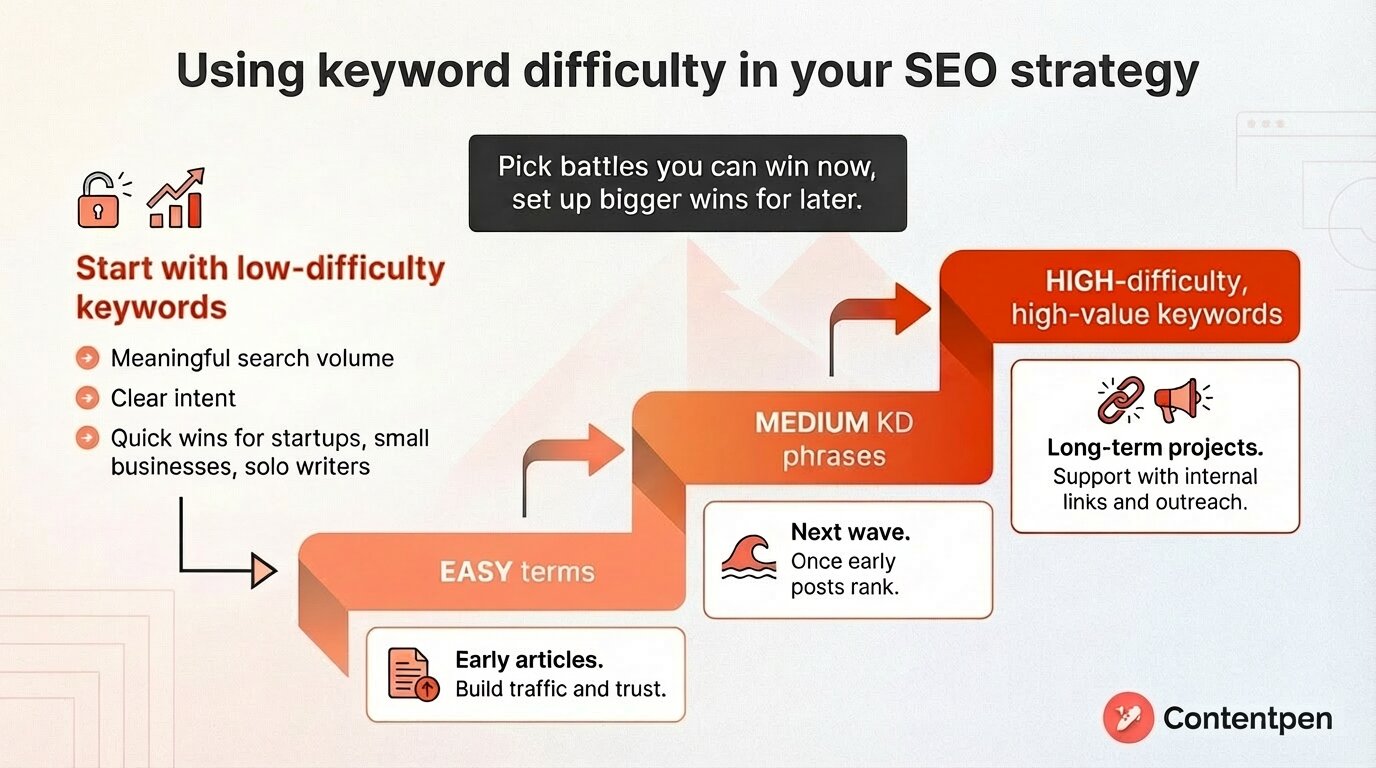
Making and implementing an SEO strategy is about picking battles you can win now while setting up bigger wins for later.
You should start with low-difficulty keywords that still have meaningful search volume and clear keyword search intent. These quick wins let you publish focused content and see movement faster, even without many links.
Next, group keywords by difficulty level and build a content roadmap:
Easy terms become early articles that build traffic and trust.
Medium KD phrases form your next wave once those early posts start to rank.
High-difficulty, high-value keywords become long-term projects that you support with internal links and outreach.
You can also use KD scores to decide where SEO fits alongside paid ads.
Finding your opportunity zone keywords using Contentpen
Instead of filtering keywords by keyword difficulty alone, filter by what experienced SEOs call the opportunity zone.
The opportunity zone is where KD is manageable, intent is commercial or informational, search volume justifies the effort, and the pages currently ranking are weaker than they should be.
In Contentpen, you can surface these types of keywords without switching tools or tabs. The dashboard shows KD, monthly search volume, CPC, and intent classification for each term.
Automated keyword research
Work on keywords worth writing, for
Get search terms with real ranking potential, not just high volume.
Our AI writing tool allows you to target the opportunity zone phrases by creating content that ranks and publishing seamlessly through its CMS integrations.
There’s also an option to view the SEO opportunities dashboard, which helps optimize content after publishing to maintain SERP positions.
Keyword difficulty in 2026 and beyond
A KD score tells you how competitive the organic results are. What it does not tell you is how many of those organic clicks you will actually receive if you rank.
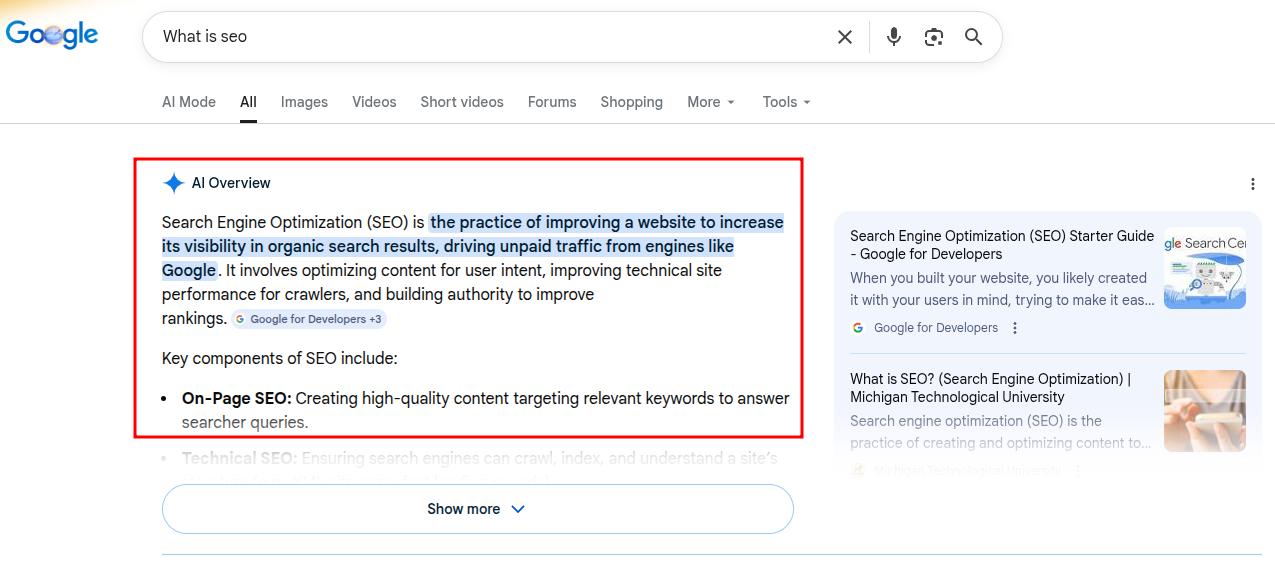
That distinction matters more than ever now that Google’s AI Overviews appear more frequently in search results.
When an AI Overview appears at the top of a results page, it answers the user’s question directly before they ever reach the organic listings.
Pages ranking in positions 1 – 5 can see significantly lower click-through rates than a year ago, simply because the user’s question was already answered above the fold.
What this means in practice is that certain keywords are effectively harder than their KD score suggests. So, you need to know how to adjust your keyword difficulty thinking for this reality.
#1: Check the SERP before you commit
Search the keyword yourself and see what the results page actually looks like. Is there an AI Overview? A featured snippet? A People Also Ask block taking up half the screen?
Every one of these features absorbs clicks that would otherwise go to organic results. The more features present, the harder the keyword is in practice, regardless of what the keyword difficulty number says.
#2: Prioritize keywords where organic results still lead
Not every search triggers AI Overviews. Highly specific queries, tool-focused searches, and transactional queries are less likely to produce an AI Overview because they require nuance, personal context, or recency that a generated summary cannot reliably provide.
These keyword types still deliver strong organic click-through rates, and they are often exactly the intent categories you should target.
#3: Use AI Overviews as a citation opportunity
If an AI Overview consistently appears for a keyword you want to rank for, your goal shifts slightly.
Instead of only aiming for position one in traditional organic results, you also aim to be cited inside the AI Overview itself.
Google tends to cite pages that are comprehensive, clearly structured, and directly answer the query within the first few paragraphs. Publishing content that meets those standards gives you two shots at visibility on the same results page.
Final thoughts
Keyword difficulty does not exist to scare you away from keywords. It gives you a clearer picture of what each target may cost in time, content effort, and links.
There is no single perfect keyword difficulty range for everyone, because the right targets depend on your current authority, niche, and resources.
Begin with easier terms, do real SERP research, and grow into tougher keywords as your site gains strength.
If you want help turning that plan into content that ranks, then let Contentpen do the heavy lifting. From keyword competition analysis to gap discovery, it helps you pick the right battles and publish content that stands out with ease.
Frequently asked questions
What is a good keyword difficulty range for a new website?
For a brand new site, aim mostly for keywords with KD under 30 and sprinkle in a few up to 40. This keeps your goals realistic while you build authority. As those pages start to rank, you can test slightly harder phrases.
What is personal keyword difficulty, and how is it different from standard KD?
Standard keyword difficulty scores look at the competition across the whole web. Personal keyword difficulty (PKD) adjusts that picture for your specific site. It asks: given your current domain authority, backlink profile, and topical coverage, how hard is this keyword for you right now?
Does keyword difficulty matter for long tail keywords?
Yes, but in a helpful way. Long-tail keywords often have both lower search volume and lower KD. Clusters of easy long tails can add up to steady traffic for your platform and support tougher head terms later.
How often should you check keyword difficulty for existing content?
Check keyword difficulty when you plan updates or new campaigns, not every week. A refresh every few months is enough for most sites. Focus more on improving content and links than on tiny changes in the score.
Can you rely on free keyword difficulty tools for serious SEO work?
A free keyword difficulty checker is fine for early research and smaller projects. For deeper campaigns and competitive spaces, paid tools with larger data sets are more reliable.
How long does it take to rank for high KD keywords?
There is no honest single answer, but there is a useful framework. For keywords in the KD 50 – 70 range, realistic ranking timelines for established sites with active link-building efforts typically fall between 6 and 12 months. For KD 70 and above, you are looking at 12months or more.
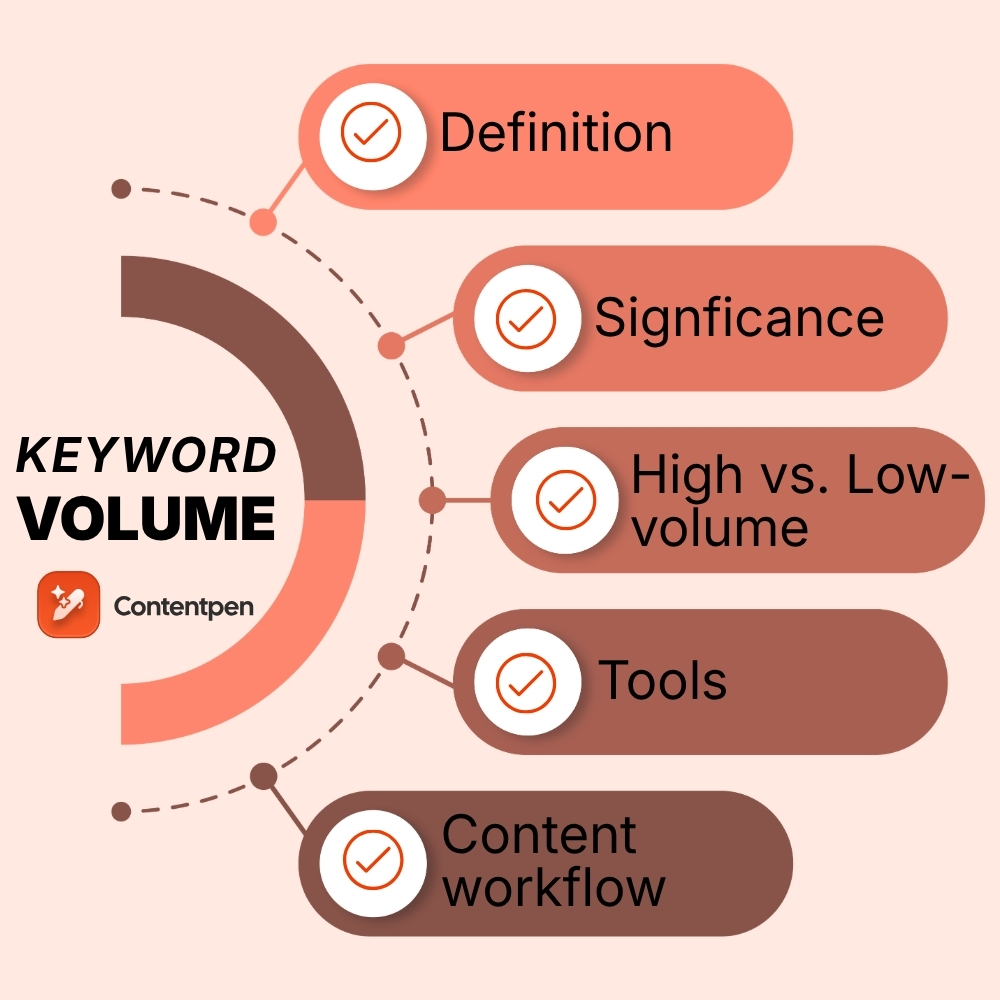
Keyword volume is the number of times a phrase is searched in a month on a search engine like Google. It shows the demand for a topic, which drives content strategies for SEO and marketing teams.
When you compare content ideas against real search volume data, you stop guessing and start planning with numbers. This is why considering keyword volume is so necessary.
In this guide, you will see what keyword volume means, how to check it, and how to use those numbers in a simple SEO workflow. By the end, you will know how to find keyword volume, read that data, and turn it into content and campaigns that bring in visitors for your platforms.
So, let’s begin, shall we?
Defining keyword volume
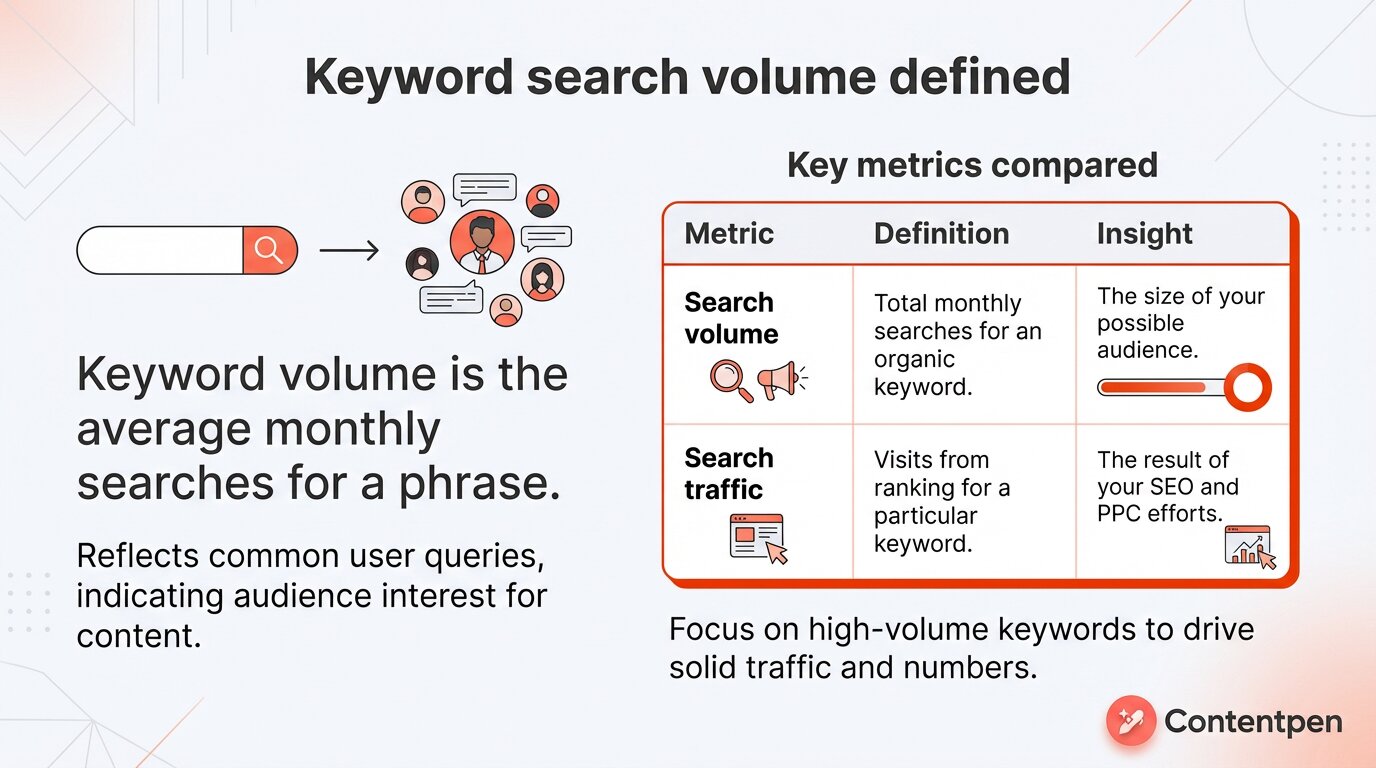
Keyword volume, often called keyword search volume, is the average number of times people search for a word or phrase in a month or a specific time range.
This number reflects the queries people have the most, which you can answer in your content to generate solid traffic and numbers.
That said, search volume and search traffic are two separate metrics. The table below summarizes the differences clearly:
Why keyword volume matters for your SEO and content strategy
You have limited time and budget. You cannot write about every topic that crosses your mind. Keyword volume data helps you decide where to focus your content efforts by showing which ideas people already search for or are currently in demand.
For SEO, keyword volume shapes your content roadmap. With keyword volume information, you can:
Estimate potential organic traffic before you write. When one idea has 2000 searches a month and another has 100, the numbers help you choose where to start.
Spot seasonal topics. If searches for a term spike every November, you can plan content a few weeks ahead and catch that interest. Then, you can circle back to your core topical clusters to keep that new audience engaged.
Compare your pages with competitors to find gaps where they rank, and you do not. Search volume around those gaps shows which ones are worth chasing first.
For paid campaigns in Google Ads, search volume guides your ad spend:
Google Keyword Planner search volume helps you avoid bidding on terms that sound good but have almost no demand, so you do not spread budget across too many weak keywords.
When you see steady volume plus a reasonable cost per click, you can group related terms into focused ad groups and build campaigns around phrases that matter.
Search volume does not tell you everything, and it never replaces expert judgment. What it does is replace guesswork about demand with real numbers, so you can line up topics, compare volume for each, and back your choices with facts and figures.
High volume vs low volume keywords: Which should you target?
It is easy to assume that more searches always mean a better keyword. In reality, chasing only big numbers can leave smaller sites stuck behind giant brands.
Therefore, the right choice depends on your goals, your site strength, and how quickly you need results from your keyword research.
High‑volume keywords
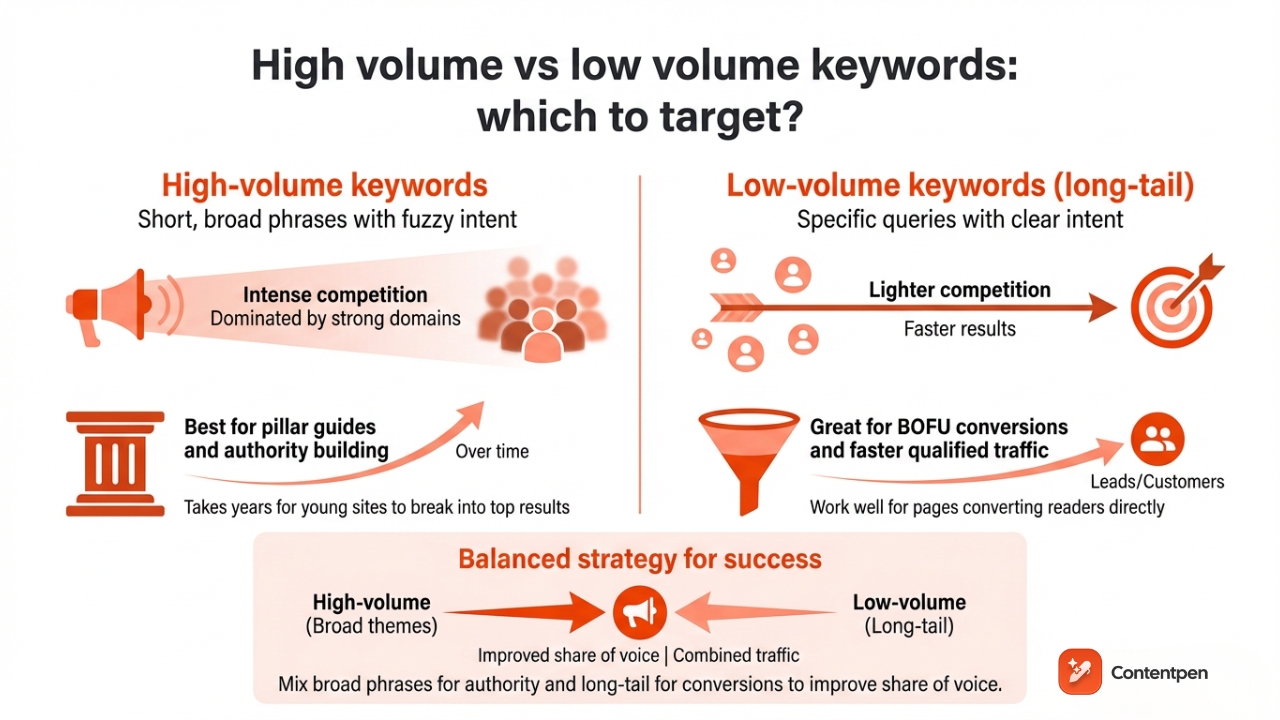
These types of keywords are short and broad. A term like ‘SEO tips’ might show thousands of searches in every keyword tool. These phrases often have fuzzy keyword intent and intense competition.
So, the results for them are usually dominated by strong domains with plenty of SEO backlinks. For a young site, this kind of target can take years to break into the top results.
Low‑volume keywords
Low-volume keywords are often called long‑tail keywords. They do not look suitable at first as they show less search volume, but that is exactly their strength.
Because these are specified search queries, their intent is very clear, and competition is lighter. So, long-tail keywords work well for pages that aim to turn readers directly into leads or customers without spending too much time in TOFU.
Good keyword research mixes both types:
A few high‑volume targets help you build authority around broad themes over time. They work well as pillar guides or main category pages that other articles support.
Many lower‑volume phrases bring in qualified visitors faster from BOFU.
In a nutshell, the combined traffic from broad phrases and long-tail keywords can help you improve your share of voice.
How to check keyword search volume: Tools and methods
Once you know about what search volume is and what it means in SEO, it is time to see some tools to measure it.
Tool
Best for
Limitation
Google Trends
Trend analysis
No exact volume numbers
Ahrefs
Detailed SEO metrics
Expensive
Semrush
SERP feature insights
Data variation
Contentpen
All-in-one keyword research + content creation workflow
Limited free trial
WordStream
Free keyword ideas
Not precise keyword volume data
Let’s review the details of these tools below.
Google Trends
Google Trends is where many people start. It pulls data straight from Google search queries, which makes it a great free search volume tool.
You can enter a list of phrases, see search volume for trending terms, and filter by country or language without setting up any ad campaigns.
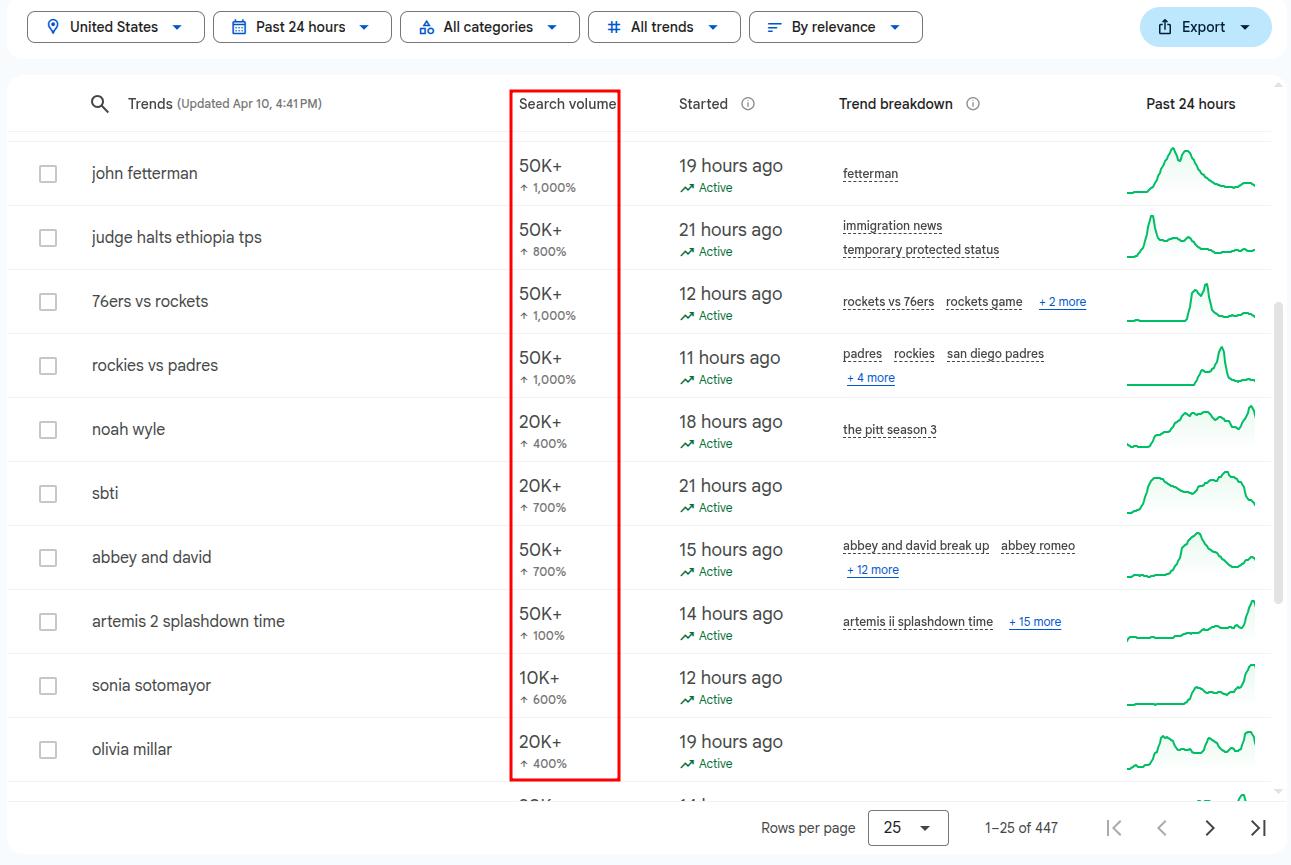
One drawback with Google Trends is that it only offers the increase in search volume for specific terms, but not the average monthly volume like other paid keyword volume tools.
Ahrefs
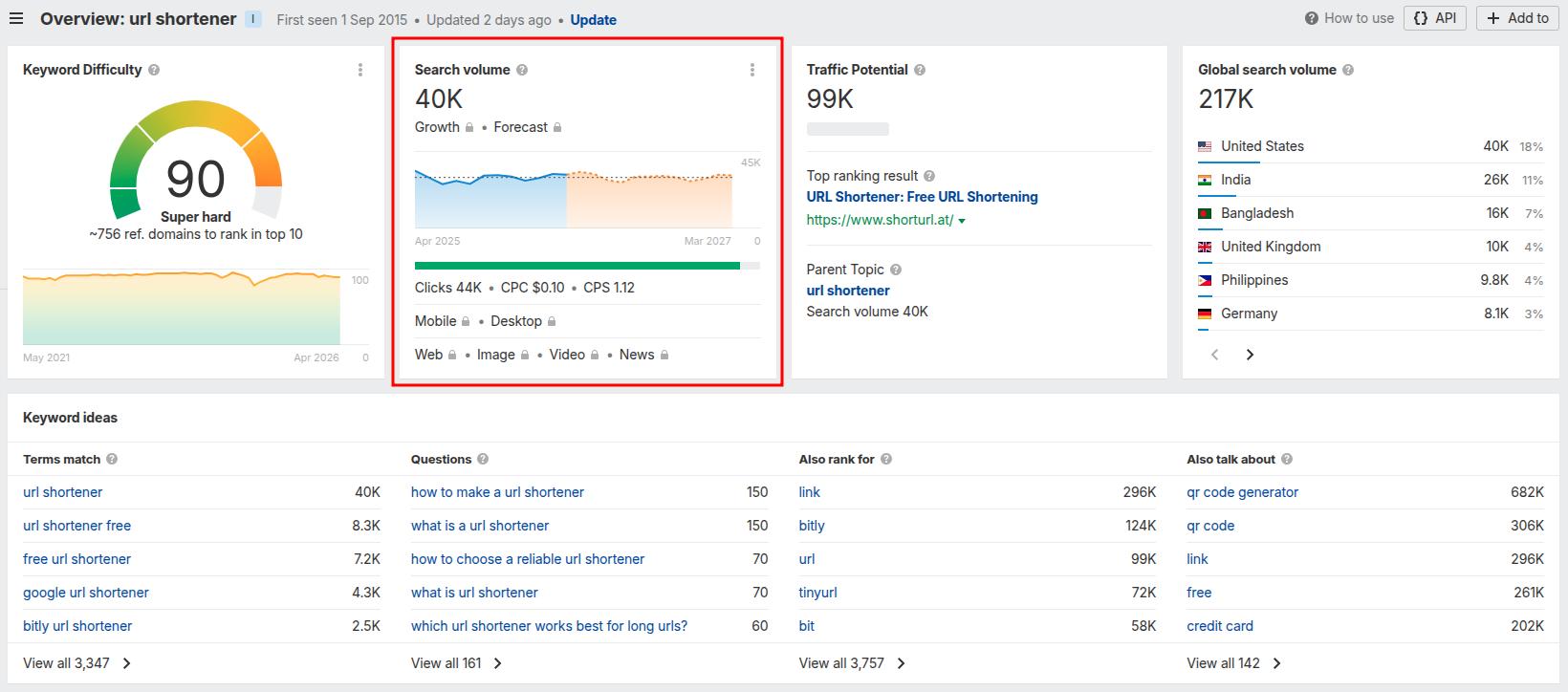
Third‑party keyword tools like Ahrefs are quite handy as a search volume checker. Go to its Keyword Explorer to get keyword volume (per month) and trends over months.
Instead of a traffic range like Google Keyword Explorer or an increase in search volume like Google Trends, Ahrefs shows you the complete picture for a keyword. Ahrefs also depicts traffic potential, questions related to the main keyword, and the global search volume for your input.
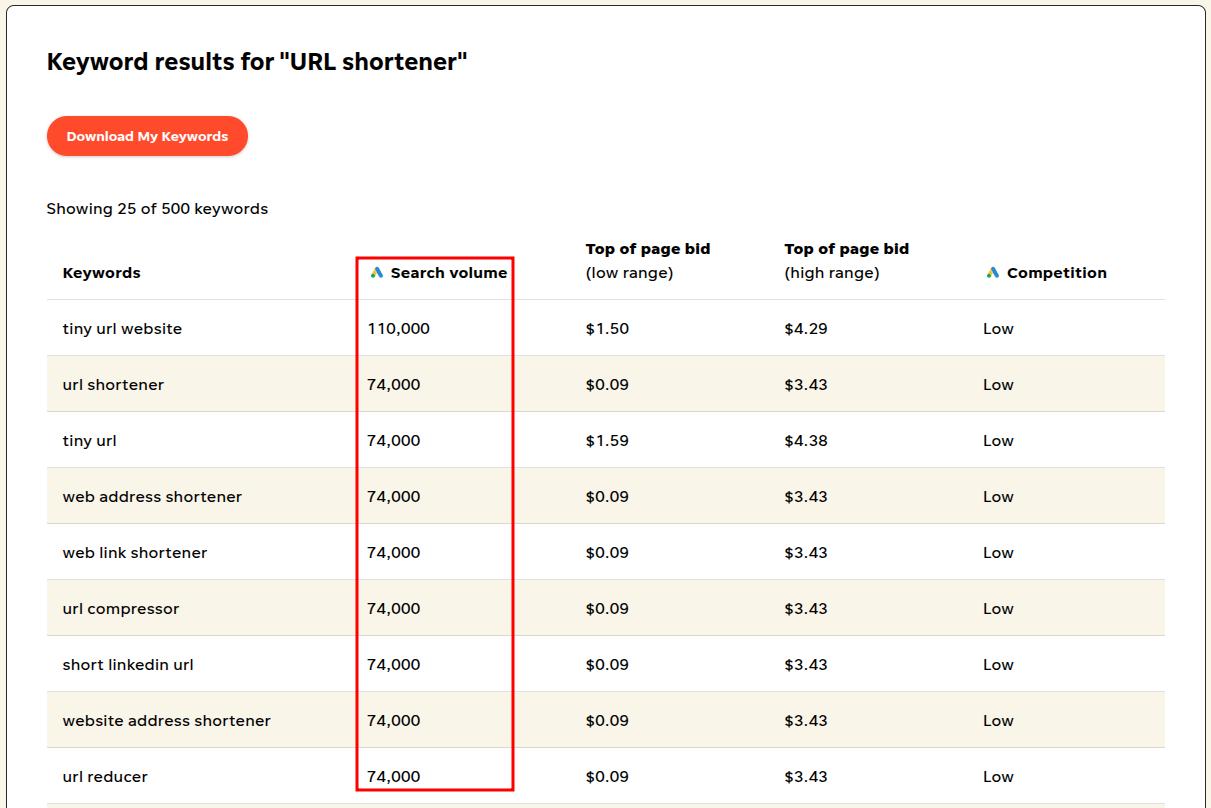
In the following example, we entered the seed phrase ‘URL shortener’ to see its search volume, trend, and other metrics:
As you can see, the keyword difficulty is extremely high for this seed keyword since the intent is not well defined, and a lot of big brands, like Replug, already occupy the space for it.
Semrush
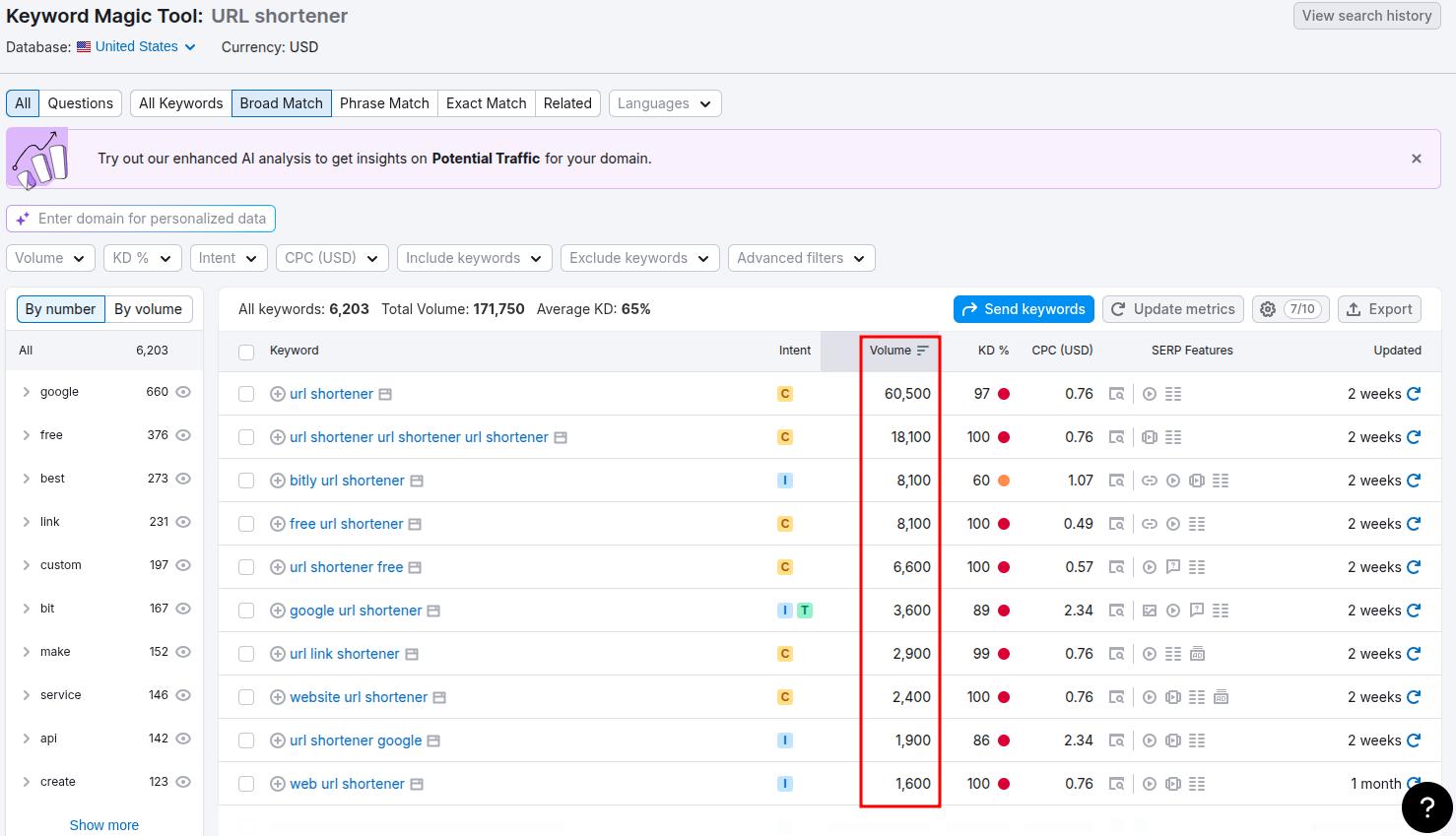
Similar to Ahrefs, Semrush also provides a powerful keyword research and volume checker tool. Its Keyword Magic Tool delivers search volume, difficulty, CPC, and other details for seed phrases.
Continuing our example from above for the keyword ‘URL Shortener’, let’s see what results Semrush delivers to us:
One slight improvement that we can instantly see in Semrush over Ahrefs is that Semrush provides us with SERP features as well. It shows us the type of featured snippets appearing for a specific keyword, like video carousels, PAA boxes, Related searches, etc.
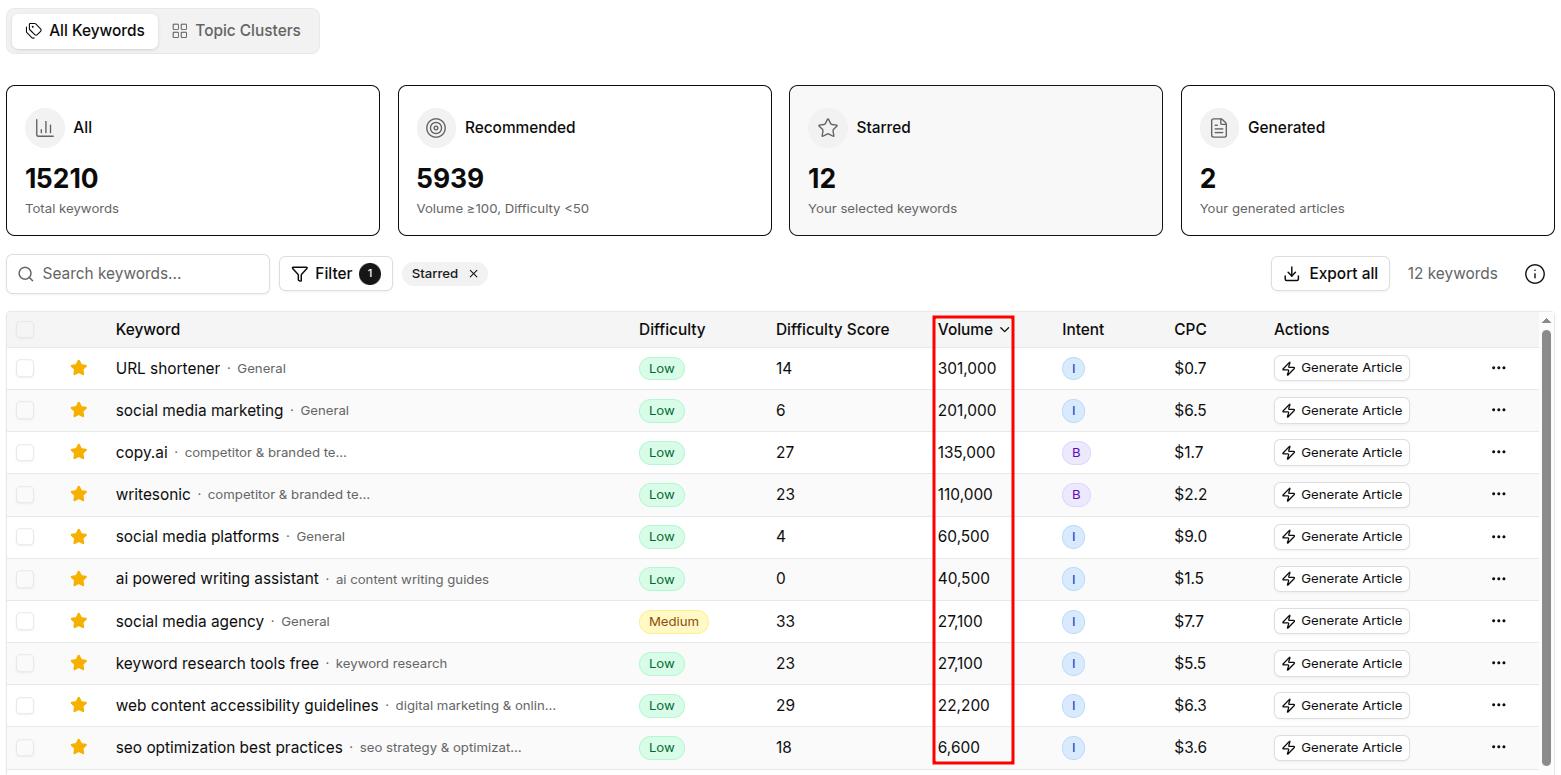
We’ll try the same ‘URL shortener’ keyword in this tool and see the results, along with some pre-saved keywords on the platform:
Similar to Ahrefs or Semrush, Contentpen provides keyword volume, difficulty, difficulty score, intent, and CPC, all in one place.
The tool also allows you to quickly create content for a keyword in a single workflow. Simply hit the ‘Generate Article’ button, enter an article title (or use AI for help), and select your content preset to get the content. It’s that simple.
Automated keyword research
Work on keywords worth writing, for
Get search terms with real ranking potential, not just high volume.
Lastly, you can use WordStream’s Free Keyword Tool to get keyword volume and other crucial metrics to inform your content strategy.
If we enter the same core keyword as we did with the previous keyword research tools, then we get the following result:
Please note that WordStream uses keyword data directly from Google Ads (Google Keyword Planner), so its values may not be as accurate as other paid options on the list.
In practice, you might:
Take a short seed list
Run it through a keyword volume checker
Confirm the most important terms with a second tool
Data will rarely match perfectly across tools, but if both tools show strong search volume for a keyword, then you can usually trust the hunch.
How to implement keyword volume data in your content and SEO workflow
Knowing the keyword volume numbers is one thing, but putting them into a simple writing and publishing workflow is what grows traffic.
You can use the following keyword volume data in a four‑step process that suits almost all types of content teams:
Brainstorm seed keywords Start with words tied to your products, services, and core topics. Add phrases customers use on calls and in emails, plus terms you see on competitor pages. Drop this rough list into a keyword research tool, so you see early demand instead of guessing.
Expand and filter with data Run your seeds through a keyword volume finder and pull monthly volume and difficulty scores. Look for the sweet spot where volume is meaningful, competition is manageable, and the topic fits what you sell.
Map keywords to search intent Keyword volume tells you how many people are searching that term; intent tells you why. Group informational searches away from terms that signal buying intent. Address user questions in blogs or articles and use buying terms for landing or product pages.
Publish, measure, and adjust For SEO, add your chosen terms to titles, headings, meta descriptions, and body copy in a natural way. For paid ads, upload the list into Google Ads, and watch how search trends shift over time. Monitor and adjust actively to avoid losing paid and organic clicks.
If you want help turning raw keyword data into a clear roadmap, use Contentpen. Our tool helps you publish content at scale while implementing the right keywords for a SERP boost and better AI visibility.
Write content that’s built to rank, not just read
Create search-optimized blogs aligned with SEO and GEO signals, so your content performs well across search and AI-driven discovery.
Keyword volume is not just another SEO metric. It is the simple number that shows which ideas people actually type into search and which ones are better left on the whiteboard.
On its own, it shows users’ demand to learn, compare, and buy a certain product or service that addresses their pain points. Paired with keyword difficulty and other key metrics, search volume gives you a clear picture of where to focus your content.
When you know how to check keyword volume, read the patterns, and plug that insight into a repeatable workflow, your content and ad campaigns stop guessing and start aiming.
Frequently asked questions
What is a good keyword search volume?
There is no magic number that works for every site. A good volume is one that fits your niche, matches your offer, and has competition you can beat. For newer sites, terms with roughly 100-1000 monthly searches and low difficulty are often a smart starting point.
Does keyword volume affect Google rankings?
Keyword volume itself does not push a page up or down. Google does not rank pages higher just because a phrase has many searches. Volume only helps you pick what to focus on. Rankings depend on content quality, relevance, links, and how well your page serves the intent behind the search query.
How often does keyword search volume data update?
Most keyword tools refresh their numbers every month. Google Keyword Planner usually works with rolling twelve‑month averages, while other platforms may smooth or adjust data in their own ways. Therefore, treat search volume as a guide rather than a perfect real‑time count.
Can keyword volume be zero but still worth targeting?
Yes. A reported ‘0’ can still hide real searches. Very narrow topics, brand‑new phrases, and local queries often sit below the threshold that keyword tools show. If a term matches your audience and solves a clear problem, it can be worth testing even when tools show no volume.
Imagine someone walks up to you in the street and asks, ‘Where’s the nearest fast-food restaurant?’ You’d instantly know what they want out of that exchange. Their “search intent” would be even clearer if they’d inquired about a specific brand of fast-food restaurant, like KFC or McDonalds.
The online world works the same. Search engines judge your pages based on the type of intent you’ve covered for a topic to index and rank them properly for specific queries.
In this guide, we’ll explore all about keyword intent: what it is and how it works. We’ll also see ways to enhance user experience by satisfying the search intent, encouraging the right type of traffic to visit and convert.
So, let’s get started.
What is keyword intent for SEO?
Keyword intent is the “why” behind a search query. It is the goal a user has in mind when they type something into Google.
Keyword intent and search intent are often used interchangeably. Both describe the purpose behind a user’s query, whether they want to learn, compare options, or take action.
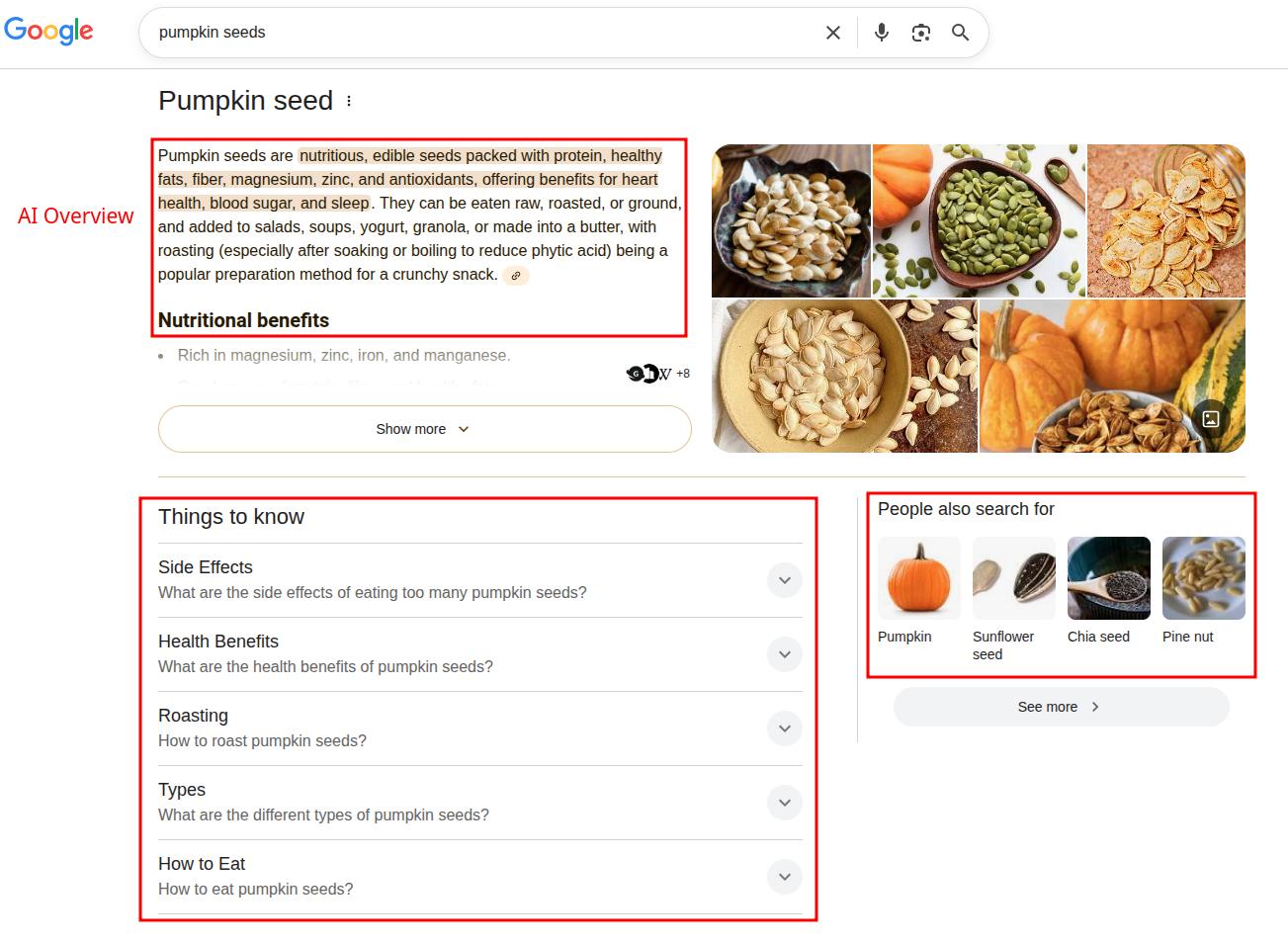
For instance, “pumpkin seeds” naturally prompts an informational intent, meaning that the user is looking to know more details about it. This requires you to create your content according to that keyword intent.
For this query, Google provides an AI Overview, ‘People also search for’ box, and a ‘Things to know’ section, along with other pages, such as WebMD, covering its health benefits. The intent is clear.
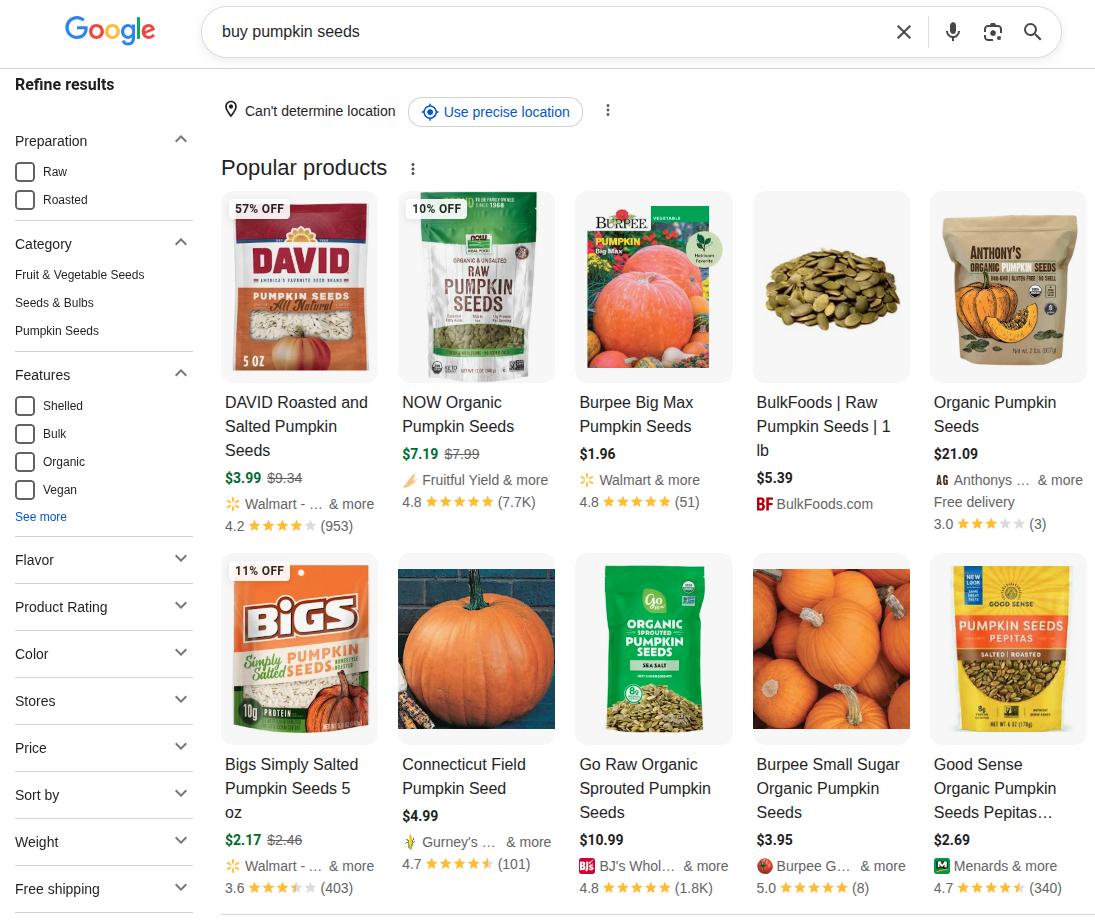
Whereas, if we type “buy pumpkin seeds” in Google, we’ll mostly receive results that help you purchase the product, rather than knowing more about it.
This result clearly shows transactional intent, which means the user already knows what pumpkin seeds are, and they’re ready to buy them after comparing some options.
What are the 4 types of keyword intent in SEO?
Writing your page content according to the keyword intent is the basis of search engine optimization. But, this raises the question: how many types of keyword intent are possible?
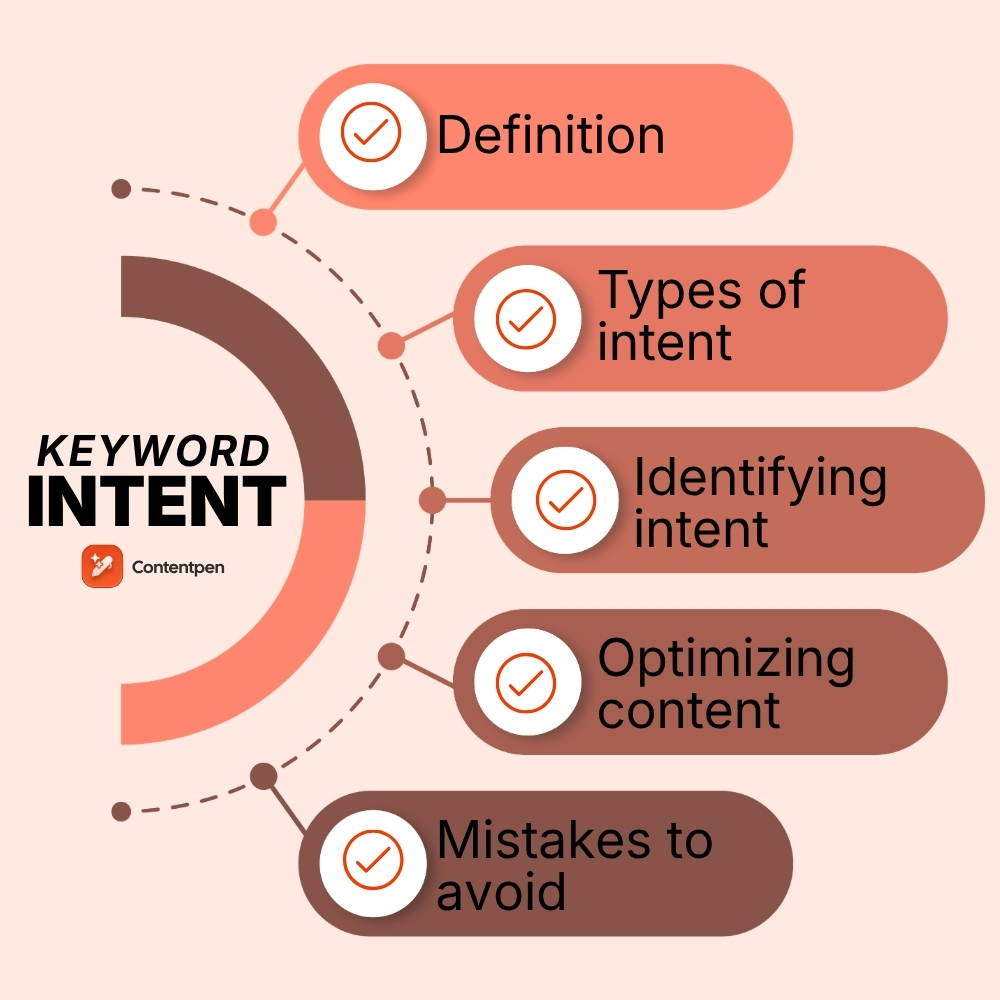
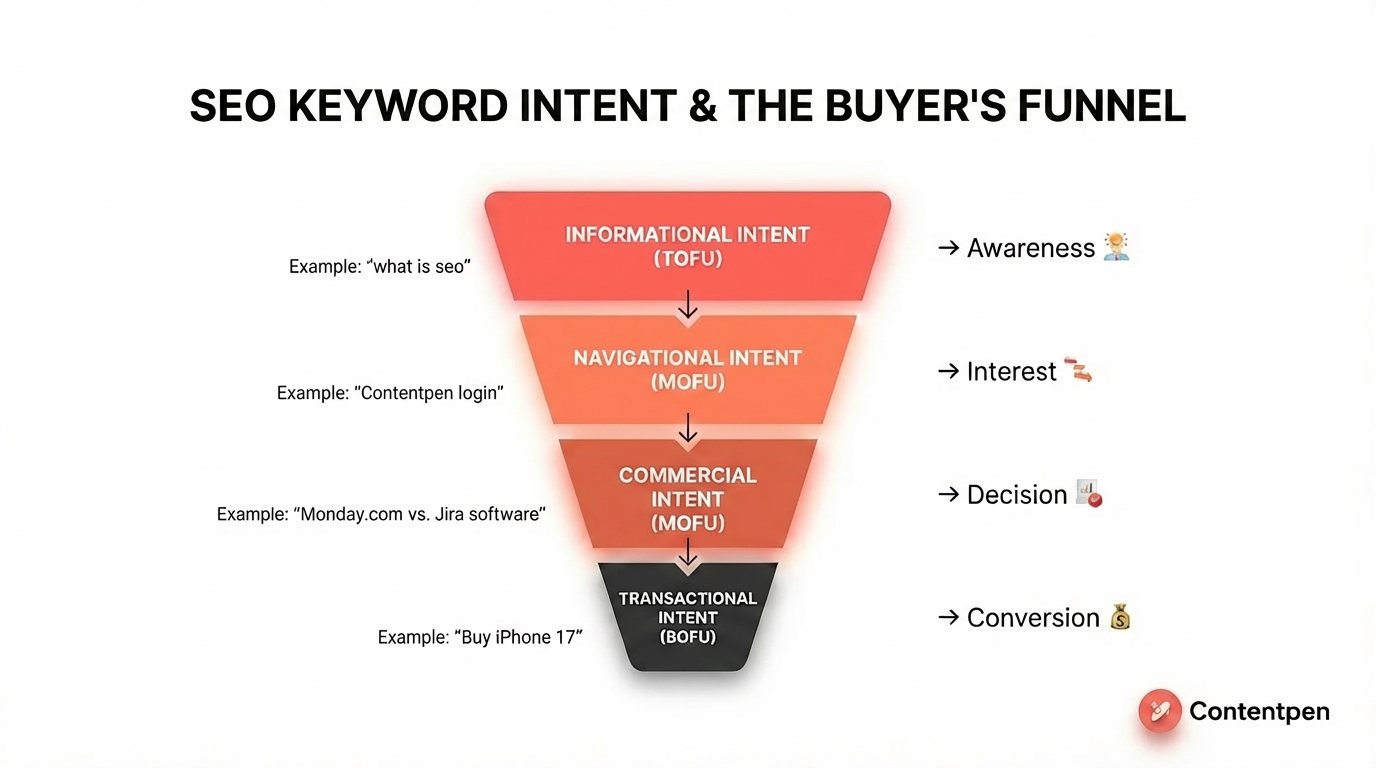
Mainly, there are 4 types of search intent in SEO: informational, transactional, commercial, and navigational.
These can be fully understood with the buyer’s funnel in mind.
Informational intent represents TOFU or Top-of-the-funnel. The user’s search behavior here is learning about the product or service, and how it can be helpful to them (no buying decision yet).
Then, we have navigational and commercial keyword intents as MOFU or Middle-of-the-funnel. At this stage of the buyer journey, the user is already aware of the basics of the product and is now comparing brand options to purchase. For instance, “Monday.com vs. Jira software”.
Finally, we have the transactional intent as BOFU, or bottom-of-the-funnel. The user has already made up a buying decision and is looking to act on it. They can search terms like ‘buy iPhone 17’ or ‘purchase health insurance.’
Below is all the information summarized for the main types of keyword intents possible in SEO:
Product pages, service pages, pricing pages, signup forms
High
How to identify keyword intent (without guessing)
Intent-based SEO starts with what Google already shows, then confirming your hunch with the support from SEO tools.
How Google determines keyword intent
Google does not rely on keywords alone to understand intent. It analyzes patterns across the SERP, including the type of pages ranking, the format of content, and user interaction signals like organic clicks and dwell time.
If most top-ranking results follow a similar structure or content type, Google treats that as the expected intent for the query.
This is why analyzing the featured snippets is more reliable to match user search intent than guessing based on keywords alone.
#1: Manual SERP analysis (your fastest signal)
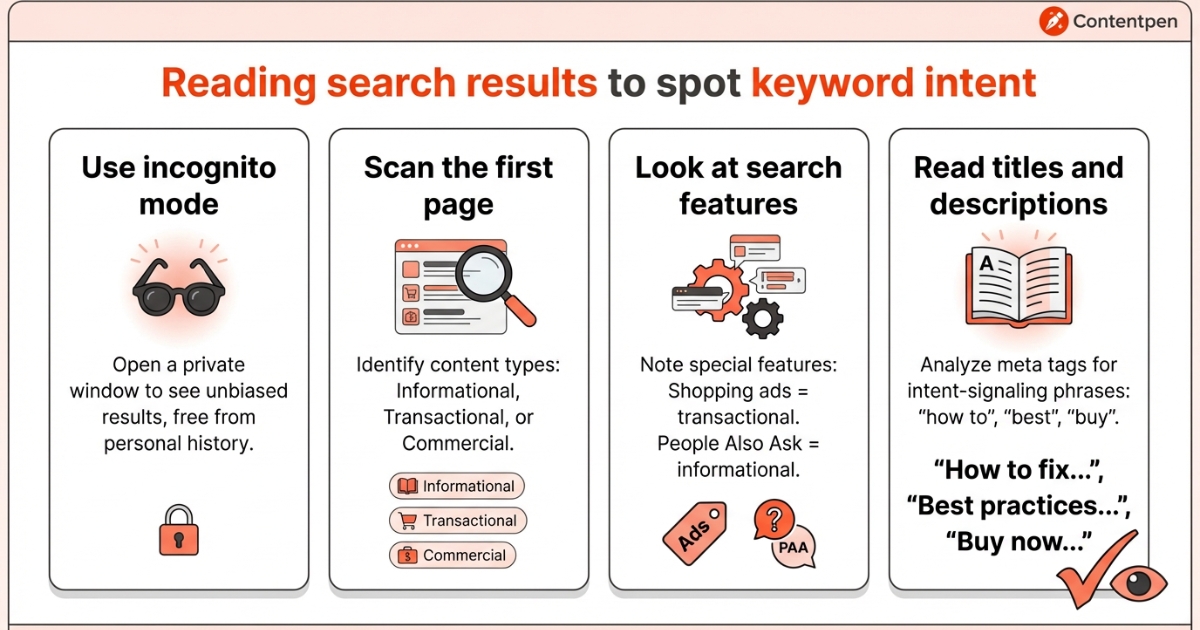
Begin by typing your target keyword into Google using an incognito or private window. This reduces the chance that your personal history or location skews the results and gives you a cleaner view of real SEO search intent.
Then work through this quick checklist:
Scan the first page. If most results are blog posts and guides, you are looking at informational keywords. If you see store pages or checkout flows, that is transactional intent. Review roundups and “best X” pages show clear commercial intent.
Look at the search features. Shopping ads or product carousels hint at transactional queries. “People also ask” boxes and short answer panels point to informational searches.
Read titles and meta descriptions. Phrases like ‘how to,’ ‘best,’ and ‘buy’ give you sharp, fast keyword intent clues.
This kind of manual SERP analysis takes only a few minutes per keyword, but protects you from writing the wrong type of page.
#2: Looking at keyword modifier patterns
Many queries reveal their purpose through simple word patterns. Phrases that start with:
‘How to,’
‘What is,’
‘Why,’
‘Guide’
These power words usually signal informational intent.
Words, like
‘Best’
‘Top’
‘Review’
‘vs’
‘Alternatives’
All point to commercial research or commercial intent.
While terms such as:
‘Buy,’
‘Price,’
‘Order,’
‘Near me,’
A city name or place
These often show transactional or local intent keywords.
Similarly, brand names with landing pages, such as:
Modern SEO tools use these patterns at scale and label intent for many terms at once.
Semrush’s Keyword Magic Tool
For instance, Semrush offers its Keyword Magic Tool that you can use to analyze keyword intent.
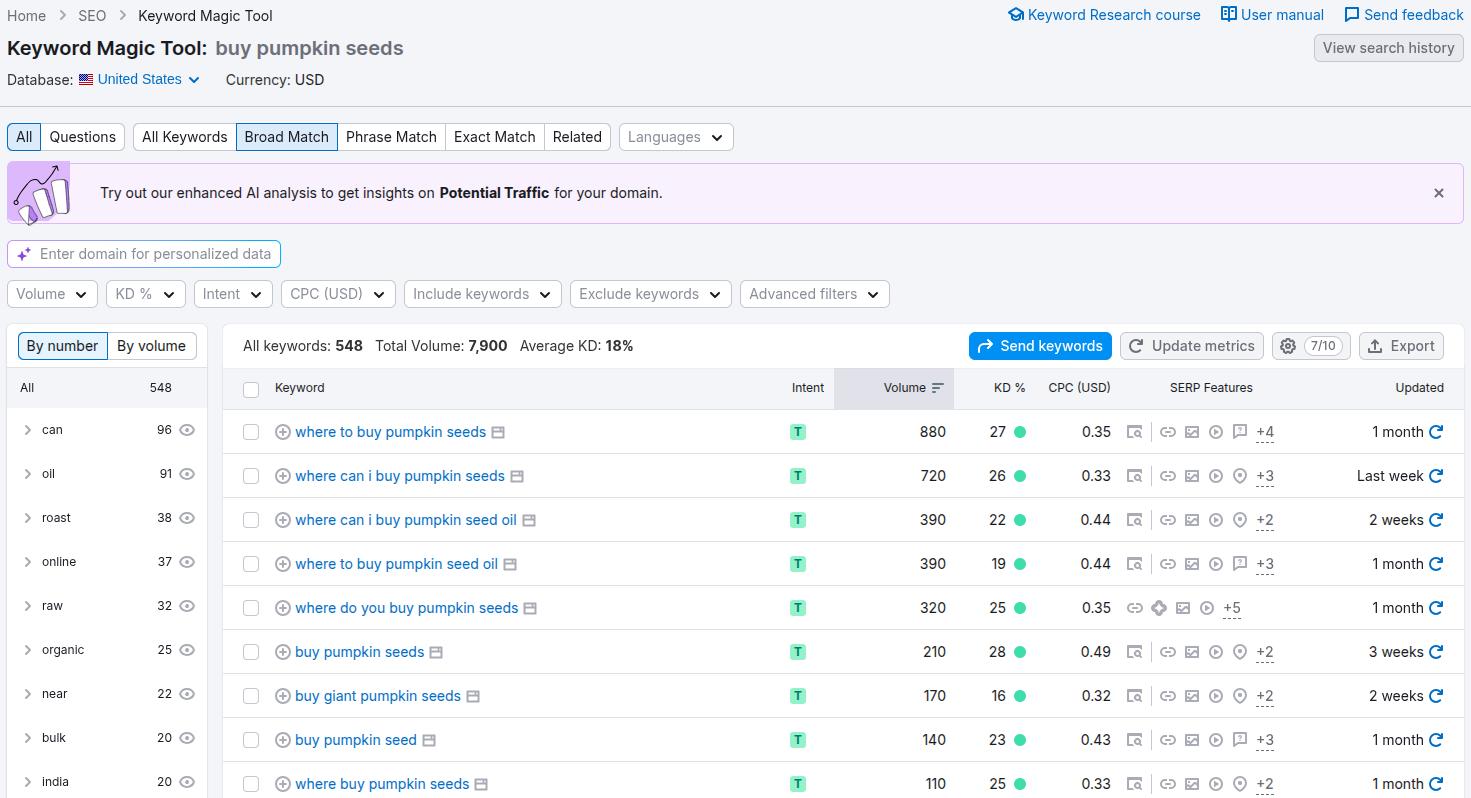
If we use the same ‘buy pumpkin seeds’ keyword and enter it in the Keyword Magic Tool, we will receive the following results:
You can see the ‘Transactional’intent (T) labelled with all the supporting keywords for our seed phrase. You can also see the search volume and cost-per-click (CPC) for the respective keywords.
The tool satisfies the search intent for you by analyzing the competitors and top SERP results, and making comprehensive pieces that rank and convert.
All you have to do is add your keywords, either manually, through Semrush or Ahrefs, or let AI create them using your content pillars.
Once your keywords are added, you can see their keyword intent, CPC, search volume, difficulty, and difficulty score in a row format.
Then, you can use the ‘Generate Article’ button to instantly create content according to the keyword intent and attract the ideal visitors to your pages.
Mixed intent keywords: When one query has multiple goals
Not every search fits neatly into a single intent category. Some queries show a mix of results, which means users may want different things at the same time.
For example, a keyword like “email marketing tools” can return comparison listicles, tool homepages, and even beginner guides in the same SERP. This is known as mixed or dual intent.
In such cases, Google is testing multiple content formats to see what satisfies users best.
To handle mixed intent keywords effectively:
Identify the dominant intent by analyzing the top 5–10 results
Look for patterns in content type (are most results listicles, tools, or guides?)
Align your page with the majority intent, not the minority
If the SERP is evenly split, you can combine formats. For instance, a “best tools” article can include brief explanations for beginners while still focusing on tool comparisons.
Mixed intent keywords are common in competitive niches, and handling them correctly can give you an edge over pages that target only one angle.
How to optimize content for every common type of search intent
Keyword intent optimization is not just about adding the right phrase into a headline. It covers the full experience on the page: format, layout, depth, and the next step a user may ask for.
When you line these elements up with what the visitor wants, you increase your chances of decreasing bounce rates and improving conversions.
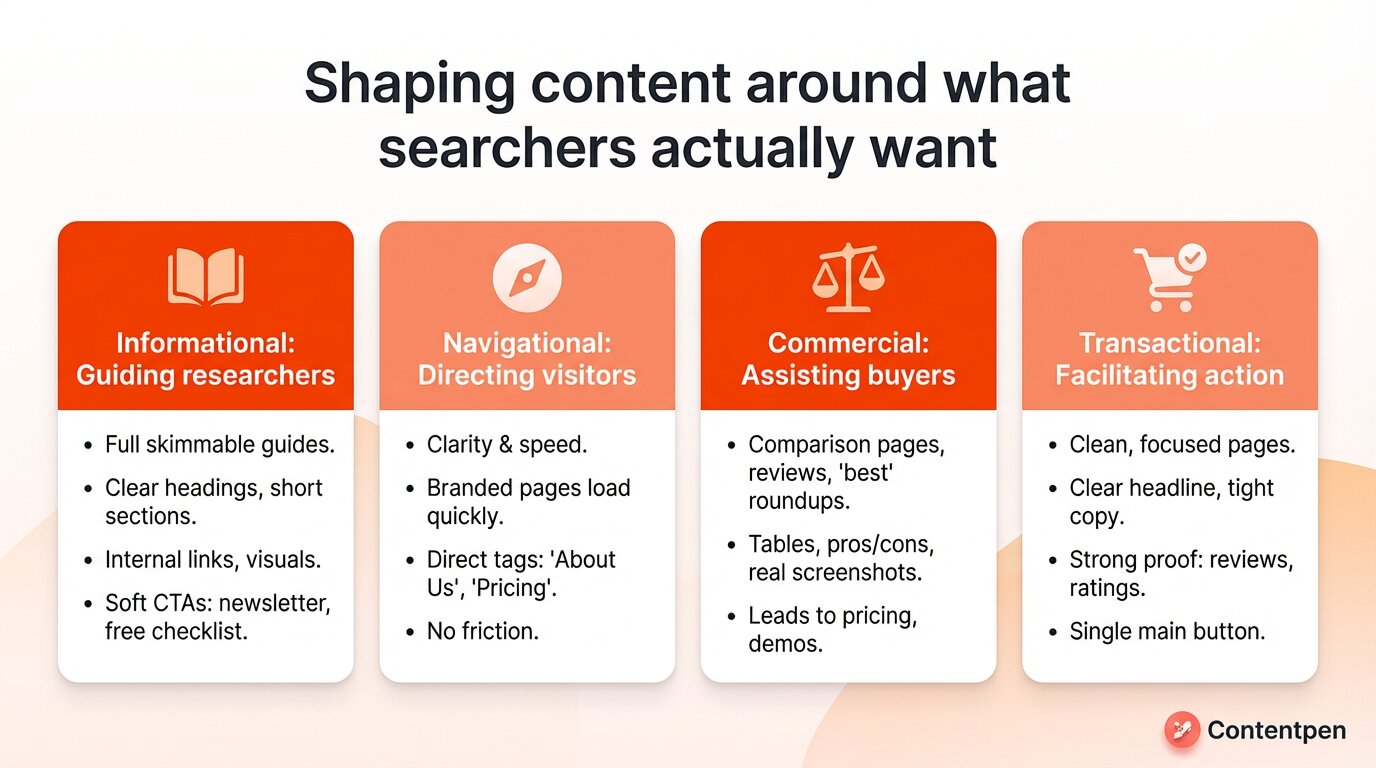
For each intent type, shape your content like this:
Informational
Create full, easy-to-skim guides that answer the main question fast and then go deeper.
Use clear headings, short sections, internal links, and visuals where they help. Calls to action should stay soft, such as a newsletter signup, a free checklist, or a gentle suggestion to read a related article.
Navigational
Focus on clarity and speed. Your branded pages should load quickly to avoid user frustration.
Use direct keyword intent tags like “About Us” or “Pricing” in content and match the wording people type into Google to help them arrive where they want. The job here is to get visitors to the right spot with no friction.
Commercial
For commercial intent, write comparison pages, reviews, and “best” roundups that feel honest and specific.
Tables, pros and cons, and real screenshots help people choose. Good calls to action lead to pricing, demos, or deeper product pages, not an instant hard sell.
Transactional
Lastly, for transactional intent, keep pages clean and focused. Use a clear headline, tight copy, strong proof like reviews or ratings, and a single main button for the action you want.
How can Contentpen help you implement the right keyword intent?
If you’ve already written a piece and are wondering, ‘Why aren’t the numbers coming in?’, it’s probably time to optimize with Contentpen.
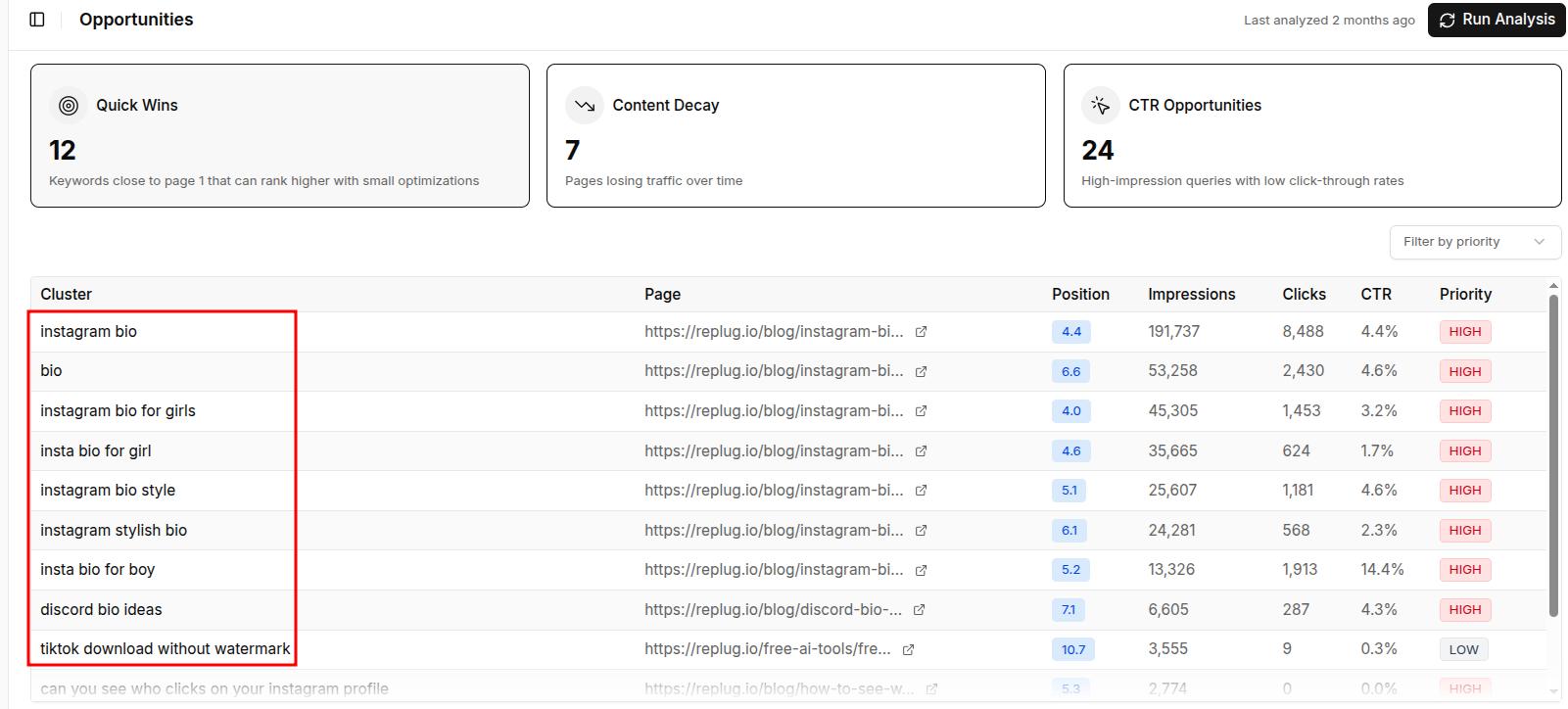
Open up your dashboard and go to the ‘Opportunities’ tab. If you’ve already set up your Google Search Console, then you’ll see some article tiles displayed here.
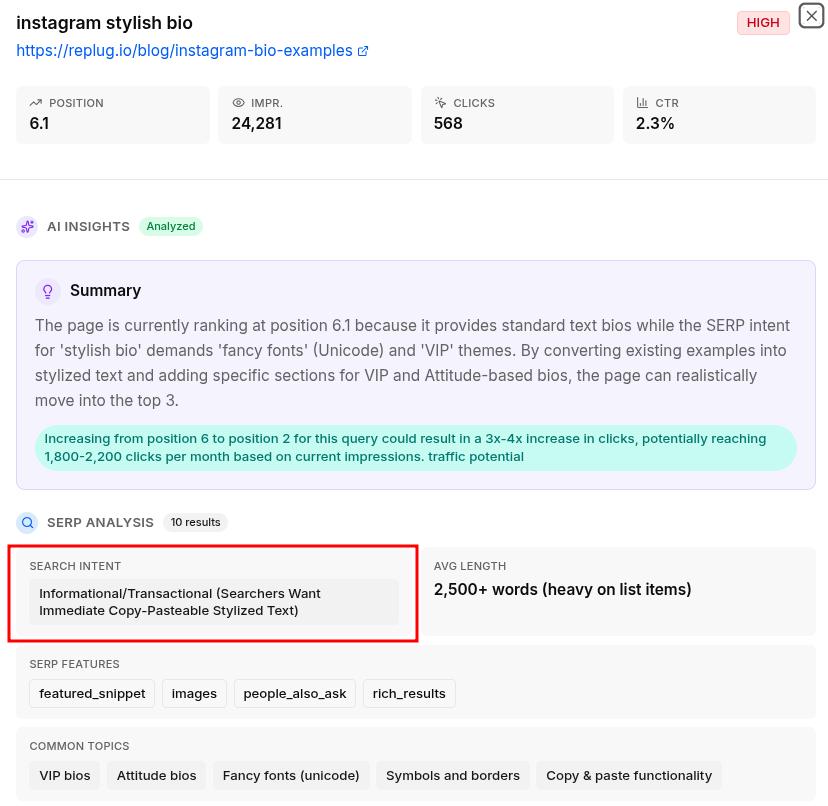
Click any of the articles you wish to see the AI-powered insights for, and a new screen will open.
Here, you can learn what’s not working for your page, including an intent mismatch, missing sections, aesthetic shortcomings, and more.
Remember to treat keyword intent types as a checklist each time you write or refresh a page.
Keyword intent mistakes and how to avoid them
Even when you understand keyword intent and know how to use SEO tools, you can still have small missteps that prevent your content from ranking or converting.
Here are some of the most common issues that we’ve found while analyzing pieces, mostly in the SaaS niche.
Targeting the wrong intent: Writing a blog post for a keyword that clearly shows product pages in the SERP will make it hard to rank, no matter how good the content is.
Ignoring SERP signals: Skipping manual SERP analysis and relying only on assumptions or only on tools often leads to mismatched content.
Forcing conversions too early: Pushing a hard sell on informational pages can increase bounce rates and reduce trust. You can sandwich your CTAs smartly: provide some value to the user, then pitch in with your solution.
Not updating content as intent shifts: Search intent can evolve over time. A keyword that once showed guides may later favor tools or product pages. So keep checking SERP results to stay updated.
Avoiding these mistakes helps ensure your content aligns with what users actually want, not just what the keyword suggests.
What we’ve learned about keyword intents
Keyword intent is the quiet factor that decides whether your content works.
When you match informational, navigational, commercial, and transactional intent with the right format, depth, and call to action, you serve searchers better and give Google clear reasons to rank you.
That same alignment improves audience engagement and makes it far more likely that visitors buy, book, or subscribe to your content.
If you are not sure where your current pages stand, use Contentpen’s SEO opportunities to get a detailed analysis and write according to what’s required.
Intent shifts are not frequent, but they do happen. The most practical trigger to watch is algorithm updates. After a core update, SERPs can reorganize significantly, and a keyword that once favored guides may start ranking product pages, or vice versa.
Should I target high-intent keywords or high-volume keywords?
Neither exclusively. The right answer depends on where you are in your customer journey. If you want to move into MOFU or BOFU, prioritize commercial and transactional intent keywords with high intent. If you are building authority and TOFU awareness, high-volume informational keywords can earn you massive organic traffic.
Can one keyword have more than one intent?
Yes, some phrases carry mixed intent. A search like “best CRM software” can show how‑to guides, comparison posts, and vendor homepages together. Checking the current SERP results is the only reliable way to see which angle Google favors more.
Does keyword intent affect conversion rates?
Yes, significantly. When your page lines up with the searcher’s expectation, they find what they need faster, feel less friction, and complete more actions, such as signups, calls, or purchases.
What are local intent keywords?
Local intent keywords add a place to the query, such as a city, neighborhood, or “near me” phrase. Examples include “SEO agency in NY” or “coffee shop near me.” These searches usually show a mix of maps, listings, and local business pages.
Long tail keywords are specific phrases that have lower search volume, but they match what a person wants much more closely.
In 2026, AI search assistants such as Google AI Overviews, ChatGPT, Perplexity, and Gemini have caused a spike in long-tail searches. People ask longer, more conversational questions, which makes a long tail SEO strategy more important today.
In this guide, you will see what long tail keywords are and why they matter for SEO in 2026. You’ll also see how to find them, how to use them in content, and how to track results.
The goal is simple: give you a clear playbook you can use whether you run a content team, a small business, or manage SEO for clients.
So, let’s get started.
What are long tail keywords?
Long tail keywords are very specific search phrases that usually contain three or more words and show clear search intent. Someone who searches “running shoes” is just browsing. Someone who searches “best running shoes for women with flat feet” has a defined need and is close to a decision.
Generally, long tail keywords are four or more words. However, in tight niches, even a two-word phrase can behave like a long tail term. For instance, ‘drone mapping’ is a keyword that is very small but very competitive in the niche of geospatial technologies.
Long tail phrases have a few common traits:
They are specific (often mention audience, use case, or pain point).
They signal clear keyword intent (to learn, compare, or buy).
They tend to have lower search volume but higher relevance.
They often lead to better conversion rates than short, vague terms.
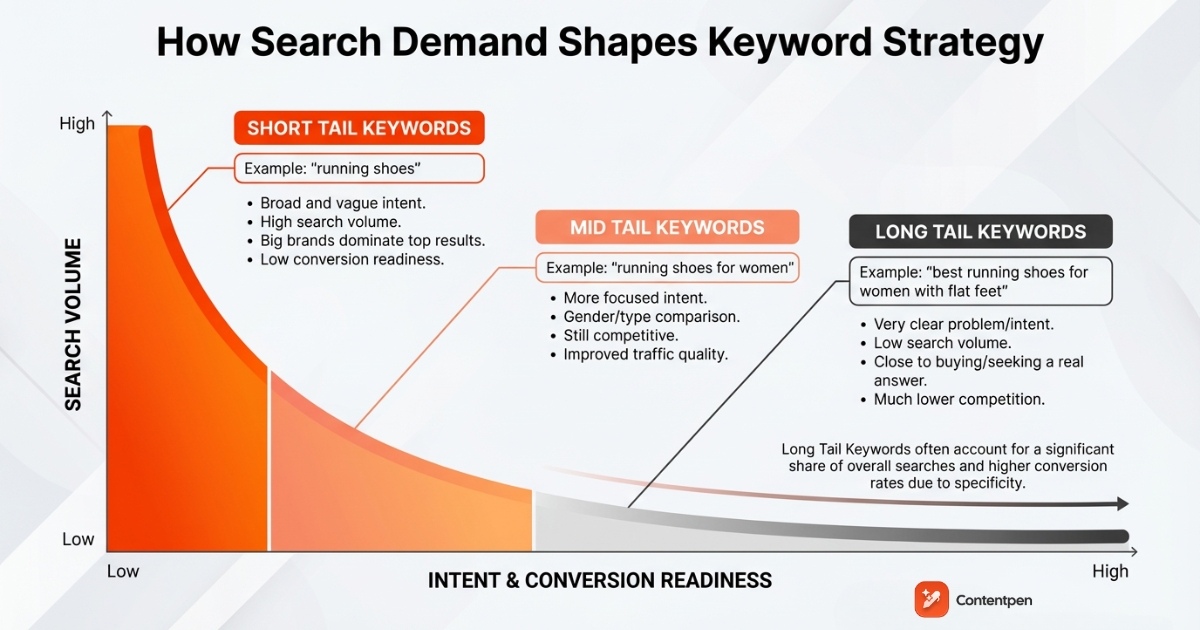
The search demand curve
In the context of long-tail organic keywords, it is very important to discuss the search demand curve. It basically explains the share of searches that each type of keyword receives.
To analyze the search demand curve, we can break it down with a simple set of long tail keyword examples around one topic:
Short tail means you target the phrase running shoes, which is broad and vague. The search volume is high, but the intent is fuzzy, and big brands dominate the top results. You might gain visibility, but most visitors will not be ready to act at all.
Mid tail means you aim for running shoes for women, which gets a bit more focused. The person now has a gender in mind and may be comparing types of shoes. Competition is still high, but intent is clearer, and traffic quality improves.
Long tail means you focus on the best running shoes for women with flat feet, which speaks to a very clear problem. Search volume drops, yet the person is close to buying or seeking a real answer, and competition is much lower.
Although the search demand curve is still valid, the search landscape has shifted drastically. According to a Search Engine Land study, Google receives 15% new searches daily that have never been searched before. This means that the user behavior is changing, and you need to capitalize on that to get quick wins.
People want to quickly narrow down their options without spending too much time researching online. After the surge of voice-assisted search technologies, such as Alexa or Google Assistant, long-tail keywords are in more demand than ever before.
This takes us to our next point: adaptability is key in modern SEO to keep increasing traffic and enjoy better visibility in both search engines and AI discovery platforms.
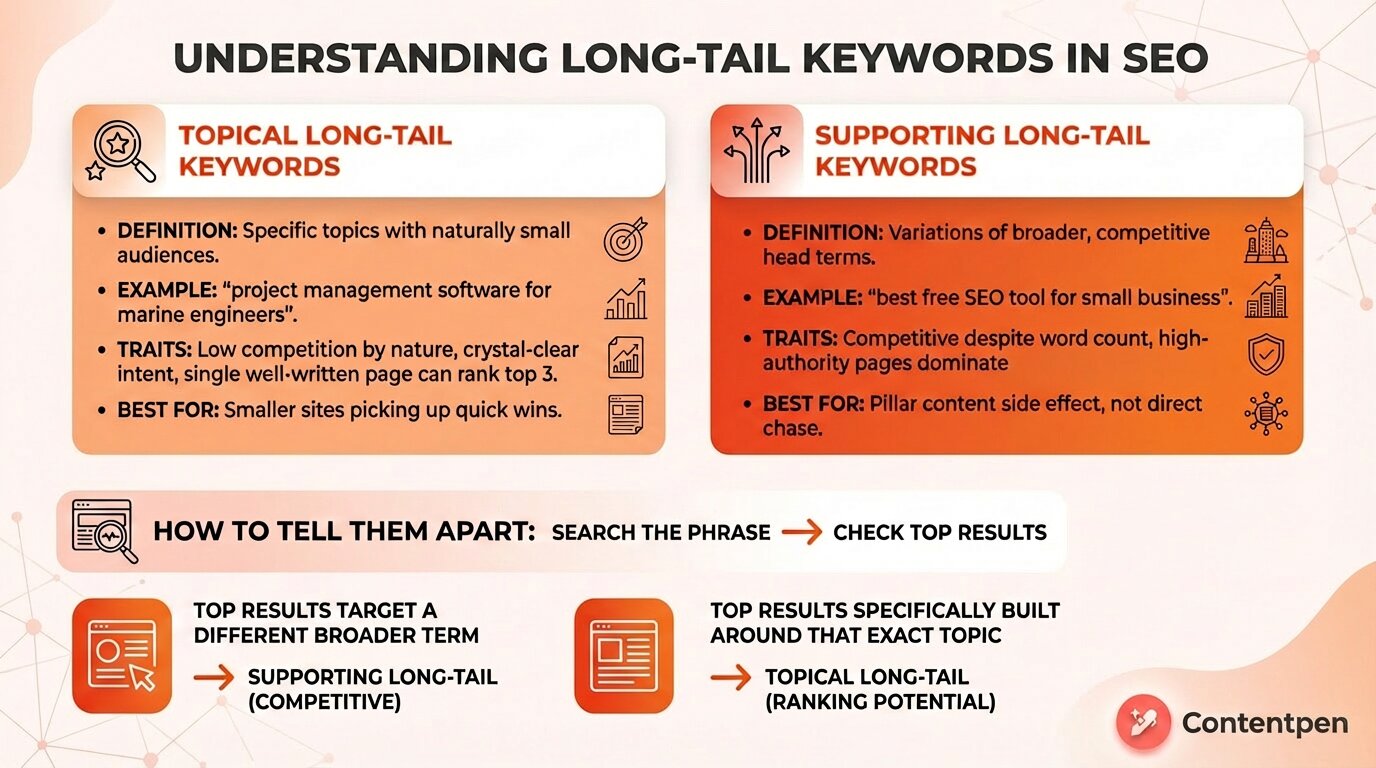
The two types of long-tail keywords
Not all long-tail keywords are created equal, and this distinction matters most for modern SEO in 2026.
The first type is a topical long-tail keyword. These are phrases that get low search volume simply because they cover a very specific topic. Nobody searches for them in large numbers because the audience is naturally small.
For example, “project management software for marine engineers” might get 30 searches a month, but every one of those visitors has an exact, defined need. These keywords tend to be genuinely low competition because few pages bother to target such a narrow topic.
The second type is a supporting long-tail keyword. These are variations of a broader, competitive head term. Think “best free SEO tool for small business”.
This keyphrase looks long-tail by word count, but the competition is fierce because dozens of high-authority pages already target the parent topic of “best SEO tool” and naturally rank for all its variations too.
How are topical long-tail keywords important for your content plan?
Topical long-tail keywords are where smaller sites pick up real wins fast. The intent is crystal clear, the competition is low by nature, and a single well-written page can hold a top-three spot for a long time.
Supporting long-tails, on the other hand, is better earned than targeted directly. When your pillar content is already strong, you tend to rank for these as a side effect rather than chasing them one by one.
A quick way to tell them apart: search the phrase and look at the top results. If the pages ranking for it are targeting a completely different, broader term, you are looking at a supporting long-tail in a competitive space.
If the top results are specifically built around that exact topic, you have found a topical long-tail with real ranking potential.
Why long tail keywords matter for your SEO strategy
For most small and mid-sized sites, long tail keywords are the easiest path to meaningful organic traffic. They help you sidestep impossible battles for broad terms and focus on people who are already primed to act. That matters for both search rankings and business results.
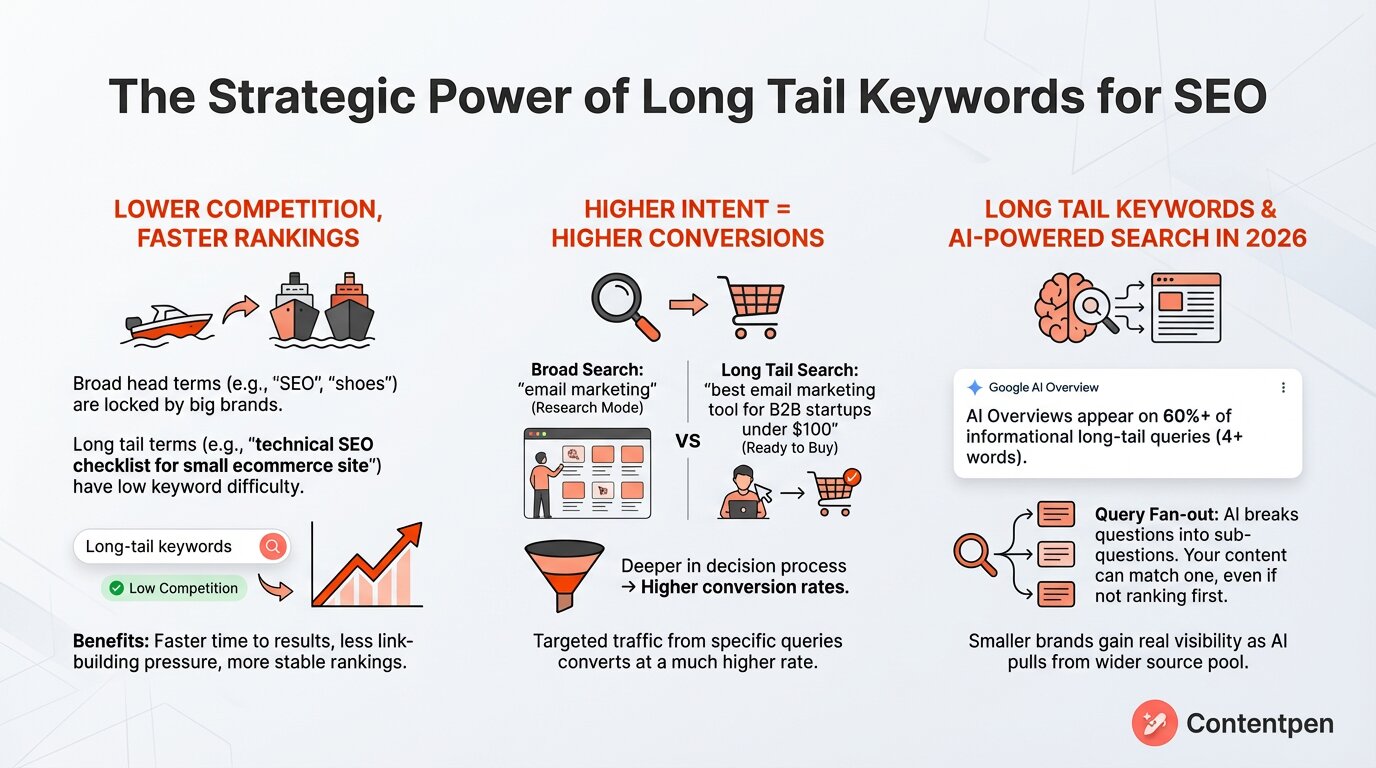
#1: Lower competition, faster rankings
Broad head terms tend to be locked up by well-known brands with strong domains and large SEO budgets. If you chase “SEO” or “shoes,” you compete with giants and wait months, maybe years, for movement.
Whereas a typical SEO long tail keyword, such as “technical SEO checklist for small ecommerce site,” faces far fewer strong pages.
Keyword tools show this as low keyword difficulty scores and low competition. These low competition keywords do not draw huge volume on their own, yet a top three spot can still bring steady, targeted visitors.
In some cases, long-tail keywords can also mean you get an AI mention in AI Overviews, or a spot in the PAA box in Google.
Therefore, with long-tail keywords part of your SEO strategy, you gain:
Faster time to results, because you are not waiting to outrank global brands.
Less link-building pressure because authority requirements are lower.
More stable rankings, because highly specific topics get fewer aggressive attacks from competitors.
#2: Long-tail keywords reward higher conversions
People who use long tail keywords are usually deeper in their decision process. The more details inside the query, the more work that person has already done.
Someone typing “email marketing” might be in research mode. Someone typing “best email marketing tool for B2B startups under $100” is hunting for a shortlist.
That higher intent leads to higher conversion rates. The traffic numbers for that phrase may look tiny compared with “keyword tool,” yet a much larger slice of those visitors will sign up, book a call, or buy. You just have to stay a bit patient.
#3: Long tail keywords are important for AI-powered search
AI assistants change how people search and how your content gets surfaced. Many AI answers now trigger on long, conversational queries instead of short phrases. Recent data shows that Google AI Overviews appear on more than 60% of informational long-tail keywords (4 words or more).
AI systems break a detailed question into many sub-questions, a process often called query fan-out. Good long tail content can match one of those sub-questions, even if you do not rank first for the main phrase. That gives your page a chance to be cited or used as context in AI answers.
This is where long-tail keywords + AI strategy come in. When your site covers very specific topics with depth, you feed both classic rankings and AI engines. Smaller brands gain a real shot at visibility here because AI pulls from a wider set of sources, not only the biggest domains.
Long tail keywords make that advice practical, because they line up very closely with what users actually type or say.
How to find long-tail keywords that actually rank
Finding long-tail keywords that have a real chance to rank starts with your audience, layers in the right tools, and ends with SERP validation.
Listen to your customers before you research
Your customers already hand you long-tail keywords every day. Sales calls, support tickets, chat logs, and product reviews all contain exact phrases people use when they describe a problem in their own words.
A sentence like “I need a way to schedule social posts without hiring someone” is not far from a rankable long-tail phrase.
Therefore, you need to make this a monthly habit: pull recent support or sales conversations and highlight phrases that describe a pain, a use case, or a budget constraint. Then, reshape them into draft queries like “best X for Y” or “how to do Z without W.”
Use keyword tools to validate and expand
Once you have a seed list from real conversations, let tools turn guesses into data-backed strategies.
Contentpen’sSERP and gap analysis surfaces what your competitors rank for that you do not. Then, the SEO platform recommends the strongest long-tail phrases to close those gaps.
Analyze SERPs, spot gaps, and create content
that fills them
Find exactly where your content is falling short, and how to beat competitors.
It also generates optimized content around those terms, which cuts the gap between research and a published page.
You can also use the Semrush Keyword Magic Tool, which lets you filter by keyword length and difficulty scores.
Google Search Console is also worth mentioning alongside other tools. It shows queries your pages already appear for but have not been optimized around, which are often your fastest ranking opportunities.
Use SERP features directly
Google reflects real user behavior better than any database. Three places give you long-tail ideas that tools often miss:
Google Autocomplete adds qualifiers like “for beginners,” “near me,” or “without a subscription” to your seed phrases. Each suggestion is a real query pattern.
People Also Ask boxes surface ready-made question formats that work directly as long-tail targets and tend to appear in both classic results and AI Overviews.
Related searches at the bottom of the results page show how users move around a topic and can reveal an entire cluster of related phrases from a single search.
Reddit, Quora, and niche communities fill the gaps that SERP features miss. People in these spaces describe problems in blunt, specific language that rarely shows up in keyword databases. A thread title like “Does anyone know of accounting software that works offline for freelancers?” is a long-tail keyword waiting to be written about.
As you collect ideas from these sources, group them by intent before you move into content planning. That grouping will make topical clustering much easier in the next step.
Create topical authority, not isolated posts
that fills them
Finding long tail keywords is only half of the work. The next step is to place them inside the content in a way that feels natural to readers and clear to search engines. This is where many teams stall, which is why you often see long lists of ideas and very few optimized pages.
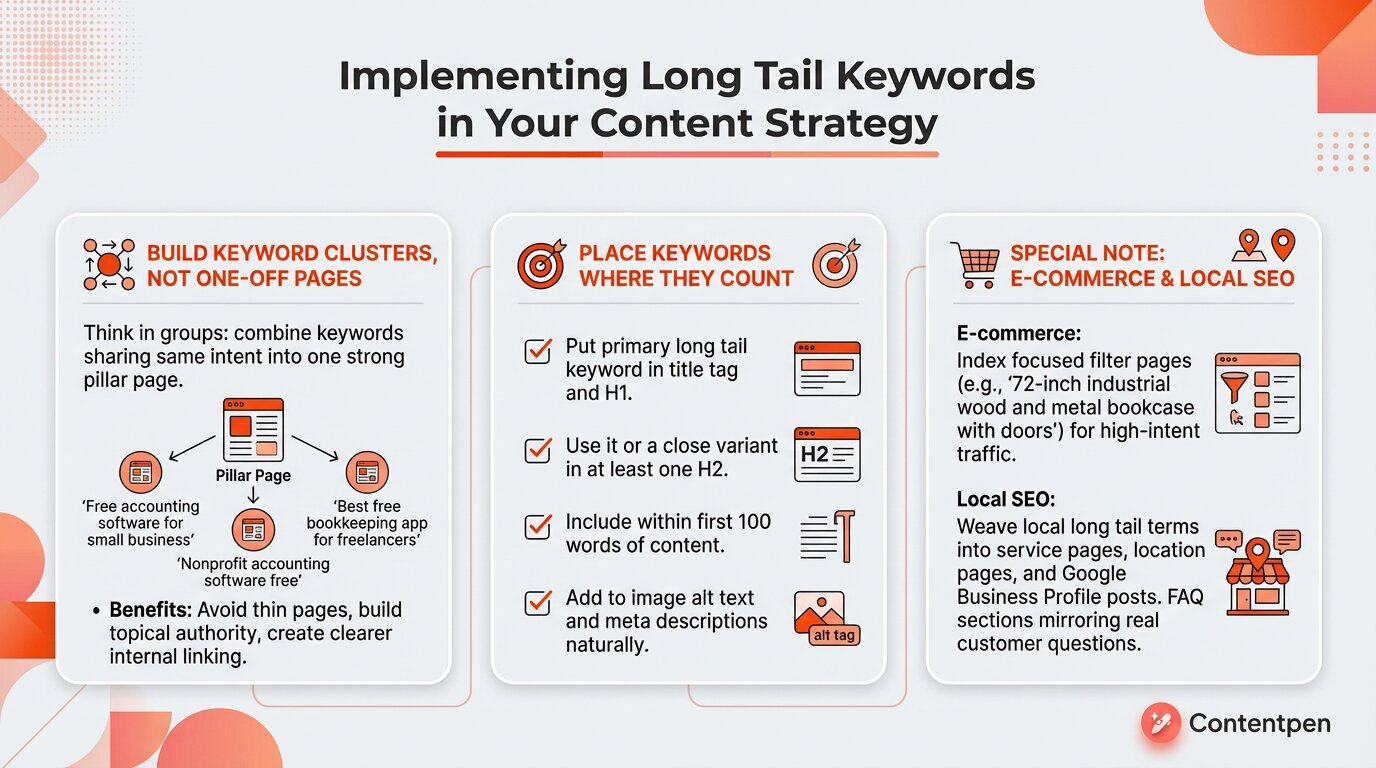
Build keyword clusters, not one-off pages
Try to think in groups, not single phrases. Take several long tail keywords that share the same intent, then create one strong page that answers all of them together. This pillar page can rank for many variations instead of just one.
For example, a SaaS company in accounting could group:
“Free accounting software for small business.”
“Nonprofit accounting software free.”
“Best free bookkeeping app for freelancers.”
A single guide could discuss all of these keyword variations, how the features compare, and what trade-offs matter most.
Real brands follow this model. A well-built page about free accounting tools for nonprofits can sit in the top three spots for dozens of related long tail phrases.
Keyword clustering also helps you:
Avoid thin, repetitive pages for each tiny variation.
Build topical authority around themes instead of scattered posts.
Create clearer internal linking between related articles and product pages.
Place keywords where they matter
Although this is a very straightforward point, many content marketers and teams seem to miss the point, especially when they’re implementing long-tail keywords.
Put your primary long tail keyword in the title tag and H1. This tells both the reader and the crawler what the page covers. When possible, also place a close variant inside at least one H2 so your subtopics stay tightly linked to that main phrase.
Use the long tail term, or a close match, within the first 100 words of your content. This quick confirmation helps search engines match page content to the query and reassures the reader that they are in the right place.
Add keywords to image alt text and meta descriptions in a natural way. Alt text helps with accessibility and sends another hint about the topic. Meta descriptions do not drive rankings by themselves, yet they can help lift click-through rates for long tail results.
Special note for e-commerce brands and local SEO specialists
Long tail keywords shine for product and local intent.
In e-commerce, filter pages can match very specific searches, such as “72-inch industrial wood and metal bookcase with doors.”
When you let search engines index these focused filter pages and add a short description on each, you open the door to many high-intent, low competition keywords. Just make sure those pages:
Load fast and work well on mobile.
Have clear headings that echo the main filters.
Include a short block of descriptive text that uses natural phrases from your keyword research.
Local SEO benefits in a similar way. Phrases such as “organic coffee shop near me open Sunday” or “emergency dentist in Austin for kids” might not get thousands of searches, yet they convert at a high rate.
When you weave these local long tail terms into service pages, location pages, and Google Business Profile posts, you help people find you first.
For local businesses, long tail work often means:
Detailed service pages for each location and offer.
FAQ sections that mirror real questions from calls and emails.
Regular posts that mention neighborhoods, landmarks, and timing (for example, “open late on weekdays”).
How to track and refine your long tail keyword performance
Once your pages target long tail keywords, you need feedback. Tracking shows which phrases work, which pages need a push, and where to focus new content. Without this loop, you are guessing, and guessing does not help in SEO for long.
Use a simple set of tools and checks:
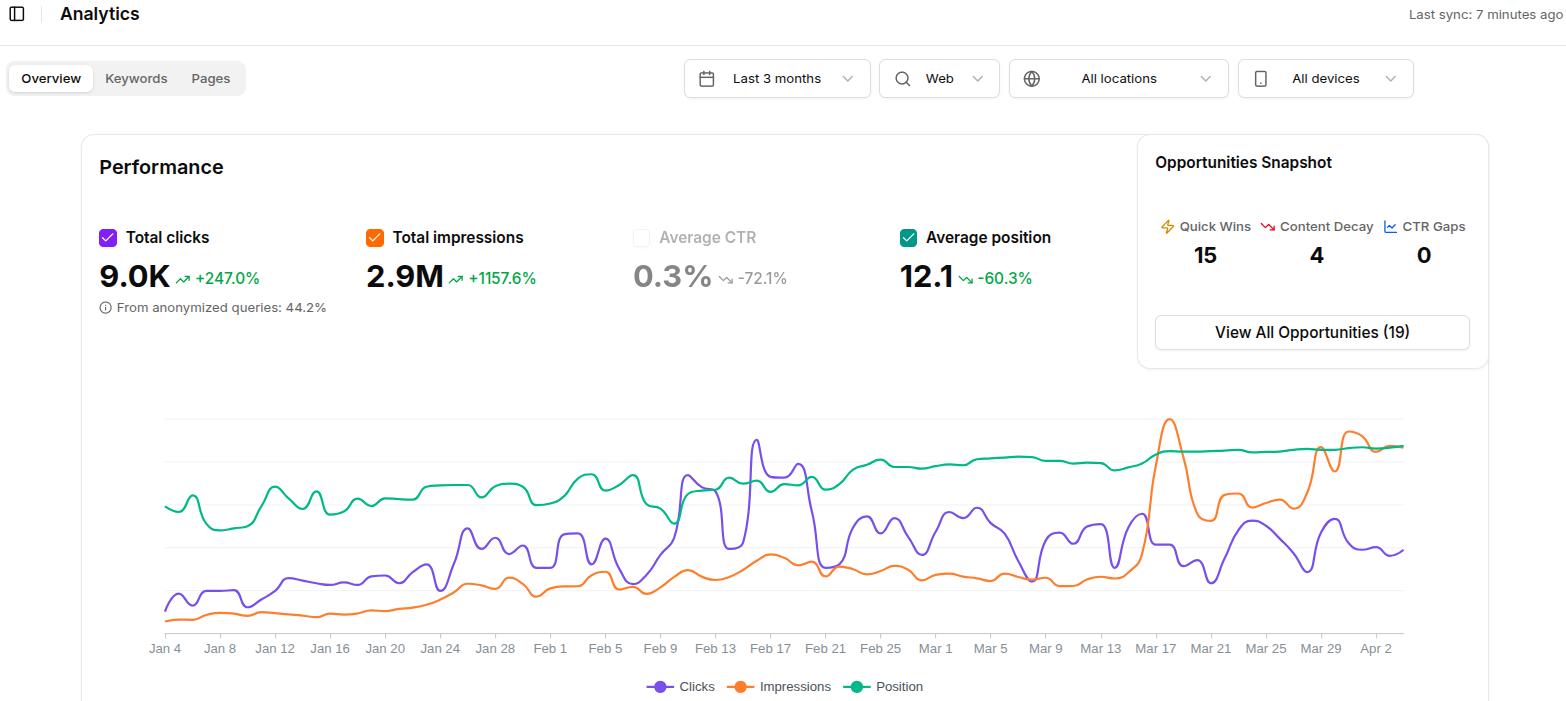
Google Search Console is the best free starting point. The ‘Performance report’ lists clicks, impressions, average position, and click-through rate for every query. Filter by longer phrases or add filters for exact words to see how your long tail pages behave.
You can also use Contentpen’s web analytics to see GSC data in one place where you perform keyword research, write, and publish content. This saves time in tool switching and streamlines your workflows significantly.
Third-party rank trackers such as Semrush Position Tracking or Ahrefs Rank Tracker give daily views on your priority long tail keywords. You can watch rankings by device or location and see when a page gains features like featured snippets or AI mentions.
Newer tools now track AI visibility across ChatGPT, Google AI Overviews, Gemini, and Perplexity. As AI answers expand, these reports help you see whether detailed pages appear as cited sources, even when classic rankings lag behind.
Over time, you can build a simple review routine that helps you sustain the rankings you secured in the first place:
Monthly: Export long tail queries from Search Console (or otherwise) and tag winners and underperformers.
Quarterly: Refresh content for underperforming pages by using Contentpen’s AI-powered SEO opportunities (better examples, clearer structure, stronger internal links).
Ongoing: Feed new long tail ideas from support, sales, and community channels back into your keyword research and content roadmap.
Final thoughts
Long tail keywords give you a realistic way to win at SEO without a huge budget or a famous brand. By focusing on detailed phrases with clear intent, you avoid crowded head terms and connect with people who already know what they want.
That matters even more in 2026 as AI-powered search favors natural, specific questions over vague phrases. Content that targets these questions with depth can show up in classic results, in AI overviews, and even in answers from tools like ChatGPT and Perplexity.
The path forward is straightforward: listen to your audience’s problems, build content around the topical long-tails, place your keywords where they signal intent clearly, and track the results tightly.
Frequently asked questions
Are long-tail keywords better for SEO?
For most sites, yes. Long tail keywords have less competition, which gives you a fair chance to rank on page one. They also carry higher intent, so visitors from those phrases convert at a higher rate. That mix often beats chasing broad terms where you rarely appear.
Can I use a free tool to find long-tail keywords?
You can go far with free options. Google Search Console and Google’s SERP features all show really useful long tail terms. Tools such as WordStream’s keyword tool add more ideas, which you can then refine with your own research.
Do long-tail keywords work for YouTube SEO?
They do. YouTube search responds well to specific phrases such as “how to set up Google Search Console for WordPress.” Placing that kind of long tail keyword in your video title, description, and tags helps your content surface for precise searches and draws viewers who actually want to consume your content.
How many long-tail keywords should I target per page?
You should target one primary long-tail keyword per page, with several close variations supporting it. A single well-focused page can rank for dozens of related phrases naturally once it covers a topic with enough depth. Trying to force multiple unrelated long-tail terms into one page usually dilutes the intent signal rather than amplifying it.
SEO keywords are the specific words people type into search engines when they want information, products, or services. They serve as the bridge between what someone wants and the content you create, helping you get more visitors on the platform who eventually convert.
In this guide, we’ll walk you through the 10 real-world SEO keyword examples and see why they work. By the end, you will know how to build a practical keyword plan, avoid common mistakes, and learn how Contentpen can help rank you better on SERPs.
So, let’s get started.
Why SEO keywords matter in 2026?
When you go after the right examples of keywords for website pages, you get several benefits. You:
Attract visitors who are more likely to convert.
Learn which topics and phrases your audience actually uses.
Rely less on paid traffic and save some resources on ranking.
Give your small business a real chance to compete with bigger sites.
With AI Overviews appearing rapidly in searches, it is important to appear on top of SERPs to maintain visibility and get real customers.
Top 10 SEO keywords examples that you can use today
Now it is time to see theory in action. Each item below is a real-world example of a high-opportunity keyword that you can model, not just in wording but in structure and intent. Together, the entries cover bloggers, local businesses, and online stores, so you can choose which ones apply to your own site.
1. Onboarding email sequence for SaaS free trial users
Zero-volume keywords like these are one of the most overlooked opportunities in B2B content. No keyword planner will flag it as worth targeting, yet the person searching it with a real, urgent problem has a high likelihood of taking an action.
That is exactly what makes it valuable.
A single, well-written guide built around this phrase can quietly drive qualified leads for months. And since many content teams don’t target such keywords, your competition is just yourself.
This is also a strong reminder that keyword research is not only about chasing volume. Sometimes, the most profitable traffic comes from phrases that tools barely register, because the intent behind them is crystal clear.
If you run a SaaS product or write for one, building a content cluster around zero-volume, high-specificity phrases like this one is one of the fastest ways to bring in the right readers.
2. Top-rated chiropractors in Portland near me
Here you tap into local intent plus social proof. Someone who types this is ready to book, not just learn.
This phrase can power a location page for a clinic or a comparison guide listing several businesses around chiropractic care in your area. It also has a good chance of triggering Google’s local map pack, which can draw many clicks.
You can support this keyword with reviews, local schema, and clear NAP (Name, Address, and Phone Number) details.
3. Web design agency no minimum contract
Keywords that contain a negative qualifier, such as “no,” “without,” or “for non-technical users,” carry a very specific signal: this person knows exactly what they are trying to avoid. That clarity makes them far more likely to convert than someone still at the early research stage.
Someone searching this organic SEO keyword is not shopping around casually. They got burned by a long-term contract before, or they are cautious about commitment, and they want a solution that removes that risk.
If your agency offers flexible terms, you can use this SEO keyword example to put you directly in front of the right person at the right moment.
You can apply this logic across almost any service or product category. Think about the most common objections your customers raise before buying, then build those objections directly into your keyword targeting.
Write content that’s built to rank, not just read
Create search-optimized blogs aligned with SEO and GEO signals, so your content performs well across search and AI-driven discovery.
This question-based keyword works well for both blogs and product support content. Most people who type it already own or plan to buy a vest for their cat.
Here, you can win a featured snippet spot with a clear guide that includes photos of how your furry friend should wear a walking vest.
Within the article, you can link to your product pages, turning informational traffic into sales. This is also a strong type of keyword in SEO, with an example showing how informational keywords can support commercial pages.
5. Dinner recipes in under 30 minutes
Time pressure makes this phrase powerful. Many people search for fast dinners after work, so this keyword can support a content hub on your site.
You can publish roundups, meal plans, and video demos around it. Over time, you can branch into example clusters like “healthy dinner recipes in under 30 minutes” or “one pan dinner recipes in under 30 minutes.” Each spin-off gives you another chance to rank while feeding into a shared internal link structure.
6. Affordable chiropractor downtown Portland
This geo-targeted keyword adds a price filter. The word “affordable” sends a signal about what the searcher values, which helps you write copy that speaks to them.
A service page built around this term should highlight payment options, insurance, and clear pricing. It may have less competition than “best chiropractor Portland,” yet still draw people who intend to book. Add patient stories and a map, and you create a traffic magnet in no time.
7. What should I eat the night before a half-marathon?
This keyword is written exactly the way someone would say it out loud, and that is precisely why it matters right now. Voice search queries and AI prompts follow this full-sentence, situation-based pattern far more often than the short phrases people type into a search bar.
Google’s AI Overviews increasingly pull from content that answers this kind of specific, scenario-framed question. A page structured around the searcher’s exact situation stands a much better chance of being cited in an AI Overview than a page optimized around a head term.
For content creators and bloggers, this means thinking beyond the keyword and into the moment. Ask yourself what your reader is doing right before they search, and frame your title and opening around that situation.
8. Casper vs Purple mattress for side sleepers
This is a comparison keyword, and it follows one of the most reliable templates in e-commerce and affiliate SEO: [Brand A] vs [Brand B] + qualifier. The person searching it is not browsing. They have already narrowed their options down and are looking to make a final decision.
That is why comparison keywords convert so well. The intent is built right into the phrase. You can apply this same structure across almost any product category: project management tools, running shoes, protein powders, etc.
The qualifier at the end, such as “for side sleepers” or “for remote teams,” sharpens the match even further and filters in the exact buyer you want.
If you run an affiliate blog or an e-commerce store, building product pages and comparison guides around this template gives you a repeatable way to target high-intent traffic.
Pair each page with a clear comparison table, honest pros and cons, and a recommendation, and you have a content format that earns both organic clicks and trust.
9. Easy recipes for a working mom
This keyword calls out a clear persona. The person behind it feels pressed for time and energy. A blog post that speaks to that life stage can earn high engagement, shares, and email sign-ups.
You can expand into related secondary keywords like “meal prep ideas for a working mom” or “budget-friendly easy recipes for a working mom,” building a deep content series that keeps people coming back.
10. Last-minute Father’s Day gift ideas under $50
This is a seasonal, time-triggered keyword that can be used for a momentary traffic gain. The search volume is almost zero in January, but it spikes sharply in the weeks before Father’s Day in June, worldwide.
The right approach is to publish this content six to eight weeks before the seasonal peak. That gives Google enough time to crawl, index, and rank your page so it is ready to capture traffic at the exact window in which Father’s Day festivities are at their peak.
A smart business owner will capitalize on this seasonal keyword and transition on to another (e.g., Independence Day, Labor Day, Thanksgiving, etc.) Or they could just use the Father’s Day seasonal keyword as a launchpad for their main product.
Here is a quick summary of all 10 examples and what makes each one work:
Keyword
Type
Search Intent
Best Used For
Difficulty
Onboarding email sequence for SaaS free trial users
Zero-volume
Informational
B2B blogs, SaaS content hubs
Very Low
Top-rated chiropractors in Portland near me
Local
Transactional
Location pages, map pack targeting
Low–Medium
Web design agency no minimum contract
Negative qualifier, long-tail
Transactional
Service pages, high-objection niches
Low
How should a cat walking vest fit?
Question-based
Informational
Blog posts, featured snippet targeting
Low
Dinner recipes in under 30 minutes
Content hub seed, long-tail
Informational
Food blogs, recipe roundups
Medium
Affordable chiropractor downtown Portland
Geo-targeted
Transactional
Local service pages
Low–Medium
What should I eat the night before a half-marathon?
Voice/AI-optimized
Informational
Blogs targeting AI Overviews, voice search
Low
Casper vs Purple mattress for side sleepers
Comparison template, long-tail
Commercial
Affiliate pages, product comparisons
Medium
Easy recipes for a working mom
Persona-based, long-tail
Informational
Lifestyle blogs, content series
Medium
Last-minute Father’s Day gift ideas under $50
Seasonal
Commercial
Gift guides, e-commerce landing pages
Low (in season)
How to find SEO keywords that actually rank
Learning about the SEO keywords examples is one thing, but finding them is the real challenge. That is why we’ve provided you with a simple workflow that you can follow to find the right keywords without hassle.
Step 1: Start with Google autocomplete
Begin with a seed phrase that fits your niche, then start typing it into Google. As you type, Google shows a dropdown of related searches other people use. For example, if you test “keto lunch,” you may see ideas like:
“Easy keto lunch for work”
“Lazy keto lunch ideas”
“keto lunch near me”
Note each keyword down in a file for later reference. Each keyphrase here can serve as your cluster for a pillar topic, such as “keto lunch” in this case.
Next, you can use question-focused tools such as AnswerThePublic or QuestionDB. These tools expand your initial query into more related terms for that topic, which you can later target in your content.
You can also utilize the AI prompts that people search in AnswerThePublic for your topic and use these queries in your content to gain better AI visibility.
Step 2: Use Google’s Keyword Planner and Search Console
Google Keyword Planner functions inside a Google Ads account, but you can use it without running ads.
When you put in a few seed phrases, you get a list of related terms, search volume ranges, and competition levels for better insights. The tool helps you choose which phrases are worth the effort without much hassle.
You should also consider using Google Search Console to check the Performance report. This shows the queries that already bring people to your site.
Look for terms where your page sits in positions close to the first page with a reasonable click-through rate. But to effectively use these “striking distance” phrases, you need to:
Sort queries by position.
Highlight those in the 11–30 range.
Check which page each query is tied to.
Improve that page’s title, meta description, headings, and content depth around the term.
Once you see these patterns, you can decide whether to create new content, improve a current page, or maintain a page with updated details that already perform well.
Step 3: Use professional competitor analysis SEO tools
You can speed up your research by looking at what already works for others. Tools such as Semrush and Ahrefs let you analyze competitors and see many of the keywords that bring them traffic.
Focus on sites similar in size to yours so the targets feel realistic. This gives you practical examples of keywords for SEO that already have proven demand.
Combine this with Google Trends to see if a keyword is rising, falling, or seasonal. That way, you avoid investing in phrases with shrinking interest and put more energy into terms that will grow over time.
Getting a comprehensive keyword list is half the job done. Now, you need to learn about the mistakes that people make when implementing those keywords on their platforms.
On-page keyword placement
Start by selecting a singular primary (focused) keyword for a page. Use that primary keyword naturally in these spots without stuffing:
Page title tag, near the beginning, if possible. This is one of the strongest on-page SEO wins you can get.
URL slug. Keep it short and descriptive to help both readers and search engines understand the topic.
H1 headline on the page, which should closely match your title and include the main term. This tells Google that the visible heading aligns with the title tag.
Use the closest match to your primary keyword in the H2 or H3 subheadings. This provides structure and reinforces topical focus, especially for long posts.
The first 100 words of the body text are where an early mention helps show relevance to the topic right away.
Beyond the primary phrase, sprinkle natural variations and related terms. If your main term is “SEO techniques,” you might also use “SEO tips,” “on-page SEO methods,” and keyword research tools to promote semantic SEO.
Automated keyword research
Work on keywords worth writing, for
Get search terms with real ranking potential, not just high volume.
Internal links matter too. When you link from one article to another, use descriptive anchor text such as “how to use SEO keywords in blog posts” instead of generic text like “click here.” This passes context and supports your target keywords for website sections.
Finally, do not forget the supporting elements:
Image alt text that describes the image and naturally includes related terms
Meta descriptions that mention the target phrase and encourage clicks
Schema markup for articles, products, and local businesses where relevant
These areas do not replace strong content, but they help Google understand and display your pages more clearly.
Other bad habits that ruin rankings
Below are some habits that can quietly hurt your rankings, even when your keyword list looks strong.
1. Keyword stuffing
This happens when you repeat a term so often that your text reads poorly. For example, for “dog vest,” some people might write:
“This dog vest is the best dog vest for medium-sized dogs. If you need a dog vest, you can buy this no-pull dog vest for $59.99.”
Not only does this sound strange, but it can also trigger spam signals.
A better approach is to use the term a few times in natural spots and rely on related words and clear explanations to show what the page covers.
2. Chasing only huge, broad phrases
New sites that go all-in on terms like “insurance” or “weight loss” often see little movement for years. You get faster results by building content around long-tail keywords and local terms first, using them as stepping stones toward the bigger phrases later.
3. Ignoring search intent
If someone searches “how to fix lower back pain,” they want advice, not a hard sell for an appointment in the first sentence.
When your content does not match keyword intent, your bounce rate increases, and your rankings slide. Therefore, you should match your pages to one of the following:
Informational intent (learn something)
Commercial research (compare options)
Transactional intent (buy or book)
Navigational (get to a specific page)
Branded (Explore the brand’s offerings)
Avoiding common mistakes and following the best practices for SEO keywords can help you rank faster and sustain your position in the SERPs for longer.
How Contentpen helps you find and use the right SEO keywords
Many business owners and content teams know keywords matter, yet feel stuck between free tools and confusing reports.
Contentpen steps in as a one-stop solution. It automatically researches and surfaces the right types of keywords for your business type and niche.
The SEO platform also creates and manages clusters of keywords so that you can establish your topical authority and increase share of voice in the industry in no time.
Create topical authority, not isolated posts
that fills them
Besides all these functionalities, the tool also offers:
SEO scoring: Contentpen provides a realistic SEO score that shows the current standing of your article in search engines. It offers real-time suggestions to boost this number even further by placing the keywords naturally in the meta title or description.
SEO opportunities: The tool automatically analyzes your site and recommends the best ‘quick wins’ where slight content tweaks or keyword implementations can help you win better SERP positions. It also highlights decaying pages that you can fix.
Website analytics: Get your impression, keyword position ranking, CTR, and traffic metrics inside Contentpen. The tool makes it easy to work from a single workspace without switching tabs.
Bulk content creation: Once you have your keyword lists sorted, the next step is bulk creating blogs with Contentpen to maximize the potential of clusters and establish your brand online.
Integrated publishing: Integrations with popular CMS platforms mean less time spent publishing and more time spent researching and implementing different SEO keyword examples across your site.
Whether you are a freelancer, an agency, or a small business owner, Contentpen is a tool that you must try to unlock more growth and productivity.
Final thoughts
The fastest path to better rankings rarely starts with fancy tricks. It starts with picking the right words. When you use specific, intent-driven long-tail and question-based terms, each page becomes a sharp answer to a clear need.
That is the power behind every strong seo keywords example in this guide. Whether you run a local clinic, a pet store, or a recipe blog, you can claim space in search by matching the exact phrases real people use.
If you want a smart tool that handles keyword research, content writing, SEO scoring, optimizing, and publishing, then look no further than Contentpen. Let us take care of your rankings. Try Contentpen now and feel the difference.
Frequently asked questions
What are the 3 types of keywords in SEO most commonly targeted?
Three keyword types that many people target are short-tail, long-tail, and geo-targeted keywords. Short-tail terms are short and broad. Long-tail phrases such as “blue running shoes for flat feet” are more specific and easier to rank for. Geo-targeted keywords, like “plumber near me,” help local businesses reach nearby customers.
What are the best keywords for SEO?
It depends on your site’s authority, niche, and funnel stage. However, in general, long-tail keywords are considered one of the best keywords in SEO since they drive a more sincere audience that is willing to convert if prompted properly.
How to write keywords for SEO?
Begin by understanding your search intent and what you want to achieve with the traffic landing on your pages. Then, start using Google’s SERP features for your target phrase to see user search patterns and queries, or use paid tools for assistance. Also consider Contentpen to automatically get relevant keywords for your platforms.
What is an SEO keyword example for Instagram?
Instagram SEO keywords can be used in your bio, captions, and on-screen text for better profile discoverability. One example would be adding ‘NYC Chef’ or ‘Vegan Athlete’ to your key text fields on the IG profile.
Keyword research for SEO is the process of finding the exact words and phrases people type into Google when they look for answers, services, and products like yours. It helps you move from guesswork to a quantified approach.
This guide walks you through the full keyword research process from start to finish. You will see how to find seed ideas, turn them into a strong list, analyze search volume and difficulty, group terms into topics, and decide what to publish first.
You will also see how to do free keyword research with Google tools and use paid keyword research tools to your advantage. By the end, you will also discover how Contentpen can assist marketers and agencies with achieving and sustaining SERP rankings.
So, let’s get started.
What is keyword research in SEO?
Keyword research is the process of discovering, reviewing, and picking the search terms your audience uses when they look for information, services, and products online.
If you wonder how to do keyword research for a website, it starts with this simple idea: your pages should match what people already type into search (search intent).
Search behavior now spreads across many places. People still go to Google first in most cases, with around an 88% share, but they also search on YouTube, TikTok, Reddit, and inside AI chatbots.
Studies show that roughly 24% of people use social media as a search tool, and about 12% ask AI assistants for help. Modern keyword research looks at this wider picture so your content can follow your audience, not just a single platform.
Why does keyword research matter in 2026?
In practice, strong keyword research matters for a few reasons:
It brings the right visitors, not just a crowd. When you match keywords to topics close to your offer, you attract people with real interest and a clear problem, which makes traffic far more likely to convert.
It guides your content strategy. Every blog post, service page, and landing page can be tied to a search term instead of a random idea.
It exposes gaps where your competitors rank, and you do not, which gives you direct chances to win share of voice.
With this base in place, you are ready to look at the four pillars that shape good research.
The four foundational elements of effective keyword research
Before you open any tool, it helps to step back and see the bigger structure. A strong SEO keyword research guide does not start with data; it starts with people, behavior, content, and authority.
1. Understanding your audience’s needs
Everything starts with people, not with search volume. You want to know what makes someone start searching, what words they use, and what “success” looks like for them. That insight turns random phrases into clear topics with real meaning.
Talk to actual customers and leads whenever you can. Ask what problem pushed them to search, what they typed into Google, and what content helped them move forward.
Then speak with your sales and support teams, who hear questions and objections every day. As you listen, write down:
The phrases people repeat
The pain points they mention
The way they describe your offer in their own words
Those notes become powerful seed ideas for future keyword research.
2. Analyzing search behavior and platforms
Next, look at how and where your audience already finds you. Google Search Console shows the queries that lead people to your site now, while Google Analytics 4 shows which channels send the most visitors and how they behave. These behavioral signals are made easy to judge with metrics, such as bounce rate, time spent per session, scroll depth, etc.
These tools tell you what is working even before you start new research.
Age and habits also shape search behavior. Younger users often start on YouTube or TikTok, where they type or speak longer, more natural questions. People who like AI assistants often ask full conversational questions, which look close to long-tail keywordphrases. Your job is to match your strategy to these habits instead of forcing everyone into one box.
3. Prioritizing content quality and relevance
You can only rank for a keyword if your page is a good fit and a strong answer. That means every topic you pick should sit close to what your business actually does, rather than chasing whatever your competitors target.
Relevance also means matching search intent. Some queries want how-to guides, others call for side-by-side comparisons or clear pricing pages.
Therefore, aim to be the clearest and most helpful resource for a specific keyword, with structure and depth that beat what is already ranking.
4. Building and using site authority
Authority is the trust your site has built over time in the eyes of search engines. It grows through consistent, helpful content and through backlinks and mentions from other trusted sites. When authority is high, you can target tougher keywords and still have a fair shot at ranking for them.
If your site is new or small, it is smarter to focus on lower competition, lower keyword difficulty terms first. You might pick specific phrases like “how do I find the best keywords for my website as a local plumber” instead of broad head terms.
Over time, as your pages earn links and organic traffic, you can move toward harder keywords. Keep in mind that you are not trying to beat huge brands everywhere on day one; you are picking spots where your content can stand out.
The step-by-step keyword research process
Now it is time to walk through how to do keyword research for SEO in a clear sequence you can reuse. Think of this as going from raw ideas to a ranked list you can plug into your content calendar. The same flow works whether you use free tools or paid platforms.
Step 1: Brainstorm seed keywords and core topic buckets
Start with what you know best, which is your own offer and your customers’ world. Pick 1-3 broad topic buckets that describe what you help people with. For example:
A coffee company might choose home brewing, coffee equipment, and coffee recipes as its seed keywords.
A B2B software brand might focus on terms like CRM, sales automation, and customer support.
Under each topic bucket or cluster, write short seed phrases your buyers might type. Stay close to their words, not your internal jargon.
For example, many buyers say “client tracking software,” not “customer relationship management platform.” Drop everything into a simple spreadsheet without judging yet; the point here is to fill the page so later tools have more to work with.
Step 2: Expand your list using keyword research tools
Once you have a list of seeds, turn them into a richer set of ideas. Plug each seed into a keyword research tool of your choice. This is where a basic SEO keyword search becomes a focused process.
Most keyword tools show different types of matches:
Phrase match results keep your seed phrase in the same order inside longer searches.
Terms match results include the same words in any order.
Related terms surface ideas that do not repeat your seed but often show up on the same top-ranking pages.
Contentpen’s built-in keyword research feature lets you enter a seed term and see difficulty, volume, and intent data in the same window where you will eventually write the article. That cuts out the copy-paste loop between a separate tool and your content editor.
Your competitors have already done a lot of the work for you. When you learn how to find competitors’ keywords, you see which topics and phrases are proven traffic drivers in your space. This is one of the fastest ways to grow your platforms.
To do this step, we recommend using any of the top competitor analysis tools on the market. You must:
Start by searching your main seeds in an incognito browser and note which sites keep appearing on the first page in the region of your choice. These are your real SEO competitors, even if they are not the same as your offline rivals.
Next, use tools like Ahrefs Site Explorer or Semrushkeyword research reports to pull the top organic keywords for each of those domains. Many of the phrases you see will be worth testing on your own site.
Then, run a content gap report that compares your site with several rivals at once. This shows keywords that at least one competitor ranks for, while you do not. It turns competitor wins into your opportunity list.
You can track this work in a simple table like the one below:
Competitor
Their top keyword
Your ranking
Opportunity
Competitor A
best espresso under 200 dollars
Not ranking
High
Competitor B
home barista guide
Page 3
Medium
Tables like this make it easy to see where you have no presence and where a small push could move you up.
Step 4: Utilize your own site’s data
If your site already gets any search traffic, you have useful keyword clues sitting in your own reports. This is a key part of how to perform keyword research that many people skip.
Open Google Search Console and head to the Performance report. Sort by average position, then filter for queries. These are “striking distance” terms where a better title, refreshed content, or a stronger internal link can move you into the top spots.
Also, check which queries have good impressions but a weak click-through rate. That often means your snippet is not clear or attractive. Small changes to your title or meta description can bring more visitors without writing a brand-new article.
Step 5: Explore niche communities for untapped keyword ideas
Some of the best keyword ideas never show up in tools until a topic is already crowded. You find them first by listening in the places your audience hangs out. This is where long-tail keyword research becomes very crucial.
Browse Reddit, Quora, Facebook Groups, and LinkedIn communities related to your niche. Look for threads with repeated questions, detailed stories, and frustrations.
Copy the way people phrase their problems, because those phrases often mirror how they search. Then, plug these words into a tool or even straight into Google to see related “People also ask” questions and suggested searches.
After you’re done exploring different types of keywords, plan your next piece of content that genuinely answers users’ queries and watch the traffic rise.
Step 6: Review and clean your master keyword list
By now, you may have numerous keyword ideas across your sheet. However, raw keyword volume is not the goal. This step is about trimming and organizing your target words and phrases so you can move into an authoritative position in your niche. You must:
Scan down the keyword list and remove terms that feel off-topic, too vague, or far outside your current business/service scope.
Group close word variations into small keyword clusters so you can target several phrases with a single piece of content.
Add a simple column for business value, where you score each term from 0-5 based on how closely it ties to what you sell.
With this cleaned keyword list ready, you can dive into deeper keyword analysis and start asking how to find the best keywords for SEO for your specific site.
What keyword research actually looks like: A real example
You now have the full six-step process for how to do keyword research for SEO. Now, let’s take a look at how you can replicate the procedure for a real business from start to finish.
The scenario: You run a SaaS platform for HR teams called HireFlow. Your product helps companies automate employee onboarding.
Starting with a seed keyword
You start with the broad topic that describes what your product does, for example, “employee onboarding.”
Using the seed keyword in a tool
If you plug in “employee onboarding” into any keyword tool of your choice, you’ll see several related phrases. Rather than picking from the top of the volume list, you should filter by a few parameters.
Although these filters vary from business to business, there is a general guideline you can follow. Choose keyword difficulty below 40, keyword intent as informational or commercial, and phrases that include words your buyers actually use.
After filtering keywords, you’ll have some standout options. In our case, we used Semrush’s Keyword Magic Tool to converge on the following three phrases:
Although keyword difficulty should be lower than 40, this is not a hard and fast rule, especially if the terms you’re targeting are crucial to your business.
Reading the SERP results
The next thing is to search each selected phrase in an incognito browser and look at the top ten results. For “employee onboarding best practices,” every result is a long guide from an HR software brand with high domain authority. Take note of the content type used for the term.
For “how to create an employee onboarding checklist,” the top results are a mix of blog posts from mid-size SaaS brands. Some are thin, some are thorough, but none of them include a downloadable checklist template. This is the content gap that you can cover to rank.
In the top SERP results, also check the following details:
How deep does the content go? Click into the top three results and read them. Are they thin 800-word posts or comprehensive 3,000-word guides? The depth of what already ranks tells you the minimum standard you need to clear, not just match.
Who is ranking? Check the domain authorities of the ranking pages. If five of the top ten results come from sites with authority similar to yours, you have a real chance to rank for that keyword.
Deciding what to create
Based on intent, keyword difficulty, and the content gap you spotted (no downloadable template in the top results), it is time to decide the type of piece you’ll publish. Consider the following aspects:
Keyword to target: “How to create an employee onboarding checklist.”
Content type: Long-form blog post.
Angle: A beginner-friendly guide with a free downloadable checklist template embedded at the top.
Supporting keywords to include: “new hire onboarding checklist,” “employee onboarding process steps,” “onboarding checklist template free.”
Add this list to your keyword map as a high-priority, short-term target and use Contentpen to generate the first draft, pulling in the supporting keywords automatically during the writing process.
Write better blogs in less time, without sacrificing quality.
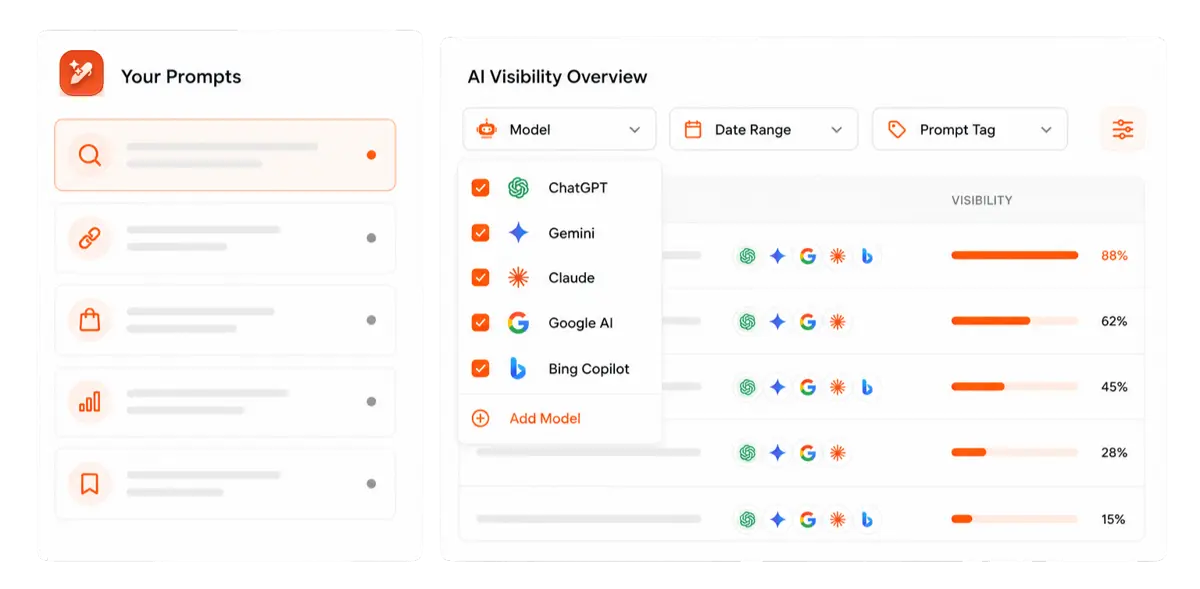
Let AI handle structure, clarity, and flow while you stay in control of the message.
This is the loop every keyword decision should follow: seed, expand, check the SERP, decide, write, and publish. The tool does the data work; you do the thinking.
How to analyze keywords: The metrics that actually matter
We’re halfway there. The next major step is learning how to do keyword analysis so you can pick targets that bring real traffic and leads. For that, you combine numbers from tools with your own sense of fit and intent.
Here are the main metrics you will see in most SEO keyword research tool dashboards:
Metric
What it measures
Why it matters
Search volume
Average monthly searches
Shows demand, though bigger is not always better
Keyword difficulty
Score for how hard it is to rank for a specific keyword
Helps you judge if you can compete for the term now or later
Cost per click (CPC)
Average ad bid price
Hints at how strong the buying intent is
Search intent
Reason behind the search
Guides what type of page you should create for the keyword
Trend or growth
Whether interest is rising or falling
Helps you ride trend waves early and avoid topics that fade quickly
All of these metrics are connected together. For instance, you cannot rank for a keyword with just a high search volume unless it has a lower difficulty.
Similarly, a seasonal keyword might show higher search volume, but since its trend can fall, there’s no guarantee that you’ll receive the benefits from it that you desired.
Tools like Ahrefs and Semrush now show intent labels and trend graphs for each keyword, which saves time and helps you focus on the right mix.
How to choose the right keyword: A simple decision framework
The metrics above tell you what a keyword looks like on paper. This framework tells you whether it is worth your time.
A keyword earns a place on your priority list when it satisfies four conditions at the same time:
Does the difficulty match where your site is right now?
A keyword difficulty score of 0 – 30 is generally workable for new or growing sites. Sites with strong authority and a solid backlink profile can go after terms in the 40 – 60 range.
Anything above 60 is typically a long-term play. If your site is under a year old and has fewer than 50 ranking pages, stay below 25 until you have built some momentum.
Does the intent match what you can actually build?
If the SERP shows that informational content dominates, you need a guide or tutorial. If commercial intent dominates, you need a comparison or review page. If you are not in a position to build the type of content the keyword demands, the keyword is not a fit right now.
Is this keyword relevant to what you sell?
A keyword can have great volume and manageable difficulty, but still be wrong for your site if it attracts readers who will never buy from you or recommend you.
Assign every keyword a business value score from 1 – 5 based on how directly it connects to your product or service. Anything scoring a 2 or below belongs in a backlog, not your active calendar.
Can you genuinely do better than what ranks today?
After reviewing the SERP, ask yourself honestly: can you write something more thorough, more current, better structured, or more useful than the current top results?
If the answer is yes and your angle is clear, the keyword is a strong candidate. If the top results are genuinely excellent and come from sites with far greater authority, move on to the next options. When all your conditions are met, you have found a keyword worth building around.
Keyword research for AI search and LLMs in 2026
Traditional keyword research was built around a typical Google search. That model still matters, but AI search has shifted the SEO game by a lot, introducing AEO (Answer Engine Optimization) into the mix.
Google’s AI Overviews now appear at the top of results for a large share of informational queries, including most “how to” searches. Perplexity, ChatGPT, and other AI platforms are answering millions of questions daily and pulling from a relatively small pool of authoritative sources.
Getting cited by these AI systems requires a slightly different approach from classic SEO, but the two strategies overlap more than most people realize.
What changes for AI search
AI systems favor content that answers questions directly, clearly, and in plain language. This means:
Keywords phrased as questions tend to perform better than head terms alone.
Entities matter more than exact phrases. Instead of optimizing for the keyword “keyword research tools,” think about covering the entities connected to it: what keyword research is, the tools involved, the process steps, and the intent types.
Structure signals clarity. Headings that match the question, concise opening paragraphs that state the answer before expanding on it, and FAQ sections at the end all make it easier for AI systems to extract and attribute your content.
Authority compounds. Pages that already rank in the top three are significantly more likely to get cited by AI tools. This means the best thing you can do for AI visibility is build genuinely strong fundamentals first, including on-page SEO and off-page SEO.
Signs a keyword is ready for AI snippet capture
Use this quick check before finalizing any keyword:
Is it phrased as a question or a clear problem statement?
Can the answer be stated in one or two sentences before expanding?
Do your H2 headings directly match likely follow-up questions?
Is this a topic where your content can become the most comprehensive resource available?
If you are ticking most of those boxes, the keyword is a strong candidate not just for organic rankings but for AI mentions as well.
The best keyword research tools: Free and paid options
You can learn how to do keyword research for SEO for free with several tools, then add paid platforms when you are ready to move faster and smarter. The goal is not to use every tool on the market, but to pick a small set that fits your budget and skills.
Free keyword research tools
Free tools give you plenty of data when you are starting out. They are also helpful if you are testing ideas before you pitch a bigger SEO budget.
Google Keyword Planner gives you search volume ranges straight from Google for many phrases. You need a free Google Ads account, but you do not have to run ads to see basic numbers. It is a solid way to sense baseline demand and to spot groups of related terms for each offer.
Google Trends shows how interest in a topic rises or falls over time and across regions. You can compare two terms side by side to see which one your audience prefers right now. This helps you avoid building content around topics that are fading or only peak in one short season.
Google Search Console focuses on your own site and reveals the queries you already rank for. It is the best free view of your current reach in search, and a must if you want to improve existing pages.
Ubersuggest keyword research tools give you quick lists of related terms, content ideas, and basic site audits. The free version limits daily searches, but it is great when you want a fast look at how hard a topic might be.
AnswerThePublic turns search suggestions into neat maps of questions and phrases around a seed keyword. It is perfect when you plan how to conduct keyword research for blog content and want to see what people ask in their own words. Even a few runs per month in the free version can fill your idea bank.
With these tools alone, you can cover how to do free keyword research for most small sites.
Professional keyword research tools
Paid tools give deeper data, better filters, and rich reports that save a lot of time once you move beyond basics. They are helpful when you handle many pages, clients, or campaigns.
Ahrefs is known for strong backlink data and detailed keyword metrics. It shows traffic potential, click data, and a parent topic for each term, which is very useful when you plan clusters.
Semrush offers a wide range of SEO, content, and ads tools in one place, and its Keyword Magic Tool is favored for deep keyword research. You can filter by search intent, question terms, and many other options in a few clicks.
HubSpot’s Content Strategy Tool helps you plan topics and clusters rather than single keywords. It suggests related subtopics, tracks how each piece of content performs, and links directly with your marketing and sales data.
ChatGPT and similar AI tools are not a direct source of live metrics, but they are very good for ideation. You can ask for long-tail versions of your main keyword, outlines for articles, or angles for new guides.
If the budget is tight, start by mastering how to do free keyword research with Google tools. As your site grows and you want faster insight, upgrading to a full SEO suite can pay off quickly.
How to organize and prioritize your keywords for maximum impact
Once you have a filtered keyword list, the next step is turning it into a clear plan. This is where many people stall. They learn how to find keywords for SEO, but do not know which to write about first or how to fit them into their site. A bit of structure here makes everything else easier.
Building topic clusters for topical authority
Search engines tend to favor sites that cover a subject in depth instead of posting scattered, one-off articles. Topic clusters help you do that by grouping related keywords and pages around a single main theme.
At the center of each cluster is a pillar page, which is a broad, detailed guide that targets a head term such as “SEO guide for small businesses.” Around it, you publish cluster posts that go deep into subtopics, like “SEO link-building tips” or “local ranking tactics”.
Each cluster post focuses on a single long-tail phrase and links to the pillar, while the pillar links out to all the cluster posts.
When several phrases lead to the same result, you can often cover them all with one strong article. For example, “whipped coffee,” “whipped coffee recipe,” and “how to make dalgona coffee” belong on a single page. This is also the basis of semantic SEO.
Mapping keywords to the buyer’s journey
Not all keywords serve the same purpose, and treating them as if they do is one of the most common planning mistakes in SEO. The most useful way to organize your list is to map each keyword to a stage in the buyer’s journey: TOFU, MOFU, and BOFU.
Funnel Stage
What the searcher wants
Keyword format
Example
Best content type
TOFU (awareness)
To understand a concept or problem
“What is X,” “Why X,” “Benefits of X”
“What is keyword difficulty”
Explainer post, glossary
MOFU (consideration)
To learn how to solve a problem
“How to X,” “Step-by-step X,” “Best way to X”
“How to do keyword research for SEO”
This article
BOFU (decision)
To evaluate and choose a solution
“Best X tool,” “X vs Y,” “X pricing”
“Best keyword research tool for agencies”
Comparison, landing page
Your target keyword sits squarely in the MOFU stage. The reader already knows they need keyword research; they are looking for the right process and, in many cases, the right tool to help them execute it.
Creating your keyword map and content calendar
To keep your work organized, build a keyword map, which is a simple spreadsheet that assigns each focus keyword to a page. Think of it as a home for every term you care about. It stops you from writing two posts for the same phrase and makes the gaps very clear.
Here is a basic structure you can use:
Priority
Focus keyword
Supporting keywords
Intent
Page type
High
How to do keyword research
Keyword research step by step
Informational
Blog post
High
Best keyword research tools
Free keyword research tool
Commercial
Blog post
Medium
Keyword difficulty SEO
How to analyze keywords
Informational
Blog post
Use the priority column to separate short, medium, and long-term targets:
Short-term picks tend to be long-tail, low difficulty, and high in business value.
Medium-term targets have moderate competition and nice traffic potential.
Long-term keywords are your “trophy” phrases with high volume and great difficulty that may require more content, links, and time.
This keyword map broadens as your content calendar does. Over time, the sheet also shows progress as items move from “New” to “Published” and as you track rankings.
Common keyword research mistakes to avoid
Most keyword research mistakes are not about effort. They come down to a few habits that are easy to form and surprisingly hard to change.
Planning entire content campaigns around seasonal keywords
A keyword that spikes every November and then disappears for eleven months needs a different content strategy than a keyword with steady, year-round demand.
For instance, we researched the keyword ‘Easter gifts’ in Ahrefs. It rises in search volume in around March every year, but dips significantly once the annual event is over.
The important takeaway from this keyword example is to target ‘evergreen’ keywords that receive a fair amount of traffic all year round. For instance, ‘how to start a blog’ or ‘what is a webhook’ are timeless topics that will continue attracting audiences due to their informational and educational nature.
Publishing two pages for nearly the same keyword
If you have a blog post targeting “keyword research tools” and another targeting “best keyword research tools,” you are competing against yourself.
Google will pick one to rank and suppress the other, usually not the one you would choose. That is why it is important to consolidate similar topics into one strong page whenever possible so that you have a better chance at dominating SERPs.
Treating keyword research as a one-time task
Search behavior shifts. New competitors enter the space. Tools evolve. A keyword that was low difficulty six months ago might now be contested by a major player right now.
Therefore, it is important to set a quarterly reminder to revisit your core keyword list and refresh your strategy based on what has changed.
Forgetting the content you already have
Before you write anything new, check Google Search Console for pages sitting in positions 5 to 15. A better title, a stronger opening paragraph, or a few additional sections can push those pages into the top three without creating anything from scratch. Those are your quickest wins.
How Contentpen helps you turn keyword research into measurable SEO results
Learning how to do keyword research for SEO is a big step, but putting it into practice week after week is where many teams get stuck. There is data to review, intent to judge, pages to update, and rankings to watch. It is easy to lose track of what matters.
Many businesses face the same problems:
They do not get enough Google traffic and see competitors outrank them for important phrases.
They are not sure if the main issue is keywords, content quality, technical SEO, or something else under the hood.
They also do not have time to become SEO specialists or a budget to waste on guesswork and generic reports.
This is where Contentpen steps in. The AI SEO content writer ensures that you see the website analytics straight from Google Search Console into your writing workflow. It also surfaces quick wins and identifies decaying pages for you so that you can take the required actions before it’s too late.
Contentpen not only takes care of your keyword research, but also the entire content lifecycle. From SEO scoring to generating article metadata and managing a media library, the tool automates the majority of your tasks so that you can focus on strategizing and implementation.
Final thoughts
Keyword research is the base that connects your content to what people actually type into search engines. When you understand how to do keyword research for SEO, you stop guessing and start meeting your audience at the exact moment they look for help.
The path is clear. You brainstorm seeds, expand them with tools, study competitors, mine your own data, review key metrics, group terms into clusters, and map each keyword to a page.
You can use both free and paid tools for keyword research. The key is regular, focused effort and a consistent content system that helps you achieve and sustain SERP and AI snippet positions alike.
Frequently asked questions
How often should I do keyword research for my website?
Every quarter, review your main keyword list to see if search volume, difficulty, or intent has changed. At least once a year, compare your plan with your current business goals. Also, repeat research whenever you launch a new offer or notice clear drops in traffic or rankings.
Can I do keyword research for free?
Yes. Google Keyword Planner, Google Trends, Google Search Console, and manual SERP research can allow you to do keyword research for free, especially for newer sites or tighter budgets.
How long does keyword research take before you see results?
Keyword research itself can be done in a few hours, but results depend on how quickly you publish and how competitive your targets are. For newer sites, it may take 2 to 3 months to see initial movement, while more established sites can see changes within a few weeks.
Should I do keyword research differently for product pages and blog posts?
Yes. Blog posts mostly target informational keywords, whereas product and service pages mostly target commercial or transactional keywords. The research process is the same, but the filters you apply in the keyword research tools shift completely.
You publish a new article. You wait. Nothing moves.
So you publish another one. Then another. But your traffic graph still looks like a flatline, and your best content is sitting on page two with nothing to show for the effort you put into it.
Here is the uncomfortable truth most SEO guides will not open with: the problem is rarely that you need more content. In the majority of cases, the real culprit is not doing a proper SEO audit that could help you uncover and fix issues that halt your growth.
This guide walks you through how to do a complete SEO audit, step by step. We cover every layer: technical SEO, on-page optimization, content quality, backlinks, local SEO, and the GEO checks needed in 2026.
So, let’s get into it, shall we?
What is an SEO audit?
An SEO audit is a structured evaluation of your website’s ability to appear in search results. That includes traditional search engines like Google or Bing. SEO audits are also meant to increase visibility in key SERP feature snippets, including AI Overview.
A thorough SEO audit answers four core questions:
Can search engines access and properly understand every important page?
Is your content relevant, thorough, and genuinely useful for the queries you are targeting?
Does your site carry enough authority to compete for those queries?
Is your content structured so AI-powered engines can retrieve and cite it?
If you can honestly answer yes to all four, you are in better shape than most. The majority of sites cannot, and so they need a series of checks to help them get the desired rankings.
Why an SEO audit matters even more in 2026
Search engines have changed quickly in the past few years. Google’s December 2025 core update put heavy weight on the ‘Experience’ pillar of E-E-A-T, rewarding content with genuine first-hand evidence and penalizing generic, thinly differentiated pages.
Sites that passed through this update had one thing in common: they had recently audited, updated, and deepened their content rather than just adding more of it.
This is why regular SEO audits are so crucial. They help you identify technical issues and thin pages early so that you can safeguard your site from Google penalties and keep the audience engaged for better CTR and ranking.
The 5 types of SEO audits you need to know
Before diving into the steps, understand what an audit actually covers. There are five distinct layers, each targeting a different dimension of your site’s health.
Technical SEO audit: Can search engines crawl, render, and index your site correctly?
On-Page SEO audit: Are your pages properly optimized for the right queries?
Content audit: Is your content current, thorough, and aligned with how people search today?
Off-Page SEO / backlink audit: Is your link profile helping or quietly working against you?
Local SEO audit: If you serve a specific geography, is your local presence set up completely?
Now, let’s quickly learn about the tools you’ll need for the five types of SEO audits.
Tools you’ll need for SEO audits
Here is the practical toolkit you’ll require to complete all types of audits for your site to refresh, regain, and maintain rankings.
Free tools:
Google Search Console: Your most important audit tool. Indexing status, click data, Core Web Vitals, and manual actions. Non-negotiable.
Semrush or Ahrefs: Backlink analysis, keyword gap analysis, and large-scale site crawling.
Screaming Frog paid version: Removes the 500-URL cap for larger platforms.
You can also use any other SEO tool you are comfortable with to complete the audit process.
Performing an SEO audit in 16 steps
Here’s a quick SEO audit checklist you can scan before diving into the steps:
Use it as a quick reference, then follow the detailed steps below to implement each fix properly.
Step 1: Collect baseline data before you start
Before touching a single setting, establish where you are right now. This baseline makes the audit actionable rather than just descriptive. You need something to measure your improvements against.
Open Google Search Console and record:
Total organic traffic (last 90 days, by clicking the ‘More’ button.)
Current keyword rankings for your five most important target terms.
Core Web Vitals (pass/fail) status report.
Screenshot or export these numbers. Every fix you implement later should be traceable back to movement in one of these baseline metrics.
Step 2: Analyze behavioral signals in GA4
You recorded the numbers in Step 1. The second step is about reading what those numbers are actually telling you in Google Analytics 4.
GA4’s behavioral data reveals how real users are experiencing your site right now, which tells you something different from what Search Console shows. Search Console tells you how Google sees your pages. GA4 tells you what happens after someone clicks.
To check behavioral signals in GA4, navigate to ‘Reports > Engagement > Pages and Screens’. Sort by page views to start with your highest-traffic pages. For each one, check:
Engagement Rate
GA4 replaced the old bounce rate metric with engagement rate. An engaged session is one where the user spent at least 10 seconds on the page, viewed more than one page, or triggered a conversion event. Aim for an engagement rate above 60% on your key pages.
Average Engagement Time per Session
This is the active time a user spends on your page, not total time on site. A low engagement time on a long-form article (e.g., under 60 seconds on a 2,000-word page) is a strong signal that the user isn’t consuming enough of your content.
Landing Page Performance
Under ‘Reports > Acquisition > Traffic Acquisition’, filter by organic search. Look at which pages users land on from search and then immediately exit. These are pages where your SEO is working (Google is sending people), but your content is failing (people are leaving).
Scroll Depth Events (if configured)
If your GA4 has scroll depth tracking enabled, check the percentage of users scrolling past the 50% and 90% mark on your most important pages. Pages with poor scroll depth beyond the 50% mark suggest that your content loses the reader halfway through.
Cross-reference everything you find here with the Search Console data from Step 1. Then move on to the next steps of the SEO audit checklist.
Step 3: Check that crawlers can access your site
Crawlability is the foundation of everything else. Search engines and AI platforms use automated bots to discover and index your content. If those bots are blocked, your site is invisible regardless of how well everything else is optimized.
Start by entering yourdomain.com/robots.txt. Your robots.txt file tells crawlers what they can and cannot access. A file that looks like this is correct:
User-agent: *
Allow: /
Disallow: /admin/
A file that looks like this is a catastrophe:
User-agent: Googlebot
Disallow: /
The second example blocks Google from your entire site, and not just the unwanted pages.
In 2026, make sure you are not accidentally blocking retrieval bots like OAI-SearchBot or PerplexityBot. Blocking these types of crawlers makes your content invisible to AI platforms when they are answering user questions.
Crawlers to verify are not blocked:
Googlebot: Google’s main search crawler
BingBot: Bing’s crawler, which also influences Microsoft Copilot results
OAI-SearchBot: Used by ChatGPT for real-time citations
PerplexityBot: Perplexity’s search crawler
Step 4: Check for duplicate versions of your site
Duplicate pages silently dilute SEO authority on a surprising number of sites, especially ones that have been through migrations or CMS changes.
Your site should be accessible at exactly one URL. Test all four of these in a browser:
http://yourdomain.com
https://yourdomain.com
http://www.yourdomain.com
https://www.yourdomain.com
Only one should load a live site. The other three should redirect automatically to a single link using 301 redirects. If multiple versions load successfully, Google may treat them as separate sites and split your authority between them.
Also, always use the HTTPS version as your canonical. Beyond the marginal ranking benefit, it is a basic security expectation that users and browsers now treat as standard.
Step 5: Crawl your site for technical errors
A site crawl reveals the technical issues that are invisible in a browser but clearly visible to Googlebot. These may include broken links, redirect chains, missing title tags, orphan pages, duplicate content, and other problems that secretly diminish rankings.
Run Screaming Frog on your site. If your site has fewer than 500 pages, the free version covers everything. The data it returns is how search engines actually experience your site, not how you see it in Chrome.
Issues to prioritize during the Screaming Frog crawl:
Broken internal links (4xx errors): Internal links pointing to pages that no longer exist waste crawl budget and create a dead end for both users and search engines.
Redirect chains: A chain like A → B → C → D dilutes link equity with every hop and slows down crawling. Flatten anything longer than one redirect to a direct 301.
Orphan pages: Pages with no internal links pointing to them are rarely prioritized by search engines. Find orphan pages by comparing your sitemap URLs against what Screaming Frog discovered via crawl.
Duplicate title tags: Two pages with identical title tags signal to Google that your content may be redundant. Fix or differentiate each one clearly.
Missing canonical tag: Pages that should be consolidated under a canonical URL but are not create indexing ambiguity. Set canonicals explicitly.
Sitemap issues: Your XML sitemap should only contain indexable pages. Screaming Frog will flag redirect URLs, noindex pages, and broken links that have crept into your sitemap over time.
Step 6: Verify indexing status
Crawling and indexing are two different things. A crawler can visit a page and still choose not to index it. Open Google Search Console and navigate to the ‘Pages report’ under indexing options.
Categorize the pages that need your attention:
“Crawled”: Google visited these pages but decided they were not worth indexing. This almost always means thin content, near-duplicate content, or low-value pages.
“Discovered”: Google found these pages but has not gotten around to crawling them yet, typically because they are considered low priority. Stronger internal links pointing to these pages often resolve this within a few weeks.
“Blocked by robots.txt.”: Confirm these are intentionally blocked. Accidental blocks after migrations are extremely common within websites.
If you don’t have a lot of pages, you can run the site:yourdomain.com operator in Google and compare the result count to your actual page count. This method may take a while, but you can clearly identify any large discrepancy between the two numbers.
Step 7: Test mobile-friendliness
Google uses the mobile version of your site for indexing and ranking. Desktop performance is secondary. A site that looks perfect on a 27-inch monitor but breaks on a phone will underperform in search, regardless of content quality.
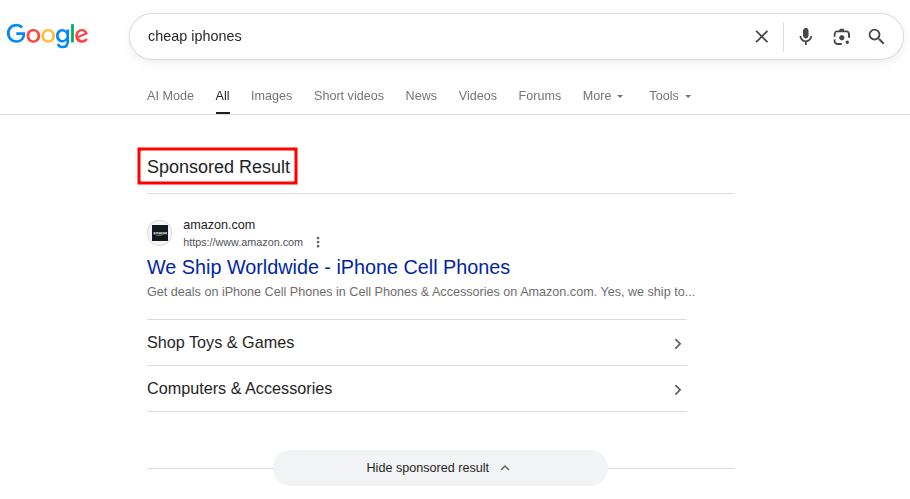
Use Bing’s Mobile Friendliness Test Tool for a quick pass on any URL. Also, check the ‘Mobile Usability report’ in Google Search Console to identify site-wide issues.
The most common mobile problems are the content text being too small to read without zooming, touch targets too close together to tap accurately, or viewport configuration errors.
If your site is on WordPress, most modern themes are mobile-optimized by default. Custom-built sites should implement responsive design principles that serve the same HTML to all devices while adjusting the layout via CSS.
Step 8: Evaluate site speed and Core Web Vitals
Site speed is both a ranking factor and a user experience issue. A slow site costs you in search and in conversions. Users who click through from an AI citation and land on a page that takes five seconds to load will leave before they read a word.
Therefore, you must run your most important pages through Google PageSpeed Insights. The three metrics to target are:
Metric
Target
What It Measures
Largest Contentful Paint (LCP)
Under 2.5 seconds
Main content loading speed
Interaction to Next Paint (INP)
Under 200ms
Responsiveness to user interaction
Cumulative Layout Shift (CLS)
Under 0.1
Visual stability during page load
You can take a quick look at Contentpen’s test in Google PageSpeed Insights for a quick review of the test and its related results.
Always test on mobile settings. Chasing a perfect 100 score is not necessary. Getting your key pages into the “Good” range across all three metrics is the goal.
Quick tip:
For LCP, the most common culprits are unoptimized hero images and render-blocking JavaScript. For CLS, always specify explicit width and height on images and video embeds. For INP, minimize third-party script execution.
Step 9: Review on-page SEO elements
On-page SEO is how you communicate to search engines what each page is about. Get the fundamentals wrong, and even excellent content can underperform. Do them right, and you create a compound effect where good content becomes visible content.
Audit these elements for every important page:
Title tags: Keep them under 60 characters, unique across the site, with the primary keyword near the front. Duplicate titles are often a symptom of keyword cannibalization.
Meta descriptions: Keep them between 130 and 150 characters. These are not a direct ranking factor, but they directly influence click-through rate. Write them like a one or two-line ad for the page, summarizing everything that you’ll cover on it in clear language.
Header structure: Use one H1 per page that clearly defines what the page covers, with a logical H2/H3 hierarchy throughout. Proper heading structure is one of the most reliable paths to featured snippet eligibility.
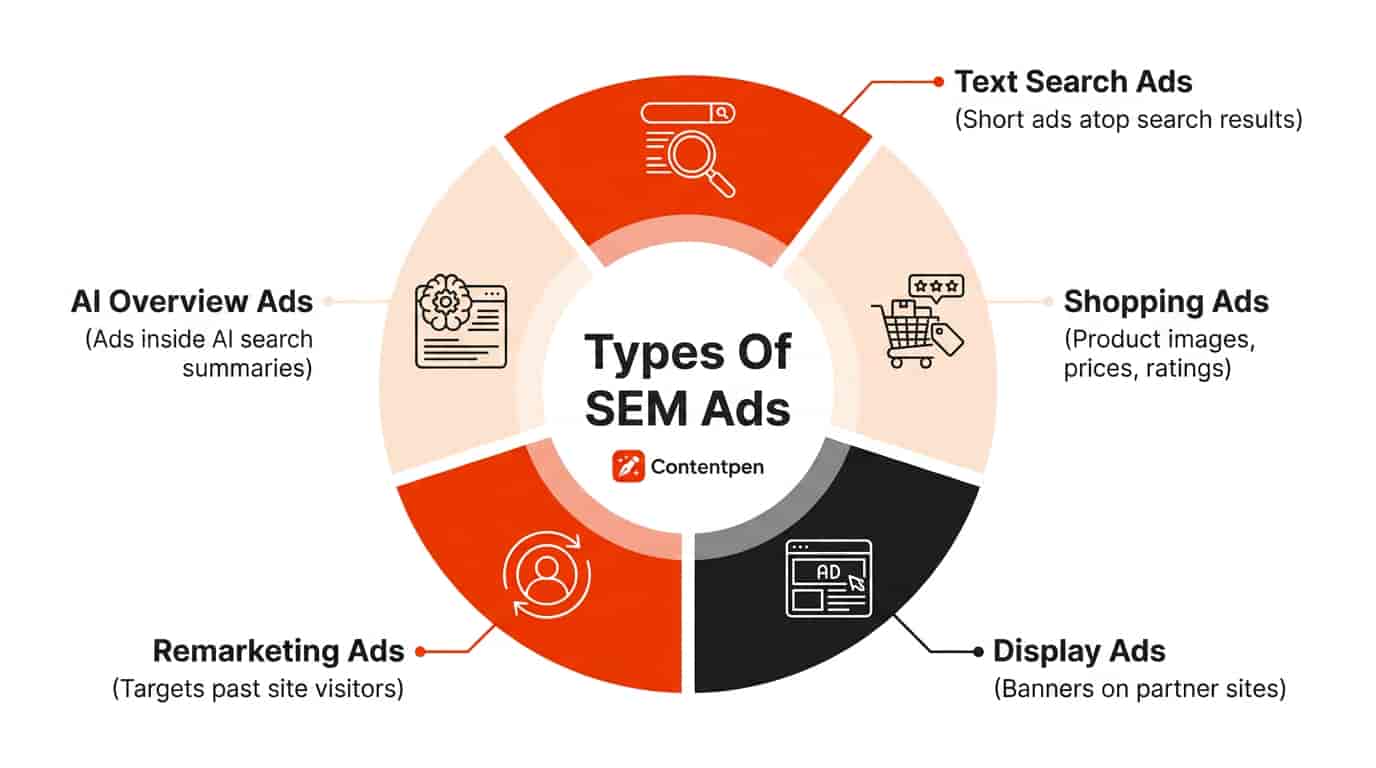
URL slugs: Keep them short, lowercase, hyphen-separated, and descriptive. /what-is-geo is good. /blog/post?id=4827&category=seo is not.
Image alt text: Every image needs descriptive alt text. This helps visually impaired users and search engines understand the image, and contributes to image search visibility.
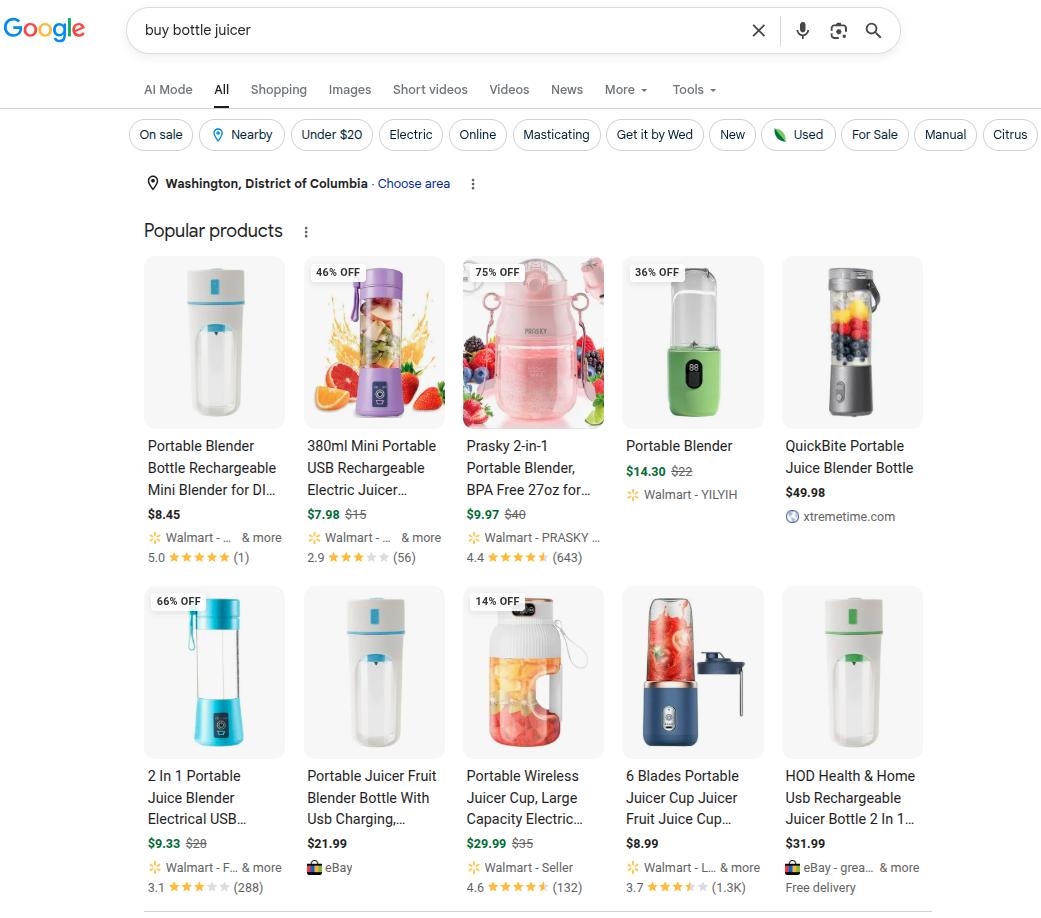
Keyword placement: Your primary keyword should appear naturally in the first 100 words. Use related keyword variations for better semantic SEO and to signal topical depth. However, always avoid stuffing keywords.
For large sites, auditing every page manually is impractical. Tools like Semrush’s On Page SEO Checker can export all of these elements in bulk so you can sort and identify issues across hundreds of URLs at once.
Step 10: Conduct a content quality audit
This is the step that drives the most growth and the one that most people rush through. Give it the time it deserves.
Open Google Search Console and navigate to the ‘Search Results report’. Set the date range to the last 12 months. Sort by impressions. Look for two categories:
High impressions, low CTR
Your content is appearing in search, but is not getting clicked. This usually means your title tag or meta description is weak, or your result is losing to a competitor’s featured snippet. Fix the on-page elements first.
Declining Year-over-Year (YOY) traffic
Pages where both impressions and clicks have dropped compared to the same period last year are your decaying pages, and they are almost always the fastest opportunities to recover.
For each priority page, ask:
Does this fully cover the topic, or are there subtopics that competitors address that we do not?
Is the data, statistics, and advice current, or has it aged out?
Does it match how people are searching today, or has search intent shifted since we wrote it?
Then sort every page into one of four action categories:
Action
When to take it
Update
Good foundation for the content; needs fresh data, new sections, or added depth
Rewrite
The premise is sound, but the execution is poor, or the intent has shifted over the years
Consolidate
Multiple weaker pages are competing for the same keyword
Remove + Redirect
Low value with no realistic path to improvement
Why refreshing existing content beats publishing new content
Refreshing a page that already has some authority almost always outperforms publishing something brand new.
A page sitting in positions 8 to 15 for a competitive keyword already has indexing history and maybe some backlinks. It often needs targeted updates, such as updating stale statistics and adding proper FAQ schema.
You should also restructure content for featured snippets and AI citations by giving direct 40-60 word answers for questions in your blog and articles.
This is exactly where you need an SEO platform and an AI writer like Contentpen. Our tool offers a ‘Refresh Existing Content’ mode that is built to accelerate the content updating process so that you don’t start from scratch.
Rather than spending hours manually combing through competitor SERPs to map the gaps, it surfaces them for you automatically. The tool also offers a 7-day free trial so that you can produce your SEO- and GEO-optimized articles with ease and see the results for yourself.
Update existing content without rewriting it
that fills them
Experience, Expertise, Authoritativeness, and Trustworthiness are the lenses Google uses to evaluate content quality, especially for sensitive industries. E-E-A-T is not a technical metric you can check with a crawler. It is a judgment call based on signals spread across your site.
You should mainly audit for:
Author credentials: Do your key articles have a named author with a bio that establishes their relevant expertise? Anonymous content or generic “Staff Writer” bylines are a weakness here.
Updated dates: Content without a visible last-updated date looks stale. A visible update date that reflects when you actually reviewed the content demonstrates content freshness.
Original data and examples: First-hand evidence is the ‘Experience’ part of E-E-A-T. Screenshots, original research, case studies, and real-life examples all signal to Google that a human who has actually done the said process wrote this content.
External sources: Citing authoritative external sources adds credibility. Link out to ‘.edu’ platforms or sites with high Domain Authority to genuinely help the reader and show search engines that you only consider top-authority pages to cite information.
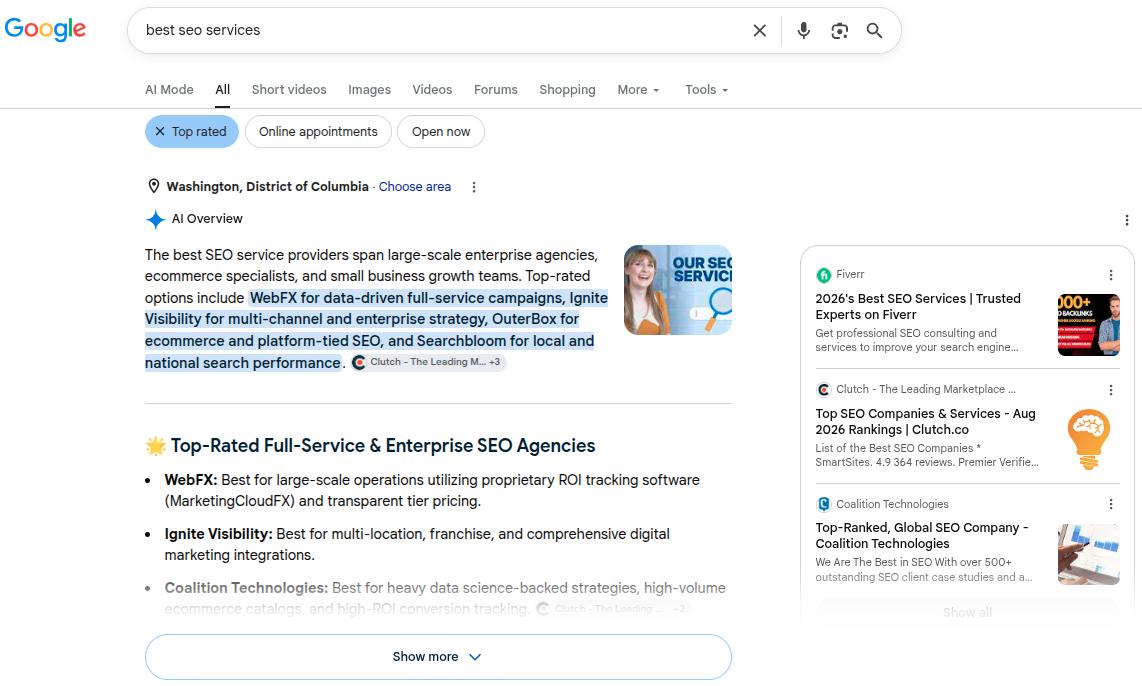
About and contact information: A clear ‘About’ page, identifiable leadership, and real contact information establish the ‘Trust’ dimension.
Step 12: Check structured data and schema markup
Structured data is how you give search engines and AI systems explicit, machine-readable context about your content. It does not directly boost rankings, but it dramatically improves how your content is understood and represented online.
Use Google’s Rich Results Test to validate your current implementation. The schema types that matter most include:
FAQPage: Marks up question-and-answer sections. This is one of the highest-value schema types for both traditional featured snippets and AI citation. Add FAQ sections to your key pages and mark them up correctly.
HowTo: For step-by-step guides like this one. When marked up properly, Google can display the steps directly in search results, improving click-through rate meaningfully.
Article: Signals content type, publication date, author, and organization. Helps AI systems accurately represent your content.
BreadcrumbList: Helps search engines understand your site hierarchy and often results in breadcrumb display in search results.
LocalBusiness: Essential for local SEO. Add with complete, accurate contact information.
Fix any validation errors the Rich Results Test surfaces. An invalid schema implementation is worse than no schema. It generates structured data errors in Search Console and signals a poorly maintained site.
Step 13: Audit your AI visibility and brand representation
AI answer engines are now a meaningful traffic source. ChatGPT, Perplexity, and Google’s AI Mode are growing rapidly. If your brand or content is not being surfaced or cited accurately in these systems, you are missing an increasingly important traffic channel.
Benchmark your AI visibility
Manually test AI platforms with queries relevant to your business. For instance:
“What is [your company]?”
“What are the best [your product category] tools?”
“How do I [solve the problem your product addresses]?”
Document whether your brand appears, how prominently, and whether the description provided by the AI platform is accurate.
If AI chatbots are describing your product incorrectly, the fix usually starts on your own site. Update your ‘About Us’ page, product descriptions, and homepage copy with accurate, current information that AI systems can easily retrieve.
Check topic association
If you sell SEO software but AI only mentions you for “content marketing tools” and never for “keyword research” or “backlink analysis,” it means you have topic association gaps. Close them by creating or updating content that clearly positions you in those missing topic areas.
You can use Contentpen for this task, which helps in generating and publishing high-quality blogs from start to finish with the least hassle.
From outline to publish-ready content
that fills them
You can also utilize the tool’s clustering feature to create topical authority and increase share of voice in a niche.
Structure Content for AI citation
AI systems retrieve content in chunks. They favor content that leads with clear, direct answers. Therefore, make your content with labeled sections and digestible, quotable segments that appear directly in ChatGPT, Perplexity, Gemini, and other AI discovery platforms.
Step 14: Conduct a backlink audit and competitor analysis
Your backlink profile is your site’s reputation in Google’s eyes. Strong, relevant links from authoritative sources help you rank. Spammy, manipulative, or irrelevant links can suppress rankings and, in serious cases, trigger manual penalties.
Analyze your link profile
Pull your backlink data from Ahrefs or Semrush. Look for:
Anchor text distribution: A healthy profile has most links using branded anchors, naked URLs, or generic phrases. Many exact-match keyword anchors across low-quality sites look manipulative.
Link quality: A link from a respected industry publication carries more weight than a hundred links from content farms. Check what your link quality suggests from the respective SEO tools.
Identify and disavow toxic links
Use Google’s Disavow Tool conservatively. Disavowing legitimate links by mistake can hurt you. Disavow at the domain level for obvious spam sources, which may include link farms, PBNs, and unrelated foreign-language sites.
Run a competitor backlink gap analysis
Find sites that link to your competitors but not to you. These are your warmest outreach targets as they have already demonstrated a willingness to link to content on your topic.
Run a keyword gap analysis
Find queries your competitors rank for that you do not. This feeds your content roadmap directly, for both refresh priorities and new content planning.
Monitor unlinked brand mentions
When you find your brand mentioned online without a link, reach out. In most cases, a polite request to convert a plain-text mention into a hyperlink has a reasonable success rate and costs almost nothing.
You can use the [“Brand Name” -site:YourSite.com] command in the search to see your brand mentions online.
Step 15: Local SEO audit (if applicable)
If you serve customers in a specific geographic area, a local SEO audit is essential.
Google Business Profile
This is your most important local SEO asset. Audit for completeness (every field filled in), accuracy (business name, address, and phone number exactly matching your website), correct primary and secondary categories, and recent activity (posts, photos, review responses).
Reviews and reputation
Positive reviews improve both ranking signals and conversion rates from local results. Monitor and respond to reviews, both positive and negative. Unaddressed negative reviews signal to Google and to potential customers that the business is not actively managed.
LocalBusiness schema
Add the LocalBusiness schema to your website with complete, accurate contact information. It helps Google verify your business details and improves your chances of appearing in the local map pack.
Step 16: Measure, prioritize, and build your action plan
An SEO audit is only worth doing if it produces action. An action plan is only useful if it is prioritized. You cannot fix everything at once, and not everything is worth fixing in the same week.
That is why you need to follow this three-tier framework to organize every issue you find and fix it without overload:
Tier 1: Fix this week (high impact, relatively low effort)
Indexing errors that are blocking important pages
Pages accidentally blocked via robots.txt
Missing or broken canonical tags on high-traffic pages
Core Web Vitals failures on your top 10 pages
Critical schema errors
Tier 2: Fix this sprint (high impact, higher effort)
Content refresh for high-impressions, low-CTR pages
Content gap fills on core topic pages
Redirect chain cleanup across the site
E-E-A-T improvements on key pages (author bios, updated dates)
For each item, log the URL or issue, the fix required, the expected impact, and who owns it. A 10-item prioritized list with owners and due dates will produce more ranking gains than an 80-item spreadsheet that nobody acts on.
Revisit these baseline metrics at 30, 60, and 90 days after implementation to check the results. If the numbers are not moving after 90 days, then your next audit starts there, and the cycle repeats with sharper priorities each time.
How often should you run an SEO audit?
Every quarter: Standard for most sites under 500 pages.
Monthly: Content-heavy publications, e-commerce sites, or any site undergoing active changes.
Weekly monitoring: Checking for indexing errors, crawl errors, and taking manual actions if needed in Google Search Console.
An SEO audit schedule may vary depending on the type of business in question or the SEO professional/consulting agency performing the procedure.
Frequently asked questions
Can I do my own SEO audit?
Yes, and a genuinely useful one. Google Search Console, Screaming Frog, PageSpeed Insights, and Contentpen; these tools mainly cover all aspects of SEO audits, and you can do it yourself without any problems.
Can ChatGPT do an SEO audit?
Yes and no. ChatGPT can help you think through content gaps, suggest title tag improvements, and analyze a piece of content for on-page factors. What it cannot do is crawl your site, pull live data from GSC, or analyze a real backlink profile.
How much do SEO audits cost?
A DIY audit using free tools costs only your time. Professional audits from freelancers can typically range from $100 – $1000, while comprehensive SEO audits from agencies can cost somewhere around $5000 – $30,000+, depending on the website.
How long does an SEO audit take?
A focused audit of a site under 50 pages can be done in 1 day. Sites with 100 to 500 pages typically take 3-4 days. Large sites with complex architectures can take 1 week or more.
How do I do a free SEO audit of my website?
Start with Google Search Console for the indexing status of your pages. Run Screaming Frog to crawl your site and surface technical issues. Use PageSpeed Insights for Core Web Vitals. Use the Rich Results Test for schema validation. Use Contentpen for content gap analysis and content refresh.
What is the difference between a site audit and an SEO audit?
A site audit typically refers specifically to the technical crawl: broken links, redirect issues, indexing problems, and similar technical health checks. An SEO audit is broader. It includes the technical crawl but also covers content quality, on-page optimization, backlinks, local SEO, and AI visibility.
94.8% of homepages have accessibility errors, and missing or inaccurate image descriptions make up more than half of those issues. That is a huge chunk of visitors running into silent images, broken context, and a poor experience.
For most content creators, marketers, SEO specialists, and small business owners, this is low-hanging fruit. A few words in the right place can support web accessibility guidelines such as WCAG and give you an image SEO boost for better visibility.
With this post, we aim to help you write the right image descriptions by sharing 12 real-world alt text examples covering different use cases and platforms.
By the end, you will be able to look at any image on your site and know exactly what to write in the alt attribute without any doubts.
So, let’s get to it, shall we?
E-commerce product image alt text examples
Many online businesses and agencies use images to represent their products on popular E-commerce platforms, such as Shopify, WooCommerce, and others.
However, most of them fail to write suitable image descriptions, which results in poor image SEO and weak content accessibility for screen reader users.
Under WCAG Success Criterion 1.1.1, every non-text element on a page must have a text alternative that serves an equivalent purpose. Therefore, vague descriptions like “bag” or “promotional banner” do not meet that bar.
The good news is that you can follow a simple alt text formula that most content teams never use:
[Product type] + [Brand if relevant] + [Key attribute] + [Color/Material] + [Variant detail if applicable]
Let’s review some quick e-commerce image examples to help you grasp the way to apply the above formula.
1. Main product shot (the hero image)
This is the image that appears in search results and at the top of the product page. It needs to communicate what the product is and what distinguishes it.
✅ Good: ‘Matte black leather laptop bag with gold zip pulls and padded shoulder strap.’
❌ Bad: ‘A matte laptop bag.’ [The bad alt text doesn’t describe any of the essential details of the bag, for instance, its color, zipper style, brand name, angle of shot, etc.]
2. Variant/color selector images
If you have an image with product variants in different colors or sizes, then your alt text must be able to specify that. Otherwise, screen readers and Google will miss out on this critical detail.
✅ Good: ‘Men’s linen shirts button-down in navy, olive, white, and terracotta.’
❌ Bad: ‘linen shirts (repeated on 4 colors.)’ [Define what colors or sizes are available so that you have a better chance of selling your items.]
3. Images with text (promotional graphics, sale banners)
For promotional images, include the full text from the image in the alternative description. This is the one case where your alt text might be longer than usual.
✅ Good: ‘A blue-white banner for SprintX, reading: Summer Sale: 30% off all shoes. Offer ends July 31. Use code SUMMER30 at checkout.’
❌ Bad: ‘Promotional banner for SprintX.’ [You lose the chance of telling search engines and screen readers what you offer in the promotion.]
Social media alt text examples by each platform
When it comes to social media, each platform has different character limits and different conventions for writing alt texts. Some apps will automatically write an alt text for you, but these are mostly not fit for use.
1. Alt text examples for Instagram
Instagram’s auto-generated alt text is notoriously vague (“may contain: one person, smiling, outdoors”). Always override it. You have 100 characters to work with, so prioritize subject + action + context.
Let’s take an example of how to write alt text for art, or in this case, a quote graphic posted on IG.
✅ Good: ‘Quote: “Alt text is the cheapest SEO win most teams ignore.”’
❌ Bad: ‘Person typing on a laptop with an opened notebook on the desk.’ [Focuses on unnecessary elements.]
Pro tip: Instagram Stories currently don’t support native alt text. For stories, you need to use the text overlay feature to add a written description directly onto the story to boost engagement.
2. Alt text for LinkedIn
LinkedIn may auto-generate alt text, but its descriptions are frequently inaccurate. The platform has a professional context, so alt text should reflect exactly that.
The alt text character limit for LinkedIn is debatable. However, it is always a better idea to keep your image descriptions to less than 125 characters, as screen-readers typically don’t read past this point.
✅ Good: ‘Torbjørn Flensted, founder of SEO.ai, speaking at SEO conference SEOday.’
❌ Bad: ‘Torbjørn Flensted speaking on a stage to other SEO professionals.’ [Again, this bad alt text example focuses on irrelevant details, missing the key context of the image.]
Pro tip: LinkedIn alt text cannot be added or edited after a post is published. So, write it well enough before posting.
3. X / Twitter (1,000 character limit)
X gives you far more room than any other platform, but that doesn’t mean you should use it all. Most posts need 1–2 sentences. Use the extra allowance for genuinely complex images like detailed charts or diagrams.
Right now, we will show you a screenshot example for alt text, which discusses one of the key points mentioned by John Mueller regarding alt text.
✅ Good: ‘Screenshot of a tweet by John Mueller reading: “Alt text is helpful for Google to understand images.” Posted November 2024.’
❌ Bad: ‘John Mueller Tweet on alt text.’ [Alt text for screenshots must explain what they say to the audience directly. This nuance is really important for Google Image SEO.]
Pro tip: X requires you to enable alt text in your “Accessibility Settings” before the option appears when uploading images. It’s off by default.
4. Facebook (100 character limit)
Facebook also auto-generates alt text using AI, but again, the output is not very useful. Therefore, you should always write custom alt text, especially for brand content.
✅ Good: ‘Contentpen bulk content creation feature – generate multiple optimized posts in one workflow.’
❌ Bad: ‘Contentpen new feature.’ [The alt text for Facebook should explain what the image communicates, especially if it’s a product or feature announcement.]
Alt text examples for common content types
Alt text requirements shift depending on the kind of image you use, and the best alt text varies image to image.
Below are some alt text examples that you can use in daily life, helping you to enhance content inclusivity and engagement on your platforms.
1. Simple photograph
Better alt text: ‘Child drawing with crayons at a kitchen table on a rainy afternoon.’
Weak alt text: ‘Child making a drawing.’
2. Headshot or portrait
Better alt text: ‘Jack Martinez, Senior Content Strategist at OpusMedia.’
Weak alt text: ‘A man with a smile.’
On a team page with headshots, the important details are the person’s name and role. So, the good alt text example gives visitors exactly what they need to know without any fluff.
3. Logo
Many sites still use alt=”logo” on brand marks, which does not help anyone. You should, at the very least, mention the brand name in the alt text for logos.
Better alt text: ‘Contentpen logo.’
Weak alt text: ‘Logo.’
If the logo links to the homepage, you can use alt=”Contentpen home page” so screen reader users know where the link goes.
4. Icon used as a button
For a search icon, some teams write alt=”magnifying glass”, which describes the look but not the function of the interactive element. Consider the example below to help you with these types of images.
Better alt text: ’Download the free SEO content guide book.’
Weak alt text: ’An opened book.’
Here, the action is what matters. This kind of descriptive alt text makes navigation clear for people using keyboards or screen readers.
5. Charts or graphs
Bar charts, graphs, and other complex infographics and visuals need a detailed description to help the users understand their purpose. However, this is where things can get a little interesting.
Level
Alt text
Too vague
‘Bar chart.’
Too literal
‘A bar chart with blue and orange columns showing numbers from January to June.’
Correct (conveying the right context)
‘Bar chart showing share of voice growing from 10% in January to 30% in June, with the sharpest gain in March, going from 15-25%.’
TL;DR: Do not be too short or too literal in your way of explaining a complex image. Briefly mention the key numbers and dates to the audience so that they can visualize the right type of graph or chart when they read your image description. Leave the details for body content.
Concluding thoughts
Alt text is more than a checkbox for accessibility audits. For most sites, it is an overlooked way to make content readable for everyone and to send clear signals to search engines about what each page covers.
That said, writing alt text at scale can feel heavy, especially if you already have countless images live. That is where Contentpen steps in. It generates context-aware alt text automatically for every image in your workflow and ships it directly to your CMS.
If you are publishing content at any kind of scale, try Contentpen free and see how much faster your workflow moves to help you rank on Google with ease.
Frequently asked questions
What images should have alt text?
Every image that contains some valuable data, information, or context that supports the main body content must have alt text. You can leave the alt attribute empty if the image is only decorative, for instance, an arrow or a line separator used for page aesthetics.
Why do chart alt text examples summarize instead of listing data?
Because screen readers need the takeaway, not raw data. Full details should be provided elsewhere on the page.
How do you handle alt text for images that already have captions?
If the caption explains the image fully, alt text can be shorter or even empty to avoid repetition for screen reader users.
Should alt text examples describe everything in the image?
No. Good alt text focuses only on what matters for the page, not every visual detail.
A lot of content teams know they should write alt text. Far fewer actually do it, or do it consistently well. The result is a site full of images that screen readers can’t describe, search engines can’t index, and visitors see as broken boxes when images don’t load.
Writing good alt text is not hard. It takes a few seconds per image and follows a small set of rules. The difficulty is knowing which rule applies to which image, understanding why context changes everything, and building the habit before publishing.
This guide covers practical tips for writing alternative text for all image types in 2026. It will also cover how Contentpen can help you with alt text so that your images are accessible for all types of readers.
So, let’s get started.
Quick recap: What alt text actually is
Alt text is a short description inside an image’s HTML alt attribute. When a screen reader reaches an image, it reads this description aloud instead of the visual.
Browsers use alternative text to explain an image when it fails to load on a webpage. Search engines use the image description to understand what it is about. Therefore, using alt text in 2026 is non-negotiable both for humans and bots.
Let’s consider the alt text example below to understand how alternative text for images works:
<img src=”data-chart.png” alt=”Bar chart showing a 40% increase in organic traffic from Q1 to Q2 after a content refresh.”>
The above line does three jobs at once: it serves accessibility, supports SEO, and provides a fallback for broken images.
According to the WCAG Guideline, all non-text content should have alt text that serves its purpose in explaining the visual. Doing so also makes your content inclusive for all types of audiences.
What to consider before writing alt text
Before touching the alt attribute, you need to answer one question: Does this image add information that a visitor would miss if the image were not there?
The mental test is to imagine removing the image entirely. If the page still makes complete sense without it, the image is decorative and does not need a description.
If removing the visual would leave a gap, for instance, a missing data point, an unclear reference, or a link with no label. Then the image is informative or functional and needs a description.
The techniques of writing alt text can change from one photo type to another, depending on the purpose the visual fulfils (more on this later).
The context rule: Same image, different alt text
This is the most important thing most alternative text guides skip entirely. The correct alt text for an image is not a fixed property of the image. It depends entirely on why you put it on that specific page.
Consider a photo of a campus building. In an article about spring weather on campus, the relevant alt text might be:
“Students sitting in brightly colored chairs outside Hollis Hall on a sunny afternoon.”
In an article about the history of that building, the alt text might be: “Hollis Hall, a red brick colonial building in the center of Harvard Yard.”
Same photo. Two completely different alt texts, because the reader needs different information in each context.
Tip: A good alt text answers the question: ‘What does a reader gain from this image, in the context of what surrounds it?’
This is also why AI-generated alternative text is unreliable as a final output. A model can describe what it sees in the image. But it cannot read your mind about why you included it in the first place.
Alt text best practices: The core principles
So far, we know the basics of alt text and how they change based on context. But how about actually writing them? Below are 6 key practical tips for writing alt text that will help you out.
1. Be specific about what matters, not everything
Describe the key subject, the action, and any details that are relevant to the page topic. You do not need to describe every element in the frame, just the ones that carry meaning.
Example:
Weak alt text: “People outside.”
Good alt text: “Three colleagues reviewing printed documents at an outdoor table.”
The second version tells a screen reader user something specific. The first tells them almost nothing.
2. Skip ‘image of’ and ‘photo of.’
We’ve previously discussed this with our ‘What is alt text’ blog as well. Do not use generic fillers in image descriptions.
Since screen readers already announce that they have reached an image element, starting with ‘image of’ or ‘photo of’ wastes the first words, which are the most crucial.
Therefore, you should start with the most important word. If the image shows a bar chart, start with ‘A bar chart.’ If it shows a founder, start with their name, designation, and relation to the content on the page.
3. Frontload the most important information
People using screen readers cannot skim the way sighted readers do. They hear alt text sequentially, and many will stop listening partway through.
Hence, you should make it a habit of writing useful alt text by putting the single most useful piece of information at the beginning.
Example:
Less effective: “In a modern office setting with large windows and plants in the background, a content manager reviews an SEO report on a laptop.”
More effective: “Content manager reviewing an SEO report on a laptop in a bright, modern office.”
4. End with a period
Screen readers pause slightly at the end of a sentence when they hit a period. Without it, the alt text runs directly into the next element, which makes it harder to follow.
This is a small detail that meaningfully improves the listening experience and makes your content more inclusive.
5. Keep it to one or two short sentences
Most images need a single sentence. Complex diagrams may need two. If you find yourself writing a paragraph, you need to stop and analyze if the information belongs in the body copy or the image description.
Also, you should keep your alt text around 125 characters, though this is not a strict technical limit.
6. Use keywords when they fit naturally
You can write alt text for SEO if the image genuinely relates to your target keyword and a natural description includes that phrase. If you are forcing a keyword into an image description where it does not belong, leave it out.
Keyword stuffing in alternative text is a known spam signal and hurts your rankings rather than helping them.
How to write alt text for images based on various types
Alt text varies depending on the type of image involved.
Photographs and standard editorial images
When writing alt text for photographs and editorials, it is generally a good idea to describe the subject, the action, and any contextually relevant details. However, this formula can change from one photo type to another.
For instance, setting shots must describe what the scene communicates or its feel rather than the subject or action. Therefore, considering the purpose of a photograph is very important to describe it well.
To learn this in more detail, check out the table below for each image type and its good and bad alt text examples.
Photo type
Weak alt text
Strong alt text
Team photo
❌ A photo with a bunch of people
✅ Four-person marketing team reviewing campaign results on a whiteboard
Portrait
❌ Headshot of Jawwad Ul Gohar
✅ Jawwad Ul Gohar, SEO content writer and author at Contentpen
Setting shot
❌ Book on a chair
✅ Cozy armchair with an open book resting on the seat and a blanket draped over the side.
Event photo
❌ Panelist photo in a conference
✅ Panelist Mr. Abraham at a content marketing conference, discussing AI writing tools on stage
For photos of people, only mention identifying characteristics (race, gender, age, physical descriptors) when those characteristics are the reason the image was included.
Functional images: buttons, icons, and linked images
For any image that does something when clicked, the alt text must describe what will happen, not what the image looks like.
An Instagram logo linking to a profile: “Visit the Contentpen Instagram page” – not just “Instagram logo.”
A printer icon: “Print the event schedule” – not just “a printer icon.”
If a text label already sits next to the icon and they link to the same destination as the label, then the icon should use an empty alt attribute.
Charts, graphs, and diagrams
The goal with data visuals is not to transcribe every number, but it is to communicate the main takeaway.
To put charts, graphs, and diagrams into the users’ perspective, start by naming the chart type first, then summarize what it shows.
Example: “Line chart showing a 25% increase in quarterly website traffic from Q1 to Q2, with the sharpest growth in March.”
For complex diagrams where one sentence is not enough, pair short alt text with a full data table or detailed explanation in the body copy nearby. The alt attribute stays concise; the surrounding content carries the detail.
For infographics, summarize the core message. Individual data points belong in an adjacent text section and should not be stuffed into the alt attribute.
Images that contain text
Screenshots, infographics, logos, and illustrated quotes often contain words that are part of the image. Include any text that is important to understanding the image in the alt description.
Example: “Screenshot of the Contentpen SEO scoring dashboard showing a blog post getting a score of 83 out of 100.”
You do not need to transcribe every word in a dense screenshot. Just focus on what matters and what is crucial to convey to the audience.
Decorative images
Decorative images include stock photos used purely for visual texture, page dividers, background patterns, and any image that does not add information beyond what the text already says.
For these, use an empty alt attribute: alt=””. Do not write anything between the quotes. This tells screen readers to skip the element entirely.
Never omit the alt attribute altogether. If the attribute is missing, some screen readers will read the image file name aloud (e.g., “IMG_4892_FINAL_v3.jpg”), which can be disorienting to say the least.
When possible, handle purely decorative images as CSS background images rather than HTML img tags. That keeps them out of the document structure entirely.
Who should write alt text, and when
This is a process question most teams never ask, and it causes most of the problems.
Alt text written long after publication is usually weaker than alt text written at the time the image was chosen. This is because the person who selected the image knows why they chose it in that moment. By the time the audit happens, that context is mostly forgotten.
Therefore, what we suggest is a better workflow:
Content writers: Write alternative text for editorial images as soon as you draft the post, because this is the time you know what the visual illustrates.
Designers: Create alt text for icons, logos, and UI elements as soon as you finalize wireframes or design specs, not when the developer is implementing the assets on the site.
Developers: Implement the alt text for the media as soon as you receive it from the design and writing teams.
Even though this workflow sounds too tiring, in reality, it isn’t.
Once you have the habit of writing/publishing alt texts alongside your images, the whole process will barely take another second. And just like that, you’ll make your images more accessible and SEO-friendly.
The alt text decision tree: A quick reference
When you are looking at an image and are not sure how to approach it, this sequence of questions covers most situations that you might face:
Does the page make full sense without this image? → Decorative. Use alt=””.
Does the image do something when clicked? → Functional. Describe the action or destination.
Does the image add meaning not in the surrounding text? → Informative. Describe what it communicates in context.
Is the image very complex (dense chart, infographic, diagram)? → Write a short summary, then add a full text explanation nearby.
Is there text inside the image that matters? → Include it in the alt text.
The above decision tree will help you decide what type of alt text you should use in every situation without any hassle.
Common alt text mistakes
Though writing alternative texts is easy, many content marketers and SEO teams commit the following mistakes that can be easily avoided.
Mistake
Why it’s a problem
What to do instead
Using the filename as alt text
File names can be meaningless and off-putting to readers
Write a short description that matches the image and its context
Leaving the alt attribute out entirely
Screen readers read the file name aloud (IMG_4892_v3.jpg)
Always include alt=”” at a minimum
Reusing the same alt text on every image
Each image on the page has a different purpose. Identical descriptions break the listening flow
Write unique alt text for each image based on its role
Keyword stuffing
Looks spammy to search engines, frustrating to screen reader users
Use keywords only when they naturally describe the image
Leaving functional icons without alt text
Critical UI elements become invisible to screen reader users
Describe the action: ‘Search’, ‘Open menu’, ‘Download case study.’
Copying the surrounding body text
Forces screen reader users to hear the same information twice
Use alt=”” if the image is redundant to the text
Writing too vague or too long
Single words give no context; long paragraphs are exhausting to listen to
Aim for one specific, context-driven sentence
While realizing your common mistakes with alt text is essential, you still have one more thing to do.
Testing your alt text before you publish
Writing image descriptions is only half of the job. Testing it before the page goes live is the other half, and most teams skip it entirely.
To test out your alt text, use the following methods:
Read it aloud in the context of the sentence or paragraph surrounding it. If it sounds out of place or adds nothing, revise it.
Use a browser extension like WAVE from WebAIM. It overlays alt text on images so you can see every description in context without using a full-screen reader.
Test with a real screen reader. NVDA (free for Windows 8.1 or above) and VoiceOver (Mac/iOS, built-in) let you navigate your page the way a blind or low-vision visitor would. Turn off the monitor and try to follow the content.
Disable images in your browser to see what alt text displays in place of each image. This is the fastest way to check alt descriptions of images manually.
If possible, have someone with low or no vision test your pages before launch. Their feedback will surface problems that no checklist will ever catch.
How Contentpen handles alt text
Contentpen generates alt text automatically for every in-article and feature image as part of the content creation workflow.
It follows the best practices covered in this guide to create concise, context-aware descriptions that support both accessibility and image search indexing.
You can review and edit the generated alt text before publishing, and it ships directly to your CMS with one-click publishing.
Publish content directly to your CMS, without copy-pasting
Move from draft to live post in a single step. No hassle, no errors!
Our AI writing tool online ensures that there is no copy-pasting, no separate alt text sprint, and no missed images from your scope.
Final thoughts
Writing good alt text comes down to three habits: understand what type of image you are dealing with, describe what it communicates in the context of the page, and do it at the time the image is added.
The next time you add an image to a post, pause for ten seconds and apply the principles we discussed in this post. This small habit will make a meaningful difference in the inclusivity of your content and how well your content performs in image search.
If you are tired of manually adding and auditing alt texts, try Contentpen today. Put your content production on autopilot and instantly enhance productivity.
Frequently asked questions
What is an example of good alt text?
A good example of alternative text can be ‘Snow leopard resting on a rocky ledge, blending into its mountain surroundings.’ The description clearly illustrates a picture in the mind of the reader and tells them exactly what it is about.
Can AI write alt text for me?
Yes. AI tools, such as ChatGPT, Gemini, or Perplexity, can produce a useful first draft for the alt text, especially for simple informative images. However, these tools may struggle with defining functional or complex images.
What is the difference between alt text and a caption?
A caption appears visually below the image and is part of the page for all visitors. Alt text is inside the HTML, read by screen readers and search engines, but invisible in the normal page view. Both can coexist but serve different purposes.
What is alt text in Amazon A+ content?
In Amazon A+, alt text is used for product images and modules so shoppers using screen readers can understand every visual. Brands must add clear, keyword-aware descriptions for each image to support both accessibility and on-platform search.