Category: SEO

Access complete SEO guides and tips to boost your search rankings, optimize content, and grow your online presence effectively.

  • Internal linking: The complete strategy guide for SEO and AI search

    Internal linking: The complete strategy guide for SEO and AI search

    How do the links on your webpages work? Do you know how to keep your audience engaged for longer? Find out everything related to internal linking in this post.

    Internal links are hyperlinks that connect one page on a site to another, while being on the same domain.

    Internal links are vital for both search engine optimization and the audience. For people, they act like signposts that show where to go next. For search engines, interlinking is a path for crawling that helps them understand your content.

    With this guide, we will walk you through everything you need to know to build an effective internal linking strategy. We will also discuss tools you can use to save time and effort when creating your site structure.

    So, let’s get started.

    How do internal links work?
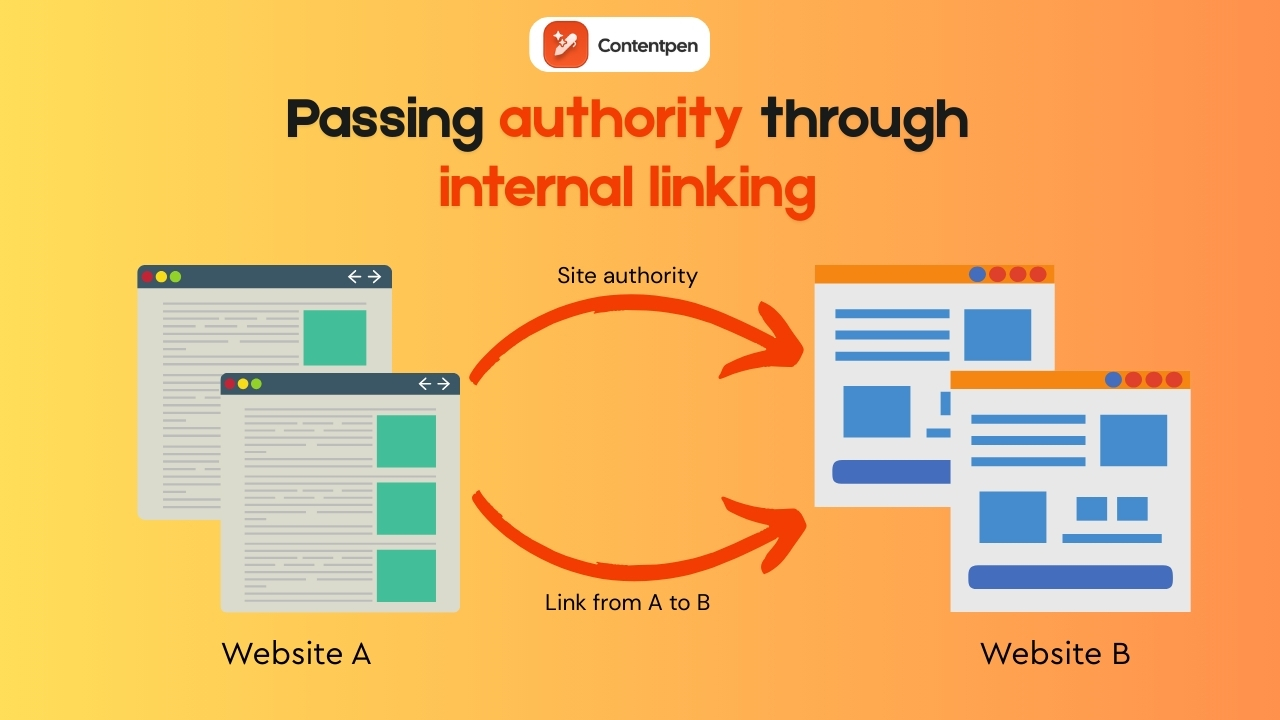
    Passing authority through internal linking - Contentpen.ai.

    Googlebot and other search engine crawlers follow internal links to discover pages, understand how they relate to each other, and decide how often to crawl them. 

    Here is a simple internal link example in HTML form:

    <a href=”https://www.yoursite.com/contact”>Contact us</a>

    This code tells the browser to send the user from one page on your domain to the Contact page.

    Good internal linking in SEO is not just about individual links. It is about how those links structure your content so people and crawlers can understand it.

    Also read: Search engine basics: How they work and why they matter.

    Types of internal linking

    Mainly, there are 7 types of internal links:

    #1: Navigational links

    These links are mostly found in the header menu, main navigation, and sometimes large sidebar menus. They point to core areas such as the homepage, service pages, pricing, and main blog categories.

    #2: Contextual links

    Contextual links are often called in‑text links. They are mostly found inside the body of a post and connect related topics, like an article about external linking to a guide on technical SEO basics. 
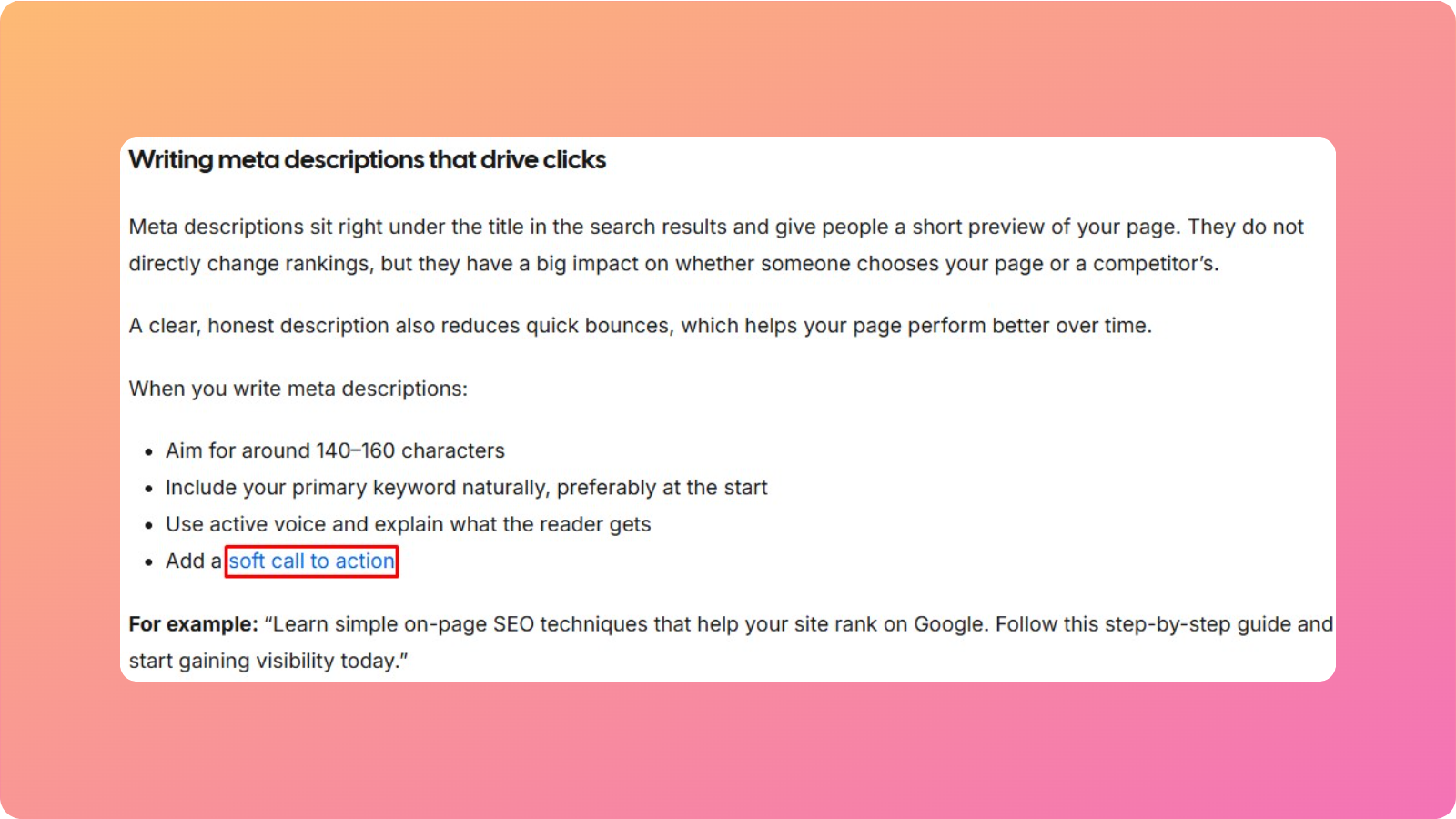
    Contextual internal link example.

    Because they live within content and carry descriptive anchor text, contextual links usually have the most significant SEO impact and do much of the work for topic relevance.

    #3: Footer links

    These appear at the bottom of each page. They often point to contact pages, legal pages, FAQs, careers, or a simple HTML sitemap. 
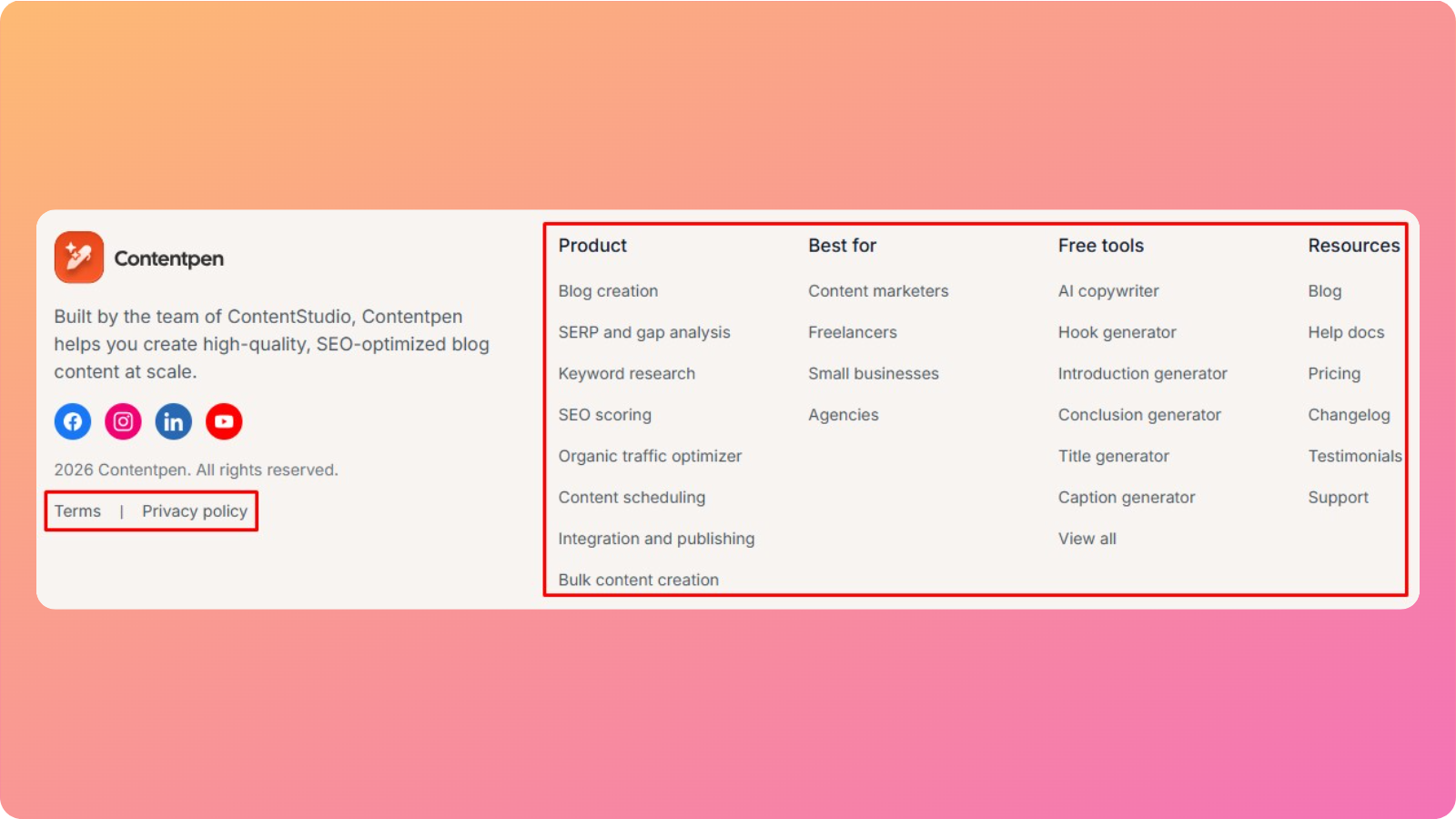
    Footer link example.

    Footer links may not be as powerful as contextual links, but they still help crawlers reach supporting pages and help visitors find “boring” but important information.

    #4: Sidebar links

    Sidebar blocks often show “recent posts,” “popular posts,” or “related resources.”

    When used well, sidebar links reduce the number of clicks required to reach deeper content and encourage visitors to view more pages per session. 

    For large blogs, sidebar modules are a simple way to build internal links at scale.

    #5: Breadcrumb links

    Breadcrumb links show where a user is inside the site structure, in a path like Home > Blog > SEO > Internal linking.

    These types of internal links help visitors jump back to a higher level, and they give search engines a clear view of how categories and subcategories relate on your website.
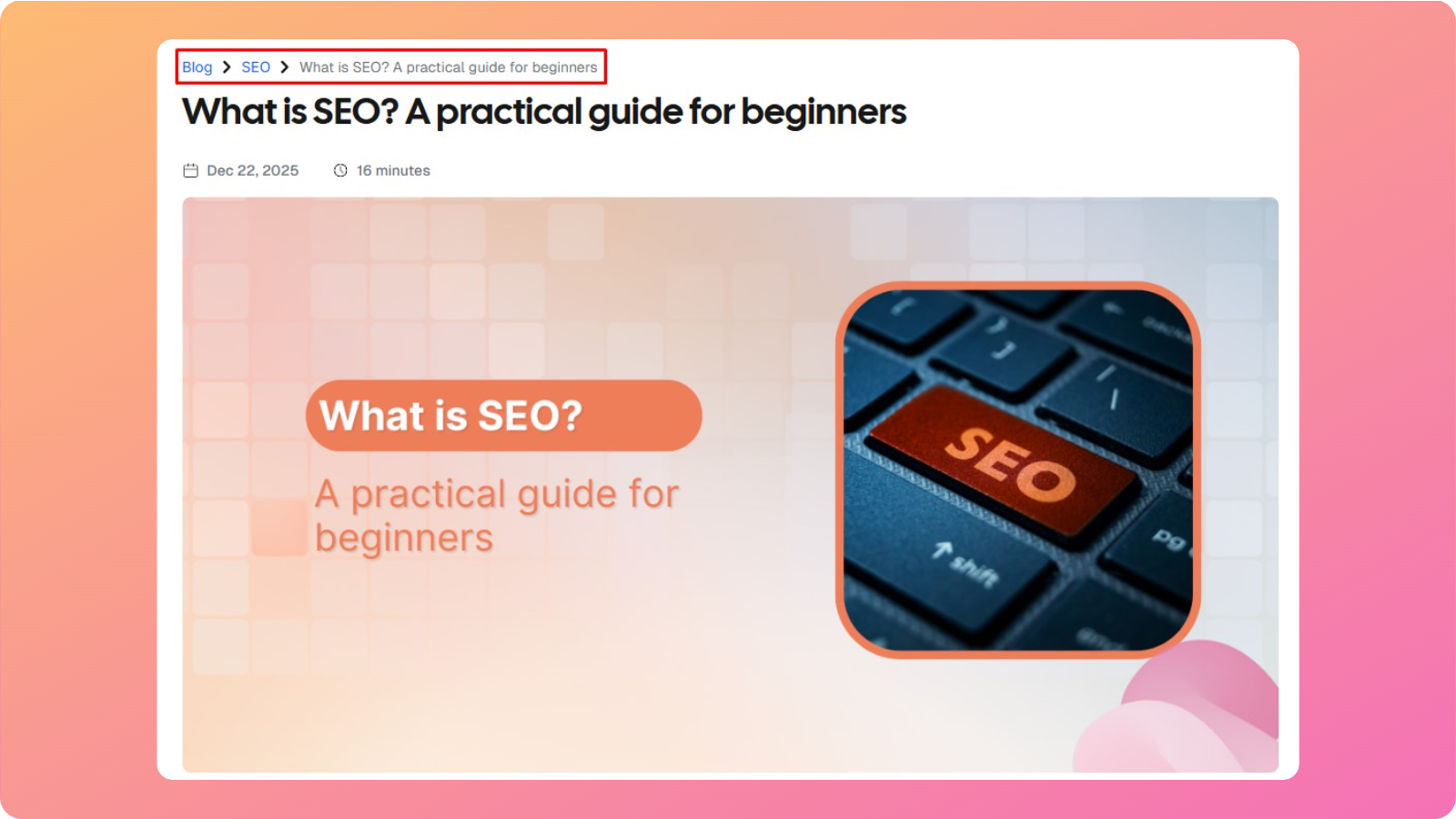
    Breadcrumb link example.

    If you see this example above, our ‘What is SEO‘ guide is placed in the ‘SEO’ category, under the ‘blogs’ main section.

    #6: Image links

    These types of internal links appear when a clickable image points to another internal page. You can place image links in alt text to point to a target page.

    Search engines read the image alt text much like they read anchor text, so make sure to write alt text with much clarity and focus.

    #7: Call‑to‑action (CTA) links

    These are links inside banners, buttons, or in‑content prompts, such as “Book a demo” or “See pricing.”

    CTA links focus more on conversions than on navigation, but they still contribute to interlinking SEO strategies by tying informative content to key pages.

    What is the difference between internal and external linking?

    Internal and external linking both matter for SEO, but they do very different jobs.

    Here is a simple comparison between them:

    AspectInternal linksExternal links
    Domain scopeConnect pages on the same domainConnect a page on your domain to a different domain
    Primary purposeGuide navigation, build site structure, and share authority within the siteCite sources, add context, and send or receive referral traffic
    SEO impactImprove crawlability, spread PageRank, and strengthen topical relevanceWhen other sites link to you, they raise your domain’s authority. Part of off-page SEO.
    Control levelFully under your controlYou control only the links you place out; backlinks from others are up to them.
    ExampleLinking from a blog about internal linking strategy to your SEO services page.Linking from that same blog to a research article on a university site.

    In terms of AEO, external links to vital data, statistics, and other high-authority domains signal topical command to AI platforms, increasing your AI citability.

    Internal links affect AI search optimization indirectly. They show good SEO habits to Google, Bing, and other search engines, which ultimately uplifts your AEO as well.

    How to build an effective internal linking strategy

    Good internal linking is not random. It is a simple, repeatable process that lines up with business goals and the way people search. 

    Instead of sprinkling links wherever they fit, you should design a map and add links that follow it.

    The steps below work for blogs, SaaS sites, ecommerce stores, and even lean startup sites.

    These will help you build internal links that support conversions, build topical authority, and keep crawl paths clean as your content library grows.

    Step #1: Plan your site structure and hierarchy
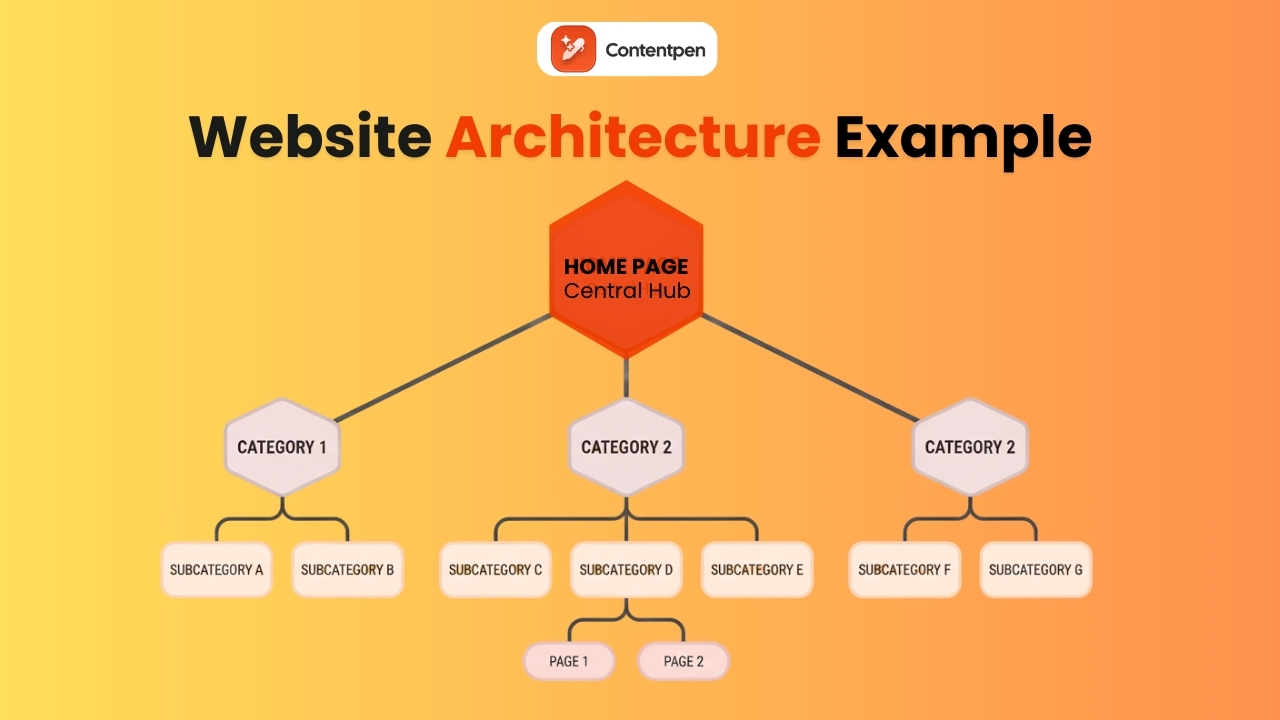
    Website architecture explained - Contentpen.ai.

    The classic site model looks like a top-down diagram. At the top is the homepage. Below that sit category or pillar pages.

    Then, under each pillar page, there are subcategories, followed by individual posts, guides, or product pages.

    This structure works well because it matches how users think. People expect to start from a broad topic, then click down into more specific answers as they move deeper into your site.

    Search engines and AI platforms love the same pattern because it sends a clear signal about which pages are broad overviews and which are narrow subtopics.

    “A good rule of thumb is to keep any important page no more than three clicks away from the homepage.”

    Step #2: Identify your most important pages

    Not all pages are equal. A strong internal linking strategy starts by deciding which URLs deserve the most attention, both as link targets and as sources that should send links to others.

    Focus on three main page groups:

    • Business‑critical pages:
      These include core service pages, high‑intent product pages, pricing, demo, and lead forms. If these pages do not rank well or receive enough traffic, the rest of your SEO work will feel weaker.
    • Pillar pages:
      These are in‑depth resources that target broad, valuable keywords, such as “email marketing starter guide.” Pillars are ideal landing pages for topic clusters and deserve significant internal focus.
    • Authority pages:
      See pages that have earned many backlinks or high search traffic. They are perfect sources to link to conversion pages, new content, and underperforming posts.

    Once you have this list of pages sorted, you’ll have a clear picture of which pages should receive more internal focus.

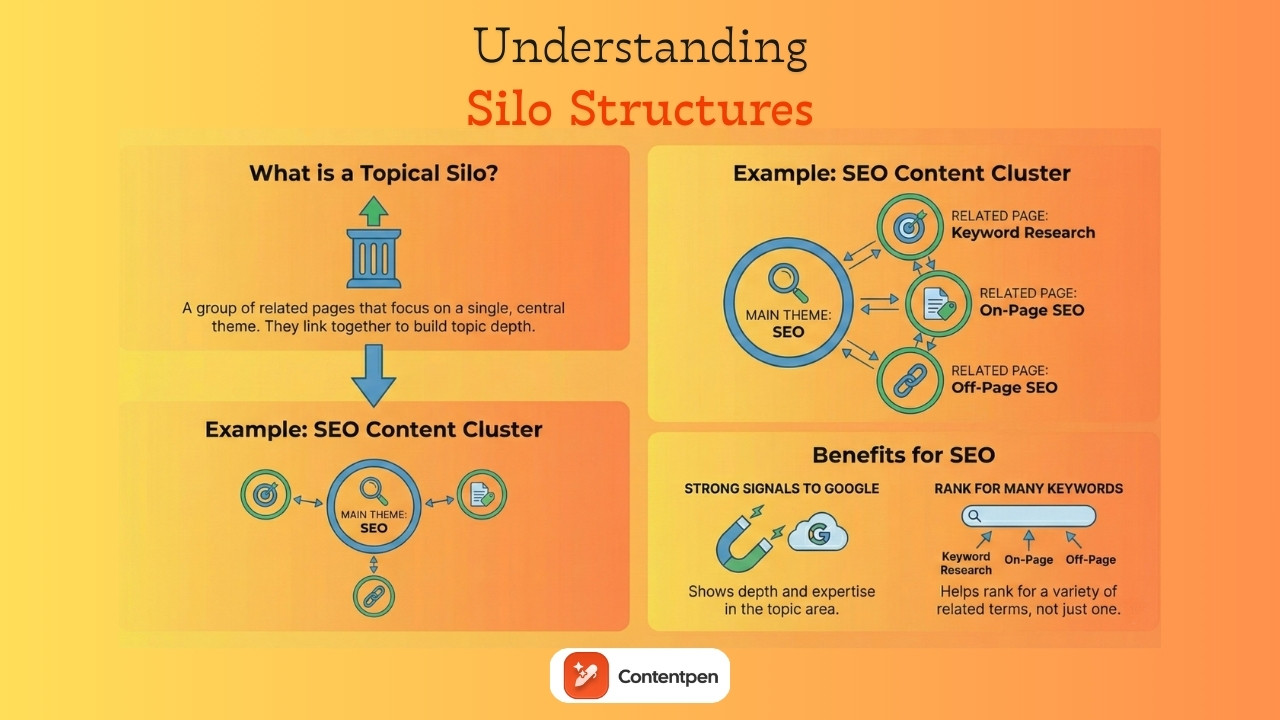
    Step #3: Implement the pillar- cluster content model
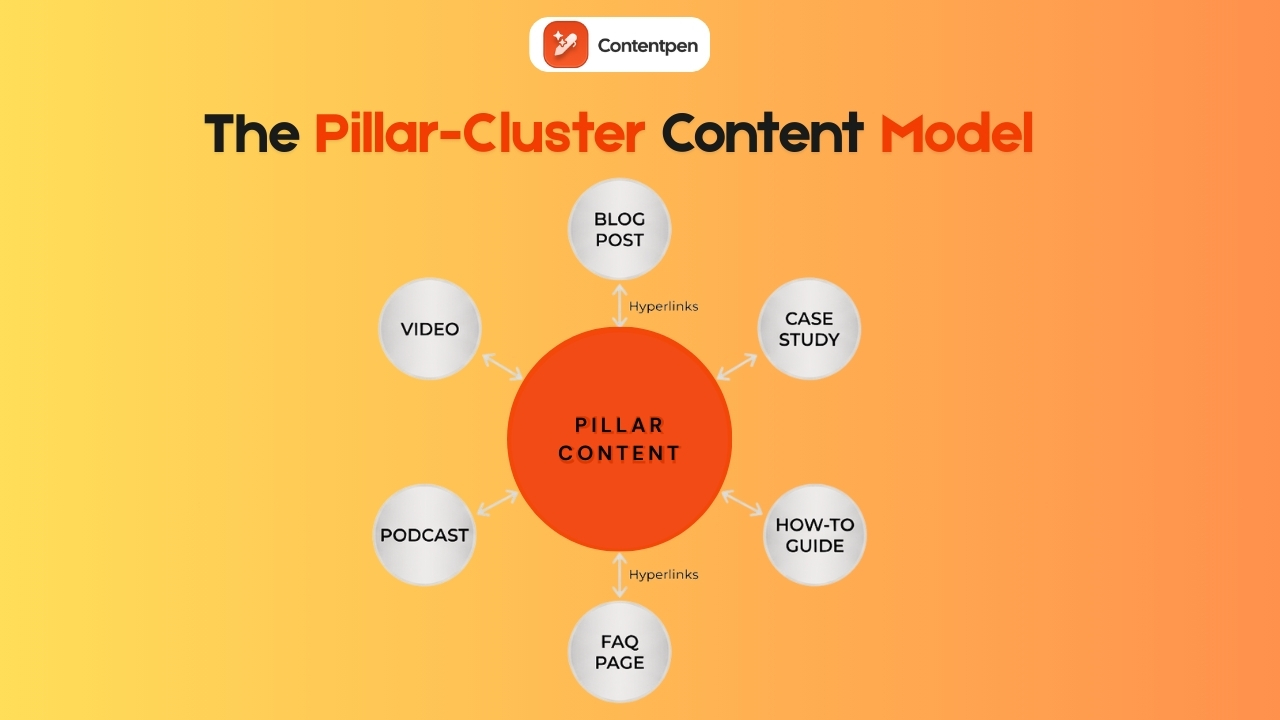
    Pillar-cluster content model explained - Contentpen.ai.

    The pillar‑ cluster model is one of the clearest ways to organize content and internal links for SEO and GEO. It makes the site easy to navigate while also sending a strong topical signal to search engines and AI systems.

    A pillar page is a broad, comprehensive coverage of a core topic. For example, what is content marketing can serve as a pillar for future articles in the same niche. 

    Pillars give readers a big‑picture view, cover main subtopics, and answer common high‑level questions. They are often long‑form content and are meant to rank for competitive keywords.

    Cluster content consists of more detailed posts, videos, or other content types that cover specific angles of the pillar topic. For a pillar, clusters might include:

    • Blog posts. For example, the post “30 recent innovative marketing examples” appears as a cluster under the pillar ‘What is content marketing?’
    • Videos
    • Podcasts
    • How-to guides
    • FAQ pages
    • Case studies

    The linking pattern is simple but powerful:

    • The pillar links out to every cluster page with descriptive anchor text.
    • Each cluster links back to the pillar.
    • Sibling clusters interlink when it is genuinely helpful.

    This creates a tight web of content around a single, broad topic, helping search engines understand that your site covers the subject in depth.

    HubSpot built a 4.5M-visitor blog on exactly this structure — see how HubSpot scaled with topic clusters.

    Step #4: Link strategically from high‑authority pages

    Some pages on a site carry far more SEO weight than others, usually because they have earned many external backlinks or strong search traffic.

    These pages are internal linking gold. They are where you can pass authority to other important URLs with just a few new links. 

    To utilize your high-authority pages for better internal linking, you can:

    • Use tools like Ahrefs or Semrush to list pages with the most organic traffic
    • Review those pages and look for natural places to add links
    • Include key service pages, new cluster posts, or other target pages identified

    However, if adding links manually in the content is challenging for you, try to automate internal linking with Contentpen.

    Improve SEO with automated linking that fills them

    check

    Adds context-aware internal and external links automatically

    check

    Uses relevant anchor text to improve SEO and content flow
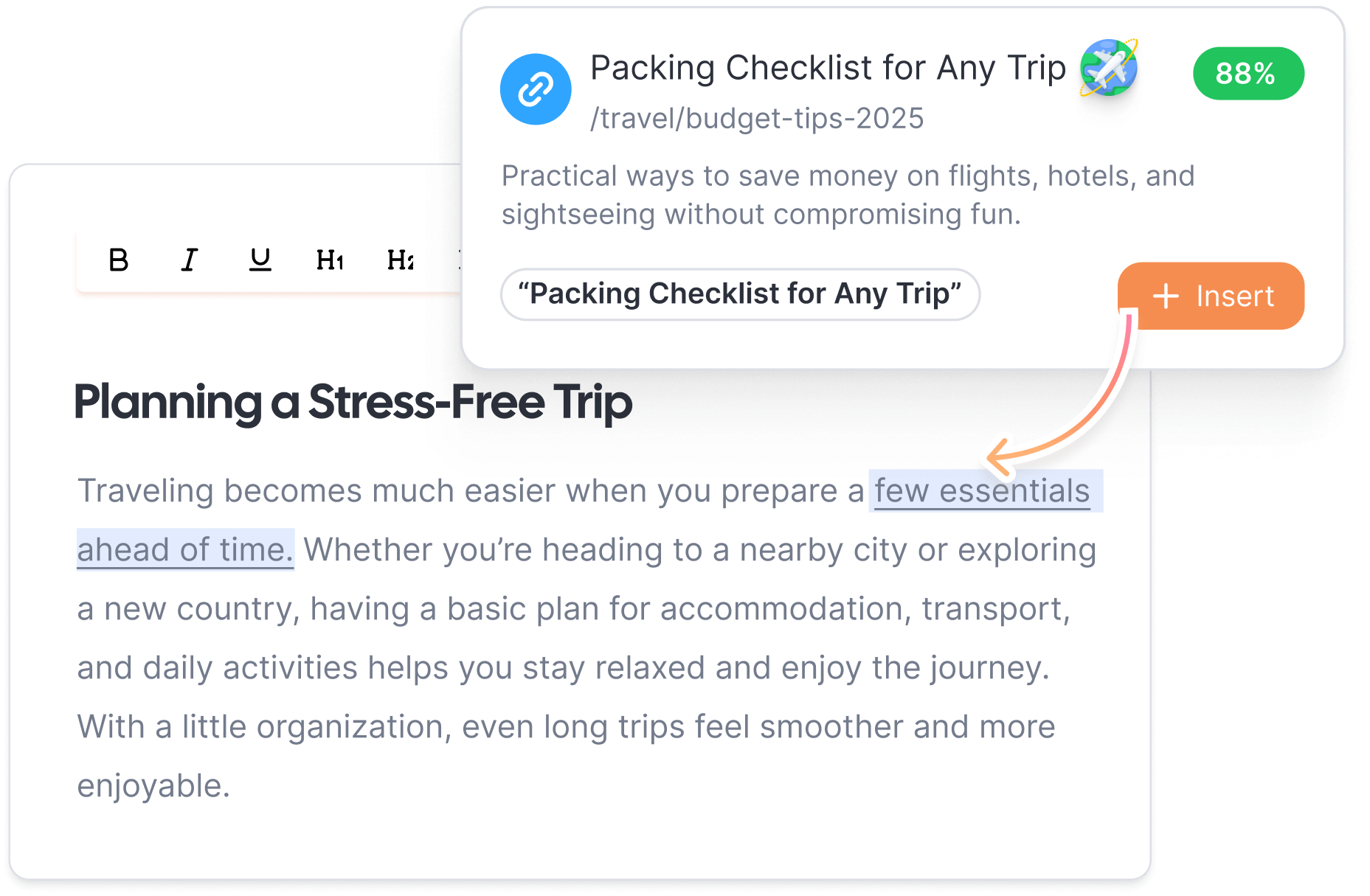
    Try Auto-Interlinking →
    AI SEO Interface

    Our tool intelligently identifies the best, most authoritative pages on your site using your sitemap and adds internal links to your content by itself.

    Step #5: Support every new piece of content

    Every new article, product page, or resource needs support from day one. Publishing without adding internal links is like putting a book on a library shelf with no index.

    Right after publishing a new page, identify 3-5 older but relevant posts that could link to it. A quick way to find these pages is with a Google search using the site operator. 

    For example, type site:yourdomain.com “internal linking” into Google to find all your previous pages where that phrase already appears.

    Open the best matches and add natural, contextual links to the new page referencing the old posts.

    This habit prevents orphan pages and speeds up indexing. It also gives the new content a base level of authority from day one.

    Why internal linking matters for SEO and GEO success

    Google representatives have described internal linking as one of the best ways to guide Google and visitors to important pages on a website. 

    In modern SEO and GEO, internal linking does even more. By connecting related articles and resources, you create a mini knowledge graph on your domain. 
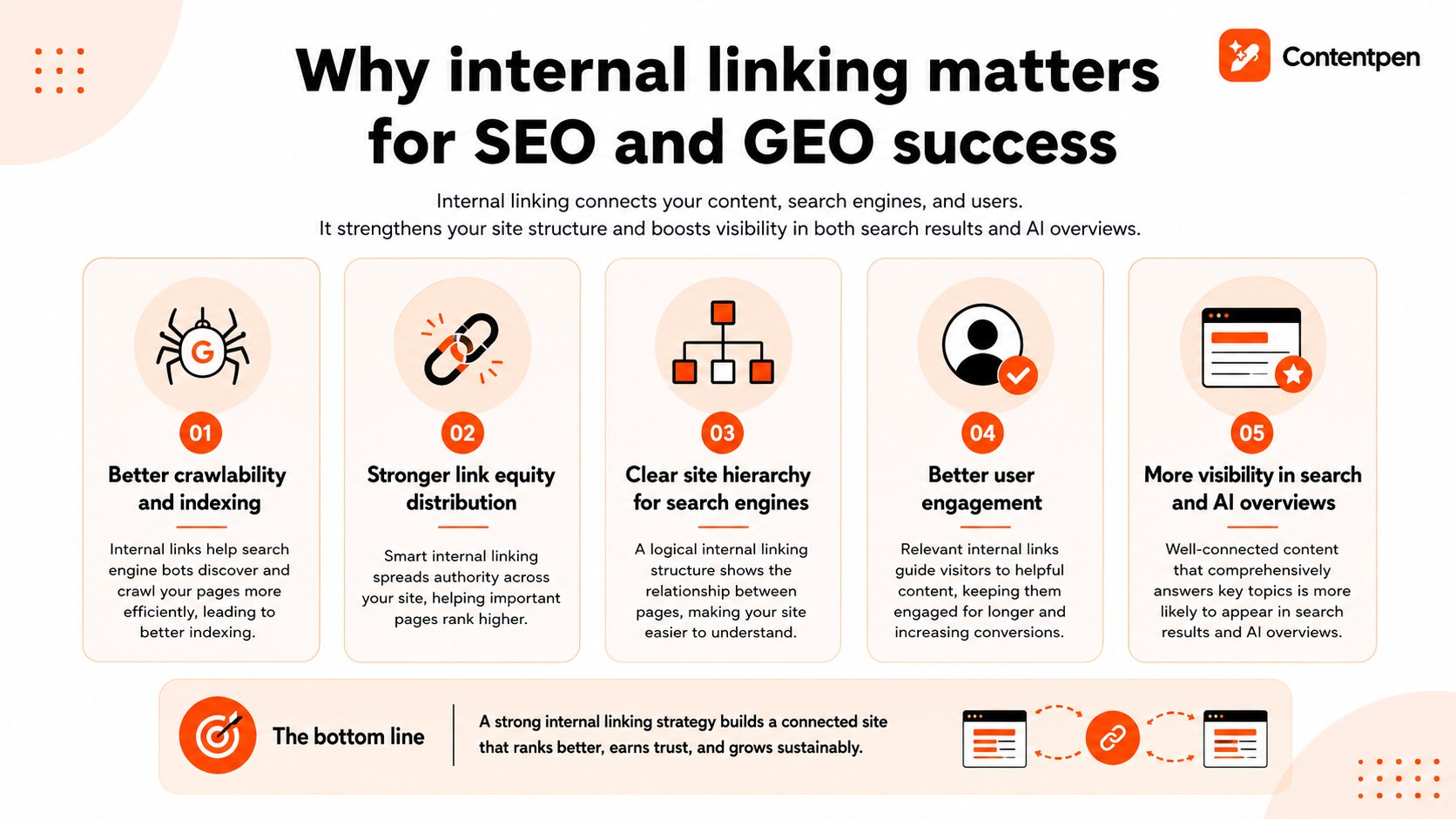
    Why internal linking matters for SEO and GEO success.

    Then, the AI systems use internal links to understand how concepts connect, which pages cover core ideas, and which content shows depth. That makes internal linking one of the few on‑page SEO tactics that support both classic rankings and future AI‑driven visibility at the same time.

    By performing internal linking for your pages, you can:

    • Improve crawlability and indexing for your pages – Internal linking improves crawlability and indexing. Search engine bots move through the web by following links.
    • Distribute link equity throughout the platform – Smart interlinking in SEO helps distribute link equity and authority. 
    • Establish a proper site hierarchy – Internal linking helps search engines read the site’s hierarchy. When the homepage links to category pages, and those link to detailed posts, then Google sees a clear “parent and child” relationship.
    • Enhance user engagement – Internal linking also helps improve user engagement. When visitors always have a clear, relevant next click, they stay longer, view more pages, and are more likely to convert.

    AI Overviews and search engine results also show your pages more often if they’re tied together with sensible internal linking and cover the information required directly.

    Internal linking best practices for maximum impact

    Once the structure and priorities are clear, it is time to focus on how to place internal links to help both users and search engines.
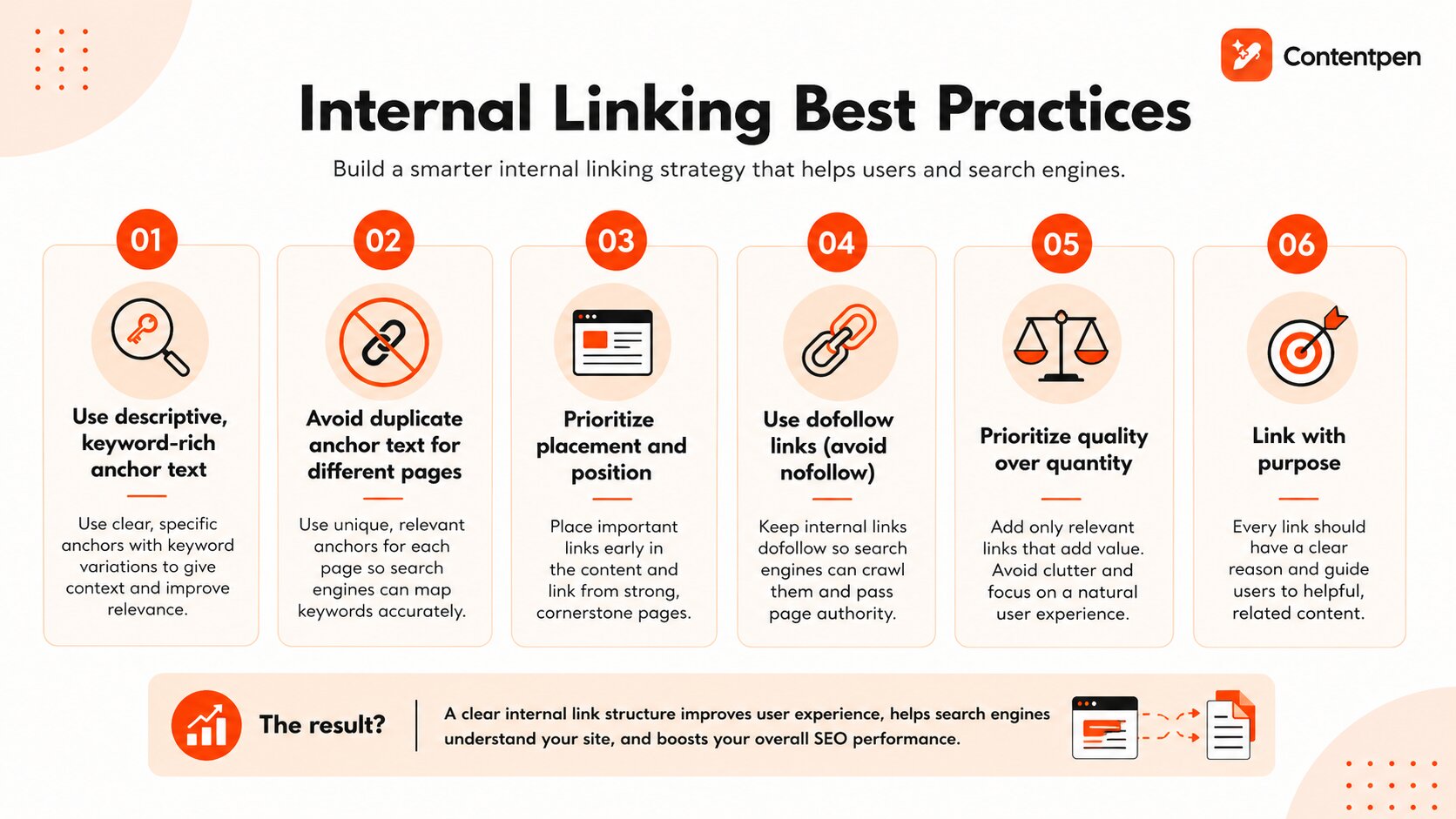
    Internal linking best practices to follow in 2026 - Contentpen.ai.

    #1: Use descriptive, keyword‑rich anchor text

    Anchor text is the clickable text of a link. Internal linking should give readers and search engines a clear idea of what to expect on the linked page. So, instead of vague phrases, use specific wording to link to your internal pages.

    You can also use keyword variations or long-tail keywords to get descriptive anchor texts, which are preferred for voice chat optimization.

    As an example, consider a page about internal linking strategy. It might have anchors like:

    • SEO internal linking strategy
    • How to plan internal linking
    • Internal link structure guide

    Mixing related phrases like this feels natural to readers and gives search engines extra context without sounding spammy.

    #2: Avoid duplicate anchor text for different pages

    Using the same anchor text to point to different URLs can confuse search engines. If two pages both receive links with the anchor “SEO services”, Google has a harder time knowing which page should rank for that phrase.

    When every key page has its own set of descriptive anchors, search engines can map keywords to URLs more confidently. That clarity reduces the risk of your own pages competing against each other.

    #3: Prioritize placement and position

    Where you place an internal link on a page matters almost as much as what it says.

    Try to place at least one important internal link early in the content, as many users never scroll to the very bottom. This is especially true for links pointing to high‑value targets, such as pillar or key conversion pages.

    #4: Use “dofollow” links (avoid nofollow)

    By default, links are dofollow, which means search engines can crawl them and pass PageRank through them. For internal linking, that is exactly what you want. Internal links exist to share authority across the site and guide crawlers.

    Also read: Defining share of voice (SOV).

    If an internal link has a rel=”nofollow” attribute, it acts like a blocked road for authority. Search engines can still see the link, but they are told not to pass value through it. 

    Therefore, you should use nofollow for certain external links, such as untrusted user‑generated content or third-party content that you do not endorse.

    #5: Don’t overdo it: Prioritize quality over quantity

    There is no perfect number of internal links per page. Google can crawl hundreds of links on a single page, but that does not mean people want to see them. A page full of links can feel noisy, and each link may receive less attention and less authority.

    #6: Focus on the quality and relevance of internal links

    As a general rule of thumb, use about 2-5 strong contextual internal links in blog posts of about 1,000 to 1,500 words.

    That said, longer posts can include as many links as needed to clearly justify and explain the topic.

    If a page starts to look cluttered, review all internal links and remove those that are outdated, duplicated, or only loosely related to the context.

    Also read: How to do SEO: A complete step-by-step guide for beginners.

    How to automate internal linking using Contentpen

    While dedicated SEO tools are suitable for internal linking analysis, they will not place the links into your content.

    This is where our SEO tool comes in. It simplifies the linking process by automatically adding contextual, high-quality internal and external links to your content as you write.

    With Contentpen, you can also add internal links to articles that you’ve already written or produced in your pipeline.
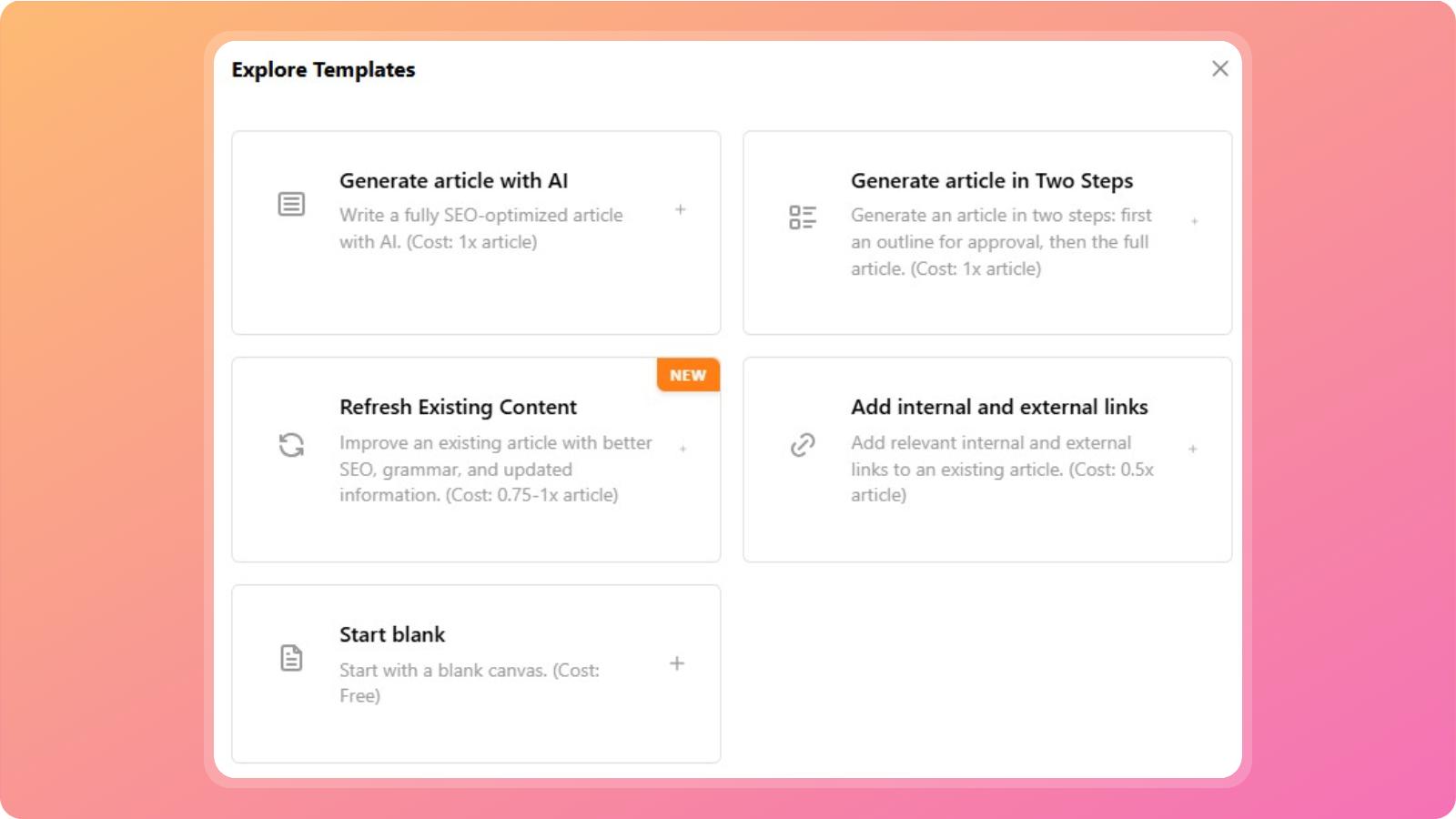
    Explore templates page - Contentpen.ai.

    For this method to work, simply select the ‘Add internal and external links’ template button.

    Enter your focus keyword and main title, and start uploading your content for effective interlinking.
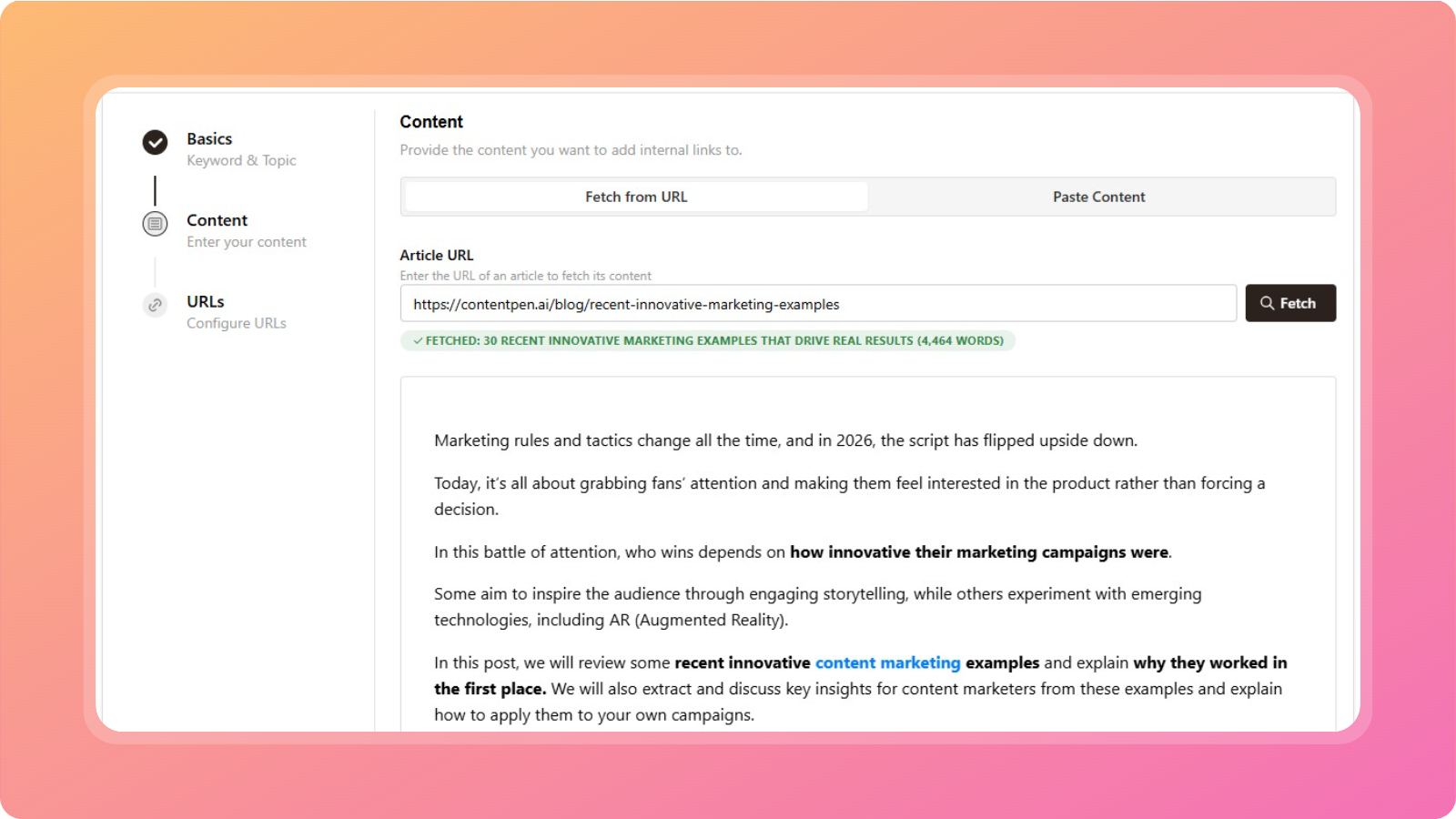
    Fetching content for internal linking - Contentpen.ai.

    Upload the required content either through the article URL or by pasting text into the box.

    After this, the AI writer will automatically add internal links with highly relevant anchor text and natural placements.

    Once the process is finished, you can click the newly added internal links in your blogs to open more options. Here, you can change the link text and URL or remove them completely.
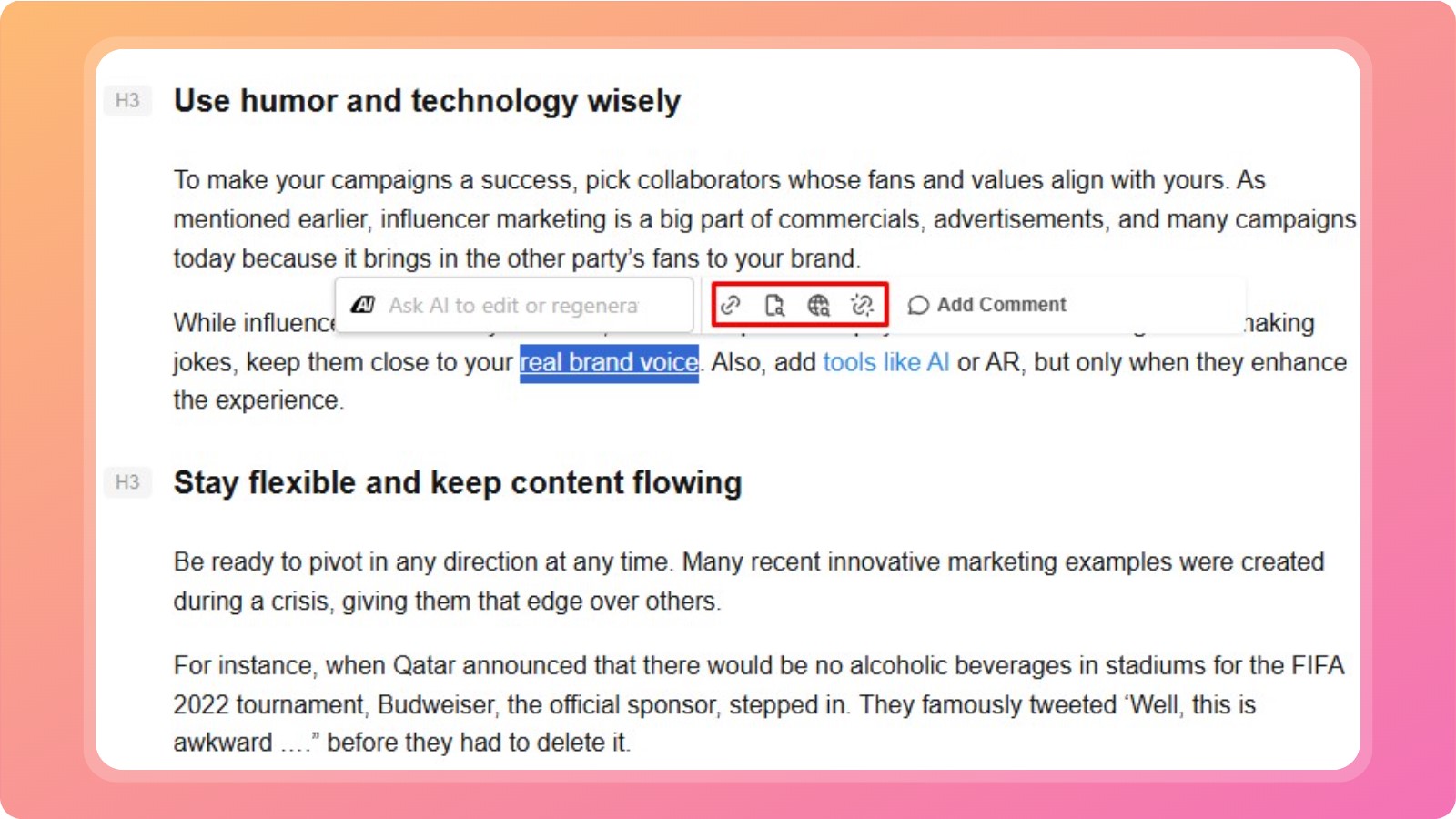
    Editing and updating internal links in content - Contentpen.ai.

    You can also click on the ‘Find internal links’ option to surface more relevant pages from your site, granting you full control over your interlinking efforts.

    Summing it up

    Internal linking is an effective SEO strategy that guides search engine crawlers and AI systems through your pages and makes it easier for users to navigate your platform.

    Having said that, many professionals still struggle to implement effective internal linking best practices, resulting in orphan pages, high bounce rates, and more.

    This guide was written to help individuals, agencies, and businesses rank higher in SERPs and AI Overviews, making their platforms SEO- and GEO-ready with minimal effort.

    In the end, we also saw how Contentpen can help automate internal and external links, further simplifying this process for your convenience.

    FAQs on internal linking

    What is an internal linking website?

    Internal linking on a website means connecting different pages within the same domain using hyperlinks. A website where pages are intentionally connected through internal links to support navigation, crawling, and content hierarchy is likely to rank higher than others.

    Should I use exact‑match anchor text for internal links?

    You can use exact-match anchor text, but do so sparingly. Prefer natural variations to avoid over-optimization and keyword cannibalization.

    What’s the difference between deep links and shallow links?

    Deep links point to internal pages beyond the homepage or category level. Shallow links point to top-level pages, such as the homepage or main categories.

    How do I find internal linking opportunities?

    You can find internal linking opportunities by using a mix of manual checks and SEO audit tools. For faster and scalable execution, use Contentpen to automatically scan your sitemap, identify relevant linking opportunities, and insert natural internal links accordingly.
  • What are SEO backlinks, and how do they work?

    What are SEO backlinks, and how do they work?

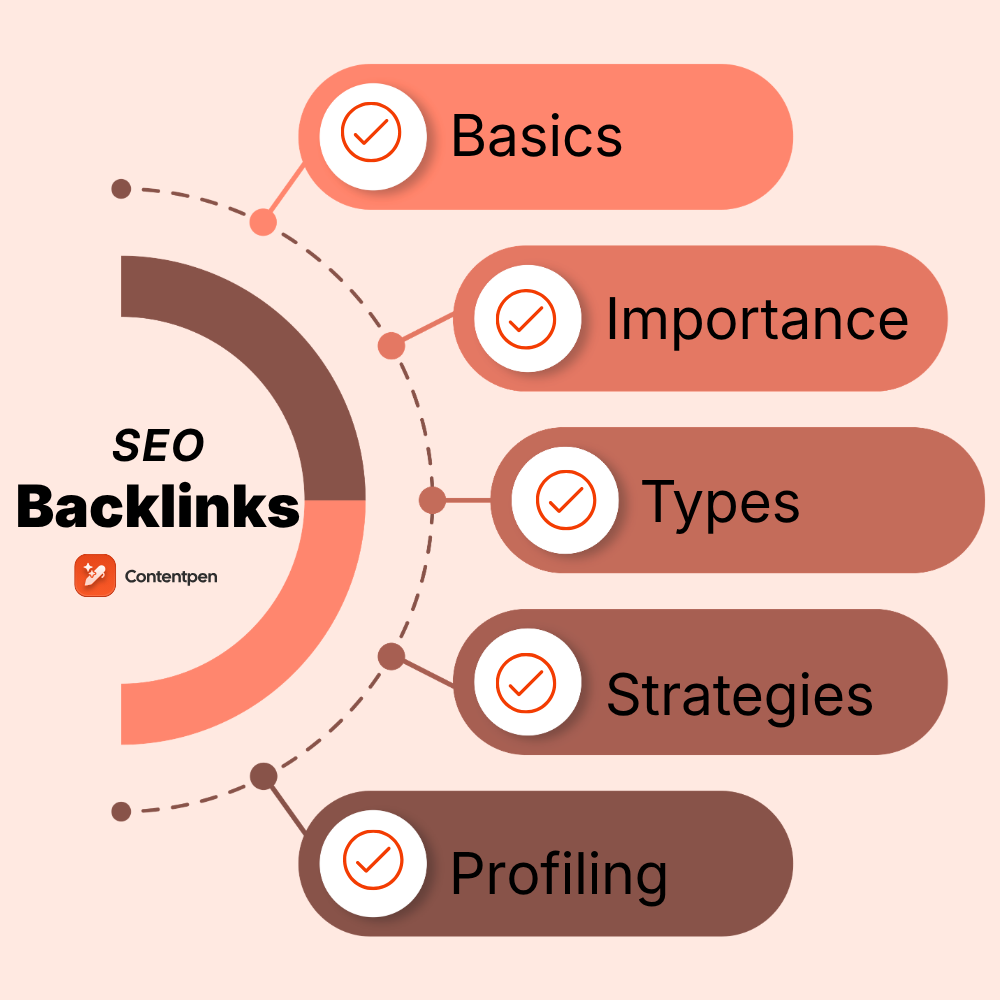
    Backlinks remain one of Google’s most influential ranking factors, yet they’re also one of the most misunderstood concepts. While many site owners focus on publishing content, few know how backlinks actually work.

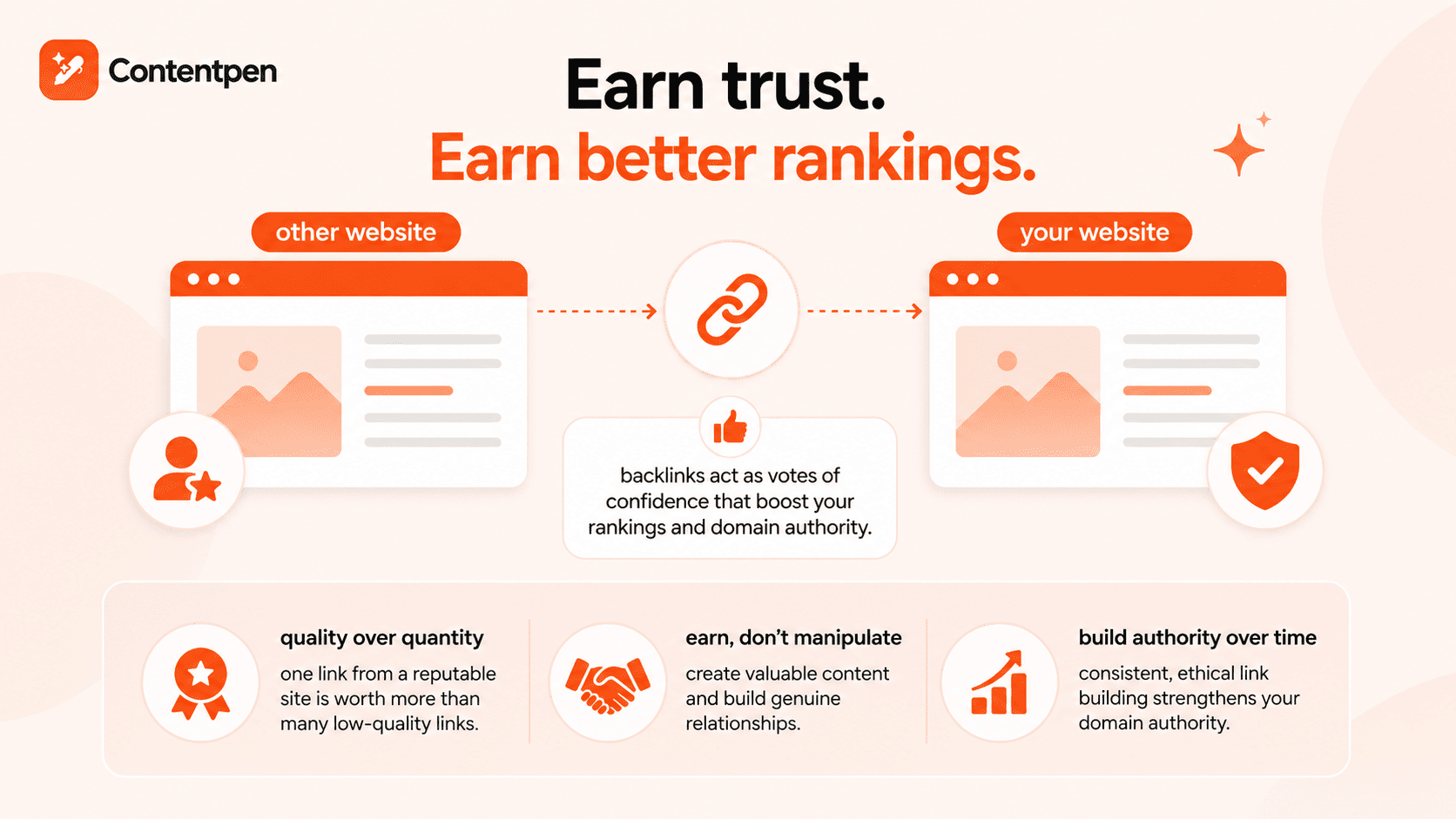
    SEO backlinks are links on other platforms that point to your website. In terms of SEO, they’re like votes of credibility that help your visibility in SERPs (search engine results pages).

    Earning high-quality SEO backlinks from reputable websites is easier said than done. It requires consistency in content creation and outreach efforts while following best practices to create an appealing overall user experience.

    In this post, you will learn all about how backlinks help you grow your online platforms sustainably. You will also learn from some real-life content marketing strategy examples and see how Contentpen can assist you in this cause.
    So, let’s get started.

    The basics of SEO backlinks

    Backlinks are part of off-page SEO. There are mentions of your site on other platforms, such as Reddit, Quora, Medium, etc., which are often recognized as a ranking factor. 

    Read more: SEO glossary for 2026.

    SEO backlinks tell crawlers, such as Googlebot, how important a webpage is on the World Wide Web using the PageRank algorithm. This ranking mechanism indicates that the quality of backlinks matters more than their quantity.
    For instance, 2 links to industry leaders in your niche might be more beneficial for your SEO than 20 scattered links over the Internet.
    Where are SEO backlinks used?

    You can use backlinks on your platform to:

    • Provide a broader context to the reader
    • Add authenticity to the content
    • Recommend something (e.g., an item for purchase)
    • Cite sources or statistical data

    While there can be many purposes of SEO backlinks, they’re essentially used to build topical authority on a subject and boost rankings by linking to top sites.

    Also read: Search engine basics: How they work and why they matter.

    The difference between internal links and backlinks

    Internal links and backlinks serve different purposes in SEO, even though both involve linking between pages.

    Internal links connect pages within the same website. They help users navigate your site, distribute link equity across pages, and guide search engines toward your most important content.

    Backlinks, on the other hand, come from external linking. They act as signals of trust and authority, helping search engines evaluate how credible and valuable your content is compared to others on the web.

    Here’s a simple table to differentiate the two SEO linking strategies:

    AspectInternal LinksBacklinks
    SourcePages within the same websiteExternal websites
    ControlFully controlled by the site ownerEarned, not controlled
    SEO roleImproves site structure and crawlabilityBuilds authority and trust
    Ranking impactIndirectDirect and strong
    RiskLowCan be harmful if low-quality

    Both are essential for SEO, but they solve different problems. Internal links strengthen your site from within, while backlinks build your site’s reputation across the wider web.

    How to create backlinks in SEO?

    Backlinks are placed on the visible text of your copy, called anchor text. Anchor text helps search engines guess what the target page is about. 

    Common types of anchor text include:

    • Branded anchors such as your company or product name
    • Keyword-rich anchors that include your primary phrase, such as “what is on-page SEO”.
    • Generic anchors such as “click here” or “this article.”
    • Naked URLs, where the link text is simply the web address, such as https://contentpen.ai/. 

    A natural backlink profile contains a healthy mix of these different anchor text types.

    One area where many people go wrong is the overuse of exact match keywords. If hundreds of your backlinks use the exact same keyword as anchor text, it can look like manipulation and leave a negative footprint on the World Wide Web. 

    Also read: 15 types of keywords: Complete SEO guide for 2026.

    Google’s Penguin filter monitors these kinds of patterns and can help determine your pages’ rankings.

    Why are backlinks important for SEO?

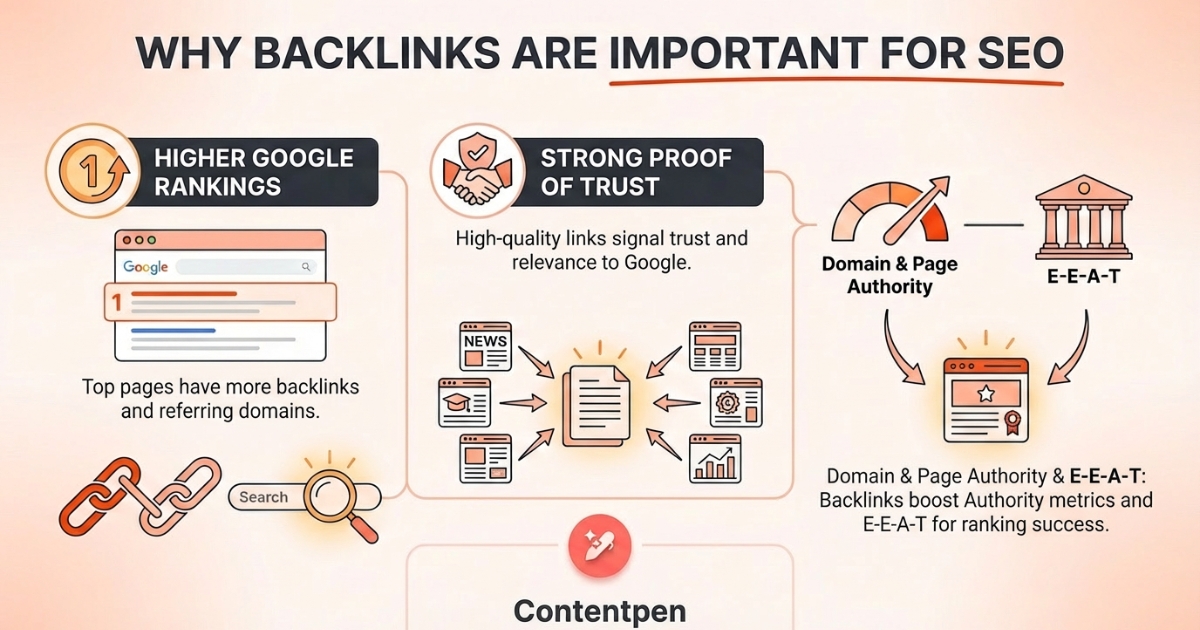
    Backlinks significance in SEO - Contentpen.ai.

    Many industry studies show that pages in the first position on Google usually have far more backlinks and more referring domains than the pages right below them.

    The reason is simple. 

    When many high-quality sites link to a page, Google reads that as strong proof that people in that field trust and use that content.

    Backlinks also power common SEO metrics like Domain Authority and Page Authority. These scores try to predict how likely a domain or page is to rank.

    Sites with many high-quality backlinks from diverse referring domains tend to have higher authority scores. DA PA checker is used by SEO experts to evaluate these scores from time to time, so they can compare website authority growth with competing domains.

    Outgoing links also affect E-E-A-T, which stands for Experience, Expertise, Authoritativeness, and Trustworthiness. When respected sites in your niche point to your content, Google sees that as proof you know the topic and that your information can be trusted.

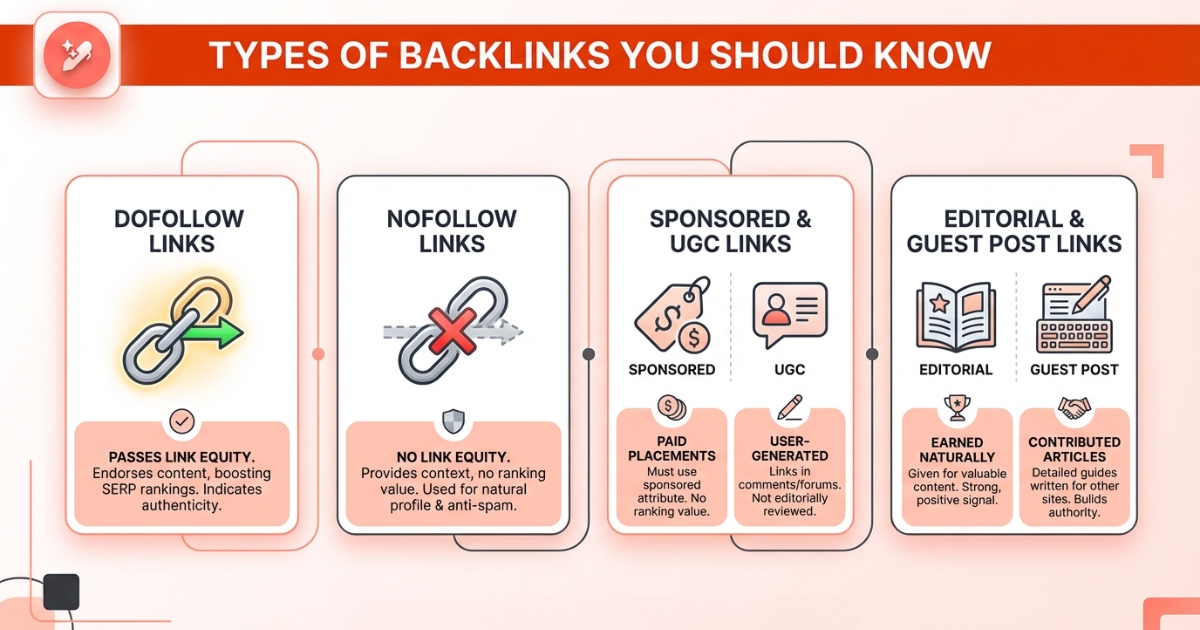
    Types of backlinks you should know

    Types of backlinks - Contentpen.ai.

    Mainly, there are 4 types of backlinks:

    • Dofollow links
    • Nofollow links
    • Sponsored and UGC links
    • Editorial and guest post links

    Let’s review them one by one in more detail.

    Dofollow vs nofollow backlinks

    Dofollow links pass link equity, or link juice, to the linked website, boosting its ranking in SERPs. It is a reminder to the crawler that you endorse the product, content, or any service on the linked website, thereby showcasing its authenticity or reliability.

    On the contrary, nofollow backlinks are used to provide readers with some reading context for the material you’ve covered. But you do not pass the link equity to the linked website.

    Initially, nofollow links were used to combat online spam. Now, many SEO strategists use them to add contextual value to content and build a natural, more balanced backlink profile for their websites.

    Sponsored and UGC links

    Sponsored and UGC links are used for paid placements or ads. 

    When a blogger gets payment or a free product in exchange for a mention, that link should use the sponsored attribute so it does not pass the normal ranking value.

    On the other hand, site owners use the user-generated content (UGC) tag on links that appear inside comments, forums, or other places where visitors can post. This tells search engines that the link was not reviewed or placed by the editor, so it should be treated with care. 

    These attributes give search engines a clearer picture of which links were earned and which were bought or posted by users.

    Editorial and guest post links

    Editorial backlinks are some of the best types of backlinks a site can earn. These links happen when a writer, editor, or site owner discovers your content and decides to link to it because it helps their readers. 

    No one pays anyone, no one trades favors, and the link is there simply because the content is valuable. Search engines treat this kind of backlink as a very strong positive sign.

    Guest post backlinks come from articles you write for other sites. You might write a detailed guide for a partner blog in your niche and include one or two links back to your own site, either in the content or in your author bio.

    Proven strategies to earn quality backlinks

    Outreaching to web admins and site owners is helpful in earning quality backlinks through reliable white-label link building solutions, but only if what you have to offer is worthwhile.

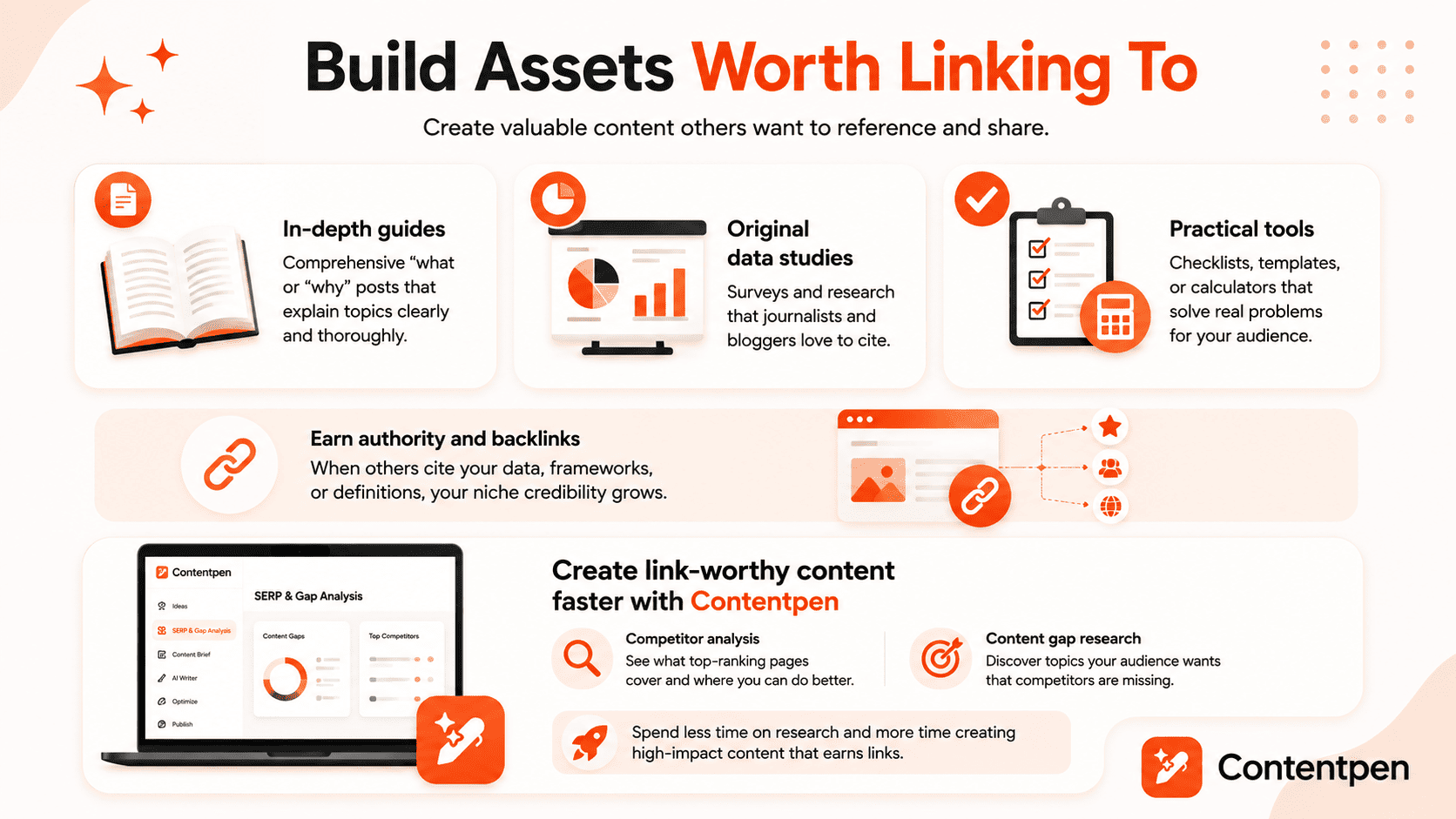
    Create linkable content assets

    Building linkable assets - Contentpen.ai.

    For a strong link-building strategy, you need helpful, detailed content that other sites would want to reference.

    Think about content formats that tend to attract links:

    • Comprehensive “what” or “why” posts, like clear guides that explain a topic in depth
    • Original surveys or data studies, which journalists and bloggers can cite
    • Practical checklists, templates, or calculators that solve a real problem

    When people cite your data, frameworks, or definitions, you gain credibility in your niche.

    That said, writing such content is no easy feat. It requires hours of manual research and writing, which can be tiring, especially for agencies that publish at scale.

    This is where our AI SEO tool shines. Contentpen helps content teams turn ideas into well-structured, SEO-friendly posts with ease. It automatically performs competitor analysis and content gap research, so you can see where your content can stand out from the competition.

    Write content that’s built to rank, not just read

    Create search-optimized blogs aligned with SEO and GEO signals, so your content performs well across search and AI-driven discovery.

    Try SEO Blogging FREE →
    AI SEO Interface

    Use broken link building to your advantage

    Instead of writing plain emails to request a backlink, try to replace the broken links on others’ websites with one of your own. This strategy, called broken link building, is highly effective for your organic growth.

    The usual flow looks like this:

    1. Find resource pages or articles in your niche that link out to many external sources.
    2. Use a browser extension or SEO tool to scan those pages for links that lead to 404 error pages.
    3. When you find a few broken links that match topics you cover, reach out to the site owner with a short, friendly email.
    4. Point out the dead links and suggest your content as a better alternative.

    Helping people fix broken links on their pages while pointing them to your resource is a win for everyone.

    Pursue digital PR and media outreach

    Digital PR takes link building into the world of news and media. The idea is to earn coverage and backlinks from journalists, bloggers, and large publications by offering helpful stories, data, or expert insights.

    Platforms like Qwoted let journalists, PR professionals, and bloggers find sources quickly from industry experts.

    Over time, this type of outreach positions you as a go-to voice in your niche. Each time you appear in an article with a backlink, you do more than gain SEO strength. You also put your brand in front of new readers who are already interested in your topic.

    Utilize guest posting and partnerships

    Guest posting remains one of the most reliable ways to earn backlinks when handled with care.

    It means offering strong, original articles to relevant blogs, industry publications, and partners where your audience already spends time.

    To find good guest post options, you can search Google for phrases such as your main keyword plus “write for us” or “contribute.” Study the sites you find to make sure they have real readers, clear editorial standards, and content that matches your field.

    Since finding quality publishing opportunities can take significant time, many businesses choose to work with a trusted blogger outreach agency, which has established relationships with relevant publishers and follows editorial best practices to secure high-quality placements.

    Partnerships also play a role. You might team up with another brand to run a joint webinar, co-author a white paper, or run a study. Each partner usually hosts content on their own site and links to the other.

    Create rank worthy content at scale

    check

    Faster

    check

    Consistent

    check

    SEO-ready

    check

    Efficient

    Try Bulk Content Creation →
    AI SEO Interface

    How to analyze and manage your backlink profile

    To properly analyze and manage your backlink profile, you must:

    • Use online tools for backlink analysis
    • Identify and disavow toxic links
    • Fix broken links

    Starting with the first one.

    Use tools for backlink analysis

    SEO tools such as Moz Link Explorer, Semrush Backlink Analytics, and Ahrefs let you enter your domain to see lists of backlinks and referring domains. You can check how many links you have, which pages attract the most traffic, and how strong the linking sites appear to be.

    Read more: The complete SEO analytics guide.

    These tools also show anchor text patterns and give you a breakdown of dofollow versus nofollow links. Many of them let you track new and lost backlinks over time, which shows whether your link-building efforts are working or not.

    Identifying and disavowing toxic links

    Not every backlink helps your SEO. Some links can hurt you, especially if they come from spammy sites, hacked sites, or private blog networks.

    For this reason, many modern SEO competitor analysis tools include a spam score or toxicity score so you can spot risky backlinks. If you notice a specific domain with many spammy links, exclude it from your backlinking strategy.

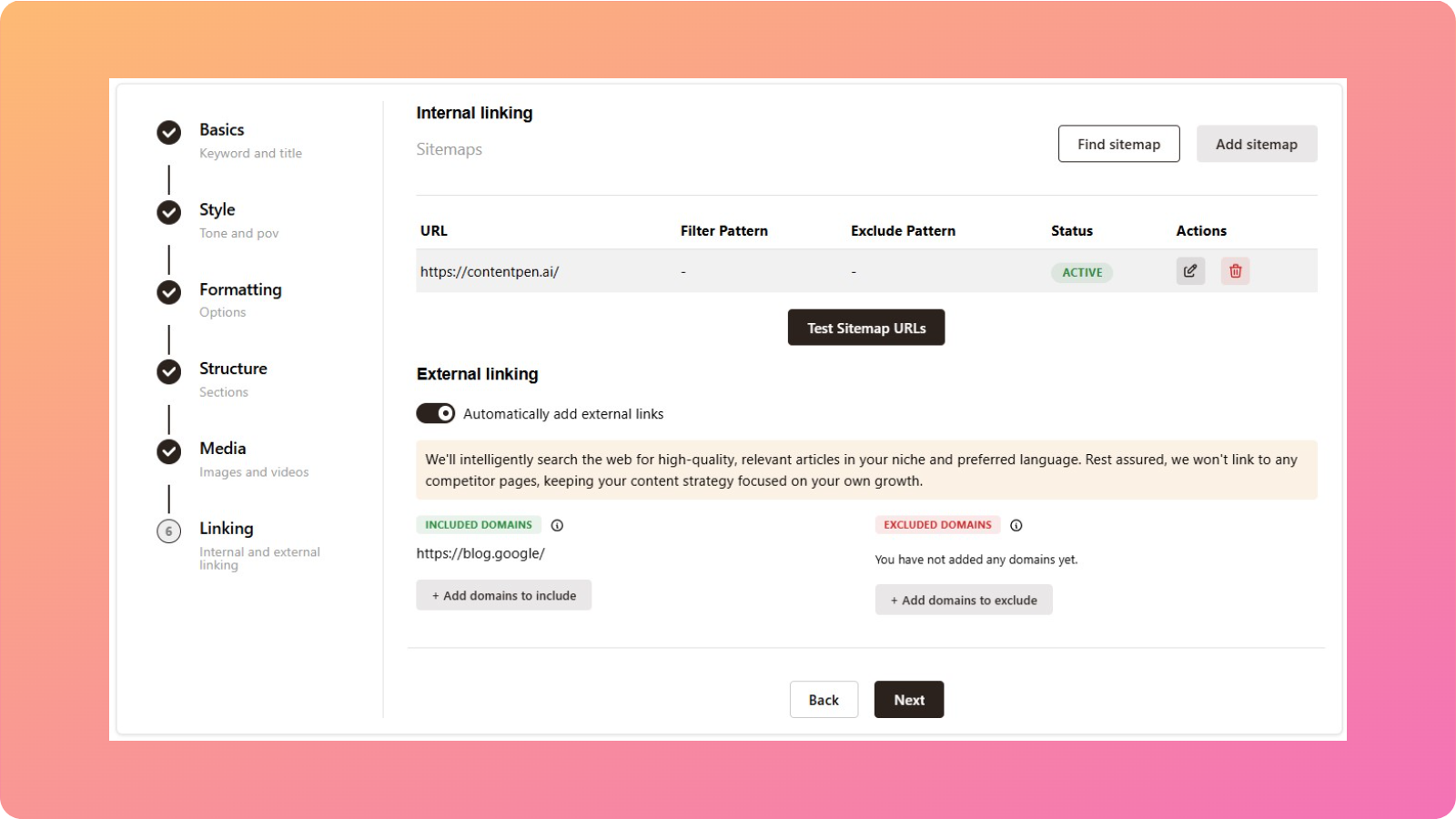
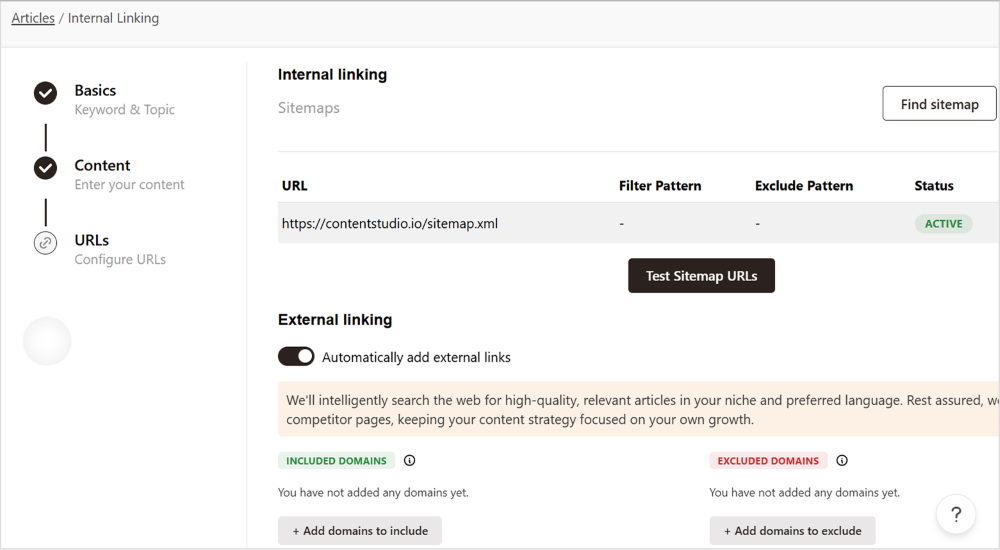
    To make this process a bit easier, you can use our tool to include and exclude domains automatically while writing the content.

    AI internal linking tool interface - Contentpen.ai.

    This will help you completely abandon toxic links, keeping your backlink profile healthy and ready for scaling.

    Fixing broken links

    Broken links usually appear over time as pages are moved, renamed, or removed. When a backlink points to one of these outdated URLs, you can encounter a 404 error page.

    From an SEO perspective, this means wasted link equity. Any authority passed from external sites stops flowing, and valuable referral traffic is lost. 

    Left unchecked, broken links quietly weaken your backlink profile.

    Also read: How to do SEO?

    To ensure this doesn’t happen, you can detect broken backlinks using tools like Google Search Console. Once identified, map each broken URL to the most relevant live page on your site.

    The primary fix is to set up 301 redirects from outdated URLs to active pages. This preserves the link value and ensures users and search engines land on useful content without interruption.

    Regularly fixing broken links with SEO audits helps you retain the benefits of backlinks you’ve already earned, improve crawl efficiency, and maintain a clean, reliable website structure.

    Final thoughts

    SEO backlinks are more than just links pointing to your website. They’re signals of trust, relevance, and authority that help search engines decide where your content belongs in the results.

    By understanding backlink types, placing links thoughtfully, and maintaining a clean backlink profile, you build a stronger foundation for sustainable SEO growth.

    Whether you’re earning editorial mentions or fixing broken links, consistency matters. That’s why using Contentpen is vital to your backlinking strategy. With our tool, you can streamline research and content creation so that you can publish linkable assets without any hurdles.

    Frequently asked questions

    How do I get SEO backlinks?

    You get SEO backlinks by earning links from other websites. This usually happens when you publish useful, original content that others want to reference, such as guides, studies, or statistical data. The focus should always be on relevance and quality, not volume.

    What are some SEO backlink examples?

    Common examples of SEO backlinks include a blog post linking to your guide as a source. A news website referencing your data or research, or a resource page listing your tool or article. These links can be dofollow, nofollow, sponsored, or editorial, depending on how they’re placed.

    How long does it take for backlinks to impact SEO?

    Backlinks do not improve rankings instantly. In most cases, noticeable SEO impact can take several weeks to a few months, depending on link quality, competition, and overall site health.

    What are social media backlinks?

    Social media backlinks are mentions that your business receives on social platforms from other brands. Even though most of these links are nofollow, they’re still helpful for building a balanced link profile.

    What are white-hat SEO backlinks?

    White hat SEO backlinks are links earned from authoritative websites that follow Google’s ethical posting guidelines by providing user-valuable content.

    What are the 4 types of SEO?

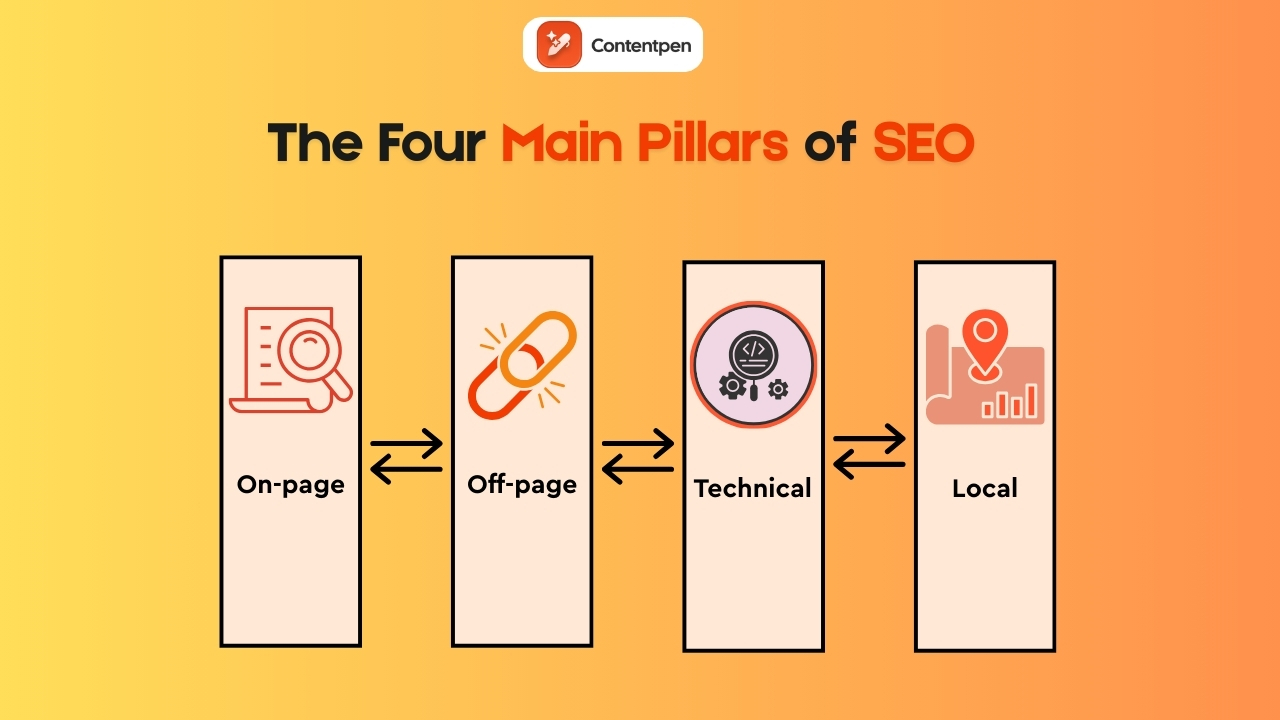
    The four main types of SEO are on-page, off-page, technical, and local SEO. Each serves a different purpose in getting you to the top SERP positions and maintaining them.

    Are SEO backlinks free?

    SEO backlinks can be free, but they are not effortless to obtain. Editorial links, organic mentions, and backlinks earned through content are free, but they require time, research, and consistent effort.

  • What is off-page SEO? Expert strategies you can use today

    What is off-page SEO? Expert strategies you can use today

    Picture a content marketer who spends weeks planning, writing, and polishing a great blog post. The keyword research looks solid, headings are on point, and internal links are tidy. The post goes live, everyone feels proud, and then the traffic graph barely moves.

    The reason for this debacle is the lack of a proper off-page SEO strategy. 

    You can do excellent on-page SEO and still struggle to rank if other sites never talk about you, link to you, or mention your brand.

    In this guide, you will learn the off-page SEO techniques that actually move the needle right now. We will walk you through the backlink strategies, guest posting for SEO, social media signals, local SEO moves, and a simple off-page SEO checklist of best practices.

    So, let’s begin, shall we?

    What is off-page SEO and why does it matter?

    Off-page SEO optimization matters because search engines rely on external links or validation to rank pages. When trusted sites link to or mention your brand, it signals authority, relevance, and credibility beyond your own content.

    That includes:

    • Backlinks from other websites
    • User-generated content (UGC) on forums like Reddit or Quora
    • Brand mentions in articles, podcasts, and social posts
    • Awards and recognition from sites like G2 or Capterra
    • Reviews and ratings on platforms such as Google and Yelp
    • Social media activity that spreads your content
    • Appearances and features on podcasts, webinars, and industry sites

    Search engine optimization means treating these signals like votes of confidence. A backlink is a direct vote. A mention in a respected article or a wave of positive reviews is a softer vote. Together, they help search engines decide which pages deserve top spots.

    These are also the pillars of Google’s E-E-A-T framework, which looks at experience, expertise, authoritativeness, and trust. The signals help you gain visibility in AI Overviews, leading to more potential clients and organic visitors.

    Also read: How to do SEO in 2026?

    Data backs this up. Studies show that about 91 percent of web pages receive no organic traffic, often because no one links to them.

    On-page vs off-page SEO: Understanding the difference

    On-page and off-page SEO work together, but they focus on very different levers. On-page SEO controls what is on your site. Off-page SEO shapes how the rest of the web responds to and talks about that site. You need both for long-term search growth.

    Here is a simple comparison to keep the difference clear.

    AspectOn-page SEOOff-page SEO
    Main focusContent and structure on your own pagesReputation, links, and signals from other sites
    Typical workKeyword research, headings, meta tags, internal links, site speed, mobile setupBacklink building, digital PR, reviews, citations, influencer work, and guest posting
    Level of controlComplete control on your sideIndirect control, based on relationships and outreach
    Core goalMake each page clear, helpful, and easy to crawlShow that your site is trusted and important in your niche

    Tools like Contentpen help with the foundation. It provides consistent, SEO-optimized content, making it much easier to run off-site SEO strategies such as outreach, guest posting, and digital PR without the extra effort.

    Write content that’s built to rank, not just read

    Create search-optimized blogs aligned with SEO and GEO signals, so your content performs well across search and AI-driven discovery.

    Try SEO Blogging FREE →
    AI SEO Interface

    If your current content and technical SEO setup already look solid but your rankings are flat, then off-page SEO is usually the missing piece of the puzzle.

    The most effective off-page SEO strategies in 2026

    Below, we will discuss the following off-page strategies that you can apply now to see organic growth for your platforms:

    • Building high-quality backlinks
    • Guest posting and collaboration
    • Using social media and influencer partnerships
    • Local SEO tactics for geographic visibility

    Think of this section as a working playbook. These off-page SEO strategies move you from theory to daily habits that build links, mentions, and visibility over time. 

    Building high-quality backlinks

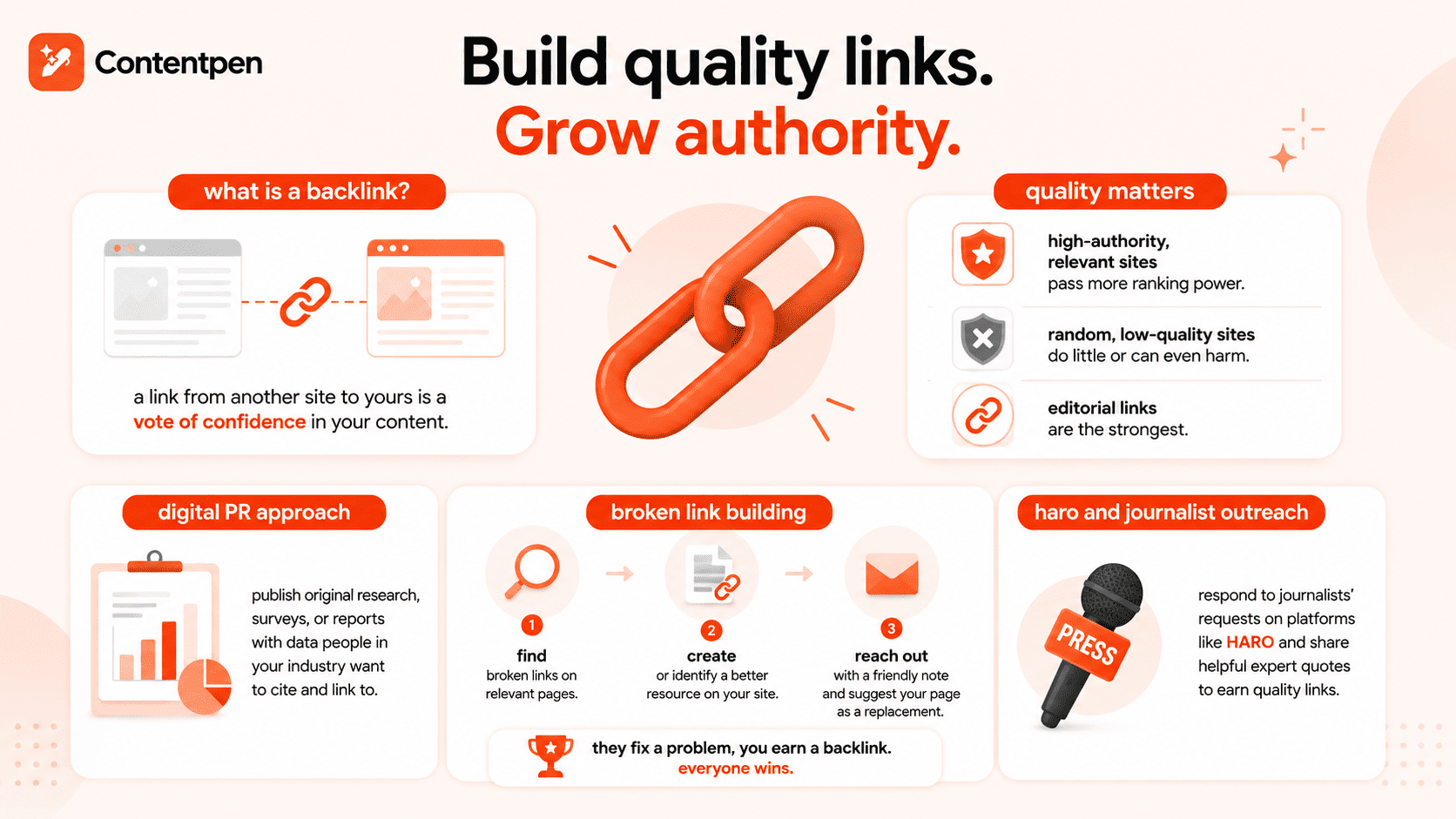
    Build quality links to grow authority - Contentpen.ai.

    Backlinks remain the core of SEO link building. 

    A backlink is a hyperlink from another site that points to your page. Search engines read that link as a vote of confidence in your content. Among off-page SEO types, this is the most popular one.

    Not all links carry the same weight:

    • High-authority, relevant sites pass far more ranking power.
    • Random, low-quality blogs or spammy directories can do little or even cause harm.
    • Editorial links (added by a writer because they found your content helpful) are the strongest ones.

    A digital PR style approach works very well. You can publish original research, surveys, or industry reports that contain data people in your field want to quote.

    Broken link building is another ethical and practical method:

    1. Find broken outbound links on relevant pages in your niche.
    2. Create or identify a better resource on your site that serves the same purpose.
    3. Reach out to the site owner with a friendly note and suggest your page as a replacement.

    They fixed a problem on their page. You gain a new backlink. Everyone wins.

    You can also respond to journalists’ requests through platforms such as HARO. When you share short, helpful expert quotes, many reporters will credit you with a link.

    Guest posting and content collaboration

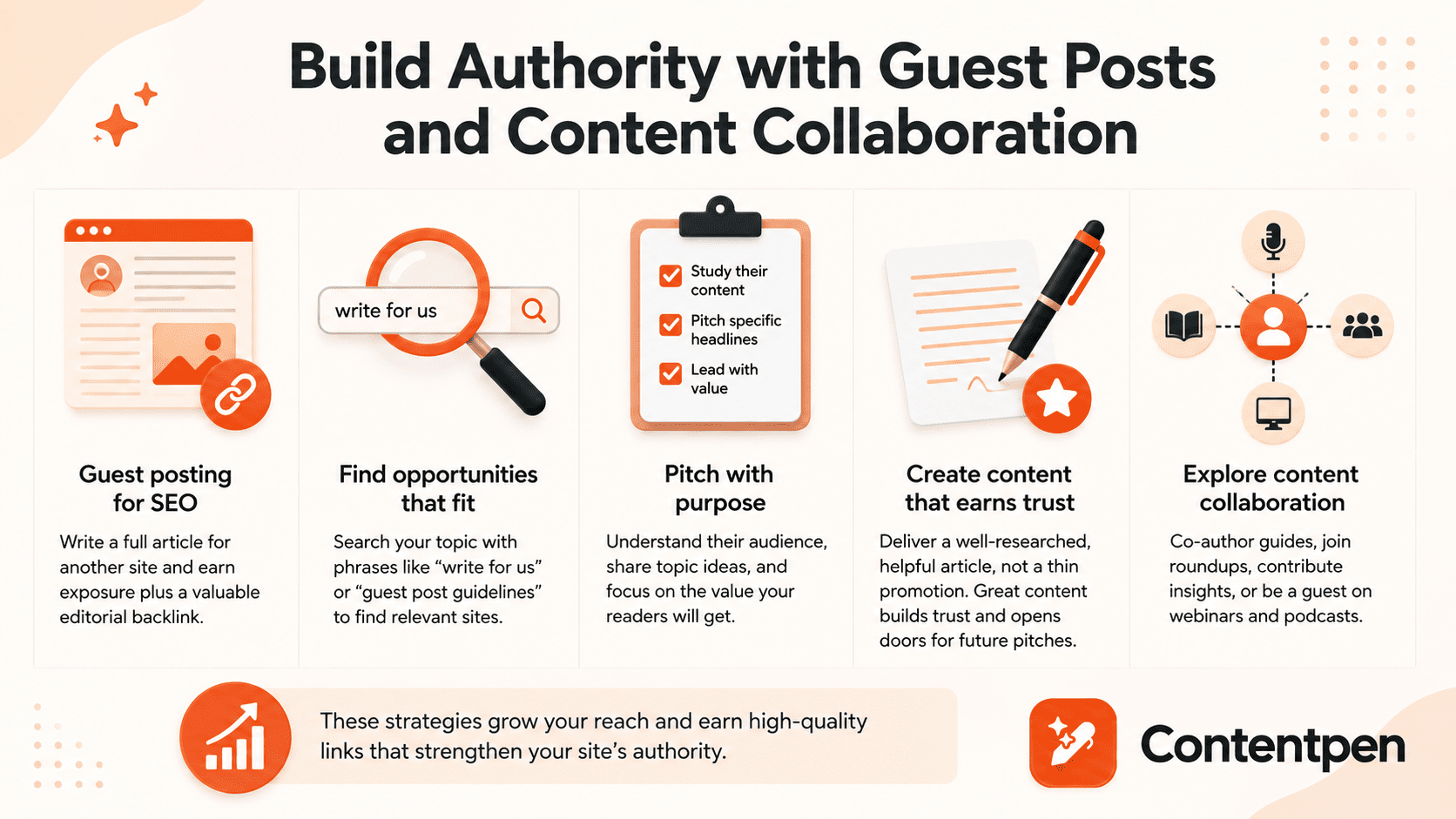
    Building authority with guest posts - Contentpen.ai.

    Guest posting for SEO means writing a full article for another site in your niche. The article lives on their domain, but usually includes a short bio or contextual link back to your site. 

    This gives you both exposure to a new audience and an editorial backlink, which is one of the safer and more effective off-site optimization methods.

    You can find guest post opportunities using simple search operators. Combine your topic with phrases like “write for us” or “guest post guidelines” in Google. 

    For example, someone in real estate could search “real estate marketing write for us” to find relevant sites that accept guest posts. Focus on sites with real traffic and real readers, rather than thin, link-only blogs.

    When you pitch, keep these tips in mind:

    • Study their content first: Know what they publish and where gaps exist.
    • Pitch-specific headlines: Offer two or three topic ideas that fit their audience.
    • Lead with value: Explain what your readers will gain, not just what you want.

    Once accepted, write a useful, well-researched blog or article, not a thin ad in disguise. That type of content earns more shares and higher trust, which in turn makes editors more open to future pitches.

    Content collaboration goes beyond single guest posts. You can:

    • Co-author reports or ebooks
    • Contribute to expert roundups
    • Share insights for another company’s guide
    • Join webinars and podcasts as a guest

    When you appear as a guest speaker, hosts almost always link to your site in show notes and event pages. Since Contentpen takes care of much of your routine blog publishing, you can put more time into these higher-impact, authority-building efforts.

    Using social media and influencer partnerships

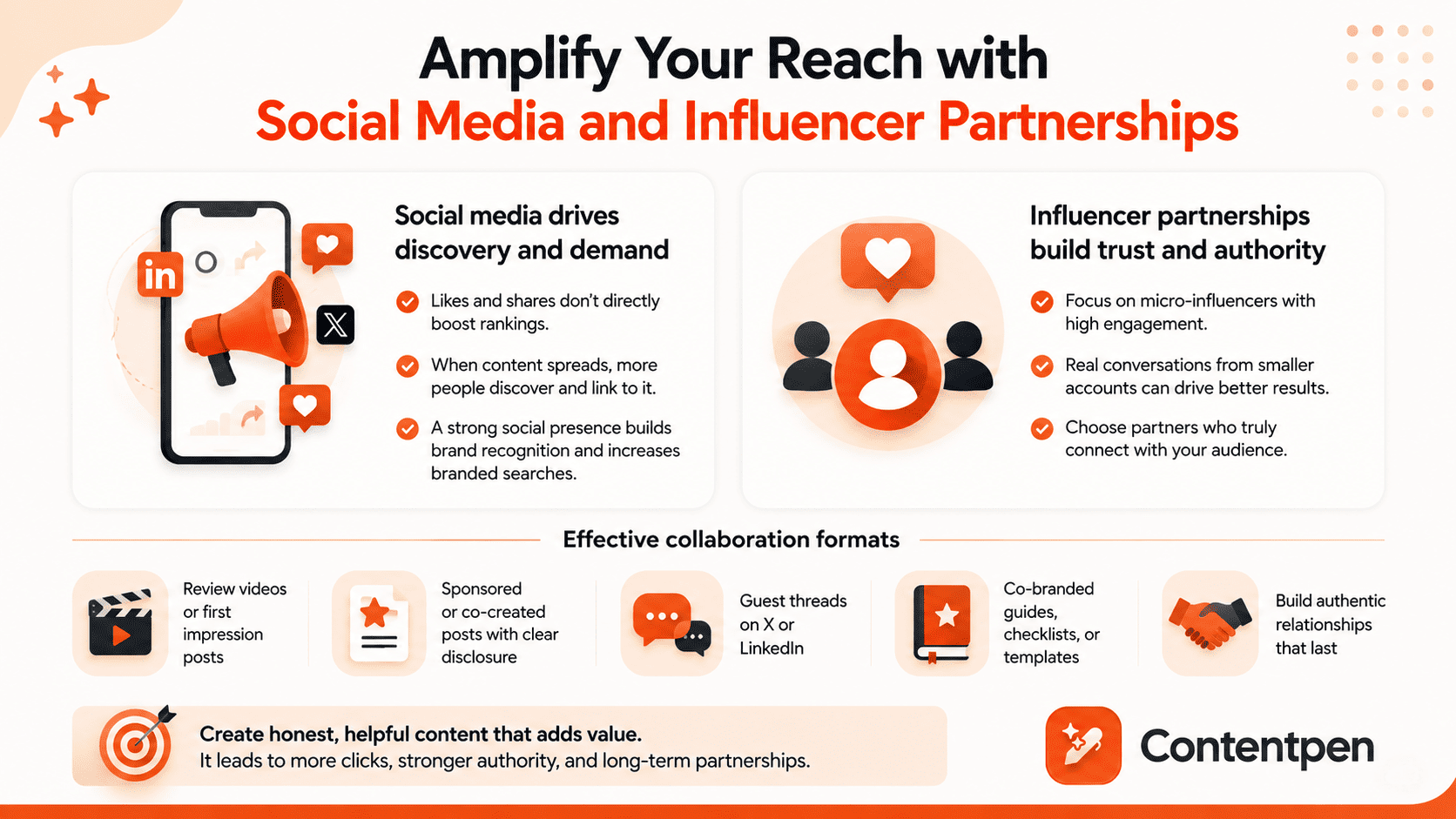
    Amplifying reach with social media posting.

    Social media likes and shares do not directly affect ranking. However, they play a strong supporting role in off-page SEO optimization in digital marketing.

    When your content spreads across LinkedIn, X, or YouTube, more people discover it, increasing the likelihood that site owners, bloggers, and journalists will link to it later. Social media signals, SEO-wise, are about amplification and discovery.

    There is also the brand voice and identity. A steady social presence helps people remember your name. When more people search for your brand directly, that pattern signals to Google that your brand is in demand.

    Influencer marketing ties into this. Instead of chasing only big names, look for micro-influencers who speak to your exact audience and have strong engagement. A smaller account with real conversations can outperform a larger account with weak interaction. 

    Common collaboration formats include:

    • Review videos or “first impression” posts
    • Sponsored or co-created posts with clear disclosure
    • Guest threads on X or LinkedIn
    • Co-branded guides, checklists, or templates

    Always aim for honest, helpful content that helps the influencer’s audience. That type of partnership leads to more clicks and a better long-term relationship.

    Local SEO tactics for geographic visibility

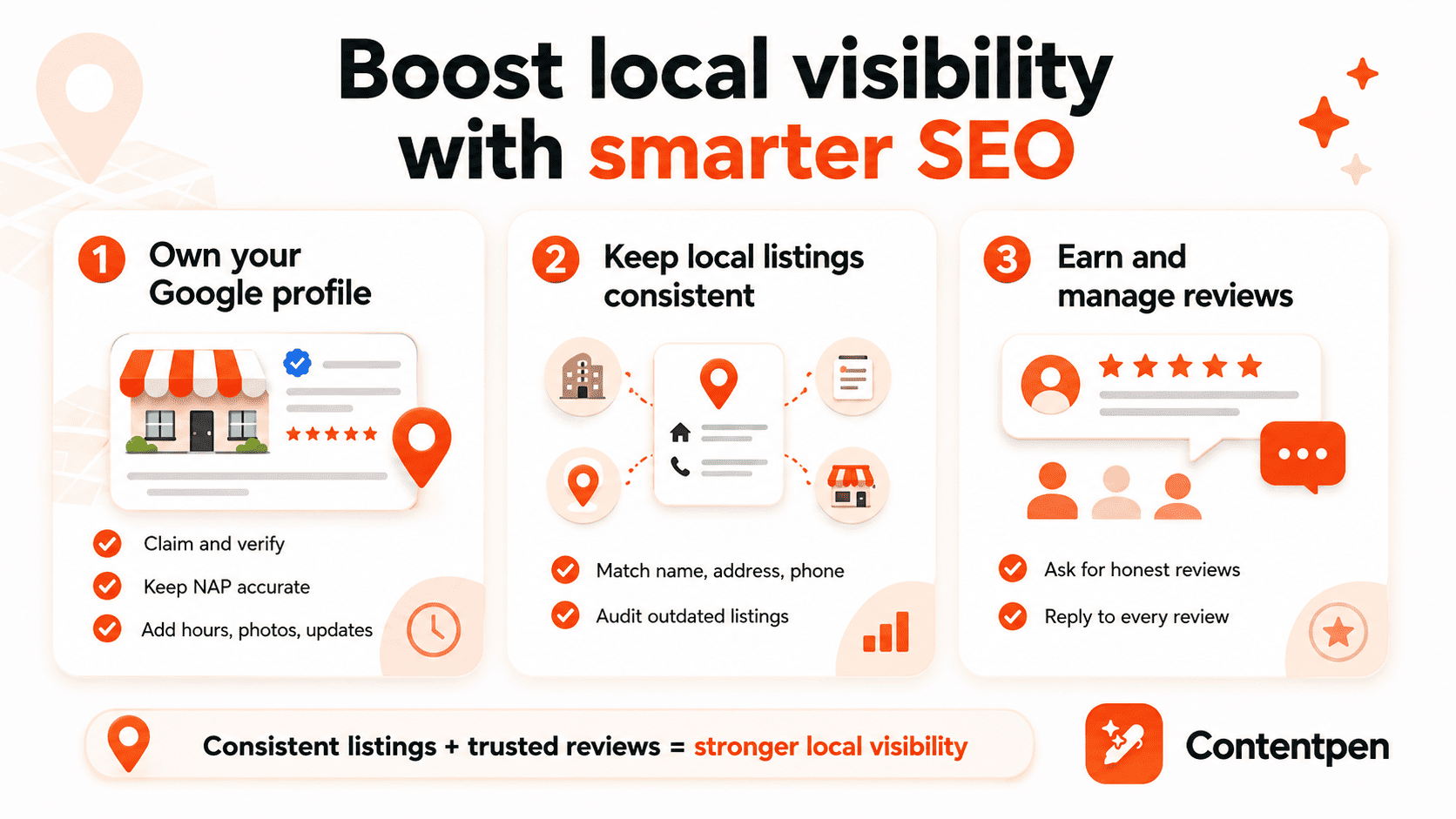
    Tips to boost local visibility - Contentpen.ai.

    If you serve customers in a specific city or region, local SEO is one of the most important off-site SEO strategies to focus on. It shapes how well you appear in searches that include “near me” terms or city names.

    Key steps include:

    Setting up Google Business Profile (GBP)

    Your GBP listing sits outside your website, making it a true off-page SEO factor. 

    Start by:

    • Claiming and verifying your profile.
    • Ensuring your business name, address, and phone number (NAP) are accurate.
    • Adding correct hours, categories, and photos of your location and team
    • Posting short updates with Google Posts to keep the profile fresh

    Working for local citations

    A citation is any mention of your business name, address, and phone number across directories such as Yelp, the Better Business Bureau, Apple Maps, and industry-specific sites. 

    Search engines cross-check these records. If your details are messy or outdated, rankings can suffer because the data looks unreliable. Do simple audits to update your listings and keep your NAP consistent.

    Investing time and effort in user reviews

    For local companies, reviews count among the strongest off-page ranking factors. 

    Google considers how many reviews you have, how often new ones arrive, and your average rating.

    To give your business a boost:

    • Ask happy customers to leave honest reviews on Google, Capterra, G2, and other key sites.
    • Reply to every review, good or bad, with polite, helpful comments.

    All of these strategies are free to implement and can improve your local search visibility much faster than many other moves.

    Off-page SEO best practices and common mistakes to avoid

    Good off-page SEO is not only about doing more. It is about doing the right things consistently and avoiding shortcuts that can backfire. 

    Think of this as a living off-page SEO checklist you can revisit each quarter.

    #1: Focus on link relevance and quality

    A single backlink from a respected, on-topic site is far more helpful than dozens of links from random, weak domains. 

    Aim to place your content where your actual buyers and peers spend time. That mindset also pushes you toward genuine relationships instead of one-off link trades.

    #2: Mix your tactics well

    Put some effort into digital PR, some into guest posting, some into social engagement, and, if you have a local angle, some into reviews and citations. 

    This type of mix looks natural to search engines and protects you if one channel slows down. Over time, keep an eye on your backlink profile with off-page SEO tools such as Moz or SEMrush to spot patterns and remove spammy links if needed.

    #3: Work with patience

    Off-page SEO techniques are inherently slow because they rely on others’ trust. Consistent outreach, helpful content, and steady networking build E-E-A-T in a way that cannot be faked.

    When every off-page move you make shows real experience, expertise, and user care, rankings tend to follow.

    Avoid risky shortcuts, such as:

    • Buying links or joining link schemes
    • Using private blog networks
    • Spamming forums or communities with your links
    • Over-optimizing anchor text with the same keyword every time

    These strategies may work in the short term, but will cause penalties that are painful to fix.

    Also read: Search engine basics: How they work and why they matter.

    How Contentpen supports your off-page SEO success

    All strong content marketing strategies start with something worth talking about. Our SEO platform gives you that base by turning SEO briefs into clear, helpful posts at scale.

    • SEO-optimized content: When every new article follows SEO optimization techniques by default, you gain a larger pool of pages that people genuinely want to read and link to.
    • Automated publishing: Contentpen automates content publishing through integration with major CMS platforms, saving you the hassle of switching tabs. You can use the saved time to focus on promotion and building authority in your niche.
    • SEO scoring and competitor insights: The platform includes SEO scoring and competitor insights, so you can see which content already wins links and plan pieces that go deeper or add missing angles.
    • Creating evergreen digital assets: Contentpen helps you develop evergreen posts that power digital PR and off-page SEO. These include data-heavy reports, expert guides, and reference posts that other writers love to cite.

    Write better blogs in less time, without sacrificing quality.

    Let AI handle structure, clarity, and flow while you stay in control of the message.

    Try AI blog writing →
    AI SEO Interface

    When you combine this content engine with consistent off-page SEO strategies, you create a system where new content and new links support each other week after week.

    Final words

    Off-page SEO is the outside proof that your site deserves attention. It covers backlinks, mentions, reviews, and partnerships that live beyond your domain yet send strong signals about your authority.

    You now have a clear set of actions to work with. Build high-quality backlinks, use guest posting and collaborations, tap into social and influencer reach, and, if you serve a region, push hard on local SEO.

    Also, consider Contentpen for reliable, SEO-rich content others can link to. When you pair strong content with thoughtful off-site optimization, search engines start to see absolute authority, and rankings begin to rise.

    Frequently asked questions

    Is off-page SEO still relevant?

    Yes, off-page SEO is still highly relevant. Search engines continue to rely on backlinks, brand mentions, reviews, and other external signals to judge a site’s authority, trustworthiness, and competitiveness in search results.

    What are off-page SEO services?

    Off-page SEO services are professional activities focused on improving a site’s authority beyond its own pages. These services typically support brand visibility, third-party validation, and external trust signals.

    What is the golden rule of SEO?

    The golden rule of SEO is to earn trust by creating valuable content for real users. Search engines consistently reward websites that demonstrate usefulness, credibility, and long-term reliability instead of shortcuts or manipulation.

    What are some off-page SEO examples?

    Common off-page SEO examples include earning editorial mentions, being cited as a source, gaining press coverage, and building recognition across authoritative platforms.

    Can I do off-page SEO without spending money?

    Yes, many effective off-page SEO techniques cost time rather than cash. You can use broken link outreach, reclaim unlinked mentions, participate in Reddit or Quora discussions, improve your Google Business Profile, and pitch guest posts to relevant blogs.

  • What is technical SEO? Your complete guide to getting started

    What is technical SEO? Your complete guide to getting started

    Are you publishing great content, building links, and still struggling to rank? In many cases, the problem isn’t what you write; it’s whether Google can properly reach and understand it.

    Answering ‘what technical SEO is’ means understanding its fundamentals to build your platforms on the right foundations. It is a part of search engine optimization that ensures search engines can find, crawl, and index your platform without any hurdles.

    If content is the message and links are the word of mouth, technical SEO is the road system that lets search engines reach everything.

    This guide walks you through the basics of doing technical SEO. It will teach you the main technical SEO optimization elements and practical steps to improve site architecture, speed, mobile experience, security, and more. 

    So, ready to get started?

    What is technical SEO?

    Technical SEO is the practice of optimizing a website’s structure, code, and infrastructure so search engines can crawl, render, and index pages efficiently. It focuses on elements such as site architecture, page speed, and control over indexing rather than on-page content.

    Understanding what is SEO and its core aspects is fundamental to grasping how technical optimization fits within the broader scope of search engine basics.

    Technical SEO lives behind the scenes, but visitors still feel it. 

    Fast pages, clean URLs, and stable layouts create a smooth experience. Slow, clunky pages with broken links or strange redirects push people away. 

    For teams, technical SEO in digital marketing is the glue between strategy and results, turning content marketing plans into real visibility and traffic.

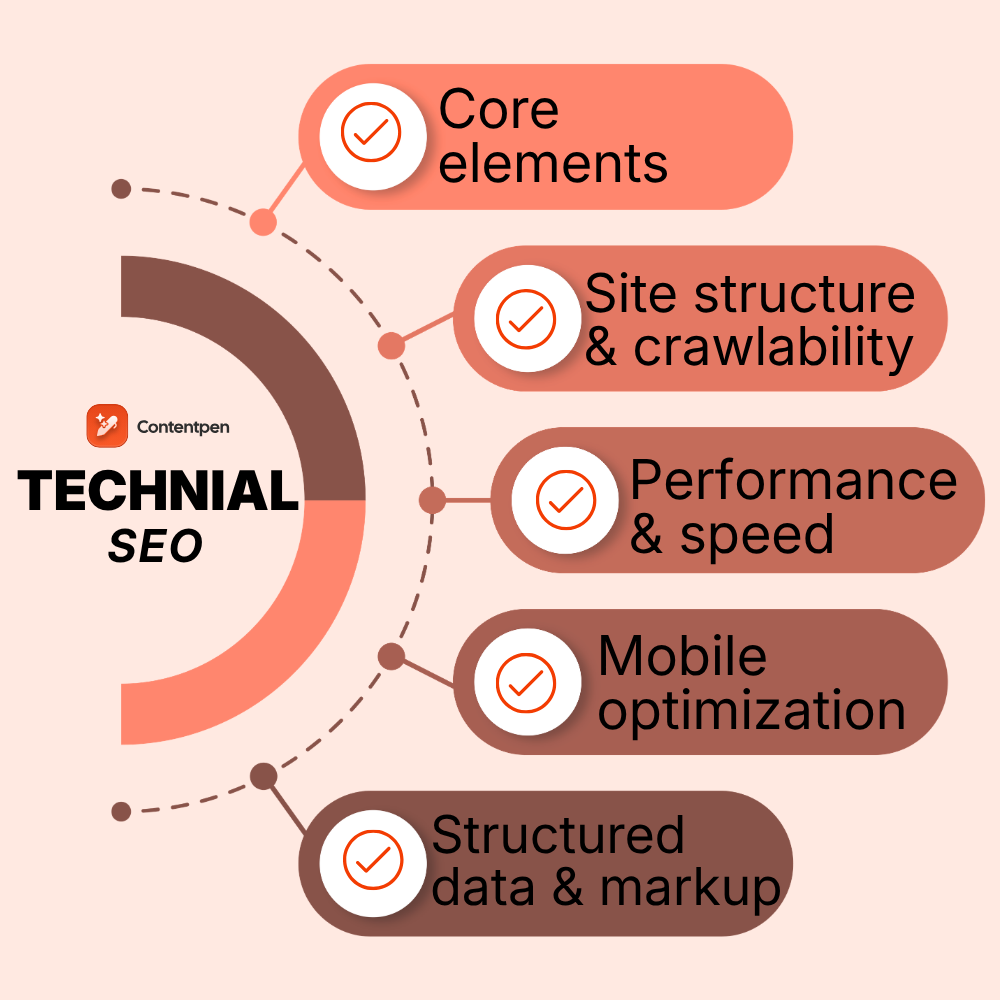
    Core technical SEO elements

    Technical SEO covers several connected areas rather than a single one.

    • Site architecture and crawlability
    • Indexing and content visibility control
    • Page speed and Core Web Vitals
    • Mobile optimization and responsiveness
    • Website security (HTTPS)
    • Structured data and schema markup

    Let’s discuss all these core technical SEO elements in more detail.

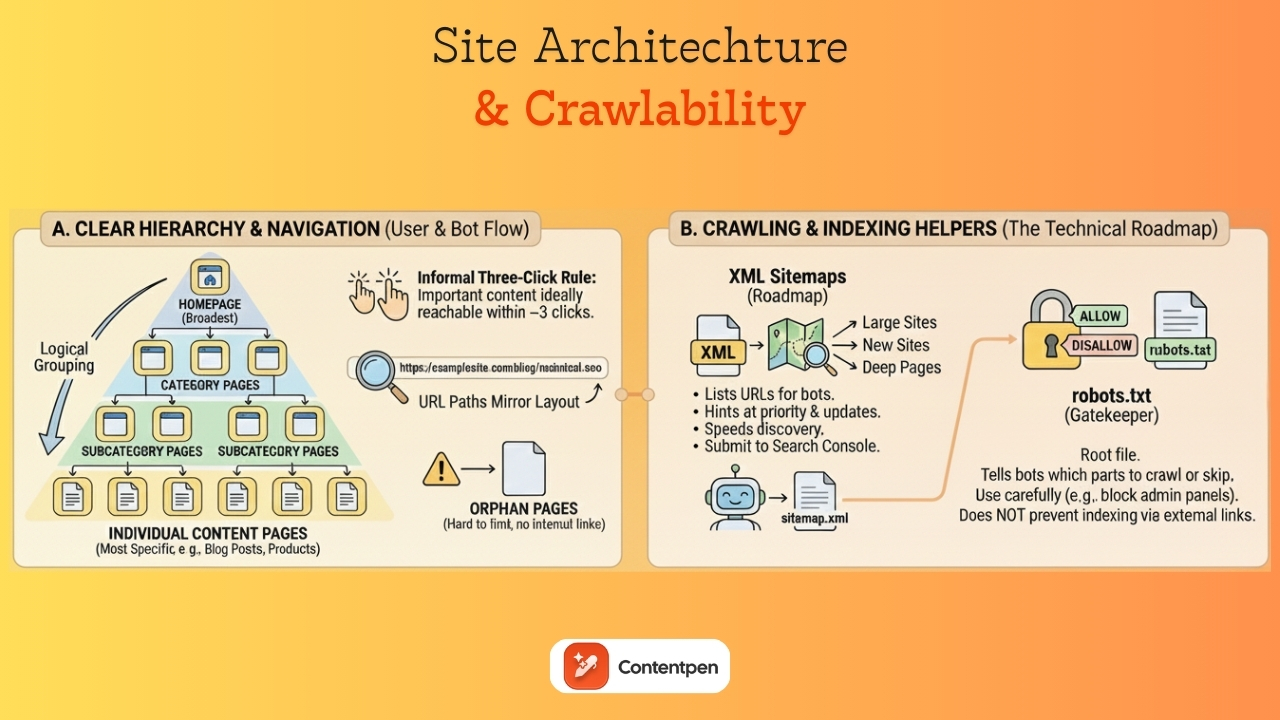
    Site architecture and crawlability

    Site architecture and crawlability - Contentpen.ai

    Site architecture is the way all your pages fit together. 

    A clear structure makes your site easier to use and easier for search engines to crawl. Think of it as a map that shows how people should move from broad topics to specific details.

    Most sites work well with a simple hierarchy:

    • Homepage at the top
    • Category pages next
    • Subcategory pages under those
    • Individual content pages, such as blog posts or product details, are at the bottom.

    An informal three‑click rule says that important content should be reachable within three clicks from the homepage. This is not a strict law, but it helps keep paths short and precise.

    Logical grouping matters. 

    Blog posts should live under a blog or resources section. Product pages should sit under category paths that make sense to visitors. 

    URL paths often mirror this layout.

    For example, a link to https://examplesite.com/blog/technical-seo for an article on technical SEO shows a clear page layout on the website. 

    When pages sit outside the structure with no internal links pointing to them, they become orphan pages, which are hard for both people and bots to find.

    If you do need to change URLs, use permanent 301 redirects from the old addresses to the new ones so both users and search engines land in the right place.

    XML sitemaps: Your website’s roadmap

    An XML sitemap is a special file that lists meaningful URLs on your site in a machine‑readable format. While users rarely see it, search engines use it as a roadmap. It hints at which pages matter most and how often they change, which can speed up discovery.

    Sitemaps are especially helpful for large sites, new sites with few backlinks, and sites where some pages are hard to reach through internal links. 

    The file usually includes each URL, the date it was last modified, and sometimes a rough priority flag. Many content management systems, including standard setups on WordPress and Shopify, automatically generate and update this file as new content goes live.

    You can often find your sitemap at a path such as https://yourdomain.com/sitemap.xml. 

    Once you have the URL, you can submit it to Google Search Console and Bing Webmaster Tools so bots can discover your content more efficiently.

    It is wise to keep sitemaps under size limits and split very large lists into several smaller files. Avoid including URLs that are blocked, noindexed, or return errors, as this might send mixed signals about your site’s actual structure.

    While an XML sitemap does not guarantee indexing, it improves site crawlability, especially when combined with clean internal linking and overall good technical health.

    Understanding and optimizing robots.txt

    A robots.txt file sits at the root of your site and gives high‑level instructions to search engine crawlers. It tells bots which parts of your site they may crawl and which sections they should skip. 

    Because robots.txt works at the folder or pattern level, it is a powerful tool that deserves careful handling.

    Typical uses include blocking admin panels, login pages, staging areas, and scripts or style folders that do not add value to the index.

    It is also essential to know what robots.txt cannot do. Blocking a URL from crawling does not always prevent it from being indexed. If other sites link to that URL, a search engine may still index a bare version of it. 

    For pages that must not appear in results, meta noindex tags or password protection are better options. 

    Google Search Console provides a robots.txt tester to help you see how bots interpret your robots.txt file. Reviewing this small text file during redesigns and migrations is an easy way to avoid sudden drops in visibility.

    Internal linking strategy for SEO

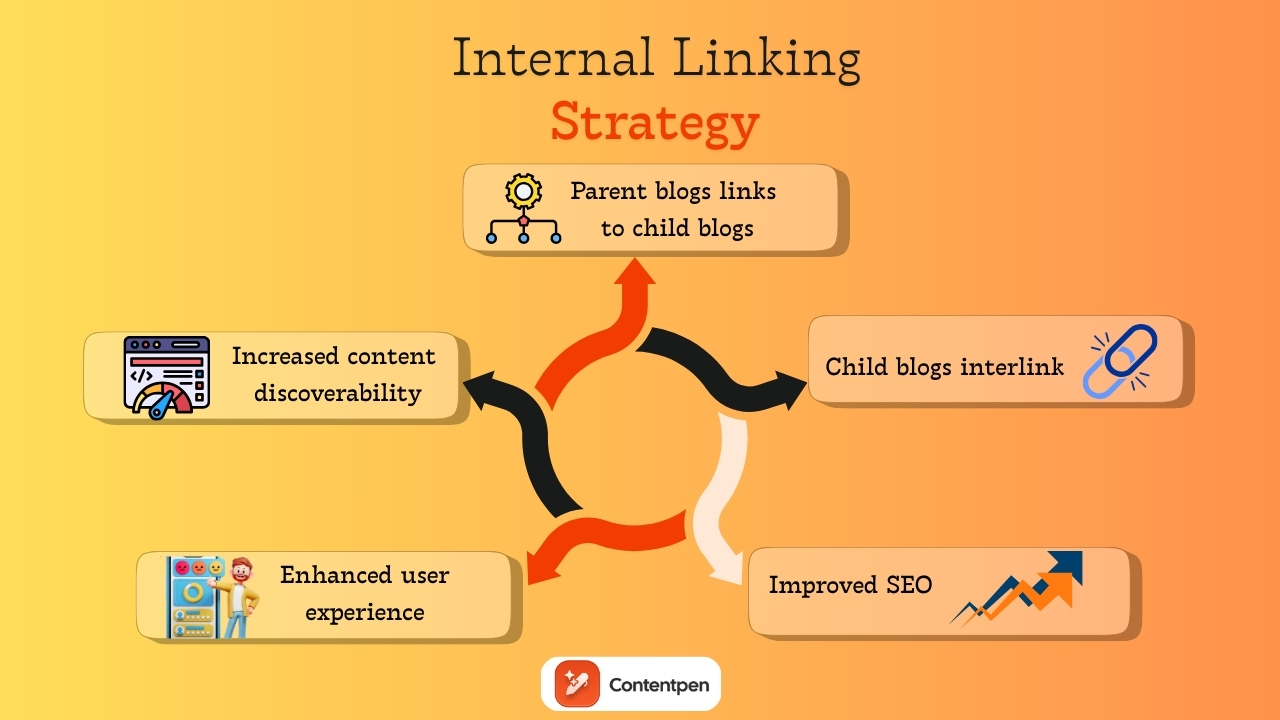
    Internal linking strategy - Contentpen.ai

    Internal links are links from one page on your site to another page on the same domain. They act like signposts for both users and search engines. 

    A thoughtful internal linking pattern makes it easy to move between related topics and helps spread authority from strong pages to newer or deeper ones. You can also get help from Contentpen to automate internal links for your convenience.

    From a technical SEO view, internal links help bots discover content. When every important page is linked from at least one other page, it is far more likely to be crawled. 

    Repeated links from strong sections such as the homepage, category pages, or top guides send a signal that a target page is essential. This supports rankings without needing more external backlinks.

    Managing indexing and content visibility

    Meta robots tags live in the head of a page and give search engines page‑level instructions. They tell crawlers whether they can index the page, follow its links, show a cached copy, or show a text snippet. 

    The most common directive in technical SEO basics is the noindex tag, which tells search engines not to index the page.

    Noindex is useful for pages that add little search value or should be excluded from results. Examples include thank‑you pages after form submissions, internal search results, some PPC landing pages, and certain thin or duplicate pages. 

    These tags should also be used for staging or test versions of a site that should not appear beside live content. 

    However, adding noindex by mistake to key templates such as product pages or blog posts can wipe out organic traffic very quickly.

    That is why you should not block a noindexed page in robots.txt. 

    Simple checks using the site:yourdomain.com search operator and reports in Google Search Console help you track which URLs are indexed and whether meta robots rules are behaving as planned.

    Canonical tags and duplicate content management

    Duplicate content happens when the same or very similar content appears at more than one URL. This can be caused by URL parameters for sorting and filtering, alternate versions, print views, product variations, and syndicated content on partner sites. 

    Google rarely punishes this directly, but it can create messy side effects.

    The main issue with duplicate content on websites is diluted link signals and confusion over which version to rank. 

    If half of your backlinks point to one URL and half to another that show almost the same page, each one looks weaker than it really is. Search engines may guess which page to show in results, and their guess may not match your preference.

    Canonical tags help clean this up. A canonical tag in the page’s head points to the preferred URL for that piece of content. 

    When several pages show similar content, they can all point to the main version. This tells search engines to focus on that URL for indexing and ranking and to fold signals from other versions into it.

    Write better blogs in less time, without sacrificing quality.

    Let AI handle structure, clarity, and flow while you stay in control of the message.

    Try AI blog writing →
    AI SEO Interface

    Website performance and page speed

    Speed is both a ranking factor and a user experience anchor. Google has used page speed in desktop ranking for years and added mobile speed as a signal in 2018. 

    A slow site feels painful to use, and people rarely wait. Even a short delay can raise bounce rates and cut conversions in half, especially on mobile.

    From a technical SEO angle, faster sites also use crawl budget more wisely. When servers respond quickly and pages render with little blocking, bots can crawl more URLs in the same time window. That means new content is discovered and updated pages are refreshed sooner. 

    On the flip side, slow timeouts and heavy resource usage can limit the number of pages a bot can reach during each visit.

    Speed ties directly to business results. Faster pages tend to see higher conversion rates, more pages per session, and better engagement. Moving from very slow to reasonably fast speed often has a bigger impact than shaving the last fraction of a second.

    Understanding Core Web Vitals

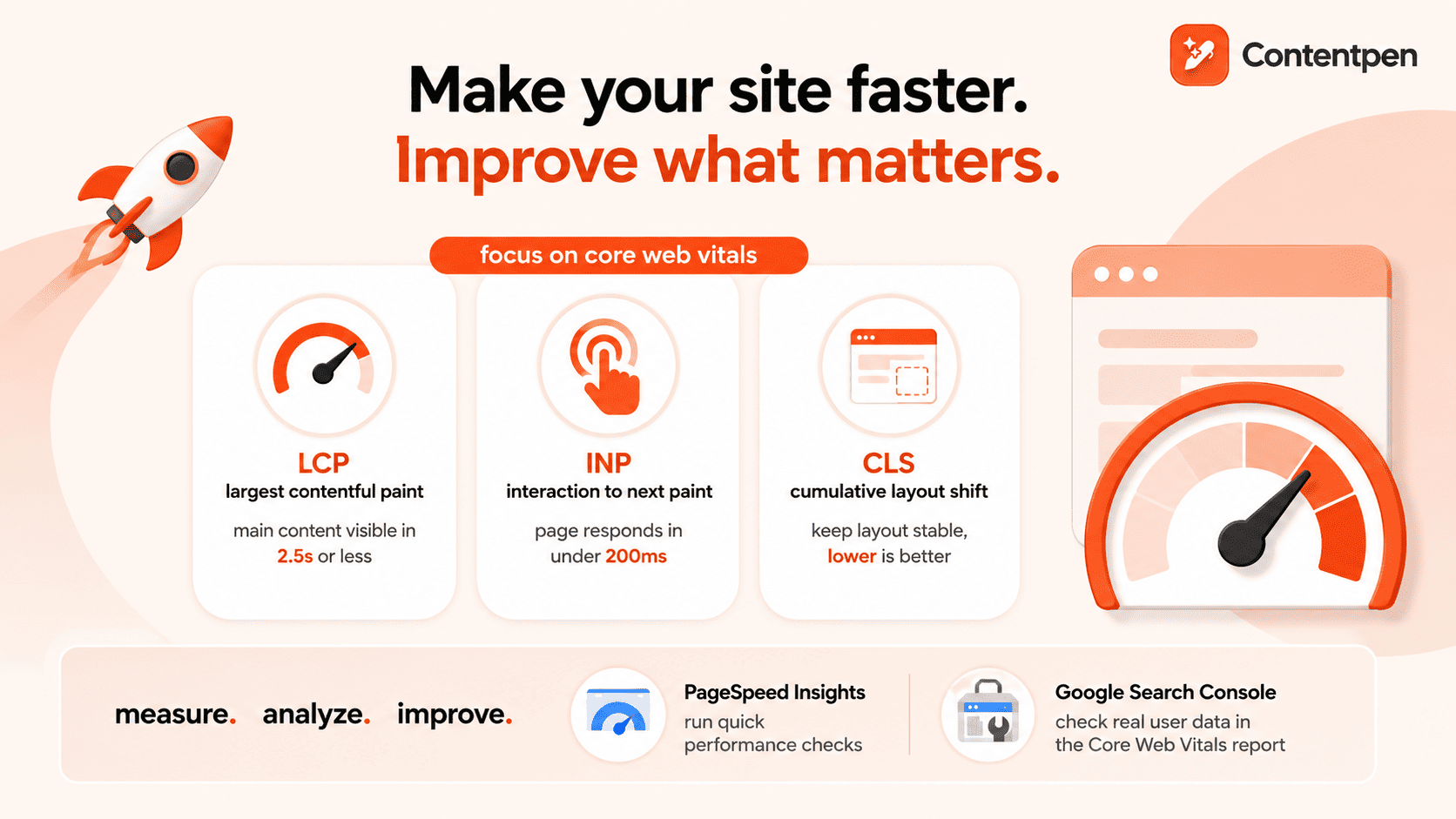
    Core Web Vitals are Google’s page experience metrics that measure loading speed, interactivity, and visual stability. They include:

    • Largest Contentful Paint (LCP): Measures loading speed
    • Interaction to Next Paint (INP): Measures responsiveness
    • Cumulative Layout Shift (CLS): Measures visual stability

    Let’s review these metrics in more detail and see how they inform Google’s evaluation of page experience.

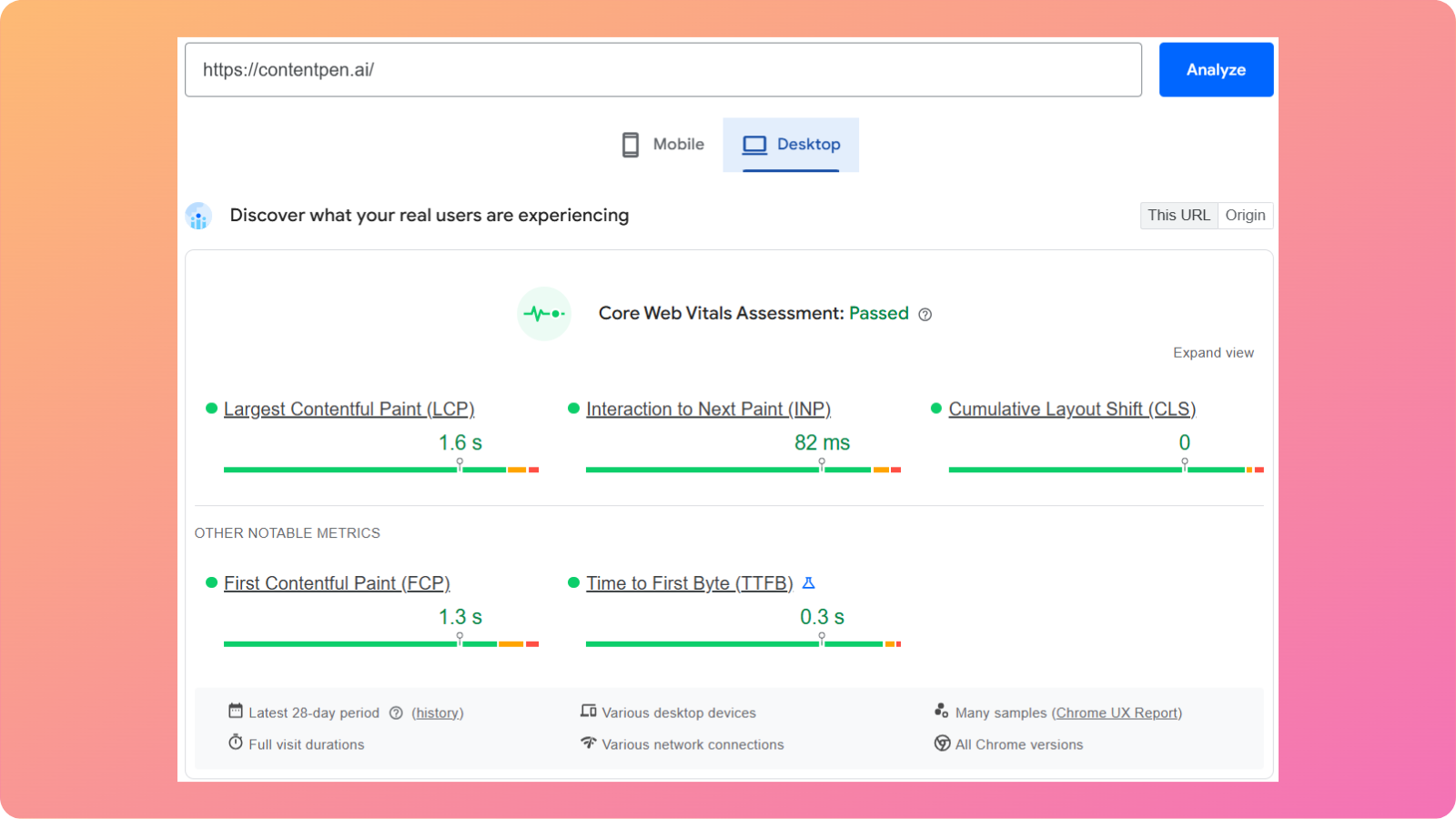
    Contentpen CWV score

    Largest Contentful Paint (LCP)

    LCP measures how long it takes for the most significant content block in the viewport to load. This might be a hero image or a large text block above the fold. 

    A good LCP is 2.5 seconds or less. 

    However, large, uncompressed images, slow servers, and render‑blocking scripts are common problems that hurt this metric.

    Interaction to Next Paint (INP)

    INP replaces the older First Input Delay metric. It looks at how quickly a page responds when a user taps, clicks, or presses a key. 

    Google recommends keeping INP under 200 milliseconds for most interactions. 

    Heavy JavaScript, long tasks on the main thread, and too many third‑party tags often make sites feel sluggish here.

    Cumulative Layout Shift (CLS)

    CLS measures how much content jumps around during page load. If text shifts because an image did not reserve space or an ad drops in late, users can mis‑tap buttons or lose their place on the website. 

    A CLS score of 0.1 or less is considered good. 

    Setting image dimensions, reserving space for ads, and avoiding sudden injected content all help to keep this score under the required limit.

    You can check Core Web Vitals in Google Search Console, PageSpeed Insights, and Chrome DevTools. Reports usually group URLs into good, needs improvement, or poor categories to help you make the right changes with ease.

    Practical ways to improve page speed

    Improving speed starts with a solid look at what slows pages down. You can follow the practices outlined below to boost your site’s performance now.

    Image optimization

    This is one of the easiest wins you can get from a technical SEO perspective.

    To optimize images, you can:

    • Compress photos before uploading: Use modern formats like WebP or AVIF to reduce file sizes while preserving image quality.
    • Use responsive image markup: This lets the browser pick the right size for each screen instead of loading large desktop versions of photos on phones.
    • Lazy-load images: Enabling lazy-loading for media below the fold means the browser fetches them only when needed, reducing initial load time for users.

    Avoid features that block or reduce media interactivity for mobile users, such as horizontal scrolling and large, intrusive pop-ups.

    Reducing requests and code size

    Reducing requests and code file size starts with combining small style sheets where it makes sense, removing unused scripts or plugins, and trimming third‑party tags.

    You should also minify HTML, CSS, and JavaScript files to remove unnecessary whitespace and comments. Enabling server-side compression, such as Gzip or Brotli, further reduces file transfer sizes.

    Improving server performance

    Choosing fast, stable hosting, server‑side caching, and tuned databases reduces time to first byte. 

    If you serve users across regions, a content delivery network (CDN) can help cache static assets on edge servers closer to visitors, which significantly cuts latency.

    When in doubt, start with the changes that affect every page template, then move to smaller gains on individual sections.

    Mobile optimization and responsive design

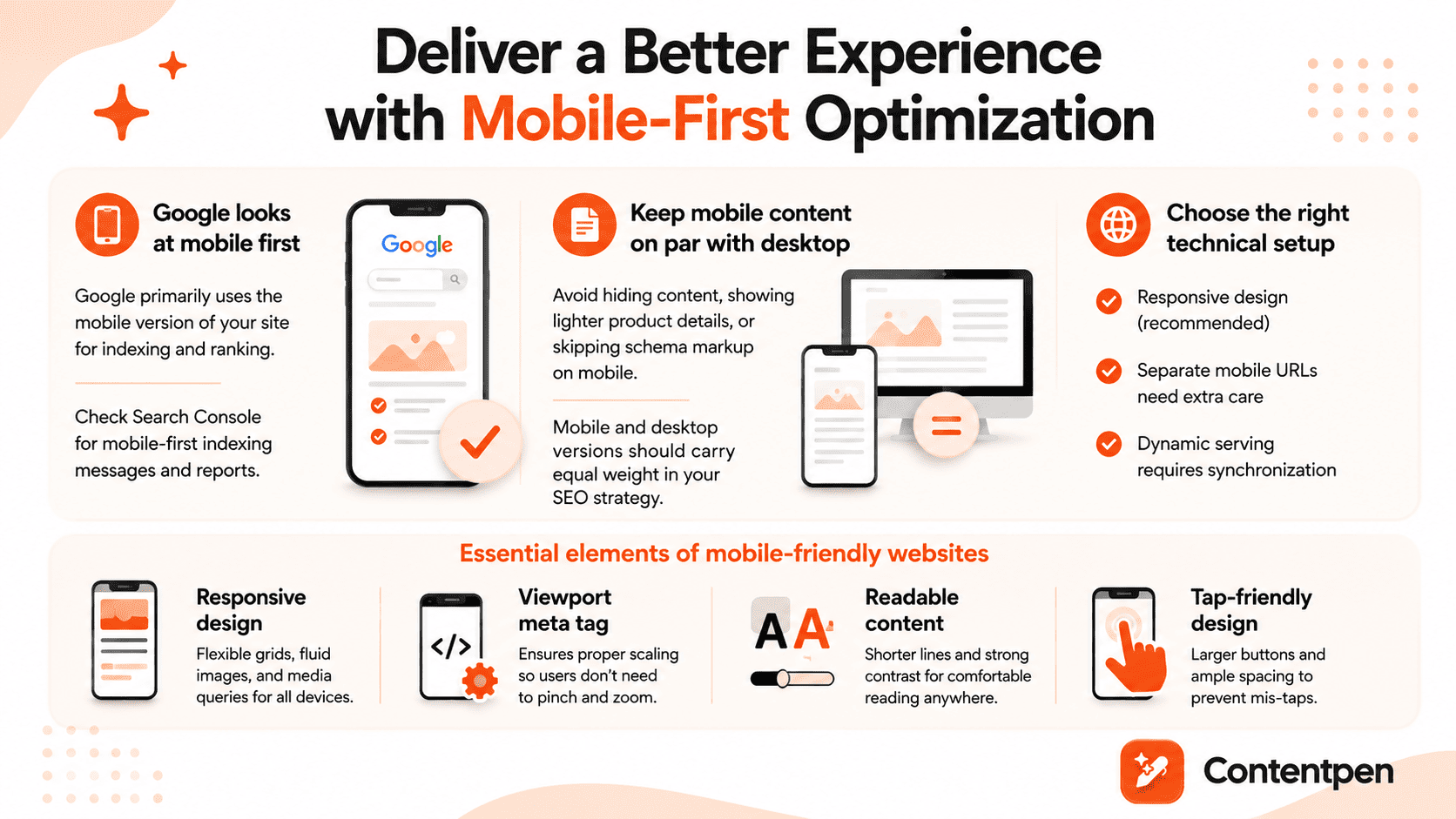
    Ensuring mobile-first experience in 2026.

    In practice, sites that use responsive design, where the same HTML adapts to different screens, usually handle mobile optimization well. 

    Websites with separate mobile URLs, such as m.example.com, or dynamic serving need more care to keep content and structured data in sync.

    You can see whether Google has moved a site to mobile‑first indexing through messages and reports in Search Console. 

    If the mobile version hides content, shows lighter product details, or skips schema markup included on desktop, it is wise to set those right. 

    Mobile‑first does not mean desktop visitors do not matter, but it does mean the mobile layout and content must carry equal weight in your SEO planning.

    Essential elements of mobile-friendly websites

    Mobile‑friendly design goes beyond simply shrinking a desktop layout. Responsive design uses flexible grids, fluid images, and media queries so each page looks and works well on phones, tablets, and desktops with a single code base.

    A proper viewport meta tag tells the browser how to scale content to the device width. Without it, many phones render the desktop layout zoomed out, forcing people to pinch and scroll in awkward ways. 

    Make sure the lines do not run too long and that the contrast between text and background is strong enough for outdoor or low‑light viewing.

    Tap targets such as buttons and links need enough size and spacing so fingers can hit them without mis‑taps. This often means larger buttons, more white space, and rethinking desktop patterns such as tiny menu items in the header.

    HTTPS and website security

    HTTPS is the secure version of the Hypertext Transfer Protocol. It uses SSL or TLS certificates to encrypt the data passing between a browser and a server. 

    This extra layer of security protects passwords, contact forms, payment data, and other sensitive information from leaking.

    Google has treated HTTPS as a ranking signal since 2014. While it is a lighter factor than content quality or links, it still sends a clear message that secure sites are preferred. 

    Modern browsers also label non‑HTTPS pages as “Not secure,” especially when forms are present. That warning can scare visitors away and lower conversion rates, even if the content itself is harmless.

    From a technical SEO perspective, HTTPS is now part of basic online hygiene.

    Implementing HTTPS correctly

    Moving to HTTPS requires planning to ensure you gain security without sacrificing SEO performance. 

    To correctly implement HTTPS for your website, follow the given steps:

    1. Get an SSL or TLS certificate: Most websites offer these for free. Once installed on the server, the certificate lets your site respond over secure URLs. 
    2. Redirect all HTTP requests: Use 301 rules to redirect them to HTTPS versions.
    3. Add the HTTPS in GSC: After the redirect rules go live, add the HTTPS links in Google Search Console and submit updated XML sitemaps.

    Watching error logs, mixed content warnings, and ranking trends over the first few weeks helps you catch and fix any hidden issues before they grow.

    Structured data and schema markup

    Structured data is extra code added to a page that describes the content in a detailed, machine‑friendly way. Regular HTML tells the browser how to display text, images, and links. Structured data tells search engines what those pieces represent.

    “Schema” is the shared vocabulary most sites use for this kind of markup. It provides search engines with information about articles, products, recipes, events, organizations, reviews, and more. 

    With structured data in place, a page can tell the search engine that “this block is a recipe with a cooking time and calorie count,” or “this page is a product with a price, brand, and rating.”

    Google strongly prefers JSON‑LD format for schemas, which wraps this information in a script block separate from the visible HTML. That approach keeps things cleaner for developers and platforms.

    Structured data by itself is not a direct ranking factor, but it does make your pages eligible for rich results such as star ratings, recipe cards, and FAQ drop‑downs. 

    These upgraded snippets stand out in search results and often drive higher click‑through rates.

    Also read: How to calculate click-through rates?

    Types of schema markup and their benefits

    • Article schema helps Google understand the details of blog posts and news stories. It marks up the headline, author, publish date, and sometimes the image that should appear in results.
    • Product schema applies to e‑commerce pages. It can include price, currency, availability, brand, and review ratings.
    • Breadcrumb schema shows search engines how a page fits within your site’s hierarchy. It marks up the navigation path (for example, Home > Blog > SEO > Technical SEO), helping Google understand site structure and page relationships.

    These are just some examples of the types of schemas that exist. This can be a powerful way to support technical SEO in digital marketing for brands that answer complex topics with helpful content.

    Why technical SEO is important

    Technical SEO matters because search engines cannot rank what they cannot reach or understand. You can publish hundreds of strong, optimized articles and still miss most of the organic traffic you deserve if your site has crawling or indexing issues.

    In many technical SEO examples, a single misconfigured tag or directive has removed entire sections of a site from search overnight. Recovering that traffic takes time, leading to lost leads and missed earning opportunities for businesses.

    The right technical SEO strategy also protects against serious issues such as duplicate content, broken internal links, and poorly handled migrations. These can dilute link signals or send users into dead ends.

    When algorithms shift, sites with clean structure, fast page load times, and strong security tend to adapt better.

    Technical SEO vs. On-page SEO vs. Off-page SEO

    Many teams mix technical SEO with on‑page and off‑page work, making planning more complicated than it needs to be. All three matter, but they focus on different parts of the same system.

    On‑page SEO deals with what is present on each page. That includes keyword research, titles and meta descriptions, heading structure, internal links, body copy, media, and content depth.

    Our SEO tool lives mainly in this space, helping teams create SEO‑ready articles, align them with search intent, and keep on‑page elements in good shape at scale.

    Off‑page SEO refers to signals from outside the site. Backlinks from other domains, mentions of your brand, social chatter, and overall domain authority sit in this pillar.

    Technical SEO focuses on the system that delivers the platform to users. It includes crawlability, XML sitemaps, page speed, Core Web Vitals, mobile optimization, HTTPS, structured data, redirect logic, and international setup.

    Here is a simple way to picture the three SEO pillars:

    SEO typeMain focusSimple examples
    On‑page SEOContent on each URLKeyword use, headings, meta tags, internal links
    Off‑page SEOSignals from other sitesBacklinks, brand mentions, digital PR
    Technical SEOSite infrastructureCrawlability, speed, HTTPS, structured data

    There is some overlap. Internal linking is both a content concern and a technical SEO element. Redirects touch user experience and technical health. The key is to see how these parts work together instead of picking one and ignoring the others.

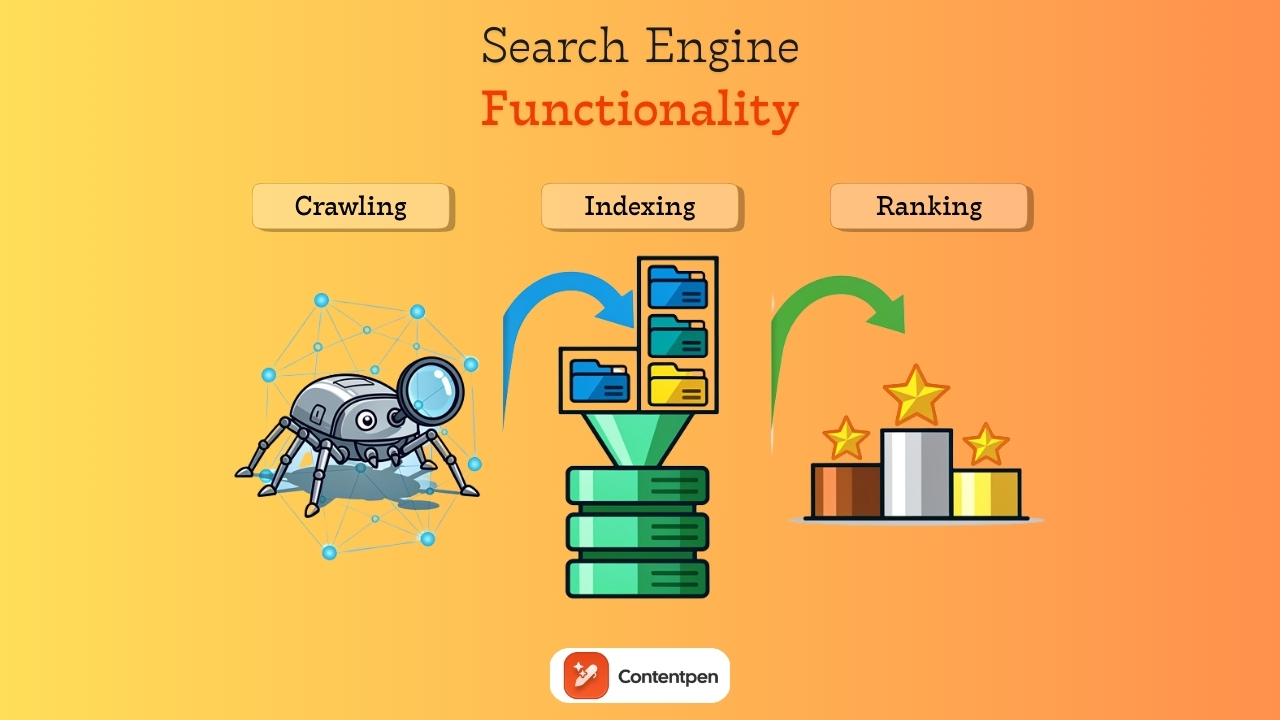
    How search engines work: Crawling, indexing, and ranking

    Search engine functionality - Contentpen.ai

    Search engines process websites in three main steps:

    1. Crawling – Bots discover pages by following internal and external links.
    2. Indexing – Pages are rendered, analyzed, and stored in the search index.
    3. Ranking – Indexed pages are evaluated and ordered based on relevance and quality signals.

    Let’s review them in more detail below.

    Step#1: Search engine crawling

    Crawling is the discovery stage. 

    Search engines send bots, such as Googlebot, to crawl links and discover new or updated pages. These bots move from page to page by following internal links within a site and external links from other sites. 

    Each domain has a crawl budget, which is the rough number of URLs a bot will check on a given visit. If your site wastes that budget on endless parameter pages or duplicate content, important pages may not be crawled as often as they should be.

    Step#2: Page indexing

    Indexing is the storage and understanding stage. 

    After crawling a URL, the search engine tries to render the page, parse the HTML, CSS, and JavaScript, and determine what the page is about. 

    Then, the crawlbot stores that information in its index, which is like a vast, connected library. Not every crawled page is added. Some pages may be skipped because they appear to be duplicates, have low value, are blocked by meta tags, or cause errors.

    Step#3: Ranking pages

    Ranking is the retrieval stage. 

    When someone searches for a phrase such as “best running shoes,” Google does not crawl the web immediately. Instead, it looks into its index, finds the most relevant pages, and shows the best pages based on many factors.

    Technical SEO work aims to keep this path smooth. Clear site architecture and strong internal linking help bots crawl deeper. XML sitemaps highlight essential URLs. Clean HTML and careful JavaScript handling make content easier to render. 

    Similarly, properly used meta robot tags and canonical tags tell search engines which pages to index and which to skip.

    Summing it up

    Technical SEO is the hidden layer that protects and promotes your search engine visibility. Without it, even the sharpest keyword research and the best‑written articles struggle to reach their audience.

    The good news is that the most essential tasks follow a repeatable pattern. You map your site structure, fix broken links, set up XML sitemaps, and keep robots.txt up to date. Over time, this becomes a practical technical SEO checklist rather than a scary set of mysteries.

    A platform like Contentpen can support your needs in this regard by generating SEO‑ready articles. It also helps score on‑page elements and frees up resources for teams to focus on the technical aspects of SEO.

    Frequently asked questions

    What is the difference between local SEO and technical SEO?

    Local SEO focuses on improving visibility in location-based searches. Technical SEO focuses on how well search engines can crawl, index, and understand a website.

    What are some technical SEO examples?

    Common technical SEO examples include setting up an XML sitemap, fixing a broken robots.txt file, and adding canonical tags to handle duplicate product pages. Shifting an entire site from HTTP to HTTPS with proper 301 redirects is another classic example of technical SEO.

    What are some technical SEO tools?

    You can use tools such as Google Search Console, PageSpeed Insights, Screaming Frog, and Lighthouse to identify and fix performance issues on your site. You can also use Usermaven to get AI-powered insights with detailed SEO analytics for your platforms.

    What is a technical SEO audit?

    A technical SEO audit is a systematic review of a website’s technical health to identify issues that affect how search engines access it. The goal is not to change content or build links, but to remove technical barriers that prevent search engines from understanding your platform.

    Do I need a technical SEO certification to handle this work?

    A technical SEO certification course can be helpful if you want structured learning, but it is not required for most sites. Many content and marketing managers learn through practice, guides like this, and hands‑on work with their own platforms.

  • How to do SEO: A complete step-by-step guide for beginners

    How to do SEO: A complete step-by-step guide for beginners

    Typing a question into Google is almost a reflex now. For most people, that is how virtually every online visit begins.

    However, the most challenging part for a business is landing the top positions for a topic and getting discovered by users. This is where SEO becomes essential.

    Search engine optimization can look scary from the outside. There are strange terms, constant algorithm updates, and a lot of opinions. Many beginners bounce between articles and videos, still wondering how to do SEO for a website in a simple, concrete way.

    The good news is that SEO is not about tricks. It is about clear, steady work that helps search engines understand your site and real people trust and enjoy your content.

    This guide gives a practical, step‑by‑step path for SEO beginners. By the end, you will understand how to improve your website’s ranking with minimal effort and hassle.

    So, let’s get started.

    What is SEO and why does it matter?

    Search Engine Optimization, or SEO, is the practice of improving your website so it shows up more often and in better positions in unpaid search results.

    In simple terms, search engine basics are about helping the right people find you when they type relevant questions or problems into Google.

    The main goal is to match real search needs with helpful content in a format search engines can understand. That means clear topics, strong on-page SEO, and a site that feels safe and easy to use.

    From a business view, SEO supports several important goals:

    • Brand awareness – Showing up often in search so people recognize your name.
    • Lead generation – Bringing in visitors who are already interested in what you offer.
    • Customer acquisition – Turning searchers into paying customers or clients.

    Top organic results often get far more clicks than ads, and that traffic usually converts well because visitors are already interested in what you have to offer. Every optimized page becomes a long‑term asset that can support your goals for years.

    7 steps to do SEO for a website from scratch

    Below are the seven steps for SEO beginners to start ranking their platforms in the top-ranked positions.

    • Laying the technical foundation for SEO success
    • Building a logical site structure
    • Mastering keyword research
    • Creating high-quality content
    • Optimizing on-page elements
    • Building authority through strategic link building
    • Setting up analytics and tracking progress

    We will discuss these steps in further detail.

    Step 1: Laying the technical foundation for SEO success

    7 steps to do seo - Contentpen.ai.

    Technical SEO is the base that supports every other SEO effort. If this base is weak, the impact of your content and links will always be limited.

    HTTPS and site security

    People and search engines both care about safety. HTTPS encrypts data between your visitor’s browser and your server. That protects login details, payment data, and other sensitive information.

    Many hosting providers offer free SSL certificates through services like Let’s Encrypt, and setup is often just a few clicks.

    XML sitemap creation and submission

    An XML sitemap file lists the main URLs you want search engines to see. It does not control which pages rank, but it helps crawlers discover content more quickly, especially on new or extensive sites.

    Most modern platforms can automatically create this file. Once you have the sitemap, you can submit its URL in Google Search Console, so Google knows where to look.

    Robots.txt file creation

    The robots.txt file tells search engine crawlers which parts of your site they may access and which areas they should ignore. It acts as a basic set of instructions placed at the root of your domain.

    For most beginners, the goal is simple: make sure important pages can be crawled and that unnecessary or sensitive areas stay out of search results. Common sections to block include admin panels, login pages, internal search results, or staging environments.

    Fixing crawl errors and indexing issues

    Google Search Console is your central place to monitor technical issues. The Coverage report shows pages with errors, such as 404 not found responses, server errors, or blocked resources.

    Fix broken internal links so visitors and bots do not hit dead ends. If you remove content intentionally, use 301 redirects to redirect traffic to the most relevant alternative. 

    Mobile responsiveness and mobile-first indexing

    Google uses mobile‑first indexing, which means it primarily uses the mobile version of your site to determine rankings. 

    If the mobile experience is poor, your rankings suffer even if the desktop version looks great.

    Check your site on different phones and tablets, and also run it through Google’s Mobile‑Friendly Test. Menus should be easy to tap, text should be readable without zooming, and important content should not be hidden.

    Site speed and Core Web Vitals

    Page speed affects both users and rankings. When pages load slowly, people often hit the back button, which sends bad engagement signals. Google also focuses on speed through a set of metrics called Core Web Vitals that assess loading time, interactivity, and visual stability.

    You can test your site with Google PageSpeed Insights. This tool shows scores along with straightforward suggestions you can follow to improve your chances of appearing in top results.

    Step 2: Building a logical site structure and navigation

    A well-structured site makes it easier for visitors to find what they need and for search engines to understand which topics you cover.

    This area is often called information architecture. It shapes menus, categories, and URL paths. When your structure follows a clear logic, it also supports future content work.

    Creating topical silos and content clusters

    Silo structures - Contentpen.ai.

    A topical silo is a group of related pages that focus on a single central theme. For instance, a silo about SEO could include pages on keyword research methods, on-page SEO, and off-page SEO strategies that all link together.

    Creating content with this approach sends strong signals to Google that your site has depth in those areas. It can help you rank for many related keywords, not just one phrase. 

    This is the approach behind HubSpot’s blogging, which turned clusters into millions of monthly visits.

    URL structure best practices

    URLs are more than technical addresses. They appear in browser bars and, sometimes, in search results as simple breadcrumbs. A good URL tells people and search engines what to expect before they click.

    Try to use short, descriptive paths like example.com/seo-keyword-research rather than codes such as example.com/p?id=8374652. 

    Use hyphens between words, avoid random numbers, and keep everything lowercase for consistency.

    Plan your site to reflect your silos when possible. For example, an article about link building might live at example.com/seo/link-building-guide. That path helps show how the page fits into your overall topic map.

    Internal linking strategy

    Internal links connect one page on your site to another. 

    Contextual interlinking and structural interlinking are two core internal linking methods used in SEO:

    • Contextual interlinking refers to links placed naturally within the main content of a page (usually within paragraphs). These links connect related topics using relevant anchor text, helping search engines understand content relationships.
    • Structural interlinking: This involves links within a website’s layout or hierarchy, such as navigation menus, breadcrumbs, footer links, and category pages. Structural interlinking defines the site structure, making navigation easier for search engines and humans.

    A strong internal linking strategy helps visitors move deeper into your content. It also passes link equity from strong pages to others.

    Make sure your most important pages, such as key service pages or cornerstone guides, receive links from many relevant articles. 

    Managing duplicate content

    Duplicate content happens when the same or very similar content appears under more than one URL. This is not usually a harsh penalty situation, but it can waste crawl budget and split ranking signals between versions.

    Try to ensure each important page has one main URL. When you must keep multiple URLs that show similar content, use canonical tags.

    Step 3: Mastering keyword research for your niche

    Keyword research is the basis of your content plan. It tells you what your audience cares about and how they phrase those needs. Without it, you risk writing content no one is searching for or content that misses the language people actually use.

    The goal is not only to list popular words. It is to understand your niche, search intent, and realistic ranking chances. 

    Understanding search intent

    Types of search intent - Contentpen.ai.

    Search intent is the reason behind a query. For SEO beginners, it helps to group intent into four main types:

    • Informational – The user wants to learn something (for example, “how to do SEO”).
    • Navigational – They want a specific site (for example, “Contentpen login”).
    • Transactional – They are ready to buy (for example, “buy SEO audit”).
    • Commercial investigation – Users are comparing options before buying (for example, “best SEO tools”).

    To match intent, look at the current top results for your target keyword. If they are mostly long guides, that tells you people and Google expect in‑depth content. 

    If they are product pages or comparison posts, adjust your format to line up with that pattern while still adding your own angle.

    Finding primary and secondary keywords

    A primary keyword is the main phrase a page is built around. Secondary keywords are related phrases and questions that support the primary topic. Together, they define what your page covers and help you show up for more searches.

    Start with broad seed phrases or focus keywords related to your business. Then use tools like Google Keyword Planner to explore long-tail and secondary keyword options for each topic.

    You can also explore Google Autocomplete suggestions and read the “People also ask” in related searches to come up with secondary keyword suggestions.

    Pay attention to three things while you collect ideas:

    • Search volume – How many people search for a phrase.
    • Difficulty – How hard it might be to rank.
    • Relevance – How closely a keyword connects to what you actually offer.

    Favor phrases that line up well with your products or services, even if their volume is modest.

    Analyzing keyword opportunity

    Not every keyword is worth chasing right away. Many broad phrases are dominated by powerful sites with years of authority. Targeting those first can lead to frustration and little progress. 

    To find the right keyword opportunities, search each potential keyword and look at the first page of results. Notice who ranks there and what type of keywords they have used.

    If you mostly see giant brands and government or university sites, that phrase may be too hard for now. If you see smaller blogs or sites similar to yours, you have a better shot at ranking.

    Look for content gaps where current pages miss important angles or fail to answer key questions. That is where your content can stand out.

    Balancing keyword optimization with natural writing

    Once you have target keywords, the next task is to use them without harming the reading experience. Google is very good at language now.

    Include your primary keyword in the title, at least one heading, the first paragraph, and a few times where it fits. Let secondary phrases appear naturally without stuffing as you explain ideas and answer related questions. 

    A helpful rhythm is to write first for humans in simple, clear language. Then do a light SEO pass, during which you can adjust keywords in content or a heading to reflect a common query.

    SEO‑aware writing tools, like Contentpen, can help here by flagging gaps in your use of target phrases while keeping readability high for the users.

    Step 4: Creating high-quality, SEO-optimized content

    Content is where your research turns into real pages that can rank and convert. Many people focus on tricks, but over the long term, content quality is one of the strongest factors in SEO success. 

    When visitors find your pages helpful and reliable, they stay longer and share them, which supports both SEO and business results.

    The E-E-A-T framework: experience, expertise, authoritativeness, trust

    Google’s quality guidelines talk about E‑E‑A‑T, which stands for Experience, Expertise, Authoritativeness, and Trustworthiness. While this is not a single ranking score, it shapes how Google assesses content quality across many signals.

    • Experience: Show first‑hand knowledge. You might include case studies, real results, or step‑by‑step screenshots from your own work with SEO.
    • Expertise: Provide accurate explanations, correct use of terms, and clear teaching.
    • Authoritativeness: Grows as your site becomes a go‑to resource in your topic area. Publishing consistent, in‑depth content and earning mentions or links from other respected sites both help.
    • Trust: Secure pages with HTTPS and provide honest, transparent claims backed by cited sources.

    When you write with these ideas in mind, you send positive signals to both users and search engines.

    Content depth and comprehensiveness

    There is no magic word count that guarantees rankings. What matters is whether your page fully answers the query and related questions. If readers have to click back and look for another result, your content did not satisfy them.

    A practical way to gauge the required depth is to review the top results for your target keyword. Notice what subtopics they include and how detailed they are. Your goal is not to copy them but to match or exceed the helpful parts while adding your own strengths or newer data.

    Cover the main topic, common follow‑up questions, and practical next steps. On more complex topics, consider a layout where beginners get straightforward basics first and more advanced readers can dig deeper into later sections.

    From outline to publish-ready content that fills them

    check

    Structured

    check

    Consistent

    check

    SEO-aligned

    check

    Fast

    Generate Outlines FREE →
    AI SEO Interface

    Writing scannable content

    Most visitors skim before they decide to read closely. They look at headings, bold text, and early sentences to see if a page is worth their time. 

    Your writing style and layout should make scanning easy while still delivering strong information.

    To make content easy to skim:

    • Use short paragraphs with three or four sentences.
    • Add descriptive subheadings every couple of hundred words.
    • Utilize lists when you need to break down steps or options.
    • Highlight a few important phrases in bold for fast reading.

    Write in active voice and choose simple words over jargon when possible. Hook readers early by stating what they will learn and why it matters within the first few lines. 

    Smooth transitions between sections help keep people moving through the page instead of dropping off.

    Maintaining originality and avoiding duplicate content

    Copying or rewriting content from other sites is a quick way to lose trust with both users and search engines. It adds nothing new and can violate spam policies.

    Build content from your own experience, data, and opinions. If you refer to other sources, quote only short parts, then add your analysis. 

    Explain what the information means for your reader and how they can apply it. This type of original angle turns a basic summary into a useful resource.

    Updating and refreshing existing content

    Even strong content can go stale. 

    Facts change, screenshots age, and recommendations shift over time. When that happens, rankings can slowly slide as fresher pages arrive. Treating content as living material keeps it working for you.

    Set a review schedule for your main pages, such as once a year or when you notice traffic slowing. During a content refresh, update stats, replace old screenshots, fix broken external links, and add any new best practices. You can also expand thin sections with clearer steps or examples.

    Contentpen can help you draft updated sections quickly while maintaining the tone and structure, so that you can focus on strategy and correctness.

    Step 5: Optimizing on-page elements for maximum visibility

    Optimizing on-page elements - Contentpen.ai.

    On‑page optimization is about sending clear signals to search engines about what each page covers. You have already seen how content quality matters. Now, focus on the HTML elements that wrap that content.

    You can think of this step as labeling your content so both users and bots can understand it. When titles, descriptions, headings, images, and internal links all support the same topic, you build a strong case for relevance.

    Crafting effective title tags

    The title tag is an essential part of your seo checklist and one of the most powerful on‑page signals. It appears as the main clickable line in search results and, in a browser, usually as the tab label.

    Good practices include:

    • Put your primary keyword near the start of the title.
    • Keep the whole thing under about 60 characters to avoid cut‑offs.
    • Make the wording clear and specific so people know what they will get.
    • Give each page a distinct title that does not repeat across the site.

    You can also add a short brand reference at the end. An example would be “Keyword research for SEO – complete beginner guide | Contentpen.” 

    Avoid vague titles such as “Home” or titles stuffed with many repeated keywords, since both send weak or spammy signals.

    Writing compelling meta descriptions

    Meta descriptions do not directly affect rankings, but they strongly influence how many people click your result when it appears. This short snippet under the title is your chance to explain the page’s value quickly.

    Aim for one or two short sentences, roughly 150–160 characters total. Summarize the main benefit or insight and where it fits; include your primary keyword naturally without sounding forced.

    Using header tags effectively

    Header tags (H1-H6) provide structure to your content. They break the page into logical chunks of topics and subtopics. This helps screen readers, human visitors, and search engines follow your arguments.

    Use one H1 per page for the main title, and include your primary keyword there if it makes sense. 

    Use H2 headings for major sections and H3 headings for subsections. Try to make each heading descriptive so that someone skimming the page can understand the gist of your points just by reading it.

    Question‑style headings such as “What is technical SEO?” or “How do I check my keyword ranking?” can also match common user queries and give you extra relevance.

    Optimizing images with alt text and descriptive filenames

    Images add context and make your pages easier to digest. They also give extra chances to explain your topic through alt text and file names. These small details support both accessibility and SEO.

    Use clear, descriptive file names such as seo-keyword-research-steps.jpg instead of img_1234.jpg. Then write alt text that briefly explains what the image shows and how it relates to the page.

    Strategic internal linking within content

    Internal links inside your articles guide readers toward deeper content and help search engines understand which pages belong together. When you place these links thoughtfully, you help both engagement and rankings.

    While writing, look for natural chances to point to related posts, guides, or service pages. Use anchor text that hints at the target topic instead of generic phrases.

    Aim to include a few relevant internal links in each article, primarily pointing toward cornerstone content and key conversion pages. 

    You can keep a simple list of your main pages handy, or use Contentpen as a writing hub that automatically adds consistent internal links for your convenience.

    Step 6: Building authority through strategic link building

    Building backlinks over time.

    When another site links to you, it is like a public vote of confidence that your content deserves to rank. Google reads that as a sign that your page has value and should be considered for higher positions.

    Many beginners feel nervous about link building because they hear stories about penalties. The key is to focus on earning links with high‑quality content and honest outreach rather than tricks. Over time, this kind of link profile supports strong domain authority.

    Understanding link equity and domain authority

    Link equity is the value passed through a hyperlink from one page to another. The best links come from relevant, reputable sites in your field and are placed within the main body of the content. A link from a weak or spammy page sends little or nothing and can even be risky.

    Domain authority is a third‑party metric used by some tools to estimate a site’s likelihood of ranking. While Google does not use this exact number, it often reflects the strength and quality of the site’s backlink profile. Sites with many high‑value links tend to have higher scores.

    White-hat link-building strategies that actually work

    Ethical link building takes more patience, but it yields safer, more stable results. The base of all good link building is content that people actually want to reference. This can include original research, deep guides, tools, or useful templates.

    Guest posts on related sites can be a healthy source of links when done with care. You write a valuable article for another site’s audience and include a relevant link back to your own related content. Both sides gain when the article is strong and on topic.

    Other methods include reaching out to owners of resource pages that list helpful links in your niche, offering your content when it fills a gap. 

    Step 7: Setting up analytics and tracking your progress

    SEO is not guesswork. To decide what to improve, you need data on what is working, what is stuck, and where new opportunities arise. 

    Setting up analytics tools is an integral part of doing your own SEO in a confident, planned way.

    You do not have to become a data scientist. You just need to watch a handful of key numbers over time and look for patterns.

    Essential tools to use

    To set up analytics and track your SEO progress, we have two essential tools.

    1. Google Search Console: This tool shows how Google views your site in search. After you verify ownership of your domain, you can see which queries bring impressions and clicks, which pages receive those clicks, and how your average positions change.
    2. Google Analytics: GA4 can track where visitors come from, how long they stay, which pages they visit, and whether they complete the desired action. 

    As a better alternative to GA4, you can also use Usermaven for AI-driven insights and detailed web analytics for your platforms.

    Key SEO metrics every beginner should monitor

    A few core metrics give a clear overview of your SEO health. Watching these each month helps you see early wins, plateaus, or problems.

    Here is a simple view of useful metrics:

    MetricWhat does it tell youWhere to check
    Organic trafficHow many visitors arrive from search, and whether that number is risingGoogle Analytics, filter by organic search in Acquisition
    Keyword rankingsHow your pages appear for target queries and how positions change over timeGoogle Search Console, or paid rank tracking tools
    Click‑through rateHow often do people click your result compared with how often it appearsPerformance report in Google Search Console
    Backlink growthWhether more sites are linking to you, and how strong those sites appearLinks report in Search Console or external SEO tools
    Core Web Vitals and speedHow your pages perform on loading, interactivity, and visual stabilityPageSpeed Insights and Core Web Vitals reports
    Conversions from organicHow well does search traffic turn into leads or customersGoogle Analytics goals or events filtered by organic traffic

    By watching these numbers, you can answer questions like “How do I check my keyword ranking?” and “Is my SEO work bringing more leads?” with real data, not guesses.

    Setting realistic expectations for SEO timelines

    SEO takes patience. For new sites, it often takes three to six months to see clear gains from consistent work. Competitive niches can take even longer, especially for very broad terms.

    Many factors shape your timeline:

    • Age and history of your domain.
    • Strength of your competitors.
    • Quality and consistency of your content.
    • Technical health and link profile of your site.

    Focus on steady improvement rather than overnight success. Watch for minor signs of progress, like more impressions, a handful of new keywords, or one strong backlink.

    Over time, these wins stack, and traffic growth tends to speed up as your authority grows. For a sense of what sustained effort compounds into, see these real SEO case studies.

    How AI tools like Contentpen streamline the SEO content process

    Contentpen for AI and SEO optimized content - Contentpen.ai.

    By now, it is clear that solid SEO has many moving parts. You need research, writing, on‑page optimization, updates, and tracking. 

    For solo marketers, small teams, and busy agencies, doing all this manually can feel impossible on a tight schedule.

    AI‑powered platforms exist to reduce that load. They help you handle the most time‑intensive tasks faster, so you can focus on strategy and quality control.

    Contentpen is one such platform, explicitly built around SEO content needs. It accelerates your content production to grow organic traffic and share of voice in your niche.

    How Contentpen helps beginners implement SEO best practices

    Our SEO platform brings several key Features into one workspace. It can help you:

    • Generate long‑form blog drafts based on your chosen topics and target keywords.
    • Structure articles in a way that supports strong SEO layouts.
    • Spot fundamental gaps in headings, keyword coverage, and formatting.

    While you write or refine text, SEO‑aware guidance in Contentpen highlights areas that may need a more transparent structure or better keyword use. 

    You can also keep your brand voice consistent by uploading your content guidelines into Contentpen and using it as a central place for drafts, outlines, and internal notes. 

    Reusing outlines and drafts makes it easier to publish content on a regular schedule without dropping quality.

    Staying current: How to keep up with SEO changes

    SEO does not stand still. Search systems release updates, new features appear in results, and best practices shift over time. With the popularity of AI search discovery, terms like GEO (Generative Engine Optimization) have also entered circulation.

    For someone learning SEO, the constant change can seem overwhelming at first glance. However, the reassuring part is that core principles remain the same. 

    Helpful, honest content, fast and safe sites, and natural links have been wise goals for many years. 

    What changes more often are the finer tactics and the weight given to certain ranking factors. When you keep your focus on serving users well, you are already on the right side of most updates.

    To stay informed without spending all day on the news, choose a small set of trusted sources. The Google Search Central blog and YouTube channel are good places for official guidance. 

    A few respected SEO blogs or newsletters can also help you understand what new updates mean in practice. You do not need to chase every rumor; watching clear trends is enough.

    Summing it up

    Learning SEO can feel like a big project, but breaking it into steps makes it manageable. You start by making sure search engines can find and crawl your site. Then you organize your structure, research the right keywords, and create content that genuinely helps people.

    From there, you tune on‑page elements, build authority with good links, and track progress with data instead of guesses. 

    Along the way, you must avoid common mistakes, such as chasing impossible keywords or ignoring mobile users. This steady, thoughtful work leads to real improvements in website ranking over time.

    Frequently asked questions

    Can ChatGPT do SEO?

    While AI chatbots like ChatGPT can help draft SEO content, they are not specialized tools for this purpose. On the contrary, tools like Contentpen are made for this task, helping you rank better with minimal effort.

    How long does it take to get to the top of Google?

    There is no fixed time, and no one can guarantee a number one spot. Focus less on the idea of “top of Google” and more on building many rankings across related keywords, which together bring strong traffic.

    Can I do my own SEO?

    Yes, many small businesses and creators learn how to do their own SEO with guides like this. Start with on‑page basics, make sure your site is fast and mobile‑friendly, and create content that answers real questions in your niche. 

    What is the difference between on-page and off-page SEO?

    On‑page SEO covers everything you do on your own site, including content quality, titles, headings, internal links, and technical health. Off‑page SEO focuses on signals from other sites, mainly backlinks and brand mentions on Reddit, etc.

    How many keywords should I target on one page?

    Most pages work best with one main keyword and a group of closely related secondary phrases. That main keyword sets the focus, while secondary terms cover variations and related questions.

  • What is on-page SEO? How to optimize pages for robots and readers

    What is on-page SEO? How to optimize pages for robots and readers

    Are you publishing article after article and still stuck on page three of Google? Does it sting a little when a competitor with similar content keeps sitting above you in the results?

    Many people think SEO is either a pile of code only developers touch or a game where only big brands can win.

    That belief leads to random tweaks, guessing at keywords, and asking tools to “check SEO on my site” without a clear plan. 

    On-site SEO is the part you control the most, and even basic on-page SEO tweaks can help you push through the rankings.

    In this guide, you will see a step-by-step workflow for on-site SEO optimization. You will learn how to pick smart keywords, craft title tags, and meta descriptions that quickly earn clicks.

    So, let’s dive in, shall we?

    Understanding the basics and significance of on-page SEO

    On-page SEO, often called on-site SEO, is the practice of improving individual pages on your website so they can rank higher for the right searches and attract visitors.

    It covers both what people see on the page, like headings and copy, and what lives in the HTML, like title tags and meta descriptions.

    This type of SEO includes everything on your site that you directly control, such as:

    • Content quality and depth
    • Keywords, headings, and formatting
    • URL structure
    • Internal links
    • Images and media

    Doing on-page search engine optimization also means improving the user experience, such as enhancing text readability and maintaining a simple, attractive layout. This is part of the SEO checklist that you need to consider for your publication workflows.

    On-page SEO optimization techniques to follow

    You can improve your SERP results and chances to be mentioned in featured snippets by following the given on-page SEO optimization techniques:

    • Keyword research
    • Strategic keyword placement
    • Meta title and description optimization
    • Crafting high-quality content
    • Structuring for readability
    • Building an internal linking strategy
    • Optimizing images and media
    • Improving page speed
    • Using schema markup

    Now, let’s discuss these strategies and techniques in a bit more detail.

    How to conduct keyword research for on-page optimization

    Finding the right keywords for content - Contentpen.ai.

    Effective on-page SEO starts with understanding what your audience types into Google when they look for answers, products, or services like yours.

    The strategies for on-page search engine optimization can vary from one organization to another, depending on the niche, search intent, and the target audience they intend to serve.

    With that said, a simple, generic keyword research workflow may look like this:

    1. Brainstorm seed topics: List seed topics that connect to your offers and your audience’s pain points.
    2. Use research tools: Then plug those seed ideas into keyword research platforms like Contentpen. Its keyword module can help surface related terms, questions, and long-tail phrases pulled from real search behavior.
    3. Check volume, difficulty, and competitors: As you review suggestions, pay attention to search volume, keyword difficulty scores, and the kind of competitors already ranking for that phrase.
    4. Prioritize long-tail queries: Long-tail phrases often have lower competition and clearer purchase intent, making them great targets.

    Although looking for the volume of a keyword is essential, you must also consider the search intent relevant to it. This will help you narrow down clicks and secure a more serious audience on the platform.

    Strategic keyword placement throughout your content

    Once you know which keywords to target, the next step is to place them strategically on your website. The goal is to help Google confirm what the page is about without making the copy sound like it was written for robots. 

    There is no perfect density number to chase, but there are parts of the page where keywords matter more.

    Key placement points include:

    • H1 heading – Include your focused keyword once here.
    • Introduction – Place the primary phrase in the first 100–150 words of your content.
    • H2 and H3 subheadings – Weave in primary and secondary keywords where they fit naturally.
    • URL slug – Keep it short and readable with your primary keyword in it.
    • Body copy – Mix the target phrase with natural variations like ‘basic on-page SEO’ or ‘on-site SEO techniques’ (also known as LSI keywords).
    • Image alt text – Describe visuals clearly and add keywords only when they make sense.
    • Meta description – Include the primary keyword once in a natural way.

    Whatever you do, always avoid keyword stuffing, which is when a user repeats exact phrases so often that the text sounds forced.

    Creating title tags and meta descriptions for higher click-through rates

    Title tags and meta descriptions are tiny pieces of HTML that carry a lot of weight. They tell Google what each page is about, helping the search engine crawler to index your pages. 

    When these are written well, you can earn more organic clicks even before you move up in positions.

    Optimizing title tags for search engines and users

    A meta title is the clickable headline that shows in search results and in the browser tab. It acts as both a ranking signal and a mini advertisement for your content, so it needs to be clear, keyword-focused, and appealing.

    Good practices for title tags include:

    • Aiming for around 40–60 characters to avoid truncation.
    • Placing your primary keyword near the start.
    • Add helpful modifiers like ‘guide,’ ‘checklist,’ ‘fast tips,’ etc.
    • Ensure every page on your site has a unique title tag.

    One simple formula is:

    Primary keyword + modifier + clear benefit

    For example: “On-page SEO guide – simple steps to rank higher in 2026.”

    Title tags set the tone for your page and help users know what to expect when they land on your platform.

    Writing meta descriptions that drive clicks

    Meta descriptions sit right under the title in the search results and give people a short preview of your page. They do not directly change rankings, but they have a big impact on whether someone chooses your page or a competitor’s. 

    A clear, honest description also reduces quick bounces, which helps your page perform better over time.

    When you write meta descriptions:

    • Aim for around 140–160 characters
    • Include your primary keyword naturally, preferably at the start
    • Use active voice and explain what the reader gets
    • Add a soft call to action

    For example: “Learn simple on-page SEO techniques that help your site rank on Google. Follow this step-by-step guide and start gaining visibility today.”

    With that said, if you are finding it tough to draft your own meta titles or descriptions, then you can get help from tools like our AI SEO tool. It scans your article, studies top competitors, and automatically suggests suitable metadata for your content.

    Creating high-quality content that satisfies search intent

    Creating content that matches the search intent - Contentpen.ai.

    On-page SEO is not just about placing keywords in the right spots. The real driver of rankings is whether the content truly answers what searchers wanted when they typed their query.

    To do this well, you need to understand search or keyword intent. Some searches are informational, while some show clear buying intent. 

    A simple view of intent types is shown below:

    Intent typeExample queryBest content format
    InformationalWhat is search engine marketingGuides, explainers, definitions
    NavigationalContentpen loginHomepages, login pages, brand landers
    TransactionalBuy an SEO audit toolProduct pages, pricing pages, service pages
    Commercialbest AI content platformsComparisons, reviews, “best of” roundups

    To understand the right intent for your content, check the first page of Google for your target phrase:

    • Look at what content format appears most often
    • Study what questions the top pages answer
    • Spot what they miss. This is where you can add information gain.

    For example: “How to do SEO” – If every top result is showing a basic step-by-step guide to this process. Then you need to take it a step further and write the dos and don’ts of SEO.

    Write content that’s built to rank, not just read

    Create search-optimized blogs aligned with SEO and GEO signals, so your content performs well across search and AI-driven discovery.

    Try SEO Blogging FREE →
    AI SEO Interface

    Remember, a strong copy keeps people hooked and engaged, which sends Google a positive signal that your content is worth ranking.

    Structuring content for readability and AI-powered search

    Modern search is no longer just about blue links and ten results. Large language models and features like AI overviews need to quickly extract clear, concise chunks of text that answer narrow questions. 

    That means your content must work well for both human skimmers and AI systems. For readers, a proper blog structure is what makes a long text feel easy on the eyes.

    You can use question-style headings, such as “How do I optimize my title tag?” so both humans and search engines instantly know what is coming next.

    Short, quotable sentences that stand well on their own are also more likely to be pulled into featured snippets and AI summaries.

    Building an effective internal linking strategy

    Internal linking strategy - Contentpen.ai.

    Internal links are links from one page on your site to another, and they are one of the most underused parts of on-page SEO optimization.

    They help search engines understand how your content relates, spread authority from strong pages to newer ones, and guide users to the next helpful piece.

    When search bots crawl your site, they follow internal links to discover new pages and to see which pages you treat as most important. 

    A well-planned internal linking setup makes it easier for crawl bots to map your topics and helps them index deep pages faster.

    Think about your key pages first, such as:

    • High-value service pages
    • Pillar blog posts
    • Detailed guides on on-page SEO and off-page SEO

    Then look for chances across your blog and other content to link to these targets with natural, keyword-rich anchor text, not generic “click here” links. 

    Mix links from the homepage, category pages, and related posts so there are many paths leading to each critical page.

    Optimizing images and media for on-page SEO

    Images, diagrams, and videos make content far more engaging, but they can also slow down pages if you don’t optimize them. 

    Since slow pages hurt user experience, image work is a key part of on-page SEO, not just a design concern.

    To optimize media:

    • Use descriptive file names before upload (for example: on-page-seo-checklist-example.jpg instead of IMG_7890.jpg).
    • Add alt text that clearly describes the image in a short phrase, such as “screenshot of on-page SEO analytics tool dashboard.”
    • Keep alt text to approximately 150 characters.
    • Compress images so they are as small as possible without looking blurry.
    • Choose appropriate file formats (JPEG and WebP for photos, PNG for simple graphics).
    • Use lazy loading so images load as visitors scroll, not all at once.

    When you handle these steps, you support accessibility, protect your speed, and even open the door to traffic from Google Images.

    Improving page speed and Core Web Vitals

    Improving Core Web Vitals to reduce bounce rates.

    Page speed has a direct impact on both SEO and revenue. People do not wait around for slow pages, and Google measures that behavior through a group of metrics called Core Web Vitals.

    The main Core Web Vitals are:

    • Largest Contentful Paint (LCP) – How long does it take for the main part of your page to become visible? Aim for 2.5 seconds or less.
    • Interaction to Next Paint (INP) – How quickly the page reacts when a user first interacts. Keep this under 200 milliseconds.
    • Cumulative Layout Shift (CLS) – How much the layout jumps around while loading. Lower is better, so people do not mistap buttons or links.

    You can run quick checks with PageSpeed Insights or look at real user data in the Core Web Vitals report inside Google Search Console to resolve these problems. 

    Even small gains matter here, as they can have a huge impact on your search engine results.

    Using schema markup for rich snippets

    Schema markup is a small extra layer of code that you add to your pages to describe their content in a way search engines can read with more precision. 

    While schema by itself does not push you up the rankings, it enables rich snippets, which are search results with extra details that can tempt more clicks.

    For content teams and marketers, the most useful schema types often include:

    • Article schema – Tells Google that a page is a blog post or news piece and provides information like author, date, and headline.
    • FAQ schema – Marks up question and answer blocks, which Google can show directly in the search results as expandable sections.
    • How-to schema – Describes step-by-step tutorials.
    • Product, Review, and Local Business schema – Share data about items you sell, ratings, prices, and business details.

    You can generate a schema by using helpers from Google and many WordPress plugins. After adding it, test your pages to confirm that Google can read the markup.

    Because many sites still ignore schema, using it on your high-intent pages can make your results stand out from others in no time.

    The role of external links in on-page SEO

    Some site owners fear that linking to other websites will drain their rankings, but that is not how search works. 

    Thoughtful external links can actually support your on-page SEO by demonstrating that you base your claims on solid sources and by providing readers with extra value.

    When you cite respected studies, industry blogs, or official documentation and link out to them, you signal that you are part of the broader conversation on that topic. 

    Readers get paths to dig deeper if they want more background, which builds trust and can keep them in your content longer. 

    Search engines also use these connections to better understand what your page is about and how it fits into the topic space.

    Keep these practices in mind:

    • Choose external sites that are relevant, trustworthy, and stable
    • Use descriptive anchor text that tells people what they will find when they click
    • Keep the number of external links balanced so they support your points
    • For links that come from sponsorships or that you would rather not vouch for, mark them with attributes like rel=’nofollow’ or rel=’sponsored’.

    By following these practices for external links, you can make sure that your content is established as an authority on the World Wide Web, favoring more clicks.

    Measuring and monitoring your on-page SEO performance

    Tracking and measuring SEO growth.

    On-page SEO is not a one-time checklist you forget about once it is done. Search behavior, competitors, and even your own offerings change over time. 

    So, you need a repeatable way to track performance and decide what to improve next.

    Begin with core metrics:

    • Organic traffic – How many visitors arrive from search, and which pages draw the most attention?
    • Keyword rankings – Where you stand for important phrases such as “rank your site on Google.”
    • Click-through rate (CTR) – How often people pick your result when they see it (from Google Search Console).
    • Engagement metrics – Bounce rate, average time on page, and pages per session, which hint at how well your content matches intent.

    Also read: How to calculate CTR?

    Plan regular content audits every quarter. Look for ways to improve your blog and consider fresh keyword research. 

    Also, during these reviews, try to update outdated stats and screenshots. Strengthen internal links and fix technical SEO problems such as broken links or slow pages.

    The shift to generative engine optimization (GEO)

    Since generative AI systems like ChatGPT, Google’s AI Overviews, and others have surfaced, generative engine optimization (GEO) has become more common.

    GEO requires you to answer user questions directly and cut out the fluff from your content. This increases the likelihood of your work being featured in snippets and AI mentions, helping you attract more traffic and eventually get more clicks and visibility.

    Focusing on SEO and GEO is what makes your pages optimized for both robots and readers. 

    Why choose Contentpen for SEO and GEO-optimized content

    Contentpen helps your content look more refined, SEO-optimized, and readable for the audience. 

    It allows you to take complete control of your content by incorporating the right keywords, optimizing for organic traffic, and keeping tabs on your SEO score.

    The finalized content is not only ready for more discoverability, but is also easily read and understood by the robots.

    Boosting on-page SEO with SEO scoring

    Our tool utilizes SEO scoring to assist you in performing the right edits before you hit publish.

    It shows your content’s keyword optimization, content structure, meta details, and media optimization indicators in one place, guiding your on-page optimization strategies.

    The tool also shows details regarding the linking strategy and semantic SEO, boosting your platform’s discoverability.

    Keyword research with Contentpen

    Contentpen automatically analyzes your niche and competitors to provide you with the best keywords for ranking.

    The tool saves hours of manual research for keyword research, streamlining your workflows and boosting your productivity in no time.

    Optimizing organic traffic

    Our AI blog writer not only helps you create SEO-optimized content but also tracks, analyzes, and optimizes organic traffic for your platforms without switching tabs.

    Contentpen is proficient in expanding your reach through smart SEO and GEO optimization tactics, leveraging SERP analysis, structure enhancer, and much more.

    Publishing content at scale also becomes easier with Contentpen’s scheduling and bulk creation capabilities.

    Summing up

    On-page SEO sits at the heart of strong search performance, and the best part is that it is entirely in your hands. 

    By focusing on page-level details, you give every article, landing page, or product page a better chance of appearing when people search for information related to it.

    Across this guide, you have seen how to move your on-page SEO optimization from guesswork to a straightforward process.

    You can now implement these strategies to win more clicks and retain every customer in your base.

    Frequently asked questions

    What is the difference between on-page and off-page SEO?

    On-page SEO focuses on content optimization, while off-page SEO involves building authority through backlinking.

    How do I get on-page SEO keywords?

    You can use different tools to get these keywords, such as Contentpen, Ahrefs, and others. Make sure to find the ones that match your content and webpage’s intent.

    What are the 4 types of SEO?

    The four main types of SEO are on-page, off-page, technical, and local SEO. These focus on different aspects of a website, helping it reach higher rankings.

    Can I rank without backlinks if I have perfect on-page SEO?

    Great on-page SEO can help you rank for low-competition long-tail searches. However, for more competitive phrases, you usually need a mix of strong on-page work and quality backlinks to reach the top spots.

    What are the 3 Cs of SEO writing?

    The 3C’s of SEO writing are content, code, and credibility. This means that you provide high-quality information (content) that is accessible to search engines (code) and is trustworthy to other users (credibility).

  • What is SEO? A practical guide for beginners

    What is SEO? A practical guide for beginners

    Search engine optimization can feel frightening for many, but it doesn’t have to be. With the right tools, strategies, and implementation, your website can achieve the visibility you want, all without much hassle.

    But ranking a website online starts with two simple questions: ‘What is SEO?’ and ‘How to do SEO?’

    Getting answers to these questions helps you rank your content and reach the right audience at the right time.

    In this guide, we will walk you through what search engine optimization is, how search engines like Google work, and how to build a practical SEO strategy from scratch.

    By the end, you should understand the search engine basics well enough to start improving your search rankings. 

    What is SEO: understanding the fundamentals

    How SEO helps websites get discovered - Contentpen.ai.

    At its core, search engine optimization (SEO) is the practice of improving a website so that search engines can place it well for people.

    When someone types a question or phrase into Google, SEO helps decide whether a page appears near the top, somewhere on page five, or not at all. 

    The purpose of SEO

    Good SEO optimization is less about tricks and more about making helpful content, organizing pages, and fixing technical issues that block search engines.

    The main goal is to appear as high as possible in search rankings for important keywords. The top organic spots capture most clicks, with only 0.63% of searchers going beyond the top 10 results. 

    This shows why SEO in digital marketing is such a high priority for brands and agencies, especially those with tighter budgets for paid ads or PPCs.

    Difference Between SEO, SEM, and PPC

    SEO sits inside a bigger bucket called search engine marketing (SEM), which covers every way a business can gain traffic from search engines, both paid and unpaid.

    Search engine optimization focuses on earning visibility in regular, non-ad results, while PPC (pay-per-click) focuses on paying for ad placements in search results.

    Here is a simple comparison:

    AspectSEOPPC
    PaymentNo fee per click; investment is time, content, and toolsPay every time someone clicks an ad
    SpeedSlower to see results, but more durableVery fast visibility, but it stops when the budget stops
    PerceptionOften seen as more trustworthy because it is organicSeen as advertising, clearly labeled
    ControlLess control over the exact positionMore control through bids, budget, and targeting

    For most brands, the smartest approach is not SEO versus PPC, but combining them. PPC can bring in fast traffic and test which keywords convert, while SEO builds long-term visibility and reduces reliance on ads over time.

    How search engines work: the three core stages

    Search engine architecture - Contentpen.ai.

    To understand what SEO is in practice, it helps to look at how search engines like Google work behind the scenes. The details are complex, but the basic flow comes down to three steps:

    1. Crawling – discovering pages
    2. Indexing – analyzing and storing pages
    3. Ranking – ordering results for each search

    Search engine optimization is about making each of these stages as smooth and efficient as possible for both robots and readers.

    Crawling: How search engines discover your content

    Crawling is the discovery step. 

    Search engines send automated programs (often called crawlers, spiders, or bots) to move from page to page across the web.  

    Each link is a path, so when a crawler finds a link, it can follow that link to discover a new page. If those paths are broken or confusing, crawlers may miss important pages. 

    A site with clear internal links, simple navigation, and logical structure can make a lot of difference for the discoverability of your site.

    Indexing: How search engines analyze and store your content

    Once a crawler reaches a page, the next step is indexing. During indexing, the search engine reads the page, looks at body content, anchor text, images, videos, and code, and then stores this information in a massive database called the index.

    Pages with clear titles, meta descriptions, headings, and alt text for images are easier for search engines to understand and match to the right searches.

    Ranking: How search engines determine the order of results

    When someone types a query, Google scans its index for relevant pages and uses many ranking factors to decide which ones appear first.

    While there are hundreds of signals in play, focusing on quality content, solid UX, and meaningful SEO backlinks covers the main areas that affect rankings.

    Besides this, you should aim to cover LSI terms for better semantic coverage. This practice allows you to rank for more keywords, gaining more traction online.

    The four types of SEO: on-page, off-page, technical, and local

    4 pillars of SEO - Contentpen.ai

    There are four main types of search engine optimization (SEO), often called the SEO pillars:

    These define a brand’s presence on the Internet and support each other in one way or another. 

    For instance, fixing a technical issue can help existing pages rank better. Similarly, publishing better content makes link building easier, while SEO link building packages can provide a structured way to support backlink acquisition and long-term growth.

    On-page SEO: optimizing your content and HTML

    On-page SEO covers everything the visitor sees and the HTML that describes it. This is where writers, editors, and content strategists have the most direct control.

    Key elements of on-page SEO include:

    • Writing content that answers real questions in depth
    • Using keyword research to guide topics and wording (without stuffing)
    • Structuring content with clear H1, H2, and H3 headings
    • Writing descriptive title tags and meta descriptions
    • Adding alt text to images for accessibility and image search
    • Creating clean, descriptive URLs
    • Adding internal links to relevant pages

    Many teams now use SEO tools to track an SEO score for each page and catch missing meta tags or weak headings. Platforms like Contentpen help you incorporate this guidance into the writing flow, so on-page optimization happens as content is created.

    Off-page SEO: building authority and reputation

    Off-page SEO is about how the rest of the web responds to a website. While on-page work explains what a page is about, off-page signals help show how important or trusted that page is.

    The biggest off-page factor is backlinks. When another site links to a page, it acts like a recommendation. A link from a respected, relevant site carries far more weight than many links from low-quality sites.

    Proper off-page signals include:

    • Natural SEO backlinks from blogs, news sites, and partners
    • Reddit SEO links from threads and subreddits
    • Brand mentions, even when they are not linked
    • Positive reviews and ratings on third-party platforms
    • Consistent, genuine activity on social channels that encourages sharing

    Over time, when your off-page signals grow stronger, you gain topical authority and improve your share of voice in the niche.

    Technical SEO: optimizing your site’s foundation

    Technical SEO deals with the structure and performance of a site. It addresses how easily search engines can crawl and index pages and how well those pages perform on different devices.

    Core areas include:

    • Crawlability and indexability
    • XML sitemaps
    • Robots.txt File Configuration
    • Canonical tags
    • Stable layouts (good Core Web Vitals)
    • Responsive design
    • Structured data (schema markup) for products, FAQs, events, etc.

    For many marketers, technical SEO can feel intimidating. The good news is that modern website builders, plugins, and tools do much of the hard work, or at least flag problems that you can later fix with ease.

    Local SEO: optimizing visibility in location-based searches

    Local SEO focuses on helping businesses appear in location-based searches and map results. When someone searches for “coffee shop near me” or “dentist in Austin,” Google prioritizes businesses that are physically close and relevant to that query.

    Key elements of local SEO include:

    • Google My Business (GMB) profile optimization
    • Local citations and consistency in name, address, and phone number
    • Location-specific content and keyword usage in content
    • Reviews and reputation management
    • Earning backlinks from local vendors, news outlets, or organizations

    Local SEO works best when combined with the other pillars. 

    A fast, mobile-friendly site with helpful content and strong backlinks will rank better locally than a poorly built site with just a Google Business Profile.

    As search engines evolve, optimization is no longer limited to ranking pages alone. AI-driven systems are now reshaping how information is discovered and presented.

    Your step-by-step SEO workflow in 2026

    Your SEO workflow in 2026.

    Knowing the fundamentals of SEO is helpful, but results come from following a repeatable process. 

    SEO is not a one-time checklist. It is an ongoing cycle, one that is built upon the following steps: Research, strategy, implementation, analysis, and adjustments.

    A solo writer can use this loop for a single blog post, while a large agency can apply it across hundreds of pages. Tools and platforms like Contentpen fit into this process by reducing work during manual research and content creation while also enabling batch processing.

    Step #1: Conducting comprehensive research

    A good search engine optimization starts with conducting solid research and an SEO audit. This includes the following elements:

    1. Audience research – roles, pain points, common questions, and the language people use
    2. Keyword research – search volume, difficulty, and intent
    3. Competitor and SERP analysis – who already ranks, what they cover, and where they fall short
    4. Site audit – current rankings, thin content, broken links, and technical issues

    Conducting research is a good starting point, but it will lead you to nothing when you can’t plan and implement a proper strategy.

    Step #2: Planning your SEO strategy

    Once keyword research is completed, the next step is to plan an SEO strategy that is aligned with your business goals.

    A simple plan might look like this:

    1. Choose priority keywords – aim for terms with solid search volume, reasonable difficulty, and strong relevance to what your site offers.
    2. Set measurable goals – for example, increase organic traffic by 25% in six months, or move three key phrases from page two to page one within 90 days.
    3. Map keywords to content – decide which existing pages to improve and which new pages to create.
    4. Build a content calendar – plan when to publish new pieces and when to refresh older content.

    Make sure to document the planning process so others can repeat it without any hiccups.

    Step #3: Implementing the SEO strategy

    After you are done with the planning of your strategy, it is now time to implement it for your website.

    You can do the following to put your strategies into motion:

    1. Schedule technical and off-page tasks – group fixes like site speed improvements and mobile issues into sprints.
    2. Set up monitoring and analytics – use SEO analytics tools to track traffic, rankings, click-through rates, bounce rates, and conversions. Set up dashboards or regular reports to spot trends early and see which efforts are working.
    3. Commit to Ongoing SEO – Schedule regular content audits, keep refreshing outdated pages, and stay informed about algorithm updates and industry best practices.

    Also read: How to calculate CTR?

    Review this plan regularly (quarterly works well for bulk content creation) and adjust based on new data. Repeat your set processes to reap significant rewards in the long run.

    How SEO is evolving in 2026

    Search is no longer limited to a list of blue links. In recent years, search engines and AI-driven tools have started answering questions directly. The tools summarize information and highlight sources without requiring users to click through multiple pages. 

    Understanding generative engine optimization (GEO)

    In simpler words, GEO is the type of search engine optimization that builds on the foundations of traditional SEO. The only change is in how content is surfaced and used.

    However, let’s clarify one thing here: GEO is not replacing SEO in any way. 

    In fact, properly SEO optimized content facilitates generative engine optimization, enabling even more discoverability for your platforms.

    Answer engine optimization (AEO) and how it works

    Similar to generative search optimization is answer engine optimization (AEO). This means modifying your content so that AI search, voice assistants (like Siri or Alexa), and chatbots (like ChatGPT) can identify and present relevant answers to the public based on the query.

    Instead of only ranking pages, generative systems may pull short explanations, definitions, or steps from multiple sources and combine them into a single answer. 

    This means that optimizing content for GEO and AEO requires:

    • Helpful, well-structured content
    • Clear explanations and intent-driven pages
    • Solid technical foundations
    • Genuine authority and expertise in responses

    As search continues to evolve, SEO is becoming less about optimizing for a single format and more about making information easy to find, understand, and trust.

    Although understanding how SEO, GEO, and AEO work is essential, real progress comes from applying these principles through a clear, repeatable process.

    Why SEO matters for your business

    Search engine optimization is not just a technical topic for specialists. It is a business decision that affects how many people discover a brand, how they feel about it, and how often they become leads or customers.

    Paid ads stop the moment a budget is paused. SEO work, on the other hand, can keep paying off for months or years as content continues to rank. That is why many teams see SEO in digital marketing as an investment rather than a cost.

    SEO also supports other channels:

    • Strong blog posts and guides can feed email campaigns
    • Helpful articles give sales teams resources to share
    • Well-structured content shared on social media

    For smaller businesses and solo creators, SEO is often the most realistic way to compete with bigger brands that dominate paid ads.

    Driving high-quality, targeted traffic

    One of the biggest strengths of SEO is the type of traffic it brings. SEO is an inbound channel. People come to a site because they are already searching for an answer, product, or service.

    Studies from BrightEdge have reported that organic search can drive more than 50% of all website traffic. 

    If you want to see what that looks like in practice, these SEO case studies break down how real brands turned search into a growth engine.

    Even more important than volume is intent. Someone searching “best project management software for agencies” clearly has a specific need and may be close to buying. Searches like “Most common SEO mistakes” clearly indicate an informational intent. This B2B SEO case study shows how that high-intent traffic was scaled in practice.

    B2B case study - Contentpen.ai.

    Compared with many social feeds, where most users browse casually, search traffic usually arrives with a clear goal. That tends to lead to higher-quality leads and more efficient conversions.

    Building trust and authority

    Appearing near the top of organic results carries strong psychological weight. When people see a brand show up again and again for important queries, they start to assume that the brand knows what it is talking about.

    Pair that with a clean design and straightforward navigation, and visitors are far more likely to stay, return, and eventually buy.

    Over time, returning visitors, positive behavior signals, and brand searches all feed back into how search engines view your site.

    Gaining visibility in different SERP features

    Modern search results contain much more than a simple list of links. For many queries, you will see:

    • Featured snippets – short answer boxes pulled from a page
    • People Also Ask boxes – related questions users often click
    • Local packs – map results for nearby businesses
    • Image and video carousels – visual results for media-friendly topics
    • AI Overviews and summaries – AI-generated answers that cite web pages

    Each of these is another chance for a brand to appear. Thus, choosing a clear structure, good headings, and concise answers in your content will increase the odds that your content will be selected for these spots.

    How Contentpen can help you write SEO-optimized content

    Contentpen features help you write search-engine-optimized content in no time. The SEO platform automates many tedious tasks associated with hunting for keywords, fixing vital SEO elements, and more.

    Keyword research using Contentpen

    Our AI blog writer helps uncover the most relevant and suitable keywords for your niche and search intent. It comes with all the up-to-date data scraped directly from the search engines, helping you implement your SEO strategies with confidence.

    AI Generate Keywords feature - Contentpen.ai

    The tool also comes with the ‘AI Generate Keywords’ feature that allows you to get the best keywords for your type of content with one click.

    Content pillars feature - Contentpen.ai

    You may also create content pillars and topic clusters to organize your SEO efforts for better outreach and visibility in user searches.

    SEO Score for quick content polishing

    Besides keyword research, Contentpen may also assist you in quickly refining your content for a better SEO score. It functions as your SEO checklist, allowing you to ramp up the production workflows and bypass any hurdles in the process.

    Review the SEO score and fix problems - Contentpen.ai

    Understanding and fixing the highlighted issues by the system can help you publish content that is ready to rule the SERP results. You might still need a bit of manual tweaking, but not so much that you’d do otherwise.

    Metadata settings for more discoverability

    Finally, our tool also helps writers, bloggers, content marketers, and businesses come up with compelling Meta titles and descriptions for their pages.

    SEO and article settings - Contentpen.ai

    In this example, the metadata for the blog ‘How to write a summary’ is automatically generated for the user. You can edit the information as per your convenience and use the SERP preview to visualize the data before finalization.

    Summing it up

    Answering the question ‘What is the SEO of a website?’ starts with understanding the basics. SEO turns a website from a quiet brochure into a working asset that brings in visitors, leads, and customers around the clock. 

    Instead of relying only on ads or word of mouth, a brand with strong SEO basics can show up at the exact moment someone is looking for answers.

    SEO can feel like a lot at first, especially with new terms and tools in the market. The important thing is to start small with the simple steps so that your site doesn’t end up lost in the abyss of the World Wide Web.

    Frequently asked questions

    How long does SEO take to show results?

    SEO is not instant. For most sites, a realistic window to see clear movement is three to six months, with stronger gains often appearing between six and twelve months.

    Can you do SEO yourself, or do you need to hire an expert?

    Many people can handle a large part of SEO on their own, especially for smaller or simpler sites. Experts are most helpful for deep technical work, complex site structures, or very competitive industries.

    What is the 80/20 rule in SEO?

    The 80/20 rule states that 80% of your organic results come from 20% of your efforts (pages, keywords, backlinks, and content). It is also known as the Pareto Principle.

    How much does SEO cost?

    There is no single price tag for SEO because costs depend on many factors. You do not pay search engines for organic clicks, but you do invest in time, SEO tools, content creation, and possibly outside help.

    Is SEO still relevant with AI and chatbots changing search?

    Yes, SEO is still very important. AI overviews and chatbots rely on content from websites to generate answers. If a site is not well optimized, it is less likely to be chosen or cited by these systems.

  • Best AI tool for writing SEO-rich blog content

    Best AI tool for writing SEO-rich blog content

    Artificial intelligence (AI) is quickly becoming the backbone of successful SEO strategies. A large majority of companies and marketers are already using AI. But the real challenge isn’t adoption. Instead, it’s choosing the best AI tool for writing SEO-rich blog content.

    Among the long list of AI writing tools, Contentpen emerges as the definitive solution for creating SEO-rich blog content that ranks higher, engages readers, and drives meaningful business results.

    This comprehensive guide explores what makes an AI tool truly exceptional for SEO content creation, why Contentpen stands above the competition, and how you can use its capabilities to transform your content marketing strategy. 

    Whether you’re a solo blogger learning how to write blogs faster using AI or managing content for a large enterprise, understanding these principles will help you create content that both search engines and human readers absolutely love.

    What makes an AI tool ideal for SEO‑rich blog content?

    The best AI tool for writing SEO-rich blog content must excel in three fundamental areas that separate professional-grade platforms from basic text generators. 

    These capabilities determine whether your content will rank on page one or get lost in the digital noise.

    1. Understanding search intent and keyword placement

    Modern SEO success depends on matching content to user intent, not just cramming keywords into paragraphs. The most effective AI tools analyze SERP features to understand what searchers actually want when they type specific queries.

    How advanced AI tools analyze search intent

    Professional platforms examine multiple data sources to understand user needs:

    • “People Also Ask” questions: Reveals related concerns and subtopics users want covered
    • Related search suggestions: Shows semantic variations and related queries
    • Current ranking content types: Identifies whether users prefer guides, comparisons, or quick answers
    • SERP features present: Indicates if Google expects videos, images, or specific content formats

    Four types of search intent

    Search intent analysis.

    Source

    Search intent analysis has become the most critical differentiator among AI SEO tools. Advanced platforms categorize queries into four distinct types:

    1. Informational: Users seeking knowledge or answers to questions
    2. Navigational: Users looking for specific websites or brands
    3. Transactional: Users ready to make purchases or take action
    4. Commercial investigation: Users comparing options before buying

    For instance, when someone searches for “best AI tool for writing SEO rich blog content,” they want a comparative analysis and actionable recommendations, which is exactly what this article provides.

    Smart keyword integration techniques

    Professional AI tools understand semantic density and keyword relationships within context:

    • Natural keyword weaving: Incorporates target terms organically within sentences
    • Optimal density maintenance: Maintains the recommended 2-3% keyword density
    • Semantic variations: Uses related terms to strengthen topical relevance
    • Contextual placement: Positions keywords where they feel natural and valuable

    This approach helps writers avoid AI detection in writing while maintaining SEO effectiveness.

    2. Ensuring readability and engagement for humans and search engines

    The dual challenge of SEO content lies in satisfying both algorithmic requirements and human preferences. Google’s algorithms increasingly prioritize user engagement metrics like time on page, bounce rate, and social shares. These are all indicators that real people find your content valuable.

    Content structure optimization

    Exceptional AI tools structure content for maximum readability using proven formatting techniques:

    Heading hierarchies:

    • H1 for main title with primary keyword
    • H2 for major sections with secondary keywords
    • H3 for subsections and detailed points
    • H4-H6 for additional organization as needed

    Scannable formatting elements:

    • Strategic bullet points that highlight key information
    • Natural paragraph breaks every 2-3 sentences
    • Bold text for important concepts and keywords
    • Tables and lists for complex data presentation

    Also read: How to structure a blog?

    Technical SEO optimization features

    Content optimization extends beyond basic formatting to include essential technical elements:

    SEO elementOptimal lengthPurpose
    Meta descriptions155 charactersImprove click-through rates
    Title tagsUnder 60 charactersCompelling headlines that rank
    Internal links3-5 per articleKeep readers engaged longer
    Schema markupAs neededEnhanced SERP appearance

    3. Streamlining your workflow for consistency

    Enterprise-level content production requires systematic processes that maintain quality while scaling output. The most valuable AI tools integrate into existing workflows, providing collaborative features that support team-based content creation without sacrificing brand consistency.

    Team collaboration features

    Modern platforms offer comprehensive collaboration capabilities:

    • Multi-user editing like Google Docs
    • Live cursor tracking and user presence
    • Instant save and sync across devices
    • Version history and change tracking
    • Comment systems for feedback and suggestions
    • Approval workflows for quality control
    • Task assignment and deadline tracking
    • Role-based permission management

    Brand consistency maintenance

    Professional AI tools ensure every piece of content reflects your unique brand personality:

    • Customizable style guides: Define tone, brand voice, and messaging parameters
    • Brand voice learning: AI adapts to your preferred communication style
    • Terminology management: Consistent use of industry-specific language
    • Template creation: Standardized formats for different content types

    Workflow automation benefits

    Workflow optimization includes advanced features that transform content marketing into a data-driven process:

    1. Content calendar integration: Schedule and plan content strategically
    2. Automated publishing: Direct posting to CMS platforms
    3. Performance tracking: Connect content creation to business outcomes
    4. Analytics integration: Monitor engagement and optimization opportunities

    This systematic approach transforms content marketing from a creative guessing game into a predictable growth engine.

    Why is Contentpen the best AI tool for writing SEO-rich blog content?

    Contentpen for AI- and SEO-optimized blogs.

    After extensive analysis of the available AI writing tools, Contentpen consistently outperforms alternatives in the specific areas that matter most for SEO content success. 

    Here’s why it’s become the preferred choice for businesses serious about organic search dominance.

    Many organizations struggle with the dos and don’ts of using AI to generate blog content, but Contentpen addresses these challenges through its specialized approach.

    Write better blogs in less time, without sacrificing quality.

    Let AI handle structure, clarity, and flow while you stay in control of the message.

    Try AI blog writing →
    AI SEO Interface

    SEO‑driven outline and structure generator

    Contentpen’s outline generation feature represents a leap beyond basic content planning tools. It analyzes top-ranking competitors for your target keywords, identifies content gaps in the current SERP landscape, and creates comprehensive article structures that position your content for search success.

    SEO‑driven outline and structure generator.

    The platform’s deep topic research capabilities include automated SERP analysis of top-ranking pages, helping you understand exactly what type of content Google rewards for your specific keywords. 

    This research-driven approach ensures your content covers all the subtopics and semantic keywords that search engines expect, while identifying SEO opportunities to provide unique value that competitors miss.

    Use Contentpen to generate an optimized outline.

    Each outline includes optimized heading structures that improve both SEO performance and user experience. The system suggests H1, H2, and H3 tags that create logical information hierarchies while incorporating your target keywords naturally. This strategic approach to content architecture often determines the difference between page one rankings and digital obscurity.

    Built‑in keyword optimization guidance

    Unlike generic AI writing tools that treat keywords as afterthoughts, Contentpen integrates keyword optimization throughout the entire content creation process. The platform provides real-time guidance on keyword density, semantic variations, and strategic placement that maximizes SEO impact without compromising readability.

    Built‑in keyword optimization guidance.

    The system’s semantic analysis goes far beyond simple keyword matching. It understands the relationships between related terms and suggests contextually relevant variations that strengthen your content’s topical authority. This sophisticated approach helps your articles rank for dozens of related keywords beyond your primary target.

    Linking automation

    Linking automation represents another significant advantage of using Contentpen. It analyzes your existing content library and suggests strategic internal links and authoritative external links that boost page authority and improve user engagement. This feature alone can dramatically improve your site’s overall SEO performance by creating stronger topical clusters and keeping readers engaged longer.

    Linking automation - Contentpen.ai.

    Related: What is content automation: Key benefits, tools and tips.

    Natural, human‑like tone and style options

    One of the biggest challenges with AI-generated content is overcoming the robotic, formulaic tone that immediately signals artificial origin to readers. Contentpen addresses this through advanced natural language processing that produces genuinely engaging, conversational content.

    The platform offers multiple tone options that can be fine-tuned to match your brand voice perfectly. Whether you need authoritative expertise for B2B audiences or friendly accessibility for consumer content, the system adapts its writing style while maintaining SEO optimization throughout.

    tone and style options.

    Brand voice consistency becomes effortless through Contentpen’s learning capabilities. The more you use the platform, the better it understands your preferred style, terminology, and messaging approach. This creates a feedback loop that continuously improves content quality while reducing the time needed for editing and revision.

    Also read: How to build a brand voice for Contentpen?

    Collaboration and publishing ease

    Content marketing success requires seamless collaboration between writers, editors, SEO specialists, and marketing managers. Contentpen facilitates this through intuitive collaboration features that eliminate the friction typically associated with team-based content production.

    The platform’s approval workflow system ensures quality control while maintaining publication schedules. Team members can provide feedback, suggest revisions, and approve content through a streamlined process that prevents bottlenecks and miscommunication.

    Direct publishing with WordPress, EmDash, Ghost, Wix, Webflow, and Shopify eliminates the tedious copy-paste process that wastes time and introduces formatting errors. Content flows seamlessly from creation to publication, complete with optimized meta tags, structured data, and internal links that maximize SEO impact from day one.

    Related: How to connect your WordPress with Contentpen?

    Publish content directly to your CMS, without copy-pasting

    Move from draft to live post in a single step. No hassle, no errors!

    Try One-click Publishing →
    AI SEO Interface

    How to create SEO‑optimized blogs with Contentpen?

    Maximizing Contentpen’s capabilities requires a systematic approach that uses each feature strategically. This step-by-step process ensures consistently excellent results while minimizing the time investment required.

    Many users find that following a structured approach helps them create blog content in 10 minutes while maintaining quality standards.

    Step 1: Select your keyword and target audience

    Begin every content project by clearly defining your primary keyword and target audience demographics. Contentpen’s keyword research tools help identify high-opportunity terms with reasonable competition levels and strong commercial intent.

    Primary keyword selection should balance search volume with ranking difficulty based on your domain authority. The platform provides keyword difficulty scores that help you choose targets you can realistically rank for within your timeline and resource constraints.

    Select your keyword and title.

    Step 2: Use Contentpen to generate an optimized outline

    The outline generation phase sets the foundation for SEO success. Input your target keyword and audience parameters, then allow Contentpen’s AI agents to analyze competitor content, identify semantic keywords, and create a comprehensive content structure.

    Outline optimization includes strategic heading placement that incorporates target keywords naturally while maintaining logical information flow. The system suggests subtopics that comprehensive coverage requires, helping you create pillar content that establishes topical authority.

    Review and customize the generated outline to ensure it aligns with your unique value proposition and brand messaging. While the AI provides excellent structural foundations, your industry expertise and brand personality should guide the final content direction.

    SEO optimized outline.

    Step 3: Draft the blog with AI suggestions

    Contentpen’s writing phase combines artificial intelligence efficiency with strategic SEO integration. The platform generates comprehensive content for each outline section while maintaining a consistent tone and incorporating semantic keywords naturally throughout.

    The AI writing suggestions adapt to your brand voice and industry terminology, creating content that sounds authentically human while meeting all SEO criteria. This balance between optimization and authenticity is crucial for content that performs well in both search rankings and user engagement.

    Draft the blog with AI suggestions.

    Related: How to create articles in bulk using Contentpen?

    Step 4: Refine and finalize your blog post

    The refinement phase transforms good AI-generated content into exceptional, publish-ready material. Review each section for accuracy, brand alignment, and value proposition clarity while ensuring all SEO elements are properly optimized.

    Refine and finalize your blog post

    Content enhancement includes fact-checking statistics and claims, adding personal insights that differentiate your content from competitors, and ensuring smooth transitions between sections that improve readability and user experience.

    Optimize meta elements, including title tags, meta descriptions, and image alt text, to maximize SERP performance. Contentpen provides suggestions for these elements, but manual review ensures they align perfectly with your content and brand messaging.

    From outline to publish-ready content that fills them

    check

    Structured

    check

    Consistent

    check

    SEO-aligned

    check

    Fast

    Generate Outlines FREE →
    AI SEO Interface

    Step 5: Export and publish

    The final step involves Contentpen’s publishing integrations to streamline content deployment across your digital platforms. The platform maintains formatting, internal links, and SEO elements during the export process, eliminating common technical issues.

    Post-publication monitoring through integrated analytics helps track performance metrics and identify opportunities for content updates or promotion strategies that maximize long-term SEO value.

    Also read: How to fact-check AI-generated content in 7 steps?

    Tips for maximizing SEO results with Contentpen

    Advanced users can unlock even greater value from Contentpen through strategic optimization techniques that compound SEO benefits over time. These approaches transform individual articles into comprehensive content strategies.

    Use the tone options to match your brand voice

    Brand voice consistency across all content creates stronger brand recognition and improves user engagement metrics that influence search rankings. Contentpen’s tone customization features should be calibrated to match your existing successful content and audience preferences.

    Experiment with different tone settings for various content types and audience segments. B2B technical content might require authoritative expertise, while consumer-focused articles benefit from conversational accessibility. The platform’s flexibility accommodates these variations while maintaining overall brand coherence.

    Document your preferred tone settings and style guidelines to ensure consistency across team members and content types. This systematic approach creates a distinctive brand voice that readers recognize and trust, improving both direct engagement and SEO performance.

    Related: How to use tone of voice in writing?

    Experiment with different outlines to suit your audience

    Content structure optimization significantly impacts both user experience and search engine evaluation. Use Contentpen’s outline generator to test different approaches for similar topics, identifying structures that resonate most effectively with your specific audience.

    Analyze performance data from different outline styles to understand what formats drive the best engagement metrics. Some audiences prefer comprehensive, encyclopedia-style coverage, while others respond better to practical, step-by-step guides or comparative analyses.

    Teams can use Contentpen presets to standardize their most effective content formats and maintain consistency across all publications.

    Always add your personal touch before publishing

    While Contentpen produces excellent foundational content, human enhancement remains crucial for creating truly exceptional material that stands out in competitive markets. Your unique insights, experiences, and expertise transform good AI content into remarkable thought leadership.

    Add personal anecdotes, case studies, and industry observations that demonstrate authentic expertise and provide value unavailable elsewhere. These human elements create the unique value proposition that search engines increasingly prioritize in their ranking algorithms.

    Conclusion

    Contentpen represents the evolution of AI-powered content creation, specifically engineered for businesses that refuse to compromise between SEO performance and content quality. It’s a comprehensive approach to SEO-rich blog content creation that includes everything from research and outlining through optimization and publishing. 

    It eliminates the fragmented workflow that hampers most content marketing efforts.

    Unlike generic AI writing tools that require extensive manual optimization, Contentpen integrates SEO best practices throughout the entire content creation process.

    So, are you ready to transform your content marketing strategy? Start your journey with the best AI blog writer today and discover why leading businesses choose it as their best AI tool for writing SEO-rich blog content. Your future search rankings will thank you!

    Frequently asked questions

    How does Contentpen differ from other AI writing tools for SEO?

    Contentpen is specifically built for SEO-rich content creation, featuring integrated keyword research, competitor analysis, automated internal linking, and real-time optimization guidance. Unlike generic AI writers, it understands search intent and structures content for both user engagement and search engine performance.

    Can beginners use Contentpen effectively for SEO content?

    Absolutely! Contentpen’s guided workflow and real-time SEO suggestions make it accessible for beginners while providing advanced features for experienced marketers. The platform includes educational tooltips and best practice recommendations that help users learn SEO principles while creating content.

    How much time can I save using Contentpen for blog creation?

    Most users report 60-80% time savings compared to traditional content creation. The platform handles research, outline generation, initial drafts, and SEO optimization automatically, allowing you to focus on adding unique insights and brand-specific elements.

    Can Contentpen help with content for different industries and niches?

    Yes, Contentpen adapts to various industries through its brand voice learning capabilities and semantic understanding. The platform works effectively for B2B, e-commerce, technology, healthcare, finance, and other sectors by customizing tone, terminology, and content structure for specific audiences.

  • How to improve your blogs for engagement, SEO, and conversions?

    How to improve your blogs for engagement, SEO, and conversions?

    Your blog isn’t performing as well as you had hoped. The traffic is stagnant, engagement is low, and conversions are practically non-existent. Sound familiar?

    The good news? You don’t need to start from scratch. With the right strategies and tools, you can learn how to improve your blogs and transform your existing content into high-performing assets that drive real results for your business.

    In this comprehensive guide, we’ll walk you through proven methods to improve your blogs for better engagement, higher search rankings, and increased conversions. Whether you’re dealing with outdated content or struggling with SEO optimization, these strategies will help you breathe new life into your blog.

    Why is improving your blogs essential

    Improving your blogs isn’t just about fixing typos or adding a few keywords. It’s about creating content that genuinely serves your audience while achieving your business goals. 

    Here’s why blog improvement should be at the top of your content strategy priority list.

    Blog improvement and its impact on SEO

    Search engines love fresh, valuable content. When you improve your blog posts, you’re sending positive signals to Google that your content is current, relevant, and worth ranking higher. By 2025, organic search will account for 53% of all website traffic, highlighting how critical SEO remains for content visibility.

    Updated blogs often see significant improvements in search visibility within weeks. In fact, refreshing evergreen blog posts can boost traffic by up to 106%.

    Consider this: a single well-optimized blog post can drive thousands of organic visitors monthly. But if that same post is outdated, poorly structured, or lacks proper SEO elements, it might barely attract a few dozen visitors. The difference between a high-performing and underperforming blog post often comes down to strategic improvements rather than complete rewrites.

    Higher retention and trust

    Readers form opinions about your brand within seconds of landing on your blog. Poor formatting, outdated information, or confusing navigation can instantly damage your credibility. When you focus on how to improve your blog content, you’re investing in trust-building elements that keep readers engaged and coming back.

    Updated blogs typically see on average:

    Quality content positions you as an industry authority, making readers far more likely to trust your recommendations and convert into customers.

    How to improve your blogs step-by-step

    You can follow this systematic approach to improve your blog posts for maximum impact. This proven process works whether you’re updating a single post or overhauling your entire content library.

    1. Audit existing blog content

    Start by analyzing your current blog performance. Look for patterns in your top-performing content and understand what makes them successful.

    Create a spreadsheet listing your blog posts with key metrics:

    • Current organic traffic
    • Average time on page
    • Bounce rate
    • Conversion rate
    • Last update date
    • Primary keywords

    This audit reveals which posts deserve immediate attention and which strategies are already working well for your brand.

    2. Update outdated information and stats

    Nothing damages credibility faster than outdated statistics or broken links. Therefore, the process of how to improve your blog’s effectiveness starts with ensuring every piece of information is current and accurate.

    Review each post for:

    • Statistics older than 12 months
    • Broken external links
    • Outdated screenshots or examples
    • References to discontinued tools or services
    • Industry changes that affect your advice

    Fresh data not only improves user experience but also signals to search engines that your content is actively maintained and trustworthy.

    Refresh content

    3. Strengthen intros, headlines, and CTAs

    Your headline determines whether people click, your introduction decides if they stay, and your CTAs drive conversions. These three elements often need the most attention when you’re working on how to improve your blogs.

    Headline optimization tips

    Your headline is your first and often only chance to capture attention. Research shows that 8 out of 10 people will read your headline, but only 2 out of 10 will read the rest of your content. Make every word count.

    • Include your primary keyword naturally
    • Promise a specific benefit or solution
    • Use numbers or specific outcomes when possible
    • Keep it under 60 characters for better search display

    Introduction improvements

    The first 50 words of your blog post determine whether readers continue or bounce. A compelling introduction should immediately address the reader’s pain point while promising a clear solution.

    • Hook readers with a compelling opening question or statement
    • Clearly state what they’ll learn or achieve
    • Use the inverted pyramid structure (most important information first)

    CTA enhancement

    Generic calls-to-action like “click here” convert 2.5 times less than specific, benefit-driven CTAs. Every CTA should clearly communicate what happens next and why the reader should care.

    • Make calls-to-action specific and action-oriented
    • Position them strategically throughout the post
    • A/B test different CTA copy and placement

    4. Add visuals, infographics, and formatting for readability

    Visual content significantly improves engagement and comprehension. When you improve your blog posts with strategic visuals, you make complex information digestible and shareable.

    Essential visual improvements include:

    • Header images that support your main message
    • Screenshots demonstrating step-by-step processes
    • Charts and graphs for data visualization
    • Infographics summarizing key points
    • Bullet points and numbered lists for scannable content

    Remember, most readers scan before deciding to read fully. Proper formatting with white space, subheadings, and visual breaks makes your content more accessible and enjoyable to consume.

    5. Check grammar, tone, and flow

    Professional, error-free content builds trust and authority. Even minor grammar mistakes can undermine your expertise and distract readers from your message.

    Use tools like Grammarly or Hemingway Editor to identify:

    • Grammar and spelling errors
    • Sentence structure issues
    • Passive voice overuse
    • Readability concerns
    • Tone consistency problems

    Ensure your brand voice remains consistent throughout the post while maintaining a conversational, engaging tone that resonates with your target audience.

    From outline to publish-ready content that fills them

    check

    Structured

    check

    Consistent

    check

    SEO-aligned

    check

    Fast

    Generate Outlines FREE →
    AI SEO Interface

    How to improve your blogs for better SEO?

    SEO optimization is crucial for long-term blog success. When you improve your blogs with proper SEO techniques, you increase visibility, attract qualified traffic, and build sustainable organic growth.

    Improve your blogs for better SEO

    1. Optimize titles and meta tags

    Your title tag and meta description are the first things users see in search results. These elements significantly impact click-through rates and search rankings.

    Title tag optimization

    Your title tag is the clickable headline that appears in search results and directly impacts both your SEO rankings and click-through rates. 

    • Include your primary keyword near the beginning
    • Keep titles between 50-60 characters
    • Make them compelling and click-worthy
    • Avoid keyword stuffing

    Meta description best practices

    Think of your meta description as a mini-advertisement for your content. While it doesn’t directly impact rankings, a compelling meta description can significantly boost your click-through rates from search results.

    • Summarize your content in 150-160 characters
    • Include primary and secondary keywords naturally
    • Add a clear call-to-action
    • Make it enticing enough to encourage clicks

    Related: The ultimate list of SEO writing tools that actually improve rankings

    2. Refresh internal linking and keyword targeting

    Internal linking helps search engines understand your content structure while keeping readers engaged with related topics. When you improve your blog posts, strategic internal linking can boost rankings across your entire site.

    The key is creating connections that genuinely help readers discover related, valuable information.

    • Link to relevant, high-authority pages on your site
    • Use descriptive anchor text that includes target keywords
    • Ensure links add genuine value for readers
    • Create topic clusters around main themes

    Related: How to automate internal and external linking using Contentpen?

    3. Add schema and improve page speed

    Add schema and improve page speed

    Source

    Technical SEO elements like schema markup and page speed directly impact your search rankings and user experience.

    The benefits of schema markup are:

    Schema markup is structured data that helps search engines understand your content context, leading to enhanced search result displays. Implementing schema can increase your click-through rates by up to 30% through rich snippets.

    • Enhanced search result displays (rich snippets)
    • Better search engine content understanding
    • Increased click-through rates
    • Competitive advantage in search results

    4. Use SEO tools to identify gaps

    Leverage AI SEO tools to uncover optimization opportunities you might miss manually. These tools can reveal:

    • Keyword gaps compared to competitors
    • Technical SEO issues
    • Content optimization suggestions
    • Backlink opportunities
    • Performance tracking metrics

    Regular SEO audits ensure your improved content maintains its competitive edge and continues attracting qualified organic traffic.

    How Contentpen helps improve your blogs

    Improving blogs manually can be time-consuming and technically challenging. Contentpen’s AI-powered platform streamlines the entire process, making it easy to improve your blogs without starting from scratch.

    Write better blogs in less time, without sacrificing quality.

    Let AI handle structure, clarity, and flow while you stay in control of the message.

    Try AI blog writing →
    AI SEO Interface

    Refresh outdated articles with AI-powered updates

    Contentpen’s refresh existing articles feature analyzes your current content and automatically updates it with fresh information, improved structure, and better SEO optimization.

    The AI system:

    • Identifies outdated statistics and replaces them with current data
    • Improves content structure for better readability
    • Enhances keyword optimization without over-stuffing
    • Maintains your original brand voice and messaging
    • Adds relevant internal and external links

    This feature alone can save hours of manual research and writing while ensuring your content remains competitive and valuable.

    Fix tone, structure, and SEO gaps automatically

    Contentpen’s advanced AI agents work together to identify and fix common content issues that hold your blogs back. The platform analyzes your existing content for:

    • Tone consistency problems
    • Structural weaknesses
    • SEO optimization gaps
    • Readability issues
    • Engagement barriers

    Instead of manually reviewing every aspect of your content, Contentpen’s AI handles the heavy lifting while you focus on strategy and high-level content planning.

    How Contentpen helps improve your blogs

    Optimize content performance without starting from scratch

    The most efficient way to improve your blog is building on existing content rather than creating everything new. Contentpen’s optimization features help you:

    • Enhance underperforming posts with proven strategies
    • Repurpose successful content for different formats
    • Scale content improvements across your entire blog
    • Maintain consistency in quality and optimization

    Related: How to use AI for content creation?

    Common mistakes that hold your blogs back

    Even well-intentioned blog improvement efforts can backfire if you make these critical mistakes. Avoiding these pitfalls ensures your optimization efforts deliver real results.

    Keyword stuffing or weak targeting

    Many bloggers either cram keywords unnaturally throughout their content or target keywords that are too competitive or irrelevant. When you improve your blogs, focus on natural keyword integration that serves readers first.

    Keyword stuffing is one of the fastest ways to tank your search rankings and frustrate readers. Google’s algorithms are sophisticated enough to detect unnatural keyword usage, often penalizing sites that prioritize keywords over user experience.

    • Unnatural, repetitive keyword use
    • Keywords that don’t fit the context
    • Sacrificing readability for keyword density
    • Ignoring semantic variations and related terms

    Lack of structure and visual hierarchy

    Poor content structure confuses both readers and search engines. When you improve your blog posts, ensure they follow a logical flow with a clear visual hierarchy.

    Content structure is the backbone of readable, engaging blog posts. Well-structured content keeps readers engaged longer and helps search engines understand your content hierarchy, leading to better rankings and user experience.

    • Use descriptive H2 and H3 headings
    • Create scannable content with bullet points and lists
    • Add white space for visual breathing room
    • Include a table of contents for longer posts
    • Use consistent formatting throughout

    Ignoring performance metrics and feedback

    Improving blogs without measuring results is like driving blindfolded. Track key metrics to understand what’s working and what needs further optimization.

    Data-driven blog improvement ensures your efforts produce measurable results. Tracking the right metrics helps you identify what’s working, what needs adjustment, and where to focus your optimization efforts for maximum impact.

    • Organic traffic growth
    • Average time on page
    • Bounce rate changes
    • Social sharing increases
    • Conversion rate improvements
    • Comment engagement

    Use this data to refine your approach and focus improvement efforts on strategies that deliver measurable results.

    Additional tips to grow your blog

    Beyond the core improvement strategies we’ve covered, successful bloggers implement several advanced tactics to accelerate their growth. These proven methods can help you build a loyal audience, increase engagement, and establish your blog as an authoritative resource in your niche.

    Build topical authority through content clustering

    Topical authority is one of the most powerful yet underutilized strategies for blog growth. Instead of writing random posts across different topics, focus on developing deep expertise in specific subject areas. Google rewards sites that demonstrate comprehensive knowledge on particular topics.

    Create content clusters around your main themes. For example, if you run a marketing blog, develop comprehensive coverage around email marketing, social media strategy, and content creation. Write multiple interconnected posts on each topic, covering everything from beginner guides to advanced strategies.

    This approach helps search engines understand your expertise while making it easier for readers to find related content. Blogs with strong topical authority often rank higher than sites with better overall domain authority but scattered content focus.

    Leverage multimedia content strategically

    Visual content processes 60,000 times faster than text, making multimedia elements crucial for engagement. However, many bloggers add images as an afterthought rather than as strategic engagement tools.

    Strategic multimedia integration:

    • Create custom graphics that summarize key points
    • Use screenshots to demonstrate step-by-step processes
    • Develop infographics for complex data visualization
    • Add relevant stock photos that support your narrative
    • Include charts and graphs to make statistics more digestible

    Remember that multimedia isn’t just about aesthetics, it’s about making your content more accessible and memorable. Each visual element should serve a specific purpose in helping readers understand and retain your message.

    Implement content refresh cycles

    Successful bloggers don’t just create new content, they systematically update existing posts to maintain their competitive edge. Set up a content refresh calendar to review and update your posts every 6-12 months.

    Content refresh priorities:

    • Update statistics and data with current information
    • Refresh screenshots and outdated examples
    • Add new insights and developments in your field
    • Improve headlines and meta descriptions based on performance data
    • Expand thin content with additional value

    Contentpen’s refresh existing articles feature can automate much of this process, saving you hours while ensuring your content stays current and competitive.

    Build genuine community engagement

    Blog engagement goes far beyond publishing great content. The most successful bloggers actively foster community through authentic interaction and relationship building.

    Community building strategies:

    • Respond to every comment with thoughtful, personalized replies
    • Ask specific questions at the end of posts to encourage discussion
    • Share behind-the-scenes insights about your writing process
    • Acknowledge and feature reader contributions
    • Create content based on reader questions and feedback

    Building a loyal community takes time, but engaged readers become your best advocates, sharing your content and attracting new audiences through word-of-mouth recommendations.

    Optimize publishing frequency for your audience

    There’s no universal “perfect” posting schedule, but consistency matters more than frequency. Research shows that bloggers who publish 2-6 times per week report the strongest results, but quality should never be sacrificed for quantity.

    Finding your optimal frequency:

    • Start with a manageable schedule you can maintain long-term
    • Monitor engagement metrics to identify your audience’s preferences
    • Consider your niche, technical topics may require less frequent, more in-depth posts
    • Use content batching to maintain consistency during busy periods
    • Track which days and times generate the most engagement

    Remember, it’s better to publish one exceptional post per week than seven mediocre ones. Focus on creating high-quality content that genuinely serves your audience.

    Use email marketing for blog growth

    Email marketing isn’t just for sales, it’s one of the most effective ways to grow your blog audience and improve SEO performance. Email subscribers are 3x more likely to share your content on social media and generate valuable return visits.

    Email strategies for blog growth:

    • Create content upgrades for popular posts
    • Send weekly newsletters featuring your best content
    • Use email to gather feedback and content ideas from subscribers
    • Segment your list based on interests and engagement levels
    • Include social sharing buttons in every email

    Building an email list establishes a direct communication channel with your most engaged readers, thereby reducing your dependence on changes to search engine algorithms.

    Monitor and act on performance data

    To grow your blog effectively, it’s essential to make data-driven decisions rather than relying on guesswork to determine what works. Set up comprehensive analytics tracking to understand which content resonates with your audience.

    Key metrics to track:

    • Organic traffic growth and keyword rankings
    • Average session duration and bounce rates
    • Social shares and comment engagement
    • Email subscription rates from different posts
    • Conversion rates for your calls-to-action

    Use this data to identify your most successful content formats, topics, and promotion strategies. Double down on what works while experimenting with new approaches based on solid performance insights.

    Create evergreen content with lasting value

    While trending topics can drive short-term traffic spikes, evergreen content provides sustained long-term growth. Focus 70-80% of your content efforts on topics that will remain relevant for years.

    Evergreen content characteristics:

    • Addresses fundamental questions in your niche
    • Provides step-by-step tutorials and how-to guides
    • Offers timeless advice and best practices
    • Includes comprehensive resource lists and tools
    • Solves persistent problems your audience faces

    Evergreen posts often become your highest-traffic content over time, continuing to attract readers and generate leads months or years after publication.

    By implementing these advanced strategies alongside the core improvement tactics we covered earlier, you’ll create a comprehensive approach to blog growth that builds sustainable, long-term success.

    Conclusion

    By following the tips, examples, and strategies discussed throughout this article, you’ll be able to significantly improve your blogs and reach a larger audience. 

    So, are you ready to transform your blog performance? Stop struggling with manual content improvements that take forever and deliver inconsistent results. Contentpen’s AI-powered platform makes it easy to improve your blogs for better engagement, higher rankings, and increased conversions.

    Try Contentpen – your best AI blog writer online and discover how quickly you can turn your existing content into high-performing assets that drive real business results.

    Frequently Asked Questions

    What’s the best way to improve old blog posts?

    Start with a comprehensive content audit to identify your highest-traffic posts with improvement potential. Focus on updating statistics, improving SEO elements, enhancing readability, and adding fresh insights. How to improve your blog effectiveness often comes down to strategic updates rather than complete rewrites.

    Which tools can improve blog quality and SEO?

    Several tools can streamline blog improvement:
    Contentpen for AI-powered content optimization and refreshing
    Grammarly for grammar and readability
    Ahrefs or SEMrush for keyword research and SEO analysis
    Google Analytics for performance tracking
    Canva for visual content creation

    How often should you refresh your content?

    Review and update your blog posts every 6-12 months, or sooner if you notice declining performance. High-traffic posts may need more frequent updates, while evergreen content might require less maintenance. Set up a content calendar to systematically improve your blog posts over time.

    Is it better to rewrite or update existing blogs?

    Updating existing blogs is usually more effective than complete rewrites. You preserve existing search rankings, backlinks, and social shares while improving performance. Only consider full rewrites if the content is completely outdated or off-brand.

    Can Contentpen really improve blog performance?

    Yes, Contentpen’s AI-powered platform has helped thousands of businesses significantly improve their blog performance. The tool combines deep research, SEO optimization, and brand voice analysis to create content that ranks higher and converts better.

  • 20 types of keywords: Complete SEO guide for 2026

    20 types of keywords: Complete SEO guide for 2026

    Keywords are the bridge between what people search for and the content you create. Understanding the various types of keywords is therefore essential for developing an effective SEO strategy that attracts targeted traffic and converts visitors into customers. 

    In this comprehensive guide, you’ll discover the 20 most important types of organic keywords, learn how to find them, and understand precisely how to use each type to boost your search rankings.

    So, let’s get started.

    Why should you know about keyword types?

    Before exploring specific keyword types, let’s first understand why this knowledge is crucial for your SEO strategy.

    • Better content planning: Each keyword type requires different content formats. Informational keywords are best suited for educational blog posts, while transactional keywords are most effective on product pages.
    • Improved user experience: Matching content to search intent (the reason behind someone’s search) dramatically enhances user satisfaction and engagement metrics.
    • Strategic resource allocation: Knowing which keywords are easier to rank for helps you prioritize your content creation efforts for maximum ROI.
    • Competitive advantage: Most websites randomly target keywords without understanding intent. Strategic keyword selection puts you ahead of 90% of your competition.

    Matching each keyword type with the right content helps Google understand that your page is exactly what people are looking for when they type in that phrase in search.

    Types of keywords: Quick reference guide

    Here’s a complete overview of 20 keyword types for SEO success.

    Keyword TypeExampleBest Use CaseCompetition Level
    1. Informational“How to make coffee”Building authority, top-funnel contentLow-Medium
    2. Commercial“Best coffee makers 2025”Product comparisons, mid-funnelMedium-High
    3. Transactional“Buy a coffee maker online”Sales pages, bottom-funnelHigh
    4. Navigational“Google sign in”Brand searches, local pagesVariable
    5. Short-tail“Coffee maker”High traffic, brand awarenessVery High
    6. Long-tail“Best drip coffee maker under $100”Targeted traffic, easier rankingLow-Medium
    7. Seed“Email marketing”Foundation for keyword researchVariable
    8. Primary“Email marketing best practices”Main page focus, content strategyMedium-High
    9. Secondary“Email marketing tips”Supporting content, topic coverageLow-Medium
    10. Semantic (LSI)“Email deliverability”Improving topical depth and AI contextLow-Medium
    11. Low-competition“Email automation for B2B SaaS”Quick wins, new websitesLow
    12. Zero-volume“How to integrate ContentStudio with CRM”Hyper-targeted niche authorityVery Low
    13. Trending“ChatGPT for business”Early authority, viral potentialLow-Medium
    14. Branded“Mailchimp templates”Brand protection, loyaltyMedium
    15. Non-branded“Email marketing software”Market expansion, new audiencesHigh
    16. Local“Coffee shops Boston”Local business, geo-targetingMedium
    17. “Near Me”“Coffee shops near me”Mobile traffic, immediate intentMedium
    18. Question-based“What is domain authority?”Featured snippets, voice search, AI answersVariable
    19. Problem-based“Why is my website loading slowly?”High-intent troubleshooting, trust buildingMedium
    20. Evergreen“Basic accounting principles”Long-term sustainable traffic growthMedium-High

    Pro Tip: The best way to rank higher in SERPs and AI Overviews is to combine multiple keyword types in your SEO strategy.

    Keywords by search intent: The foundation of modern SEO

    Search intent is the most efficient way to categorize keywords. Google’s algorithm prioritizes content that matches what users actually want to find.

    1. Informational keywords

    Informational keywords are search queries used by people who want to learn, understand, or research a topic rather than make an immediate purchase. These keywords help you build authority and trust with potential customers early in their journey. 

    While they don’t directly drive sales, informational keywords are ideal for attracting individuals who may become customers later and establishing your brand as a trusted resource within your industry.

    Examples:

    Intent signals typically contain words such as “how to,” “what is,” “why does,” “guide to,” “tutorial,” or “tips.”

    Content formats: Blog posts, guides, tutorials, FAQ pages, and educational videos.

    How to find them:

    1. Use Google’s “People Also Ask” feature for your topic.
    2. Search AnswerThePublic for question-based keywords.
    3. Filter keyword tools for “informational” intent.
    4. Check forums like Reddit and Quora for common questions.
    Informational intent example from Google search

    Optimization tips:

    • Create comprehensive, well-researched content.
    • Answer the question directly in the first paragraph.
    • Include related subtopics to cover the topic thoroughly.
    • Use clear headings and formatting for easy scanning.

    2. Commercial keywords

    Commercial keywords are search queries from users who are considering a purchase but require additional information before making a decision. These keywords target high-intent users who are close to making a purchase decision and often have higher conversion rates than informational terms. They represent the crucial middle-funnel stage where prospects are actively evaluating options.

    Examples:

    • “Best CRM software for small business”
    • “iPhone vs Samsung comparison”
    • “Top 10 coffee grinders 2026”
    • “Writesonic alternatives“

    Intent signals: Words like “best,” “top,” “review,” “comparison,” “vs,” “alternative,” and “pros and cons.”

    Commercial keyword example

    Content formats: Product comparisons, review articles, buyer’s guides, and “best of” lists.

    How to find them:

    1. Add commercial modifiers to your seed keywords (best + [product]).
    2. Look for keywords with commercial intent flags in keyword tools.
    3. Monitor what products/services people compare to yours.

    Optimization tips:

    • Include detailed product specifications and comparisons.
    • Add pros and cons sections.
    • Use high-quality images and comparison tables.
    • Include clear calls to action toward your products.
    • Add trust signals like reviews and testimonials.

    3. Transactional keywords

    Transactional keywords are search queries from users who are ready to take action, typically making a purchase or signing up for something. These keywords have the highest conversion potential, as users searching for these terms are likely to have their credit cards ready and know what they want. They represent the bottom of the marketing funnel, where prospects are ready to become customers.

    Examples:

    • “Buy MacBook Pro 2026.”
    • “Download free SEO template”
    • “Order pizza online”
    • “Subscribe to Netflix”

    Intent signals: Action words like “buy,” “order,” “purchase,” “download,” “subscribe,” “get,” and “shop.”

    Buying items through search showcases transactional keyword

    Content format: Product pages, service pages, landing pages, and checkout pages.

    How to find them:

    1. Add buying modifiers to your product keywords.
    2. Check what transactional terms competitors rank for.
    3. Use Google Ads Keyword Planner to find high-CPC terms (indicates commercial value).
    4. Monitor your sales team’s most common customer requests.

    Optimization tips:

    • Create dedicated landing pages for each transactional keyword.
    • Include transparent pricing and purchase options.
    • Minimize distractions and focus on conversion.
    • Add urgency elements (limited-time offers, stock levels).
    • Ensure fast page loading and mobile optimization.

    4. Navigational keywords

    Navigational keywords are search queries where users want to find a specific website, brand, or page. If people are searching for your brand, you want to capture that traffic. For other brands, these keywords are usually not worth targeting unless you’re creating comparison content. They’re essential for brand protection and controlling your online presence.

    Examples:

    • “ContentStudio login“
    • “Amazon customer service”
    • “Nike official website”
    • “Gmail sign in”

    Intent signals: Brand names, website names, specific page types (“login,” “contact,” “support”).

    Navigational keyword type example

    Content format: Homepage, brand pages, specific landing pages.

    How to find them:

    1. Monitor searches for your brand name and variations.
    2. Check Google Search Console for branded search terms.
    3. Use keyword tools to find “brand + modifier” combinations.
    4. Track misspellings of your brand name.

    Optimization tips:

    • Ensure your official pages rank #1 for your brand terms.
    • Create pages for familiar brand + modifier searches.
    • Optimize for voice search versions of your brand name.
    • Monitor and protect against negative SEO targeting your brand.

    Keywords by length and specificity

    The length of a keyword often correlates with its competitiveness and specificity.

    5. Short-tail keywords (head terms)

    Short-tail keywords are broad keywords with 1-3 words that have high search volume but vague intent. While challenging to rank for, these keywords can drive significant traffic and help establish your industry’s topical authority. They’re essential for long-term SEO strategy and brand visibility, though they typically have lower conversion rates due to their broad nature.

    Examples:

    • “Healthy food recipes”
    • “SEO tools”
    • “Running shoes”
    • “digital marketing“

    Characteristics:

    • High monthly search volume (10,000+ searches).
    • Very competitive.
    • Broad, unclear intent.
    • Lower conversion rates.

    How to find them:

    1. Start with your primary business categories.
    2. Use Google Autocomplete for basic terms.
    3. Check what broad terms competitors rank for.
    4. Think about how customers describe your industry.
    Short-tail keyword example

    Optimization strategy:

    • Target them with comprehensive pillar pages.
    • Create topic clusters around these terms.
    • Focus on long-term ranking goals.
    • Ensure high domain authority before targeting.

    6. Long-tail keywords

    Long-tail keywords are specific phrases with four or more words that have lower search volume but more apparent intent. These keywords are often easier to rank for and attract highly qualified traffic, making them perfect for new websites to build authority. They typically have higher conversion rates because they capture users with particular needs and intentions.

    Examples:

    • “Best espresso machine under $500”
    • “How to optimize blog posts for SEO”
    • “Organic dog food for sensitive stomachs”
    • “Email marketing automation for e-commerce”

    Characteristics:

    • Lower monthly search volume (usually under 1,000).
    • Less competitive.
    • Specific, clear keyword intent.
    • Higher conversion rates.

    How to find them:

    1. Use Google Autocomplete and “People Also Ask”.
    2. Check AnswerThePublic for question-based long-tail terms.
    3. Analyze your Google Search Console data for long phrases.
    4. Use keyword tools with long-tail filters.
    Long-tail keywords example

    Optimization strategy:

    • Create specific, focused content for each long-tail term.
    • Group related long-tail keywords into topic clusters.
    • Target multiple long-tail variations on single pages.
    • Use them in FAQ sections and subheadings.

    For a large-scale example, read Zapier’s programmatic SEO playbook.

    Keywords by research strategy

    These keyword types form the foundation of your research process.

    7. Seed keywords

    Seed keywords are basic terms that describe your business, industry, or topics you want to rank for. They’re the starting point for finding more specific keywords and determining what other keywords you’ll discover during research. Choosing the right seed keywords is crucial because incorrect seeds can lead to wasted time targeting irrelevant terms that don’t align with your business goals.

    Examples:

    • “Email marketing” (for a marketing agency)
    • “Yoga” (for a fitness blog)
    • “Coffee” (for a coffee shop)
    • “Accounting software” (for a SaaS company)
    • Auto repair (for windshield replacement)

    How to find them:

    1. Brainstorm core business terms.
    2. Check your website’s navigation menu.
    3. Ask customers how they describe your products.
    4. Look at competitor websites for category names.
    5. Use your industry’s common terminology.

    Best practices:

    • Start with 5-10 seed keywords per topic.
    • Include both product terms and problem-focused terms.
    • Consider different ways customers might describe the same thing.
    • Validate seeds by checking if they generate relevant keyword suggestions.

    8. Primary keywords

    Primary keywords are the main keywords you want a specific page to rank for. Each page should have one primary keyword that guides the content strategy and prevents keyword cannibalization (multiple pages competing for the same term). Having an explicit primary keyword provides focus for your content creation and helps search engines understand the fundamental topic of your page.

    Examples:

    • Primary keyword for a blog post: “email marketing best practices”
    • Primary keyword for a product page: “project management software”
    • Primary keyword for a service page: “SEO audit”

    How to choose them:

    1. Pick keywords with decent search volume (varies by industry).
    2. Ensure a manageable competition level.
    3. Match search intent with your content type.
    4. Consider business value and conversion potential.
    Primary keyword example written in Google search bar

    Optimization strategy:

    • Include in title tag, H1, and URL.
    • Mention it naturally in the first paragraph.
    • Use in image alt text and meta description.
    • Don’t overuse; focus on natural, helpful content.

    9. Secondary keywords

    Secondary keywords are related terms that support your primary keyword and help you rank for multiple variations. They enable you to cover topics comprehensively and capture additional search traffic with related intent, while also helping search engines better understand the full scope and context of your content.

    Examples: 

    If the primary keyword is “email marketing best practices,” then secondary keywords can be:

    • “email marketing tips”
    • “effective email campaigns”
    • “email marketing templates”
    • “email marketing platforms”

    How to find them:

    1. Use “People Also Ask” and “Related Searches” on Google.
    2. Check keyword tool suggestions for your primary term.
    3. Look at what terms top-ranking pages also rank for.
    4. Use Google Search Console to find terms your existing content ranks for.

    Optimization strategy:

    • Include in H2 and H3 subheadings.
    • Use naturally throughout the body content.
    • Add to image alt text and captions.
    • Use as an internal link’s anchor text.

    10. Semantic (LSI) keywords

    Semantic keywords are terms and phrases conceptually related to your primary keyword. They aren’t just synonyms; they are entities that search engines expect to see when a topic is covered comprehensively. Including these helps search engines verify that your content provides genuine depth rather than just surface-level information.

    Examples:

    If your primary keyword is “email marketing best practices,” then semantic keywords may include:

    • “email best practices for employees”
    • “B2B email best practices”
    • “email automation workflows”
    • “A/B testing emails”
    • “email deliverability”

    How to find them:

    1. Analyze the “Related searches” or “People also search for” results at the bottom of Google search results.
    2. Look at the bolded words in the meta descriptions of top-ranking competitors.
    3. Use specialized semantic research tools to identify missing “entities” in your content.
    Where to find semantic keywords on a Google search

    Optimization tips:

    • Sprinkle them naturally where they add value to the reader.
    • Avoid keyword stuffing. The goal is to build a topical map, not to hit a density percentage.
    • Use these terms to help AI models (GEO) categorize your content correctly.

    Also read: 10 SEO keywords examples to boost your rankings.

    Keywords by competition level and opportunity

    Understanding keyword difficulty helps you prioritize your efforts.

    11. Low-competition keywords

    Keywords that are relatively easy to rank for due to lower competition from other websites.

    Characteristics:

    • Lower keyword difficulty scores (typically under 30).
    • Fewer high-authority sites are ranking.
    • Often longer, more specific phrases.
    • May have lower search volume but higher conversion potential.

    Examples:

    • “Best project management software for remote teams under 50 people”
    • “How to optimize a Shopify store for voice search”
    • “Email marketing automation for B2B SaaS companies”

    How to find them:

    1. Use keyword difficulty filters in SEO tools (set max difficulty to 20-30).
    2. Target long-tail variations of competitive terms.
    3. Look for newly trending topics before they become competitive.
    4. Focus on niche-specific terms in your industry.

    Strategic advantages:

    • Faster ranking results for new websites.
    • Higher chance of reaching page 1.
    • Often, more targeted, qualified traffic.
    • Suitable for building initial authority and traffic.

    12. Zero-volume keywords

    Zero-volume keywords are hyper-specific terms that keyword tools report as having “0” monthly searches. In reality, these terms often drive the most qualified traffic because they are so specific that they face almost no competition. They represent highly motivated users with very particular needs.

    Examples:

    • “Email marketing automation for B2B SaaS”
    • “Best organic dark roast coffee for Aeropress cold brew”
    • “How to integrate ContentStudio with CRM”

    How to find them:

    1. Pay attention to specific phrasing used in niche communities or professional Slack groups.
    2. Look at your own internal site search data to see what users are searching for on your site.
    3. Use “wildcard” searches in Google Autocomplete to find long-tail gems that tools might miss.
    Zero-volume keyword example

    Optimization tips:

    • Don’t let the “0” search volume discourage you; if it’s a real-world problem, someone is searching for it.
    • Aim to be the only comprehensive resource on the internet for that specific query.
    • Group multiple related zero-volume terms into one “Ultimate Resource” for a specific niche.

    13. Trending (seasonal) keywords

    Search terms experiencing rapid growth in search volume are often related to current events, new technologies, or seasonal trends.

    Examples:

    • “ChatGPT for business” (emerged in 2025)
    • “iOS 26 features” (seasonal around Apple releases)
    • “Sustainable packaging solutions” (growing environmental trend)
    • “Remote work productivity tools” (grew during the pandemic)

    How to identify them:

    1. Use Google Trends to spot rising search terms.
    2. Monitor social media for emerging topics in your industry.
    3. Check keyword tools for terms with growth indicators.
    4. Follow industry news and technological developments.
    5. Set up Google Alerts for industry keywords.
    Google Trends shown with trending keywords

    Why they’re valuable:

    • Lower competition in the early stages.
    • Opportunity to become an authority on new topics.
    • Potential for viral content and backlinks.
    • Can establish thought leadership.

    Risks to consider:

    • Maybe temporary trends with short lifespans.
    • Could become highly competitive quickly.
    • Might not have lasting search volume.
    • May not align with your business goals.

    Keywords by brand association

    Brand-related keywords require different strategies depending on ownership.

    14. Branded keywords

    Branded keywords are search terms that include your brand name, product names, or other branded terms specific to your company. These keywords typically have high conversion rates since users already know your brand, are easier to rank for because you own the brand, and are essential for brand protection and control. They often indicate bottom-funnel traffic with strong purchase intent.

    Examples:

    • “Nike running shoes”
    • “Mailchimp email templates”
    • “Contentstudio free tools”
    • “Tesla Model 3 review”

    How to optimize for them:

    1. Ensure your official pages rank #1 for brand terms.
    2. Create pages for brand + product combinations.
    3. Monitor for negative content ranking for your brand terms.
    4. Optimize for brand + location combinations if relevant.

    Types of branded keywords to target:

    • Brand name alone
    • Brand + product categories
    • Brand + “review,” “pricing,” “features”
    • Brand + location modifiers
    • Common misspellings of your brand
    Branded keyword example - Contentpen.ai

    15. Non-branded keywords

    Non-branded keywords are generic terms that don’t include any specific brand names but relate to your industry, products, or services. They’re essential for capturing users who are unfamiliar with your brand, typically have higher search volume than branded terms, and are crucial for market expansion and establishing authority in your category. While usually more competitive, they’re essential for long-term growth.

    Examples:

    • “Email marketing software” (instead of “Mailchimp”)
    • “Running shoes” (instead of “Nike running shoes”)
    • “Project management tool” (instead of “Asana”)
    Non-branded keyword example

    Competition considerations:

    • Usually, more competitive than branded terms.
    • Require stronger content and SEO efforts.
    • May have lower initial conversion rates.
    • Important for long-term growth.

    Keywords by location

    Local and geographic keywords are crucial for location-based businesses.

    16. Local keywords

    Local keywords are search terms that include specific geographic locations, such as cities, neighborhoods, or regions. They’re essential for local businesses, often trigger Google’s local pack results, usually have high commercial intent, and face less global competition. These keywords are crucial for companies that serve specific geographic areas and want to attract nearby customers.

    Examples:

    • “Pizza delivery Manhattan”
    • “Dandelion Chocolate, San Francisco”
    • “Wedding photographers San Francisco”
    • “SEO agency London”

    Types of local keywords:

    • Service + city (“plumber Boston”)
    • Service + neighborhood (“hair salon SoHo”)
    • Service + “near [landmark]” (“coffee shop near Central Park”)
    • Service + zip code (“restaurants 90210”)

    How to find them:

    1. Combine your primary services with local area names.
    2. Use Google My Business insights to see how people find you.
    3. Check local competitor websites for the location terms they target.
    4. Use local keyword research tools to help you cluster keywords by location, intent type, competition level, brand association, or SEO strategy. 

    Automated keyword research

    Work on keywords worth writing for

    Get search terms with real ranking potential, not just high volume.

    Try Keyword Research for FREE →
    AI SEO Interface

    17. “Near Me” keywords

    “Near Me” keywords are search queries where users add “near me” to find local businesses or services in their vicinity. These keywords have extremely high commercial intent, representing mobile-first searches with immediate needs that often lead to same-day visits or purchases, and are growing rapidly with the adoption of voice search. They’re invaluable for local businesses seeking to capture customers who are ready to take immediate action.

    Examples:

    • “Coffee shops near me”
    • “Auto repair near me”
    • “Gyms near me”
    • “Italian restaurants near me”

    Optimization strategies:

    • Ensure Google My Business (GMB) is fully optimized.
    • Include location information throughout your website.
    • Create location-specific landing pages.
    • Optimize for mobile and page speed.
    • Encourage customer reviews and local citations.
    Near me type of keyword example shown on Google for an Italian restaurant

    Other types of keywords you should know in 2026

    While we’ve covered the foundational SEO keywords for success in 2026, there are still some other types of keywords that you should know.

    18. Question-based keywords

    Question-based keywords are search queries phrased as direct questions. They reflect users looking for clear answers, definitions, or step-by-step guidance. These keywords are especially powerful for brands wanting visibility in Featured Snippets, “People Also Ask” boxes, and AI-generated search results.

    Examples:

    • “What is domain authority?”
    • “How does Google rank websites?”
    • “Why is my website not getting traffic?”
    • “Can you rank without backlinks?”

    Intent signals: Words such as “what,” “how,” “why,” “when,” “where,” and “can.”

    Content formats: FAQ pages, definition-style articles, structured blog posts, how-to guides.

    How to find them:

    1. Use Google’s “People Also Ask” feature.
    2. Analyze Google’s Autocomplete suggestions when typing question phrases.
    3. Browse Reddit, Quora, and niche forums.
    4. Use AnswerThePublic for question variations.
    Question-based keyword example shown

    Optimization tips:

    • Answer the question directly in the first paragraph.
    • Use the exact question as an H2 or H3 heading.
    • Keep answers concise before expanding into a deeper explanation.
    • Add FAQ schema markup where appropriate.

    19. Problem-based Keywords

    Problem-based keywords target the specific pain points your audience is experiencing before they even know your product is the solution. These are often high-conversion terms because they attract users who are actively looking for a way to fix a frustrating issue.

    Examples:

    • “Why is my website loading slowly?”
    • “How to stop coffee beans from going oily.”
    • “Computer making a loud fan noise.”

    Intent signals: Contain words like “fix,” “problem,” “issue,” “why is,” or “help with.” 

    Problem-based keyword example

    Content formats: Troubleshooting guides, fix-it tutorials, and deep-dive case studies.

    How to find them:

    1. Search industry-specific forums for common user complaints and frustrations.
    2. Ask your customer support or sales team for the most frequent issues customers report.
    3. Analyze search queries that include negative modifiers like “broken” or “not working.”

    Optimization tips:

    • Acknowledge the user’s frustration early in the content to build immediate trust.
    • Provide a clear, step-by-step solution that naturally leads to your recommended tool or service.
    • Use instructional headings that clearly describe each stage of the solution.

    20. Evergreen keywords

    Evergreen keywords are search terms that maintain consistent interest and search volume over a long period. Unlike trending keywords that spike and fade, evergreen terms provide a steady, predictable stream of traffic for years, forming the sustainable core of your SEO strategy.

    Examples:

    • “How to lose weight”
    • “History of the Roman Empire”
    • “Basic accounting principles”
    • “How to tie a tie.”

    Intent signals: Foundational topics that aren’t tied to a specific year, trend, or software version. Content formats: Ultimate guides, “What is” articles, and foundational “How-to” pages.

    How to find them:

    1. Check Google Trends for a steady, flat line over a 5-year period.
    2. Identify “timeless” pain points in your industry that don’t change with technology.
    3. Target fundamental industry pillars that beginners will always need to learn.

    Optimization tips:

    • Periodically update the content with fresh images or data to maintain its “freshness” score.
    • Use a generic URL structure (e.g., /seo-basics/ instead of /seo-basics-2025/).
    • Build a strong internal linking structure toward these pages to maintain their authority over time.

    How to find and use different types of keywords

    To have a successful SEO strategy, you need to combine all types of keywords by utilizing the following methods:

    • Google Autocomplete: Start typing your seed keyword in Google and note the suggestions that appear. These represent real searches people are making.
    • People Also Ask: Look for the expandable questions that appear in search results. Each question represents a potential keyword opportunity.
    • Related Searches: Scroll to the bottom of Google search results to find related search terms. Use these naturally throughout your content to rank better in SERPs.
    • Google Search Console: Check what keywords your website already ranks for. Look for opportunities to optimize for terms that rank on the first two pages of the search results.
    • Competitor Analysis: Visit your competitors’ websites and note the terms they use in titles, headings, and body content. Some of them might be question-based, while others can be branded, trending, semantic, and other types of keywords.
    • Use Contentpen: Our tool automatically recognizes ranking opportunities for you by analyzing your website and competitor details in the niche. You can directly use these different types of keywords together to make a high-ranking blog post immediately.

    Turn existing content into growth opportunities

    check

    Identify pages losing traffic or CTR

    check

    Find quick wins to improve clicks and rankings

    Find Content Opportunities →
    AI SEO Interface

    Measuring keyword performance

    Implementing keywords is not that straightforward. You need to consistently monitor keyword positions to understand where they stand in the space and what can be done to improve or maintain them.

    Key metrics to track

    1. Rankings: Monitor position changes for target keywords to see if your optimization efforts are working. Track both individual keyword positions and overall ranking trends.

    2. Organic Traffic: Track search traffic from different keyword groups to understand which types of keywords drive the most visitors to your site.

    3. Click-Through Rate (CTR): Measure how compelling your titles and meta descriptions are by monitoring what percentage of people click on your results when they appear in search.

    4. Conversion Rate: Track which keywords drive the most valuable actions (purchases, signups, downloads) to focus your efforts on high-converting terms. Conversely, you could also take a look at the bounce rate.

    5. Search Impression Share: See how often you appear for target terms compared to total search volume, helping identify growth opportunities. This metric is also known as share of voice in the online space.

    Tools for tracking

    These are some of the most useful tools for keyword tracking you can use today to rank higher on both search engines and AI discovery platforms.

    1. Contentpen

    Keyword clusters and discovery options - Contentpen.ai
    1. This SEO platform offers AI-powered keyword discovery and content optimization.
    2. Comprehensive keyword analysis with real-time, updated search volume data.
    3. Topical cluster creation based on your needs, helping you target more keyword options.

    2. Google Search Console

    1. Free tracking of rankings, impressions, and clicks.
    2. Shows which keywords already drive traffic to your site.
    3. Identifies opportunities for improvement.

    3. Usermaven

    1. Detailed traffic and conversion tracking.
    2. Revenue attribution to specific keywords.
    3. User behavior analysis for keyword-driven traffic.
    Usermaven as a keyword tracking tool

    4. Semrush

    • Automated position monitoring for target keywords.
    • Historical ranking data and trend analysis.
    • Competitor ranking comparisons.

    5. Ahrefs

    • Ongoing opportunity identification.
    • Search volume and competition tracking.
    • New keyword discovery and trend monitoring.

    Conclusion

    A successful keyword strategy isn’t about ranking for the most keywords; it’s about ranking for the right keywords that drive qualified traffic and conversions for your business.

    The SEO landscape continues to evolve, but focusing on user intent and providing genuine value will always be the foundation of effective keyword targeting. Use this guide as your roadmap, but always prioritize creating content that genuinely helps your audience. 

    Start by auditing your current content against these keyword types, first identifying gaps in your strategy, and then begin creating content that targets the most valuable opportunities for your business.

    Frequently asked questions

    What are the 4 different types of keywords?

    The four main 4 different types of keywords for SEO are commercial, transactional, navigational, and informational. 

    How many keyword types should I target on each page? 

    There is no set pattern with this. But generally speaking, focus on a single primary keyword per page, followed by a mix of secondary, semantic, and other relevant keywords where contextually relevant.

    What is keyword cannibalization?

    Keyword cannibalization occurs when multiple pages on the same website target the same keyword or very similar keywords, causing them to compete with each other in search results.

    Should new websites avoid competitive keywords entirely? 

    Not entirely, but prioritize long-tail and low-competition keywords first. As your site gains authority, gradually target more competitive terms.

    How often should I update my keyword strategy? 

    Review quarterly for major updates, but monitor performance on a monthly or weekly basis. Industry trends, seasonality, and algorithm changes may require more frequent adjustments.

    Can one keyword fit multiple types?

    Absolutely. For example, “best coffee maker 2026” is a commercial intent, medium-tail length, and non-branded term. Understanding all applicable types helps with strategic decisions and how you can use them together for better results.

    What’s the most essential keyword type for new businesses? 

    Start with informational long-tail keywords to build authority and traffic, then gradually incorporate commercial and transactional terms as your content library grows.