A good SEO analytics tool is like a health monitor for your site. It helps you see what is working, what is failing, and where the next easy win might be hiding.
The right SEO analytics platform should not feel like a stats textbook. It should turn web SEO analysis into plain language, show website keyword rankings in context, and suggest clear next steps.
Thanks to AI, many tools now turn messy SEO data analysis into simple to‑do lists anyone on the content team can follow.
This guide walks through expert‑tested picks for SEO analytics tools for every type of user and budget. It covers free SEO analysis basics from Google, full all‑in‑one suites, and focused tools for content, technical audits, and rank tracking.
So, let’s get started.
What is an SEO analytics tool?
In simple terms, an SEO analytics tool is an application that helps users plan and strategize to improve their visibility in search engines and grow organic traffic.
As you’ll see in today’s lineup of best SEO analytics tools in 2026, each option in the list specializes in a certain aspect of search engine optimization.
Some of them help you with keyword research and content creation, while others help display important CTR, impressions, and other types of data for your platforms.
During our comparisons across different categories of SEO tools, you’ll also encounter all-in-one suites that take care of all these aspects and more.
What makes an SEO analytics tool truly user-friendly?
User‑friendliness sounds simple, but anyone who has opened a cluttered SEO analytics dashboard knows it is not. A tool can have the best data in the market and still sit unused if it feels confusing or slow.
To judge any SEO analytics tool, it helps to think about how quickly a new user can get from login to a useful insight.
Most user‑friendly tools tend to share a few traits:
- Clear interface. A user-friendly SEO analytics tool must include filters, date ranges, and export buttons to help users make sense of the data. If users need a guide just to find basic reports from the website analysis tool, the platform is working against them.
- Actionable output. Raw numbers have limited value on their own. A user‑friendly SEO analytics platform explains what numbers mean and what to do next. Clear guidance matters more than fancy graphs.
- Learning support. Strong tools offer short onboarding flows, in‑app tips, and links to simple help articles or videos. Some even bake training into the product so that beginners can learn SEO analysis step by step.
- Smooth integrations and pricing. Helpful tools fit into an existing workflow instead of fighting it. Direct connections to Google Search Console, GA4, WordPress, and reporting tools keep data in sync, and an affordable price is always a plus point.
Ideally, an SEO analytics tool should have all these things, or at least to some degree: a low entry barrier and essential metrics needed for growth.
Essential free SEO analytics tools every marketer needs
Before paying for any SEO platform, it makes sense to use the free keyword analysis tools provided by Google and Bing.
These tools can help you get started with SEO analytics and learn the search engine basics without any investment.
#1: Google Search Console
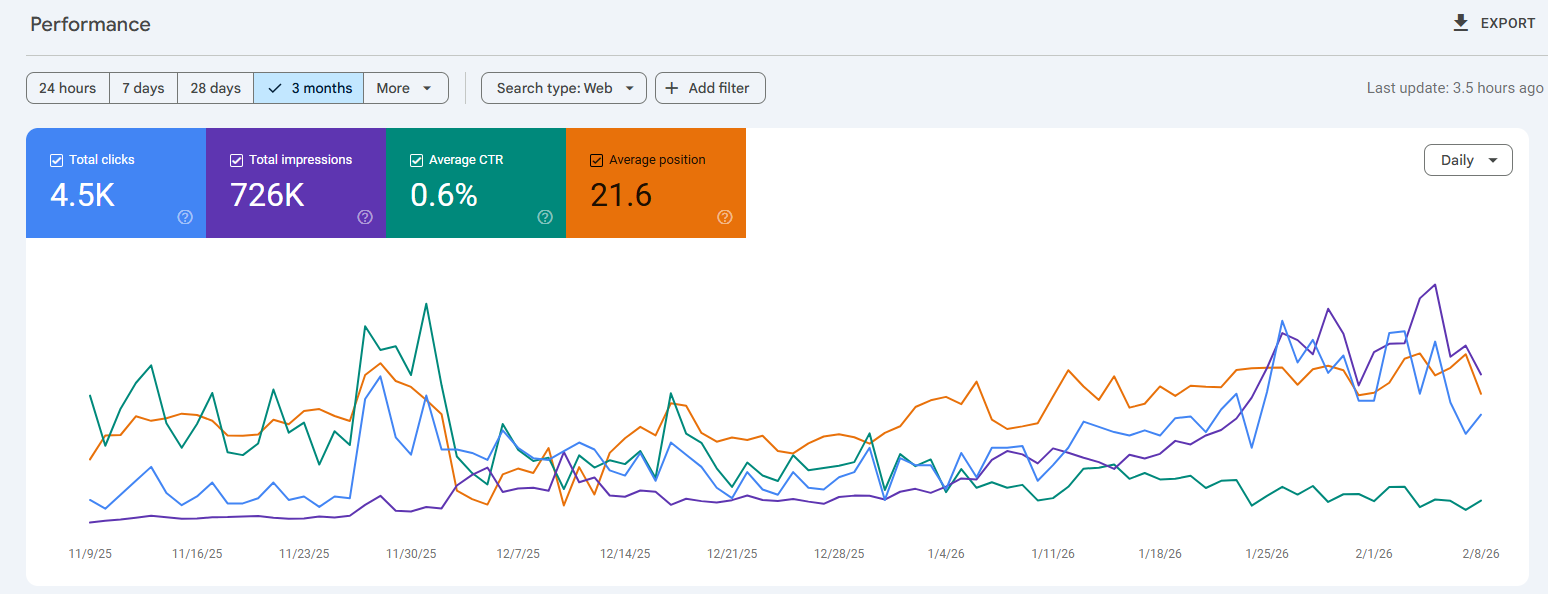
Best for: First-party SEO performance tracking.
Google Search Console shows which queries drive clicks, how often pages appear in results, and the average position for each term.
It also flags indexing errors, mobile issues, and Core Web Vitals issues that can harm rankings. The URL Inspection feature works like a fast SEO checker for a single page, so issues are easier to find.
#2: Google Analytics 4 (GA4)
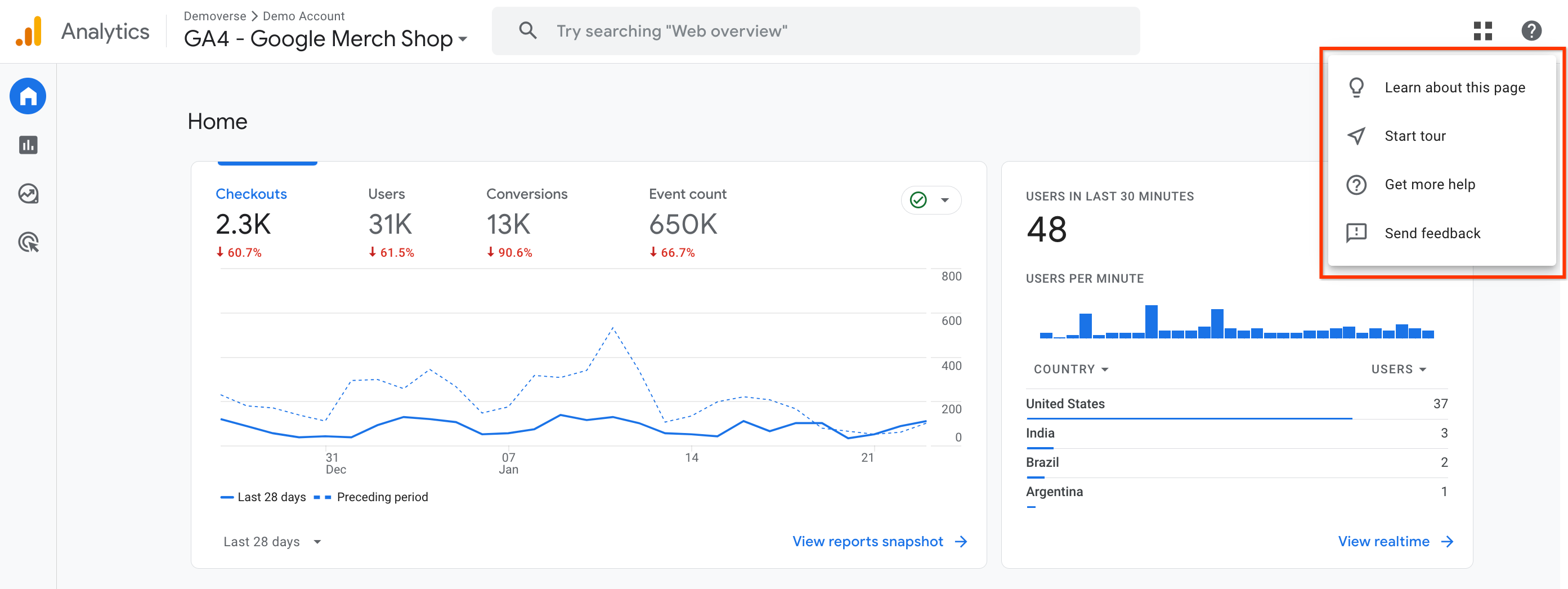
Best for: Post-click behavior and conversion tracking.
Google Analytics 4 (GA4) adds the full picture of user behavior. While Search Console focuses on search, GA4 shows every traffic source, on‑site paths, and conversions.
GA4 also helps track referral traffic from AI tools like ChatGPT or Perplexity, which is vital as AI‑generated answers grow.
#3: Bing Webmaster Tools
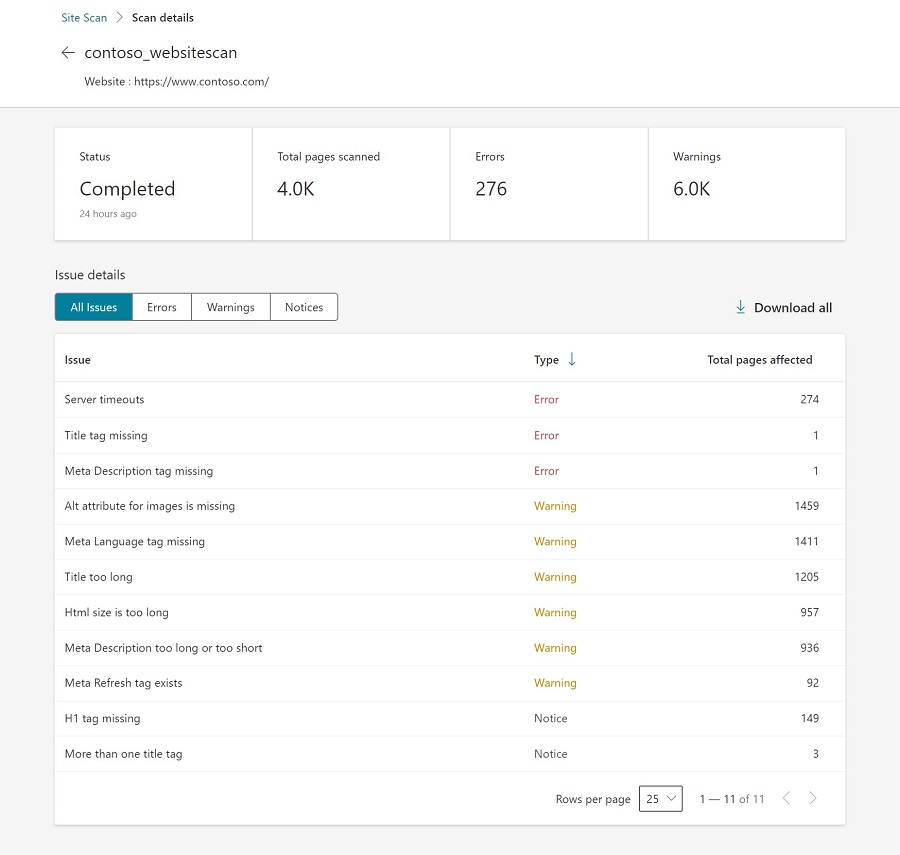
Best for: Tracking technical issues and ensuring AI visibility.
Bing Webmaster Tools is often overlooked, but it plays a bigger role, especially now that Bing powers many AI assistants.
It mirrors much of Google Search Console, with some extra perks such as an easy Site Scan for technical checks that feels like a light SEO audit tool.
Because ChatGPT pulls data from Bing, good performance here can also mean better visibility in AI mentions. The setup is quick, making it a good entry tool for SEO beginners.
Setting up these 3 tools can help you lay the base of a comprehensive SEO analytics workflow, from initial data collection through analysis and reporting.
Best all-in-one SEO analytics platforms for comprehensive insights
Free tools handle a lot, but there comes a point where deeper competitive analysis and smoother workflows are needed. That is when an all‑in‑one SEO analytics platform starts to pay off.
These SEO tools often replace several point tools at once, bringing keyword research, auditing, rank tracking, and reporting into a single dashboard.
#4: Semrush
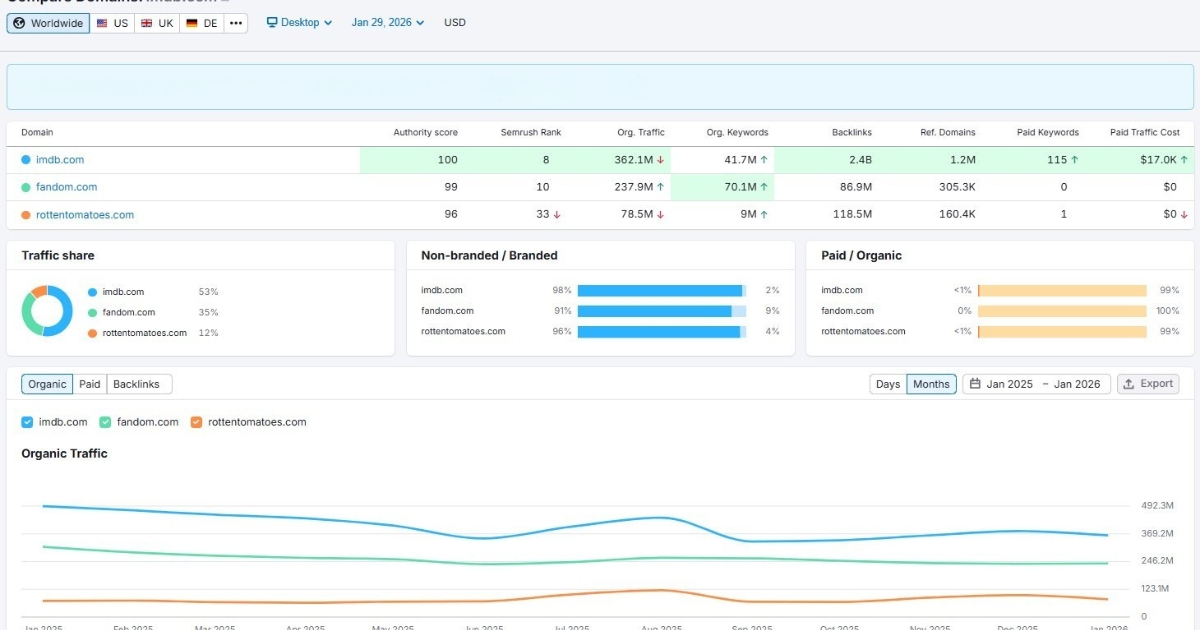
Best for: Enterprise off-page and on-page SEO analytics and competitor analysis.
Semrush sits at the high end of the all‑in‑one market and acts like a control center for nearly every SEO task.
It shines for agencies, larger in‑house teams, and SEO specialists who handle many sites and need detailed data. With a large keyword index and strong link data, it doubles as both an SEO analyzer and a competitor website analysis tool.
Key strengths include:
- Extensive keyword database with powerful topic research tools.
- AI features such as Semrush Copilot and Personal Keyword Difficulty make search engine optimization keyword analysis faster by pointing out realistic targets for a specific domain.
- Visibility tracking for traditional rankings and AI search experiences, which helps teams follow both classic and new types of results.
The tradeoff is the learning curve and the price. New users may need a couple of weeks to feel comfortable with the interface, while the tool may not be particularly lucrative for startups or freelancers on a budget.
Pricing:
7-days free trial with limitations. Paid plan starts at $199/month.
#5: Ahrefs
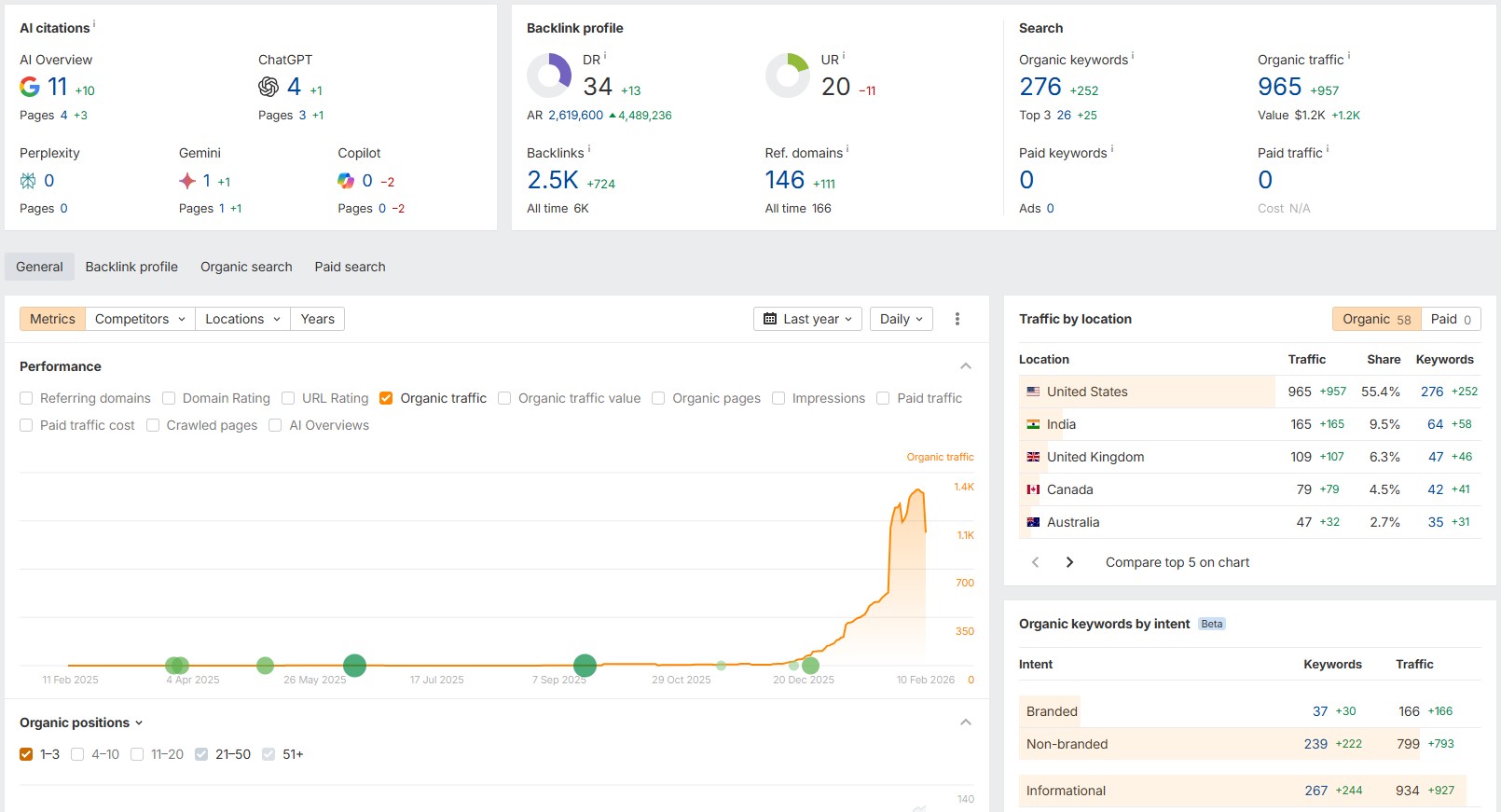
Best for: Backlink analytics and competitor research.
Ahrefs is widely known for having one of the strongest backlink indexes on the market. For link‑focused campaigns and deep competitor work, it is often the first paid SEO analytics tool professionals consider.
The Site Explorer module offers a comprehensive view of competitors’ pages, keywords, and links in a clean, simple layout.
Its main strengths are:
- Backlink data that supports serious link building and online PR campaigns.
- Keyword research with difficulty scores and click‑through estimates makes SEO analysis more practical.
- The AI Content Helper checks topical coverage and points out gaps in content drafts.
Many users also trust Ahrefs for early signals of new rivals in a niche, thanks to its steady crawling. It is not cheap by any means, but it is mostly accurate in its analytics data.
Pricing:
No free plan available. Pricing starts at $129/month.
#6: SE Ranking
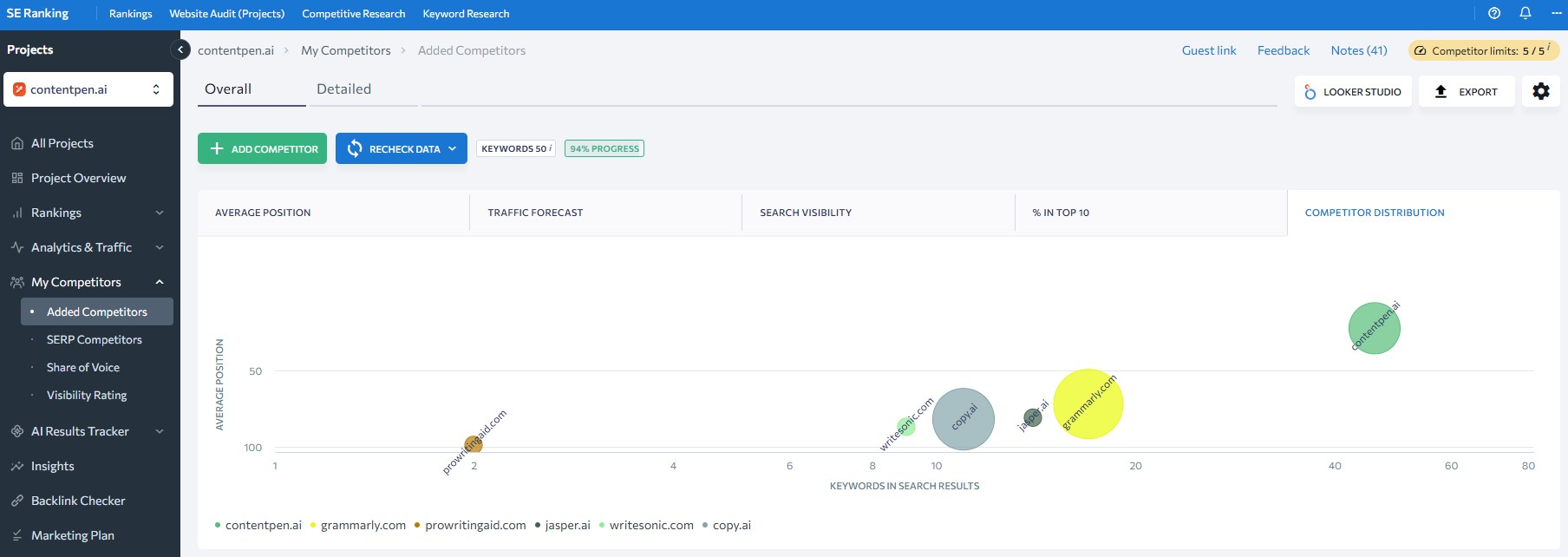
Best for: Scalable rank tracking.
SE Ranking aims to give agencies and growing teams a strong feature set without enterprise‑level pricing.
It covers keyword research, auditing, backlink data, and reporting, but is best known for accurate rank tracking and client‑friendly reports. Its project‑based layout also makes it easy to manage many sites at once.
Notable features include:
- Accurate rank tracking with flexible grouping and tagging.
- The AI Overview tracker, which watches how often a site appears inside Google’s AI‑style summaries.
- White‑label reports and lead‑generation widgets that support agency growth.
For many teams, SE Ranking is the most practical SEO analytics platform when price and features are both crucial.
Pricing:
14-day free trial. Paid plans start from $129/month.
#7: KeySearch
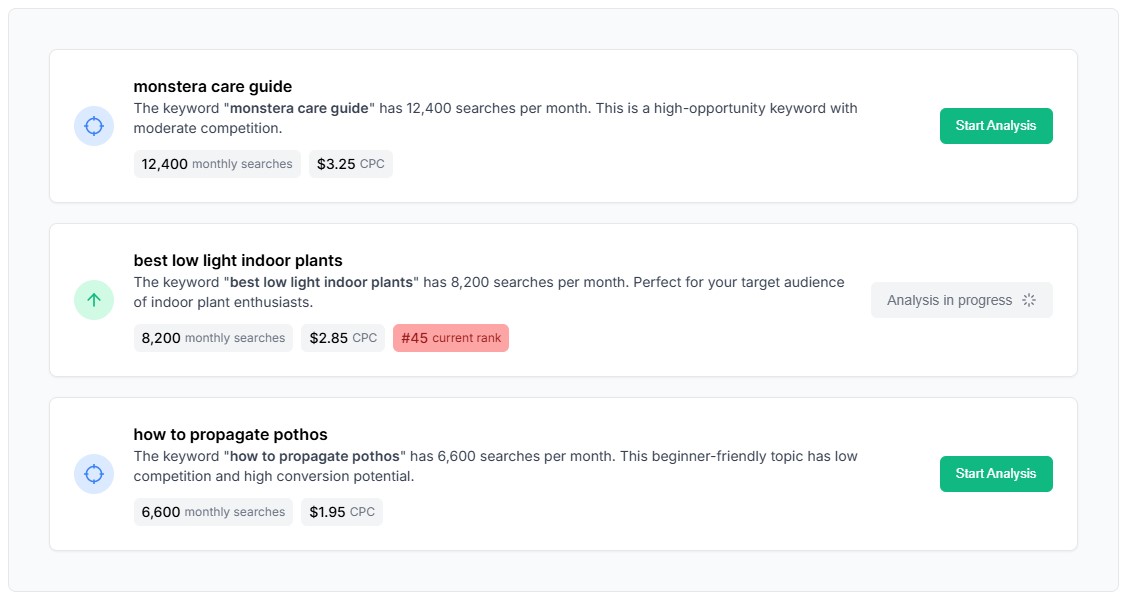
Best for: Budget-friendly SEO analytics.
KeySearch is a budget‑friendly pick for people just starting with SEO analytics. It delivers many features of larger suites at a much lower price, helping new businesses move past the guesswork and gain better visibility in SERPs and AI overviews.
Users get:
- Keyword research with difficulty scoring.
- Light competitor checks that point out what similar sites rank for.
- Basic rank tracking and a simple content assistant.
KeySearch works well as a first paid SEO analytics tool for people who want more than a single Google keyword analysis tool but are not ready to commit to Semrush or Ahrefs yet.
The data comes from well‑known sources, and the interface is simple enough. It is not as deep or fast as higher‑priced platforms, but it gets the job done.
Pricing:
Free 7-day trial available. Paid plans start at $24/month.
Performance and diagnostic SEO analytics tools for better growth
All‑in‑one suites are great for day‑to‑day work, but sometimes a focused SEO analytics tool does a single job far better. Content optimization, full‑scale site crawls, and precise rank tracking are common cases where specialist tools shine.
Let’s see them in more detail.
#8: Contentpen
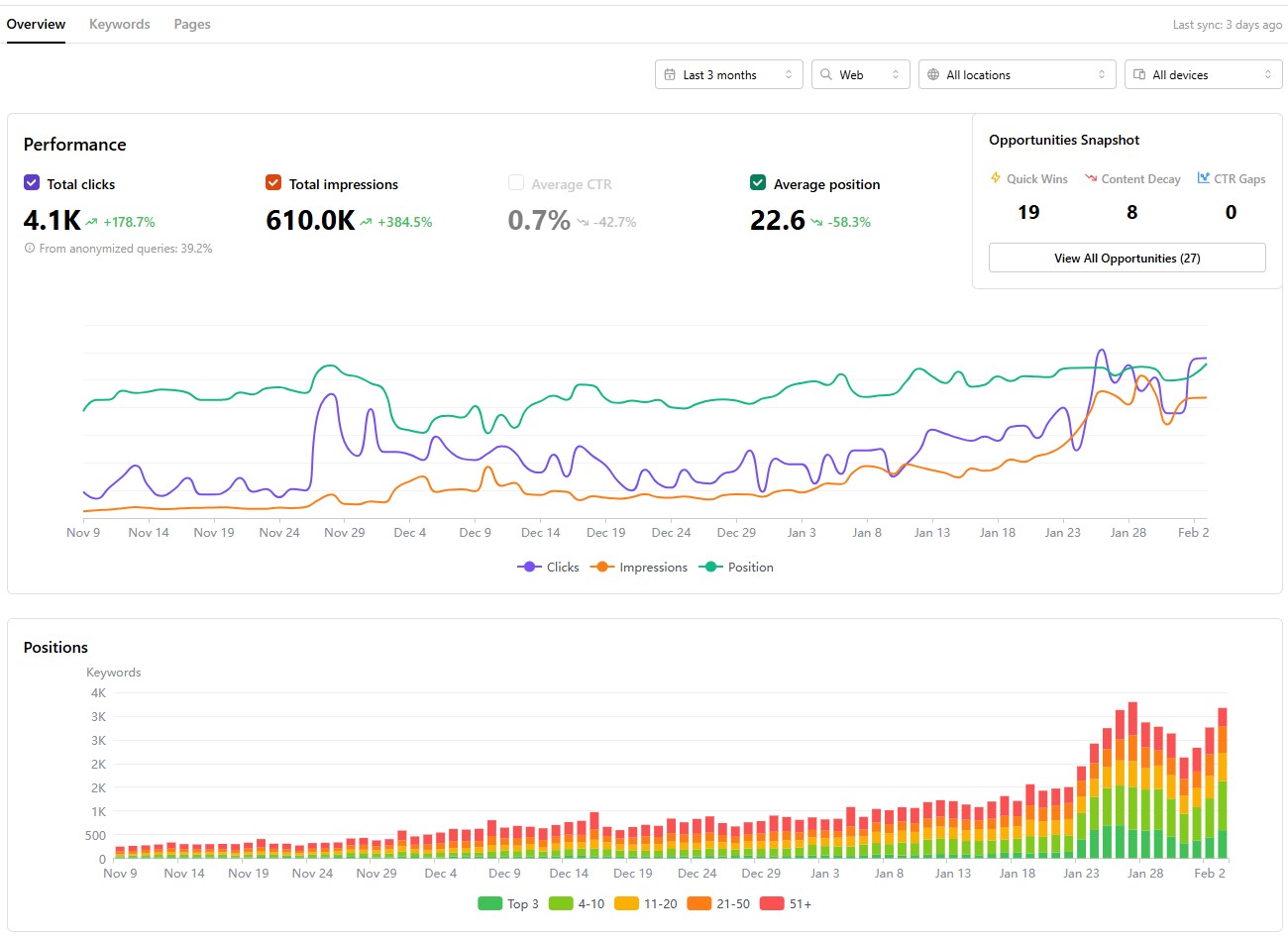
Best SEO analytics tool for accurate content performance tracking.
Contentpen stands out as an integrated platform that combines AI-assisted writing, SEO scoring, and publishing workflows into one system.
It provides robust analytical features to help you analyze traffic sources across your platforms, along with keyword positions, CTR values, and page impressions.
Key capabilities include:
- AI-powered content creation with a built-in AI assistant (Ask AI) to boost readability in blogs while ensuring search engine discoverability.
- SEO scoring based on real ranking data that stays updated.
- Competitor content comparison to surface quick wins, decaying blogs, and ranking opportunities.
- Performance tracking across web, image, video, and news sources for multiple device types.
- Date range selection from the last 7 days to 16+ months to view all the essential SEO metrics at a glance.
Contentpen is ideal for agencies, editorial teams, and businesses that want to scale content without scaling tools.
Pricing:
Free trial for 7 days. Paid plans start at $27/month.
#9: Usermaven
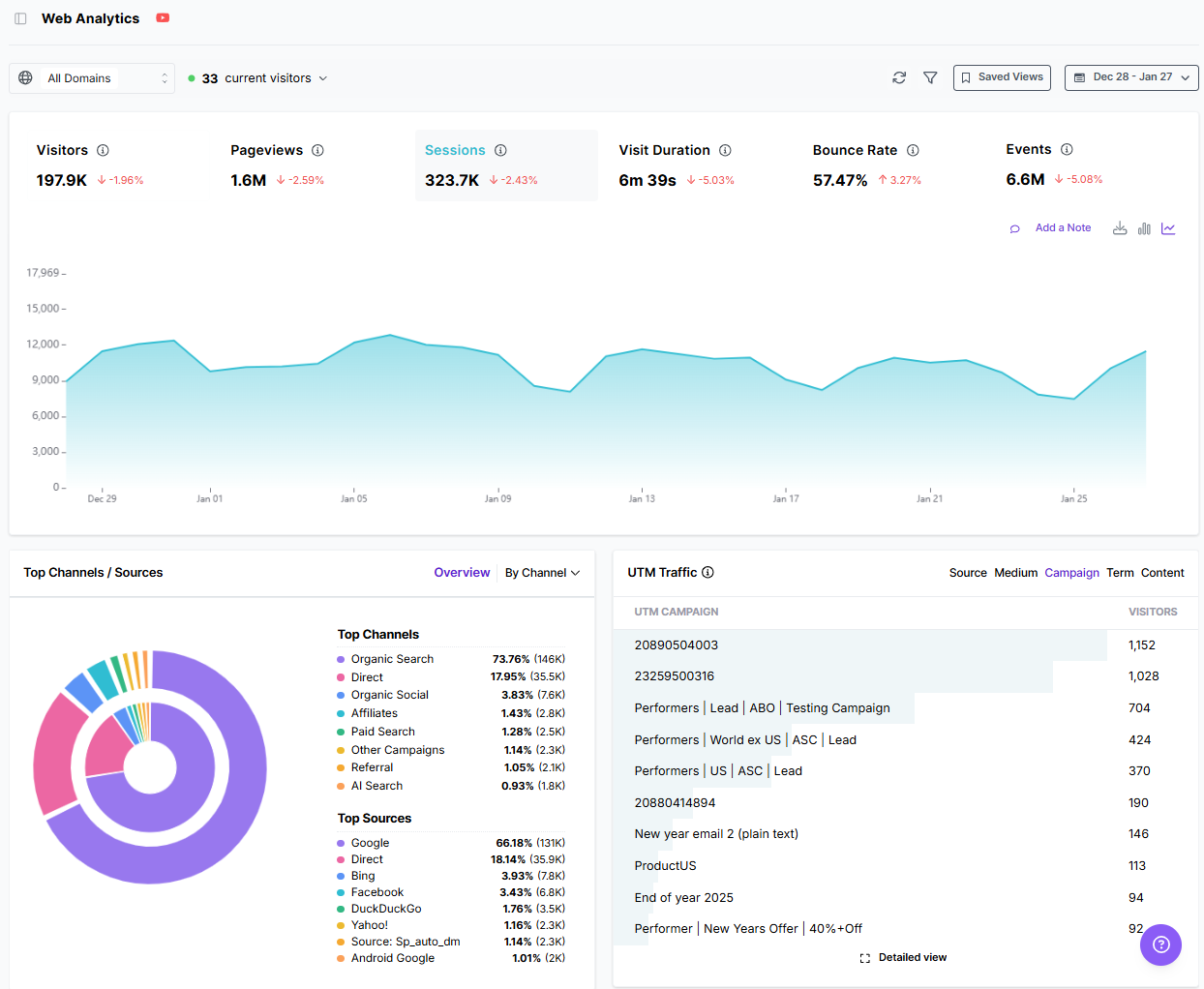
Best for: Post-click SEO attribution and behavior analytics.
Usermaven is an AI-powered web and product analytics and attribution tool designed as a powerful alternative to GA4. It helps teams track the full customer journey and understand how users behave across pages, funnels, and events, without overwhelming dashboards.
Usermaven is ideal for:
- Tracking organic traffic behavior post-click.
- Advanced SEO attribution to see where the traffic is coming from.
- Segmenting audiences to enable personalized digital marketing efforts.
- Maven AI is included to answer analytical queries with ease.
Usermaven’s real-time data access and integration with popular tools, such as HubSpot and Slack, ensure better decision-making and more productivity.
Pricing:
A 14-day free trial is available. Paid plans start at $84/month.
#10: Screaming Frog
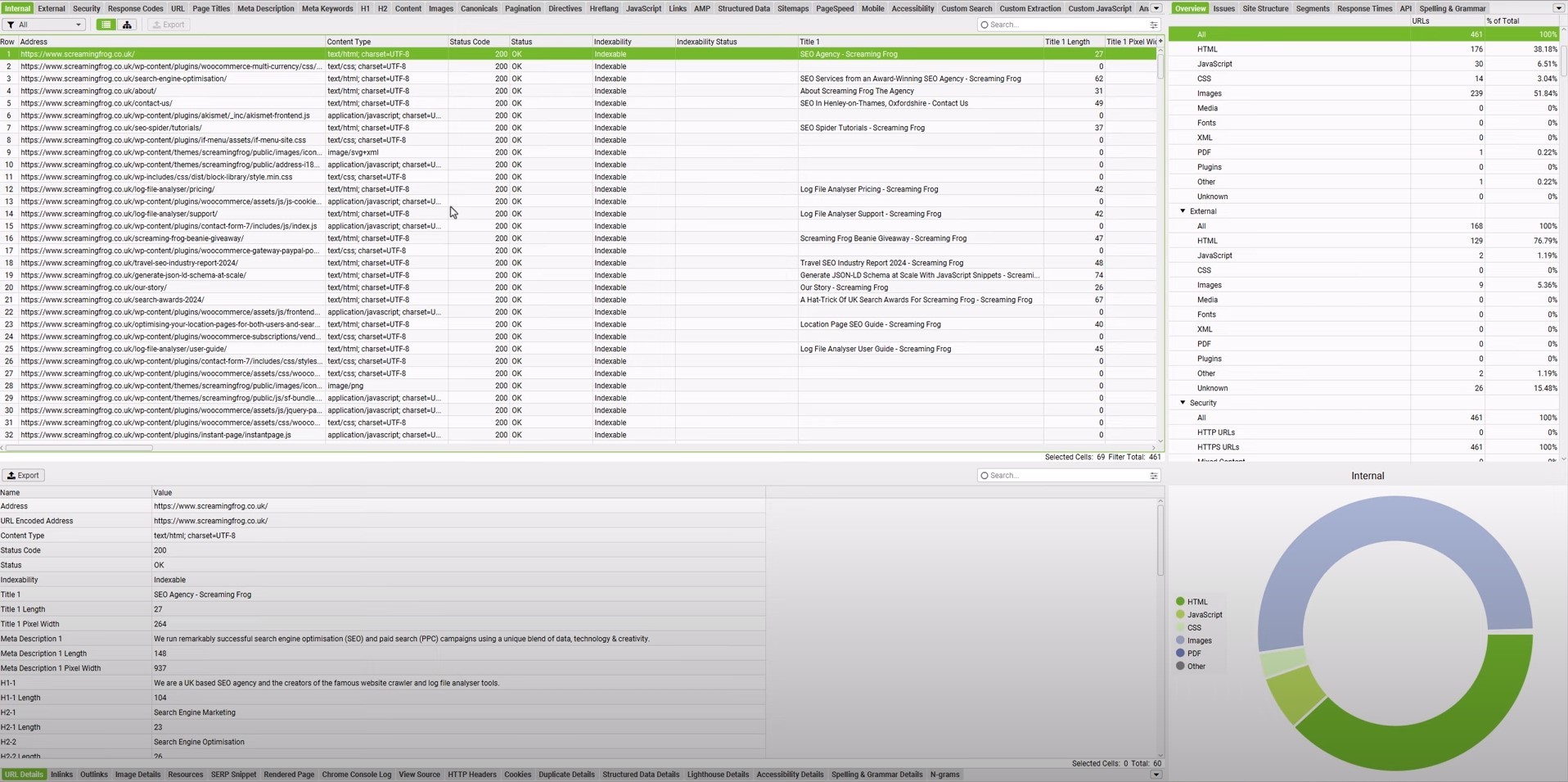
Best for: Technical SEO diagnostics.
Screaming Frog is a well‑known tool for technical SEO. It is a desktop crawler that scans a site in the same way search bots do. It reports on broken links, redirect chains, thin content, missing tags, and more. For a deep website analysis tool, it is hard to beat.
Typical use cases include:
- Spotting broken links on anchor texts and redirect loops.
- Checking metadata such as title tags, meta descriptions, and canonical tags.
- Finding thin or duplicate content that should be merged or expanded.
Reading the reports requires some basic technical SEO knowledge, especially when using advanced filters. Yet for agencies and seasoned SEO pros, Screaming Frog offers the detail they need.
Pricing:
A free version is available that handles crawling for up to 500 URLs. Price per license for the advanced version is $279/year.
#11: Nightwatch
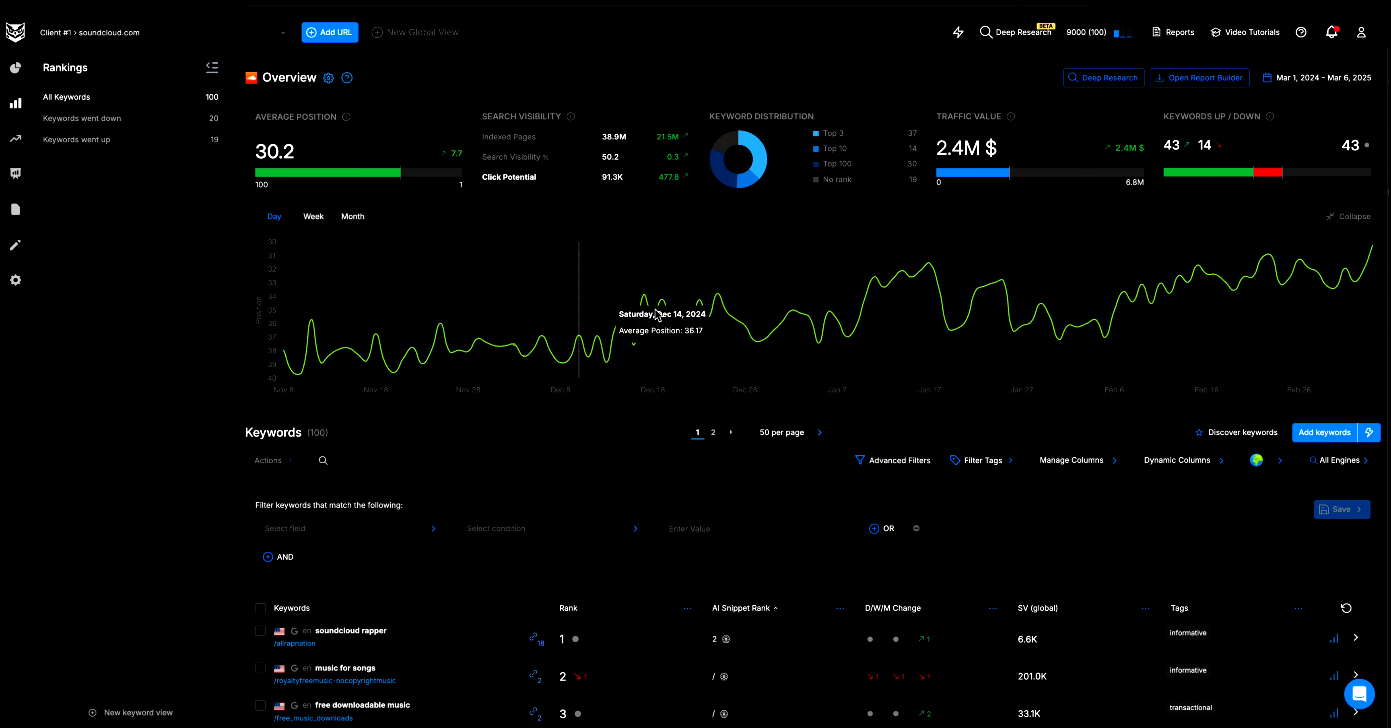
Best for: Precision rank tracking and local SEO.
Accurate rank tracking is the backbone of search engine optimization analysis, and Nightwatch is built around that task. It focuses on precision, especially for local SEO rankings across cities or even neighborhoods.
Key capabilities include:
- Keyword tracking across famous search engines and AI discovery platforms, such as Google, Bing, YouTube, Perplexity, and ChatGPT.
- Zip-code level tracking precision for more than 107,000 locations.
- Wide device support, allowing users to track rankings, SERPs, and other numbers on desktop, mobile, and tablet devices.
Integrations with Google Analytics and Looker Studio help tie rankings back to traffic and conversions, while the interface stays clean and modern.
Pricing:
A 14-day full-feature trial is available. Paid plans start at $39/month.
How AI is reshaping SEO analytics (and making it more accessible)
AI has transformed SEO analytics from spreadsheet work into guided, conversational analysis. Instead of manually exporting data and searching for patterns, users now receive summarized insights, prioritized recommendations, and automated workflows.
Artificial intelligence also opens a new front, often called Generative Engine Optimization (GEO). People now find content not only on classic search pages but also through AI systems like ChatGPT, Perplexity, and Gemini.
Therefore, it is now necessary to track mentions for these chatbots with specialized SEO analytics tools, such as SE Ranking. This tool adds its own AI Overview tracking to help users see when they are named in Google’s AI-style sections.
Similarly, our AI blog writer produces SEO- and GEO-optimized content that aligns with your custom brand voice. The analytics show AI discovery platforms as traffic sources, helping you accurately weigh your content writing efforts.
All SEO analytics tools compared
Below is a detailed table of all the SEO analytics tools we’ve discussed so far.
| # | Tool | Best For | Core Analytics Focus | AI Analytical Features | Trial / Pricing |
| 1 | Google Search Console | First-party SEO performance tracking | Queries, clicks, impressions, rankings, indexing, Core Web Vitals | ✅ (AI-powered configuration) | Free |
| 2 | Google Analytics 4 (GA4) | Post-click behavior and conversion tracking | Traffic sources, user paths, conversions, and AI referral tracking | ❌ | Free |
| 3 | Bing Webmaster Tools | Bing and AI assistant visibility | Performance data, indexing, site scans, and technical issues | ❌ | Free |
| 4 | Semrush | Enterprise SEO analytics | Rankings, backlinks, site audits, and visibility tracking | ✅ (AI search tracking) | 7-day trial, from $199/mo |
| 5 | Ahrefs | Backlink analytics and competitor intel | Backlinks, rankings, traffic estimates, and content gaps | ✅ (AI Content Helper) | No free plan, from $129/mo |
| 6 | SE Ranking | Scalable rank tracking | Rankings, audits, backlinks, and AI Overview tracking | ✅ (AI Overview tracker) | 14-day trial, from $129/mo |
| 7 | KeySearch | Budget-friendly SEO analytics | Keyword research, basic rank tracking, competitor checks | ❌ | 7-day trial, from $24/mo |
| 8 | Contentpen | Content performance analytics | CTR, impressions, rankings, competitor content comparison | ✅ (Ask AI, SEO scoring, AI writing) | 7-day trial, from $27/mo |
| 9 | Usermaven | Post-click SEO attribution and behavior analytics | Funnels, events, organic traffic behavior, conversions | ✅ (Maven AI) | 14-day trial, from $84/mo |
| 10 | Screaming Frog | Technical SEO diagnostics | Crawl data, broken links, metadata, indexability | ❌ | Free (500 URLs), $279/yr |
| 11 | Nightwatch | Precision rank tracking and local SEO | Keyword rankings, SERP tracking, geo-level visibility | ✅ (Nightwatch AI Agent) | 14-day trial, from $39/mo |
Choosing the right SEO tool for your needs comes down to your preference and what your priorities are.
- If your marketing fundamentals revolve around content-driven approaches, choose Contentpen.
- If the services you offer require local visibility, choose Nightwatch.
- If you require enterprise-level backlink data and SEO analytics, then Semrush or Ahrefs is your best bet.
It is important to consider your team’s skills, budget, and existing tool stack to make the right call for an SEO analytics tool. Always consider the software’s free trials to try it in your daily workflow before fully committing.
Final thoughts
An SEO analytics tool is a bare essential in 2026, especially when visibility is desired in both SERPs and AI Overviews. Today, most brands require these specialized SEO tools to beat competitors and drive organic traffic.
Our list covers both free and paid SEO analytics tools to help you choose the option that best fits your needs.
It is always recommended to test these tools before purchasing and to invest in team training and workflow integration to maximize ROI. With proper planning, you can fully utilize the best SEO analytics tools in 2026 and achieve the desired results.
Frequently asked questions
An SEO tool is used to measure search visibility, diagnose ranking issues, track performance, and guide optimization decisions that improve organic traffic.
Yes. Modern SEO analytics tools like Contentpen support content planning, optimization, and performance measurement by identifying ranking gaps, search intent, and opportunities to improve existing pages.
Yes, it can, but the prompting required for ChatGPT to do so is intense. Better alternatives are available, such as Contentpen for content-driven SEO and Nightwatch for local SEO.
SEO analytics should be reviewed weekly for performance trends and monthly for strategy adjustments. Sites in competitive niches may require daily monitoring of rankings to see traffic and audience behavioral shifts for better growth.
Leave a Reply