As a growing marketer, you’ve likely seen the bounce rate metric in Google Analytics and wondered what it is and why it matters.
Bounce rate is the percentage of visitors who land on a page and leave without taking any further action. It is a central metric for many digital marketing and SEO efforts, and is crucial for decision-makers to further their strategies.
The problem is that bounce rate is one of the most misunderstood numbers in SEO analytics. Many teams see a high website bounce rate and panic, even when the page is doing its job. Others ignore it, missing serious content or user experience issues.
This guide breaks down everything about bounce rate. It explains the basics, how the bounce rate formula works, what counts as a good bounce rate, and practical steps to quickly reduce it for your platforms.
So, let’s get started, shall we?
What is bounce rate?
Bounce rate is the percentage of sessions in which someone lands on a page and then leaves without any further interaction. For a single page, this is often called the page bounce rate.
It is important to note that the definition of bounce rate is different in Universal Analytics and Google Analytics 4 (GA4):
- Old Analytics: If someone leaves without clicking anything else, it’s a bounce.
- New GA4: If someone stays for less than 10 seconds, doesn’t trigger a conversion, and doesn’t see 2 or more pages, it’s a bounce.
The newer way is much better at measuring “boredom” vs. “interest” and at determining whether the content users found on your site was actually helpful or not.
How to calculate bounce rate?
We can quantify this metric by using a simple bounce rate formula like this:
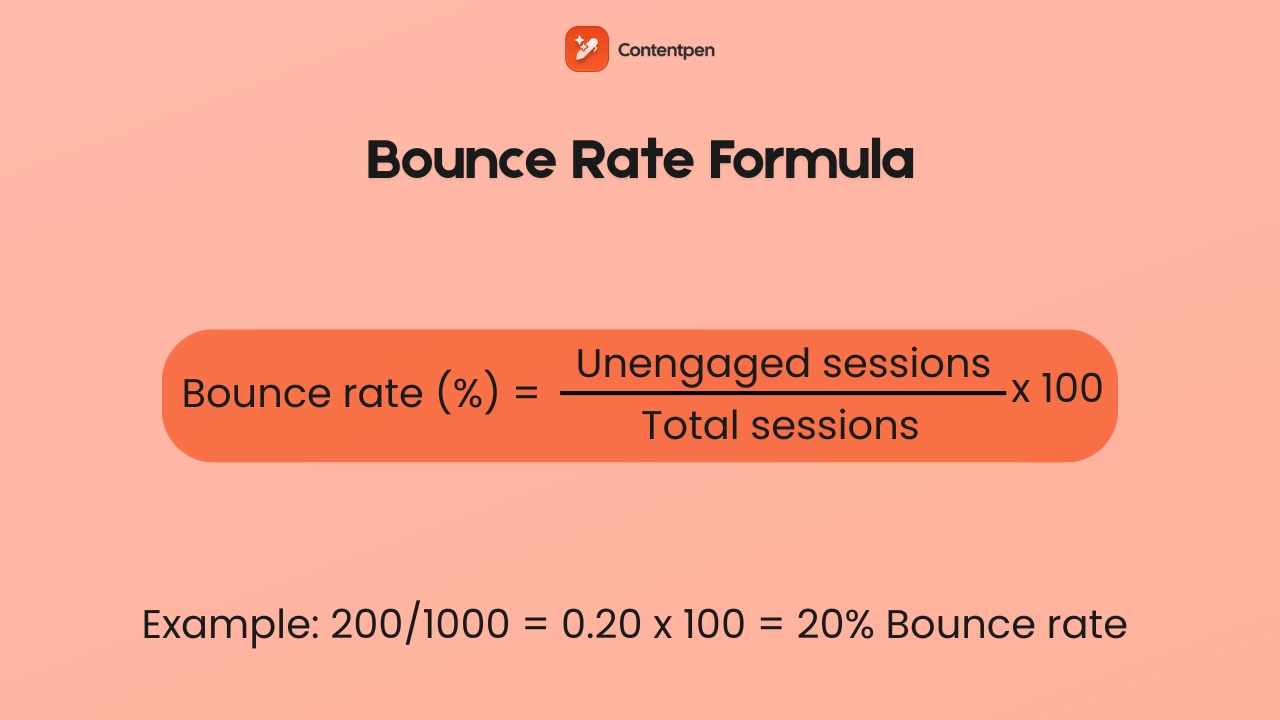
Bounce rate (%) = (Unengaged sessions ÷ Total sessions) × 100
Let’s understand this with a quick bounce rate example. So, if you have a site with 1,000 total sessions, of which 500 were unattended or unengaged (with no action), then the bounce rate is 500/1,000, or 50%.
It is also important to note that the engagement rate is the inverse of the bounce rate. So if your site has a 30% bounce rate, that means the engagement rate would be 70%.
Mathematically, this means:
Bounce rate (%) = 100 – engagement rate (%)
Or vice versa.
How can visitors bounce off a page?
A visitor can bounce in several common ways:
- Users click the browser back button right after the page loads. This often happens when the content does not match what they expected from the search result. It can also happen when the layout feels confusing at a glance, or the page takes too long to load.
- Since mobile devices are now the primary source of website traffic, poor mobile optimization will almost certainly result in higher bounce rates.
- Some visitors type a new URL into the address bar. That can signal they changed their mind or the content did not feel trustworthy.
- A session can time out after a period of inactivity, often around 30 minutes. When that happens with only one pageview, SEO analytics tools, such as Google Analytics, record it as a bounce.
Exit rate vs. bounce rate: What’s the difference?
Exit rates and bounce rates are two separate metrics used to evaluate a site, but are often confused.
The confusion usually comes from one fact:
Every bounce is an exit. But not every exit is a bounce.
To understand the difference clearly, focus on when the session ends and what happened before it ended.
You can also see this table for a clearer explanation:
| Bounce Rate | Exit Rate |
| Measures sessions that end on the first page | Measures sessions that end on any page |
| Only applies to entry pages | Applies to every page on your site |
| Based on sessions | Based on pageviews |
| Requires zero further interaction | Can happen after multiple interactions |
| Indicates failure to continue | Indicates where users finish |
TL;DR:
- Use bounce rate to evaluate first impressions and engagement.
- Use the exit rate to diagnose journey drop-offs and flow efficiency.
How to check my website bounce rate in GA4?
Checking bounce rate in Google Analytics 4 is simple, but you need to know where to look because it is not shown in every default report.
The quickest way to find it is to perform the following steps:
Step 1: Open the Reports section
Go to Reports → Engagement → Pages and screens.
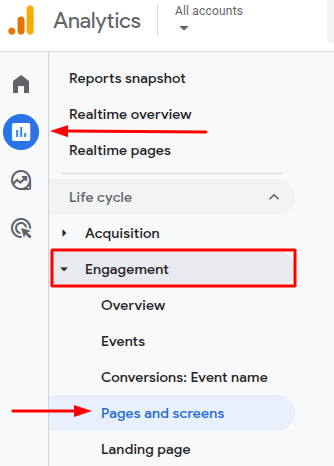
This report shows performance data for individual pages. If bounce rate is not visible, click the pencil icon (Customize report) and add Bounce rate as a metric.
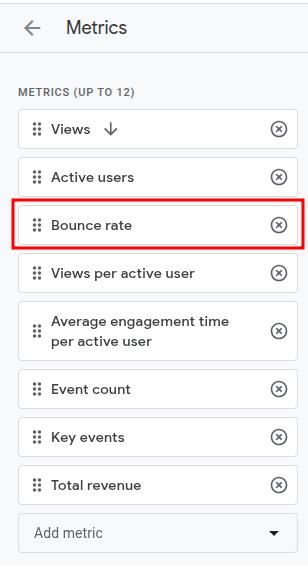
Now, drag the bounce rate to one of the top positions, then hit Save to easily add this metric to your report.
Step 2: Check bounce rate by page
Once added, you will see the bounce rate next to views, users, engagement rate, and average engagement time.
Remember that in GA4, bounce rate is calculated as the percentage of unengaged sessions, meaning:
- Less than 10 seconds
- No conversion
- No second pageview
So if you see a 35% bounce rate, that means 65% of sessions were engaged.
Step 3: Check bounce rate by traffic source
To diagnose problems more deeply, go to:
Reports → Acquisition → Traffic acquisition
By default, you may see the engagement rate there in a column.
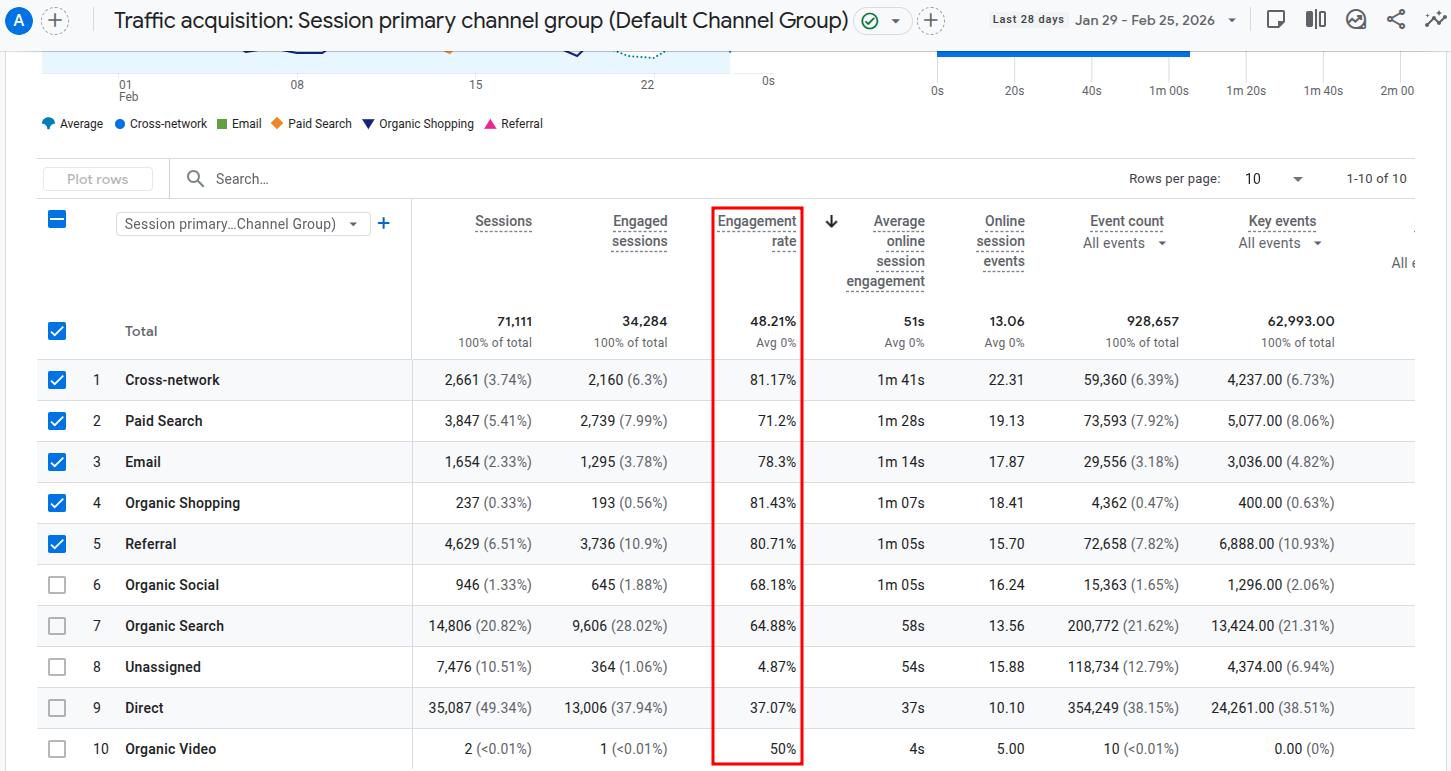
You can either use the mathematical formula (1 – engagement rate) = bounce rate to calculate the bounce rate for all traffic sources. Or you can add the bounce rate directly to the column as well from the customization option.
What is a good bounce rate? (benchmarks by industry and page type)
Many teams ask what a normal bounce rate for a website should be, but there is no single perfect number. A good bounce rate for a website depends on the industry, traffic source, and page type.
Still, there are some benchmark numbers, produced by customedialabs, that you should know for different websites:
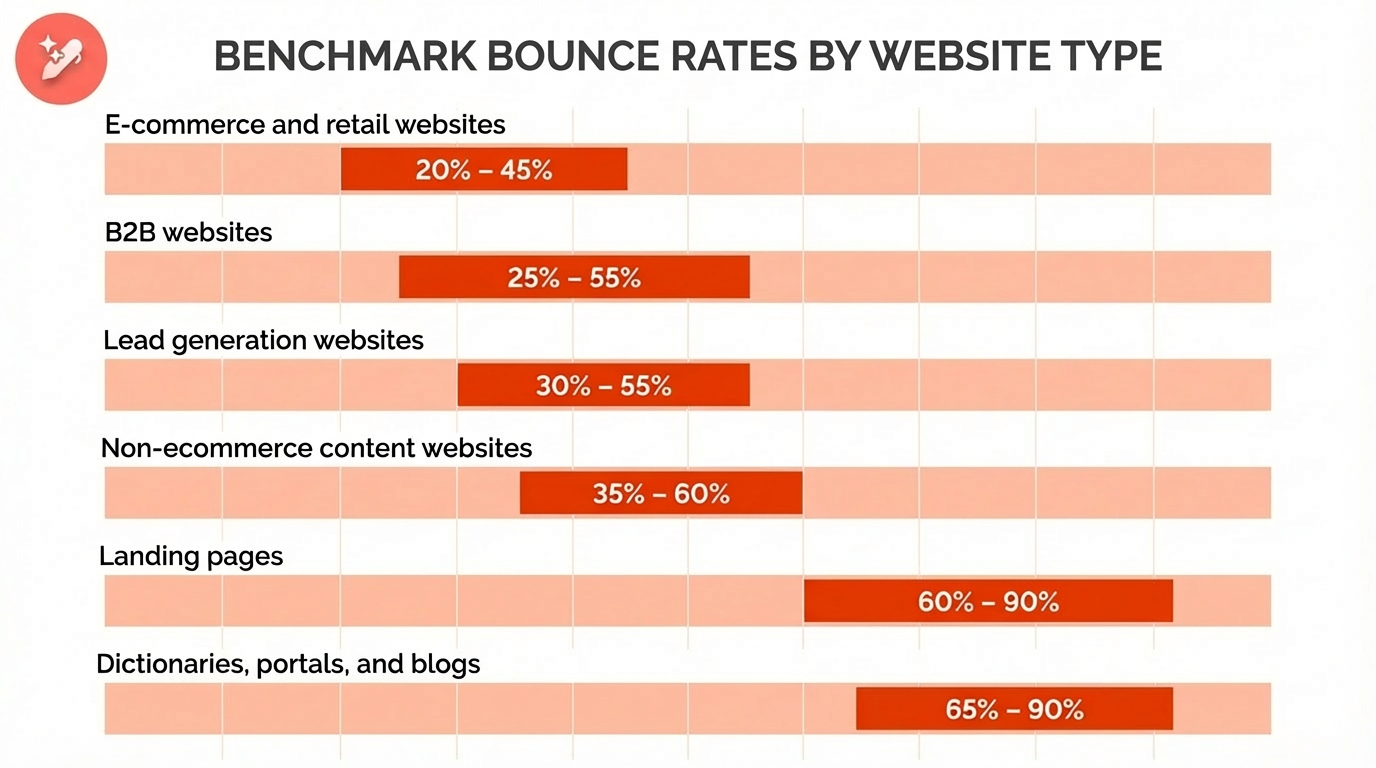
There are also some industry benchmarks available for different niches. Please note that these are average numbers and can vary for your site.
| Industry Type | Typical Bounce Rate (Approx.) |
| Apparel and footwear | 36% |
| Travel and leisure | 39% |
| Food | 39% |
| Health and wellness | 40% |
| Automotive | 40% |
| Real estate | 42% |
| Education | 46% |
| SaaS / IT and technology | 48% |
Source: Databox.
Let’s break down these numbers by industry to help you better understand the bounce rate benchmarks.
If you look closely at the table, the apparel and footwear industry typically has lower bounce rates because users intend to stick around, browse products, and buy stuff.
Contrastingly, content-heavy industries (news outlets, etc.) tend to see higher bounce rates, as users read one thing and then move on to another page when they’ve got their answers.
Detailed data can also help you separate “high but healthy” bounce rates from “high and harmful” ones:
- High but healthy: Single‑purpose landing pages, FAQ pages that answer one question, directions/contact pages, quick reference posts.
- High and harmful: Product pages with very little detail, blog posts that never answer the main question, pages with heavy technical problems, or confusing design.
This context keeps the team focused on the right fixes instead of chasing a random target.
Why is your bounce rate high? (Common causes)
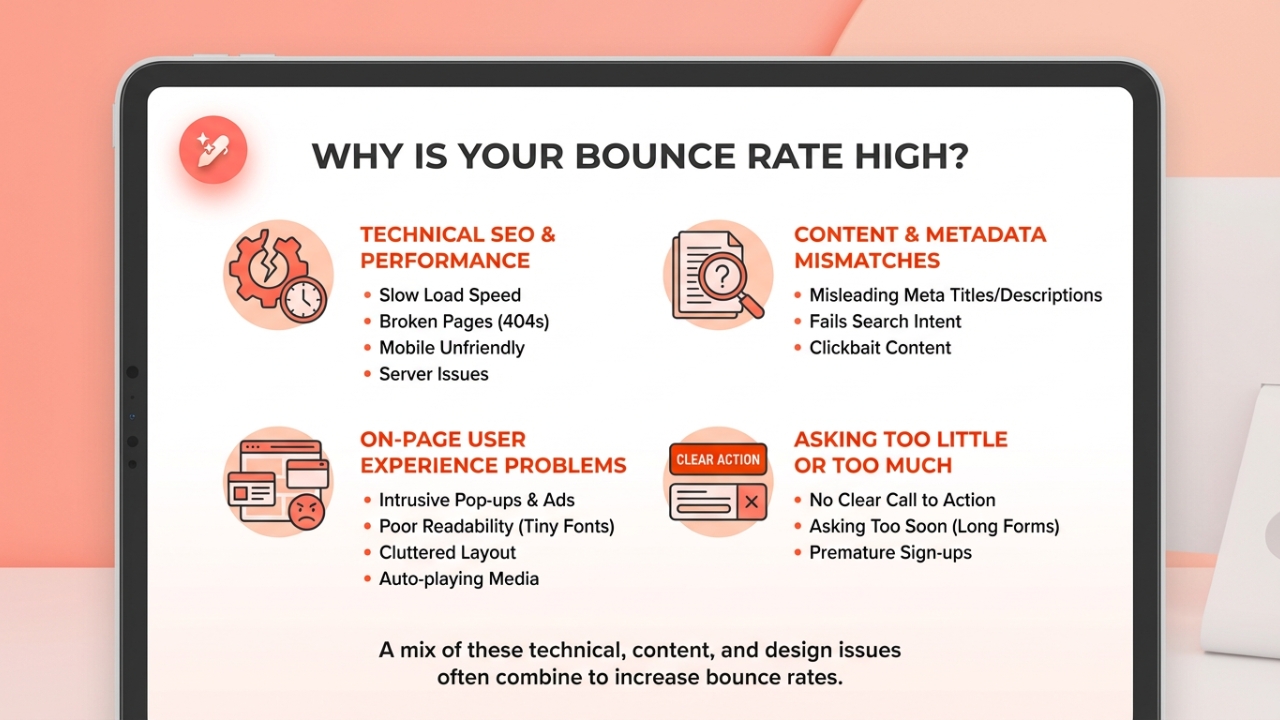
High bounce rate can be due to the following reasons:
- Technical SEO and performance issues
- Content and metadata mismatches
- On-page user experience problems
- Asking too little or too much of the user
Let’s discuss these in more detail.
Technical SEO and performance issues
These issues are a frequent cause of a high bounce rate. Slow page load speed is a major issue, and as seconds tick by, more visitors leave before they see any content. Blank pages, 404 errors, and server problems also push people away.
A site that is not mobile-friendly is just as bad, so these problems hurt both bounce rate and search performance.
Content and metadata mismatches
If the content you’re writing doesn’t match the meta title and meta description you’ve written for your page, then that ends up being clickbait. Users often feel they’ve been lied to, which compels them to check out your competitors, increasing bounce rates.
Also, a piece of content that doesn’t properly satisfy search intent can also send people away because it fails to answer the question they had in mind.
On-page user experience problems
Users want the fewest disruptions during their browsing sessions. If all they get are intrusive pop-ups, auto-playing videos with sound, and heavy ad layouts, it makes it hard for them to stay on your page.
Think about how you like to see a webpage. Do you like it messy and unorganized, or neat and aesthetic?
Poor readability, with tiny fonts and no white spaces, can also cause people to give up quickly. Not performing on-page SEO or not refining on-page elements will hurt your business in the long run.
Asking too little or too much
Finally, when there is no clear call to action, visitors do not know what to do next, causing them to leave your page.
On the contrary, asking for too much too soon, such as filling out long forms or signing up for a newsletter even though the brand hasn’t earned the trust or attention yet, also leads to more exits.
A high bounce rate is rarely caused by a single issue. Most of the time, there is a mix of small technical, content, and design problems that add up. Fixing them as a team tends to lower the bounce rate and improve other metrics as well.
How to improve bounce rate with proven strategies that work
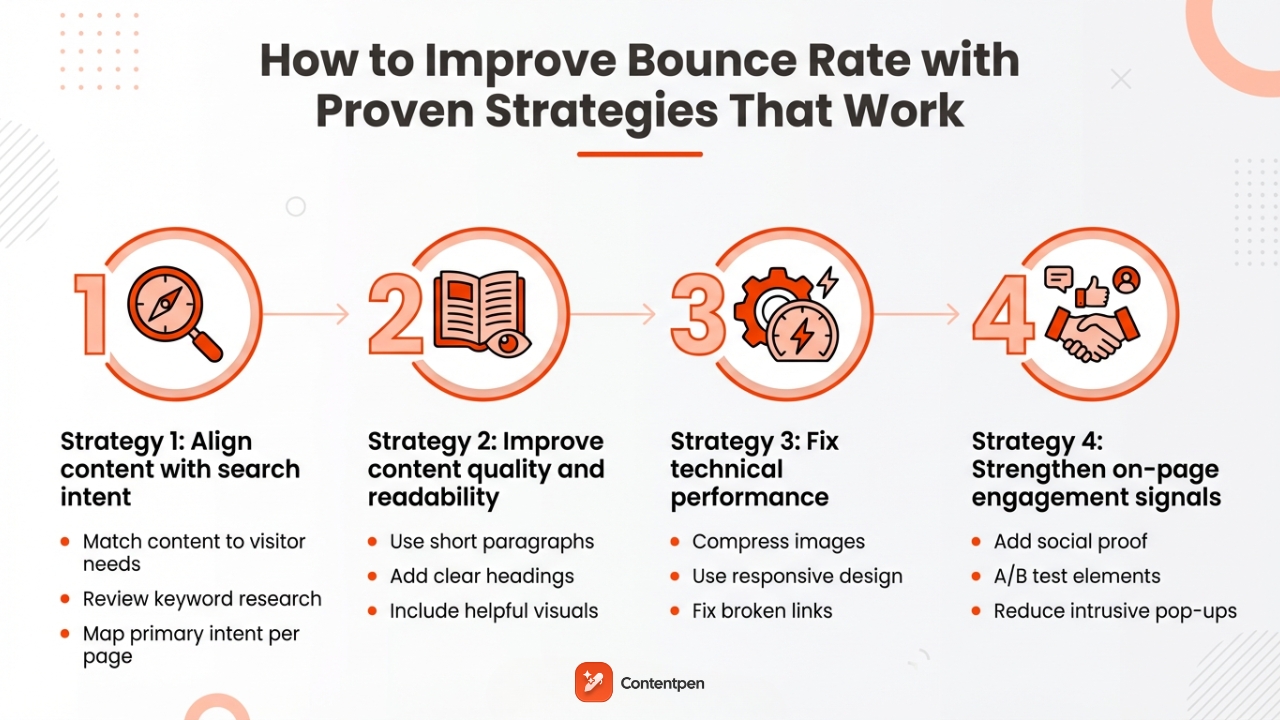
Improving bounce rate is very doable once the causes are clear. The best wins come from matching content to search intent, making pages easier to read, resolving technical issues, and clearly guiding visitors toward the next step.
Strategy 1: Align content with search intent
The fastest way to improve bounce rate is to match each page to what visitors really want. That starts by looking at the search results for a target keyword and noticing what types of pages rank. This keyword research shows whether people want how‑to guides, product pages, or quick answers for the target phrase.
Also, make sure to:
- Match title tags, meta descriptions, and H1 headings to the page topic. Clear, honest copy and metadata keep expectations in line.
- Review each important page and ask whether it fully answers the main question behind the keyword. If not, expand or adjust the content so visitors do not have to click the back button and try another result.
- Map one primary intent per page (informational, commercial, transactional, navigational) and trim anything that distracts from that main goal.
If you set your goal to help users with genuine content, you automatically beat the majority of results for that search query. This raises engagement rate and decreases bounce rate.
Strategy 2: Improve content quality and readability
Clean, useful content is one of the strongest ways to reduce bounce rate. Short paragraphs, clear headings, and simple language help readers scan and stay. Keeping information accurate and up to date also improves how people feel about the page.
Practical ways to improve content quality include:
- Break long blocks of text into sections with descriptive H2, H3, or H4 headings. Include a TOC (Table of Contents) or jumpable links that help visitors find the part that matters most to them without having to click away from the page.
- Use short paragraphs, bullet lists, and plenty of white space to keep pages light. Add helpful visuals like images and diagrams to show key points, not just tell them. Update older posts with new data and examples so they match what people expect this year.
- End key articles with a short summary or key takeaways section so skimmers still feel they got value.
Creating this kind of content every week takes time and effort, which is why Contentpen is here for your help. Our AI-powered blog writer helps teams produce SEO- and GEO-friendly articles that align with search intent and brand voice every time.
The tool also includes SEO scoring and built-in SERP and gap analysis, so each post is written to keep visitors on the page and move them deeper into the site.

Know exactly what to fix, before publishing to get it ranked!
Get real-time SEO feedback while writing, no guesswork, no plugins.
Try SEO Scoring →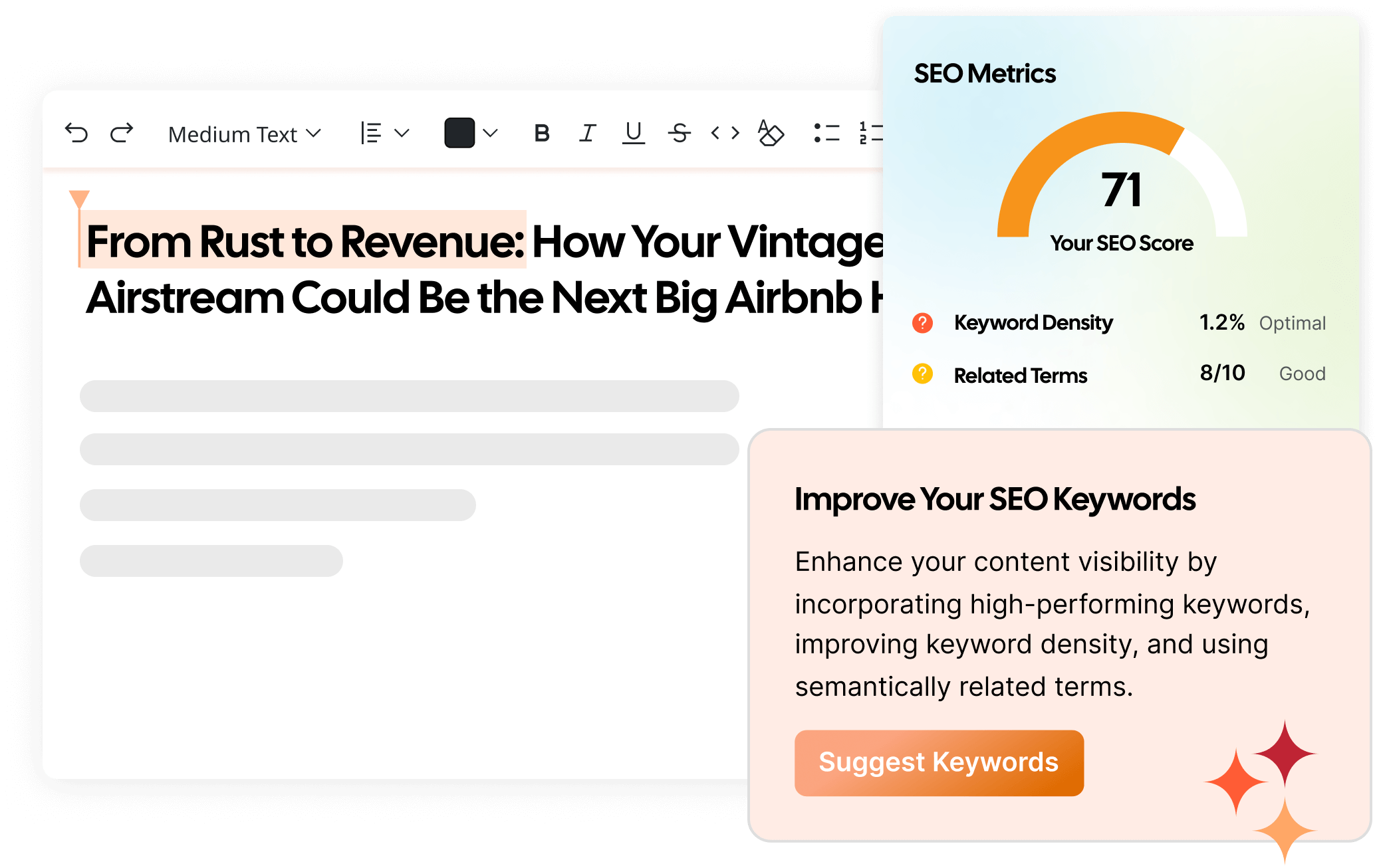
A simple way to use Contentpen for bounce rate improvement is to:
- Enter your target keyword and audience.
- Let the platform suggest suitable secondary keywords and outline that mirrors top‑ranking content.
- Refine sections, add brand examples, and publish to your favorite CMS platform with built-in integrations.
- Revisit high‑bounce pages and use Contentpen’s opportunities feature to restructure or expand them based on what users seem to be missing.
Strategy 3: Fix technical performance
Even the best content loses if the page feels slow or broken. Technical fixes often deliver quick gains in bounce rate, especially on high-traffic pages. They also support better rankings and conversion rates.
Keep your focus on:
- Compressing images and using modern formats to speed page load times. Minify CSS and JavaScript files to cut unnecessary weight. Run important URLs through Google PageSpeed Insights and focus on the warnings that affect real users.
- Checking that your site uses a responsive design that works well on phones and tablets. Test forms, menus, and buttons on different devices to be sure they are easy to tap.
- Fixing broken links, 404 errors, and redirect loops so visitors do not hit dead ends. Watch your error logs and Google Search Console reports for any emerging patterns.
- Using a reliable hosting setup and a content delivery network (CDN) if traffic is spread across regions.
Even shaving one or two seconds off load time can reduce abandonment on busy pages, leading to much lower bounce rates and higher engagement rates.
Strategy 4: Strengthen on-page engagement signals
Once visitors land on a page and find it useful, the next step is to guide them. Strong internal links and clear CTAs help turn one‑page visits into deeper sessions, leading to better conversions.
You can also strengthen engagement and increase conversions by building trust with the users. To do so, you may:
- Show social proof like reviews, ratings, and logos near a certain call to action so people feel safe to continue.
- A/B test different headlines, layouts, and buttons to see which versions keep visitors around longer.
- Reduce intrusive elements, such as aggressive pop-ups or autoplay audio, in video ads or product demos, especially on mobile.
Small gains across these strategies add up. When content matches intent, pages load quickly, visitors know what to do next, and bounce rate drops; other metrics improve as well.
Final thoughts
Bounce rate is a helpful signal that indicates whether pages are meeting the visitor’s needs or not. When read properly, it becomes a clear guide for what to fix on your site.
Real gains come from combining several changes. Align content with search intent, improve readability, clean up technical issues, and give visitors obvious next steps. Start with the pages with the highest bounce rates, then move deeper into the site.
For teams looking to improve content quality and SEO alignment, Contentpen is a valuable option. It offers search-focused articles at scale to help visitors stay longer and engage from the first click.
Frequently asked questions
Google has said that bounce rate is not a direct ranking factor. The number itself is not used inside the core algorithm. However, a very high bounce rate can indicate problems affecting rankings, especially on AI platforms such as Perplexity and ChatGPT.
For many sites, a bounce rate above 70% is a warning sign worth checking. It often means visitors are not finding what they expected, or the page feels hard to use.
In Universal Analytics, any single-page session with no recorded interaction is counted as a bounce. In GA4, bounce rate reports the share of unengaged sessions: sessions under 10 seconds with no conversion and no second pageview.
No. Generally, the lower the bounce rate, the better. This metric varies by industry and page type, so there’s no single value that’s good or bad for you. The better idea is to compare your bounce rate with industry benchmarks and see whether any changes are needed to your site.
Leave a Reply