Remember when creating a blog post meant spending hours drafting content, formatting text, adding images, and then going through multiple editing rounds? Those days are becoming obsolete. Content creation has transformed from a lengthy, meticulous process into something anyone can efficiently create a blog in 10 minutes.
This revolution in blogging has democratized content production, allowing writers of all experience levels to publish professional-quality articles without excessive time investment.
The good news is that modern content creation tools have transformed this process. What once took hours can now be accomplished in minutes without sacrificing quality.
This revolution in content production empowers writers of all experience levels to publish professional-quality articles efficiently and consistently.
Let’s see how you can create a blog post in 10 minutes.
What is the best way to create a blog in 10 minutes?
Creating a blog the traditional way is exhausting. From researching the topic, drafting content, optimizing for SEO, to finally formatting everything, it can easily take hours, if not days. And if you’re managing multiple tasks or clients, that time adds up fast. The pressure to consistently produce high-quality content can feel overwhelming and unsustainable.
Introducing Contentpen – The best AI blog writer online
Contentpen is an AI blog writing tool designed to help users create high-quality, SEO-optimized content efficiently.

The 10-minute content creation system explained
Here’s the streamlined workflow that makes 10-minute content creation possible:
1. Pick your topic and angle (1 minute)
Begin by identifying what specific value you’ll deliver to readers. Instead of broad topics like “digital marketing,” focus on targeted angles like “how small businesses can use email marketing to increase repeat purchases.” This clarity creates a natural structure for your content and helps you stay focused during the writing phase.
2. Set up your content preset (2 minutes)
This is where Contentpen truly shines. Configure your content preset once with settings that match your content goals:
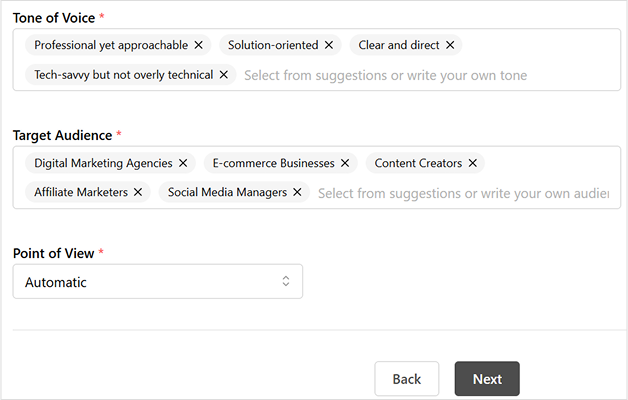
- Tone of voice: Select from options like “clear and straightforward,” “professional but approachable,” “helpful and solution-focused,” or “confident without being pushy.” This setting ensures a consistent voice across all your content without constant conscious adjustment.
- Target audience: Define precisely who you’re writing for – marketing professionals, business owners, IT managers, product teams, or other specific groups. This setting helps you maintain appropriate terminology and examples throughout your content.
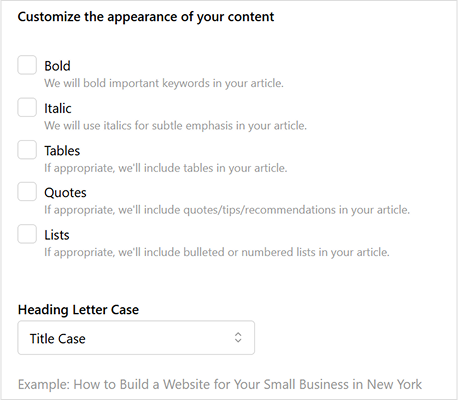
- Formatting preferences: Choose which text treatments to apply automatically. Enable bold formatting for key concepts, italics for emphasis, tables for data presentation, pull quotes for important insights, and list formatting for scannable information.
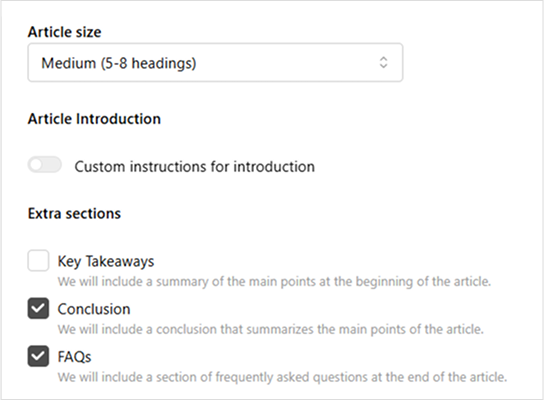
- Structure elements: Select your preferred article length (small, medium, or large) and additional sections like key takeaways, conclusions, and FAQs. These structural elements create reader-friendly content without requiring manual formatting.
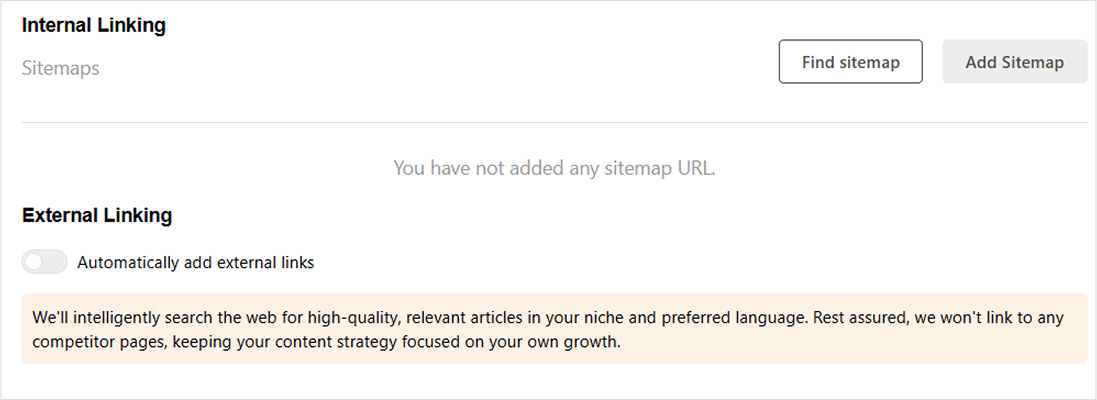
- Linking strategy: Configure how you want internal and external links handled. Set up automatic internal linking to your existing content and control which external domains to include or exclude.
3. Write your content (5 minutes)
With your preset handling of all formatting and structural decisions, you can focus entirely on your ideas. This is pure content creation – no more switching between writing and formatting modes. The preset acts like a professional editor working alongside you, automatically implementing your predetermined style preferences as you write.
Since you don’t need to worry about how your content will look, you can dedicate your full attention to explaining concepts clearly, providing valuable insights, and connecting with your readers. Many writers report that this focused approach not only saves time but also improves the quality of their writing.
4. Add visuals (1 minute)
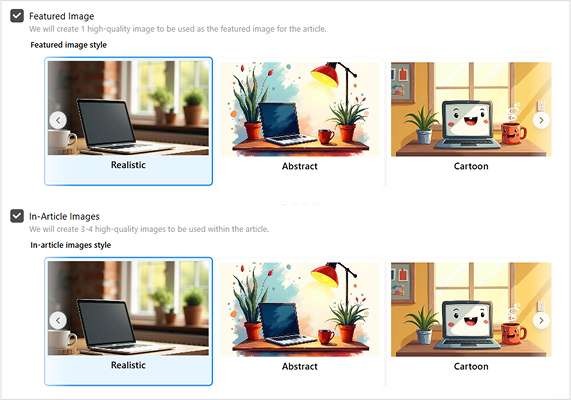
Visuals dramatically improve reader engagement, but finding, sizing, and positioning images often becomes a time-sink. Your Contentpen preset handles these technical aspects automatically:
- Featured images are properly sized and positioned
- In-article images maintain consistent formatting
- Tables follow your predetermined styling
- Visual hierarchy remains consistent across all content
Simply select the images you want to include, and your preset ensures they enhance your content without disrupting your writing flow.
5. Review and publish (1 minute)
With structural and formatting elements handled automatically, your final review can focus entirely on content quality. Quickly scan for:
- Clarity of your main points
- Coherence of your overall argument
- Any obvious grammatical issues
- Effectiveness of your headline
Once satisfied, you can publish with confidence, knowing your content maintains professional quality and brand consistency – all created in just 10 minutes.
This streamlined approach doesn’t just save time – it fundamentally changes the content creation experience. By removing technical distractions, Contentpen lets you focus on what truly matters: sharing your expertise and connecting with your audience through valuable content.
How Contentpen presets transform content creation
Think of presets as your personal content production team – a designer, editor, and SEO specialist working silently in the background while you focus solely on your ideas. Let’s explore how each component of this system works together to revolutionize your content creation process:
Style settings that establish your consistent voice
Every writer knows that maintaining a consistent tone across multiple articles is challenging. Without a system, your writing voice might shift depending on your mood or energy level. Contentpen solves this through style presets that provide a consistent framework:

Tone of voice options include:
- Clear and straightforward: Direct language that prioritizes simplicity and clarity, ideal for instructional content or technical explanations
- Professional but approachable: Balanced tone that conveys expertise while remaining conversational, perfect for business blogs and thought leadership
- Helpful and solution-focused: Empathetic tone that emphasizes practical answers to reader problems, great for how-to content
- Confident without being pushy: Authoritative voice that presents strong opinions while respecting different perspectives
Target audience settings ensure your content speaks directly to:
- Marketing professionals and teams: Using appropriate terminology and examples relevant to marketers’ daily challenges
- Product managers and teams: Framing concepts in terms of product development cycles and user experience
- Business owners and founders: Focusing on practical implementation and business outcomes rather than theory
- IT managers and developers: Incorporating technical specificity while maintaining accessibility
- Digital marketing agencies: Addressing agency-specific workflows and client relationship considerations
When you select these style settings, Contentpen subtly guides your writing process. For example, if you’ve selected “helpful and solution-focused” for a business owner audience, the system might suggest more actionable subheadings and practical examples instead of theoretical discussions.
Formatting options that create visual consistency
Readers form impressions about your content quality within seconds, largely based on visual presentation. Inconsistent formatting signals amateur content, while consistent styling builds trust. Contentpen’s formatting presets automatically implement your visual preferences:

Text formatting elements you can automate include:
- Bold for important keywords: Drawing attention to critical terms and concepts that define your topic
- Italic for subtle emphasis: Creating natural reading rhythm by highlighting key phrases
- Tables for organized data: Presenting comparative information in consistently styled, scannable formats
- Quotes for testimonials or insights: Setting apart important statements with distinctive styling
- Lists for easily scannable information: Breaking complex processes into digestible steps with consistent formatting
Heading case consistency options include:
- Title case: How to Create a Blog in Less Than 10 Minutes
- Sentence case: How to create a blog in less than 10 minutes
- lowercase: how to create a blog in less than 10 minutes
When implemented across dozens or hundreds of articles, these consistent formatting choices create a professional, cohesive reading experience that builds trust with your audience. Rather than spending time manually formatting each element, your preset applies these styling decisions automatically.
Structure settings that enhance readability
Content structure significantly impacts how readers engage with your ideas. Well-structured content leads readers naturally from introduction to conclusion, while poor structure creates confusion and abandonment. Contentpen’s structure presets implement proven readability principles:

Article structure options include:
- Small articles (3-4 headings): Concise content focused on a single specific topic or question
- Medium articles (5-8 headings): Comprehensive coverage of broader subjects with multiple subtopics
- Large articles (8+ headings): In-depth explorations of complex topics with detailed subsections
Additional structural elements you can automatically include:
- Key takeaways: Summary sections highlighting essential points for readers who scan
- Conclusion: Synthesized wrap-ups that reinforce main arguments and provide closure
- FAQs: Anticipatory question-and-answer sections addressing common reader concerns
- Featured images: Consistently positioned and sized visual elements that enhance engagement
- In-article visuals: Strategically placed images that break up text and illustrate concepts
These structure settings don’t just save time – they implement proven readability principles that keep readers engaged. When readers encounter content with a familiar, logical structure, they can focus on your ideas rather than struggling to follow your organization.
Linking strategies that strengthen your content ecosystem
Strategic linking transforms standalone articles into interconnected content ecosystems that boost SEO performance and reader engagement. However, managing links manually across dozens or hundreds of articles becomes impossibly complex. Contentpen’s linking presets automate this process:

Internal linking capabilities include:
- Sitemap integration: Automatically identifying relevant connection points within your existing content
- Content relationship mapping: Building logical pathways between related topics
- Historical content utilization: Ensuring older articles remain connected to newer content
External linking features include:
- Intelligent link suggestion: Finding high-quality, relevant external resources that enhance your credibility
- Domain control system: Including trusted sources while excluding competitor content
- Automatic relevance detection: Identifying contextually appropriate linking opportunities
Instead of spending hours manually identifying and inserting links, your preset implements your linking strategy automatically across all content.
Three real examples of Contentpen presets in action
Let’s explore three scenarios demonstrating how different preset configurations serve specific content needs:
- The marketing consultant’s educational blog
Scenario: Jessica runs a digital marketing consultancy and needs to regularly publish educational content for potential clients.
Preset configuration:
- Style: Professional but approachable tone targeting business owners and marketing professionals
- Formatting: Bold for key marketing terms, italics for emphasis, lists for step-by-step instructions
- Structure: Medium articles (5-8 headings) with conclusion and FAQs sections
- Linking: Automatic internal linking to related marketing resources on her site
Why this works: This preset creates professionally structured content that positions Jessica as an expert while making complex marketing concepts accessible to business owners. The consistent formatting and helpful additional sections (like FAQs) enhance readability and demonstrate thoroughness.
Time-saving benefit: Jessica can focus entirely on sharing her marketing expertise without worrying about formatting consistency or structure. Her articles always look professional and maintain the same helpful tone that her audience expects.

- The SaaS company’s product updates
Scenario: A software company needs to regularly publish product updates and feature announcements.
Preset configuration:
- Style: Clear and straightforward tone targeting IT managers and developers
- Formatting: Tables for feature comparisons, bullet lists for key changes
- Structure: Small articles (3-4 headings) with a key takeaways section highlighted at the top
- Linking: Internal links to documentation and previous feature announcements
Why this works: This preset configuration creates concise, well-organized product updates that technical audiences can quickly scan for relevant information. The consistent structure helps regular readers know exactly where to look for the information they need.
Time-saving benefit: Multiple team members can contribute to product update articles while maintaining perfect consistency in branding, terminology, and presentation, critical for technical documentation.
- The travel blogger’s destination guides
Scenario: Marco creates in-depth travel guides about international destinations.
Preset configuration:
- Style: Helpful and solution-focused tone targeting travel enthusiasts
- Formatting: Quotes for local insights, bulleted lists for packing tips
- Structure: Large articles (8+ headings) with featured images and in-article photography
- Linking: External linking enabled to trusted travel resources and booking sites
Why this works: This preset creates comprehensive, visually rich travel guides with consistent sections that readers come to expect (accommodations, local transportation, must-see attractions). The helpful tone and solution-focused approach build trust with travelers planning their trips.
Time-saving benefit: Marco can create detailed travel guides in a fraction of the typical time, allowing him to publish more frequently and cover more destinations. The preset ensures that his guides maintain the same quality and structure that his audience values.
Why blogs still matter in a world full of videos?
Today, videos are everywhere. TikTok, YouTube, and Instagram clips fill our screens daily. With so much video content, you might wonder if blogs are still worth creating. The answer is a strong yes. Written content offers unique benefits that videos simply cannot replace.

Better visibility in search engines
When people search for information online, written content still shows up more often in results. Search engines like Google can understand text much better than video content. This means:
- Blogs help more people find your website through searches
- Written content can rank for many different search terms at once
- Search engines can better understand what your site is about through your writing
- Links between your blog posts help search engines see your site as valuable
- Text is easier for search engines to read and recommend to others
Content that lasts longer
Unlike social media posts that disappear quickly, blog articles can bring value for years:
- A good blog post can continue getting readers long after you publish it
- You can easily update old posts to keep them current
- Your collection of articles builds up over time, creating a valuable resource
- Helpful content continues solving people’s problems for years
- Older posts keep working for you without additional effort
Turning readers into customers
Blog content is excellent at guiding people toward becoming customers:
- You can naturally include a call to action at key points in your articles
- Readers can sign up for more content while reading your blog
- People often feel more comfortable considering purchases while reading
- You can offer downloadable resources in exchange for contact information
- Written comparisons and reviews help people make buying decisions
Explaining complex topics thoroughly
Some subjects need detailed explanations that videos can’t provide effectively:
- Readers can go through the information at their own speed
- Complex ideas often need careful reading to understand
- Technical details and data are easier to present in text
- Step-by-step instructions are simple to follow in written form
- People can easily refer back to specific parts of your article
Reaching more types of people
Written content works for people in situations where video doesn’t:
- People with hearing problems can access written content easily
- Blogs work for people with slow internet connections
- Text can be translated into other languages more accurately
- People can read blogs at work without needing headphones
- Screen readers can convert text for people with visual impairments
Easier and cheaper to create
Blog content typically needs fewer resources than good videos:
- You only need a computer to write
- No special equipment or editing software required
- Writing usually takes less time than video production
- Text is easier to fix and update later
- One person can handle the entire writing process
What readers prefer
Many people still prefer reading in certain situations:
- Professional information is often easier to understand in writing
- People like to scan written content during work hours
- Technical instructions are clearer in text form
- In-depth topics benefit from the structure of written content
- Some people simply prefer reading to watching videos
Working with videos, not against them
Blogs and videos can work together effectively:
- Blog posts can expand on ideas from your videos
- Written content can provide details to support video demonstrations
- Articles make information from videos searchable
- Adding videos to blog posts increases engagement
- Written content brings different people to your site than videos alone
How Contentpen changes the content creation game
Content creation technology has fundamentally transformed what’s possible for writers and publishers. With platforms like Contentpen and the power of content presets, you can transform your ideas into polished, professional articles in just minutes. This efficiency doesn’t just save time – it enables more consistent publishing, broader topic coverage, and ultimately, greater audience impact.
Frequently asked questions
The 10-minute approach works because it separates content creation from technical formatting. By using structured outlines and content presets, you can focus purely on your ideas while automation handles the presentation aspects. It’s like having a professional designer and editor working alongside you in real-time.
Unlike basic templates, modern content presets offer sophisticated customization while maintaining design coherence. Contentpen’s presets handle technical formatting while still allowing your unique voice and style to shine through. You can also modify presets to create a signature look for your content.
Templates typically control only the basic layout, while content presets manage dozens of parameters, including typography, spacing, image handling, interactive elements, and platform-specific optimizations. They’re much more comprehensive and specifically designed for efficient content production rather than just visual presentation.
Absolutely. In fact, this approach particularly benefits non-professional writers by providing structure and handling technical aspects of content creation. The preset system acts as a guide, helping you organize your thoughts while ensuring a professional presentation.
Yes. Search engines prioritize valuable, well-structured content – which this approach delivers. Contentpen’s presets include SEO-friendly formatting, heading structures, and metadata optimization. Your content’s search performance ultimately depends on its value to readers, not how long it took to create.
Focus on bringing unique perspectives, original insights, or exclusive information to your topics. While presets handle formatting consistency, your distinct viewpoint and expertise will differentiate your content. Consider incorporating only original research, personal experiences, or specialized knowledge that you can provide.
Absolutely. Presets handle the technical and design foundation, but you maintain complete control over your content, voice, and creative direction. You can also customize presets to align perfectly with your brand identity while retaining all the time-saving benefits.