Manually writing a page for every keyword variation your business could rank for is not realistic once you have hundreds of locations, products, or categories to cover. That’s the gap programmatic SEO (pSEO) fills.
Programmatic SEO is a method of generating large numbers of optimized pages by combining a data source, a content template, and automation.
It differs from traditional content creation in scale and process, where there are a lot of manual hand-offs and the turnaround times are significantly higher.
This guide defines the programmatic approach toward SEO, walks through real examples from brands, and covers the tools, templates, and steps you need to scale content without producing low-value pages.
We’ll also look at how platforms like Contentpen make content scaling accessible to teams without technical skills or higher resources.
So, let’s get started.
Key takeaways
- Programmatic SEO uses templates and data to generate many pages targeting long-tail keywords at once, rather than writing each one individually.
- It differs from traditional SEO mainly in automation, but both still need genuine search intent matching and real content value to rank.
- Success depends on clean data, solid templates, and ongoing maintenance, since thin or duplicate content can trigger ranking penalties fast.
- AI tools like Contentpen now make this kind of content scaling accessible without needing a development team or custom code.
- Our free Google Sheets template turns a clean dataset into dozens of draft pages, as long as a person reviews every page before it goes live.
What is programmatic SEO?
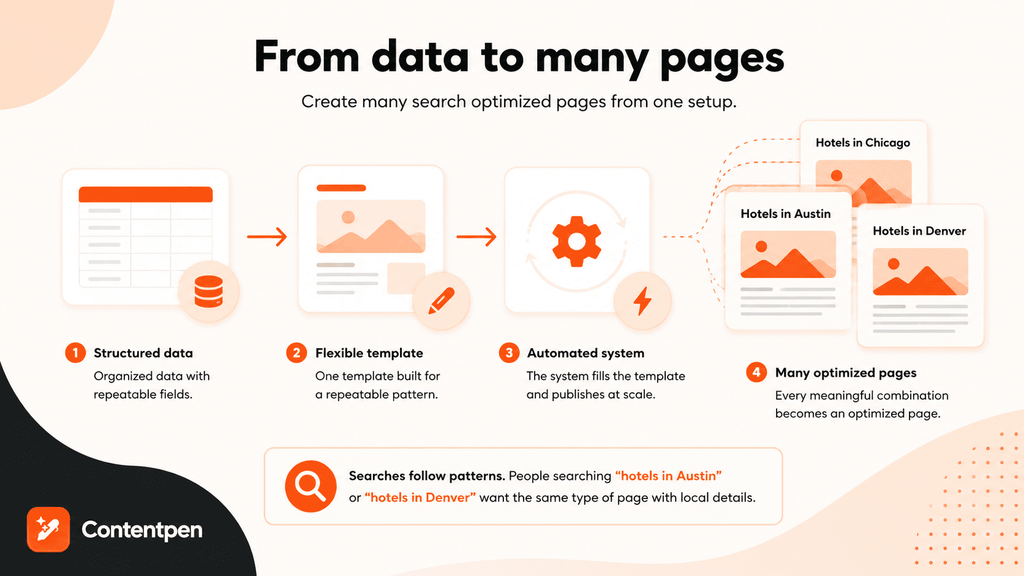
Programmatic SEO (also known as pSEO) is the practice of pairing a structured data source with a content template and an automated publishing system to produce many optimized pages from a single setup.
Instead of a writer producing one article at a time, a team builds one flexible template, feeds it data, and lets the system generate a page for every meaningful combination.
This works because so many search queries follow predictable patterns. A traveler searching “hotels in Austin” and another searching “hotels in Denver” want the same type of page, just filled with different local details.
Programmatic SEO is built exactly for that kind of repeatable, data-driven page creation demand without increasing headcount or manual burden.
What are the differences between programmatic SEO and traditional SEO?
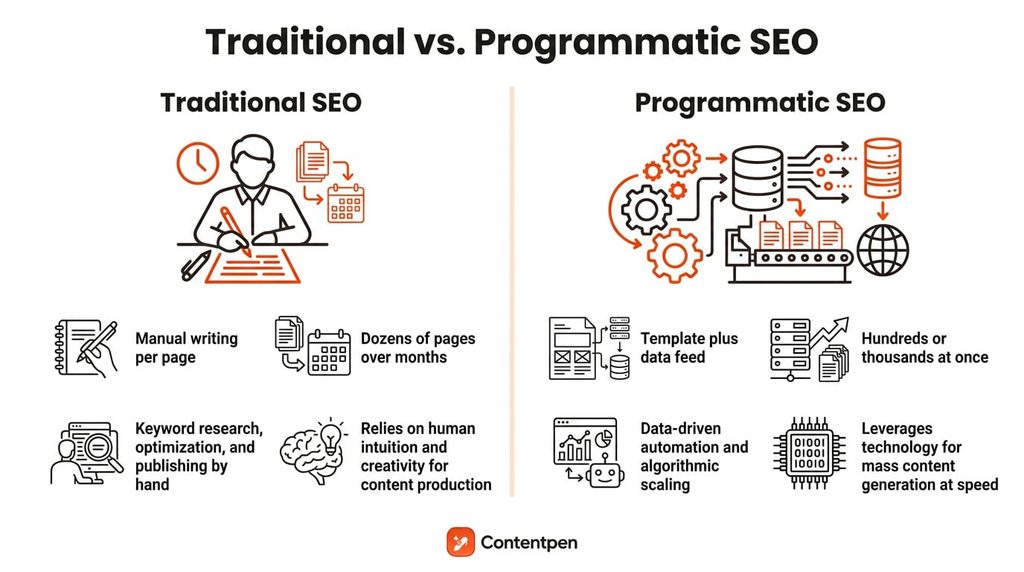
Traditional SEO usually means one page built around one keyword focus, shaped by an editor who researches, drafts, and refines the content manually or by a human plus an AI pass.
Programmatic SEO instead relies on templates and data feeds that generate many pages from a single structure, trading individual craftsmanship for repeatable scale.
Both approaches still need to satisfy real search intent to rank, but the time investment and output volume look very different.
| Factor | Traditional SEO | Programmatic SEO |
| Creation method | Manual writing, page by page | Template plus data feed, automated |
| Scale | Dozens of pages over months | Hundreds or thousands of pages over months |
| Time investment | High per page, low per batch | High upfront setup, low per page after |
| Best use case | Competitive, high-value topics | Long-tail, location-based queries |
Even though Programmatic SEO is a useful technique to generate multiple pages at once, it does carry some risks.
Is pSEO spamming content?
While the general notion is that pSEO can land your site in spam, this is not necessarily true.
John Mueller from Google said, “programmatic SEO is often a fancy banner for spam”, which highlights one crucial thing: auditing and maintaining your pages in pSEO is equally important as generating them.

If all your focus is on scaling pages, then you can easily create thin content, which goes directly against Google’s spam policies.
So, the key here is to keep strong editorial control when scaling, so that each page provides value to the reader. Google doesn’t mind where the content was generated from unless the content quality is severely poor.
With that out of the way, let’s explore some real-life pSEO examples from brands that successfully implemented this strategy and saw organic growth over time.
Programmatic SEO examples
Many brands use programmatic SEO to scale their content for product pages or expand directories to rank for more organic keywords online.
Canva – pSEO for SaaS
In SaaS content marketing, the most problematic thing is producing multiple pages for each type of tool or builder.
This is where Canva saw an opportunity and utilized programmatic SEO to dominate search results without increasing manual workload. They identified a general pattern and executed the pages with a repeatable page structure.
- The pattern: [Asset type] + maker / builder
- Examples: Photo collage maker, resume builder, certificate maker
Every page generated has some unique content to it and leads users straight to Canva’s own ecosystem to complete the job.
G2 – Category leader strategy
G2 ranks for broad software terms by generating directory pages that mostly cover the buyer’s intent of finding the “best” tool in a niche or category.
- The pattern: Best + [software category] + software
- Examples: Best CRM software, best project management software, best video editing software.
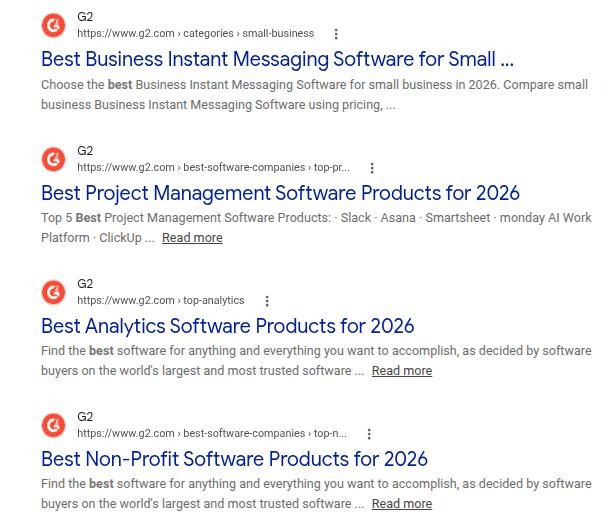
Their pSEO strategy has paid off in recent years, making them one of the biggest B2B software data sources and peer-to-peer review platforms today.
Tripadvisor – Owning a niche
Tripadvisor follows a similar approach to G2. They’ve programmatically created multiple pages that cover “best restaurants,” “best tourist spots”, and “best hotels” for users to explore.
- The pattern: The 10 best + [hospitality type] + in + [location]
- Examples: The 10 best hotels in Tokyo, the 10 best restaurants in Paris, the 10 best vacation rentals in Maui.
The company has dominated the travel niche for years in this way, helping it grow its footprint online.
Also read: 30+ travel blog examples to inspire your own.
Yelp – Local service strategy
Yelp scales its traffic by combining a vast directory of local business data with localized search terms, using deep geographic templates down to the neighborhood level.
- The pattern: Best + [business category] + near / in + [city or neighborhood]
- Examples: Best Thai food near me, best plumbers in Austin, best hair salons in Brooklyn.
The company also programmatically filters business operating hours from its database to instantly target users with immediate commercial intent.
Also read: Zapier case study – 9M+ visitors/month using pSEO.
Contentpen – Creating comparison pages
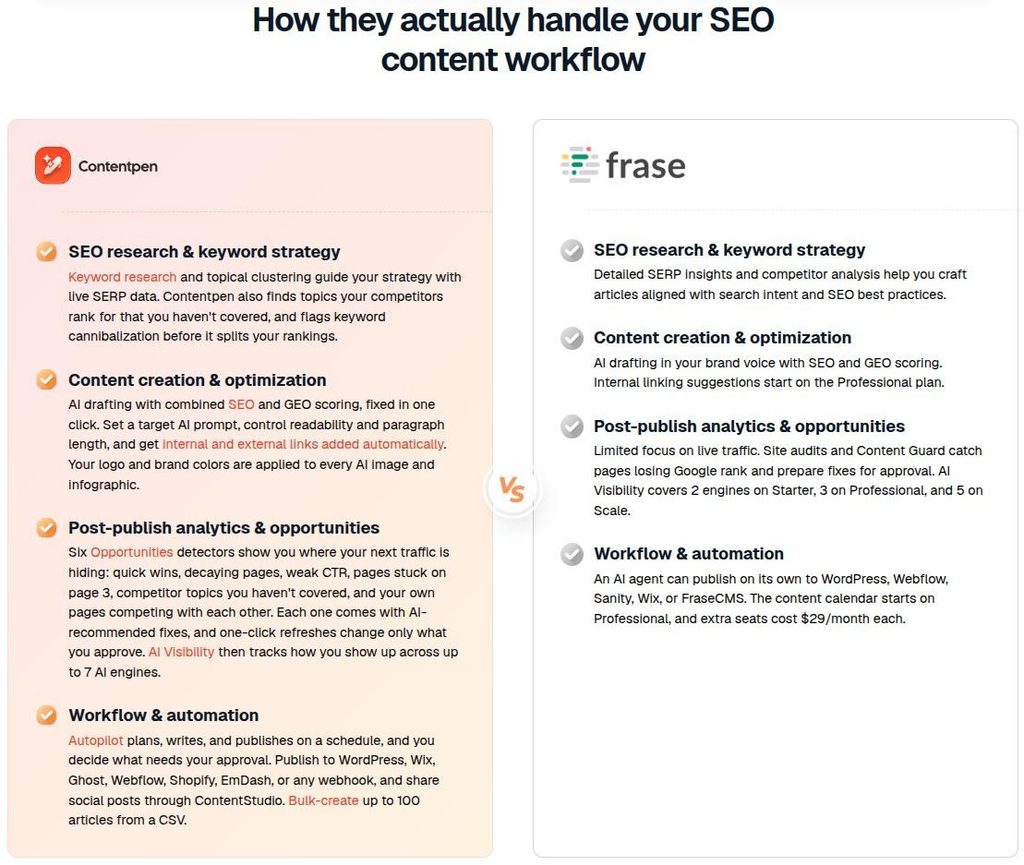
Comparison pages put one product against competitors to help buyers choose the right solution for their needs. These pages work because the underlying question, like “does this tool do X,” repeats across many product names, making it a natural fit for a template-driven approach.
Take Contentpen as a SaaS product example. Our comparison pages follow a similar template and pattern, with slight variations according to the product in focus.
- Contentpen vs. Rytr
- Contentpen vs. Jasper AI
- Contentpen vs. Writesonic
- Contentpen vs. Frase
- Contentpen vs. Wordtune
- Contentpen vs. Copy.ai
Each page builds upon the same structure: [Tool standout feature vs one Contentpen feature], [direct comparison table], [choosing the right tool].
How do you build a programmatic SEO strategy?
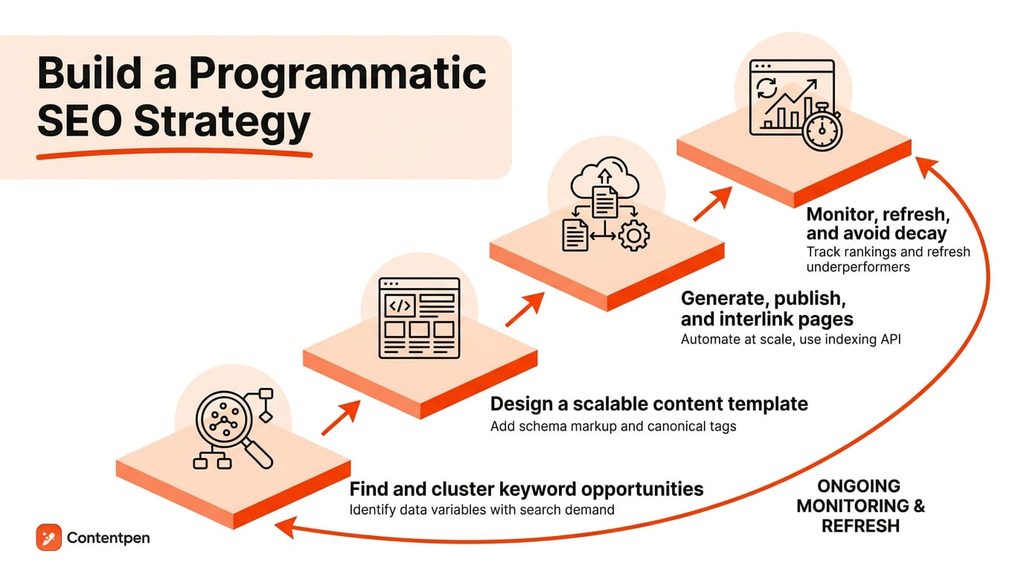
Building a programmatic SEO strategy means turning raw keyword and business data into a repeatable system that researches, publishes, and maintains pages on an ongoing basis.
The process has four distinct phases, and skipping any one of them is usually where thin content or duplicate content problems start.
#1: Find and cluster keyword opportunities
Start with keyword research to identify which data variables, like location, price, or category, actually drive clicks.
For this phase, you can use Contentpen’s built-in keyword research tool to help find terms that have lucrative search volume, CPC, and lower difficulty.
Take a look at this cluster analysis inside the Contentpen dashboard for the seed query “best ai for writing”:
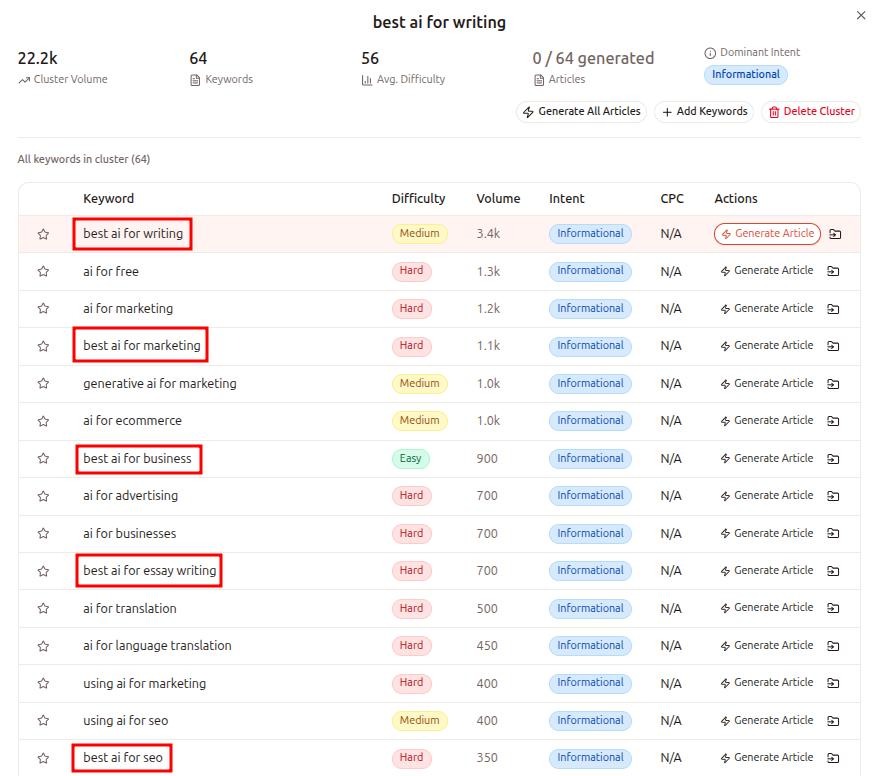
At first glance, this cluster contains 64 individual keywords representing a combined volume of over 22,000 monthly searches.
Instead of manually assigning topics, Contentpen uncovers a highly predictable, repeatable semantic formula hidden inside the user data:
Pattern: best AI for +[Niche / Use Case]
The red highlights reveal exactly how a programmatic database handles this structure at scale. By isolating the dynamic variable (marketing, business, essay writing, or SEO), you establish the exact structural parameters for your pages.

Automated keyword research
Work on keywords worth writing for
Get search terms with real ranking potential, not just high volume.
Try Keyword Research for FREE →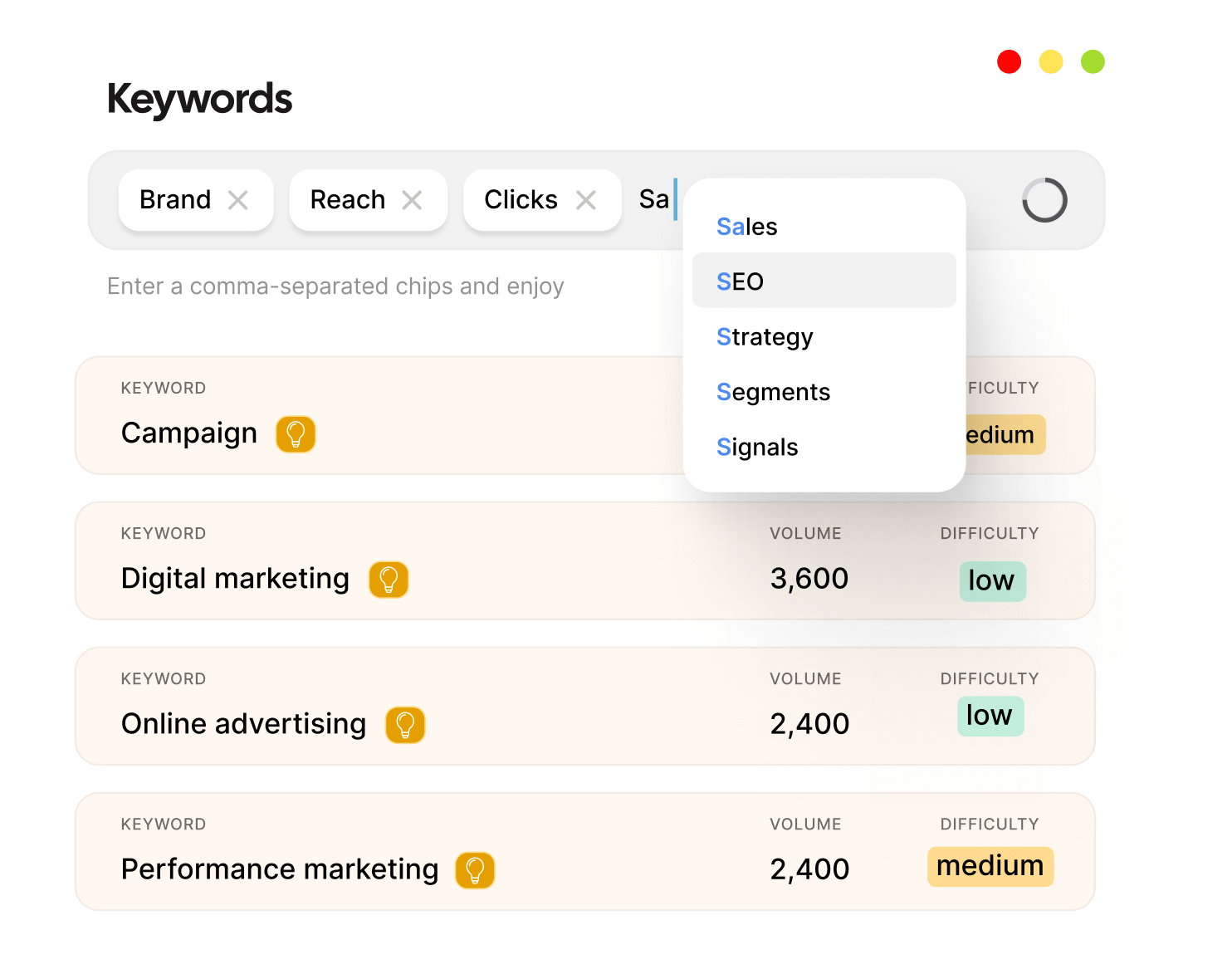
From here on, prioritize combinations with genuine demand, and skip permutations that look comprehensive on paper but attract no real searches or are too difficult to rank for.
#2: Design a scalable content template
Once your keyword list is final, decide what every page will contain. A solid template usually has a headline, a short intro, a data block, an FAQ, and internal links to related pages.
Sketch it in Canva or Figma first, so you know how the page should look before any data goes in.
Add schema markup and a self-referencing canonical tag to every page early, so search engines understand which URL is the main version. Keep the intro genuinely useful. Explain why a location or category matters, instead of pasting the same line on every page.
#3: Generate, publish, and interlink pages at scale
With your template ready, it’s time to fill it with data. You can do this for free in a Google spreadsheet, or let a tool do the heavy lifting.
Build a free pSEO template in Google Sheets
The easiest way to understand pSEO is to build a small version yourself. We made a free Google Sheets template for the keyword pattern “[company] revenue” (like “walmart revenue”).
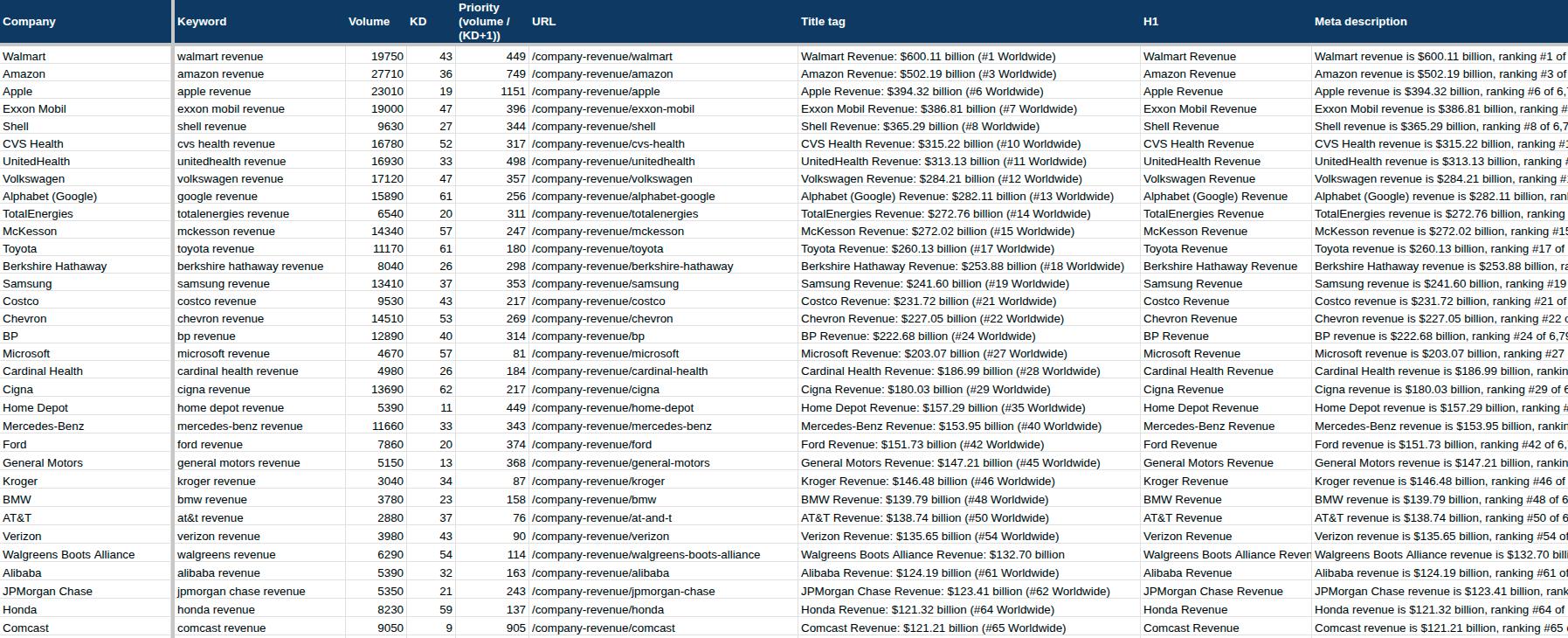
It uses the Kaggle dataset of the top 7,000 companies by revenue, and we picked 50 well-known companies to test with. Here’s how it works:
- Pick a pattern with demand: Change one part of the keyword to create a pattern. For instance, in our case, it will be the company name (‘Amazon’ revenue, ‘Shell’ revenue, etc.)
- Add your data: Paste the dataset into a blank spreadsheet or Excel file. In our case, the data columns were company code, revenue, country, and price of one share in dollars.
- Add keywords: Include real keyword data from Search Console, Keyword Planner, Ahrefs, or Contentpen’s keyword research tool for the target terms of the pages.
- Let formulas build each page: Create title, H1, meta description, intro, and FAQ columns for every row with automation.
- Add fresh body text: We used a free Gemini 3.5 Flash-Lite script to write unique wording for each page in the AI Lab tab. On a paid Google plan, the =AI() function does the same job.
- Review, then export: Mark each page as Reviewed, and the Publish tab collects them for a CSV export to CMS.
Copy our programmatic SEO content template and see for yourself.
Please note that the AI text only changes the wording from page to page. The value comes from your data, expertise, experience, and the facts you add by hand, so have a person review every page before it goes live.
Skip the spreadsheet with Contentpen
A spreadsheet is a great way to learn pSEO, but a slow way to run it at scale. You still have to find keywords with real demand, write some portion of every page, check the SEO and AEO, and publish it manually.
Contentpen handles all of that in one place. The AEO and SEO tool finds keywords with real search demand, writes the topics and content, scores every draft, and publishes it straight to WordPress, Ghost, Wix, Webflow, Shopify, or EmDash CMS.
In the SEO autopilot mode, you can review the outline before the draft is written, or the finished draft before it goes live, to add that human layer in the mix.
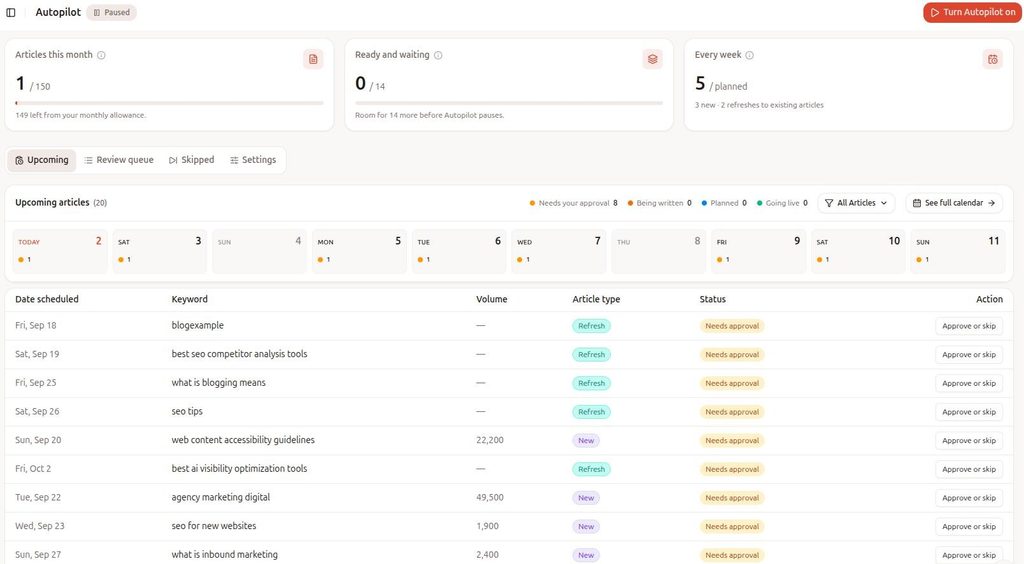
This content automation ensures that your blogs are published with the least manual hand-offs, maximizing productivity of your teams.
Publish and interlink your pages
Automate internal linking between related pages using Contentpen, connecting location pages to category pages and category pages to salary or price filters. This allows authority to flow throughout your platform.
Once pages go live, submit your sitemap in Google Search Console, and use IndexNow for Bing. See how Google Search works through its normal crawling and indexing process.
#4: Monitor, refresh, and avoid content decay
Track ranking position and click-through rate across page templates as a group, not just individual pages. Flag pages that start losing position and refresh them before they fall out of search results entirely.
You can use Contentpen’s SEO opportunities to detect and fix the ranking issues automatically with AI. This SEO automation ensures that your team is spending more time strategizing and less time on maintenance tasks.
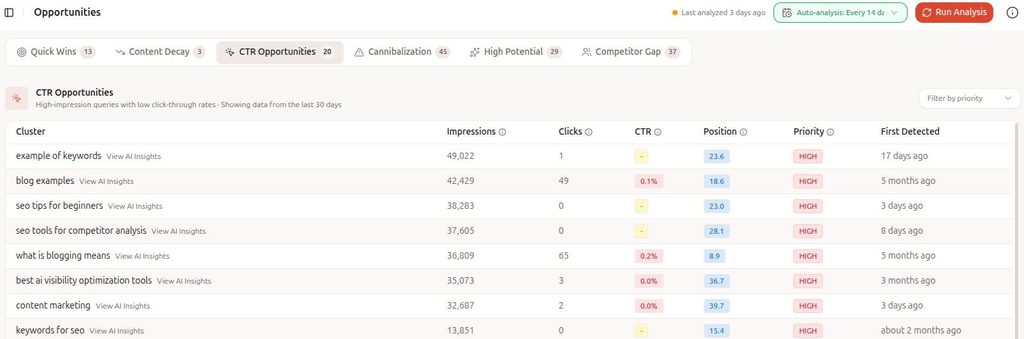
Remember, in pSEO, maintaining and refreshing content is the difference between pages that compound traffic and ones that fade a few months after launch.
What are the best programmatic SEO tools?
The right programmatic SEO tools depend on your technical resources, but most teams need four things in one place: research, generation, publishing, and monitoring.
The good news is that AI-powered platforms have reduced much of the engineering overhead that used to make this kind of scaling expensive and cumbersome.
Contentpen for AI-assisted content scaling
Contentpen supports the full content scaling workflow from one workspace, starting with keyword research and clustering that maps directly to content variations and supporting topics.
Its competitor gap analysis identifies exactly which topics a competitor ranks for that you don’t, which removes a lot of the guesswork from prioritizing what to build next.
Beyond research, the platform handles on-brand images and metadata across an entire keyword list. It also offers web analytics to see what’s working and what’s not.
Every draft also gets dual AEO optimizations and SEO scoring, so content is built to perform in Google and get cited by AI engines like ChatGPT and Perplexity.
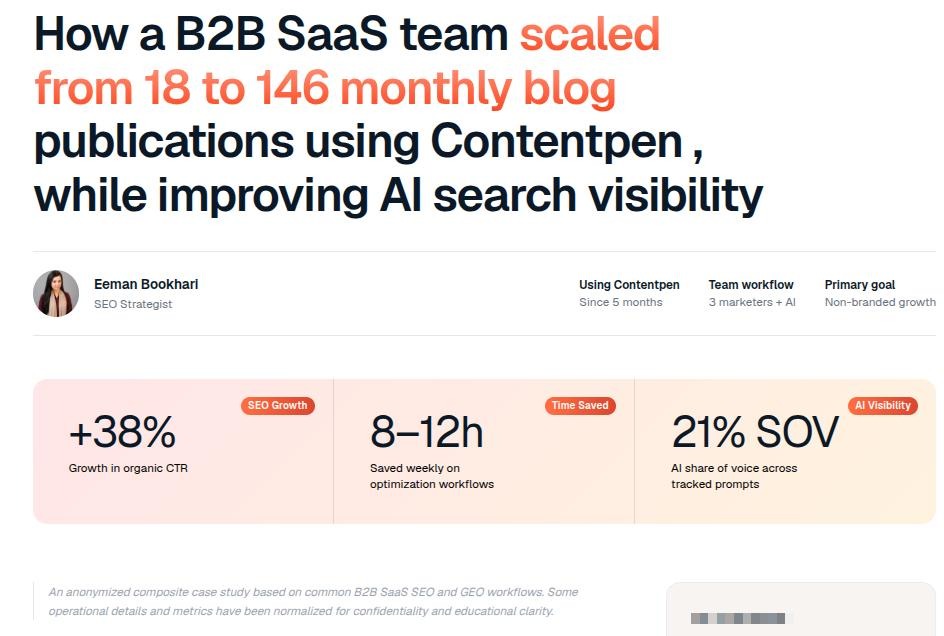
One documented case was for a B2B SaaS company that scaled from 18 to 146 monthly blog publications in five months using Contentpen.
Other tools: CMS platforms, spreadsheets, and custom scripts
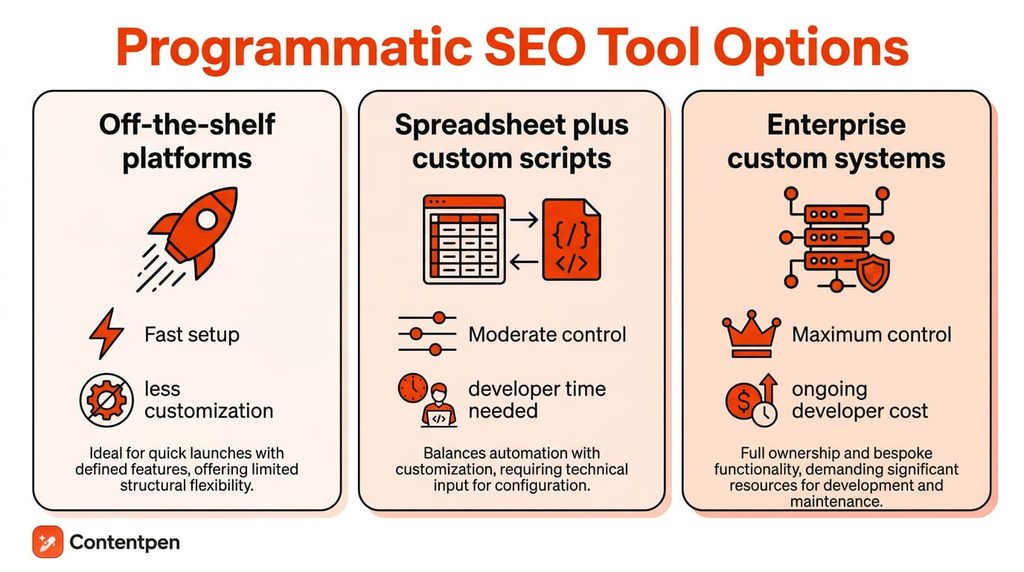
Many teams run programmatic SEO on tools they already know: a spreadsheet or database for the data, a CMS for the pages, and a bit of automation in between. Here are the most popular options for programmatic SEO that you can use today.
Spreadsheets and databases
- Google Sheets is the easiest place to start. It’s free, and formulas can build titles, intros, and FAQs from every row, just like in our free Google Sheets template. The catch is publishing, since you export a CSV and import it into your CMS yourself.
- Airtable works like a spreadsheet with a proper database inside. Views, statuses, and linked records make it easier to manage thousands of rows and approve pages before they go live. It holds your data, but you still need a CMS to show the pages.
CMS platforms and plugins
- The WP All Import extension takes a CSV, XML, or Google Sheets file and turns each row into a post or page. Pair it with Advanced Custom Fields to place each data point in your theme template. But keep in mind that it only suits teams already on WordPress.
- Webflow CMS lets you design one collection template, and every item gets its own page. With this platform, you get strong design control, but CMS item limits depend on your plan.
- Whalesync connects Airtable, Notion, or Google Sheets to Webflow or WordPress. When you update a row, the live page updates too, so you don’t re-import files.
Besides these platforms, you can also use Zapier, Make, or n8n to handle the connection between tools. They help you send a row of content for approval or push new data to your CMS when something changes.
Custom scripts
If you have a developer team, you can skip the plugins. A script reads a CSV or JSON file, loops through each row, and generates pages with a framework like Next.js or Astro.
Enterprise teams often add API access and webhooks, so pages update in real time when the data changes.
The trade-offs are consistent across all three:
- Spreadsheet-first setups are cheap and quick to start, but publishing stays manual.
- CMS plugins and sync tools publish for you, but trade some flexibility for speed and ease of use.
- Custom scripts give you the most control and customization, but they demand ongoing developer time that pre-built platforms don’t.
Whichever stack you pick, it only decides how fast your pages go live. It can’t tell you whether they deserve to rank. That’s why the next step is checking every page for thin content before you hit publish.
How do you avoid thin content and ranking penalties?
Thin content and duplicate content are the two biggest risks in any large-scale page strategy, and both are preventable with a few consistent checks applied before pages go live.
The goal isn’t perfection on every single page. It is catching the pages that clearly lack substance before search engines do.
Quality checks that protect your rankings
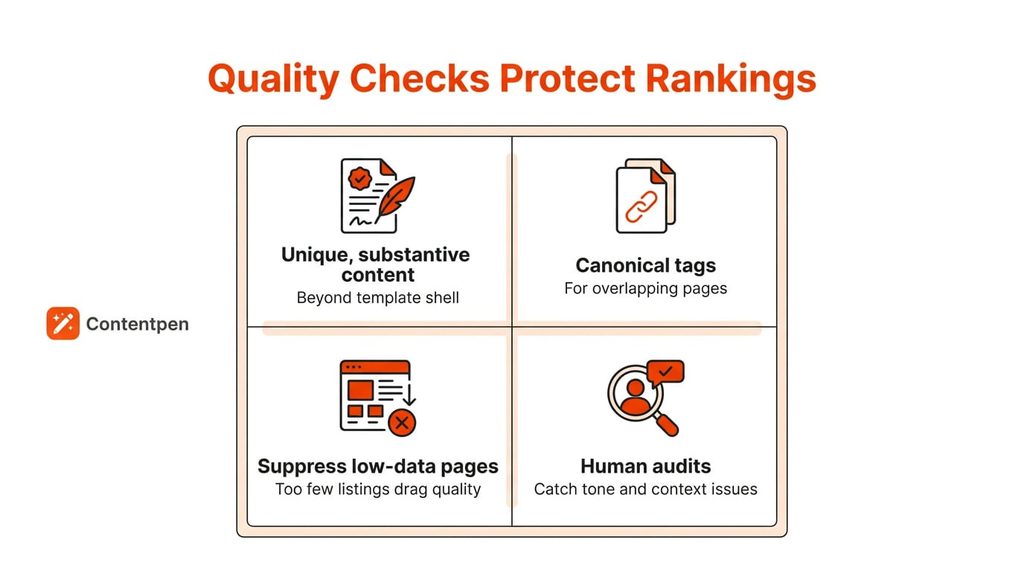
Before publishing a batch of programmatic pages, confirm that each one has enough unique, genuinely useful content beyond the template shell.
A quick pre-launch checklist helps keep quality consistent across a large batch of pages:
- Confirm each page has unique, substantive content, such as editor insights, examples, statistics, or expert opinions.
- Use canonical tags only for true duplicate URLs. If two pages are near-identical, merge them or add unique content to differentiate them.
- Run periodic human audits alongside automated checks, since a person will often catch context and tone issues that a script won’t flag.
Besides checking the content quality, ensure that your text fits cleanly in the design for every page.
You also need to keep monitoring your site for technical SEO issues as your pages scale. Use tools like Screaming Frog to find broken links, 404 errors, and other problems that can hurt rankings in the long run.
Final thoughts
Programmatic SEO works best when you treat it as a system of templates, data, and ongoing maintenance, rather than a one-time push to publish as many pages as possible.
The teams that do get the most long-term value from pSEO are the ones who prioritize real search demand over raw page count, and who keep refreshing pages as rankings shift.
If you’re ready to start, begin small, pick one data variable with clear search demand, and build from there rather than trying to cover every possible combination at once.
Tools like Contentpen can help you research, generate, and maintain that content from a single workspace, so your team spends more time on further business strategies rather than the repetitive, mundane tasks.
Write content that’s built to rank, not just read
Create search-optimized blogs aligned with SEO and GEO signals, so your content performs well across search and AI-driven discovery.
Try SEO Blogging FREE →
Frequently asked questions
Yes, as long as each page has real data and a clear search intent behind it. Pages that only swap a keyword into the same text tend to struggle, while pages built on useful data keep earning traffic, as the examples above show.
Yes. You can build a small version in Google Sheets with a free dataset, formulas that create titles, intros, and FAQs, and a CSV export to your CMS. Our free template walks you through it, and the AI text step is optional.
You can use data you own, such as product or customer data, public datasets you’re licensed to use, or licensed data from providers. Scraped data can raise copyright issues, so check the licence before you use any dataset, as we did with our Kaggle example.
Several paid and free courses cover template design, schema markup, and real case studies in enough depth to be worth your time. Look for ones with hands-on projects rather than pure theory, since building a small template yourself is the fastest way to understand the process.
You need basic keyword research skills, comfort with spreadsheets or databases, and an understanding of templates and schema markup. You don’t need to code. AI autopilot tools like Contentpen can handle research, writing, and publishing, so you can focus on checking quality.