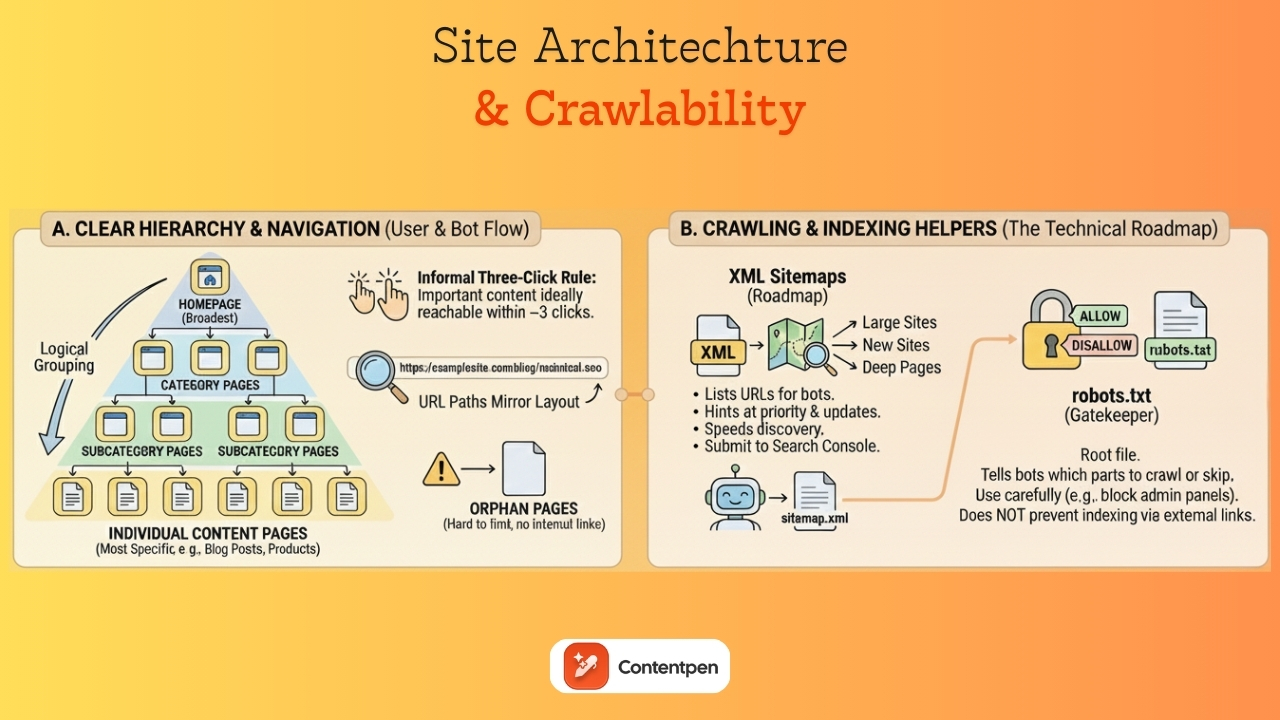
A sitemap is an XML file that lists your site’s important URLs, such as pages, videos, and other files. It helps search engines like Google discover and index your content more efficiently. But its usefulness doesn’t stop at search engines.
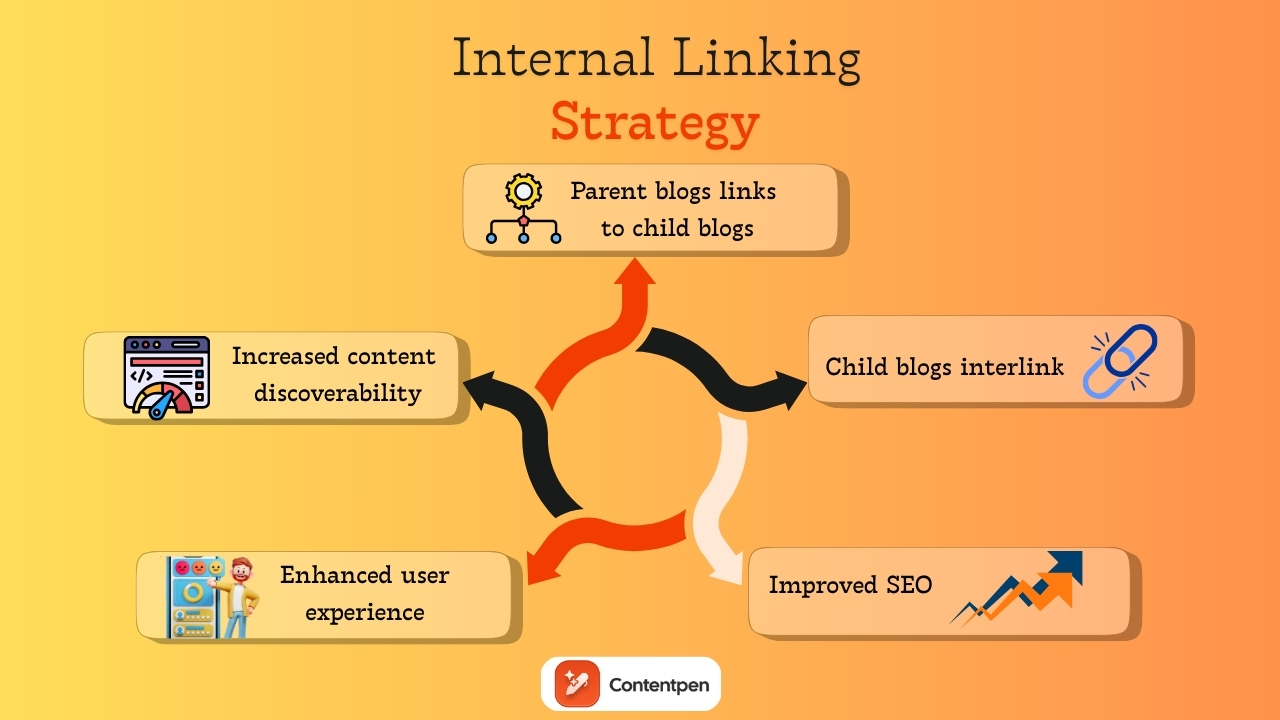
Sitemaps also allow tools like Contentpen to automate internal linking for your blogs and articles. The best news? This process is only a one-time effort and doesn’t require manual tweaking as you add content.
Curious to learn more? Let’s check how to add a sitemap in Contentpen with all methods considered.
2 ways to add a sitemap in Contentpen
There are two ways in which you can enter your sitemap in our AI writing tool:
Through ‘Knowledge Base’ settings
Through ‘Presets’ options
Let’s review them in more detail.
Using the Knowledge Base settings
Step 1: Sign in or create an account on Contentpen to access the main dashboard.
Step 2: From there on, see the ‘Knowledge’ button from the left-side navbar and click on it.
Step 3: Then, click the ‘Website’ option to proceed with setting up your sitemap in Contentpen.
On this screen, you see two buttons, ‘Find Sitemap’ and ‘Add Sitemap.’
Usually, sitemaps follow a familiar pattern:
https://yoursite.com/sitemap.xml
Or
https://yoursite.com/server-sitemap.xml
Step 4: If you know yours, click ‘Add Sitemap’ to proceed with the XML sitemap integration inside Contentpen.
On this screen, you can use the Filter and Exclude Pattern (optional) fields as well. In simpler terms, it means:
Filter Pattern – To only include selected categories or pages you prefer to show. For instance, ‘/blog/’.
Exclude Pattern – To leave out specific pages you don’t want found or crawled from the sitemap. For example, ‘/admin/’.
Step 5: Alternatively, if you don’t know your sitemap or want this process to be completely automated, then use the ‘Find Sitemap’ button.
At this screen, enter your domain and hit the ‘Find My Sitemap’ button to let Contentpen automatically discover your XML file(s).
Step 6: Once discovered, click ‘Add’ to include your sitemap in Contentpen and proceed with the same configuration steps as shown earlier in step 4.
Finally, you can test your added sitemap using the ‘Test Sitemap URLs ‘ button.
Note: Keep the ‘Automatically crawl and add links to knowledge base’ slider on to help Contentpen learn contextual details from your pages. This will ensure smooth internal linking and better on-brand content for your blogs.
Using the Presets settings
Step 1: For the second method of adding your sitemap to Contentpen, go to the ‘Presets’ options from the main dashboard.
Then, click on the ‘Create New Preset’ button to proceed.
Step 2: Once you are at the preset settings, set up your ‘Style’, ‘Formatting’, ‘Structure’, and ‘Media’ details, as shown in the ‘How to use Contentpen presets’ blog.
Step 3: After all the other preset options are done, go down to the final ‘Linking’ option.
Here you will find the same ‘Find sitemap’ and ‘Add sitemap’ buttons as in the previous method.
Repeat step 4, or steps 5 and 6 from the Knowledge Base method to achieve a successful Contentpen sitemap setup.
Adding a sitemap in our SEO platform is simple, quick, and designed to make internal linking easier. Whether you prefer to let the system handle it automatically or want to add or adjust it manually, the process is smooth and flexible.
Plus, with powerful customization options like exclude and filter patterns, you stay in full control of what shows up in your content.
Once your sitemap is set up, you can fully automate your linking and content structure, saving hours on manual SEO work.
From outline to publish-ready content
that fills them
Yes. If your website has more than one sitemap (e.g., a separate one for blog posts and products), you can add each one individually through the Knowledge Base or Presets settings.
Does Contentpen use my sitemap for anything other than internal linking?
Yes. Once crawled, your sitemap helps Contentpen build a knowledge base of your existing content, which it uses to generate more contextually relevant and on-brand articles.
Is it possible to include only selected pages in my sitemap?
Yes. The “Filter pattern” feature lets you specify which pages or categories you want to include, giving you complete control of your internal links.
Will my sitemap update automatically when I publish new content?
If you’ve enabled the automated feature, then yes. Your sitemap will update in real time as you publish new content.
What happens if I change my website URL?
In that case, you’ll need to update your sitemap settings with the new URL. You can either fetch it automatically again or manually paste the new sitemap.
Do I need any technical skills to use the sitemap feature?
Not at all. Whether you’re using the automated or manual method, the process is beginner-friendly and takes just a few clicks.
Brand voice is the distinct personality of a business that helps it stand out from others. It is one of the leading factors why some companies get a lot of traffic while others are never discovered.
Building a brand voice for Contentpen is surprisingly simple. With just a few easy steps, you’ll be ready to publish tone-consistent content that is bound to engage, educate, and convert.
No matter if you are a small business with multiple writers or a freelancer, the brand voice feature is definitely going to be very helpful to you. By using it, you can build trust with the audience in no time.
So, let’s break down how you can use AI to develop a distinct, human, and memorable brand voice for your business.
A step-by-step guide to setting up your brand voice
The good part about Contentpen is that you don’t have to build a brand voice manually like most other writing tools. The AI text generator does most of the work once you sign in and add your website details.
Step 01: Sign in and enter your website
Once you sign in to Contentpen, enter your website URL and name in the designated fields to start building your brand voice.
From there, the platform goes to work instantly. It pulls your website’s content, tone, and language patterns to generate a preliminary brand voice profile.
Step 02: Let AI analyze your content
Contentpen uses AI to scan your existing website copy, blog posts, product descriptions, and even metadata. It identifies your tone, style, and audience preferences to create a brand voice that reflects your current content identity.
The analysis covers three areas:
Business identity: Your brand persona (About the brand), ICP (Ideal Customer Profile), and USP (Unique Selling Point).
Audience targeting: Your author persona, target audience, voice, and competitors in the same niche.
Content strategy: Your content themes (pillars) to align with your brand goals. Also, you can add any suggested tags manually that can help categorize your content for AI visibility and discovery.
Step 03: Save and apply across your content
Once you’re happy with the setup, you can save your brand voice and start using it instantly with the suggested topics.
Contentpen will now automatically align with your chosen brand voice for every blog post you write. You can click ‘Create Article’ to instantly make a blog, or choose ‘Skip for Now’ to access your main dashboard and write later.
Write content that’s built to rank, not just read
Create search-optimized blogs aligned with SEO and GEO signals, so your content performs well across search and AI-driven discovery.
Additional step: Refine or update your brand voice anytime
Not satisfied with the auto-generated voice or want to tweak it to align with your evolving brand personality? No problem. Contentpen gives you full control to manually adjust it. Here’s how:
Head to your Contentpen dashboard.
From the left-hand menu, click on “Knowledge”, then select “Brand voice.”
In this section, you can manually update details like your USPs, target audience, author persona, tone, and more. Once you’ve made your changes, you can head out to the main dashboard, and Contentpen will automatically save all your details for the next draft.
Final thoughts
In 2026, brand voice isn’t just about logos and color palettes – it’s about how you sound. Whether you’re a startup or a growing digital brand, your voice is your vibe. It tells your audience who you are, what you stand for, and why they should care.
The AI writing tool makes it incredibly easy to build a brand voice that stays consistent across all your content. It helps you establish your brand and improve share of voice in your niche with ease.
Frequently asked questions
Do I need any technical skills to build a brand voice on Contentpen?
Not at all. Contentpen is built for ease: just sign in, add your website, and the AI will do the rest to determine your brand voice.
Can I manually adjust the brand voice Contentpen creates?
Yes! You can refine or completely update your brand voice anytime from the dashboard under the “Knowledge” settings.
How does Contentpen analyze my content?
It uses AI to analyze tone, sentence structure, vocabulary, and audience targeting patterns across your existing content.
What if I don’t have a website yet?
You can still build your brand voice manually by inputting your brand persona, target audience, USPs, tone, and content themes directly into the platform.
Is the tool suitable for startups or solo creators?
Absolutely. Contentpen is perfect for small teams or individuals who want to build a consistent and professional brand voice without a full-scale creative team.
Connecting your WordPress site to Contentpen is quick and easy. This integration allows you to seamlessly manage, schedule, and publish content from Contentpen directly to your WP dashboard without any manual work.
With just a few clicks, you can connect your site, install the Contentpen plugin, and start pushing content live, all from one place.
So, let’s get started.
Step 01: Copy your Contentpen “API key”
Start by logging into your Contentpen account. If you don’t have one yet, sign up at Contentpen.
Go to the “Integration” tab in the left menu.
Enter your WordPress site URL and click “Connect WordPress.”
Then, copy the API Key that appears.
Once you’ve copied your API key, it’s time to install the Contentpen WordPress plugin.
Step 02: Install the Contentpen WordPress plugin
Log in to your WordPress admin panel. In the left-hand sidebar menu, hover over “Plugins” and then click “Add Plugin.”
In the search bar at the top right, type “Contentpen.” You should see the official Contentpen plugin in the search results. Look for a plugin with the Contentpen logo and a description.
Once you’ve found the correct plugin, click the “Install Now” button next to it.
After the plugin has been installed, the “Install Now” button will change to “Activate.” Click “Activate” to enable the plugin on your WordPress site.
Step 03: Connect your WordPress site to your Contentpen account
Once the plugin is activated, connect it to your Contentpen account.
Now, you need to find the Contentpen settings. After activation, a new menu item for “Contentpen” might appear in your WordPress sidebar.
Go into the ‘Contentpen’ settings and paste the API key you copied earlier to link your WordPress site.
Save or update the settings to confirm the connection between Contentpen and your WP account.
Step 04: Verify the connection from WordPress
Once you’ve connected WordPress to the AI writing tool, it is time to verify the connection from Contentpen.
Click on the ‘Verify Connection’ button in the WordPress integrations tab and wait for a while.
You will get a notification pop-up confirming that you have a successful connection with WordPress.
You can also upload images that Contentpen generates directly to WordPress by using the slider at the bottom of the WP integration page.
How to publish a blog directly from Contentpen to WordPress
Let’s say you’ve just finalized a blog post draft in Contentpen. Instead of downloading and manually uploading it into WordPress, you can now:
Step 01: Click on the content piece you want to publish.
Step 02: Hit the “Publish” button in the top right corner.
Step 03: A pop-up will appear, allowing you to choose an author, assign categories, and add relevant tags for the post. You can also choose to send the content to your WP as a draft instead of publishing it directly.
Step 04: When you’re ready, hit the “Publish Post” button, and your blog will go live on your website instantly.
Final thoughts
You’re all set! With Contentpen connected to WordPress, you can schedule, manage, and publish content without ever leaving the platform.
From here, you might want to explore scheduling posts in advance, enabling image uploads, or creating content directly from the AI writing assistant app.
Remember to keep the plugin updated to stay compatible with new features as they roll out. Also, check out Contentpen blogs for more information about the tool and see how you can utilize it to write SEO-optimized content with convenience.
From outline to publish-ready content
that fills them
Once logged into Contentpen, go to the “Integration” tab in the left menu, enter your WordPress site URL, click “Connect WordPress,” and your API key will be generated there.
Do I need any coding skills to connect Contentpen with WordPress?
Not at all! The setup involves simple copy-paste steps and plugin installation with no coding required.
Can I disconnect Contentpen from WordPress anytime?
Yes, you can remove the plugin or reset the integration from your Contentpen account at any time.
Is it safe to use my API key in WordPress?
Yes, your API key is unique to your account and securely links Contentpen with your site. However, never share it publicly or with untrusted users.
What should I do if the connection between Contentpen and WordPress fails?
Try these quick fixes first:
– API key not working: Re-copy it fresh from the Integration tab and avoid any stray spaces in the link – Plugin not visible after installation: Refresh the plugins page or reinstall the plugin from WordPress – Connection still failing: Check that your WordPress site URL is entered correctly in Contentpen (include https://)
If none of these work, disconnect and reconnect from the Integration tab, or contact Contentpen support for help.
As the name suggests, your brand voice is the unique expression of your brand’s personality, vision, and custom preferences.
It’s the distinctive character that comes through in all your brand’s communications – whether written, spoken, or visual.
Your brand voice is a unique blend of your USPs (Unique Selling Propositions), ICPs (Ideal Customer Profiles), and overall brand persona tailored to your target audience.
It defines how your brand communicates – through word choice, tone, rhythm, and style – and serves as the verbal reflection of your identity and core values.
In today’s blog, we’ll see why brand voice matters, explore its key components, and share tips to help you develop one that resonates.
So, without any further ado – let’s get started!
Why brand voice matters?
When consumers encounter thousands of marketing messages daily, brands with inconsistent or generic voices simply fade into the background.
1. Brand recognition and recall
Just as we recognize friends by their speech patterns without seeing them, consumers can recognize brands through their distinctive communication style. A consistent voice creates memorable impressions that stick with customers even when they’re not actively engaging with your content.
2. Trust and authenticity
When your voice remains consistent across all touchpoints, it signals reliability and authenticity to your audience. Conversely, an inconsistent voice creates cognitive dissonance and can undermine trust. Imagine if your bank suddenly started using slang-filled, casual messaging after years of formal communication.
3. Differentiation in crowded markets
In industries where product differentiation is challenging, a distinctive brand voice can provide a competitive edge. Consider how brands like Dollar Shave Club disrupted the razor industry not through revolutionary products but through a fresh, irreverent voice that stood apart from established competitors.
4. Emotional connection
The right brand voice can forge emotional bonds with audiences by reflecting shared values, aspirations, or worldviews. This emotional connection goes beyond functional benefits, creating a deeper brand loyalty.
5. Consistency across teams and channels
A documented brand voice provides guidelines for everyone creating content for your brand, from in-house teams to external agencies, ensuring consistency even as your communication channels multiply.
The emotional flavor or attitude in your messaging (e.g., friendly, professional)
Sets the mood and helps match your brand’s vibe to your audience’s expectations.
Unique Selling Proposition (USP)
The distinctive feature or benefit that makes the brand stand out from competitors.
It helps to clearly define the brand’s niche and sets it apart in the marketplace, making it memorable to the audience.
Brand persona
The core goal behind your communication (e.g., to inspire, to inform, to sell)
Ensures your messaging stays focused and consistent across channels.
Key themes
The beliefs and principles that guide your brand voice
Builds trust and helps connect with like-minded audiences.
Targeted audience
How well your voice aligns with your target audience’s preferences
Makes your messaging feel relevant and relatable, boosting engagement.
How to use AI to create your brand voice?
With the rise of AI, developing that unique voice is no longer reserved for big teams or agencies. Today, smart tools can help you define how your brand sounds and ensure that tone stays consistent across every piece of content.
Introducing Contentpen – The ultimate AI writing tool
Contentpen is an AI-powered content creation platform that helps you establish a distinct tone of voice. And keep it consistent across every channel with ease. With customizable content presets, you can define your brand personality once and apply it to everything from blog posts to ad copy.
Need to scale?
Contentpen’s bulk article generation lets you produce high-quality, on-brand content in minutes – not days. Plus, built-in SEO optimization ensures your content doesn’t just sound great; it performs, too.
Whether you’re managing one brand or juggling several, our AI content writing app makes it effortless to stay true to your voice while expanding your online presence.
Brand voice in action: Examples
Looking at successful brands can provide inspiration for developing your own voice:
The New York Times: Authoritative and thoughtful
The Times maintains a voice of reasoned authority – formal without being stuffy, intelligent without being pretentious, and serious without being devoid of humanity.
ContentStudio: Professional and action-oriented
ContentStudio talks with you in crisp, action-driven language, powerful enough to fuel complex campaigns but approachable enough for every team member. It’s clear, step-by-step prompts guide you from ideation through scheduling to performance insights, so you can craft, publish, and optimize social content that truly connects and converts with ease.
Wendy’s: Irreverent and bold
Particularly on social media, Wendy’s has cultivated a sassy, irreverent voice that’s unafraid to challenge competitors directly and use humor to connect with younger audiences. Just like this
Common challenges business face when setting a brand voice
Developing and maintaining a consistent brand voice often involves navigating several challenges:
1. Scaling across large organizations
As companies grow, maintaining voice consistency becomes more complex. Creating clear guidelines, providing ongoing training, and establishing content review processes can help address this challenge.
2. Adapting to new platforms
Each new communication channel may require adaptations of your voice while maintaining its core elements. For example, your LinkedIn content might use a more professional tone than your TikTok content, but both should still be recognizably your brand.
3. Balancing global consistency with local relevance
International brands must consider how their voice translates across cultures and languages, often requiring flexibility to respect local communication norms while maintaining global brand cohesion.
4. Managing voice during crises
Difficult situations may require temporary adjustments to your typical voice, showing appropriate sensitivity while remaining authentic to your brand identity.
Measuring brand voice effectiveness
While somewhat subjective, several approaches can help evaluate your brand voice:
Audience perception surveys: Ask customers to describe your brand’s personality based on your communications
Content engagement metrics: Monitor how audiences respond to content that exemplifies your voice
Brand recognition tests: See if audiences can identify your brand from unbranded content samples
Consistency audits: Regularly review content across channels for voice alignment
Team adoption measurement: Assess how consistently team members apply voice guidelines
Conclusion
Brand voice is far more than a marketing nicety – it’s a strategic asset that shapes how audiences perceive, remember, and connect with your brand.
In an increasingly digital marketplace where consumers encounter countless messages daily, a distinctive, consistent, and authentic voice helps your brand cut through the noise and build meaningful relationships with your audience.
By thoughtfully developing your brand voice based on your fundamental values and audience needs, then systematically implementing it across all communications, you create a powerful tool for brand recognition, differentiation, and emotional connection that delivers measurable business benefits.
FAQs on brand voice
What is a brand voice?
A brand voice is the unique personality and tone a company uses in its communications, reflecting its values and connecting with its audience.
Why is a consistent brand voice important?
Consistency builds trust and recognition, ensuring all brand messages align and resonate with the target audience.
How can AI assist in developing a brand voice?
AI tools can analyze existing content to identify tone patterns and help generate new content that maintains a consistent brand voice.
What challenges do businesses face in establishing a brand voice?
Challenges include maintaining consistency across platforms, adapting to different audiences, and ensuring all team members adhere to the established voice.
Remember when creating a blog post meant spending hours drafting content, formatting text, adding images, and then going through multiple editing rounds? Those days are becoming obsolete. Content creation has transformed from a lengthy, meticulous process into something anyone can efficiently create a blog in 10 minutes.
This revolution in blogging has democratized content production, allowing writers of all experience levels to publish professional-quality articles without excessive time investment.
The good news is that modern content creation tools have transformed this process. What once took hours can now be accomplished in minutes without sacrificing quality.
This revolution in content production empowers writers of all experience levels to publish professional-quality articles efficiently and consistently.
Let’s see how you can create a blog post in 10 minutes.
What is the best way to create a blog in 10 minutes?
Creating a blog the traditional way is exhausting. From researching the topic, drafting content, optimizing for SEO, to finally formatting everything, it can easily take hours, if not days. And if you’re managing multiple tasks or clients, that time adds up fast. The pressure to consistently produce high-quality content can feel overwhelming and unsustainable.
Introducing Contentpen – The best AI blog writer online
Contentpen is an AI blog writing tool designed to help users create high-quality, SEO-optimized content efficiently.
The 10-minute content creation system explained
Here’s the streamlined workflow that makes 10-minute content creation possible:
1. Pick your topic and angle (1 minute)
Begin by identifying what specific value you’ll deliver to readers. Instead of broad topics like “digital marketing,” focus on targeted angles like “how small businesses can use email marketing to increase repeat purchases.” This clarity creates a natural structure for your content and helps you stay focused during the writing phase.
2. Set up your content preset (2 minutes)
This is where Contentpen truly shines. Configure your content preset once with settings that match your content goals:
Tone of voice: Select from options like “clear and straightforward,” “professional but approachable,” “helpful and solution-focused,” or “confident without being pushy.” This setting ensures a consistent voice across all your content without constant conscious adjustment.
Target audience: Define precisely who you’re writing for – marketing professionals, business owners, IT managers, product teams, or other specific groups. This setting helps you maintain appropriate terminology and examples throughout your content.
Formatting preferences: Choose which text treatments to apply automatically. Enable bold formatting for key concepts, italics for emphasis, tables for data presentation, pull quotes for important insights, and list formatting for scannable information.
Structure elements: Select your preferred article length (small, medium, or large) and additional sections like key takeaways, conclusions, and FAQs. These structural elements create reader-friendly content without requiring manual formatting.
Linking strategy: Configure how you want internal and external links handled. Set up automatic internal linking to your existing content and control which external domains to include or exclude.
3. Write your content (5 minutes)
With your preset handling of all formatting and structural decisions, you can focus entirely on your ideas. This is pure content creation – no more switching between writing and formatting modes. The preset acts like a professional editor working alongside you, automatically implementing your predetermined style preferences as you write.
Since you don’t need to worry about how your content will look, you can dedicate your full attention to explaining concepts clearly, providing valuable insights, and connecting with your readers. Many writers report that this focused approach not only saves time but also improves the quality of their writing.
4. Add visuals (1 minute)
Visuals dramatically improve reader engagement, but finding, sizing, and positioning images often becomes a time-sink. Your Contentpen preset handles these technical aspects automatically:
Featured images are properly sized and positioned
In-article images maintain consistent formatting
Tables follow your predetermined styling
Visual hierarchy remains consistent across all content
Simply select the images you want to include, and your preset ensures they enhance your content without disrupting your writing flow.
5. Review and publish (1 minute)
With structural and formatting elements handled automatically, your final review can focus entirely on content quality. Quickly scan for:
Clarity of your main points
Coherence of your overall argument
Any obvious grammatical issues
Effectiveness of your headline
Once satisfied, you can publish with confidence, knowing your content maintains professional quality and brand consistency – all created in just 10 minutes.
This streamlined approach doesn’t just save time – it fundamentally changes the content creation experience. By removing technical distractions, Contentpen lets you focus on what truly matters: sharing your expertise and connecting with your audience through valuable content.
How Contentpen presets transform content creation
Think of presets as your personal content production team – a designer, editor, and SEO specialist working silently in the background while you focus solely on your ideas. Let’s explore how each component of this system works together to revolutionize your content creation process:
Style settings that establish your consistent voice
Every writer knows that maintaining a consistent tone across multiple articles is challenging. Without a system, your writing voice might shift depending on your mood or energy level. Contentpen solves this through style presets that provide a consistent framework:
Tone of voice options include:
Clear and straightforward: Direct language that prioritizes simplicity and clarity, ideal for instructional content or technical explanations
Professional but approachable: Balanced tone that conveys expertise while remaining conversational, perfect for business blogs and thought leadership
Helpful and solution-focused: Empathetic tone that emphasizes practical answers to reader problems, great for how-to content
Confident without being pushy: Authoritative voice that presents strong opinions while respecting different perspectives
Target audience settings ensure your content speaks directly to:
Marketing professionals and teams: Using appropriate terminology and examples relevant to marketers’ daily challenges
Product managers and teams: Framing concepts in terms of product development cycles and user experience
Business owners and founders: Focusing on practical implementation and business outcomes rather than theory
IT managers and developers: Incorporating technical specificity while maintaining accessibility
Digital marketing agencies: Addressing agency-specific workflows and client relationship considerations
When you select these style settings, Contentpen subtly guides your writing process. For example, if you’ve selected “helpful and solution-focused” for a business owner audience, the system might suggest more actionable subheadings and practical examples instead of theoretical discussions.
Formatting options that create visual consistency
Readers form impressions about your content quality within seconds, largely based on visual presentation. Inconsistent formatting signals amateur content, while consistent styling builds trust. Contentpen’s formatting presets automatically implement your visual preferences:
Text formatting elements you can automate include:
Bold for important keywords: Drawing attention to critical terms and concepts that define your topic
Italic for subtle emphasis: Creating natural reading rhythm by highlighting key phrases
Tables for organized data: Presenting comparative information in consistently styled, scannable formats
Quotes for testimonials or insights: Setting apart important statements with distinctive styling
Lists for easily scannable information: Breaking complex processes into digestible steps with consistent formatting
Heading case consistency options include:
Title case: How to Create a Blog in Less Than 10 Minutes
Sentence case: How to create a blog in less than 10 minutes
lowercase: how to create a blog in less than 10 minutes
When implemented across dozens or hundreds of articles, these consistent formatting choices create a professional, cohesive reading experience that builds trust with your audience. Rather than spending time manually formatting each element, your preset applies these styling decisions automatically.
Structure settings that enhance readability
Content structure significantly impacts how readers engage with your ideas. Well-structured content leads readers naturally from introduction to conclusion, while poor structure creates confusion and abandonment. Contentpen’s structure presets implement proven readability principles:
Article structure options include:
Small articles (3-4 headings): Concise content focused on a single specific topic or question
Medium articles (5-8 headings): Comprehensive coverage of broader subjects with multiple subtopics
Large articles (8+ headings): In-depth explorations of complex topics with detailed subsections
Additional structural elements you can automatically include:
Key takeaways: Summary sections highlighting essential points for readers who scan
Conclusion: Synthesized wrap-ups that reinforce main arguments and provide closure
FAQs: Anticipatory question-and-answer sections addressing common reader concerns
Featured images: Consistently positioned and sized visual elements that enhance engagement
In-article visuals: Strategically placed images that break up text and illustrate concepts
These structure settings don’t just save time – they implement proven readability principles that keep readers engaged. When readers encounter content with a familiar, logical structure, they can focus on your ideas rather than struggling to follow your organization.
Linking strategies that strengthen your content ecosystem
Strategic linking transforms standalone articles into interconnected content ecosystems that boost SEO performance and reader engagement. However, managing links manually across dozens or hundreds of articles becomes impossibly complex. Contentpen’s linking presets automate this process:
Internal linking capabilities include:
Sitemap integration: Automatically identifying relevant connection points within your existing content
Content relationship mapping: Building logical pathways between related topics
Instead of spending hours manually identifying and inserting links, your preset implements your linking strategy automatically across all content.
Three real examples of Contentpen presets in action
Let’s explore three scenarios demonstrating how different preset configurations serve specific content needs:
The marketing consultant’s educational blog
Scenario: Jessica runs a digital marketing consultancy and needs to regularly publish educational content for potential clients.
Preset configuration:
Style: Professional but approachable tone targeting business owners and marketing professionals
Formatting: Bold for key marketing terms, italics for emphasis, lists for step-by-step instructions
Structure: Medium articles (5-8 headings) with conclusion and FAQs sections
Linking: Automatic internal linking to related marketing resources on her site
Why this works: This preset creates professionally structured content that positions Jessica as an expert while making complex marketing concepts accessible to business owners. The consistent formatting and helpful additional sections (like FAQs) enhance readability and demonstrate thoroughness.
Time-saving benefit: Jessica can focus entirely on sharing her marketing expertise without worrying about formatting consistency or structure. Her articles always look professional and maintain the same helpful tone that her audience expects.
The SaaS company’s product updates
Scenario: A software company needs to regularly publish product updates and feature announcements.
Preset configuration:
Style: Clear and straightforward tone targeting IT managers and developers
Formatting: Tables for feature comparisons, bullet lists for key changes
Structure: Small articles (3-4 headings) with a key takeaways section highlighted at the top
Linking: Internal links to documentation and previous feature announcements
Why this works: This preset configuration creates concise, well-organized product updates that technical audiences can quickly scan for relevant information. The consistent structure helps regular readers know exactly where to look for the information they need.
Time-saving benefit: Multiple team members can contribute to product update articles while maintaining perfect consistency in branding, terminology, and presentation, critical for technical documentation.
The travel blogger’s destination guides
Scenario: Marco creates in-depth travel guides about international destinations.
Preset configuration:
Style: Helpful and solution-focused tone targeting travel enthusiasts
Formatting: Quotes for local insights, bulleted lists for packing tips
Structure: Large articles (8+ headings) with featured images and in-article photography
Linking: External linking enabled to trusted travel resources and booking sites
Why this works: This preset creates comprehensive, visually rich travel guides with consistent sections that readers come to expect (accommodations, local transportation, must-see attractions). The helpful tone and solution-focused approach build trust with travelers planning their trips.
Time-saving benefit: Marco can create detailed travel guides in a fraction of the typical time, allowing him to publish more frequently and cover more destinations. The preset ensures that his guides maintain the same quality and structure that his audience values.
Why blogs still matter in a world full of videos?
Today, videos are everywhere. TikTok, YouTube, and Instagram clips fill our screens daily. With so much video content, you might wonder if blogs are still worth creating. The answer is a strong yes. Written content offers unique benefits that videos simply cannot replace.
Better visibility in search engines
When people search for information online, written content still shows up more often in results. Search engines like Google can understand text much better than video content. This means:
Blogs help more people find your website through searches
Written content can rank for many different search terms at once
Search engines can better understand what your site is about through your writing
Links between your blog posts help search engines see your site as valuable
Text is easier for search engines to read and recommend to others
Content that lasts longer
Unlike social media posts that disappear quickly, blog articles can bring value for years:
A good blog post can continue getting readers long after you publish it
You can easily update old posts to keep them current
Your collection of articles builds up over time, creating a valuable resource
Helpful content continues solving people’s problems for years
Older posts keep working for you without additional effort
Turning readers into customers
Blog content is excellent at guiding people toward becoming customers:
You can naturally include a call to action at key points in your articles
Readers can sign up for more content while reading your blog
People often feel more comfortable considering purchases while reading
You can offer downloadable resources in exchange for contact information
Written comparisons and reviews help people make buying decisions
Explaining complex topics thoroughly
Some subjects need detailed explanations that videos can’t provide effectively:
Readers can go through the information at their own speed
Complex ideas often need careful reading to understand
Technical details and data are easier to present in text
Step-by-step instructions are simple to follow in written form
People can easily refer back to specific parts of your article
Reaching more types of people
Written content works for people in situations where video doesn’t:
People with hearing problems can access written content easily
Blogs work for people with slow internet connections
Text can be translated into other languages more accurately
People can read blogs at work without needing headphones
Screen readers can convert text for people with visual impairments
Easier and cheaper to create
Blog content typically needs fewer resources than good videos:
You only need a computer to write
No special equipment or editing software required
Writing usually takes less time than video production
Text is easier to fix and update later
One person can handle the entire writing process
What readers prefer
Many people still prefer reading in certain situations:
Professional information is often easier to understand in writing
People like to scan written content during work hours
Technical instructions are clearer in text form
In-depth topics benefit from the structure of written content
Some people simply prefer reading to watching videos
Working with videos, not against them
Blogs and videos can work together effectively:
Blog posts can expand on ideas from your videos
Written content can provide details to support video demonstrations
Articles make information from videos searchable
Adding videos to blog posts increases engagement
Written content brings different people to your site than videos alone
How Contentpen changes the content creation game
Content creation technology has fundamentally transformed what’s possible for writers and publishers. With platforms like Contentpen and the power of content presets, you can transform your ideas into polished, professional articles in just minutes. This efficiency doesn’t just save time – it enables more consistent publishing, broader topic coverage, and ultimately, greater audience impact.
Frequently asked questions
How can I create quality content so quickly?
The 10-minute approach works because it separates content creation from technical formatting. By using structured outlines and content presets, you can focus purely on your ideas while automation handles the presentation aspects. It’s like having a professional designer and editor working alongside you in real-time.
Does content presets limit my creativity or make my blog look generic?
Unlike basic templates, modern content presets offer sophisticated customization while maintaining design coherence. Contentpen’s presets handle technical formatting while still allowing your unique voice and style to shine through. You can also modify presets to create a signature look for your content.
How do content presets differ from regular blog templates?
Templates typically control only the basic layout, while content presets manage dozens of parameters, including typography, spacing, image handling, interactive elements, and platform-specific optimizations. They’re much more comprehensive and specifically designed for efficient content production rather than just visual presentation.
Can I use the 10-minute approach if I’m not a professional writer?
Absolutely. In fact, this approach particularly benefits non-professional writers by providing structure and handling technical aspects of content creation. The preset system acts as a guide, helping you organize your thoughts while ensuring a professional presentation.
Can content created this quickly perform well in search engines?
Yes. Search engines prioritize valuable, well-structured content – which this approach delivers. Contentpen’s presets include SEO-friendly formatting, heading structures, and metadata optimization. Your content’s search performance ultimately depends on its value to readers, not how long it took to create.
How can I make my quickly created content stand out from competitors?
Focus on bringing unique perspectives, original insights, or exclusive information to your topics. While presets handle formatting consistency, your distinct viewpoint and expertise will differentiate your content. Consider incorporating only original research, personal experiences, or specialized knowledge that you can provide.
Can I still personalize my content when using presets?
Absolutely. Presets handle the technical and design foundation, but you maintain complete control over your content, voice, and creative direction. You can also customize presets to align perfectly with your brand identity while retaining all the time-saving benefits.
Creating high-quality content consistently is tough, especially when you’re racing against deadlines, out of ideas, or short on resources. That’s where AI tools for content creation step in to transform the game.
From generating blog topics and social captions to designing images and videos for posts, AI-powered platforms are helping marketers, creators, and teams produce content faster and smarter.
With the right tools in your stack, you can save hours of manual effort, streamline your content workflow, and focus more on strategy and creativity rather than repetitive tasks. But with so many tools available, finding the best ones for your needs can be overwhelming.
That’s why we’ve handpicked 17 of the best AI tools for content creation, each offering unique features to help you write, design, plan, and publish content more efficiently.
Let’s explore, shall we?
Why use AI content creation tools?
AI content creation tools are transforming how businesses and creators approach content marketing. Here are five key benefits of using these tools:
Speedy content production: An AI writer can generate ideas, outlines, and drafts in minutes, cutting down hours of work and freeing you up for strategy and fine-tuning.
Boosted creativity: Stuck in a creative rut? AI offers fresh angles, catchy headlines, and unique suggestions to keep your content sharp and inspired.
Cost-efficient output: Skip the high costs of hiring multiple creators. AI tools handle repetitive tasks with bulk-creation options, helping you produce high-quality content on a leaner budget.
Better SEO performance: With built-in SEO scoring and optimization features, AI tools suggest keywords, structure, and metadata to improve search rankings and drive traffic.
Consistent brand messaging: AI helps maintain a unified brand voice across all platforms, keeping your messaging consistent.
AI tools are also great for startups and agencies looking to communicate their inner creativity without requiring many hard skills.
How we tested these tools: Our selection criteria (methodology)
We evaluated each tool fairly, based on the following four pillars:
Output quality and reliability: Does the tool produce content that requires minimal human intervention, or does it hallucinate? We prioritized tools known for factual accuracy and high-quality media asset creation.
Workflow Integration: In 2026, the only tools we consider worthwhile are those that integrate freely with others without discrepancies or hiccups. Therefore, we looked for robust API support and “Zapier-friendly” ecosystems where possible.
Ease of use vs. power: We balanced beginner-friendly interfaces (like Canva) with “power-user” platforms (like Surfer SEO) to ensure there’s a fit for every skill level.
Value for Money: We analyzed whether the features justified the monthly subscription, especially for solo creators versus scaling agencies.
While this is a fairly straightforward methodology, our team of expert marketers and SEO specialists personally tested these tools to ensure the selection is honest and properly reviewed.
17 best AI content creation tools compared head-to-head
Below are all the best AI content creation tools in 2026 that you need to consider for your tech stack.
Tool
Primary Use Case
Standout Feature
G2 Rating
Starting Price
Contentpen
SEO- and GEO-ready blog generation
Automated topical clustering and analytics
4.9 ⭐
$27/mo
Surfer SEO
SEO strategy
Real-time “Content Score”
4.8 ⭐
$69/mo
HubSpot
AI-assisted content creation
CRM-connected workflows
4.4 ⭐
$20/mo
Neuron Writer
Semantic SEO
NLP-driven SERP analysis
4.8 ⭐
$19/mo
Jasper.AI
Enterprise AI writing
“Brand Voice” memory
4.7 ⭐
$39/mo
Copy.AI
Marketing and sales
GTM automated workflows
4.9 ⭐
$36/mo
ElevenLabs
Realistic voiceovers
Emotional speech inflection
4.5 ⭐
$5/mo
Murf AI
Corporate eLearning
Built-in “Studio” & Canva Sync
4.7 ⭐
$19/mo
HeyGen
Video messaging
Lip-sync video translation
4.8 ⭐
$24/mo
Synthesia
Training videos
160+ AI digital twins
4.7 ⭐
$18/mo
Descript
Video/audio editing
Text-based “Overdub” Editing
4.6 ⭐
$12/mo
Canva
Visual design
“Magic studio” suite
4.7 ⭐
$15/mo
InVideo
Video creation and editing
Automatic scene generation
4.4 ⭐
$28/mo
Grammarly
Content editing and polishing
Contextual tone detection
4.7 ⭐
$12/mo
ContentStudio
Complete social media management
AI image and video generation
4.6 ⭐
$25/mo
Rytr
Budget AI content creation
Built-in plagiarism checker
4.7 ⭐
$9/mo
Pictory
Video highlights
Script-to-video shorts
4.6 ⭐
$19/mo
Now, let’s read more details about each of these tools.
1. Contentpen
Contentpen is a game-changing AI writer for blogs built to help businesses scale their content production effortlessly without compromising on quality or SEO performance. While tools like Jasper require manual prompting, Contentpen’s automated topical clustering allowed us to map out a 30-day content calendar in one click, with post scheduling already taken care of.
The tool is also very useful for identifying quick wins and decaying pages, so your content strategies are always up-to-date.
Learning curve for new users, given the step-wise process to generate content
Pricing:
Starter: $27/month
Premium: $55/month
Agency: $139/month
2. Surfer SEO
Surfer SEO is a powerful content optimization tool designed to help marketers, content creators, and SEO professionals create high-ranking content with ease. It analyzes top-performing pages for your target keyword and provides actionable recommendations to improve your content’s structure, keyword usage, and on-page SEO elements.
HubSpot Content AI Agent is an AI-powered content creation tool built directly into HubSpot’s marketing and CMS ecosystem. It’s designed to help marketers, content creators, and businesses generate blog posts, landing page copy, emails, and social content faster while keeping everything connected to campaigns, CRM data, and marketing workflows.
Key features:
AI-generated blog posts, emails, and landing page copy
Content repurposing and rewriting assistance
CRM-connected personalization
Integrated SEO and campaign workflows
AI visibility tracking with HubSpot AEO
Pros:
Combines content creation with AI visibility optimization
Built directly into HubSpot’s marketing ecosystem
Streamlines content creation and campaign execution
Useful for multi-channel marketing workflows
Strong integration with CRM and automation tools
Cons:
Best suited for teams already using HubSpot
Advanced capabilities require paid plans
Less focused on deep SEO optimization when compared to specialized SEO tools
Pricing:
Free plan available
Starter: $20/month
Professional: $100/month
Enterprise: Custom pricing
4. Neuron Writer
Neuron Writer is a semantic SEO powerhouse that goes beyond basic keyword stuffing by using NLP (Natural Language Processing) to understand the “why” behind the search results. It’s built specifically for content strategists who need to outrank high-authority competitors by closing the topical gap and optimizing for semantic relevance in real-time.
Key features:
Competitor content scoring and insights
Built-in content outlines and structure templates
Internal linking and schema recommendations
Strong collaboration features with folder tracking
Pros:
Simplifies complex SEO insights for non-technical users
Direct “One-Click” export to WordPress and Shopify
Excellent price-to-value ratio for scaling agencies
Cons:
The interface can be visually overwhelming for beginners
Focuses primarily on long-form blogs
Some tools, like plagiarism checking, may require higher plans
Pricing:
Bronze plan: $23/month
Silver plan: $45/month
Gold plan: $69/month
Platinum plan: $93/month
Diamond plan: $117/month
5. Jasper.AI
Jasper offers AI text generation for a wide range of content types, from landing pages to full marketing campaigns. Key tools include Remix for reworking existing content, an interactive chat for brainstorming, and a handy Chrome extension.
Copy.ai is an AI-powered writing tool designed to help marketers, entrepreneurs, and content creators generate engaging copy in seconds. It offers a wide range of templates for social media posts, blogs, product descriptions, emails, and more, making it a versatile option for both short-form and long-form content needs.
Key features:
The blog post wizard quickly generates full-length blog posts
Brand voice customization
Workflow automation
Multi-language support in 25+ languages
Pros:
Fast content generation
A wide range of templates
More than 2,000 third-party integrations
Cons:
Limited long-form content control
No built-in SEO optimization
Dependence on prompt quality
Pricing:
Chat: $29/month
Enterprise: Custom pricing
7. ElevenLabs
ElevenLabs is a next-generation voice creation tool that uses advanced AI to generate natural, expressive speech from text. Unlike generic text-to-speech tools, it focuses on nuanced voice modulation, emotional inflection, and realistic delivery, making it perfect for narrations, podcasts, video voiceovers, and accessibility content.
Key features:
The Eleven v3 Model supports more than 70 languages
Voice cloning supported (where permitted)
API support for integration with other platforms
Conversational AI with human-like responding capabilities
Industry-leading accuracy for live speech-to-text transcription
Pros:
Extremely low latency makes it perfect for real-world applications
Flexible customization for different content types
Works well with video and multimedia tools
Large library of “Community Voices” categorized by mood and use case
Cons:
Usage-based credit systems can be confusing and expensive for long-term projects
Focused solely on audio generation
Some advanced voice cloning features require verification or higher tiers
Pricing:
Starter: $5/month
Creator: $11/month
Pro: $99/month
Scale: $330/month
Business: $1320/month
Enterprise: Custom pricing
8. Murf AI
Murf is an advanced AI tool designed to create realistic voiceovers, podcasts, and other audio content without the need for professional voice actors or audio engineers. The platform uses AI to convert text into natural-sounding speech, making it perfect for a wide range of applications, from explainer videos and presentations to audiobooks and podcasts.
Key features:
Lifelike voices with customizations available
Audio syncing
Real-time collaboration options
Pros:
Easy-to-use interface suitable for beginners
Option to adjust voices according to brand guidelines with prompting
Supports more than 33 global languages
Cons:
Voices may sound robotic or unnatural in certain contexts
No video editing features available
Output quality can vary depending on the clarity and complexity of the original text
Pricing:
Free: $0/month
Creator: $19/month
Business: $66/month
Enterprise: Custom
9. HeyGen
HeyGen is a specialized AI video studio designed to eliminate the need for cameras, studios, and actors. By using digital twins and “Avatar IV” technology, HeyGen allows brands to create realistic video messages and presentations with animated avatars that convey their ideas with accurate lip-sync.
Key features:
Seamlessly dub and lip-sync video content into 175+ languages
Text-to-video with animated avatar generation
Custom background and branding options
Pre-built templates for quick production
Pros:
Customizable avatars and scenes
Requires no video production skills to use
Accurate presenter nuances and facial expressions with lip sync
Cons:
Voices may sound robotic or unnatural in certain contexts
No video editing features available
Output quality can vary depending on the clarity and complexity of the original text
Takes a long while to provide reasonable outputs
Pricing:
Free: $0/month
Creator: $24/month
Pro: $79/month
10. Synthesia
Synthesia is a leading AI video platform that allows users to generate full videos using realistic digital presenters. It’s ideal for training materials, explainer content, and corporate communications where human-style delivery is important. With Synthesia, you can write a script and get a broadcast-quality video in minutes.
Key features:
SOC 2 compliance, ensuring high-level protection for sensitive training data
Realistic full-body avatar visibility with natural micro-gestures and movements
Interactive AI avatars can answer employee questions in real-time
Automatically turns technical documents into storyboarded video drafts
Pros:
Built-in screen recorder and media library for easy “How-to” video creation
230+ AI presenter avatars available
160+ languages and dialects supported
Cons:
Avatars can feel slightly more “corporate” and less “expressive” compared to HeyGen’s avatars
The personal plan limits the number of video scenes you can create
Pricing:
Basic: $0/month
Starter: $14/month
Creator: $49/month
Enterprise: Custom pricing
11. Descript
Descript is an all-in-one audio and video editor that treats media like a text document. Instead of wrestling with complex timelines, you edit your video by deleting or rearranging words in the transcript, while its AI “Underlord” handles the tedious production tasks.
Key features:
Comes with a powerful conversational assistant that executes intricate video editing commands only through text
Overdub voice replication ensures you say the right words
Performs eye-contact correction to ensure camera-aligned sight
One-click filler word removal, such as “ums,” “uhs,” and repetitive “likes.”
Pros:
Extremely intuitive, even for beginners
Reduces content editing and publication times for teams
Perfect for podcasters and YouTubers who do not use traditional non-linear editors (NLEs)
Multi-track remote recording allows you to record high-quality guests directly in the app
Cons:
Not focused on visual effects or animation
Heavy reliance on cloud processing can lead to system slowdowns
Pricing:
Hobbyist: $16/person/month
Creator: $24/person/month
Business: $50/person/month
12. Canva
Canva has evolved from a simple graphic design tool into a powerful AI-driven content creation platform. It’s best known for its user-friendly drag-and-drop interface, which makes designing social media posts, presentations, marketing materials, and videos accessible to everyone, with no design skills required.
Key features:
Customizable brand kits
Magic Write (AI writing assistant)
Magic Design (instant design generation)
Magic Edit (AI-powered image editing)
Team collaboration
Pros:
Combines visual design and AI writing in one tool
Extremely beginner-friendly with pre-made templates
Great for social media, marketing visuals, and quick content generation
Affordable pricing for individuals and small teams
Cons:
Limited content elements and graphics
Some advanced features are locked behind paid plans
Video content generation and animations need further development
Pricing:
Free: $0/year/person
Pro: $120/year/person
Business: $200/year/person
Enterprise: Custom
13. InVideo
InVideo is an AI-driven video creation platform designed to simplify the video production process for marketers, content marketers, and businesses. It allows users to create high-quality videos quickly with minimal effort, even if they have no prior video editing experience.
Key features:
Automatic scene generation
Text-to-video capabilities
Smart video editing
Extensive media library
Ready-to-use templates
Voiceover and audio integration
Pros:
Easy-to-use interface
Time-saving AI tools that automate video creation tasks
Large selection of templates and stock media
Affordable pricing, with both free and premium options
Cons:
Limited advanced editing features
AI-generated scripts and videos may lack creativity or nuance
Export quality is limited on free plans
May require additional manual editing to perfect the final video
Pricing:
Free: $0/month
Plus: $28/month
Max: $50/month
Generative: $100/month
Team: $899/month
Enterprise: Custom pricing
14. Grammarly
Grammarly is one of the most popular AI writing tools, designed to help users write clear, mistake-free, and impactful content across multiple platforms.
Beyond basic proofreading, Grammarly offers advanced features like tone detection, style suggestions, and clarity improvements, ensuring your writing matches your intent and audience. Its plagiarism checker is especially useful for content creators aiming to produce original content.
Key features:
Real-time grammar, spelling, and punctuation checks
Style guide and brand tone consistency tools for teams
Pros:
Easy-to-use interface
Enhanced content clarity, engagement, and correctness
Helpful tone detector and rewrite suggestions
Works across multiple tools and platforms
Cons:
Limited features in the free version
May over-correct or suggest unnecessary changes for creative writing
Not primarily a content generation tool
Pricing:
Free: $0/month
Premium: $12/user/month
Business: Custom
15. ContentStudio
ContentStudio is designed to help marketers, content creators, and businesses generate high-quality, engaging content faster and more efficiently. The tool uses the latest AI models to generate top-notch videos and photos for your social media posts, along with catchy captions that boost engagement.
Key features:
Multiple photo styles
Quick prompts and predefined prompts library
Support for 6 global languages
Customizable brand guidelines
Relevant hashtag suggestions
Pros:
Smart team collaboration with approval workflows
Multi-modal inputs are accepted to create media assets
Powerful social media content scheduling
Detailed post analytics to inform posting strategies
Cons:
Dependency on the type of prompt used
AI performs best for short-form content
Pricing:
Standard: $19/month
Advanced: $49/month
Agency Unlimited: $99/month
16. Rytr
Rytr is an AI writing assistant designed for creators seeking affordable, fast, and reliable text generation for blogs, emails, social posts, and more. While simpler than other enterprise tools, it strikes a strong balance between ease of use and quality output, making it a solid choice for freelancers and small businesses.
Key features:
Powered by Copyscape to ensure 100% original output
The tool analyzes your writing style to create a tone that mimics your brand
Selectable settings from “None” to “Max” to control how wild the AI gets in creativity
Multiple content templates available for common formats
Allows you to give direct, custom instructions for unique text outputs
Pros:
Clean, beginner-friendly interface
Generates reasonable quality content quickly
Budget-friendly with a free tier available
Cons:
Lacks deep SEO implementation in content
Not designed for long-form blog drafting
Pricing:
Free: $0/month
Unlimited: $9/month
Premium: $29/month
17. Pictory
Pictory is an AI video creator focused on transforming text content into shareable video clips. The tool automates the entire workflow, whether you want to repurpose blog posts, turn scripts into visuals, or create short social videos. It selects scenes, captions, and the best highlights from other content sources to create TikTok Reels or short-form videos to improve engagement.
Key features:
Robust article-to-video functionality to summarize the key points into a storyboarded video
Automatic video captioning that increases social media engagement
Brand kit option available to save custom settings
AI voiceover support
Pros:
Excellent for “faceless” YouTube channels and quick content repurposing
Zero video editing skills required; the AI handles the scene transitions and music
A massive library of Getty and Storyblocks clips is included in the subscription
Cons:
Automated visuals may require manual refinement
Limited control over complex animations compared to tools like InVideo
Pricing:
Starter: $25/month
Professional: $35/month
Team: $119/month
Enterprise: Custom
Which is the best AI tool for content creators?
If you’re looking for the best AI tool for content creators, Contentpen stands out as the top choice.
Here’s why Contentpen leads the pack:
Deep brand-voice integration ensures that every piece of content sounds like you
Built-in SEO optimization drives more organic visibility with minimal manual effort
AI insights let you know about quick wins, CTR opportunities, and content decays
Content workflows, pipelines, and publishing tools keep teams in sync and make scaling production easy.
Write content that’s built to rank, not just read
Create search-optimized blogs aligned with SEO and GEO signals, so your content performs well across search and AI-driven discovery.
Whether you’re a solo creator or part of a growing team, Contentpen helps you easily create discoverable SERP and AI-overview-worthy content that keeps driving traffic and leads for your business.
Final words
AI tools have transformed the way content is created, helping marketers, creators, and businesses produce high-quality content faster and more efficiently than ever before.
From generating blog posts and social media captions to designing visuals and optimizing for SEO, these AI-powered tools offer smart solutions for every stage of content creation.
That said, let’s get one thing clear here: AI is not here to replace creativity. It’s here to enhance it.
The ideal approach is to allow these tools to handle the heavy lifting so you can focus on what matters most: crafting content that connects and converts.
Frequently asked questions
What are AI content creation tools?
AI content creation tools use artificial intelligence to generate, optimize, and edit content such as blog posts, social media captions, videos, and graphics with minimal manual effort.
Can I legally publish a book written by AI?
Probably not. If you want to author a book, you must be the one to write it. While it is completely fine to take inspiration from or use AI tools for specific portions of the content, overreliance on them will not make the work legally yours, and the resulting work will also be weak and shallow.
What are the 7 types of AI?
The 7 types of AI include superintelligent AI, general AI, narrow AI, self-aware AI, Theory of Mind AI, Limited Memory AI, and Reactive Machines. These artificial intelligence categories are organized by training frameworks and real-world use cases.
What are the top 5 AI tools?
While your use case may be different, our top 5 AI tools of all time are: Contentpen, Canva, Grammarly, ContentStudio, and ElevenLabs. These tools complete the tech stack, covering everything from text generation and optimization to video, images, and audio content.
Are AI writing tools good for SEO?
Yes, many AI writing tools include built-in SEO features, such as keyword suggestions, content scoring, and optimization tips, to help your content rank higher on search engines.
Are AI content tools suitable for beginners?
Most AI content creation tools are user-friendly and designed for beginners. They offer templates, guided workflows, and automation features to make the process easy, even for non-experts.
How to set up your Contentpen workspace? A beginner’s guide
Setting up your Contentpen workspace is super easy, and it only takes a few minutes to get started.
Whether you’re a content marketer, agency, or brand strategist, this setup guide will help you personalize your workspace and tailor it to your content needs.
So let us walk you through the steps:
A step-by-step guide to create a Contentpen workspace
To get started, simply sign up for your Contentpen account by entering your name, email address, and a secure password. You can also add your team or brand name if you’d like, and choose the company type. This will help Contentpen decide your niche and show related content suggestions when you write or optimize articles.
Once that’s done, click on “Create Account”, and you’re in!
Step 01: Add your brand details
Start by entering your basic brand details:
Workspace name
Workspace URL
Workspace timezone
Once you enter the details, Contentpen will analyze the information for further customization.
Step 02: Automated brand information
After you’ve added your brand info in the SEO platform, the AI agent jumps into action. It automatically pulls key brand elements from your website, including:
Your ideal customer profile (ICP)
Your unique selling proposition (USP)
You’re free to tweak or add more details here if needed. Once everything looks good, hit “Next.”
Step 03: Adjust the targeted audience
On the next screen, you’ll come across another automated section containing author persona, target audience, brand voice, and competitors’ details.
The platform auto-generates:
An author persona
Your target audience profile
Your brand voice
A list of top competitors
Everything is editable. Keep what works, remove what doesn’t, and make sure it matches your brand’s personality and goals.
Step 04: Set up your content strategy
Finally, you’ll be asked to fine-tune your content strategy.
Here, you can add or remove content pillars that are not relevant to you or your business/service. Once you’re done, click “Next,” and you’re all set!
That’s it – your workspace is ready!
You’ll be redirected to the main Contentpen dashboard, where you can begin creating content effortlessly.
Write content that’s built to rank, not just read
Create search-optimized blogs aligned with SEO and GEO signals, so your content performs well across search and AI-driven discovery.
Contentpen now natively supports Ghost, Wix, Webflow, ContentStudio.io, WordPress, and Shopify integrations. It also connects with Google Search Console to surface website analytics.
For CMS platforms, such as WordPress, first add the Contentpen plugin to the account, then paste the full URL of your site into Contentpen.
Voila! Integration made easy!
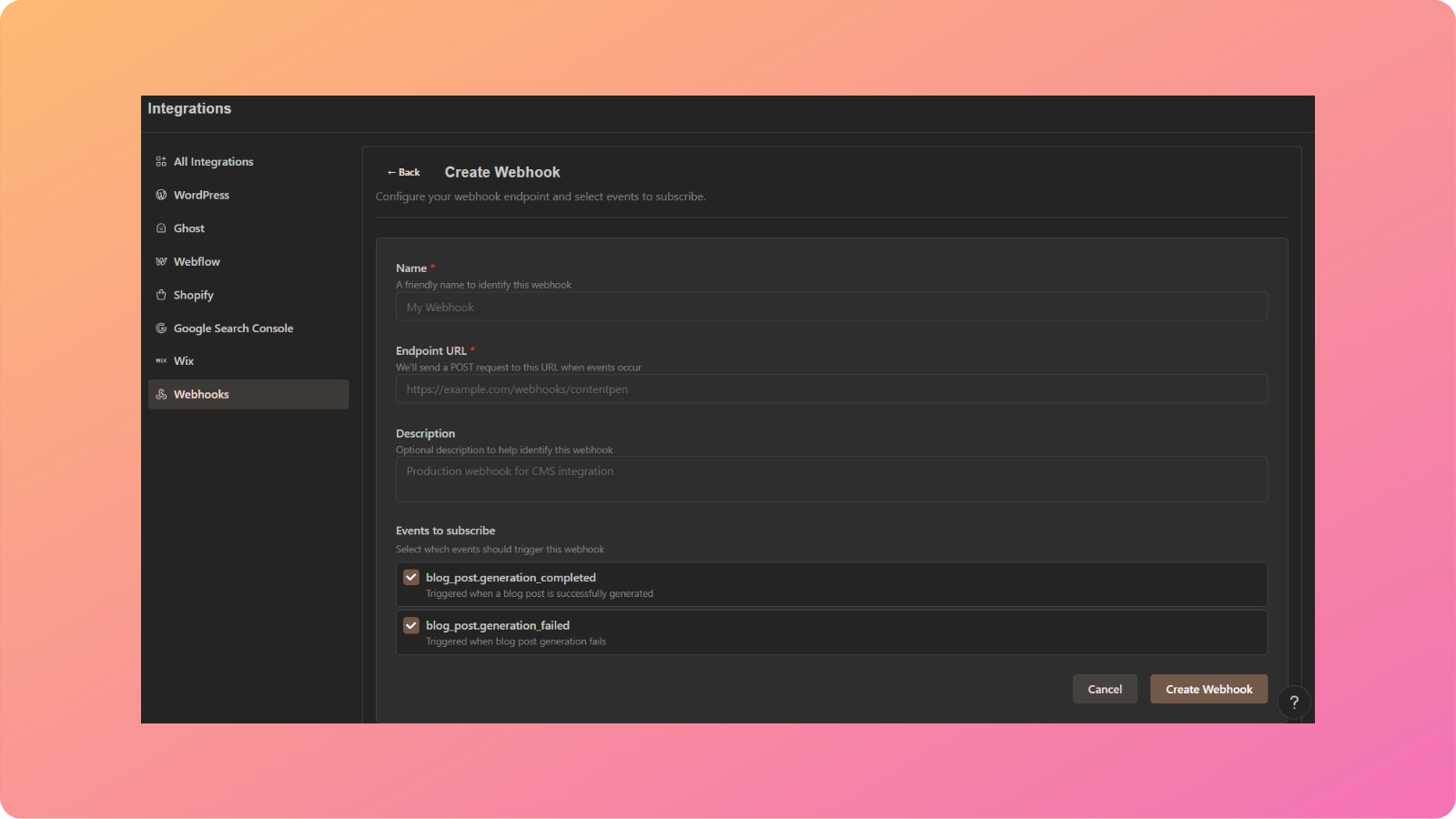
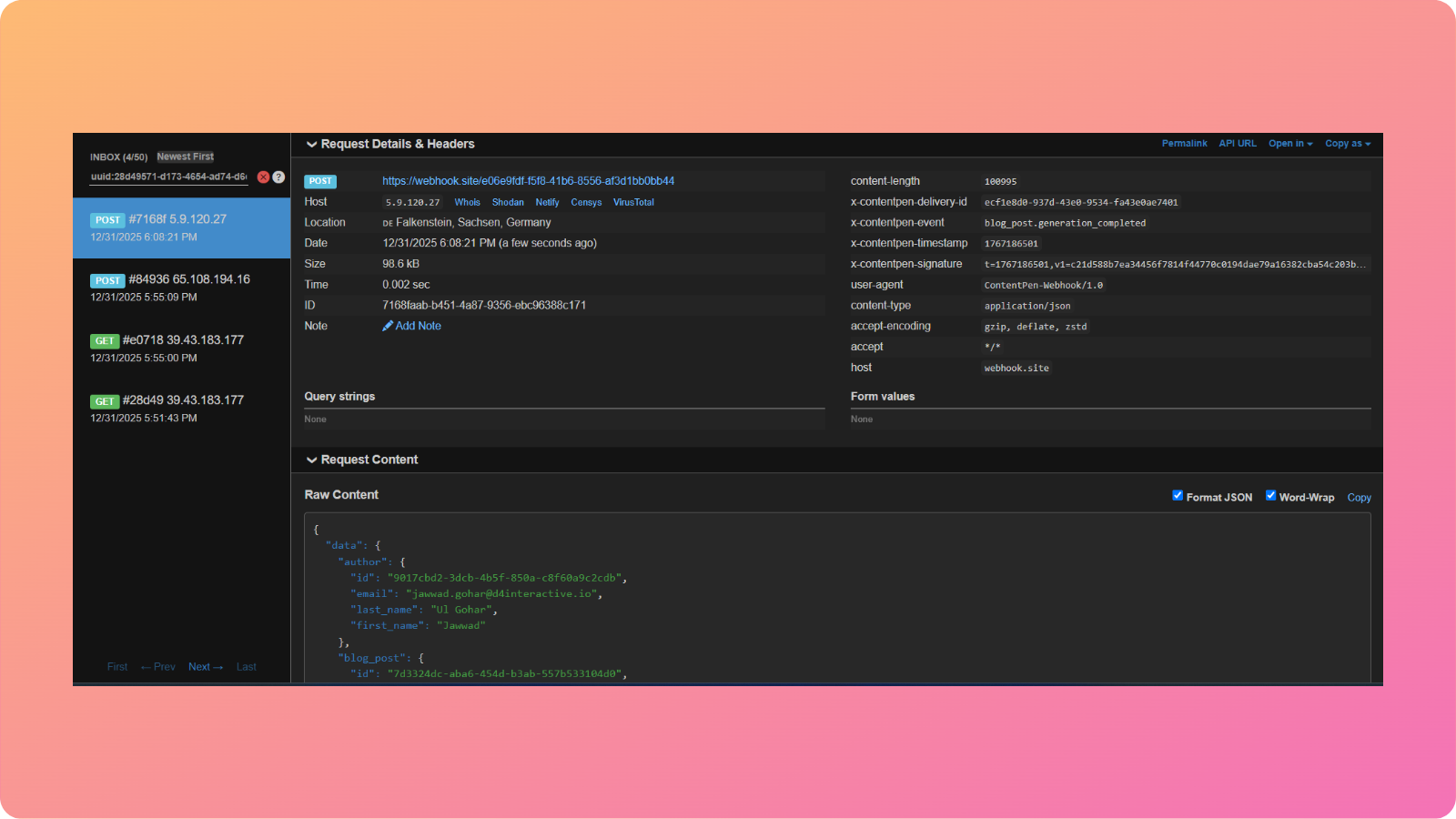
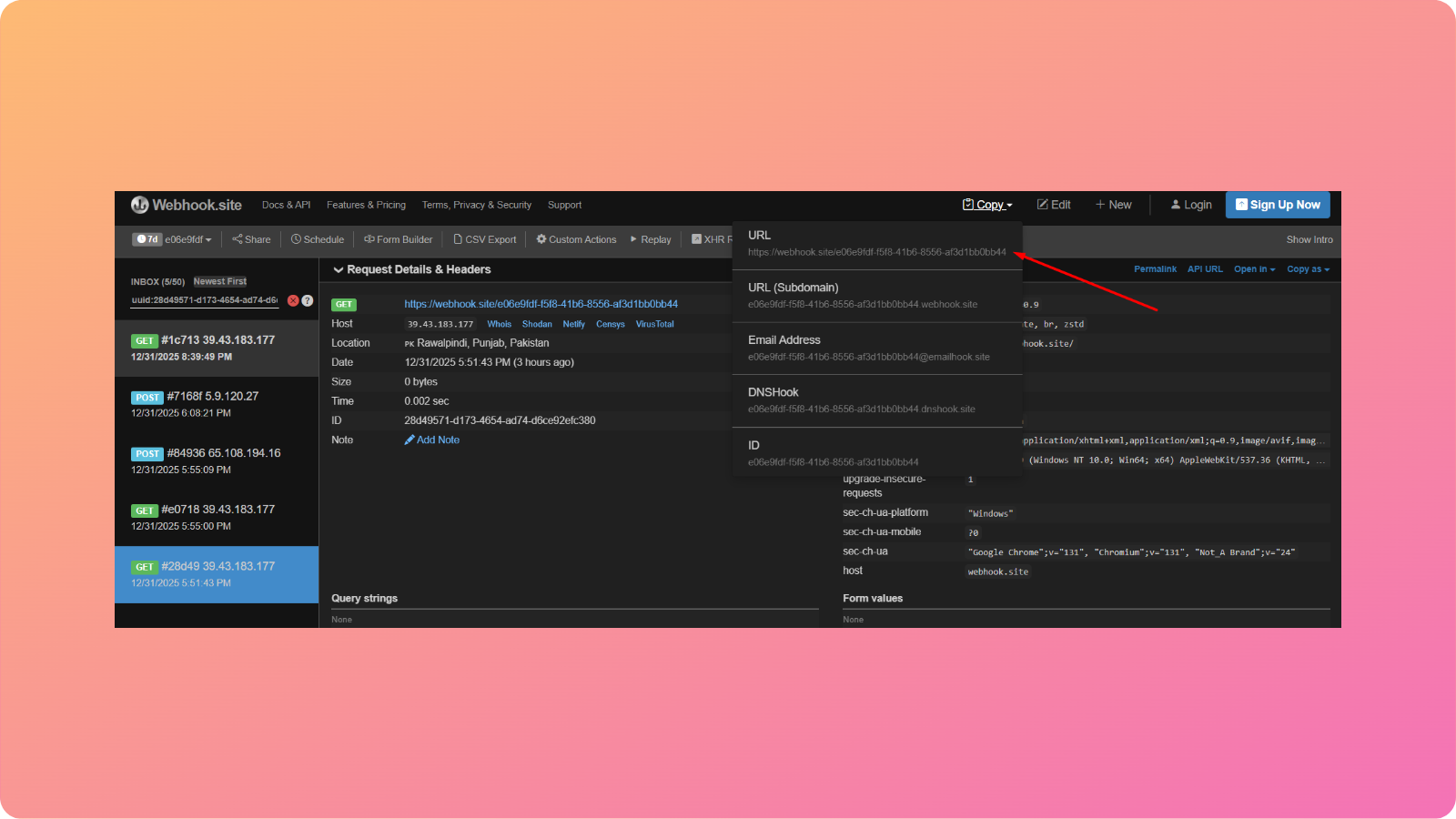
You can also create customized workflows using our ‘Webhooks‘ feature so you can receive real-time notifications (success or failure) about your blogs.
#2: Customize appearance
Contentpen supports both ‘Light’ and ‘Dark’ modes to help you feel accustomed to your workspace. The appearance is set to ‘System’ by default.
After customizing the appearance settings, you can also upload your own avatar and change your display name if needed.
#3: Create and organize articles with folders
Contentpen simplifies content organization with folders that you can create and edit.
To create a folder, go to ‘Workspace Settings -> Folders’ option.
Here, you can choose a color for the folder to simplify content sorting.
Then, click on ‘Create’. And just like that, you have created your first content folder!
Now you can visit your content planner and add the articles to the created folder to streamline your writing workflow.
#4: Assign team members to your workspace
You can add team members to your workspace by simply navigating to ‘Workspace Settings -> Team Members’ screen and clicking the ‘Add Team Member’ button.
Here, include the team members’ work email and assign them a proper access role.
Then, click the ‘Invite’ button, and that’s it. Your teammate will now be on board once they click and join Contentpen with the link they receive in their email.
#5: Choose your editorial workflow
Another thing we recommend is selecting the editorial workflow under workspace settings.
Contentpen offers two options: ‘Simple Workflow’ (for small teams) and ‘Approval-Based Workflow’ (for large teams).
Choose whichever one suits your team size and needs with a single click.
Final thoughts
Setting up the Contentpen workspace is a straightforward process. It hardly takes a few minutes to start publishing high-quality, SEO- and GEO-ready blogs that gauge the audiences and boost organic traffic for better conversions.
With just a few easy steps, you’ve set the foundation for a content workflow that’s smart, organized, and built around your brand. Whether you’re writing solo or collaborating with a team, your workspace is now fully tailored to your needs.
Frequently asked questions
Can I update my brand details later?
Yes! All brand details, including workspace name, URL, and time zone, can be edited anytime from your settings.
Is Contentpen suitable for agencies managing multiple clients?
Absolutely. You can create and switch between multiple workspaces. You can also choose your own editing workflow, making it easy to manage content strategies for different clients.
Will I lose progress if I don’t complete the setup in one go?
No, Contentpen auto-saves your progress, so you can resume setup anytime from where you left off.
What happens after setup? Can I start publishing immediately?
Once your setup is complete, you’ll land on the Contentpen dashboard, where you can start creating and scheduling content right away.
Is there a free trial to explore the platform before committing?
Definitely! Contentpen offers a 7-day free trial so you can explore all features and see how it fits your workflow before upgrading to the paid plan.
These days, almost everyone has access to AI tools or AI blog writers. But having AI at your fingertips doesn’t automatically make you a better writer.
The real advantage comes from knowing how to use AI the right way – choosing the best tools, applying the right techniques, and blending AI’s efficiency with your unique voice.
While AI can speed up the writing process, relying on it without a clear strategy often leads to content that feels generic or lacks personality.
That’s why it’s essential to know which AI tools are best for blog writing, how to guide them with clear prompts, and when to refine the output to make it your own.
Today, we’ll cover practical strategies to help you understand how to use AI to write blog posts– from selecting the right platform to using techniques that make your content engaging, authentic, and SEO-friendly.
Let’s dive in and see how you can create blog posts that capture attention and deliver value – without losing the personal touch that makes your writing unique.
Key takeaways
Efficiency & scalability: AI significantly reduces the time and cost associated with blog post creation, allowing for increased content output.
Quality & consistency: With proper prompt engineering and human editing, AI can produce high-quality, consistent content that aligns with your brand voice.
SEO optimization: AI tools assist in keyword optimization, headline generation, and image optimization, enhancing your blog’s search engine visibility.
Content authenticity: While AI is a powerful tool, maintaining originality and authenticity requires human oversight, including fact-checking and personalization.
Strategic implementation: A successful AI toolinvolves a clear content strategy, effective prompt creation, and a thorough editing process.
Tool selection: Choosing the right AI tool is vital, Contentpen provides many features that assist greatly in the creation of AI blog posts.
Human touch is vital: AI is a tool, not a replacement. Human editing and brand voice implementation is critical.
Why you need to use AI to write blog posts in 2026?
The demand for fresh, engaging content is higher than ever. According to a 2023 report by HubSpot, businesses that publish 16+ blog posts per month generate 3.5x more traffic than those that publish fewer than four. However, creating this volume of content manually is time-consuming and expensive.
An AI writing assistant like Contentpen is designed to streamline the process, enabling you to produce high-quality blogs in a fraction of the time. By 2026, it’s estimated that most businesses will use AI tools for content creation, making it essential to adopt this technology now to stay competitive.
The evolution of blog content creation
Gone are the days when blog writing was solely a manual process. With advancements in natural language processing (NLP) and machine learning, AI tools can now generate coherent, engaging, and SEO-friendly content.
For example, Contentpen uses cutting-edge AI to assist with everything from brainstorming ideas to crafting full-length articles. This evolution has not only made content creation faster but also more accessible to non-writers.
Time and cost analysis: Traditional vs. AI-assisted writing
Creating blog posts can be both time-consuming and costly, especially when relying on traditional methods. With AI-assisted tools like Contentpen, businesses can streamline the writing process without sacrificing quality. Here’s a quick comparison:
Aspect
Traditional writing
AI-assisted writing
Time per blog post
Approximately 4-6 hours. A study by MIT researchers found that professionals using traditional methods took longer to complete writing tasks. Source
Approximately 1-2 hours. The same MIT study reported that participants using AI tools completed tasks 40% faster. Source
Cost per post (freelance)
$500 – $5,000. According to a Deloitte report, the average cost for producing a single piece of high-quality content using traditional methods can range significantly based on complexity and requirements. Source
Up to 60% reduction in costs. A 2021 report by Market Research Future estimates that businesses utilizing AI for content creation can reduce costs by up to 60%. Source
Consistency
Varies by the writer. Traditional methods rely heavily on individual writer’s style and consistency.
High consistency with proper prompts. AI tools can maintain a consistent tone and style across content pieces when guided effectively.
Scalability
Limited scalability due to human resource constraints.
Highly scalable. AI tools can generate large volumes of content quickly, facilitating rapid scaling.
These findings suggest that AI-assisted writing tools can significantly enhance productivity and reduce costs while maintaining or improving content quality.
On the other hand, AI-assisted writing speeds up the process, reducing the time needed to produce an AI blog post to just 1-2 hours. With tools like Contentpen, the cost per post also drops significantly, making it a cost-effective solution for businesses looking to scale their content production.
Plus, with the right prompts, AI can maintain a consistent tone and style across all your content, ensuring a cohesive brand voice.
08 essential steps to write blog posts with AI
Writing blog posts with AI involves a series of essential steps to ensure the content is engaging, SEO-friendly, and aligned with your brand voice.
AI-assisted blogs can save time, reduce costs, and improve productivity while maintaining high quality. The following steps outline how to effectively leverage AI tools like Contentpen for blog writing.
1. Select the right AI tool
Choosing the right AI writing tool is essential for creating high-quality content that meets your goals. Look for a platform that offers robust features, such as SEO optimization, tone customization, and versatile content generation, like Contentpen.
Contentpen is a great choice, known for its user-friendly interface, advanced AI capabilities, and ability to produce engaging, well-structured content quickly.
It integrates seamlessly with your workflow, supports collaboration if needed, and enhances productivity by automating time-consuming writing tasks.
2. Conduct research and prepare key details
Thorough research is crucial for creating relevant and engaging content. Start by identifying your target audience and understanding their preferences, pain points, and interests. Gather essential keywords to optimize your content for search engines and align with your SEO strategy.
Clearly define your content objectives – whether it’s to inform, persuade, or drive conversions – to ensure the AI generates content that meets your goals.
Outline the main points, structure, and tone of your blog post to provide the AI with a clear framework. This includes defining the introduction, key sections, and conclusion to maintain coherence and readability.
3. Craft clear and detailed AI prompts
The quality of AI-generated content depends on the prompts you provide. Be specific and include key details such as:
Target audience: Define who the content is for.
Tone and style: Specify if the tone should be professional, conversational, or playful.
Main points: Highlight essential topics to cover.
For example, instead of saying, “Write a blog about AI,” use a detailed prompt like: “Write a 1,000-word blog post for small business owners on how AI can improve productivity. Focus on cost-effective tools like Contentpen, with practical examples and tips.”
4. Edit and refine AI-generated content
While AI-generated drafts provide a solid foundation, refining them ensures your content resonates with your audience and aligns with your brand identity. Use Contentpen’s editing features to enhance and personalize the content:
Adjust tone and style: Tailor the language, tone, and style to match your brand’s voice, whether it’s professional, conversational, or authoritative.
Add personalization and examples: Strengthen engagement by incorporating personal anecdotes, real-life case studies, or industry-specific examples that showcase expertise and credibility.
Ensure accuracy and credibility: Verify facts, statistics, and references to maintain reliability and build trust with your readers.
This combination of AI efficiency and human creativity results in high-quality content that is both engaging and authentic. You can also use the humanize AI text tool to smooth out robotic sentence structures and repetitive patterns, ensuring your writing sounds natural, fluid, and free of AI “tells.”
5. Optimize keywords naturally
Effective keyword integration is crucial for both search engine visibility and reader engagement. AI tools like Contentpen analyze your content to identify keywords that align with user intent and search engine algorithms.
Unlike traditional manual research, AI ensures that keywords are seamlessly woven into your text without overstuffing – enhancing readability while improving search rankings.
For example, if your blog focuses on “AI productivity tools,” You can provide Contentpen-related long-tail keywords such as “affordable AI tools for small businesses” or “boost productivity with AI automation.” This strategic use of keywords not only attracts search traffic but also ensures your content remains natural, engaging, and valuable to readers.
6. Write click-worthy headlines and meta descriptions
Headlines and meta descriptions are essential for attracting clicks from search results, so they must be both compelling and clear. AI tools can generate multiple headline variations, allowing you to choose the most attention-grabbing option while ensuring it aligns with your content’s purpose.
For example, if you’re writing about “AI productivity tools,” AI might suggest headlines like “Boost Your Productivity with AI Tools: Top Picks for 2024” and meta descriptions like “Discover the best AI productivity tools to streamline your workflow, save time, and boost efficiency for your business.” This combination enhances both search visibility and user engagement.
7. Optimize images for SEO and speed
Visual elements not only enhance user engagement but also play a vital role in SEO. AI tools like Contentpen help optimize your images by:
Generating descriptive alt text: AI suggests alt text that accurately describes your images, improving accessibility and making your visuals more discoverable in search engine image results. For example, instead of “AI tool screenshot,” AI might recommend “Dashboard of AI productivity tool showcasing automated task management.”
By combining engaging visuals with optimized SEO practices, you can boost both user engagement and search engine performance.
8. Build a strong internal linking structure
Internal linking is essential for both SEO and user engagement. It helps search engines crawl your site more efficiently while encouraging readers to explore related content. AI tools like Contentpen can scan your content and automatically add relevant internal links that align with your topic and keywords.
For example, if you’re writing about “AI content creation,” AI might recommend linking to posts such as “AI productivity hacks” or “Choosing the Right AI Writing Tool.”
By strategically linking to blog posts, landing pages, or product pages, you not only improve your site’s SEO performance but also guide readers through your content ecosystem, increasing time spent on your website.
Transform your content creation with Contentpen
Creating high-quality content consistently can be challenging, but Contentpen makes the process faster and more efficient. Whether you’re drafting blog posts, social media captions, or website copy, this AI-powered tool streamlines your workflow, saving you time while maintaining quality.
How Contentpen streamlines the writing process
From brainstorming ideas to hitting publish, Contentpen simplifies every step of content creation. Its intuitive interface is easy to navigate, making it perfect for beginners, while its advanced features cater to the needs of seasoned writers. With AI-driven suggestions and real-time feedback, you can focus more on creativity and less on tedious tasks.
Smart features that set Contentpen apart
Contentpen offers a suite of powerful features designed to elevate your writing:
AI article generation: Quickly create SEO-optimized articles using AI. Simply provide a primary keyword, topic, and choose from preset templates to generate engaging content.
Bulk article generation: Save time by generating multiple articles at once. Add multiple rows with different keywords and topics, then generate them in a single click.
Internal & external link suggestions: Automatically add relevant internal and external links to improve both SEO and user experience.
Image generation with alt text: Generate and insert images complete with alt texts, enhancing both visual appeal and accessibility.
Feature image addition: Automatically add feature images to make your content visually engaging from the start.
Brand voice customization: Ensure consistency in your content by aligning with your brand’s unique tone of voice. Adjust the writing style to match your desired formal, conversational, or playful tone.
Content presets: Choose from various presets to generate content tailored to specific needs, ensuring each article fits the intended purpose and platform.
Knowledge base integration: Incorporate information from your knowledge base to generate accurate and contextually relevant content.
Planner: Stay organized with a built-in content planner that helps you schedule and manage your content pipeline efficiently.
Collaboration tools: Easily collaborate with team members by inviting them to the platform, streamlining the review and editing process.
“Ask AI” feature: Add AI-generated prompts directly within your draft, allowing quick additions or modifications wherever needed.
Additionally, Contentpen includes SEO optimization features such as:
SEO score tracking: Monitor your content’s SEO score with a visual grade indicator to ensure it’s optimized for search engines.
Keyword optimization: Ensure primary and secondary keywords are used effectively.
Meta details optimization: Optimize meta titles and descriptions to improve search visibility.
Technical SEO factors: Ensure your content meets technical SEO best practices.
User engagement elements: Enhance the user experience by adding engaging elements like CTAs, interactive content, and visuals.
Starting with Contentpen is quick and straightforward:
Select the Generate Article with AI template.
Enter your primary keyword and topic.
Choose a preset that suits your content style.
Click Generate Articles and let AI do the work.
Within seconds, you’ll have a draft ready for review. Enhance it with internal and external links, adjust the tone to match your brand voice, and add media assets for a polished, professional post.
Easily share your draft with your team by adding members to collaborate in real-time. Whether you need a single blog or multiple articles in bulk, Contentpen helps you deliver engaging content with ease.
Quality assurance for AI-written content
Ensuring the quality of AI-generated content is crucial for maintaining credibility, readability, and engagement. While AI tools can streamline the writing process, human oversight is essential to ensure accuracy, originality, and alignment with your brand voice. Let’s explore key techniques to maintain high-quality content.
Ensuring authenticity and compliance
Use AI detection tools like Originality.ai to verify content doesn’t appear automated
Incorporate unique insights and personal examples to enhance readability
Maintain a natural flow with diverse sentence structures
Refining content with human expertise
Verify facts and statistics for accuracy
Simplify complex sentences and remove jargon
Add personality with a unique voice and conversational elements
Integrate keywords naturally for SEO integrity
Maintaining consistency
Use tools like Google Docs or Notion to organize and label drafts
Document major edits and feedback
Analyze engagement metrics to refine future content
Content authenticity checklist
Fact-check all information using reliable sources
Ensure originality with plagiarism checkers (Grammarly, Copyscape)
Add unique insights and personal experiences to differentiate your content
Common mistakes to avoid
Over-relying on AI without human refinement
Using vague prompts instead of specific, detailed ones
Neglecting to add personal judgment and creativity
By combining AI efficiency with human creativity, you’ll create content that’s both engaging and credible.
Conclusion
Using AI to write blog posts is no longer a futuristic concept – it’s a game-changing reality that’s transforming content creation. By integrating tools like Contentpen into your workflow, you can streamline the writing process, reduce costs, and consistently produce high-quality, SEO-optimized content that resonates with your audience.
Ready to elevate your blogging experience? Sign up for Contentpen today and experience the future of content creation!
FAQs on AI blog writing
What is AI blog writing, and how does it work?
AI blog writing uses machine learning algorithms to generate content based on user inputs. Tools like Contentpen analyze prompts and produce coherent, engaging articles.
How much does it cost to write blog posts with AI?
Costs vary, but AI tools like Contentpen are significantly more affordable than hiring freelance writers.
Will AI replace human writers completely?
No, AI is a tool to assist writers, not replace them. Human creativity and oversight remain essential.
Can search engines detect AI-written content?
Search engines focus on content quality, not its origin. Ensure your content is valuable and well-optimized.
How long does it take to write a blog post with AI?
With tools like Contentpen, you can create a blog post in 1-2 hours, including editing.
Do I need writing experience to use AI writing tools?
No, AI tools are designed to be user-friendly for both beginners and experts.
How does Contentpen help in creating better blog posts?
Contentpen offers SEO optimization, tone customization, and smart editing features to enhance content quality.
What types of blog posts can I create with AI?
You can create a wide range of content, including how-to guides, listicles, case studies, and more.
AI-generated content is everywhere now—blog posts, essays, marketing copy, social media captions, product descriptions, and even professional reports.
Tools like ChatGPT and Jasper make writing easier, but they also come with a challenge: AI detection systems are getting smarter.
If you’re a writer, student, or professional, knowing how to avoid AI detection in writing is key to keeping your work authentic.
The good news? You can humanize AI-generated content with the right techniques, making it sound natural and uniquely yours.
This guide will show you exactly how to tweak AI-written text so it feels like something only a human could create. Let’s dive in!
What is AI detection?
AI detection is the process of identifying whether a piece of content – text, images, audio, or video – has been created by artificial intelligence instead of a human.
At its core, AI detection works by comparing a given piece of content against known human-created content and identifying inconsistencies.
These inconsistencies arise because AI models generate text using probability-based predictions rather than organic thought processes.
As a result, AI-generated content often exhibits patterns that are more structured, repetitive, and predictable compared to human writing.
AI detection is widely used in various fields, including:
Academia – To detect AI-assisted assignments and prevent academic dishonesty.
Publishing & journalism – To ensure articles are written by humans and maintain editorial integrity.
Marketing & SEO – To assess content originality and authenticity for search engines and readers.
Legal & compliance – To verify authorship and ensure transparency in official documents.
How does AI detection work?
AI detection algorithms examine multiple characteristics of a text to determine whether it was likely generated by an AI. These include:
Characteristics
Description
Statistical analysis
AI-generated text often follows predictable structures and word choices, distinguishing it from human writing.
Perplexity & burstiness
Human writing has natural variations in sentence length and complexity, whereas AI text is more uniform and structured.
Linguistic cues
AI-generated content lacks emotional depth, inconsistencies, and contextual adaptability, common in human writing.
Metadata & hidden markers
Some AI-generated text includes invisible markers or metadata that indicate AI authorship, making detection easier.
By analyzing these elements, AI detection models can identify AI-generated content with increasing accuracy.
Strategies to avoid AI detection in writing
To effectively avoid AI detection, it’s important to understand how AI-generated content is identified. AI detection tools analyze patterns, sentence structures, and predictability in writing.
1. Humanize the text
One of the most effective ways to avoid AI detection is to humanize the text. This involves making the content sound more natural and less robotic. Here are some tips to achieve this:
Vary sentence structure: AI-generated content often has a uniform sentence structure. Mix short and long sentences to create a more natural flow. This mimics human writing patterns and reduces predictability.
Use idioms and colloquialisms: Incorporate idiomatic expressions and colloquial language that are less likely to be used by AI. Phrases like “a blessing in disguise” or “hit the nail on the head” add a conversational tone.
Add personal anecdotes: Including personal stories or experiences can make the content feel more authentic and human. A brief personal insight or a relatable scenario enhances engagement.
Use active voice: AI-generated content often relies on passive voice. Switching to active voice can make the text more engaging and human-like. For example, “The team completed the project” sounds more natural than “The project was completed by the team.”
Introduce emotion: Adding emotional elements such as humor, excitement, or empathy makes the content feel more personal and human-written.
2. Edit and revise
Editing is crucial when it comes to avoiding AI detection. Even the best AI-generated content can benefit from a human touch. Here’s how to edit effectively:
Rephrase sentences: Rewrite sentences to make them less predictable and more unique. Avoid formulaic structures that AI tends to follow.
Add nuance: Introduce subtle nuances and variations in tone that are difficult for AI to replicate. This could include rhetorical questions or varied pacing in writing.
Check for consistency: Ensure that the content is consistent in style and tone throughout. Inconsistencies can be a red flag for AI detection tools.
Read aloud: Reading the content aloud can help identify unnatural phrasing and robotic patterns.
Use a second pair of eyes: Having someone else review the content can help pinpoint areas that sound overly mechanical or structured.
3. Use AI writing tools wisely
While AI writing tools are incredibly useful, they should be used as a starting point rather than the final product. Here’s how to use them wisely:
Combine multiple tools: Different AI writing tools are used to generate content, and then the outputs are blended to create a more diverse and less detectable text.
Customize outputs: Most AI tools allow you to customize the output by adjusting parameters like tone, style, and complexity. Experiment with these settings to produce more human-like content.
Avoid over-reliance: Don’t rely solely on AI-generated content. Use it as a foundation and build upon it with your own insights and creativity.
Infuse unique perspectives: AI-generated content often lacks originality. Adding fresh viewpoints, unique examples, and personal insights can enhance authenticity.
4. Incorporate human elements
Adding human elements to your content can significantly reduce the chances of it being flagged as AI-generated.
Here’s how to do it:
Include opinions and perspectives: Share your own opinions, perspectives, and insights to make the content more personal and less generic.
Use real-world examples: Incorporate real-world examples and case studies that are relevant to the topic. This adds depth and authenticity to the content.
Engage with the audience: Write in a conversational tone and engage with the reader by asking questions or encouraging them to think critically.
Break the rules occasionally: AI tends to follow strict grammatical rules. Humans, on the other hand, sometimes break grammar conventions for emphasis or effect, making writing feel more natural.
5. Leverage paraphrasing tools
Paraphrasing tools can be a valuable asset in avoiding AI detection. These tools can help you rephrase AI-generated content to make it less detectable.
Here’s how to use them effectively:
Choose the right tool: Select a paraphrasing tool that offers advanced options for rephrasing, such as changing sentence structure and word choice.
Rephrase strategically: Focus on rephrasing key sections of the content, especially those that are more likely to be flagged by AI detection tools.
Review the output: Always review the paraphrased content to ensure it maintains the original meaning and flows naturally.
Manually adjust where needed: Automated paraphrasing may sometimes produce awkward phrasing. Tweaking the output manually enhances readability.
6. Use plagiarism checkers
Plagiarism checkers can help you identify and eliminate any content that may be flagged as AI-generated.
Here’s how to use them:
Run a plagiarism check: Use a plagiarism checker to scan your content for any similarities with existing AI-generated text.
Make necessary adjustments: If the plagiarism checker flags any content, make the necessary adjustments to ensure it’s unique and original.
Cross-check with AI detection tools: After making adjustments, cross-check the content with AI detection tools to ensure it’s no longer detectable.
Rewrite high-risk sections: AI-generated content often appears similar across different pieces. Identifying and reworking these sections enhances uniqueness.
7. Focus on quality and depth
High-quality, in-depth content is less likely to be flagged as AI-generated.
Here’s how to achieve this:
Research thoroughly: Conduct thorough research on the topic to ensure your content is accurate and well-informed.
Provide detailed insights: Offer detailed insights, analysis, and explanations that go beyond surface-level information.
Use credible sources: Cite credible sources and references to add authority and credibility to your content.
Avoid generic content: AI-generated text often lacks depth. Adding substantial analysis and expert opinions improves authenticity.
8. Experiment with different writing styles
Experimenting with different writing styles can help you create content that is less predictable and more human-like.
Here’s how to do it:
Try different tones: Experiment with different tones, such as formal, informal, persuasive, or informative, to see which one works best for your content.
Mix writing styles: Combine different writing styles, such as narrative, descriptive, and expository, to create a more diverse and engaging piece.
Adapt to the audience: Tailor your writing style to the target audience, taking into account their preferences, interests, and level of expertise.
Switch perspectives: Writing in first-person, second-person, or third-person voice can create variation and make the content less robotic.
9. Use AI detection tools to your advantage
Ironically, AI detection tools can be used to your advantage when trying to avoid AI detection.
Here’s how:
Test your content: Run your content through AI detection tools to see if it gets flagged. Use the feedback to make necessary adjustments.
Analyze the results: Analyze the results from the AI detection tools to identify patterns or characteristics that may be giving away the AI-generated nature of your content.
Iterate and improve: Continuously iterate and improve your content based on the feedback from AI detection tools until it passes as human-written.
Identify common AI pitfalls: Understanding what triggers AI detection helps refine content accordingly.
10. Stay updated on AI detection trends
AI detection technology is constantly evolving, so it’s essential to stay updated on the latest trends and developments.
Here’s how:
Follow industry news: Keep an eye on industry news and updates related to AI detection technology.
Join online communities: Join online communities and forums where professionals discuss AI detection and share tips and strategies.
Experiment with new tools: Experiment with new AI writing and detection tools to stay ahead of the curve and adapt your strategies accordingly.
Monitor detection algorithms: Understanding how AI detection tools evolve can help you refine your approach continuously.
By implementing these strategies, you can create content that appears more organic, engaging, and human-like. Avoiding AI detection isn’t just about tricking algorithms; it’s about producing high-quality, authentic writing that resonates with readers.
As AI detection tools evolve, staying adaptable and refining your approach will help maintain the natural flow and originality of your content.
Ethical considerations in AI-generated content
While knowing how to avoid AI detection is useful, it’s equally important to consider the ethical implications of AI-generated content.
Misuse can lead to trust issues, legal concerns, and reputational damage. Here are key ethical considerations to keep in mind:
1. Transparency: Disclose AI usage
Being transparent about AI-generated content helps maintain trust with your audience. If AI is used to assist in content creation, consider disclosing it. For example:
Ethical approach: “This article was created with AI assistance and edited by a human for accuracy.”
Unethical approach: Passing off AI-generated content as entirely human-written without any modifications.
2. Originality: Avoid plagiarism
AI tools should be used to enhance creativity, not replace it. Always ensure your content is original and not copied from other sources. Ways to maintain originality include:
Paraphrasing thoughtfully: Instead of copy-pasting AI outputs, rewrite them in your own words.
Adding unique insights: Infuse personal experiences, opinions, or industry-specific expertise.
Using plagiarism checkers: Tools like Copyscape or Grammarly can help ensure content remains unique.
3. Quality: Prioritize value over automation
AI-generated content should not compromise quality. Instead of mass-producing low-quality articles, focus on creating high-value content that benefits the reader. Consider:
Fact-checking AI outputs: Verify AI-generated data to prevent misinformation.
Enhancing readability: Edit AI-generated text to improve clarity and engagement.
Avoiding keyword stuffing: AI may overuse keywords for SEO, but natural integration improves readability and ranking.
4. Compliance: Follow legal and ethical guidelines
AI content should align with ethical and legal standards to prevent misleading or deceptive practices. Ensure:
Adherence to regulations: Content should comply with copyright laws and data privacy regulations like GDPR.
Avoiding manipulation: AI should not be used to create false narratives, deepfakes, or misleading product claims.
Respect for cultural sensitivities: AI might lack cultural awareness, so reviewing content for appropriateness is crucial.
By considering these ethical guidelines, you can use our AI writing tool online responsibly while maintaining credibility and trust with your audience.
Conclusion
As AI technology continues to evolve, staying updated on the latest trends and developments is crucial. By following the strategies outlined in this guide and considering the ethical implications, you can create high-quality, undetectable content that resonates with your audience and stands the test of time.
Remember, the goal is not to deceive but to enhance your writing with the help of AI while maintaining authenticity and originality. With the right approach, you can harness the power of AI to create compelling, human-like content that avoids detection and delivers value to your readers.
FAQs on AI-generated content
How can I make AI-generated content more original?
To make AI-generated content more original: – Add your own insights, opinions, and expertise. – Conduct additional research to include unique data or examples. – Blend content from multiple AI tools to create a diverse output. – Use plagiarism checkers to ensure the content is unique.
How can I stay updated on AI detection trends?
To stay updated on AI detection trends: – Follow industry blogs and news outlets covering AI and content creation. – Join online communities or forums focused on AI writing tools and detection. – Experiment with new AI writing and detection tools as they are released. – Attend webinars or conferences on AI and content creation.
Is it ethical to use AI-generated content without disclosure?
The ethics of using AI-generated content depends on the context. In most cases, it’s best to be transparent about using AI tools, especially in academic or professional settings. However, using AI as a tool (without misrepresentation) is generally acceptable if the goal is to enhance creativity and productivity.
Can AI-generated content rank well on search engines?
Yes, AI-generated content can rank well on search engines if it is high-quality, original, and optimized for SEO. However, search engines like Google prioritize content that demonstrates expertise, authoritativeness, and trustworthiness (E-A-T), so human input is often necessary to achieve these qualities.
What should I do if my content is flagged as AI-generated?
If your content is flagged as AI-generated: – Review the flagged sections and rephrase them to sound more human-like. – Add personal insights, examples, or anecdotes to enhance authenticity. – Test the revised content using AI detection tools to ensure it passes.
AI-powered content creation is changing the way businesses, marketers, and writers produce high-quality content.
By automating research, structuring, and optimization, AI-driven content creation tools help streamline the writing process while maintaining relevance and engagement.
This guide will walk you through how to use AI for content creation, covering essential steps, best practices, and optimization techniques.
How does AI work for content creation?
Content creation has traditionally been a manual process requiring extensive research, writing, and editing. However, AI has transformed this landscape by automating content generation, from ideation to final drafts. By leveraging advanced algorithms, AI-powered content creation tools can analyze vast amounts of data, understand context, and generate human-like text efficiently.
How AI analyzes data, understands context, and generates text?
At its core, AI for content creation relies on natural language processing (NLP) and machine learning to interpret text patterns and produce coherent content. These systems are trained on extensive datasets, enabling them to:
Extract relevant information by scanning sources such as articles, reports, and search trends.
Understand language structure and intent to create contextually accurate responses.
Generate well-structured content that aligns with the tone and style required for different formats.
AI-powered content creation tools can analyze input prompts to produce original text that mimics human writing while maintaining clarity and relevance.
The role of AI-powered content creation in automating writing
One of the biggest advantages of AI-powered content creation is its ability to streamline writing tasks. AI can assist with:
Generating blog posts and articles based on specific topics and keywords.
Rewriting existing content to improve readability and engagement.
Enhancing consistency in tone and messaging across multiple platforms.

This automation reduces the time and effort needed to create high-quality content, allowing marketers and businesses to scale their content strategies more efficiently. A modern AI blog-writing tool goes beyond simple text generation.
Platforms like Contentpen AI integrate AI-driven capabilities to:
Assist with SEO optimization by suggesting relevant keywords and readability improvements.
Improve writing quality through grammar and style enhancements.
Enable bulk content production without sacrificing consistency or engagement.
By incorporating AI content creation software into their workflows, content creators can produce high-performing content faster while maintaining accuracy and relevance.
How to use AI for content ideation and research?
Finding relevant content topics is one of the biggest challenges in content marketing. Traditional brainstorming often leads to repetitive ideas, missed opportunities, or content that doesn’t align with audience search intent.
AI content creation tools solve this problem by analyzing vast amounts of data, identifying trending topics, and suggesting content ideas that are optimized for SEO and engagement.
Businesses can streamline ideation, improve research efficiency, and develop content that resonates with their audience by using AI content creation software.
Here’s how to leverage AI for better content ideation and research.
1. Analyze trends using AI content creation software
Before selecting a topic, it’s essential to validate demand by analyzing real-time trends and audience interests. AI content creation software scans search engines, social media, and competitor content to uncover topics with high engagement potential.
Identifies emerging trends by analyzing recent search behavior.
Tracks competitor performance to detect content gaps.
Monitors audience engagement to align content with what users care about.
Instead of relying on intuition, AI ensures every topic is backed by data, making content more relevant and impactful.
2. Generate high-impact topic ideas with AI
Once AI identifies trending topics, it generates content ideas that align with search intent and audience demand. This prevents businesses from creating outdated or low-performing content.
Creates SEO-driven content topics based on keyword and search trend analysis.
Structure topic ideas into detailed outlines for easier content creation.
Suggests multiple content angles to differentiate from existing articles.
For example, instead of “AI content creation tools”, AI might suggest:
“Best AI content creation tools for businesses in 2024”
“How AI content creation software can improve content marketing results”
These AI-generated ideas ensure your content stands out and addresses specific audience needs.
3. Refine and personalize topics using an AI writer
Not all content topics are one-size-fits-all. An AI writer helps refine topic ideas by adjusting them based on audience preferences, content formats, and engagement goals.
Optimizes headlines for higher engagement and SEO rankings.
Recommends content formats (guides, comparisons, or listicles) based on user intent.
Align tone and structure to match your brand voice and target audience.
For example, if AI suggests “AI writing tools”, an AI writer can refine it into:
“Top 5 AI writing tools to streamline your content workflow” (List format)
“How AI writing tools can help marketers improve content quality” (Educational tone)
This ensures content ideas are structured for maximum impact and user engagement.
4. Use AI-driven keyword research to validate topic potential
A great topic isn’t enough—it must be backed by strong keyword research to ensure high search visibility. AI-driven keyword research helps businesses target the right audience with minimal competition.
Identifies high-volume, low-competition keywords to improve rankings.
Analyzes search intent to match content with what users are looking for.
Uncovers long-tail keyword opportunities to reach niche audiences.
For example, instead of “AI content creation tools”, AI might suggest:
“Best AI content creation tools for small businesses” (Less competitive)
“AI content writing tools that improve SEO rankings” (High-intent, targeted search query)
How to create high-quality content using Contentpen’s AI writer?
Creating high-quality content efficiently requires a structured approach. Contentpen’s AI-powered writing tools help you generate, refine, and optimize content that is SEO-friendly, engaging, and aligned with your brand’s voice. Whether you’re writing blog posts, articles, or marketing content, this step-by-step guide will show you how to use Contentpen to streamline your content creation process.
Step 1: Define your topic and keywords
The foundation of any great piece of content starts with a well-defined topic and the right keywords. Contentpen helps streamline this process by allowing you to:
Enter a primary keyword to establish the main focus of your content.
Add secondary keywords to ensure broader coverage and context.
Use saved presets to maintain a consistent format and structure.
By providing clear input, you ensure that AI generates content that is relevant, targeted, and optimized for search rankings.
Step 2: Customize tone and writing style
Your content should align with your brand voice and audience expectations. Contentpen allows you to:
Select a tone of voice (e.g., professional, conversational, authoritative).
Define your target audience (marketers, business owners, developers, etc.).
Choose the point of view (first-person, second-person, or third-person).
These settings guide the AI writer, ensuring the output is tailored for your audience and engages them in the right way.
Step 3: Set formatting preferences for better readability
Well-structured content improves readability and engagement. Contentpen gives you control over how your content is presented by allowing you to:
Bold key phrases to highlight important points.
Italicize text for emphasis or stylistic preference.
Use tables for structured data and clear comparisons.
Include quotes for expert insights and authoritative references.
Organize content with bullet points and numbered lists.
Set heading styles to ensure consistency across your content.
With these customization options, your AI-generated content will not only be informative but also visually appealing and easy to scan.
Step 4: Generate content with structured sections and media
Before finalizing content creation, Contentpen allows you to enhance your article’s structure and visual appeal. You can:
Define the article length (short, medium, or long-form).
Add extra sections such as key takeaways, FAQs, and conclusions.
Select a featured image that aligns with your article.
Choose in-article images with different styles (realistic, abstract, cartoon).
By incorporating well-structured sections and visuals, your content becomes more engaging, informative, and easy to digest.
Step 5: Automate internal and external linking
Effective linking improves SEO, content navigation, and authority, making it a crucial step in AI-powered content creation. Contentpen simplifies this by offering both internal linking suggestions and external linking automation to enhance the content structure and discoverability.
Internal linking for better content navigation
Adding relevant internal links helps connect different pieces of content, improving user experience and SEO. Contentpen allows users to:
Find and add a sitemap to ensure seamless internal linking.
Automatically detect related content to strengthen topic clusters.
Improve content engagement by guiding readers to relevant pages.
External linking for authority and credibility
Quality outbound links enhance content depth and credibility. Contentpen’s AI ensures:
Relevant, high-quality external links are suggested based on niche and language preferences.
Competitor pages are excluded, keeping your strategy focused on growth.
SEO benefits are maximized by linking to authoritative sources without keyword dilution.
By leveraging AI-driven internal and external linking, businesses can enhance content visibility, engagement, and search rankings while keeping content strategy streamlined and effective.
Step 6: Click ‘Create’ to generate your article
Once all preferences are set, click the “Create” button, and Contentpen’s AI content creation software will generate a fully structured article within seconds.
During this process, the AI:
Develops content based on your selected keywords and tone.
Structure headings, subheadings, and paragraphs logically.
Applies formatting, readability, and SEO best practices.
In just a few moments, you’ll have a fully written draft, significantly reducing the time and effort spent on manual writing.
Step 7: Review, refine, and optimize your article
AI-generated content provides a strong foundation, but the final touch ensures it meets quality, accuracy, and engagement standards. Contentpen offers advanced editing and collaboration features so you can:
Manually refine sections for improved clarity and flow.
Regenerate specific sections by giving AI new prompts inside the article.
Find internal linking opportunities to connect related content.
Discover external linking suggestions to add authoritative references.
Use comments and collaboration tools to work with your team on final edits.
This step ensures that your content is polished, optimized, and ready for publication, giving you complete control over the final quality and brand alignment.
How to train AI to improve content quality over time?
AI is more than just a tool for content generation—it is a system that learns and improves over time. By leveraging AI-driven content creation, businesses can refine AI models to match their brand voice, enhance content quality, and align with audience preferences.
When properly trained, AI content creation software becomes more effective at producing high-value, engaging, and optimized content with each use.
AI learns from feedback and iterations
AI continuously adapts based on user inputs, edits, and refinements, ensuring that content evolves to meet quality standards. Every time AI-generated content is reviewed, AI analyzes those changes to make better decisions in the future.
AI tracks user modifications to improve tone, structure, and accuracy.
Feedback loops refine AI-generated outputs, ensuring consistency and alignment with brand messaging.
Pattern recognition helps AI adapt to common content structures and industry-specific writing styles.
By consistently reviewing and fine-tuning AI-generated drafts, businesses can train AI to produce content that requires less editing over time.
How AI-driven content creation adapts based on user input?
Unlike static content templates, AI-driven content creation allows for real-time adaptability. AI refines its outputs by analyzing how users interact with content, making adjustments based on:
Keyword placement and optimization to enhance SEO performance.
Content structure modifications based on formatting and readability preferences.
Tone and messaging refinements that align with audience expectations.
For example, if users frequently adjust AI-generated introductions to include data-driven insights, AI will start prioritizing industry statistics and authoritative references in future drafts. This iterative learning process ensures continuous improvement and brand consistency.
Customizing AI for your brand’s content needs
To maximize AI’s potential, businesses need to train AI to align with their brand identity and audience preferences. This can be done by:
Providing sample articles as a reference for tone, style, and structure.
Defining brand-specific terminology and preferred phrases.
Guiding AI with structured prompts to generate content that fits specific brand guidelines.
By fine-tuning AI’s understanding of brand voice and messaging, businesses can eliminate generic outputs and ensure content uniqueness.
What are the best AI content creation tools?
Choosing the best AI tools for content creation can significantly improve efficiency, quality, and SEO performance. With advanced AI content creation tools, businesses can generate blog posts, social media content, and marketing copy faster while maintaining accuracy and engagement.
Here are some of the best AI tools for content creation:
Contentpen – A powerful AI writing assistant that generates high-quality, SEO-optimized content tailored to brand voice.
Jasper AI – Ideal for long-form content creation with various templates and tone customization.
Copy.ai – Best for short-form content like social media captions and ad copy.
Writesonic – A great tool for AI-generated blogs, product descriptions, and landing pages.
Grammarly – Enhances AI-generated content with grammar, tone, and readability improvements.
Why Contentpen AI stands out for SEO and content quality?
Among the best AI tools for content creation, Contentpen AI stands out due to its SEO-driven approach, customizable content generation, and brand consistency features.
Unlike generic AI writing tools, Contentpen is built to optimize content for search rankings while maintaining high readability and engagement.
SEO-optimized content generation
Keyword integration – Automatically suggests and incorporates high-ranking keywords for better visibility.
Internal and external linking recommendations – Helps improve on-page SEO and authority.
Structured content – Generates SEO-friendly headings, meta descriptions, and optimized formatting to rank higher on search engines.
High-quality, brand-aligned content
Customizable tone and style – Ensures consistency across all content formats.
Advanced formatting controls – Allows users to fine-tune structure, readability, and engagement.
AI-driven content refinement – Users can regenerate, edit, and collaborate to ensure accuracy and brand alignment.
With Contentpen AI, businesses can create well-structured, engaging, and SEO-optimized content that not only ranks well but also resonates with their target audience.
FAQs about using AI for content creation
How does AI help overcome writer’s block?
AI helps overcome writer’s block by generating topic ideas, outlines, and content drafts instantly. When struggling with ideas, AI can provide structured suggestions to kickstart the writing process.
Can AI assist in repurposing existing content?
Yes, AI can assist in repurposing existing content by transforming blog posts into social media captions, email newsletters, or video scripts. Repurposing content with AI allows businesses to maximize content value across multiple platforms.
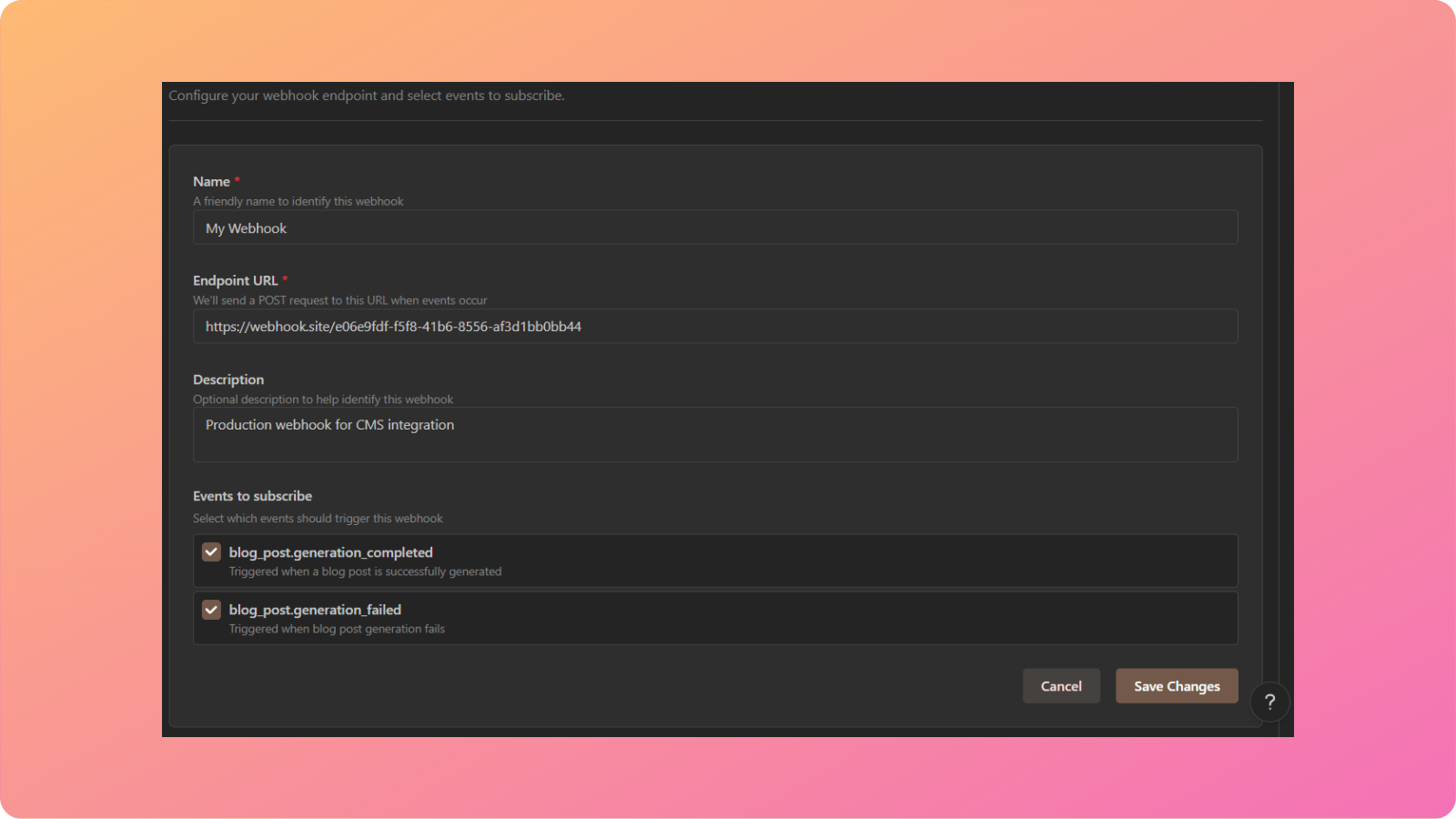
How does AI personalize content for different audiences?
AI personalizes content by analyzing audience preferences, tone, and language style. By using AI, businesses can generate customized messaging tailored to specific reader demographics.
Can AI help in creating long-form content?
Yes, AI can help in creating long-form content by structuring articles, expanding sections, and ensuring a logical flow. AI-generated long-form content maintains consistency while improving readability.

How do AI tools handle industry-specific content?
AI tools handle industry-specific content by adapting to niche topics and technical language. With proper training, AI can generate detailed and relevant content that aligns with industry standards.