For seven years, FAQ schema had one big payoff. A few lines of code on a page with questions and answers could get Google to show those questions as a drop-down list right under your search result.
That payoff disappeared on May 7, 2026, when Google stopped showing FAQ rich results for every site.
The markup itself didn’t go anywhere, though. The code is still valid, and leaving it on your pages does no harm. What changed is the reason to use it.
Below, you’ll see what Google removed, where the FAQ markup still earns its place, how to write answers that AI tools want to quote, and how to test this schema markup.
So, let’s get started.
Key takeaways
- FAQ schema, also called FAQPage schema or FAQ structured data, is code that labels the questions and answers on a page so search engines and AI tools can read them.
- Google deprecated FAQ rich results for every site on May 7, 2026, then dropped the Search Console report and Rich Results Test support in June of the same year.
- FAQ schema markup already on your pages is still valid, causes no errors, and doesn’t need to be removed.
- The markup doesn’t earn AI citations on its own. Clear, answer-first content on the page is what gets quoted.
- Test the code with the Schema Markup Validator and confirm it’s in the page’s raw HTML.
What is FAQ schema?
FAQ schema is structured data, written with schema.org’s FAQPage type, that marks up a list of questions and their answers.
Visitors never see it. It sits in your page’s code as a machine-readable copy of your Q&A section, so a crawler knows exactly which text is the question and which text is the answer.
It’s one of the many types of schema markup, and the structure is simple. The page is marked as an FAQPage, and its mainEntity holds a list of Questions. Each Question has a name (the question itself) and an acceptedAnswer (the answer text).
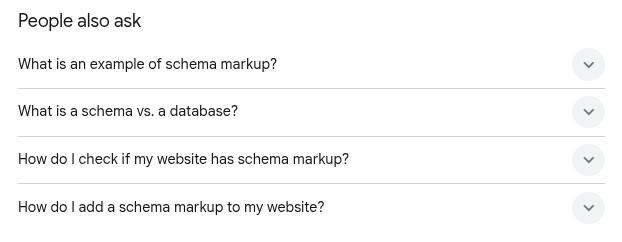
Don’t confuse FAQ schema with Google’s ‘People also ask’ box, shown below for the search ‘what is schema markup’. Google picks those questions and answers from pages across the web on its own. A page doesn’t need FAQ schema to appear there, and the markup doesn’t decide which pages do.
FAQ schema explained with an example
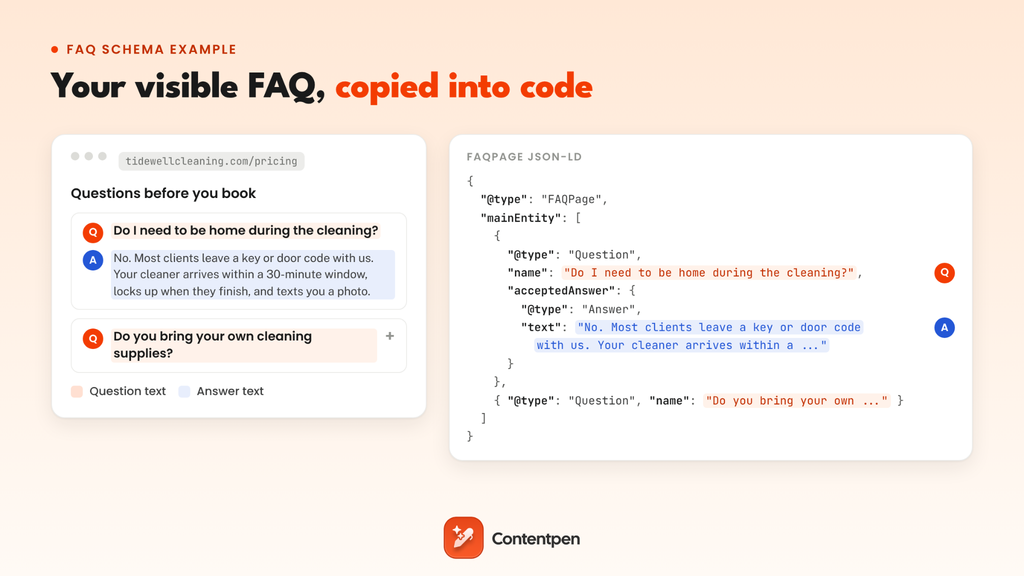
Here’s an FAQ schema example for a made-up cleaning company, Tidewell Home Cleaning, on its pricing page:
“Do I need to be home during the cleaning?
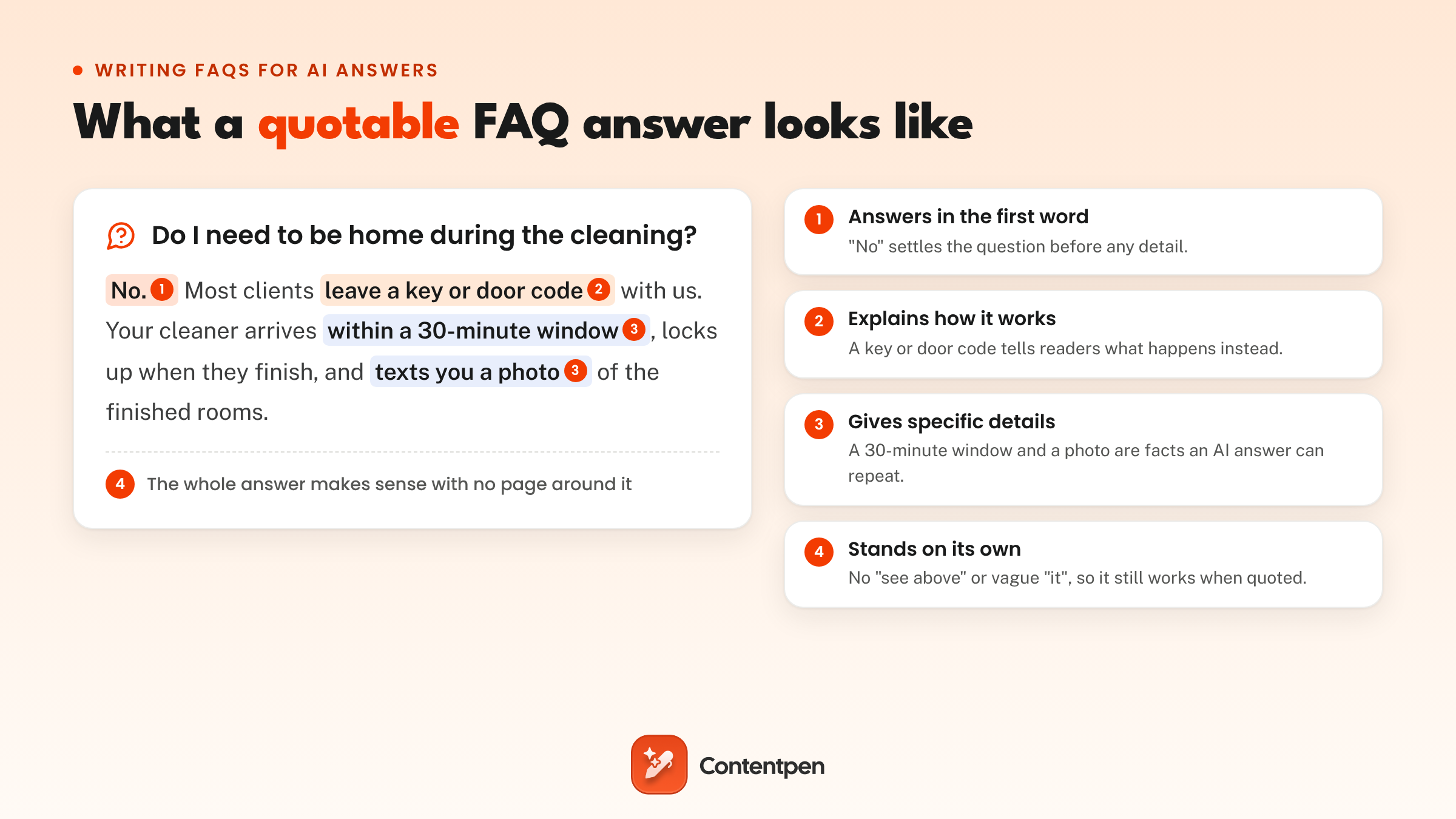
No. Most clients leave a key or door code with us. Your cleaner arrives within a 30-minute window, locks up when they finish, and texts you a photo of the finished rooms.
Do you bring your own cleaning supplies?
Yes. Every team brings vacuums, mops, and plant-based cleaning products. If you’d rather we use your products, leave them on the counter, and we’ll use those instead.”
The FAQ schema code for those two questions will look like this:
| <script type=”application/ld+json”> { “@context”: “https://schema.org”, “@type”: “FAQPage”, “mainEntity”: [ { “@type”: “Question”, “name”: “Do I need to be home during the cleaning?”, “acceptedAnswer”: { “@type”: “Answer”, “text”: “No. Most clients leave a key or door code with us. Your cleaner arrives within a 30-minute window, locks up when they finish, and texts you a photo of the finished rooms.” } }, { “@type”: “Question”, “name”: “Do you bring your own cleaning supplies?”, “acceptedAnswer”: { “@type”: “Answer”, “text”: “Yes. Every team brings vacuums, mops, and plant-based cleaning products. If you’d rather we use your products, leave them on the counter, and we’ll use those instead.” } } ] } </script> |
Each visible question becomes a name, and each visible answer becomes the text inside acceptedAnswer. Nothing is added, trimmed, or reworded on the way in.
Is FAQ schema still relevant after Google’s 2026 change?
For Google’s results page, no. Since May 7, 2026, Google hasn’t shown FAQ rich results for any site, and no amount of perfect markup brings them back.
For everything else, the answer is a smaller, quieter yes. The code is still valid, it costs nothing to keep, and it hands other crawlers a clean copy of your questions and answers.
To see why its value shrank, look at how the feature rose and fell.
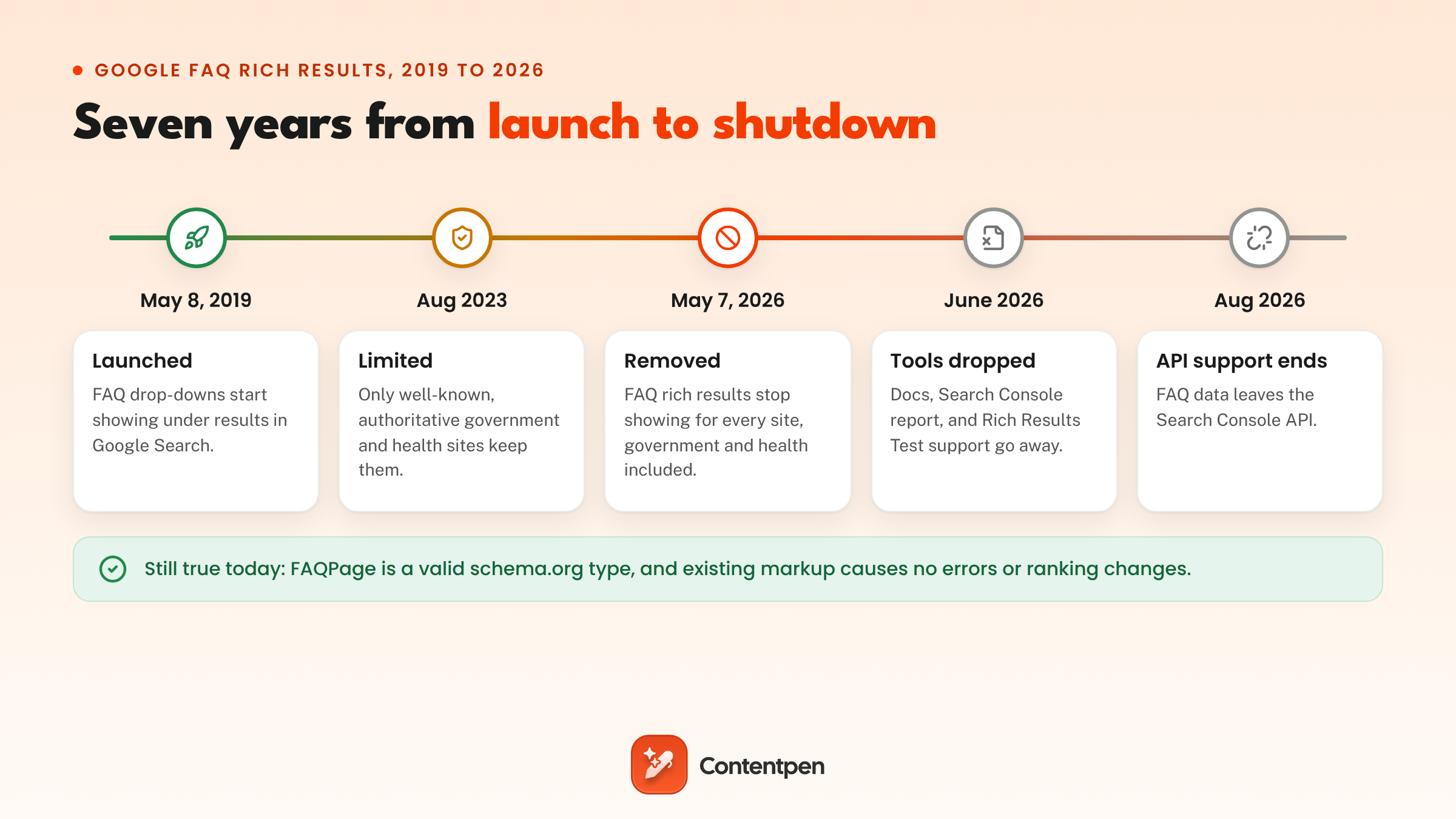
Google launched FAQ rich results on May 8, 2019, alongside How-to markup.
Adding FAQPage code to a page with questions and answers meant that Google could show a few of those questions as drop-downs right under your blue link in the SERPs. Searchers could open them and read the answers without leaving Google.
Marketers loved them because the extra questions made a listing stand out and pushed competitors further down the results page. It was also one of the easiest rich results to earn, and that popularity became the problem.
In August 2023, Google limited FAQ rich results to “well-known, authoritative government and health websites,” saying it wanted “to provide a cleaner and more consistent search experience.” Every other site lost them overnight.
Then, on May 8, 2026, Google’s Search Central updates log announced that the feature “will no longer appear in Google Search starting May 7, 2026.” That closed the door on government and health sites too, one day short of the feature’s seventh birthday.
What Google removed, and what it left alone
Google pulled more than the search feature. Here’s where every piece stands now:
| Feature or tool | Status in 2026 |
|---|---|
| FAQ rich results in Google Search | Gone for all sites since May 7, 2026 |
| Search appearance filter and rich result report in Search Console | Removed in June 2026 |
| Support in the Rich Results Test | Removed in June 2026 |
| Support in the Search Console API | Removed in August 2026 |
| Google’s documentation for the feature | Removed on June 15, 2026 |
| FAQPage as a schema.org type | Still valid |
| Markup already on your pages | No errors and no ranking change |
Search Engine Journal’s coverage has the full Search Console timeline. The short version: nothing breaks if you leave your FAQ markup in place. Google said it plainly back in 2023, and it still holds: “Structured data that’s not being used does not cause problems for Search.”
Why did Google remove FAQ rich results?
Google didn’t give a reason for the 2026 shutdown. However, looking at how the feature was used, three reasons stand out:
- Too many sites used it for space, not answers: The code was easy to add, so FAQ drop-downs spread to product pages, blog posts, and even homepages, often with questions nobody had asked.
- It cluttered the results page: A few listings with long drop-downs pushed everything else down, which works against the clean, consistent search experience Google wanted to carry forward.
- Google answers many of those questions itself now: People also ask boxes and AI Overviews already show quick answers near the top of the page, so the drop-downs added little value. Google hasn’t named this as a reason, but the overlap is hard to miss.
Lily Ray, who wrote about the markup when it launched in 2019, put the removal in context on LinkedIn.
She said it “wouldn’t be the first time that Google is playing the cat-and-mouse game when they see too many sites using the same exact techniques ‘for SEO/GEO,’” as PPC Land reported.
FAQ wasn’t the only feature on Google’s cutting list. In June 2025, Google announced it would retire several rich results, including Book Actions, then reversed course on Book Actions that November, as our guide to Book schema explains. FAQ got no such second chance.
What Google’s decision means for businesses
For most businesses, the real loss came in August 2023, when the drop-downs disappeared for every site outside government and health industries. The 2026 change made it permanent. In practice, it means four things:
- No extra space on Google: Your listing looks the same with or without the markup, so FAQ drop-downs can’t help you stand out anymore.
- Some lost clicks may come back: The drop-downs often answered the question right on the results page, so some searchers never needed to visit the site. When the feature launched, Search Engine Land advised testing whether it helped traffic at all.
- No FAQ data in Search Console: The report and the search appearance filter are gone, so you can’t track FAQ performance there anymore.
- The value moved to your page: Clear answers in your visible content are now what earns attention, both in classic results and in AI answers.
So the change costs most businesses a visual perk, not rankings. The effort that used to go into drop-downs now pays off in the answers themselves, starting with AI search.
Does FAQ schema help with AEO and AI citations?
Not on its own. What helps answer engine optimization is the content itself, because answer engines quote the words on your page. The markup is a tidy wrapper around those words and nothing more.
Here’s what we can say with some confidence:
- Google’s AI features don’t need it: Google says no special markup is required to appear in AI Overviews. After the removal, Glenn Gabe of G-Squared Interactive read it as Google “clearly saying FAQ structured data is not important for ranking across its AI surfaces like AI Overviews and AI Mode.”
- AI crawlers only see what’s in your HTML: A 2024 Vercel study found that the main AI crawlers, including OpenAI and Anthropic, don’t run JavaScript. So if your FAQ schema is added by a script, like a Google Tag Manager tag, they never see it.
- The research is thin: The studies on markup and AI citations, which we break down in our guide to schema markup for AI search, show small or mixed effects. None of them show this markup working as a reliable citation switch.
So treat the markup as a clean label, not a strategy. The real work is writing answers an AI system can quote as they are, then checking whether it does.
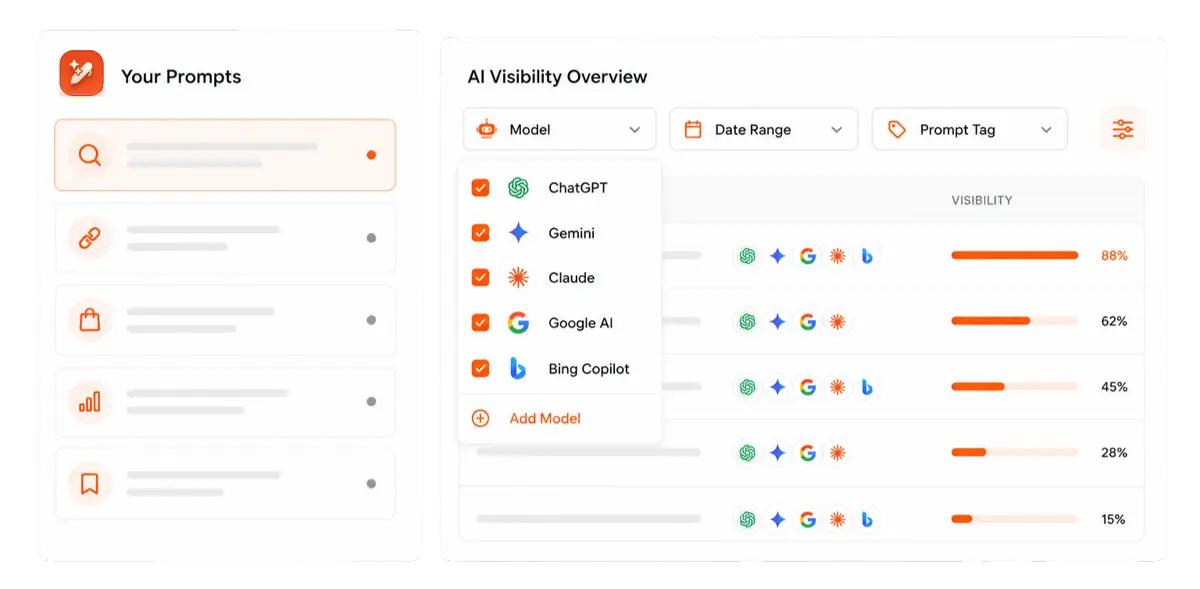
Contentpen’s AI visibility tool helps here by tracking how AI models mention your brand across the prompts you care about. So you can see whether a rewritten answer on your page actually changes anything or not.

Find your brand in AI search

Track AI citations, share of voice, and brand sentiment
Find the top sources driving citations
FAQPage or QAPage: Which one fits your page?
To use FAQPage or QAPage, check who wrote the answers. If your business wrote them, use FAQPage. If your users wrote them, use QAPage.
| FAQPage | QAPage | |
|---|---|---|
| Who writes the answers | You, the site owner | Your users or community |
| Questions per page | Several | One |
| Answers per question | One official answer | Several, with an optional accepted answer |
| Typical pages | Pricing, service, shipping, and support pages your team wrote | Forum threads and community help pages where users reply |
| Google rich result in 2026 | None | Still eligible |
QAPage is still very much alive at Google. Its QAPage documentation says properly marked up pages “are eligible to have a rich result displayed,” and Google added new supported properties for it in March 2026 as well.
Don’t take that as a loophole. The same page warns, “Don’t use QAPage markup for FAQ pages or pages where there are multiple questions per page.” Switching to QAPage just to win back a rich result isn’t a wise move.
What does a good FAQ look like?
A good FAQ section answers questions real people ask, puts each answer in its first sentence, and makes sense even if someone reads only one answer. The same traits make it easy to quote in AI search, because answer engines pull short passages, not whole pages.
Use these rules when you write or rewrite yours:
- Start with questions people already ask: Pull them from Google’s People also ask box, Autocomplete, related searches, your support inbox, sales calls, and Search Console queries that start with ‘how’, ‘can’, or ‘does’.
- Put the answer in the first sentence: Lead with yes, no, a number, or a name. Add the detail that helps someone decide after that.
- Make each answer stand on its own: Skip phrases like “as mentioned above.” Name the product or service instead of writing “it,” so the answer still works when it’s quoted somewhere else.
- Keep one question per intent: Three versions of the same question don’t add value. They only spread one answer thin.
- Match the questions to the page: A pricing page answers pricing questions. A returns page answers returns questions. You get where we’re going with this?
- Leave the sales pitch out: Google’s old guidelines banned this markup for advertising, and a pitch rarely answers the question a user has anyway.
Notice that none of these rules is about code. Get the writing right, and the markup becomes a copy-and-paste job.
Short, complete answers take longer to write than long ones, so give them that extra time to draft.
If you’d rather catch weak spots before a post goes live, Contentpen’s SEO and GEO scoring checks for an answer-box paragraph under your H1 and for FAQ-style blocks. This helps you to notice gaps in your content before publishing while they’re still easy to fix.
Get your content cited by AI, not just ranked on Google!
See your real-time GEO score as you write to make every piece citation-ready.
Try GEO Scoring →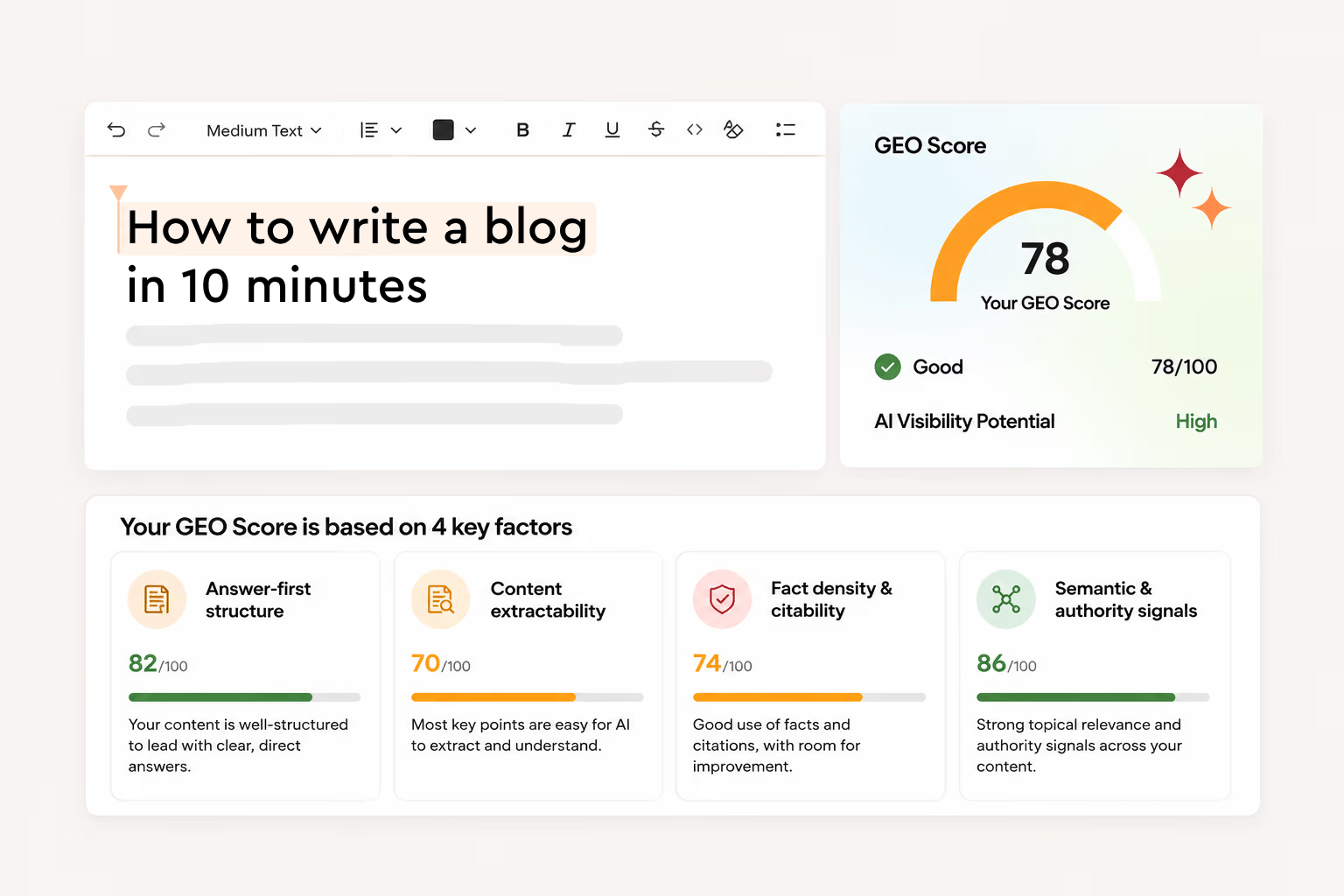
How to add FAQ schema to your website
Pick the method that matches how your site is built. Whichever you choose, two rules stay the same. The markup has to be in the page’s HTML when it loads, and it has to match the visible questions and answers word for word.
1. Write the JSON-LD yourself
Hand-written JSON-LD gives you full control. Use the Tidewell block above as an FAQ schema template, swap in your own questions, and paste it into the page’s head or body. Google reads JSON-LD in either place.
Two details trip people up most:
- Watch out for double quotes inside answers: Each answer already sits inside double quotes, so an extra quote in the text cuts it short and breaks the whole block. Add a backslash before it, or use single quotes to get around this problem.
“text”: “Use the code “SPRING10″ at checkout.” ❌
“text”: “Use the code \”SPRING10\” at checkout.” ✅
- Keep HTML in answers basic: Google’s old guidelines allowed simple tags like links, paragraphs, lists, and bold text. A link inside an answer needs escaped quotes too, as in <a href=\”/pricing\”>.
If typing JSON isn’t your thing, a free FAQ schema generator builds the same block from a simple form. You still need to paste it in the right place and test it, which we cover below.
2. On WordPress with Yoast, Rank Math, or Elementor
Most WordPress sites never touch the code, because the SEO plugin writes it for them:
- Yoast SEO: Add the free Yoast FAQ block in the block editor and type your questions into it. Yoast outputs the markup automatically, and it still does after Google’s change.
- Rank Math: Use Rank Math’s FAQ block in the block editor, or its Schema Generator in the Pro version if you’d rather build the markup separately.
- Elementor: Turn on the FAQ Schema switch in the Accordion widget’s settings. Rank Math Pro adds its own FAQ option to the same widget, so use only one. With both on, the page gets the markup twice, as Rank Math’s own guide warns.
Whichever plugin you use, let only one of them output the markup. If you built your questions with a newer Elementor accordion, check the page source before you assume the markup is there, because not every accordion version outputs it.
3. On Shopify, Webflow, and other site builders
On Shopify, open the theme editor, add a Custom Liquid section to the page template, and paste your script there. Don’t paste it into the page’s rich text editor. Shopify strips script tags when you save, so the markup quietly disappears.
If you have ‘Q&A’ sections on many pages, store the questions and answers in metafields and generate the JSON-LD with one Liquid snippet.
On Webflow, open the page settings and paste the script into the custom code box for the head tag. Most other builders have a similar custom code or code injection setting that does the same job.
4. Combine FAQ schema with your WebPage and Article markup
FAQPage is a more specific kind of WebPage on schema.org, so you don’t need separate WebPage and FAQPage blocks for one URL. Yoast’s schema documentation handles it by giving the page both types at once.
On a blog post with an FAQ section, keep your Article schema and connect everything in one @graph. Each node gets an @id, so the pieces can point to each other instead of repeating themselves:
| <script type=”application/ld+json”> { “@context”: “https://schema.org”, “@graph”: [ { “@type”: [“WebPage”, “FAQPage”], “@id”: “https://www.example.com/move-out-cleaning/#webpage”, “url”: “https://www.example.com/move-out-cleaning/”, “name”: “Move-out cleaning checklist”, “mainEntity”: [ { “@id”: “https://www.example.com/move-out-cleaning/#faq-1” } ] }, { “@type”: “BlogPosting”, “headline”: “Move-out cleaning checklist”, “isPartOf”: { “@id”: “https://www.example.com/move-out-cleaning/#webpage” } }, { “@type”: “Question”, “@id”: “https://www.example.com/move-out-cleaning/#faq-1”, “name”: “How long does a move-out cleaning take?”, “acceptedAnswer”: { “@type”: “Answer”, “text”: “A two-bedroom apartment takes a team of two about four hours.” } } ] } </script> |
The page is both a WebPage and an FAQPage. The blog post sits inside it, and the question hangs off the page through mainEntity. Your Breadcrumb schema can join the same graph as one more node.
How to test FAQ schema?
Now that Google’s Rich Results Test has dropped checking FAQ schema, you need an alternative way to go about this process.
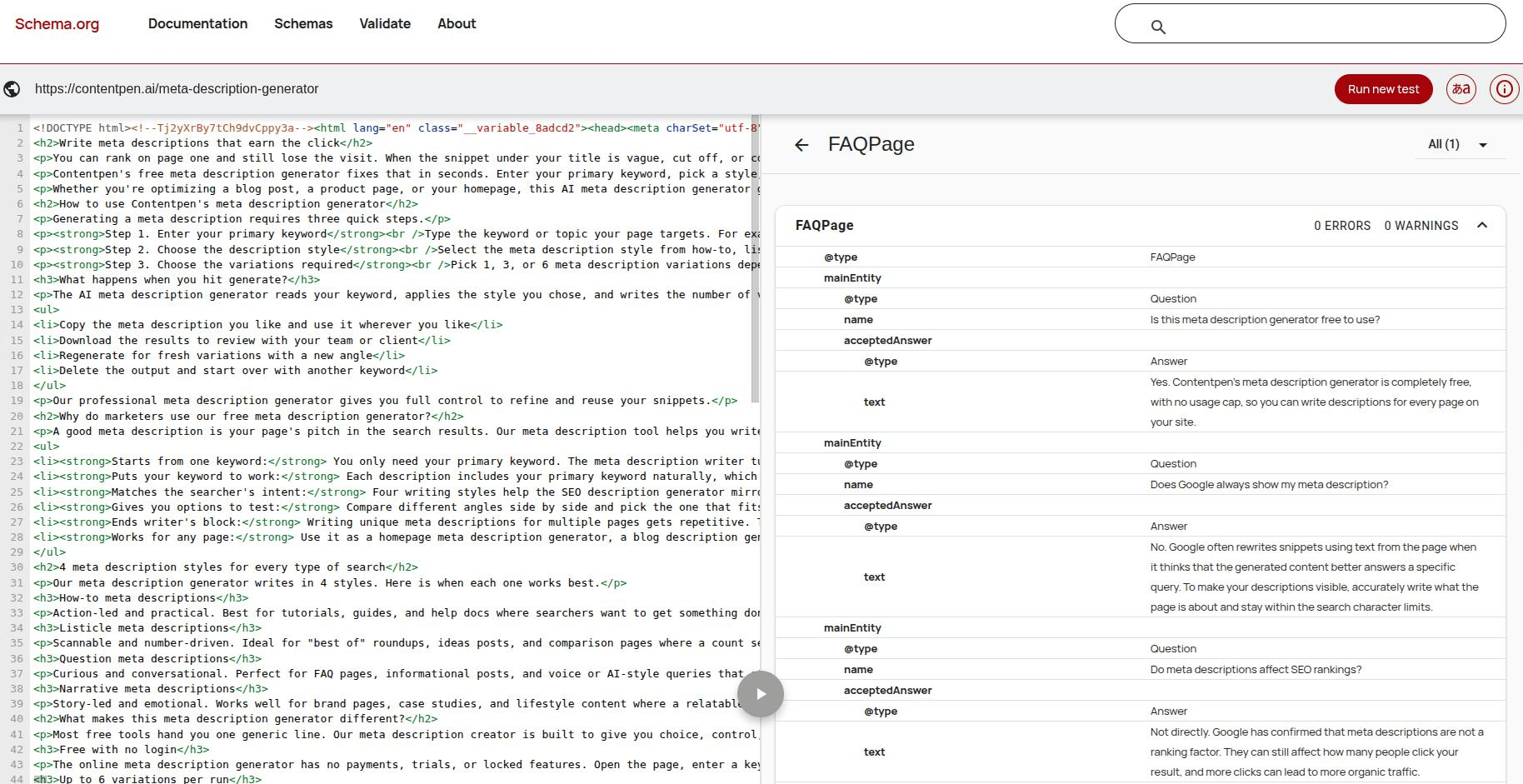
Run the code through the Schema Markup Validator, then check the live page’s HTML yourself. Google’s Rich Results Test dropped support in June 2026, and the matching Search Console report went with it, so nothing will warn you when the markup breaks.
Use this four-step checking process:
- Validate the code: Paste the URL or the script into the Schema Markup Validator. It checks syntax and vocabulary and lists every Question it finds for the page.
- Confirm it’s in the raw HTML: Open View Page Source for a page (not Inspect) and search for FAQPage. If it shows up only in Inspect, a script added it after the page loaded, and crawlers that don’t run JavaScript won’t see it.
- Count the FAQPage blocks: One page should have one FAQPage. Two usually means a plugin and a page builder are both writing markup.
- Compare it with the page: Read the markup against the visible questions and answers. After any edit to the page, check whether both changed or not.
Add these checks to your regular SEO audit. Without a Search Console report, an audit is now the only thing that catches broken markup.
You can use tools like Screaming Frog SEO Spider to carry out your technical audits (free for up to 500 URLs) or any other service you like.
FAQ schema problems to catch in your next audit
Since Google’s tools no longer flag this markup, these problems can sit on a page for months. Here’s what to look for:
| Problem | Why it matters | Fix |
|---|---|---|
| Markup answers differ from the page | Readers and crawlers get two versions of your answer | Generate the markup from the visible answers |
| FAQPage on user-written Q&A | It misdescribes who wrote the answers | Use QAPage for single-question community threads |
| Two FAQPage blocks on one page | Crawlers get conflicting copies of the same questions | Let one plugin or widget output the markup, not both |
| Markup added only with JavaScript | Crawlers that don’t run JavaScript never see it | Put the script tag in the HTML the server sends |
| Broken JSON from unescaped quotes, trailing commas, or curly quotes pasted from a word processor | The whole block fails, and nothing warns you now | Validate before every publish |
| Stale answers with old prices or retired policies | Machines keep repeating facts that are no longer true | Review the answers whenever the page’s facts change |
| Promotional answers or questions nobody asks | It adds noise and hides the useful answers | Cut the list back to questions real visitors ask |
Most of these issues come from treating the markup as a separate task from the content. When the answers and the code come from one source, almost none of them can happen.
Should you keep, add, or remove FAQ schema?
It depends on where your markup came from and whether the questions help readers:
- Keep it if a plugin or block already outputs it. It costs nothing, and Google says it causes no problems.
- Add it to new pages when your CMS builds it automatically from a visible FAQ. Hand-coding it across hundreds of pages, just in case it helps, isn’t a good use of your time in 2026.
- Fix it before you add more. Start with your highest-traffic pages, where broken or stale markup gets read the most.
- Remove the FAQ section itself if it was written only to win the old rich result. Generic questions and answers nobody needed don’t help readers or answer engines, with or without markup.
In short, the code is optional now. A clear, honest set of answers isn’t.
Rich results came and went. Clear questions with direct answers never went out of style, and they’re the same thing that helps a page rank on Google and get cited in AI answers.
If you’d like that work handled for you, Contentpen is an SEO and AEO tool whose AI agents research, write, optimize, and publish SEO and GEO-optimized articles on autopilot. It also puts useful FAQs in your content, which become the building blocks of your FAQ schema.
Write content that’s built to rank, not just read
Create search-optimized blogs aligned with SEO and GEO signals, so your content performs well across search and AI-driven discovery.
Try SEO Blogging FREE →
Frequently asked questions
No. The FAQ section is the questions and answers visitors see on the page. FAQ schema is the code behind it, which visitors never see. You can publish the section without the code, but never add code for questions that don’t appear on the page.
Yes. The answer text can hold a normal HTML link, written with escaped quotes inside the JSON. Link to the page that finishes the answer, like your pricing page or a full guide, which also supports your internal linking.
As many as your page shows. Schema.org sets no limit. A handful of real questions usually serves readers better than a long list written to fill space.
You can show them on several pages, but mark them up on one. Google’s old guidelines asked for a single marked-up copy of repeated Q&A content, and it’s still a sensible rule. Pick the page that owns the topic.
Yes, as long as the answer text is in the page’s HTML when it loads. If an answer is fetched from the server only after someone clicks, it isn’t in the HTML, and crawlers can miss it.
Yes. FAQPage works in JSON-LD, Microdata, or RDFa. JSON-LD is easier to maintain because it lives in one script block instead of being woven through your HTML. Stick to one format per page.
No. FAQPage marks up questions and answers, while HowTo marks up step-by-step instructions with tools and time. Google stopped showing HowTo rich results in September 2023, nearly three years before FAQ rich results went.