LocalBusiness schema is structured data that describes a physical business, like a bakery, dental office, or auto repair shop, in a format Google reads directly. It includes your name, address, phone number, opening hours, and the shop’s exact location.
Add it to your homepage or location pages, and Google can use those details in the knowledge panel people see when they look you up in Search and Maps.
This guide shows you how to pick the right business type, fill in the properties Google reads, mark up tricky opening hours, and add it all to WordPress, with a complete example you can copy.
Key takeaways
- LocalBusiness schema describes one physical location. Each branch gets its own block.
- Use the most specific type that fits, like Bakery, Dentist, or Plumber, instead of plain LocalBusiness schema.
- Keep every detail identical to your Google Business Profile and to what’s visible on the page.
- Don’t mark up star ratings your own customers left on your own site. Google won’t show them.
What is LocalBusiness schema?
LocalBusiness schema is the schema.org type for a business that serves customers in a defined area or location. Schema.org treats it as both an Organization and a Place.
That’s why one block can hold company details, like your name and phone number, and location details, like your address, coordinates, and opening hours.
Where Google uses it
When someone searches for a business by name in Google Search or Maps, Google can show a knowledge panel with its address, hours, phone number, and directions.
LocalBusiness markup on your website is one of the sources Google can use to understand and confirm those details.
As with any structured data, the markup makes your business details eligible to appear. Google still decides what to show and when, based on a lot of factors.
LocalBusiness schema vs Google Business Profile
LocalBusiness schema and Google Business Profile are meant for two separate jobs, and you want both.
Your Google Business Profile is a listing you manage inside Google. It drives how you appear in Maps and in the local pack, like a short list of businesses that shows up for searches like “bakeries near me.”
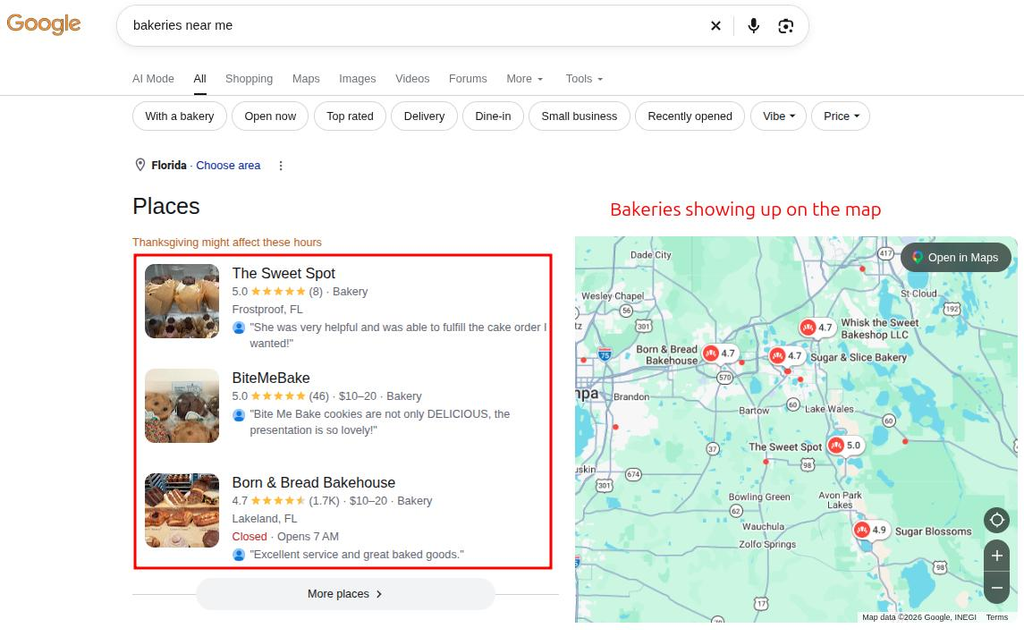
On the other hand, LocalBusiness schema lives on your own website and describes the same business from your side.
What ties LocalBusiness schema and Google Business Profile together is your name, address, and phone number, often shortened to NAP. These should 100% match on both.
For example, if your Google profile says “75 Larkspur Street, Unit B” and your markup says “75 Larkspur St,” pick one version and use it everywhere.
How it relates to Organization schema
LocalBusiness is a subtype of Organization, so it can use every Organization property, including logo and sameAs.
A single-location bakery only needs the LocalBusiness block. A brand with several locations uses Organization schema for the company and LocalBusiness for each branch. You’ll see that setup later in this guide.
Picking the most specific LocalBusiness type
Google recommends to use the most specific subtype available for a local business.
For example, a bakery should use the “Bakery” subtype of LocalBusiness schema as it opens up properties that only make sense for that kind of business, like a menu for special items, etc.
Choose one of the subtypes below to properly mark up your local business:
| Your business | Use this @type |
|---|---|
| Bakery | Bakery |
| Café or coffee shop | CafeOrCoffeeShop |
| Restaurant | Restaurant |
| Dental practice | Dentist |
| Plumbing company | Plumber |
| Electrical contractor | Electrician |
| Heating and air conditioning company | HVACBusiness |
| Car repair shop | AutoRepair |
| Hair salon | HairSalon |
| Gym or fitness club | HealthClub |
| Law firm | LegalService |
| Accounting firm | AccountingService |
| Real estate agency | RealEstateAgent |
| Hotel | Hotel |
Schema.org lists dozens more, grouped under broader types like FoodEstablishment, HomeAndConstructionBusiness, and Store. Browse the group closest to your business if you don’t see yours here.
What if you fit in more than one type of business?
In that case, list them in an array. A café that also sells secondhand books can use “@type”: [“CafeOrCoffeeShop”, “BookStore”]. Both types apply, and Google reads them together.
What if your type isn’t listed?
Use the closest broader type. A pottery studio that sells its own work fits the Store subtype, and a business with no close match at all can use the generic LocalBusiness schema. A broad, accurate type beats a specific, wrong one.
The properties Google reads in a LocalBusiness schema
Google splits LocalBusiness properties into two required ones and a longer list of recommended ones. Here’s what each does and how to fill it in.
Required: name and address
- name: Your business name exactly as it appears on your sign and your Google Business Profile.
- address: A PostalAddress with streetAddress, addressLocality (city), addressRegion (state), postalCode, and addressCountry (a two-letter code, like US).
Google asks you to fill in as many address fields as you can. Leave out either name or address, and the block isn’t eligible for Google’s local business features.
Recommended properties
| Property | What to put in it | Example |
|---|---|---|
| telephone | Your main number with country and area code | +1-828-555-0142 |
| url | The URL of this location’s page | https://www.example.com/asheville/ |
| geo | Latitude and longitude, with at least 5 decimal places | 35.59512, -82.55148 |
| openingHoursSpecification | The days and times you’re open | Tuesday to Friday, 07:00 to 15:00 |
| priceRange | A price level or range, under 100 characters | $ or $10-15 |
| servesCuisine | The food you serve (food businesses only) | Baked goods |
| menu | A link to your menu (food businesses only) | https://www.example.com/asheville/menu/ |
| department | A unit inside your business with its own hours or phone | A pharmacy inside a grocery store |
Fill in what applies and skip what doesn’t. For instance, a plumber has no menu, and that’s fine.
For coordinates, right-click your front door’s spot in Google Maps. The first line of the menu shows the latitude and longitude. Click it to copy it and put it in your LocalBusiness schema.
Reviews and star ratings: the self-serving rule
aggregateRating and review are on Google’s recommended list, with a big condition: Google only recommends them for sites that collect reviews about other local businesses, like a directory.
If your bakery’s site marks up reviews its own customers left, Google treats them as self-serving and has not shown stars for them since 2019.
Keep the reviews on your page for visitors if you like. Just leave them out of the markup.
Selecting opening hours in LocalBusiness schema, step by step
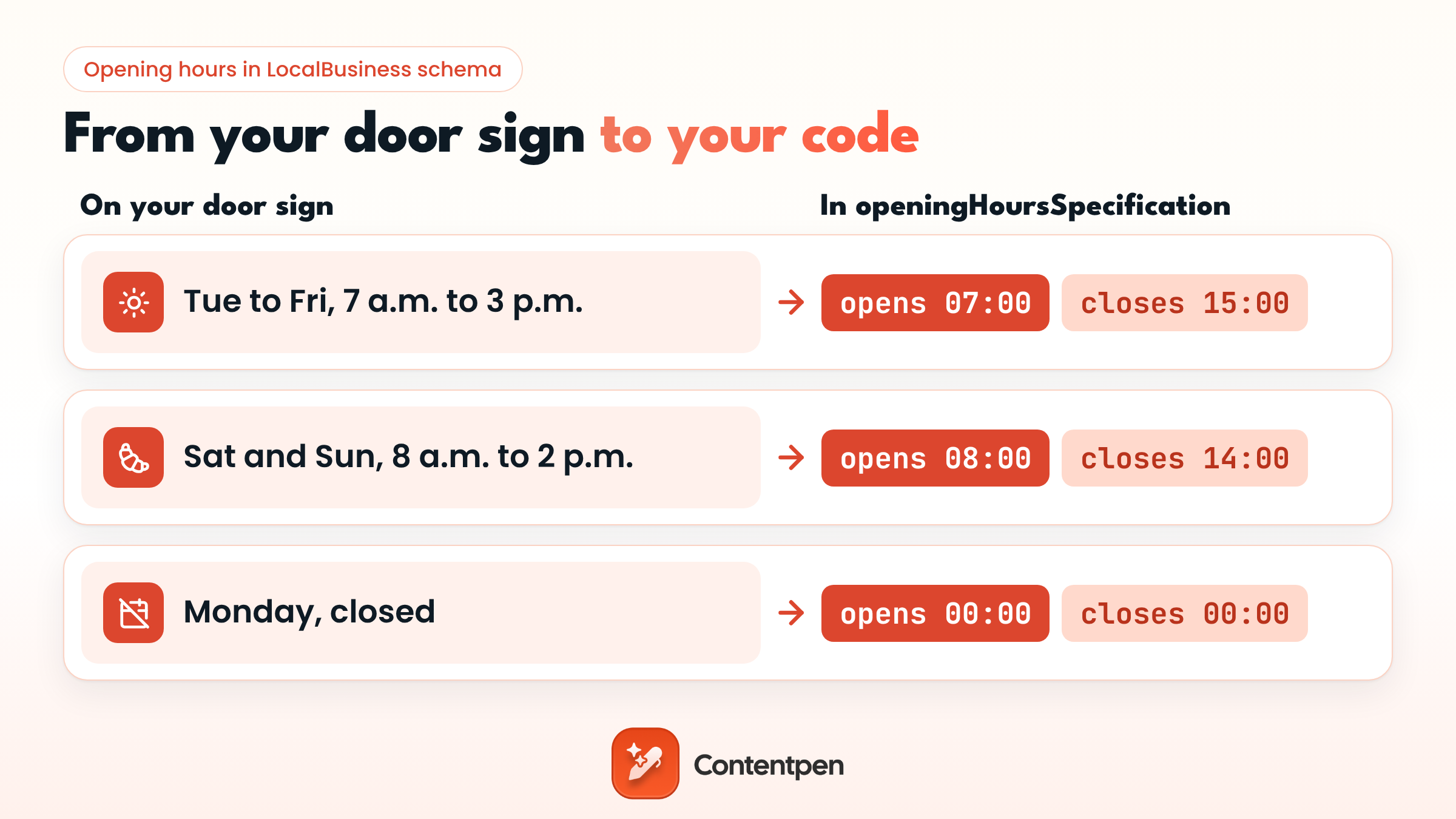
openingHoursSpecification is the property local sites get wrong most often, usually because real hours are messier than “9 to 5.” Each block lists one or more days (dayOfWeek), an opening time (opens), and a closing time (closes), in 24-hour format.
Days with the same hours share a block, and days with different hours get their own.
Regular weekly hours
Let’s take Thimblecrust Bakery as an example, a fictional single-location bakery in Asheville, North Carolina. It opens from 7 a.m. to 3 p.m., Tuesday through Friday, so one block covers all four days:
| { “@type”: “OpeningHoursSpecification”, “dayOfWeek”: [“Tuesday”, “Wednesday”, “Thursday”, “Friday”], “opens”: “07:00”, “closes”: “15:00” } |
A second block for Saturday and Sunday, 08:00 to 14:00, completes a normal week.
Closed days and 24-hour days
- Closed all day: Set both opens and closes to “00:00” for that day.
- Open 24 hours: Set opens to “00:00” and closes to “23:59.”
The two look alike, so read them twice. “00:00” to “00:00” means closed, not open around the clock.
Late nights and holiday hours
If you close after midnight, keep it in one block. A bar open from 6 p.m. Friday to 2 a.m. Saturday uses Friday as the day, “18:00” as opens, and “02:00” as closes. Don’t split it across two days.
For holidays and seasonal changes, add validFrom and validThrough dates in YYYY-MM-DD format. Here’s Thimblecrust closing for Christmas, from December 24 to 26:
| { “@type”: “OpeningHoursSpecification”, “opens”: “00:00”, “closes”: “00:00”, “validFrom”: “2026-12-24”, “validThrough”: “2026-12-26” } |
Update the special hours in your Google Business Profile at the same time. Plenty of people check Maps before they head out on Christmas Eve.
Complete LocalBusiness schema example
Here’s the full LocalBusiness markup for Thimblecrust Bakery. It brings together everything above. For other types side by side, browse our schema markup examples.
| { “@context”: “https://schema.org”, “@type”: “Bakery”, “@id”: “https://www.example.com/asheville/#bakery”, “name”: “Thimblecrust Bakery”, “url”: “https://www.example.com/asheville/”, “telephone”: “+1-828-555-0142”, “priceRange”: “$”, “servesCuisine”: “Baked goods”, “menu”: “https://www.example.com/asheville/menu/”, “address”: { “@type”: “PostalAddress”, “streetAddress”: “75 Larkspur Street”, “addressLocality”: “Asheville”, “addressRegion”: “NC”, “postalCode”: “28801”, “addressCountry”: “US” }, “geo”: { “@type”: “GeoCoordinates”, “latitude”: 35.59512, “longitude”: -82.55148 }, “openingHoursSpecification”: [ { “@type”: “OpeningHoursSpecification”, “dayOfWeek”: [“Tuesday”, “Wednesday”, “Thursday”, “Friday”], “opens”: “07:00”, “closes”: “15:00” }, { “@type”: “OpeningHoursSpecification”, “dayOfWeek”: [“Saturday”, “Sunday”], “opens”: “08:00”, “closes”: “14:00” }, { “@type”: “OpeningHoursSpecification”, “dayOfWeek”: “Monday”, “opens”: “00:00”, “closes”: “00:00” } ] } |
This is the JSON-LD on its own. On your page, it goes inside a script tag whose type is application/ld+json. Most SEO plugins add that for you.
What each part does
- @type: Bakery instead of plain LocalBusiness, because it’s the closest match.
- @id: A permanent ID for this location, so other markup can refer to it.
- name and address: The two required properties, matching the sign and the Google Business Profile.
- telephone and url: A local number with the +1 country code, and the page for this exact location.
- geo: Coordinates with five decimal places, precise enough to pin the shop, not just the street.
- priceRange, servesCuisine, and menu: Food details that set expectations before anyone walks in.
- openingHoursSpecification: Three blocks for weekdays, weekends, and closed Mondays.
Every value here is also visible on the bakery’s page. If a detail isn’t on the page, it shouldn’t be in the markup either.
LocalBusiness schema template
Copy this template below for your pages.
| { “@context”: “https://schema.org”, “@type”: “YourMostSpecificType”, “@id”: “https://www.yourdomain.com/location-page/#business”, “name”: “Business name”, “url”: “https://www.yourdomain.com/location-page/”, “telephone”: “+country-code-area-code-number”, “priceRange”: “$$”, “address”: { “@type”: “PostalAddress”, “streetAddress”: “Street address”, “addressLocality”: “City”, “addressRegion”: “State”, “postalCode”: “Postal code”, “addressCountry”: “US” }, “geo”: { “@type”: “GeoCoordinates”, “latitude”: 12.34567, “longitude”: -12.34567 }, “openingHoursSpecification”: [ { “@type”: “OpeningHoursSpecification”, “dayOfWeek”: [“Monday”, “Tuesday”, “Wednesday”, “Thursday”, “Friday”], “opens”: “09:00”, “closes”: “17:00” } ] } |
Replace the type with yours, add a block for each set of hours, and delete anything that doesn’t apply. One location, one block.
How to add LocalBusiness schema to your site
It comes down to three decisions: which page gets the markup, how you add it, and how you check it.
Where the markup goes
A single-location business usually adds it to the homepage or contact page, wherever the address and hours appear. Businesses with several locations add each block to that location’s own page. Either way, the details in the markup should be visible on the same page.
Keep the block focused on the business itself. If Thimblecrust runs a Saturday sourdough class, that class gets its own Event schema on the class page, not a spot in the LocalBusiness markup.
Adding LocalBusiness schema to WordPress
- Yoast: The Local SEO add-on, a paid extension, adds fields for your address, phone number, opening hours, and locations, then outputs the markup.
- Rank Math: Its Local SEO module collects your business type, address, phone number, and hours. Adding multiple locations requires Rank Math PRO.
- Manually: Use a header and footer code plugin, or your theme’s custom code area, to paste the JSON-LD into the page’s head, wrapped in its script tag.
Stick to one method. If an SEO plugin and a separate schema plugin both output LocalBusiness markup, you’ll end up with two blocks that may disagree.
Testing the markup with a schema validator
- Paste your URL or code into Google’s Rich Results Test. You should see a Local business item detected.
- Fix anything marked as an error. Warnings point to missing recommended properties, so add them if they apply to you.
- Run the code through the Schema Markup Validator to check the schema.org vocabulary itself, like a misspelled type.
- After you publish, use URL Inspection in Google Search Console to confirm Google can crawl the live page.
Run the test again whenever you change your hours or move. It takes a minute and catches typos before customers do.
Take a look at our Thimblecrust schema example output from Google’s Rich Results Test:
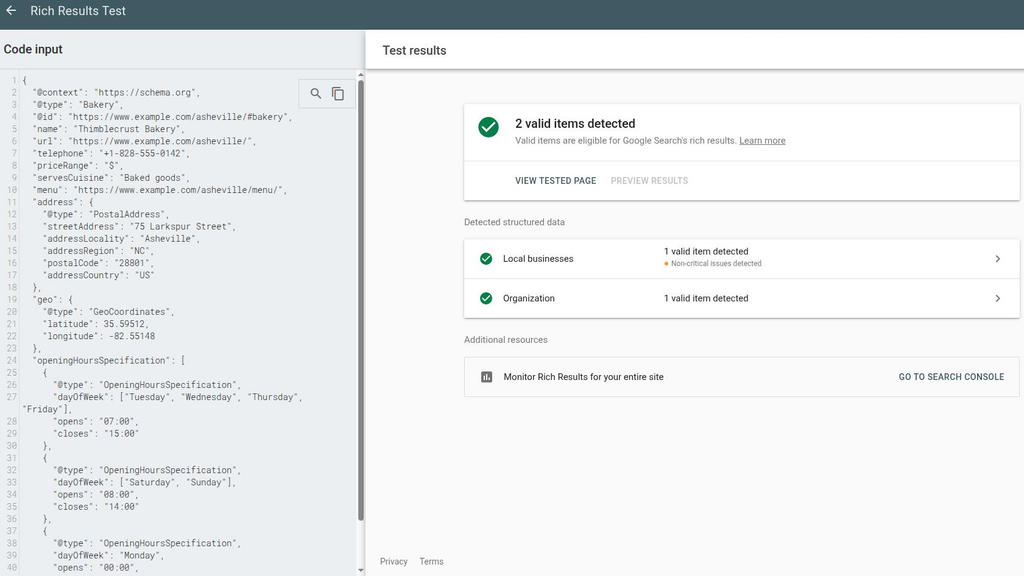
The test finds two valid items, LocalBusiness and Organization. That’s expected, because every LocalBusiness is also an Organization. The non-critical issue flags a missing image property, which doesn’t affect eligibility, so you can leave it out.
If you’d like to add one, use a real photo of your storefront or products. Just keep your Google Business Profile photos current too, since those are what people usually see when they look you up online.
Schema markup for multiple locations and service-area businesses
The setup changes once you have more than one address, or no storefront at all.
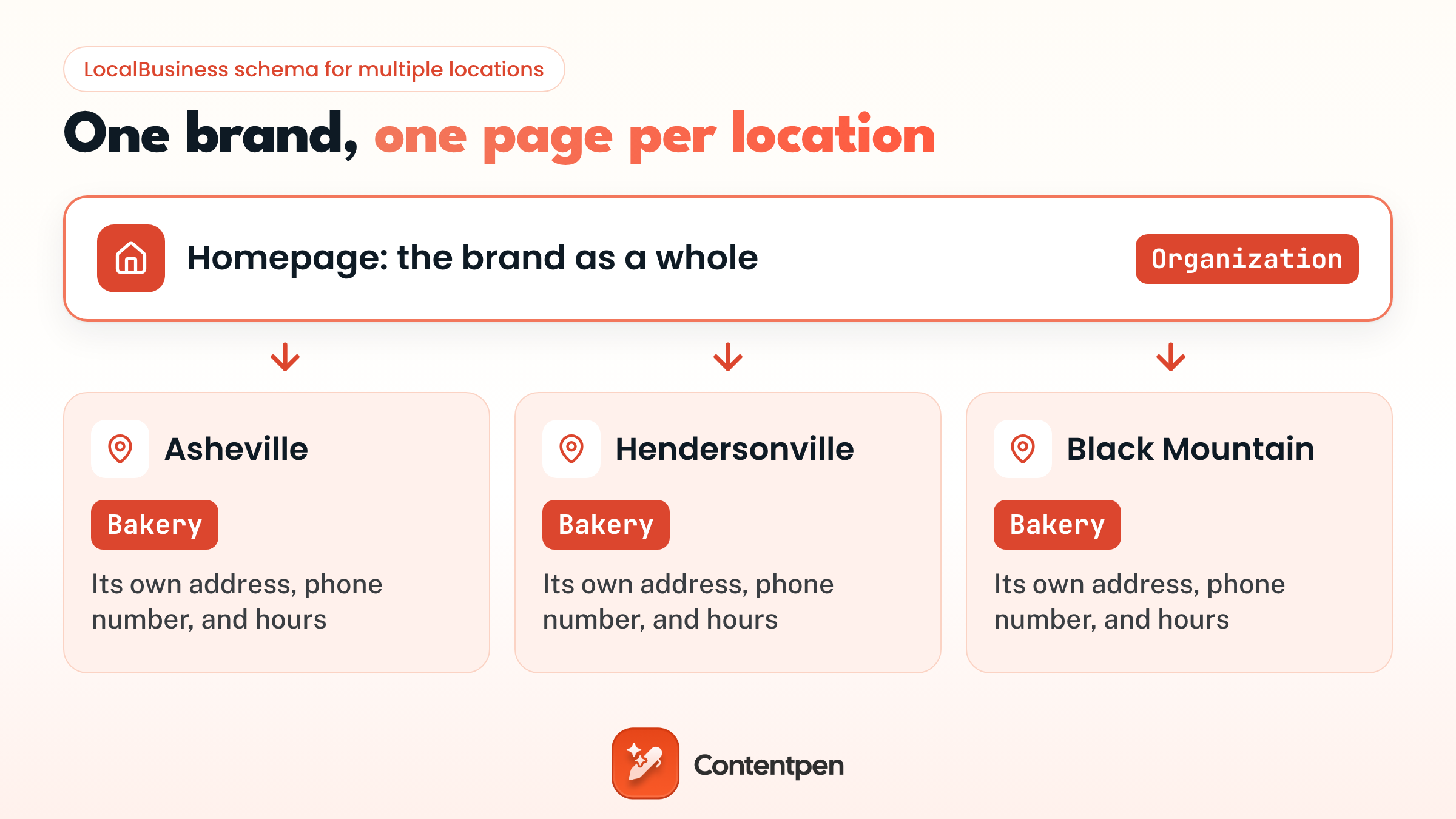
One page per location
Give every location its own page and its own LocalBusiness block, with that branch’s address, phone number, and hours. Then link each branch to the brand by adding parentOrganization, pointing to the @id of the Organization markup on your homepage:
| “parentOrganization”: { “@id”: “https://www.example.com/#organization” } |
Don’t squeeze three addresses into one block, or list every branch in your homepage markup. Google reads each block as one business in one place.
Each location page should also be worth reading on its own, with directions, parking, the team, and what’s different about that branch.
Before you write them, use a keyword research tool to find how people near each location actually search, such as “sourdough Hendersonville” versus “bakery near Black Mountain.”

Automated keyword research
Work on keywords worth writing for
Get search terms with real ranking potential, not just high volume.
Try Keyword Research for FREE →
Departments inside one location
A unit inside your business with its own hours or phone number, like the pharmacy in a grocery store, goes in the department property rather than on a separate page. Google suggests naming it with the store name followed by the department name, for example, “Pinewick Market Pharmacy.”
Businesses that travel to customers
Plumbers, cleaners, and mobile dog groomers often work at customers’ homes instead of a storefront. They can still use LocalBusiness schema and add areaServed to list the cities or regions they cover.
Google still requires an address. If you work from home and your Google Business Profile hides your street address, a practical middle ground is to include only your city, state, postal code, and country, so the markup matches what you show publicly.
Google asks for as many address fields as possible, so this trades a little completeness for privacy.
To describe specific jobs, like drain cleaning or water heater installation, use Service schema alongside your LocalBusiness block. Each Service names your business as its provider.
Mistakes that hurt your local markup
While adding your LocalBusiness markup, make sure you don’t commit these mistakes:
- Out-of-date hours: Winter hours on the door, summer hours in the markup.
- NAP that doesn’t match: A call-tracking number on the site and your main number on Google Business Profile, or two spellings of your street.
- A generic schema type: LocalBusiness when Bakery, Dentist, or Plumber exists.
- One block for several branches: Multiple addresses crammed into a single entity.
- Self-serving review stars: Your own customers’ reviews marked up on your own site.
- Details that aren’t on the page: Hours or a phone number in the markup that visitors can’t see.
- Rough geographic coordinates: Decimal places in the coordinates matter more than you think. It can land the pin blocks away from your door if not done right.
Most of these come from markup that was correct on launch day and never touched again. A review every time something changes at the business keeps it accurate.
Final thoughts
Your markup is only as good as its last update. The bakery that changes its winter hours on the door but not on the website is the one getting a one-star review from someone who drove over on a Monday.
LocalBusiness schema isn’t hard to write. Keeping it true is the real job.
Start with name, address, phone number, and hours, test the block, and make it part of your routine to update the markup whenever the sign on the door changes.
If you’d like help with the content around it, see how Contentpen works for small businesses. It’s an SEO and AEO tool that researches, writes, and publishes content for what people in your area read.
Write content that’s built to rank, not just read
Create search-optimized blogs aligned with SEO and GEO signals, so your content performs well across search and AI-driven discovery.
Try SEO Blogging FREE →
Frequently asked questions
Yes. Local results still appear in Google Search and Maps, and Google says it ranks them on relevance, distance, and prominence. A complete Google Business Profile, steady reviews, and clear location pages do most of the work. LocalBusiness schema supports them by keeping your details easy for machines to read.
Any business that serves customers at a physical location or in a set area, like a bakery, dental office, hair salon, hardware store, gym, auto repair shop, law office, or plumber. If customers come to you, or you go to them within a defined area, then LocalBusiness schema fits your purpose.
There’s no schema.org type called “Business.” People usually mean Organization schema, which describes a company as a whole, or LocalBusiness schema, which describes a place customers visit. The deciding question is whether customers deal with you at a physical location or not.
Not for one location. The template above covers it. A generator saves time when you manage dozens of locations, but check what it produces, because wrong time formats and missing country codes are common problems with such tools.
Yes. Google still maintains its LocalBusiness documentation and updated it as recently as September 2026. Structured data remains one of the clearest ways to hand Google your business details in a format it reads and understands. You can compare it with other types of schema markup to see which ones your site needs.
It can help AI tools get your basics right, but Google says you don’t need special structured data for its AI features. Google’s AI guidance does recommend keeping your Business Profile up to date, since AI answers can include local business details. Keep both in sync, and read our guide to schema markup for AI search for the bigger picture.