Search for almost anything and look just under the site name in the results. On well-built sites, you won’t see a messy URL there. You’ll see a short path, like Blog › What is SEO › How to do an SEO audit. Ever wondered where that line comes from?
That path is a breadcrumb trail.
Breadcrumb schema, also called Breadcrumb structured data or BreadcrumbList markup, is a schema markup that tells search engines the route from the top of your site to the page someone is on.
It’s also one of the most widely used types of schema markup. The schema.org BreadcrumbList page counts it on more than 10 million domains, and Google still shows it in desktop results in 2026.
This guide explains how the markup is built, where Google shows it, and how to add it to your pages.
So, let’s get started.
Key takeaways
- Breadcrumb schema is BreadcrumbList structured data that describes where a page sits in your site, with one ListItem for each step in the trail.
- Each step needs a position, a name, and an item (its URL).
- Since January 2025, Google shows breadcrumbs only on desktop. Mobile results show the domain alone, but the markup is still supported.
- Google recommends trails that follow a typical user path rather than your URL folders.
What is Breadcrumb schema?
In SEO and digital marketing, a breadcrumb is the row of links near the top of a page that shows where it sits on a website. For example, Blog › What is AEO › Best AI visibility tools, or Home › Women › Running shoes on an online e-commerce store. This is your breadcrumb navigation.
Breadcrumb schema is the same row written as JSON-LD, so search engines can read it without guessing about the internal hierarchy of your pages.
Breadcrumbs vs Breadcrumb schema
The table below summarizes the differences between breadcrumbs and Breadcrumb schema:
| Visible breadcrumbs | Breadcrumb schema | |
|---|---|---|
| Who reads it | Visitors | Search engines and other crawlers |
| Where it lives | In the page layout, usually above the title | In a script tag in the page’s HTML code |
| What it does | Lets readers jump up a level in one click | Describes the path so Google can show it in results |
| What happens without it | Readers lose a quick way back to the section | Google falls back to parts of your URL |
Google’s structured data guidelines ask you to mark up only what readers can see, so the trail in your code should be the trail on your page.
Here’s that idea on our own blog.
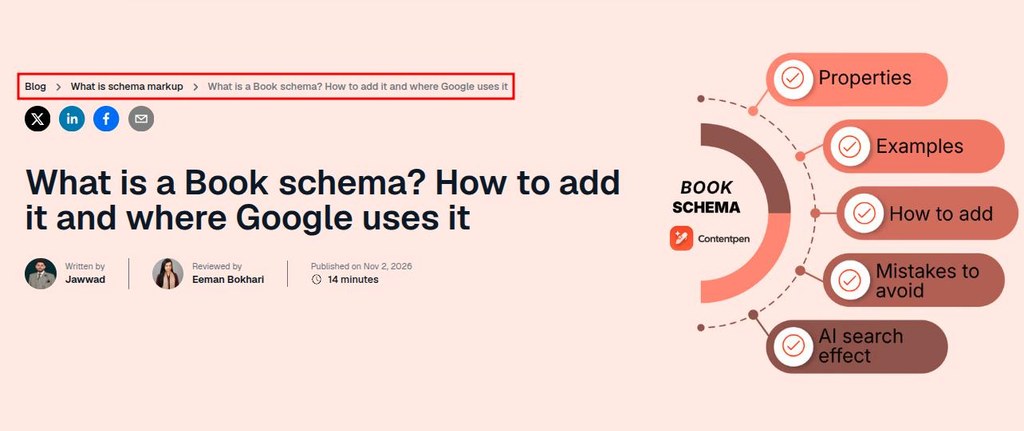
The trail above our Book schema guide tells readers it belongs to the schema markup hub, and that same parent and child relationship is what Breadcrumb schema hands to Google.
Where Google shows your breadcrumbs in 2026
On desktop, Google shows the trail in the URL line under your site name. On mobile, it doesn’t. Since January 23, 2025, mobile results show only the domain of the page.
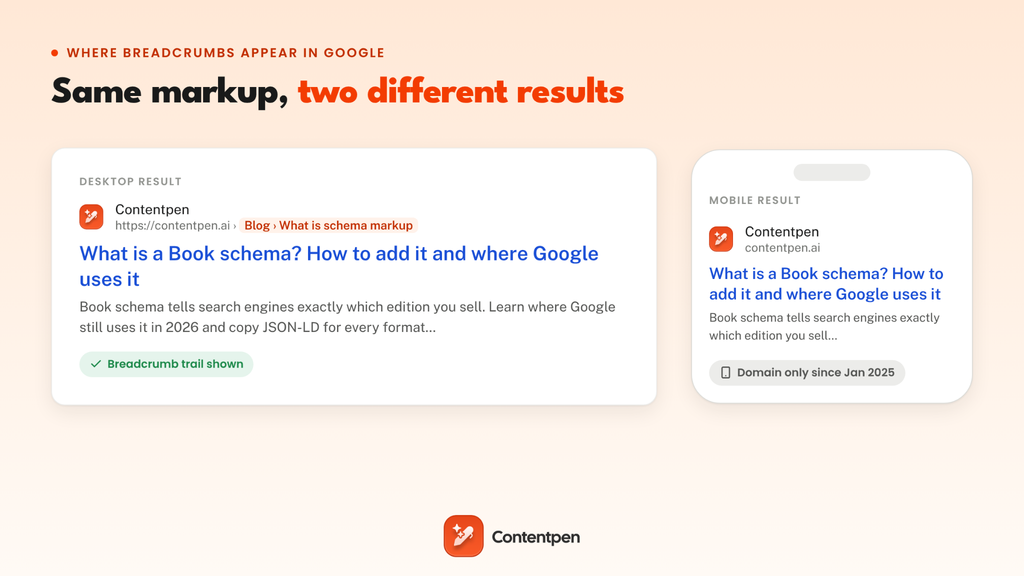
Google made the change because breadcrumbs were often cut off on small screens, as Search Engine Journal reported. Desktop kept them, and Google’s breadcrumb documentation still lists the feature as available on desktop in every region and language where Search runs.
If you already have the markup, there’s nothing to change.
What if you skip the markup?
In case you don’t add the Breadcrumb schema, Google usually falls back to your URL, so readers see folder names like › blog › book-schema instead of the labels you’d pick to show the exact cluster.
Markup lets you decide what that line says. Before anyone clicks, the trail tells users which part of your site the page belongs to so that they can navigate your site with ease.
The four building blocks of a BreadcrumbList
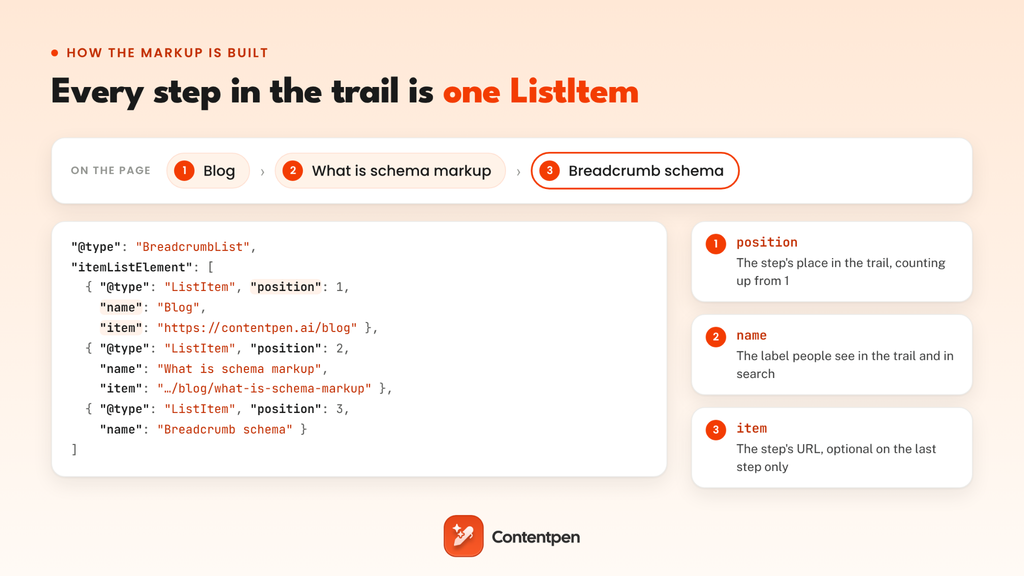
Every BreadcrumbList follows the same pattern: one list, one ListItem for each step in the trail, and three properties inside each step.
| Property | What it holds | Google’s rule |
|---|---|---|
| itemListElement | The steps of the trail, as an array | Required, with at least two ListItems |
| position | The step’s place in the trail | Required, counting up from 1 |
| name | The label people see | Required, unless the item is an object that carries its own name |
| item | The step’s full URL, not a relative path | Required on every step except the last, where Google uses the page’s own URL |
One detail trips people up: the order of items in your code isn’t what sets the order of the trail. Schema.org notes that position is what search engines use to rebuild it, so number every step.
Here’s a Breadcrumb schema example for a three-step trail like the one on our blog:
| <script type=”application/ld+json”> { “@context”: “https://schema.org”, “@type”: “BreadcrumbList”, “itemListElement”: [ { “@type”: “ListItem”, “position”: 1, “name”: “Blog”, “item”: “https://contentpen.ai/blog” }, { “@type”: “ListItem”, “position”: 2, “name”: “What is schema markup”, “item”: “https://contentpen.ai/blog/what-is-schema-markup” }, { “@type”: “ListItem”, “position”: 3, “name”: “Breadcrumb schema” } ] } </script> |
Swap in your own labels and URLs in the Breadcrumb schema template, and leave the item off the last step. A blog post usually carries this list alongside a page-level type, such as Article schema for the post itself.
How to plan a breadcrumb trail worth marking up
Plan the trail around how people reach the page, not around your URL folders. Google says so directly: “We recommend providing breadcrumbs that represent a typical user path to a page, instead of mirroring the URL structure.”
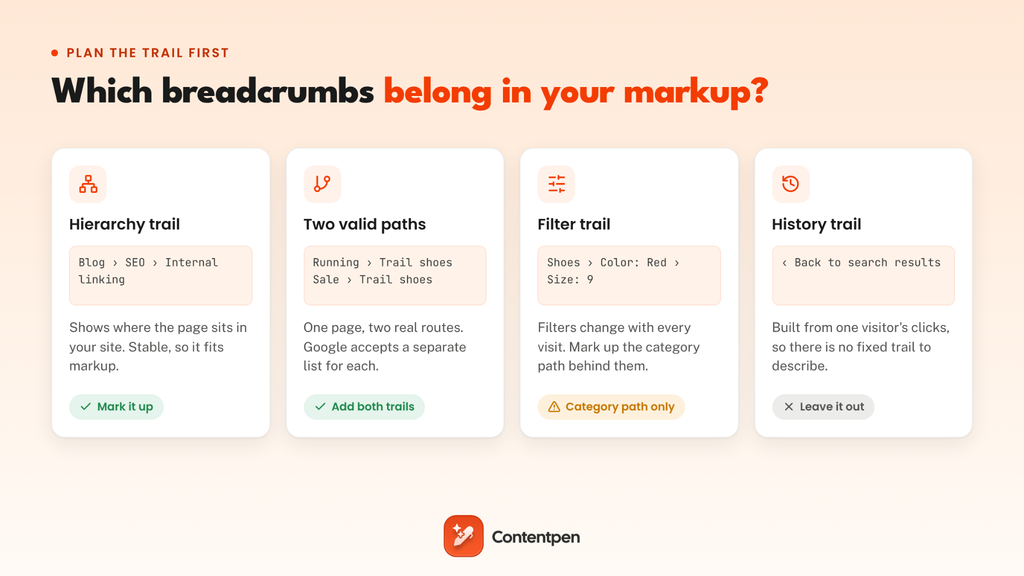
Hierarchy trails for blogs and service sites
Most pages need one trail: the top section, then the hub or category, then the page. On a blog built around topic clusters, the middle step is the pillar page. That’s why every schema guide on our blog sits under What is schema markup, and why the trail doubles as a map of the cluster.
Those crumbs are also real internal links, pointing from detailed posts back to their hub, which our guide to internal linking covers in depth.
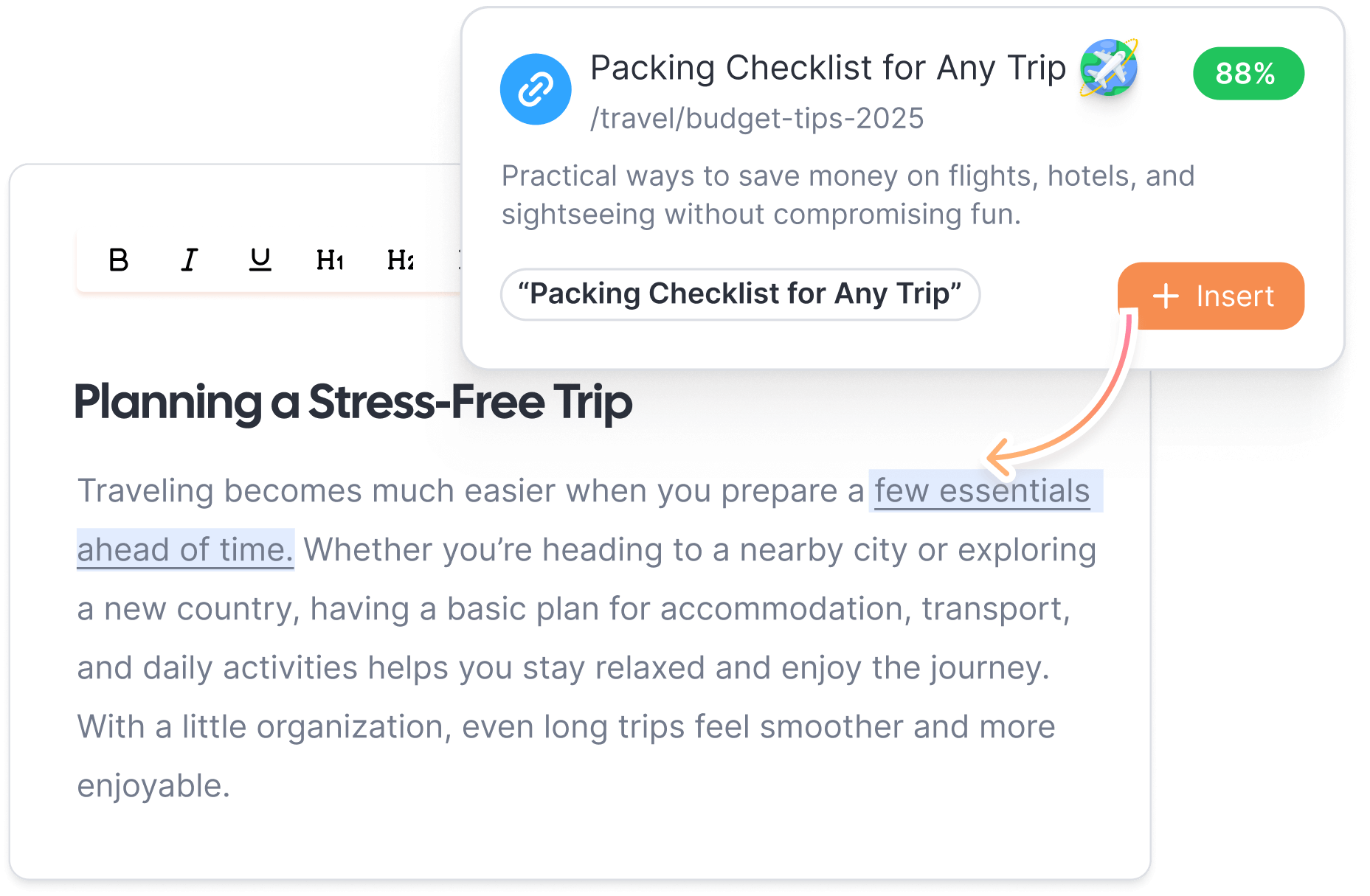
Contentpen’s AI linking assistant follows the same logic in your content. It reads your sitemap and links each new article to its pillar and related posts as it writes, so the links inside your posts match the hierarchy your breadcrumbs show.

Improve SEO with automated linking that fills them

Adds context-aware internal and external links automatically
Uses relevant anchor text to improve SEO and content flow
Two trails for one page
Some pages live in two places at once. A cast-iron skillet might sit under Kitchen › Cookware and also under Gifts › Housewarming.
Google lets you add a separate BreadcrumbList for each path, somewhat like this:
| <script type=”application/ld+json”> [ { “@context”: “https://schema.org”, “@type”: “BreadcrumbList”, “itemListElement”: [ { “@type”: “ListItem”, “position”: 1, “name”: “Kitchen”, “item”: “https://example.com/kitchen” }, { “@type”: “ListItem”, “position”: 2, “name”: “Cookware”, “item”: “https://example.com/kitchen/cookware” }, { “@type”: “ListItem”, “position”: 3, “name”: “Emberline 10-inch skillet” } ] }, { “@context”: “https://schema.org”, “@type”: “BreadcrumbList”, “itemListElement”: [ { “@type”: “ListItem”, “position”: 1, “name”: “Gifts”, “item”: “https://example.com/gifts” }, { “@type”: “ListItem”, “position”: 2, “name”: “Housewarming”, “item”: “https://example.com/gifts/housewarming” }, { “@type”: “ListItem”, “position”: 3, “name”: “Emberline 10-inch skillet” } ] } ] </script> |
Stick to paths a shopper would actually take. Two or three trails are plenty, and a trail for every tag adds noise without giving Google a clearer picture.
Filter and history trails: What to leave out
Trails built from filters, like Cookware › Material: Cast iron › Size: 10 in, change with every visit, and filtered URLs usually aren’t pages you want indexed.
So, it is important to mark up the category path behind them instead.
History trails, like a “Back to results” link, come from one visitor’s clicks, so there’s no fixed path to describe. Keep those as on-page navigation only.
Adding Breadcrumb schema on WordPress, Shopify, or a custom site
Most WordPress SEO plugins output BreadcrumbList for you once breadcrumbs are turned on. On Shopify, it depends on your theme. On custom sites, the markup should come from the same data that renders the visible trail.
1. WordPress with Yoast SEO or Rank Math
Both plugins on WP need breadcrumbs switched on first, since the feature is off by default:
- Yoast SEO: Go to Yoast SEO -> Settings -> Advanced -> Breadcrumbs and turn on ‘Enable breadcrumbs for your theme’. Show the trail with the Yoast Breadcrumbs block, the Home » shortcode, or the yoast_breadcrumb() function in your theme. After this, Yoast adds the breadcrumb JSON-LD to your page source.
- Rank Math: Turn on the Schema module, then go to Rank Math SEO -> General Settings -> Breadcrumbs and enable them (switch to Advanced Mode if you don’t see the option). Show the trail with the [rank_math_breadcrumb] shortcode or the rank_math_the_breadcrumbs() function.
Once the visible trail appears on your posts, open the page source or run a test to confirm the BreadcrumbList is there too.
2. Shopify
Breadcrumbs on Shopify come from your theme.
Some themes, including Shopify’s free Dawn theme, don’t include a breadcrumb section out of the box, so store owners add one with a theme snippet or an app. Whichever route you take, check that it outputs BreadcrumbList markup and not just the visible links.
3. Custom and headless sites
For headless and custom sites, generate the JSON-LD from the same source that draws the visible trail, such as your category tree or route config. With one source, the markup and the page can’t drift apart.
The visible trail needs clean breadcrumb HTML too. Following the W3C’s breadcrumb pattern, wrap the trail in a nav element with an aria-label, list the steps in order, and mark the current page with aria-current:
| <nav aria-label=”Breadcrumb”> <ol> <li><a href=”https://contentpen.ai/blog”>Blog</a></li> <li><a href=”https://contentpen.ai/blog/what-is-schema-markup”>What is schema markup</a></li> <li><span aria-current=”page”>Breadcrumb schema</span></li> </ol> </nav> |
A Breadcrumb schema generator works for a single page. On a site with hundreds of pages, a template is the only setup that stays accurate as your structure changes.
If you can’t edit your templates, Google Tag Manager can inject the JSON-LD for you. However, use it as a temporary fix.
Google only sees the markup after it renders the page’s JavaScript. But many other crawlers, including most AI crawlers, don’t run JavaScript at all. So, it is crucial to move the markup into your templates as soon as you can.
Checking your markup and fixing Search Console breadcrumb errors
It is important to check your pages and fix any breadcrumb issues if they persist. To do this, test one page before you roll the markup out, then let Search Console watch the rest of the site.
- Rich Results Test: Run a URL through Google’s Rich Results Test to confirm it detects Breadcrumbs and to see any errors.
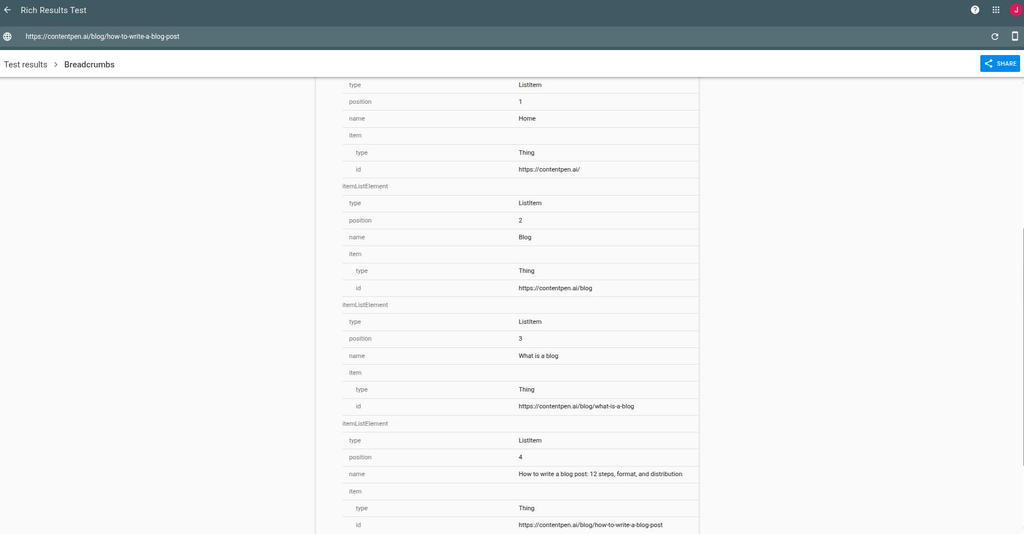
- Schema Markup Validator: Use the Schema Markup Validator as a free schema checker to validate the full schema.org syntax.
- Google Search Console: Open the Breadcrumbs report to spot errors across every page Google has crawled.
When Search Console flags a problem, the message usually points straight at the fix:
| Error message | What it means | Fix |
|---|---|---|
| Either “name” or “item.name” should be specified | A step has no label, often because a page or category has an empty title | Give every ListItem a name |
| Missing field “item” | A step before the last one has no URL | Add a URL to every step except the current page |
| Missing field “itemListElement” | The list has no steps | Check that your plugin or template fills in the trail |
| Missing field “id” | An item was written as an object without a URL in @id | Use a plain URL for item, or add an @id to the object |
Most of these come from a plugin or theme template, not hand-written code. Fix the template once, and every page that uses it is corrected on the next crawl.
Are breadcrumbs good for SEO after Google dropped them on mobile?
Yes, even though they don’t lift rankings on their own. On desktop, they make your result easier to understand. On every device, they give readers a one-click way up a level, and they add consistent internal links that show search engines how your pages relate.
That structure matters in AI search too.
Google says no special markup is needed to appear in AI Overviews, but a page that clearly sits under a well-covered hub is easier to read in context. For what the research says about markup and AI citations, see our guide to schema markup for AI search.
That said, the structure of your site only pays off when the pages inside it are worth ranking and citing.
Contentpen is an SEO and AEO tool whose AI agents research, write, optimize, and publish SEO and GEO-optimized articles on autopilot for each cluster. This helps your hubs and the posts beneath them gain organic traffic and grow together.
Write better blogs in less time, without sacrificing quality.
Let AI handle structure, clarity, and flow while you stay in control of the message.
Try AI blog writing →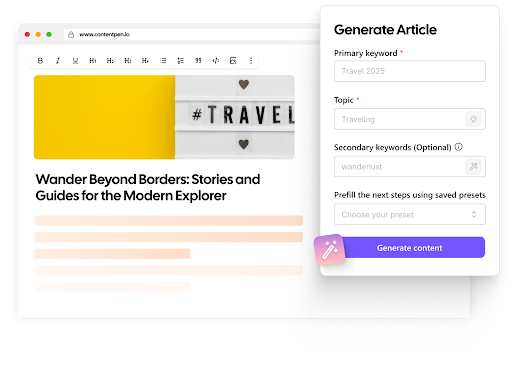
Your Breadcrumb schema checklist
Run through this list on one Breadcrumb schema template before you roll it out across the site:
- The visible trail and the markup show the same steps.
- Every step has a position starting at 1, a name, and a URL, except the current page.
- Each list has at least two steps.
- Trails follow how people browse, not just your URL folders.
- Pages in two categories get one BreadcrumbList per path.
- The Rich Results Test detects Breadcrumbs, and Search Console shows no errors.
Tick these off once, and every page on that template gets a trail readers can click, and Google can show.
Frequently asked questions
No. Nothing sits above the homepage, and Google needs at least two steps in a trail, so there’s nothing to mark up in that case.
No. Start the trail at the level that helps readers most. Our blog trails start at Blog, for example, because that’s the section readers browse the most.
On the page, usually not, since it’s the page the reader is already on. In the markup, its URL is optional, and Google uses the current page’s URL if you leave it out.
No. Short labels like “Running shoes” often work better than full SEO titles. Just keep the markup and the visible trail using the same labels.
Sitelinks are the extra links Google sometimes shows under a result, and Google picks them automatically. Breadcrumbs describe where one page sits in your site, and you control them through your markup.
Yes. Google supports JSON-LD, Microdata, and RDFa for breadcrumbs. JSON-LD is usually easier to maintain because it sits apart from your page’s HTML.