Dataset schema is structured data that describes a collection of data for search engines. It tells Google what the data covers, who made it, when it was last updated, what license it carries, and where to download it.
It’s a type of schema markup that most websites never need. But if you publish original numbers, like a benchmark report, survey results, public records, or research files, it’s what puts those numbers in front of analysts, journalists, students, and researchers looking for a source.
This guide covers what Dataset schema is, where marked-up data shows up, and how to mark up a whole catalog without writing every page manually.
So, let’s begin, shall we?
Key takeaways
- Dataset schema uses schema.org’s Dataset type to describe your data, not to repeat the values inside it. Google needs only a name and a description of 50 to 5,000 characters.
- Marked-up data can appear in Google Dataset Search, and dataset pages still rank in regular results and get cited in AI Overviews.
- The Free, Usage rights, Download format, and Last updated filters in Dataset Search all read details you publish.
- Kaggle, Zenodo, figshare, and Dryad add the markup for you. For a catalog on your own site, a short Python script can generate it for every page.
What is Dataset schema?
Schema.org defines a Dataset as “a body of structured information describing some topic(s) of interest,” and Dataset schema is the label that sums that information up for machines. It includes the title, a summary, the author, the time period and place it covers, the license, and the download links.
The label never holds the data itself. Google’s guidance is to describe the data (what it’s about, which variables it measures, who created it) rather than repeat specific values.
That’s why it works for almost anything, from a 40-row spreadsheet of café prices to a library of satellite images.
Among all the types of schema markup, it’s one of the rarer ones. Schema.org reports the Dataset type on 10,000 to 100,000 domains, which is far fewer than Article schema or Product markup.
The problem is that plenty of businesses are sitting on data worth sharing, but have never used a Dataset schema. That makes their data harder for search engines to find and understand.
Where your data shows up: Google Dataset Search and regular results
Marked-up data can surface in two places, and Google runs both:
- Google Dataset Search: A search engine built only for data, at datasetsearch.research.google.com. In 2023, Google’s research team said it indexed “more than 45 million datasets from more than 13,000 websites,” and it finds most of them through schema.org markup.
- Regular Google results: In February 2023, Google added a datasets section to Search that showed the top three matches. Today, dataset pages still rank as normal results, and AI Overviews draw on them, naming the datasets and linking to their catalog pages.
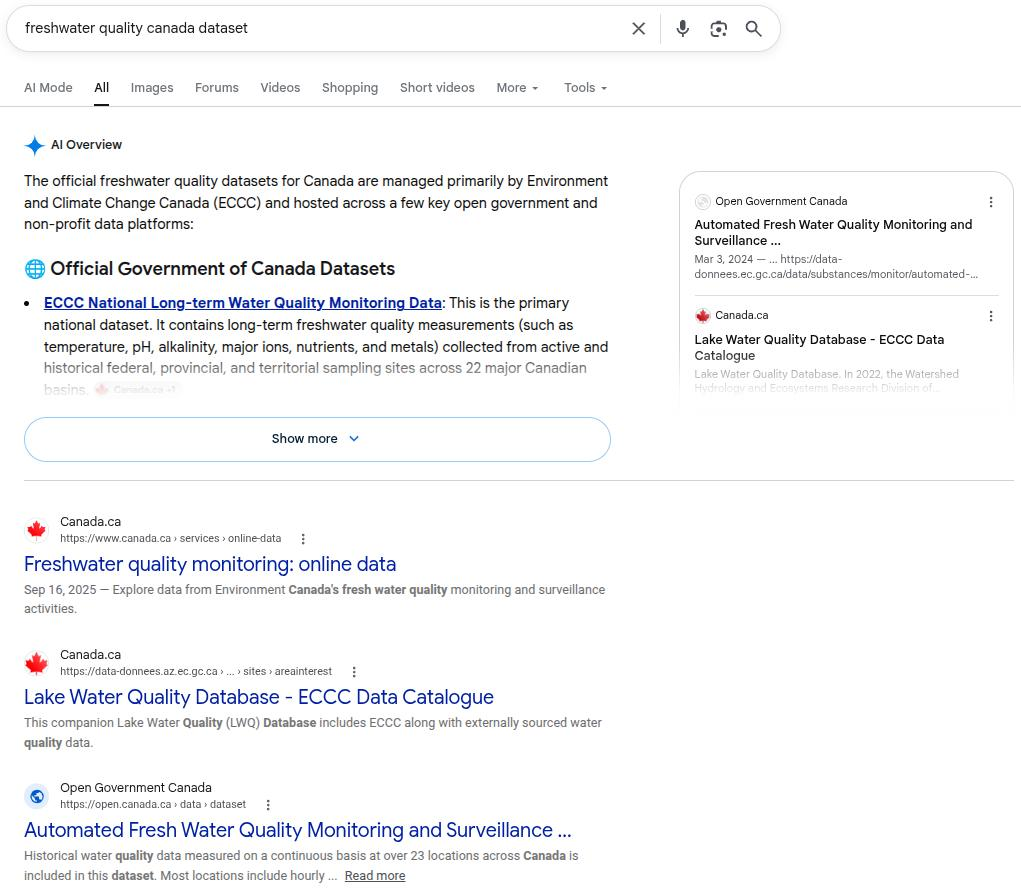
Google teaches reporters to use Dataset Search through its News Initiative, and researchers use it to find sources they can cite. For a business, that’s a direct line to the people who write the articles and reports that quote data.
Does your data count as a dataset?
Google’s idea of a dataset is broader than most people expect. Its examples include:
- A table or a CSV file
- A group of tables or files that make up one collection
- A file in a proprietary data format
- Images that capture data, like scans or satellite photos
- Machine learning files, such as trained model parameters
What doesn’t count as a dataset is a page that only talks about data. A blog post with three charts from your annual survey isn’t a dataset, but the spreadsheet behind those charts is.
So, the smarter move will be to publish the raw file on its own page with a download link, and mark up that specific page.
That one step turns a report people read once into a source they can reuse, cite, and come back to next year.
Dataset Search filters you should know about
When someone narrows down results in Dataset Search, Google says the filters “are based on values from the data providers.” In other words, they’re based on you.
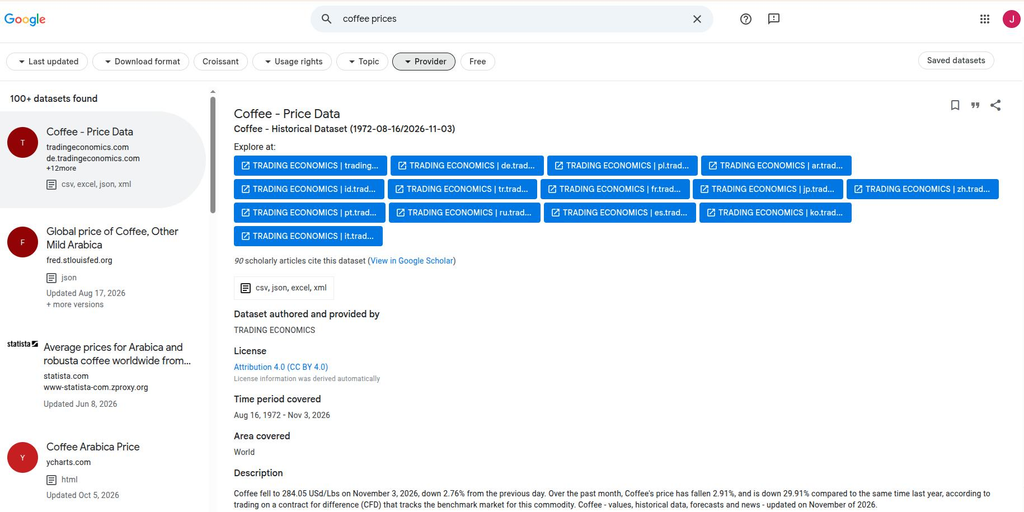
Here’s what sits behind each one:
| Filter | What searchers pick | What feeds it |
|---|---|---|
| Last updated | The past month, year, or three years | The newest of dateModified, datePublished, and dateCreated, or the page’s own update date if none is set |
| Download format | Table, text, image, or other | distribution, with encodingFormat |
| Usage rights | Commercial or noncommercial use | license |
| Topic | Broad fields like social or life sciences | Google assigns it from your title, description, and page text |
| Provider | A specific publisher | The creator or provider you name |
| Free | Only data that costs nothing | isAccessibleForFree |
Most publishers leave these gaps wide open. When Google’s team analyzed 31 million datasets in 2020, only 34% listed a license and only 44% included download information.
Every blank field is a filter your data quietly falls out of, so a complete record already puts you ahead of many other sites.
The properties to fill in, sorted by the question they answer
Google requires just two properties: name and description for Dataset schema. The description has to be 50 to 5,000 characters long. It can use Markdown, and line breaks inside the code are written as \n.
Give every collection its own name, too, because ten files all called “Sales data” look like duplicates.
Everything else is recommended, and it’s easier to remember when you group it by what a searcher wants to know:
| The searcher’s question | Properties | Worth knowing |
|---|---|---|
| What is it? | name, description, alternateName, keywords | alternateName covers abbreviations and old titles. Keywords can be text or DefinedTerm entries. |
| Who made it, and can I trust it? | creator, funder, citation, version, identifier | Add ORCID or ROR IDs with the sameAs property. citation is for papers about the data. identifier holds a DOI. |
| Can I use it? | license, isAccessibleForFree | Use a versioned license URL, like CC BY 4.0. |
| What area and time does it cover? | temporalCoverage, spatialCoverage | Dates use ISO 8601, with “..” for an open end. Locations can be a Place, latitude first. |
| What was measured, and how? | variableMeasured, measurementTechnique | Still pending at schema.org, but Google recommends both. |
| How do I get it? | distribution, url, includedInDataCatalog | url is the landing page. distribution holds the file, one per format. |
| How does it relate to other data? | hasPart, isPartOf, sameAs, isBasedOn | Covered further down. |
You don’t need all of these on day one. Name, description, license, distribution, and dates answer the questions people ask first and switch on most of the filters. Add the rest as your data grows.
Dataset schema example: A café price index
Here’s a full example for a made-up research firm, Kettlebridge Research, that publishes monthly drink prices from independent cafés across the US:
| <script type=”application/ld+json”> { “@context”: “https://schema.org”, “@type”: “Dataset”, “name”: “US independent café drink prices, 2022–2026”, “alternateName”: “Kettlebridge Café Price Index”, “description”: “Monthly average prices for drip coffee and lattes at 1,240 independent cafés across 48 US states, collected from published menus between January 2022 and September 2026. Prices are in US dollars and exclude sales tax.”, “url”: “https://www.example.com/data/cafe-price-index”, “keywords”: [“coffee prices”, “café menu prices”, “beverage inflation”, “independent cafés”], “creator”: { “@type”: “Organization”, “name”: “Kettlebridge Research”, “url”: “https://www.example.com” }, “license”: “https://creativecommons.org/licenses/by/4.0/”, “isAccessibleForFree”: true, “version”: “3.0”, “dateModified”: “2026-10-05”, “temporalCoverage”: “2022-01/2026-09”, “spatialCoverage”: { “@type”: “Place”, “name”: “United States” }, “variableMeasured”: [ { “@type”: “PropertyValue”, “name”: “Average drip coffee price”, “unitText”: “USD” }, { “@type”: “PropertyValue”, “name”: “Average latte price”, “unitText”: “USD” }, { “@type”: “PropertyValue”, “name”: “Cafés sampled”, “unitText”: “count” } ], “measurementTechnique”: “Monthly review of published café menus”, “distribution”: [ { “@type”: “DataDownload”, “encodingFormat”: “text/csv”, “contentUrl”: “https://www.example.com/data/cafe-price-index.csv” }, { “@type”: “DataDownload”, “encodingFormat”: “application/json”, “contentUrl”: “https://www.example.com/data/cafe-price-index.json” } ] } </script> |
A few choices here are worth copying:
- The name carries the country and the years: If Kettlebridge launches a UK index next year, the two won’t look like duplicates.
- The dates do two jobs: The temporalCoverage field tells searchers which months the prices cover, and dateModified keeps the Last updated filter honest.
- variableMeasured mirrors the CSV columns: Each one is a PropertyValue with a unit, so people know the prices are in US dollars before they download anything.
- There are two downloads: The CSV lands under the Table format, the most common kind of data in Dataset Search, and the JSON file is there for developers.
- The license is a versioned URL: That’s what the Usage rights filter can read.
Swap in your own details, and make sure everything in the code also appears on the page. If a visitor can’t see the license or the time period, it shouldn’t be in the markup either. For other types, our schema markup examples show how the most common ones are built.
When the same data lives in more than one place
Data travels. It gets mirrored on a government portal, cleaned up by a partner, or split into yearly files. Google’s rules cover each case:
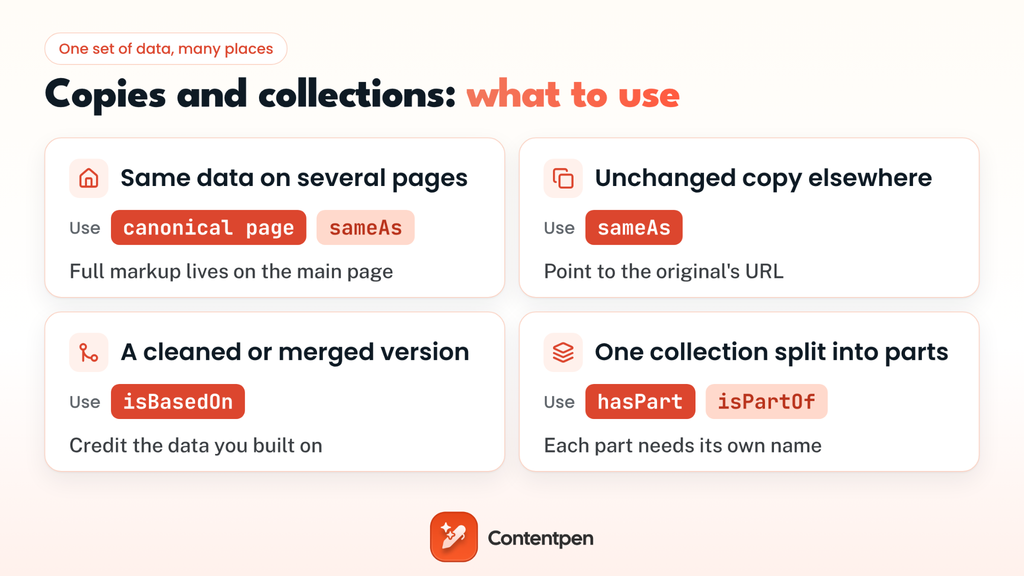
- The same data on several of your pages: Put the full markup on the canonical page, the data’s main home page. Other pages that list it, like a search results page on your site, use sameAs to point back to it.
- A straight copy somewhere else: If you republish data unchanged, add sameAs with the original’s URL. Never reuse one sameAs URL for two different collections.
- A changed or combined version: If you cleaned, merged, or reworked someone else’s data, use isBasedOn to credit the source instead.
- A collection of smaller sets: Use hasPart on the parent and isPartOf on each part. Every part has to work as a complete dataset on its own, with its own name and description.
For a yearly series like the café index, the 2026 file uses isPartOf to point to the full index, and the index uses hasPart to list each year. Back that up with internal linking between those pages, so people and crawlers can follow the same path the markup describes.
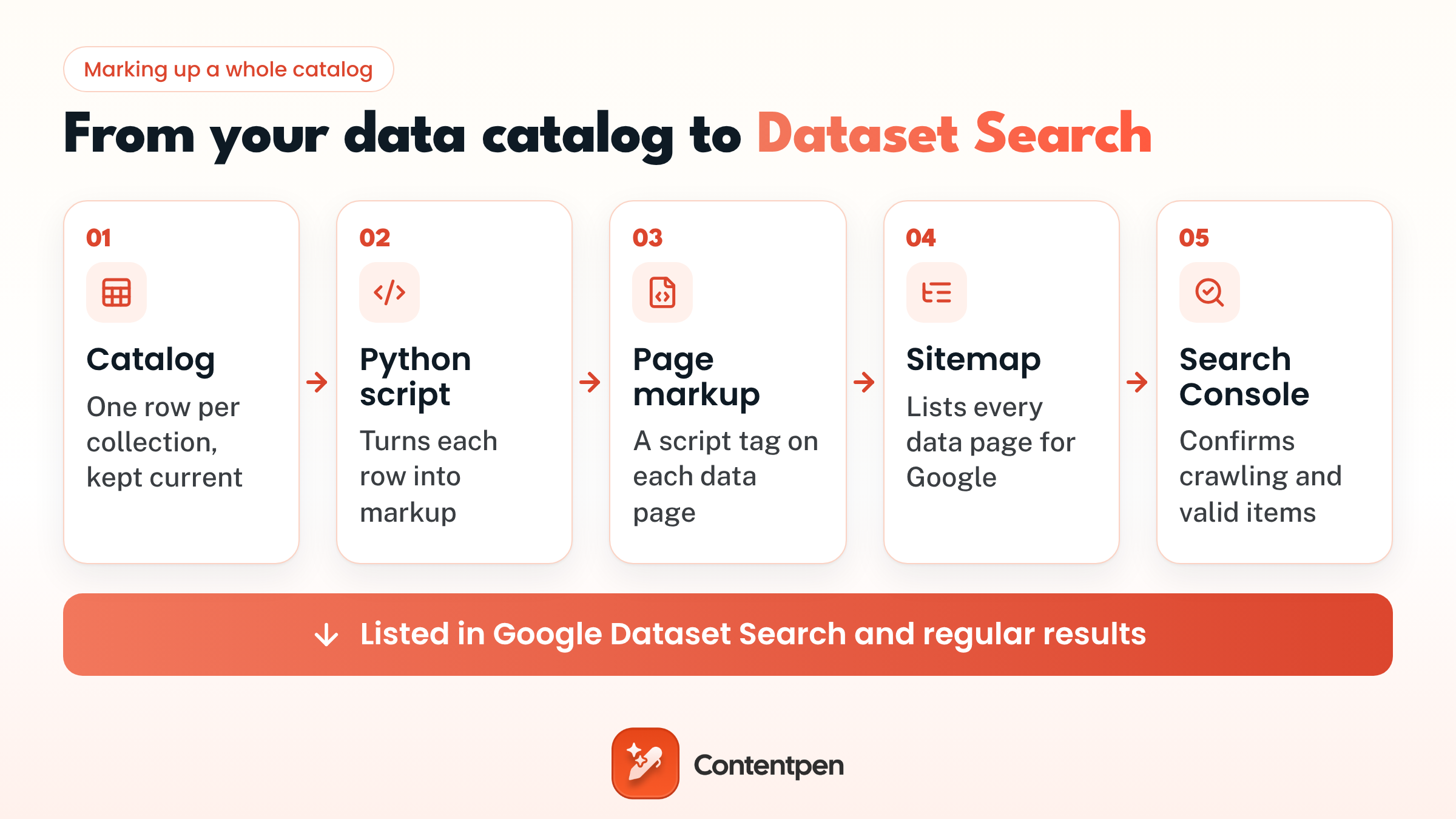
Dataset schema with Python: Mark up a whole catalog at once
To begin this process, first check whether you need to write any markup at all. Kaggle, Zenodo, figshare, and Dryad add Dataset schema automatically, so anything you host there is already covered.
On your own site, writing the code by hand is fine for one page. But for multiple pages, it isn’t viable at all.
If you already keep a catalog spreadsheet, a short Python script can turn each row into markup and check Google’s description rule as it goes:
| import csv import json with open(“catalog.csv”, newline=””, encoding=”utf-8″) as f: for row in csv.DictReader(f): if not 50 <= len(row[“description”]) <= 5000: print(f”Skipped {row[‘name’]}: description must be 50 to 5,000 characters”) continue markup = { “@context”: “https://schema.org”, “@type”: “Dataset”, “name”: row[“name”], “description”: row[“description”], “url”: row[“page_url”], “license”: row[“license_url”], “isAccessibleForFree”: row[“free”].lower() == “yes”, “temporalCoverage”: row[“temporal_coverage”], “dateModified”: row[“date_modified”], “distribution”: [{ “@type”: “DataDownload”, “encodingFormat”: “text/csv”, “contentUrl”: row[“csv_url”], }], } with open(f”{row[‘slug’]}.json”, “w”, encoding=”utf-8″) as out: json.dump(markup, out, indent=2, ensure_ascii=False) |
Your site template then places each file inside a script tag on the matching page. When a row changes, rerun the script, and the markup stays in step with the catalog instead of slowly drifting away from it.
Check your markup before Google does
Run a few pages through Google’s Rich Results Test first. It should detect a Dataset item and flag anything broken.
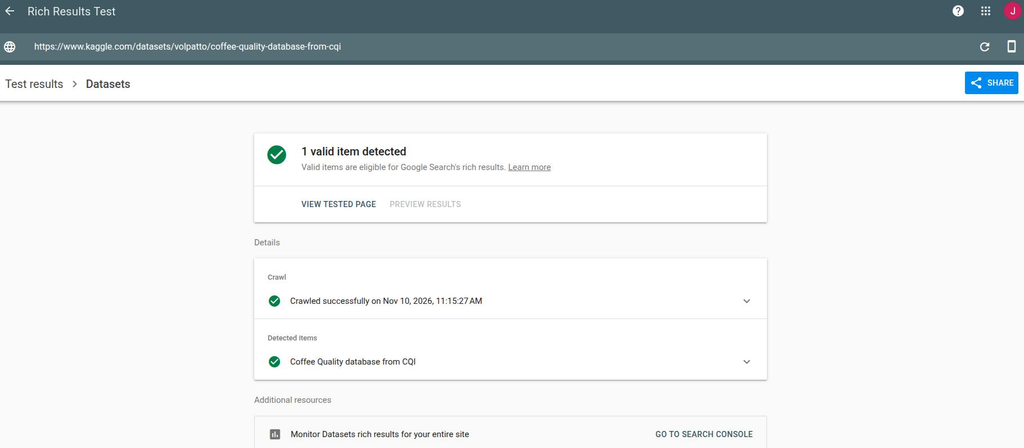
Fix the errors before you publish. Warnings are suggestions, and two of them confuse nearly everyone:
- “Organizations need a contactType”: Validators may suggest adding contact details to your creator. It’s optional. Add a contact point, such as customer service, if you’d like the warning gone.
- Table warning under mainEntity: Google says you can ignore this warning.
One more catch: Google accepts the W3C’s DCAT vocabulary as an alternative to schema.org, but DCAT written in RDFa won’t show up in the Rich Results Test. Check those pages in Search Console instead.
Once your pages are live, inspect one with URL Inspection in Search Console to confirm Google can crawl it.
Also, list every data page in your sitemap, then give Google a few days to crawl it. Search Console’s rich results report will show valid and invalid Dataset items, and the Performance report shows the impressions and clicks those pages earn.
Can your data become the source AI answers quote?
It can, but the markup alone won’t do it.
There’s no evidence that Dataset schema itself gets you cited in ChatGPT or Google’s AI Overviews, and Google says its AI features don’t need any special markup either. Our guide to schema markup for AI search goes through what the evidence does show.
What AI answers do cite is a clear number stated in plain words. Ask Google what a latte costs in the US, and its AI Overview answers with exact prices and credits the two coffee sites it took them from.
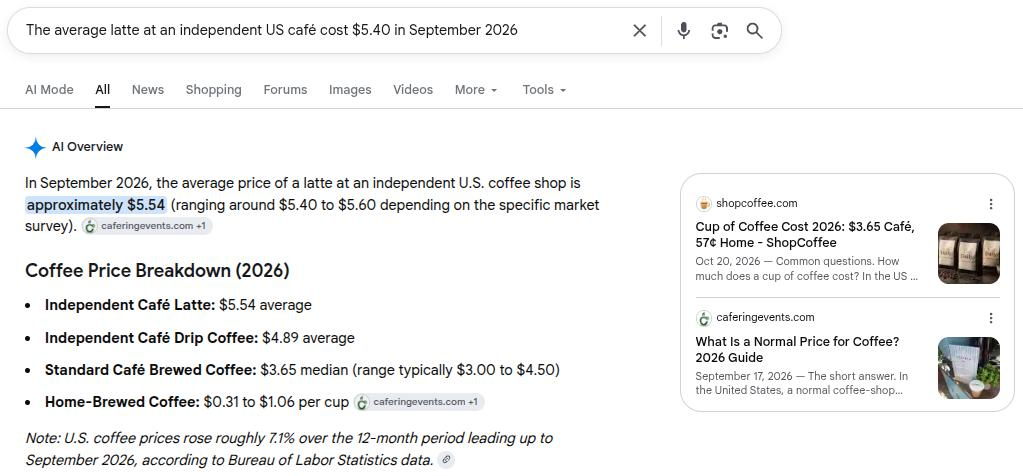
Look at where those numbers came from. ShopCoffee fits its whole price list into one sentence, with drip coffee at “about $4.89 at an independent coffee shop (a latte $5.54).” The AI Overview repeats those exact figures.
So treat the markup as your filing system and the page as your pitch. Put 3-4 headline findings above the download link, written the way someone would repeat them. For our made-up café index, that could be:
“Lattes at independent US cafés cost 9% more in September 2026 than two years earlier.”
A sentence like that is easy to quote, and the license on the page tells people they’re allowed to.
Then check whether it’s working. Contentpen’s AI visibility tool tracks whether ChatGPT, Perplexity, Gemini, and other AI engines mention your brand for the prompts you care about, so you can see when your research starts getting picked up.

Find your brand in AI search

Track AI citations, share of voice, and brand sentiment
Find the top sources driving citations
Wrapping up
Most companies already have data someone else would find useful, like survey results, pricing trends, usage benchmarks, or years of customer patterns for an industry. It usually ends up as a chart in a slide deck and gets forgotten once the quarter ends.
Dataset schema gives that data a second life. Pick one collection you’re proud of, write a description a stranger would understand, choose a license, add the download link, and mark it up. Then watch who finds it.
And when you want those findings to travel further, Contentpen can help. It’s an SEO and AEO tool in one that plans, writes, and publishes articles around your research, then shows you whether they rank on Google and get cited by AI or not. Try it free for 7 days.
Frequently asked questions
No. In data tools, a dataset schema defines a table’s columns and data types. The SEO kind describes the whole collection for search engines.
No. The database holds the data. The schema is its blueprint. Schema includes which tables exist, what each column is called, and what kind of value each one can hold. A database can be full of rows, but the schema decides how those rows are organized.
A data model is the plan, usually a diagram of the things you track and how they connect. A schema is that plan written for a specific database, with real table names, data types, and constraints.
Yes. Set isAccessibleForFree to false and describe it like any other collection. It can still appear in Dataset Search. It just won’t show up when someone turns on the Free filter.
It can, if the PDF holds the data itself, like tables of results, rather than a report about the data. List it as a distribution with encodingFormat set to application/pdf. If you can, offer a CSV alongside it, since most people want data they can open in a spreadsheet.
No. A DOI is useful because it gives your data a permanent ID that researchers can cite, but it’s optional. Google’s 2020 analysis found only about 11% of indexed datasets had one.
Add a robots meta tag with noindex to the page. However, the change can take days or even weeks to show up on Google.