Course schema is structured data, built on schema.org’s Course type, that tells search engines what you teach. It labels the title, a short description, who runs the class, and details like format, schedule, instructor, and price.
It’s a type of schema markup that matters to anyone selling or running training courses, from a solo creator with one cohort to a university with hundreds of classes in its catalog.
This guide sorts out what still works with Course schema, what to mark up, and how to set up a catalog that qualifies in 2026.
Key takeaways
- Course schema uses schema.org’s Course type for name, description, provider, and CourseInstance for each run, which includes dates, format, instructor, and price.
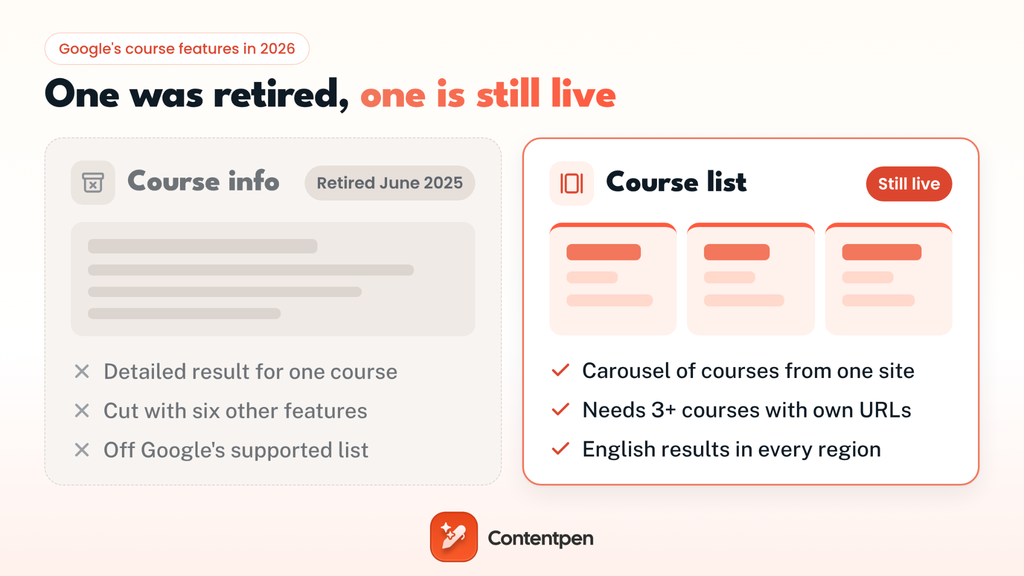
- Google retired the Course info rich result in June 2025. The Course list carousel is still live for English results in every region where Google Search is available.
- Course names can’t carry prices, discounts, or promotional phrases, and only the first 60 characters of a description show.
- Markup alone won’t get you into AI answers. Google says that no special schema is needed to win AI citations, so the facts on your page matter most for AI visibility.
What does Course schema describe?
Schema.org defines it simply: “An educational course is a sequence of one or more educational events and/or creative works which aims to build knowledge, competence or ability of learners.” The markup splits that idea into two layers:
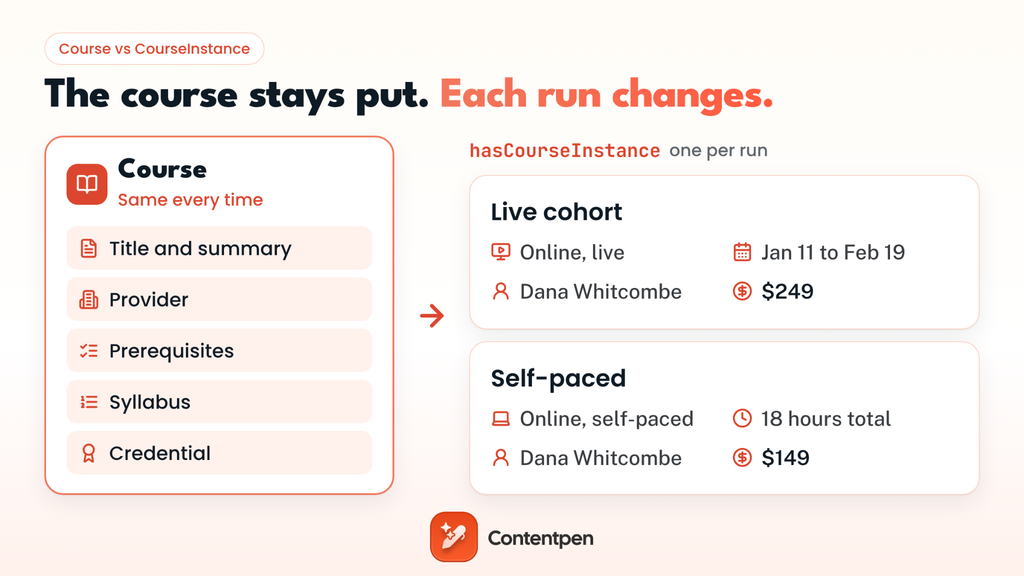
- The course itself: Everything that stays the same each time you teach it. That’s the name, a description, the provider, prerequisites, the credential people earn, and the syllabus.
- Each run of it: The details that change from one session to the next, like the start date, whether it’s online or in person, the instructor, and the price. Schema.org calls each run a CourseInstance, and it’s a type of Event, so its date fields work the same way they do in Event schema.
That second layer is the one most sites skip. Schema.org’s own data shows the Course type on 100,000 to 1 million domains, but CourseInstance on only 10,000 to 100,000.
Plenty of course providers describe the classes they’re offering, but never say when it runs, how it’s taught, or what is the cost for it.
Course is one of the education-focused types of schema markup, and it’s the one most training businesses actually need.
What Google kept, and what it quietly retired
Google used to support two features for this markup, and that’s where the confusion starts:
| Feature | What it showed | Status in 2026 |
|---|---|---|
| Course info | A detailed result for a single class, built from its full markup | Retired. Google announced it was phasing out Course info on June 12, 2025, along with six other features. |
| Course list | A carousel of classes from the same provider, showing each title, provider, and a short description | Still supported, in English, in every region where Google Search is available |
Google removed the Course info documentation in September 2025, and when it revisited its search features that November, it brought Book actions back, not Course info.
So is Course schema still relevant?
Yes, though for a narrower reason than before.
Course and CourseInstance are still valid schema.org types, but Google only stopped drawing the detailed card from them.
The carousel and review stars are the only visual rewards left in Search. That said, the full markup still provides search engines and AI tools with clean facts about your classes. This includes who teaches them, how long they take, and what they cost.
Do review stars still work on course pages?
Review snippets are the gold stars and rating count that sit under a search result. Google still supports them for classes, and they weren’t part of the 2025 cleanup. Search for an ‘introduction to web design’ course, and you’ll see them in action:
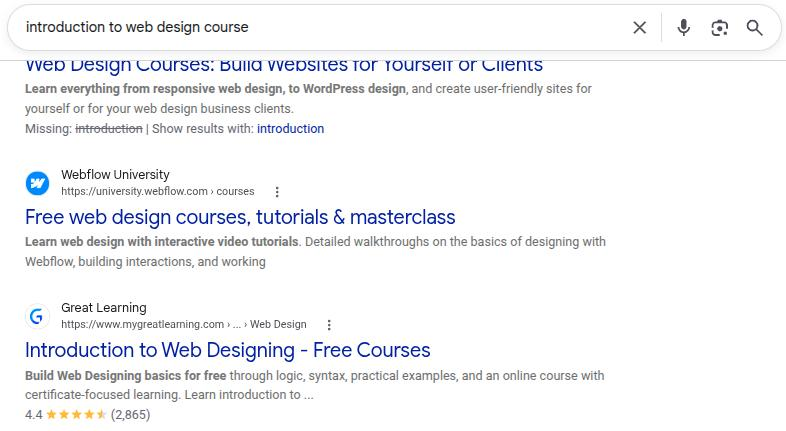
Great Learning’s free class is the only result on that screen with stars. With 4.4 stars from 2,865 ratings, this result is hard to scroll past. That’s review markup at work.
On your pages, you add it inside the Course markup as an aggregateRating:
| “aggregateRating”: { “@type”: “AggregateRating”, “ratingValue”: “4.7”, “reviewCount”: “312” } |
Google’s review snippet guidelines add a few conditions:
- Rate the class, not the company: Most businesses add review stars for their businesses, when they should only add the ratings that belong to the course.
- Show it on the page: Keep the same ratings and scores on your page as in your markup code.
- Keep it first-party: Ratings from other websites, like a marketplace listing for the same class, can’t be pulled into your markup.
- Keep it real: Fake reviews, and reviews traded for discounts or free access without a clear disclosure, aren’t allowed.
Google also recommends only accepting ratings that come with a written comment and the reviewer’s name. If you ignore these rules, Google can take manual action for your site.
Does your content count as a course?
Google is stricter here than schema.org. Its guidelines call for a series or unit of curriculum with lectures, lessons, or modules on a subject. It must have “an explicit educational outcome of knowledge and/or skill” and be led by one or more instructors with a roster of students.
Here’s how that plays out for common kinds of training content:
| What you’re publishing | Mark it up as |
|---|---|
| A six-week bootcamp with modules, an instructor, and enrolled students | Course |
| A self-paced class with lessons, quizzes, and a clear skill at the end | Course |
| A one-off webinar or public event (for example, “Astronomy Day”) | Event |
| A single short tutorial (for example, a three-minute video on writing your first SQL query) | VideoObject, or nothing |
When you’re unsure whether to mark up your content as a course or not, look at what your page asks of people.
If they enroll, work through several lessons or modules, and finish with a new skill, mark it up as a course. If they just show up once, it’s an event.
Course vs CourseInstance: What goes where
A course has two kinds of details. Some stay the same every time you teach it. Others change each time you offer it.
Here’s where each detail goes:
On the Course (stays fixed):
| Detail | Property |
|---|---|
| Title and summary | name, description |
| Who runs it | provider (an Organization with sameAs) |
| Code, level, and language | courseCode, educationalLevel, availableLanguage |
| What learners need first | coursePrerequisites |
| What they earn | educationalCredentialAwarded |
| Modules and lessons | syllabusSections |
On each CourseInstance (changes each run):
| Detail | Property |
| Online, in person, or blended | courseMode |
| Dates and pace | startDate, endDate, courseSchedule |
| Total effort for a self-paced run | courseWorkload |
| Who teaches it | instructor |
| Price | offers (an Offer with price and priceCurrency) |
Two of these properties answer questions people search for on their own.
The syllabusSections property shows how a course is structured, listing each module and how long it takes. The courseMode property shows the course type, meaning how it’s taught: online, onsite, blended, live, or self-paced.
Course schema template: One class, two ways to take it
Here’s a full example for a made-up training company, Quillmoor Academy, that teaches SQL to marketers as a live cohort and as a self-paced version:
<script type="application/ld+json">
{
  "@context": "https://schema.org",
  "@type": "Course",
  "name": "SQL for Marketing Analysts",
  "description": "Write SQL to pull, join, and report on campaign data. Six weekly modules for marketers who are new to databases.",
  "courseCode": "QM-SQL101",
  "provider": {
    "@type": "Organization",
    "name": "Quillmoor Academy",
    "sameAs": "https://www.example.com"
  },
  "educationalLevel": "Beginner",
  "availableLanguage": "en",
  "coursePrerequisites": "Comfortable with spreadsheets",
  "educationalCredentialAwarded": "Certificate of completion",
  "syllabusSections": [
    { "@type": "Syllabus", "name": "Module 1: Selecting and filtering data", "timeRequired": "PT3H" },
    { "@type": "Syllabus", "name": "Module 2: Joining campaign tables", "timeRequired": "PT3H" }
  ],
  "hasCourseInstance": [
    {
      "@type": "CourseInstance",
      "courseMode": ["online", "synchronous"],
      "startDate": "2027-01-11",
      "endDate": "2027-02-19",
      "courseSchedule": {
        "@type": "Schedule",
        "repeatFrequency": "P1W",
        "repeatCount": 6,
        "duration": "PT3H"
      },
      "instructor": { "@type": "Person", "name": "Dana Whitcombe" },
      "offers": {
        "@type": "Offer",
        "price": "249",
        "priceCurrency": "USD",
        "url": "https://www.example.com/courses/sql-for-marketing-analysts"
      }
    },
    {
      "@type": "CourseInstance",
      "courseMode": ["online", "asynchronous"],
      "courseWorkload": "PT18H",
      "instructor": { "@type": "Person", "name": "Dana Whitcombe" },
      "offers": {
        "@type": "Offer",
        "price": "149",
        "priceCurrency": "USD",
        "url": "https://www.example.com/courses/sql-for-marketing-analysts"
      }
    }
  ]
}
</script>
A few choices here are worth copying:
- The description starts with the outcome: Google shows only about 60 characters in the carousel, so the first sentence should say what learners will be able to do with the course without any fluff.
- One class, two instances: The live cohort has dates and a weekly schedule. The self-paced version instead shows total workload, since it has no fixed dates.
- courseMode uses plain values: “online” plus “synchronous” or “asynchronous” tells machines exactly how each version of the class is taught.
- Each run carries its own price: The cohort costs more than the self-paced version, and the markup says so instead of forcing one price on both.
- The provider points to its site: sameAs tells search engines which Quillmoor Academy this is.
Swap in your own details in the example above, and keep everything in the code visible on the page too. If the price or start date isn’t on the page, it shouldn’t be in the markup either. For other schema types built the same way, see our schema markup examples.
On WordPress, you don’t have to write this by hand.
Plugins like Rank Math cover the main fields of the Course schema, including mode, workload, and a price category of Free, Partially Free, Subscription, or Paid.
This helps you get done with creating the schema without manual work.
How to get your catalog into the Course list carousel
The carousel shows several classes from one provider, so Google needs a page that lists them. It gives you two ways to set that up:
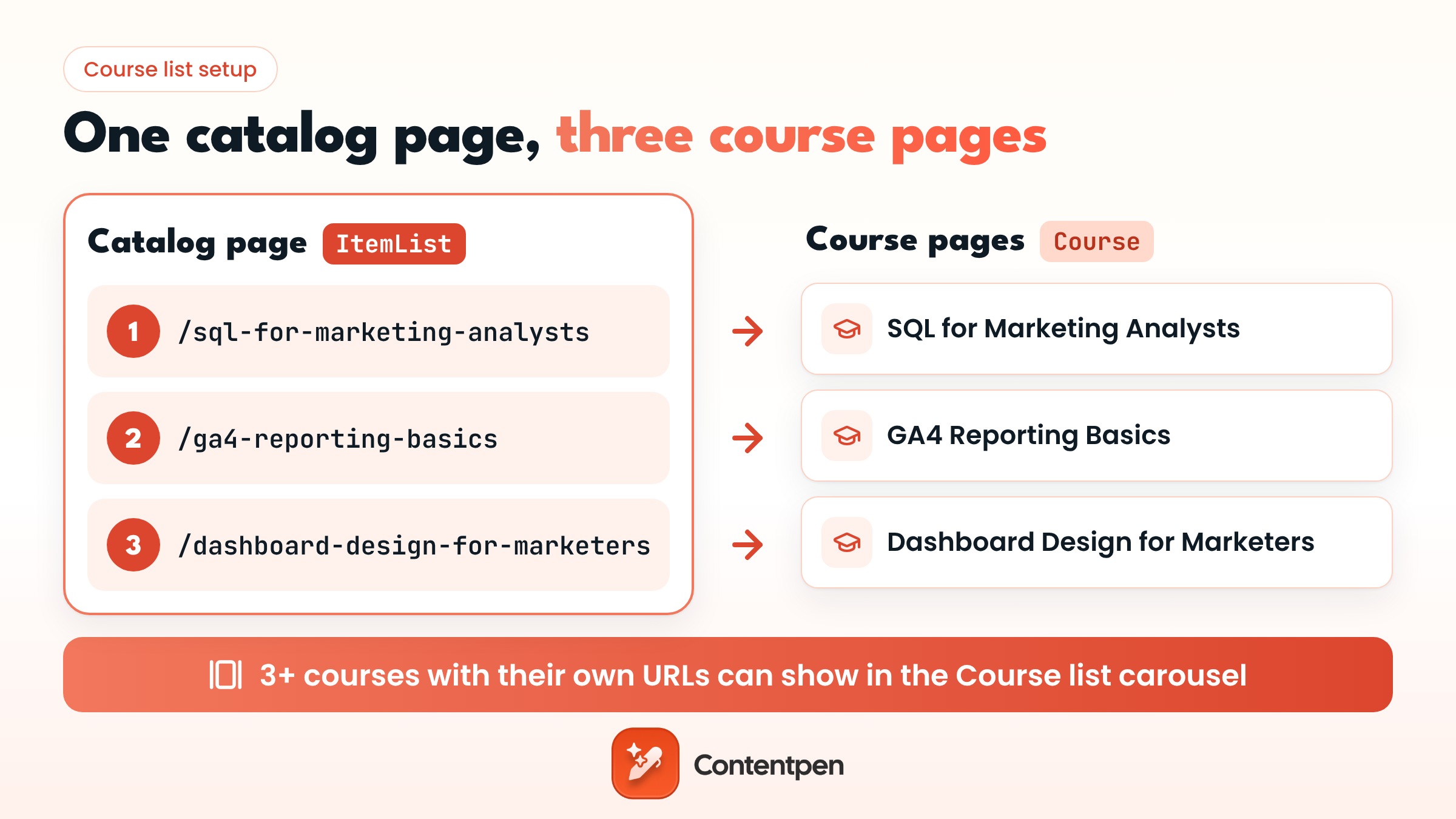
- A summary page plus detail pages: Your catalog page carries ItemList markup with the URL and position of each class, and each detail page carries its own Course markup.
- An all-in-one page: One page holds both the list and the full details of each class on it.
Whichever setup you pick, Google checks the same few things:
| What Google checks | The rule |
| Name and description | Required on every course. Only the first 60 characters of the description show. |
| Provider | Recommended, so the carousel shows who runs the class |
| Number of courses | At least three |
| ItemList markup | On the summary page or the all-in-one page |
| List items on a summary page | Only the type, position, and URL of each course page |
| List items on an all-in-one page | The full course details, with the URL of that same page plus a unique anchor for each course |
| URLs | Each one unique, and all on the same domain |
Here’s the ItemList block for a summary page:
| <script type=”application/ld+json”> { “@context”: “https://schema.org”, “@type”: “ItemList”, “itemListElement”: [ { “@type”: “ListItem”, “position”: 1, “url”: “https://www.example.com/courses/sql-for-marketing-analysts” }, { “@type”: “ListItem”, “position”: 2, “url”: “https://www.example.com/courses/ga4-reporting-basics” }, { “@type”: “ListItem”, “position”: 3, “url”: “https://www.example.com/courses/dashboard-design-for-marketers” } ] } </script> |
Back the markup up with plain internal linking. Link the catalog page to every detail page and each one back to the catalog, so crawlers can walk the same list the code describes.
Course names that cost you the carousel
Google’s rules dictate that you keep promotional phrases, prices, and discounts out of the name. So, it’s important that you take a look at a few examples below before you name your courses.
| Good ✅ | Bad ❌ |
|---|---|
| SQL for Marketing Analysts | SQL for Marketers: 50% Off This Week |
| SQL for Marketing Analysts | The #1 SQL Course Online |
| SQL Bootcamp for Marketers | SQL Bootcamp ($249) |
The best names describe the skill in the words learners type. Our guide on how to do keyword research shows how to find those phrases before you name anything to support SEO and Google best practices.
Bigger catalogs hit a different problem. They often get two classes chasing the same search query. For instance, “Intro to SQL” and “SQL for Beginners” can end up splitting clicks, and neither ranks as well as one strong page would.
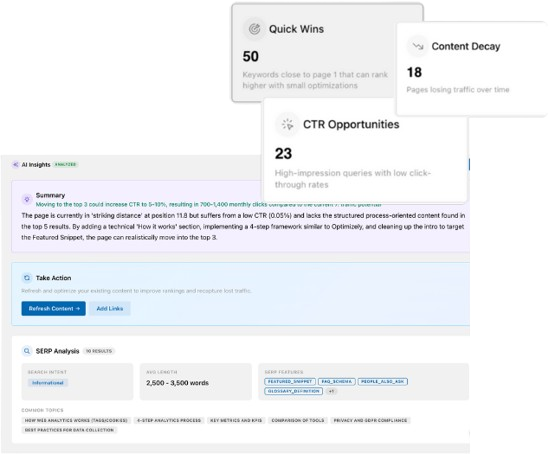
Contentpen’s SEO opportunities solve this problem by checking your pages every 14 days for cannibalization issues, plus pages that are losing clicks. It helps you know which ones to merge, retarget, or refresh without going through each one manually.

Turn existing content into growth opportunities

Identify pages losing traffic or CTR
Find quick wins to improve clicks and rankings
Which schema validator to trust now
Google’s Rich Results Test checks the features Google supports, and here, that means the carousel and review stars. Run your catalog page through it to confirm the list is eligible, and a rated course page to check its stars.
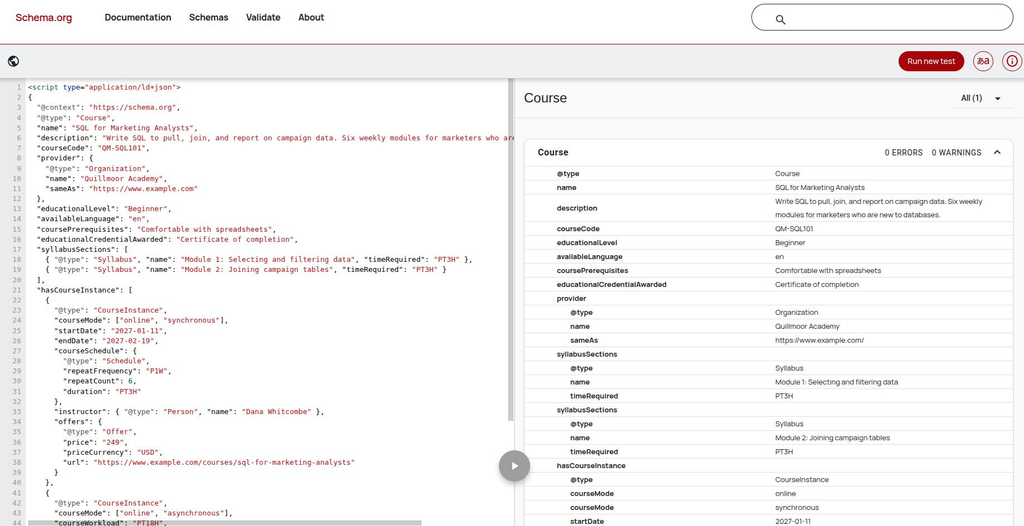
For everything else, use the Schema Markup Validator. It reads every schema.org type on the page, including CourseInstance, Offer, and Syllabus, and flags properties that don’t fit. Run each detail page through it before you publish.
Here’s the template from earlier that we’ve used for showcase. The validator reads every property, including both CourseInstance runs, with zero errors or warnings.
Once your pages are live, inspect one with URL Inspection in Search Console to make sure Google can crawl it, and keep these pages in your sitemap so new classes and updated dates get picked up.
Can Course schema get your classes into AI answers?
Not on its own. Markup can help some AI tools read your course pages correctly, but the facts written on the page do most of the work.
More learners now ask AI tools where to learn something. Search Google for beginner SQL courses, and the AI Overview will show you specific classes and the platforms that offer them.
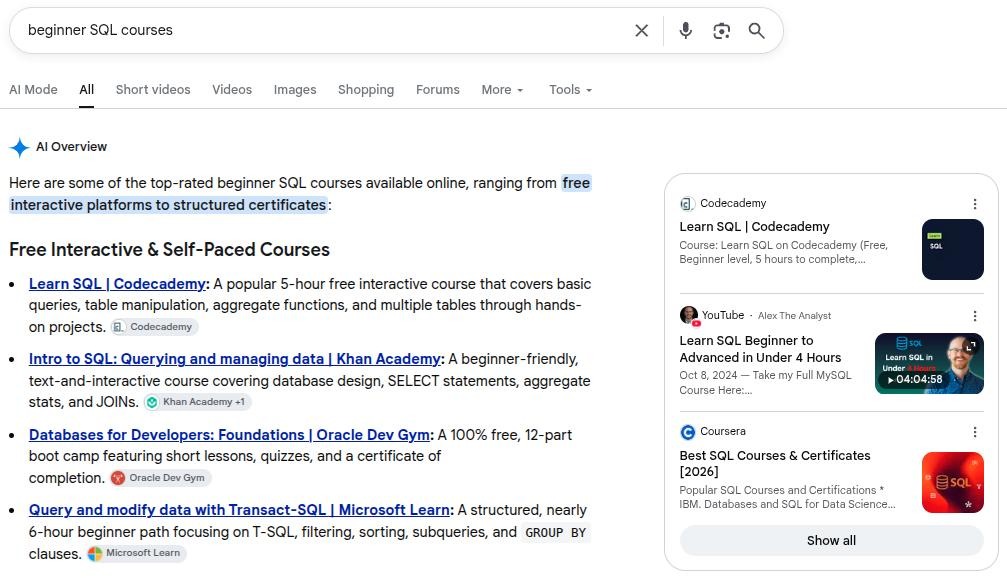
Look at what it repeats for each class. See how long it takes, how many parts it has, whether it’s free, and whether you get a certificate. Those are the same details your page and your markup should spell out.
Here’s what the companies behind these answers have said about markup:
- Google: On several occasions, Google has mentioned that no special schema.org structured data is needed to appear in AI Overviews. Google’s AI features guide does list one related best practice, which is to make sure your structured data matches the visible text on the page.
- Microsoft: Bing’s Fabrice Canel confirmed at SMX Munich in 2025 that schema markup does help Microsoft’s LLMs understand your content.
- Everyone else: It isn’t clear whether ChatGPT, Perplexity, or the Gemini app use schema data at all.
Overall, we can sum up that markup is a helpful layer, not a shortcut to rankings or winning AI citations. Check out our guide to schema markup for AI search, where we have covered in detail what the research shows in 2026.
What helps is a page that answers a learner’s questions in plain words. For instance, what people will be able to do afterward from the content, how long it takes, how it’s taught, and what it costs.
Those are the same facts your Course markup carries, so the page and the code end up telling one consistent story that any search engine or AI tool can repeat.
Final thoughts
The class is the product, and the teaching is the hard part. Markup is the small job that makes sure the people who’d get the most out of your courses can actually find them.
Start with your three best-selling courses. Give each its own page and markup. Then roll the same setup out to the rest of your catalog.
And if you want learners finding you long before they search for a class like yours, then let Contentpen help.
It’s an SEO and AEO tool in one, with AI agents that research, write, and publish the articles your future students search for, from career guides to course discussions. So you rank on Google and get cited by AI without the manual work.
Write content that’s built to rank, not just read
Create search-optimized blogs aligned with SEO and GEO signals, so your content performs well across search and AI-driven discovery.
Try SEO Blogging FREE →
Frequently asked questions
No. When Google retired the feature, it said so directly: “This update won’t affect how pages are ranked.” So, you lose the detailed card, not your place in the results.
Yes, if the dates, format, instructor, and price are already on the page. Google no longer builds a feature from them, but it says using these types outside Google Search “is not affected,” and other search engines and AI tools can still read them. Leave out anything the page doesn’t show.
A syllabus is the roadmap for a class. It lists the topics, the schedule, the assignments, and how learners are graded. In markup, each section of it can be a Syllabus item inside syllabusSections.
In education and psychology, a schema is a mental framework people use to organize what they know, like the script you follow without thinking when you order at a restaurant. It has nothing to do with Course schema, which is code written for search engines.
Most follow the same pattern: modules that group related lessons, lessons that teach one idea each, practice or assessments to check progress, and a final outcome like a project or certificate.
Yes. Set the Offer price to 0, or pick Free as the category if you’re using the Rank Math plugin. A free class still has to meet Google’s rules to join the carousel.
Not for the program as a whole. Schema.org has a separate type for that, which is EducationalOccupationalProgram. It covers things like total length, cost, and the credential. Use Course schema for each class inside the program.